height LEXUS RX350 2015 Owners Manual
[x] Cancel search | Manufacturer: LEXUS, Model Year: 2015, Model line: RX350, Model: LEXUS RX350 2015Pages: 886, PDF Size: 11 MB
Page 68 of 886
681-3. Adjustable components (s eats, mirrors, steering wheel)
Front seats
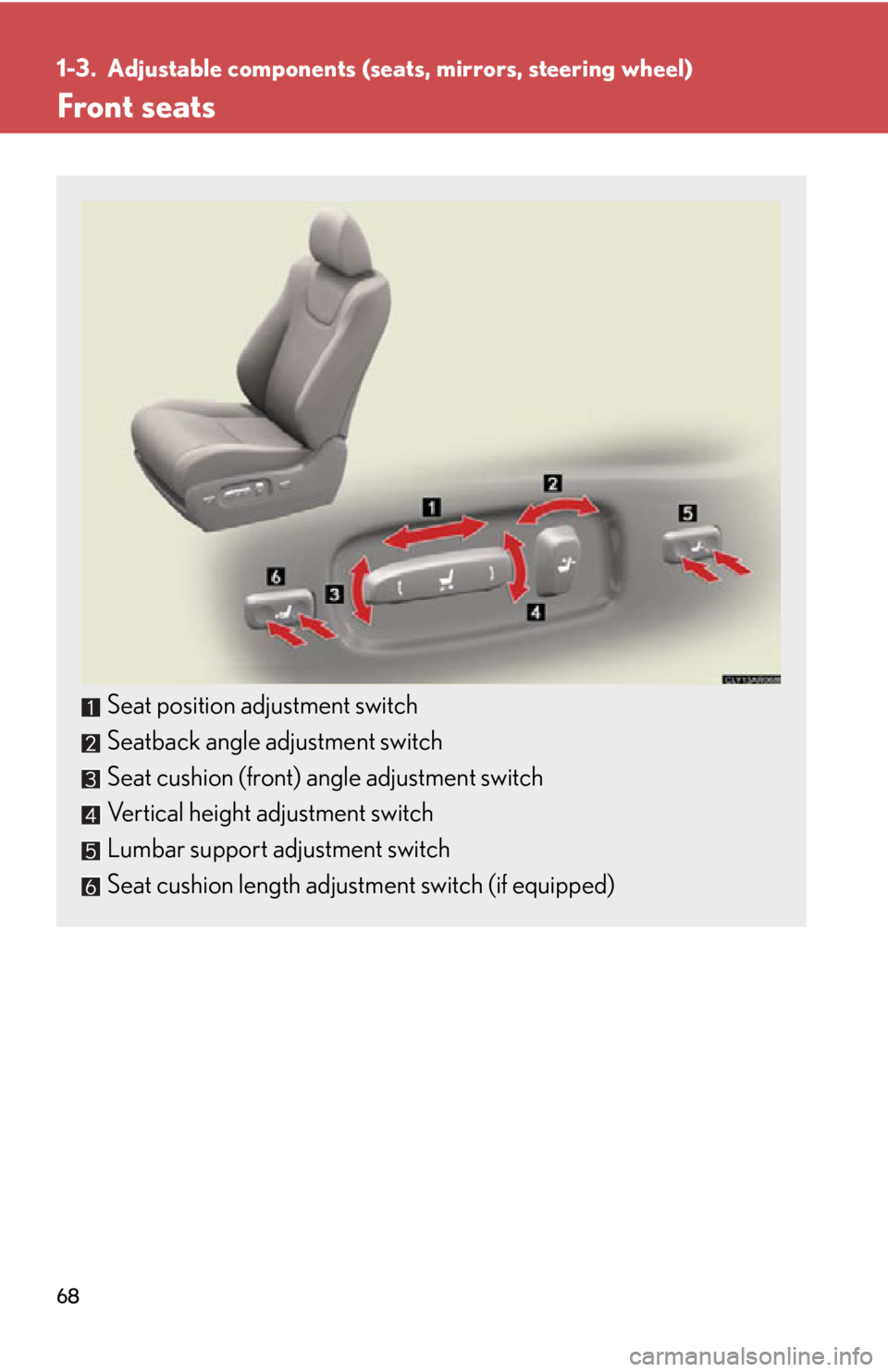
Seat position adjustment switch
Seatback angle adjustment switch
Seat cushion (front) angle adjustment switch
Vertical height adjustment switch
Lumbar support adjustment switch
Seat cushion length adjustment switch (if equipped)
Page 82 of 886
821-3. Adjustable components (s eats, mirrors, steering wheel)
■
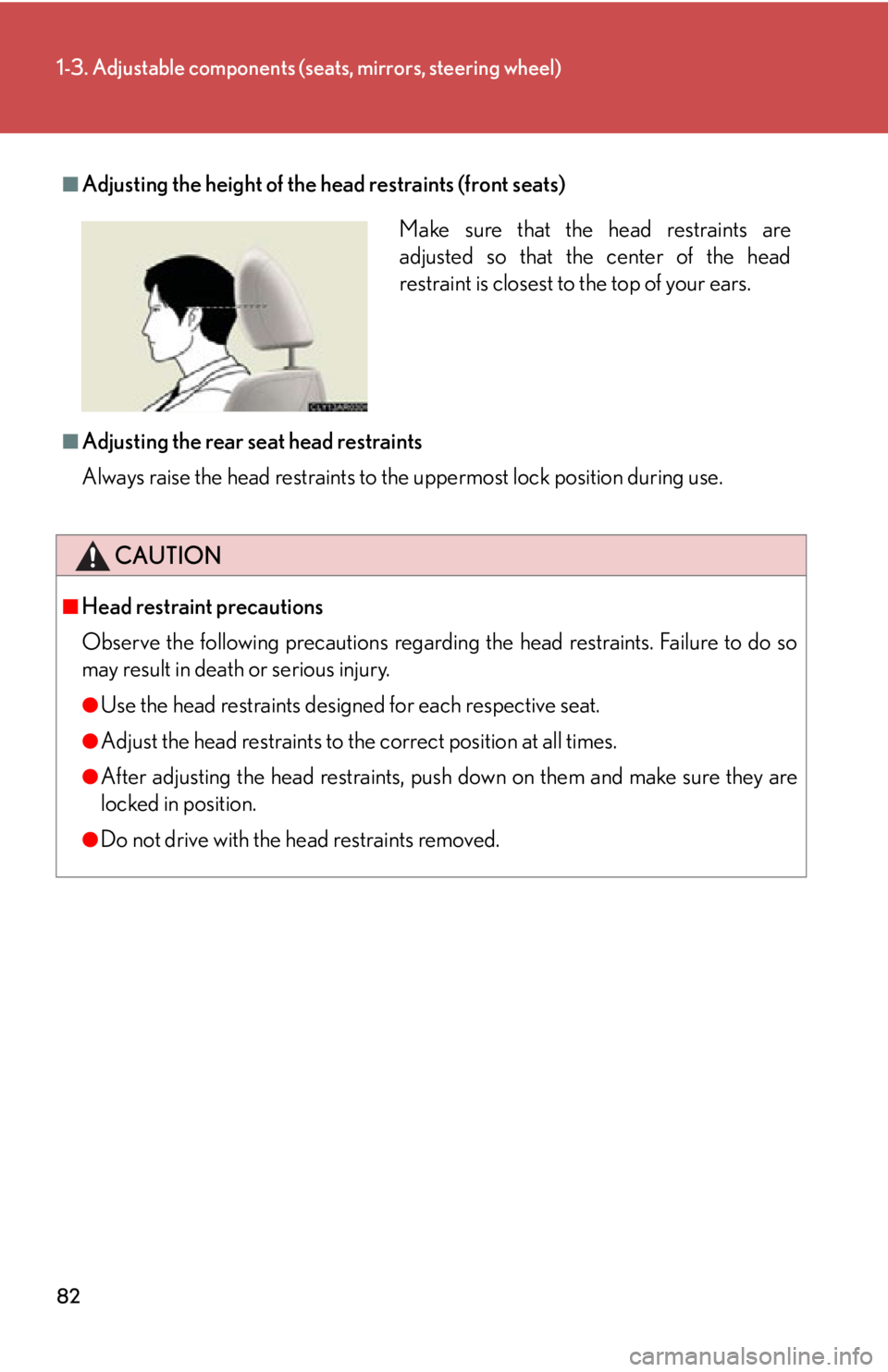
Adjusting the height of the head restraints (front seats)
■
Adjusting the rear seat head restraints
Always raise the head restraints to th e uppermost lock position during use.
CAUTION■
Head restraint precautions
Observe the following precautions regarding the head restraints. Failure to do so
may result in death or serious injury. ●
Use the head restraints design ed for each respective seat.●
Adjust the head restraints to the correct position at all times.●
After adjusting the head restraints, push down on them and make sure they are
locked in position.●
Do not drive with the head restraints removed. Make sure that the head restraints are
adjusted so that the center of the head
restraint is closest to the top of your ears.
Page 84 of 886
841-3. Adjustable components (s eats, mirrors, steering wheel)
Seat belt pretensioners (front and outside rear seats)
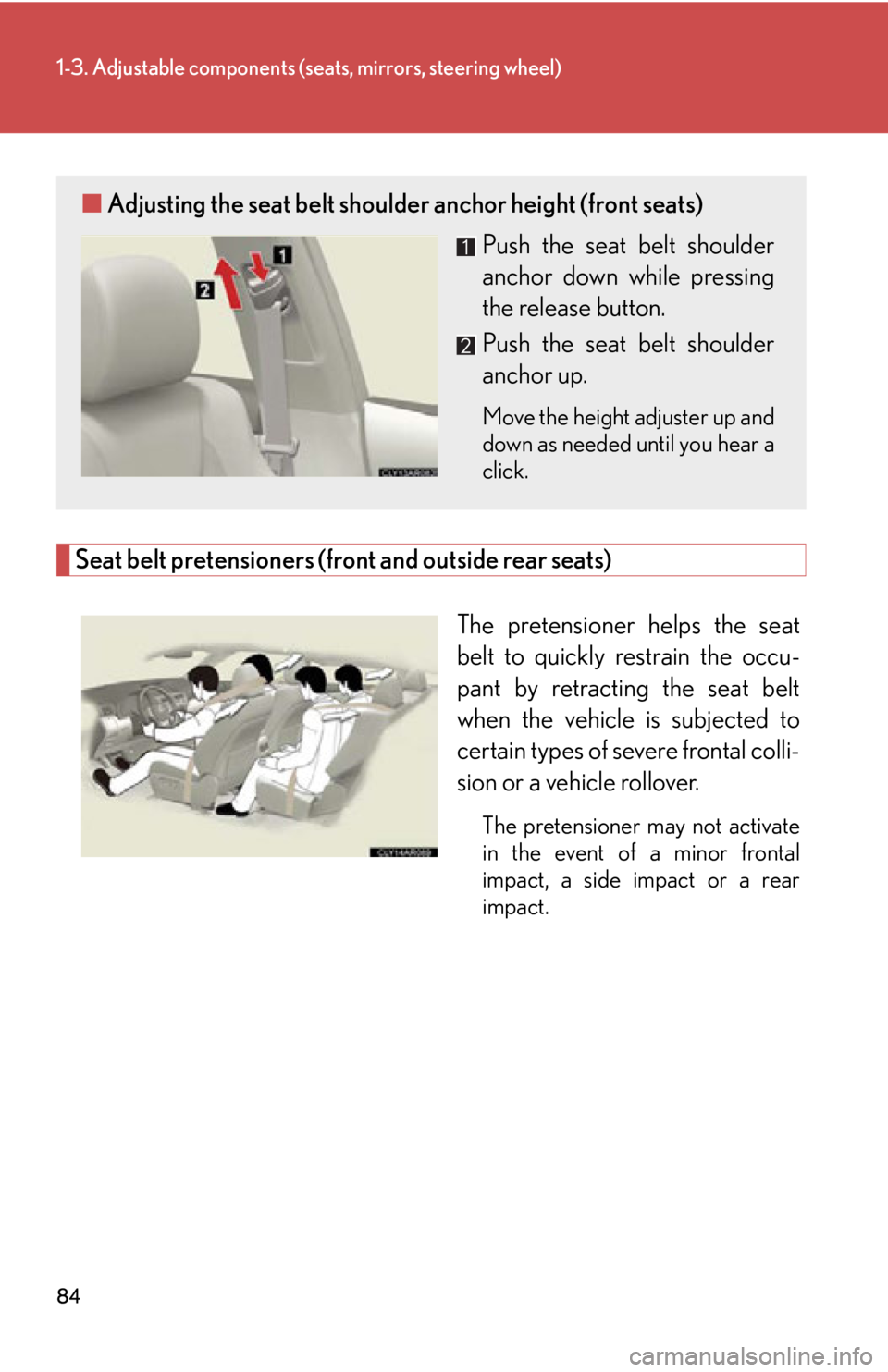
The pretensioner helps the seat
belt to quickly restrain the occu-
pant by retracting the seat belt
when the vehicl e is subjected to
certain types of severe frontal colli-
sion or a vehicle rollover. The pretensioner may not activate
in the event of a minor frontal
impact, a side impact or a rear
impact.■ Adjusting the seat belt shoulder anchor height (front seats)
Push the seat belt shoulder
anchor down while pressing
the release button.
Push the seat belt shoulder
anchor up. Move the height adjuster up and
down as needed until you hear a
click.
Page 92 of 886
921-3. Adjustable components (seats, mirrors, steering wheel)
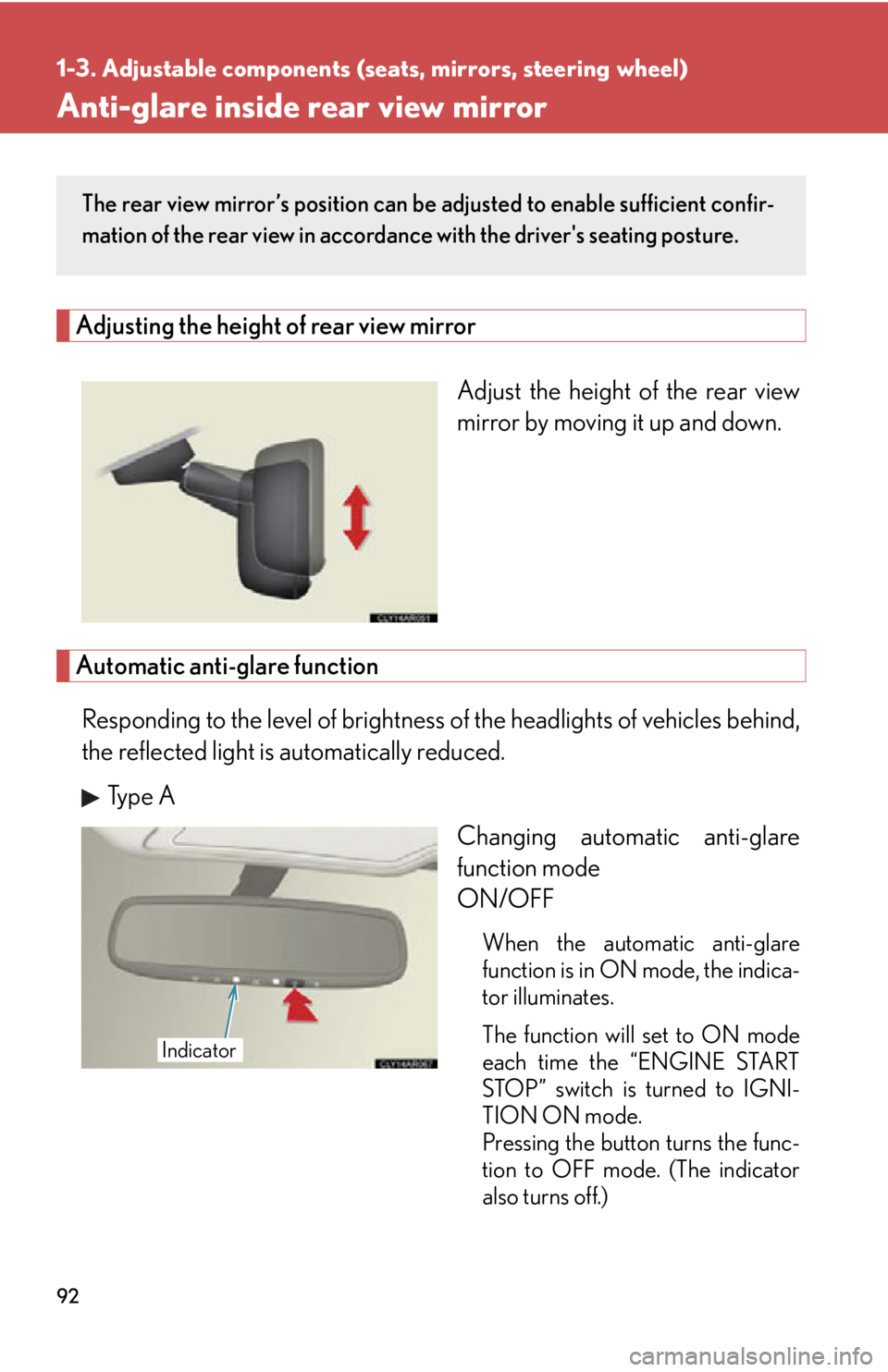
Anti-glare inside rear view mirror Adjusting the height of rear view mirror
Adjust the height of the rear view
mirror by moving it up and down.
Automatic anti-glare function
Responding to the level of brightness of the headlights of vehicles behind,
the reflected light is automatically reduced.
Type A
Changing automatic anti-glare
function mode
ON/OFF
When the automatic anti-glare
function is in ON mode, the indica-
tor illuminates.
The function will set to ON mode
each time the “ENGINE START
STOP” switch is turned to IGNI-
TION ON mode.
Pressing the button turns the func-
tion to OFF mode. (The indicator
also turns off.)The rear view mirror’s position can be adjusted to enable sufficient confir-
mation of the rear view in accordance with the driver's seating posture.
Indicator
Page 281 of 886

2812-4. Using other driving systems
2
When driving ■
Conditions that may trigger the system even if there is no possibility of collision ●
When there is an object by the roadside at the entrance to a curve●
When passing an oncoming vehicle on a curve●
When driving over a narrow iron bridge●
When there is a metal object on the road surface●
When driving on an uneven road surface●
When passing an oncoming vehicle on a left-turn●
When your vehicle rapidly closes on the vehicle in front●
When a grade separation/interchange, sign, billboard, or other structure
appears to be directly in the vehicle's line of travel●
When climbing a steep hill causes an over head billboard or ot her metallic struc-
ture to appear directly in the vehicle's line of travel●
When an extreme change in vehicle height occurs●
When the axis of the radar is out of adjustment●
When passing through certain toll gates●
When driving on a bridge●
When passing through a tunnel
When the system is activated in the situations described above, there is also a possi-
bility that the seat belts will retract quickly and the brakes will be applied with a force
greater than normal. When the seat belt is locked in the retracted position, stop the
vehicle in a safe place, release the seat belt and refasten it.
Page 282 of 886

2822-4. Using other driving systems
■
Obstacles not detected
The sensor cannot detect plastic obstacles such as traffic cones. There may also be
occasions when the sensor cannot detect pedestrians, animals, bicycles, motorcy-
cles, trees, or snowdrifts. ■
Situations in which the pre-collision system does not function properly
The system may not function effectively in situations such as the following: ●
On roads with sharp be nds or uneven surfaces●
If a vehicle suddenly moves in front of your vehicle, such as at an intersection●
If a vehicle suddenly cuts in front of your vehicle, such as when overtaking●
In inclement weather such as heav y rain, fog, snow or sand storms●
When your vehicle is skiddi ng with the VSC system off●
When an extreme change in vehicle height occurs●
When the axis of the radar is out of adjustment■
Automatic cancelation of the pre-collision system
When a malfunction occurs due to sensor contamination, etc. that results in the
sensors being unable to detect obstacles, the pre-collision system will be automati-
cally disabled. In this case, the system will not activate even if there is a collision pos-
sibility.■
When there is a malfunction in the system, or if the system is temporarily unus-
able
Warning lights and/or warning messages will turn on or flash. ( P. 744, 754)
Page 289 of 886

2892-4. Using other driving systems
2
When driving ■
Conditions under which the Blind Spot Monitor may not function correctly ●
The Blind Spot Monitor may not detect ve hicles correctly in the following condi-
tions:
• During bad weather such as heavy rain, fog, snow etc.
• When ice, mud etc. is attached to the rear bumper
• When driving on a road surface that is wet due to rain, standing water etc.
• When there is a significant difference in speed between your vehicle and the
vehicle that enters the detection area
• When a vehicle is in the detection area from a stop and remains in the detec-
tion area as your vehicle accelerates
• When driving up or down consecutive stee p inclines, such as hills, a dip in the
road etc.
• When multiple vehicles approach with only a small gap between each vehicle
• When vehicle lanes are wide, and the vehicle in the next lane is too far away
from your vehicle
• When the vehicle that enters the detect ion area is traveling at about the same
speed as your vehicle
• When there is a significant difference in height between your vehicle and the
vehicle that enters the detection area.
• Directly after the BSM switch is set to on.
• When towing a trailer
• When items such as a bicycle carrier are installed on the rear of the vehicle●
Instances of the Blind Sp ot Monitor unnecessarily detecting a vehicle and/or
object may increase under the following conditions:
• When there is only a short distance between your vehicle and a guardrail, wall
etc.
• When there is only a short distance between your vehicle and a following
vehicle.
• When vehicle lanes are narrow and a vehicle driving 2 lanes across from your
vehicle enters the detection area
Page 292 of 886
2922-5. Driving information
Utility vehicle precautions
Off-road vehicle feature
● Specific design characteristics give it a higher center of gravity than
ordinary passenger cars. This vehicle design feature causes this type of
vehicle to be more likely to rollov er. And, utility vehicles have a signifi-
cantly higher rollover rate than other types of vehicles.
● An advantage of the higher ground clearance is a better view of the
road allowing you to anticipate problems.
● It is not designed for cornering at the same speeds as ordinary passen-
ger cars any more than low-slung sports cars designed to perform sat-
isfactorily under off-road condit ions. Therefore, sharp turns at
excessive speeds may cause rollover.
CAUTION■
Off-road vehicle precautions
Always observe the following precautions to minimize the risk of death or serious
injury or damage to your vehicle: ●
In a rollover crash, an unbelted person is significantly more likely to die than a
person wearing a seat belt. Therefore, the driver and all passengers should fasten
their seat belts whenever the vehicle is moving.
●
Avoid sharp turns or abrupt maneuvers, if at all possible.
Failure to operate this vehicle correctly may result in loss of control or vehicle roll-
over causing death or serious injury.
●
Loading cargo on the roof luggage carrier will make the center of the vehicle
gravity higher. Avoid high speeds, sudden starts, sharp turns, sudden braking or
abrupt maneuvers, otherwise it may result in loss of control or vehicle rollover
due to failure to operate this vehicle correctly.This vehicle belongs to the utilit y vehicle class, which has higher
ground clearance and narrower tread in relation to the height of its
center of gravity to make it capable of performing in a wide variety of
off-road applications.
Page 311 of 886
3112-5. Driving information
2
When driving Trailer Tongue Weight
● A recommended tongue weight varies in accordance with the types of
trailers or towing as described below.
● To ensure the recommended values shown below, the trailer must be
loaded by referring to the following instructions.
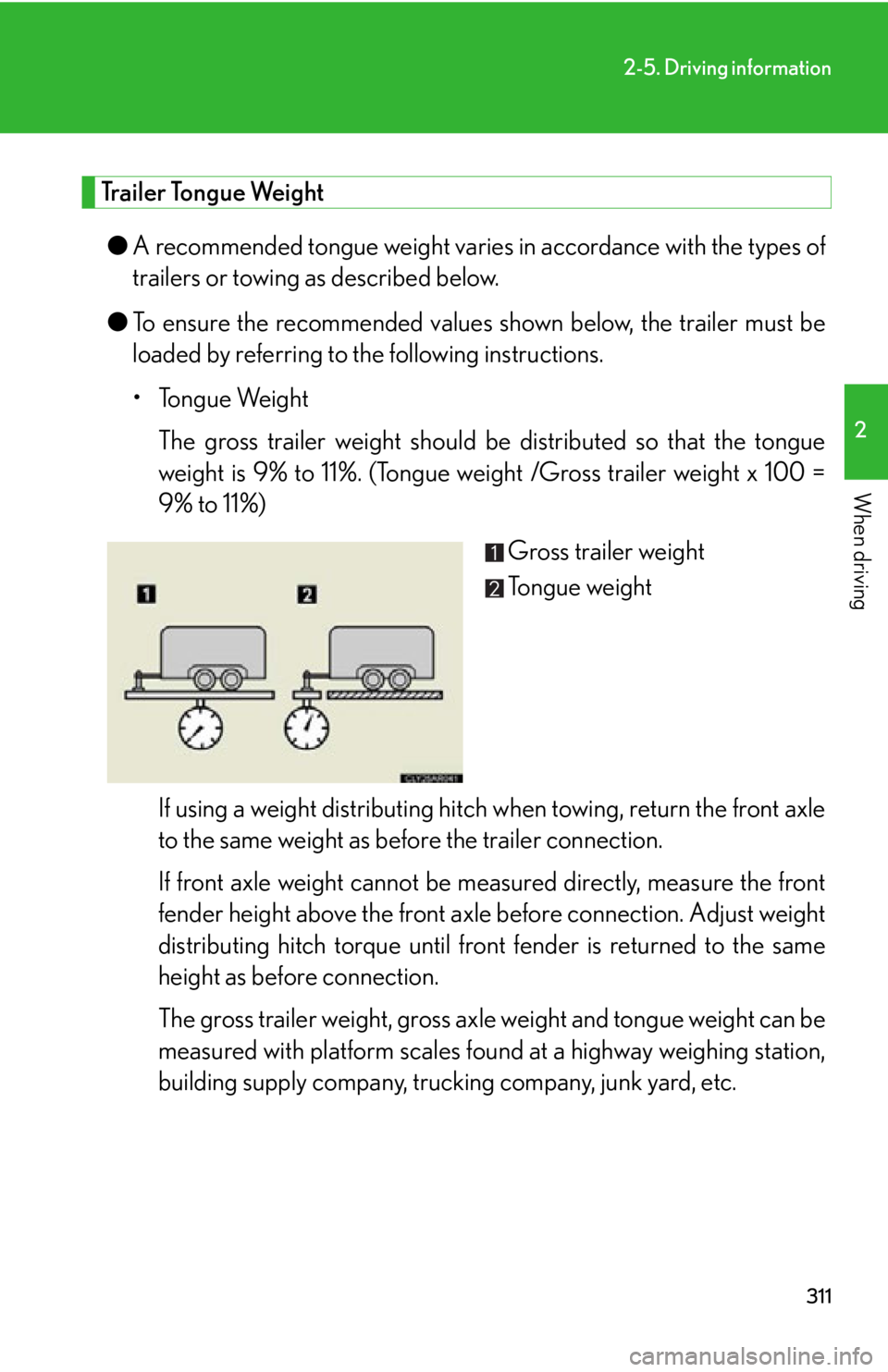
• Tongue Weight
The gross trailer weight should be distributed so that the tongue
weight is 9% to 11%. (Tongue weight /Gross trailer weight x 100 =
9% to 11%)
Gross trailer weight
Tongue weight
If using a weight distri buting hitch when towing , return the front axle
to the same weight as before the trailer connection.
If front axle weight cannot be mea sured directly, measure the front
fender height above the front axle before connection. Adjust weight
distributing hitch torque until fr ont fender is returned to the same
height as before connection.
The gross trailer weight, gross axle weight and tongue weight can be
measured with platform scales foun d at a highway weighing station,
building supply company, truck ing company, junk yard, etc.
Page 319 of 886
3192-5. Driving information
2
When driving ■
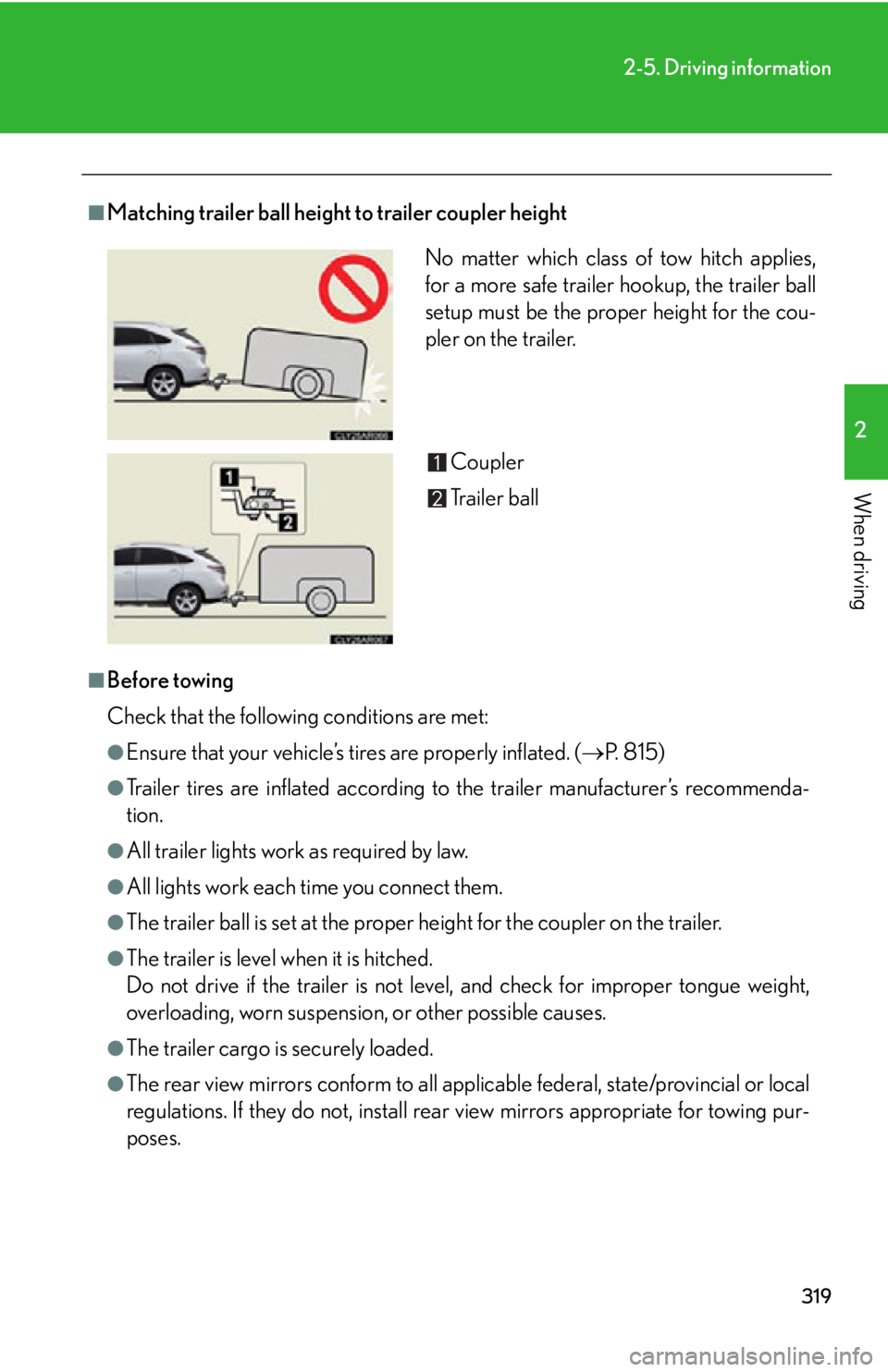
Matching trailer ball height to trailer coupler height
■
Before towing
Check that the following conditions are met: ●
Ensure that your vehicle’s ti res are properly inflated. ( P. 8 1 5 )●
Trailer tires are inflated according to the trailer manufacturer’s recommenda-
tion.●
All trailer lights work as required by law.●
All lights work each time you connect them.●
The trailer ball is set at the proper height for the coupler on the trailer.●
The trailer is level when it is hitched.
Do not drive if the trailer is not level, and check for improper tongue weight,
overloading, worn suspension , or other possible causes.
●
The trailer cargo is securely loaded.
●
The rear view mirrors conform to all applicable federal, state/provincial or local
regulations. If they do not, install rear view mirrors appropriate for towing pur-
poses. No matter which class of tow hitch applies,
for a more safe trailer hookup, the trailer ball
setup must be the proper height for the cou-
pler on the trailer.
Coupler
Trailer ball