fuel consumption LEXUS RX350 2016 User Guide
[x] Cancel search | Manufacturer: LEXUS, Model Year: 2016, Model line: RX350, Model: LEXUS RX350 2016Pages: 748, PDF Size: 12.36 MB
Page 476 of 748
476
RX350_U_OM48E90U 5-12. Other function
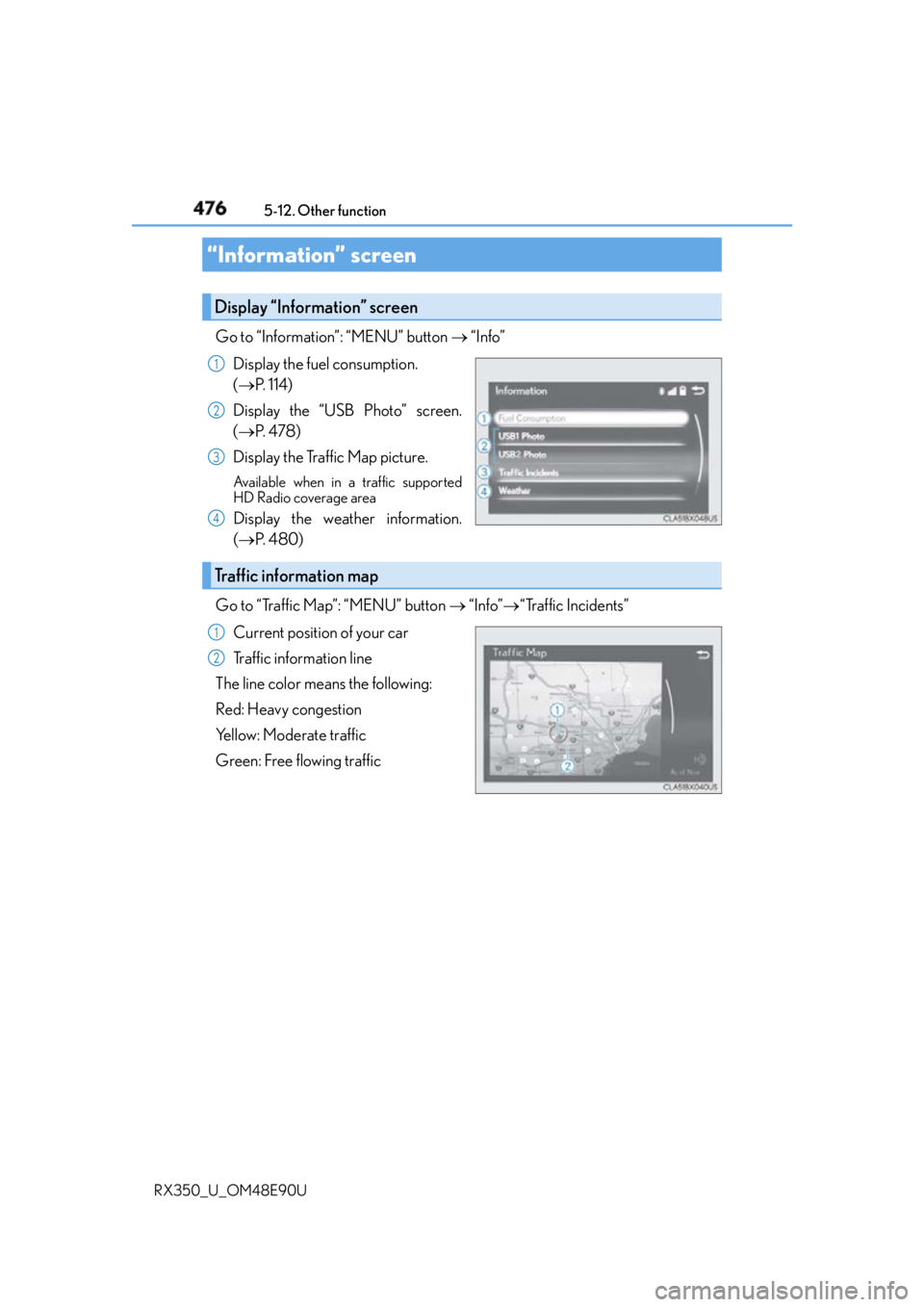
Go to “Information”: “MENU” button “Info”
Display the fuel consumption.
( P. 1 1 4 )
Display the “USB Photo” screen.
( P. 4 7 8 )
Display the Traffic Map picture. Available when in a traffic supported
HD Radio coverage area
Display the weather information.
( P. 4 8 0 )
Go to “Traffic Map”: “MENU” button “Info” “Traffic Incidents”
Current position of your car
Traffic information line
The line color means the following:
Red: Heavy congestion
Yellow: Moderate traffic
Green: Free flowing traffic“Information” screen Display “Information” screen 1
2
3
4
Traffic information map 1
2
Page 502 of 748

502 6-2. Using the air conditio ning system and defogger
RX350_U_OM48E90U ■
Registering air conditioning settings to elec tronic keys (vehicles with driving position
memory) ●
Unlocking the vehicle using an electronic ke y and turning the engine switch to IGNI-
TION ON mode will recall that key’s registered air conditioning settings. ●
When the engine switch is tu rned off, the current air conditioning settings will automat-
ically be registered to the electronic key that was used to unlock the vehicle.●
The system may not operate correctly if more th an one electronic key is in the vicinity or
if the smart access system with push-button start is used to unlock a passenger door. ●
The doors that can recall the air conditioni ng setting when unlocked using the smart
access system with push-b utton start can be changed.
* For details, contact your Lexus
dealer.
* : The doors that can recall the driving positi on memory are changed at the same time.■
Using automatic mode
Fan speed is adjusted automatically accordin g to the temperature setting and the ambi-
ent conditions.
Therefore, the fan may stop for a while until warm or cool air is ready to flow immediately
after the “AUTO” button is pr essed or “AUTO” is selected.■
Operation of S-FLOW mode
In automatic mode, S-FLOW mode will be turned off if a rear door has been opened and
closed. To activate S-FLOW mode again, press . ■
Using the voice command system (veh icles with a navigation system)
Air conditioning system can be operated usin g voice commands. For details, refer to the
“NAVIGATION SYSTEM OWNER’S MANUAL”. ■
When the outside temperature exceeds 75 F (24 C) and the air conditioning system
is on ●
In order to reduce the air conditioning po wer consumption, the ai r conditioning system
may switch to recirculated air mode automatically.
This may also reduce fuel consumption. ●
Recirculated air mode is selected as a defaul t mode when the engine switch is turned to
IGNITION ON mode. ●
It is possible to switch to outside air mode at any time by pressing the outside/recircu-
lated air mode button. ■
Automatic mode for air intake control (if equipped)
In automatic mode, the system detects exhaust gas and other pollutants and automati-
cally switches between outside air and recirculated air modes.
When the dehumidification function is off, and the fan is operating, turning automatic
mode on will activate the dehumidification function.■
Fogging up of the windows ●
The windows will easily fog up when the humidi ty in the vehicle is high. Selecting “A/C”
will dehumidify the air from the outlet s and defog the windshield effectively. ●
If you turn “A/C” off, the windows may fog up more easily. ●
The windows may fog up if the recirculated air mode is used.