fuel LEXUS RX350 2016 Owner's Manual
[x] Cancel search | Manufacturer: LEXUS, Model Year: 2016, Model line: RX350, Model: LEXUS RX350 2016Pages: 748, PDF Size: 12.36 MB
Page 243 of 748
2434-3. Operating the lights and wipers
4
Driving
RX350_U_OM48E90U ■
Daytime running light system ●
To make your vehicle more visible to other drivers during daytime driving, the daytime
running lights turn on automatically whenever the engine is started and the parking
brake is released with the headlight sw itch in (Canada only) or position.
(Illuminate brighter th an the parking li ghts.) Daytime running lights are not designed for
use at night.
For the U.S.A.: Daytime running lights can be turned off by operating the headlight
switch to position. ●
Compared to turning on the headlights, the daytime running light system offers greater
durability and consumes less electricity, so it can help improve fuel economy. ■
Cornering lights (if equipped)
When the cornering lights are on for more th an 30 minutes, they will turn off automati-
cally. ■
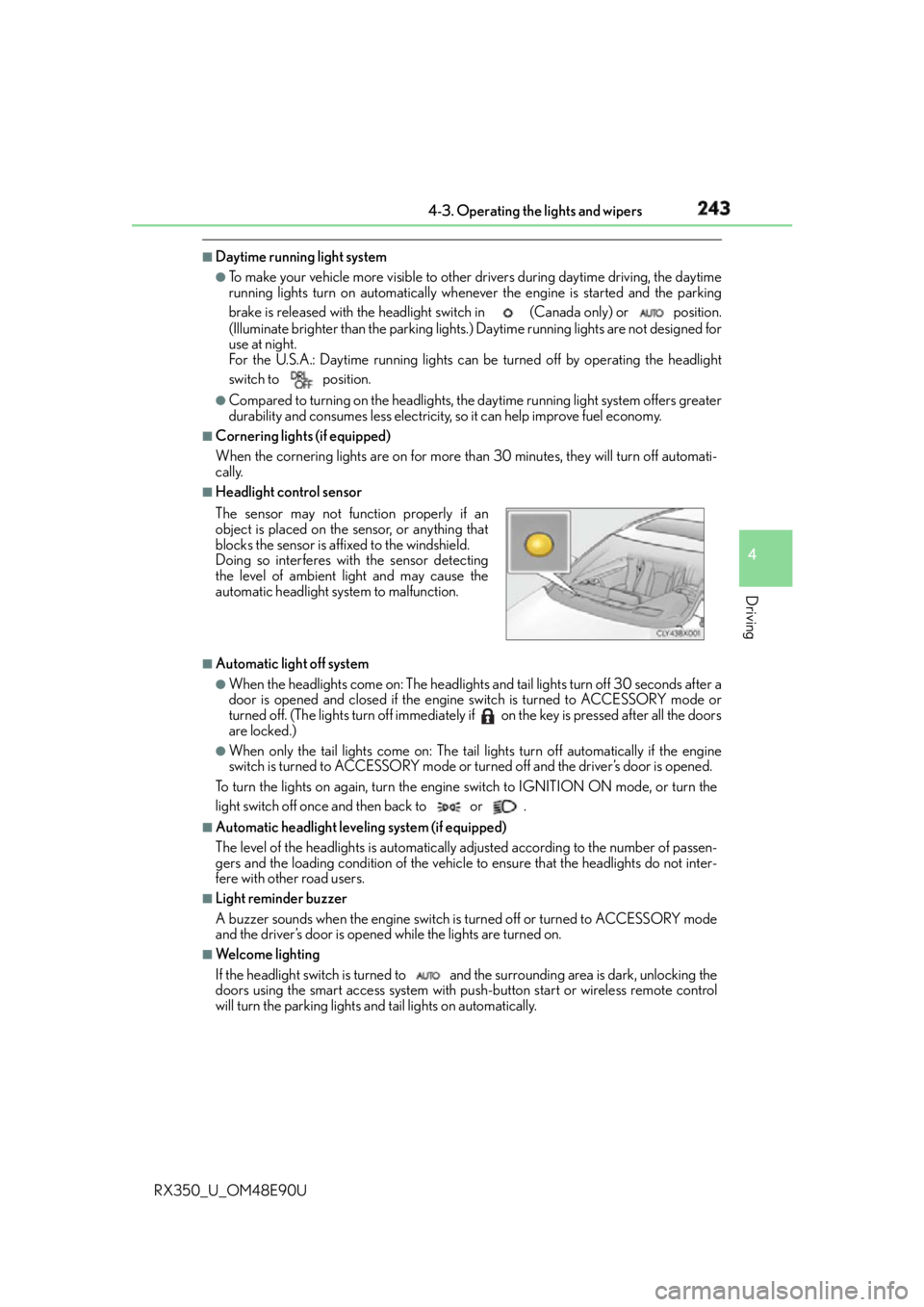
Headlight control sensor
■
Automatic light off system ●
When the headlights come on: The headlights and tail lights turn off 30 seconds after a
door is opened and closed if the engine switch is turned to ACCESSORY mode or
turned off. (The lights turn off immediately if on the key is pressed after all the doors
are locked.) ●
When only the tail lights come on: The tail lights turn off automatically if the engine
switch is turned to ACCESSORY mode or turned off and the driver’s door is opened.
To turn the lights on again, turn the engine switch to IGNITION ON mode, or turn the
light switch off once and then back to or . ■
Automatic headlight leveling system (if equipped)
The level of the headlights is automatically ad justed according to the number of passen-
gers and the loading condition of the vehicle to ensure that the headlights do not inter-
fere with other road users. ■
Light reminder buzzer
A buzzer sounds when the engine switch is turned off or turned to ACCESSORY mode
and the driver’s door is opened while the lights are turned on. ■
We l c o m e l i g h t i n g
If the headlight switch is turned to and the surrounding area is dark, unlocking the
doors using the smart access system with pu sh-button start or wireless remote control
will turn the parking lights and tail lights on automatically.The sensor may not function properly if an
object is placed on the sensor, or anything that
blocks the sensor is affixed to the windshield.
Doing so interferes with the sensor detecting
the level of ambient light and may cause the
automatic headlight system to malfunction.
Page 258 of 748
258
RX350_U_OM48E90U 4-4. Refueling
●
Close all the doors and windows, and turn the engine switch off. ●
Confirm the type of fuel. ■
Fuel types
P. 6 8 3 ■
Fuel tank opening for unleaded gasoline
To help prevent incorrect fueling, your vehicle has a fuel tank opening that only accom-
modates the special nozzle on unleaded fuel pumps.
Opening the fuel tank cap Perform the following steps to open the fuel tank cap:
Before refueling the vehicle
Page 259 of 748
2594-4. Refueling
4
Driving
RX350_U_OM48E90U WA R N I N G ■
When refueling the vehicle
Observe the following precautions while refu eling the vehicle. Failure to do so may
result in death or serious injury. ●
After exiting the vehicle and before openin g the fuel door, touch an unpainted metal
surface to discharge any static electricity. It is important to discharge static electricity
before refueling because sparks resulting fr om static electricity can cause fuel vapors
to ignite while refueling. ●
Always hold the grips on th e fuel tank cap and turn it slowly to remove it.
A whooshing sound may be heard when the fuel tank cap is loosened. Wait until the
sound cannot be heard before fully removing the cap. In hot weather, pressurized fuel
may spray out of the filler neck and cause injury. ●
Do not allow anyone that has not discharged static electricity from their body to come
close to an open fuel tank. ●
Do not inhale vaporized fuel.
Fuel contains substances th at are harmful if inhaled.●
Do not smoke while refueling the vehicle.
Doing so may cause the fuel to ignite and cause a fire. ●
Do not return to the vehicle or touch any person or object that is statically charged.
This may cause static electricity to build up, resulting in a possible ignition hazard.■
When refueling
Observe the following precautions to prevent fuel overflowing from the fuel tank: ●
Securely insert the fuel nozzle into the fuel filler neck. ●
Stop filling the tank after the fuel nozzle automatically clicks off.●
Do not top off the fuel tank.
NOTICE ■
Refueling
Do not spill fuel during refueling.
Doing so may damage the vehicle, such as causing the emission control system to
operate abnormally or damaging fuel system components or the vehicle’s painted sur-
face.
Page 260 of 748
260 4-4. Refueling
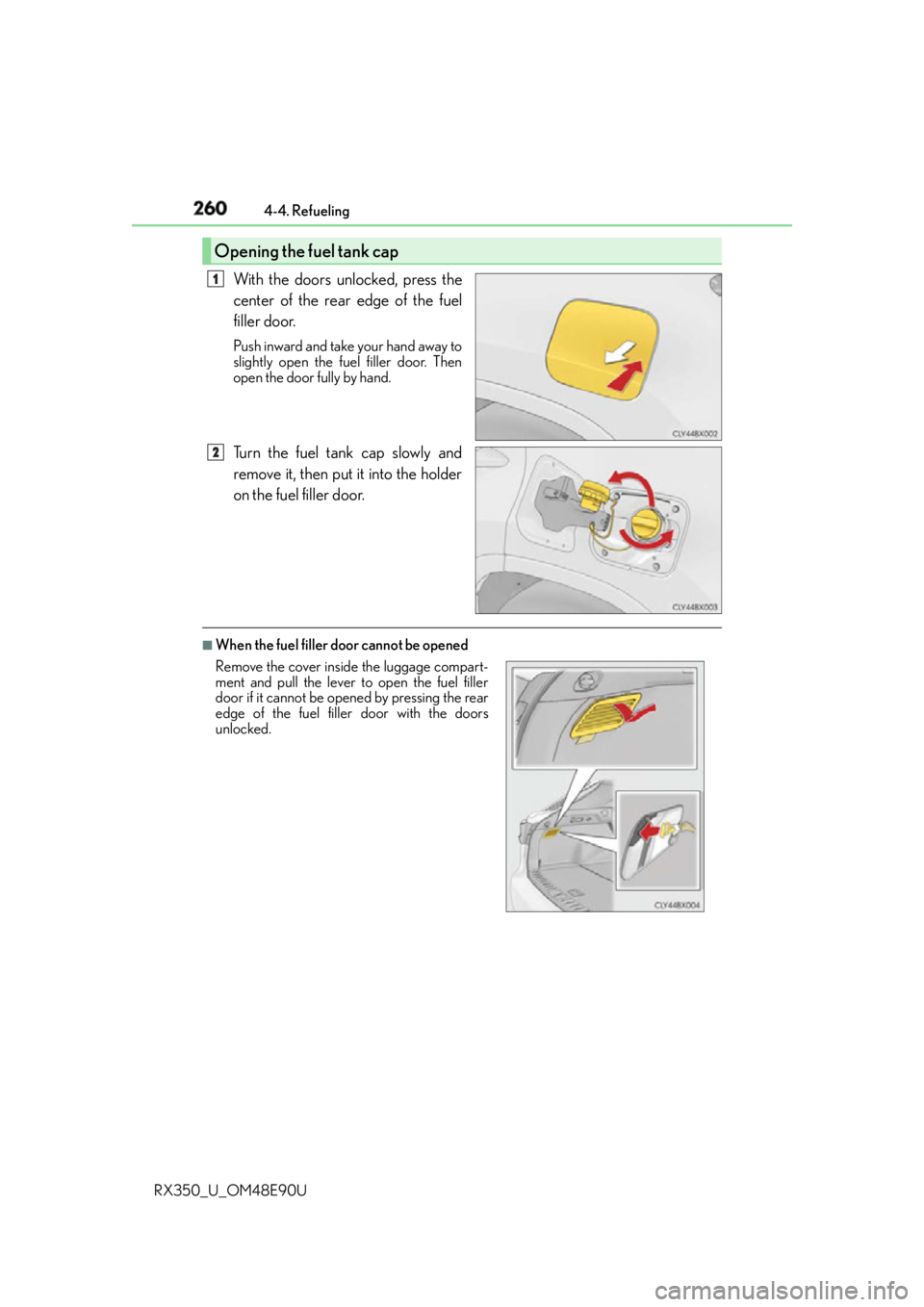
RX350_U_OM48E90U With the doors unlocked, press the
center of the rear edge of the fuel
filler door. Push inward and take your hand away to
slightly open the fuel filler door. Then
open the door fully by hand.
Turn the fuel tank cap slowly and
remove it, then put it into the holder
on the fuel filler door. ■
When the fuel filler door cannot be openedOpening the fuel tank cap 1
2
Remove the cover inside the luggage compart-
ment and pull the lever to open the fuel filler
door if it cannot be opened by pressing the rear
edge of the fuel filler door with the doors
unlocked.
Page 261 of 748
2614-4. Refueling
4
Driving
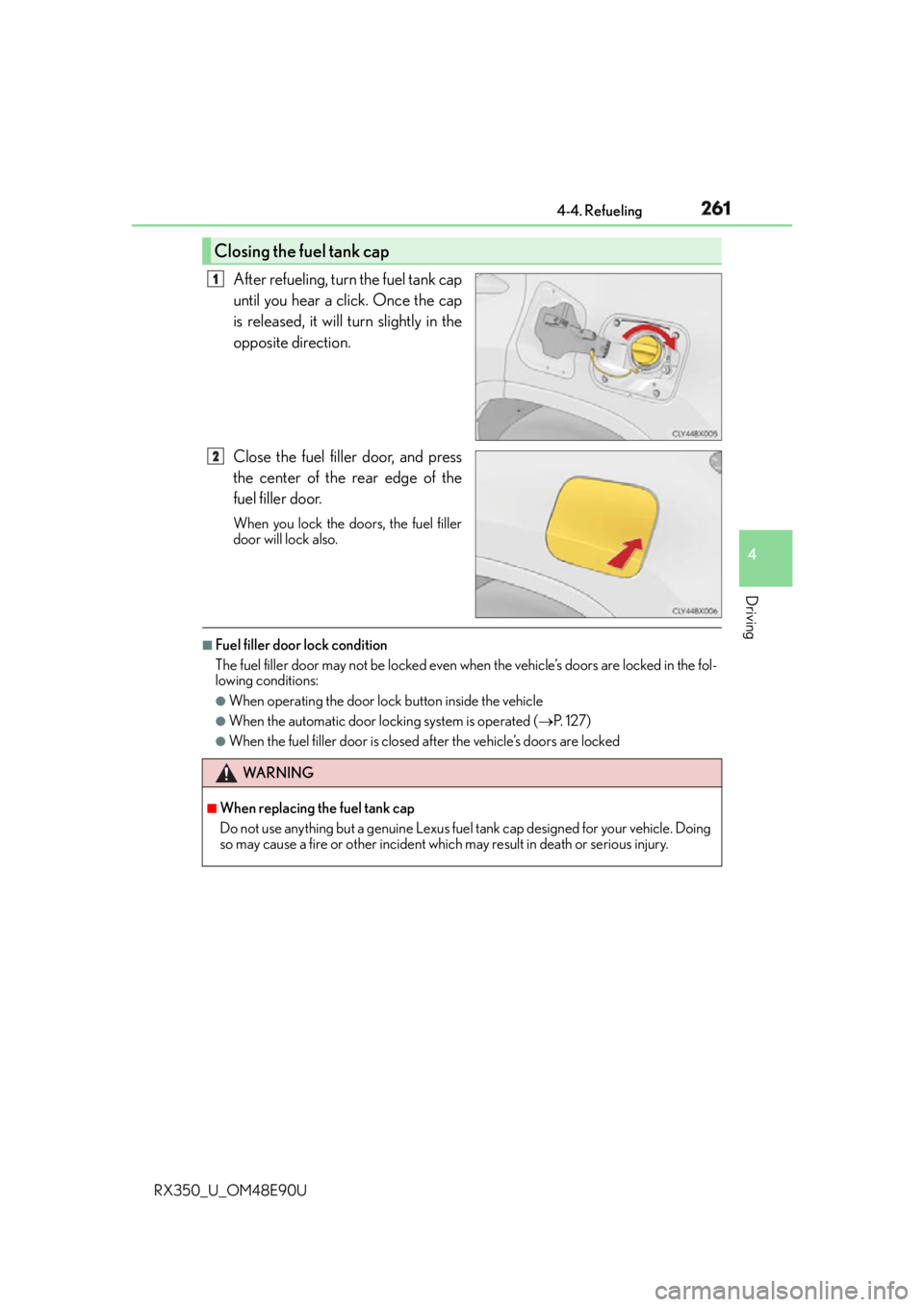
RX350_U_OM48E90U After refueling, turn the fuel tank cap
until you hear a click. Once the cap
is released, it will turn slightly in the
opposite direction.
Close the fuel filler door, and press
the center of the rear edge of the
fuel filler door. When you lock the doors, the fuel filler
door will lock also. ■
Fuel filler door lock condition
The fuel filler door may not be locked even wh en the vehicle’s doors are locked in the fol-
lowing conditions: ●
When operating the door lock button inside the vehicle ●
When the automatic door locking system is operated ( P. 1 2 7 )●
When the fuel filler door is closed after the vehicle’s doors are lockedClosing the fuel tank cap 1
2
WA R N I N G ■
When replacing the fuel tank cap
Do not use anything but a genuine Lexus fuel tank cap designed for your vehicle. Doing
so may cause a fire or other incident whic h may result in death or serious injury.
Page 369 of 748
3694-5. Using the driving support systems
4
Driving
RX350_U_OM48E90U
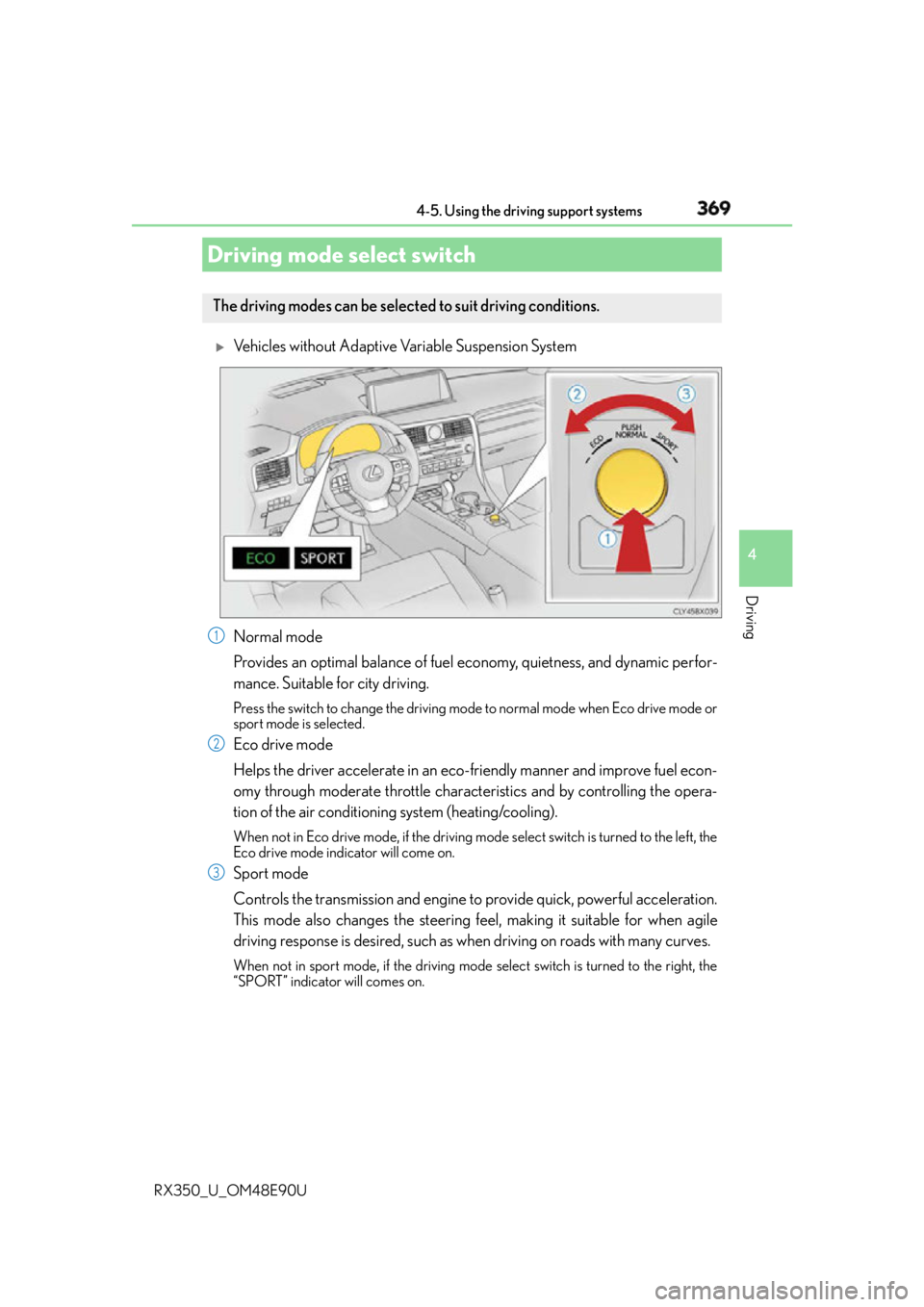
Vehicles without Adaptive Variable Suspension System
Normal mode
Provides an optimal balance of fuel economy, quietness, and dynamic perfor-
mance. Suitable for city driving. Press the switch to change the driving mode to normal mode when Eco drive mode or
sport mode is selected.
Eco drive mode
Helps the driver accelerate in an eco- friendly manner and improve fuel econ-
omy through moderate throttle characteristics and by controlling the opera-
tion of the air conditioning system (heating/cooling). When not in Eco drive mode, if the driving mode select switch is tu rned to the left, the
Eco drive mode indicator will come on.
Sport mode
Controls the transmission and engine to provide quick, powerful acceleration.
This mode also changes the steering f eel, making it suitable for when agile
driving response is desired, such as wh en driving on roads with many curves.When not in sport mode, if the driving mode select switch is turned to the right, the
“SPORT” indicator will comes on.Driving mode select switch The driving modes can be selected to suit driving conditions.
1
2
3
Page 370 of 748
370 4-5. Using the driving support systems
RX350_U_OM48E90U
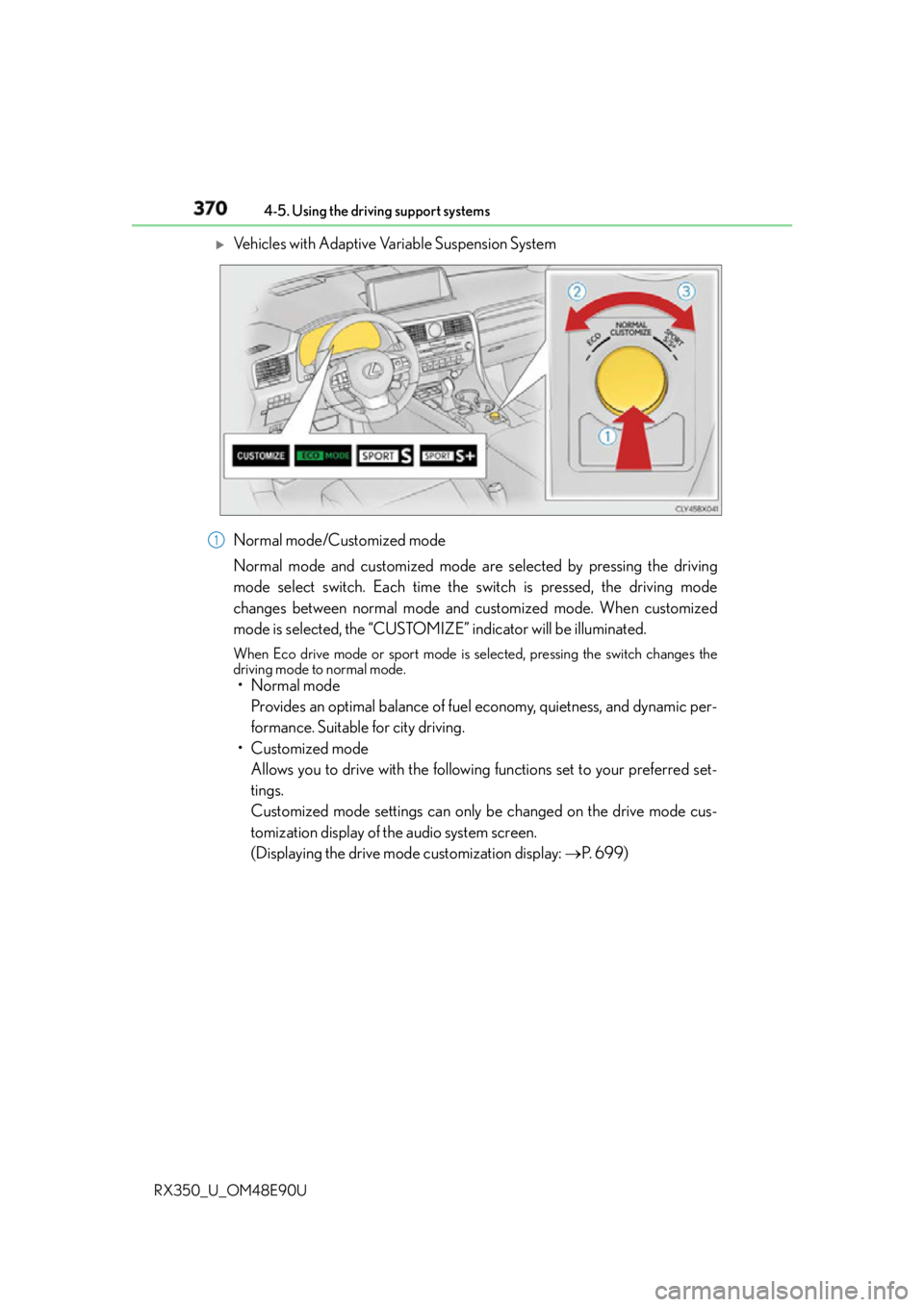
Vehicles with Adaptive Variable Suspension System
Normal mode/Customized mode
Normal mode and customized mode are selected by pressing the driving
mode select switch. Each time the switch is pressed, the driving mode
changes between normal mode and customized mode. When customized
mode is selected, the “CUSTOMIZE” indicator will be illuminated. When Eco drive mode or sport mode is se lected, pressing the switch changes the
driving mode to normal mode.
• Normal mode
Provides an optimal balance of fuel economy, quietness, and dynamic per-
formance. Suitable for city driving.
• Customized mode
Allows you to drive with the following functions set to your preferred set-
tings.
Customized mode settings can only be changed on the drive mode cus-
tomization display of the audio system screen.
(Displaying the drive mode customization display: P. 6 9 9 )1
Page 371 of 748
3714-5. Using the driving support systems
4
Driving
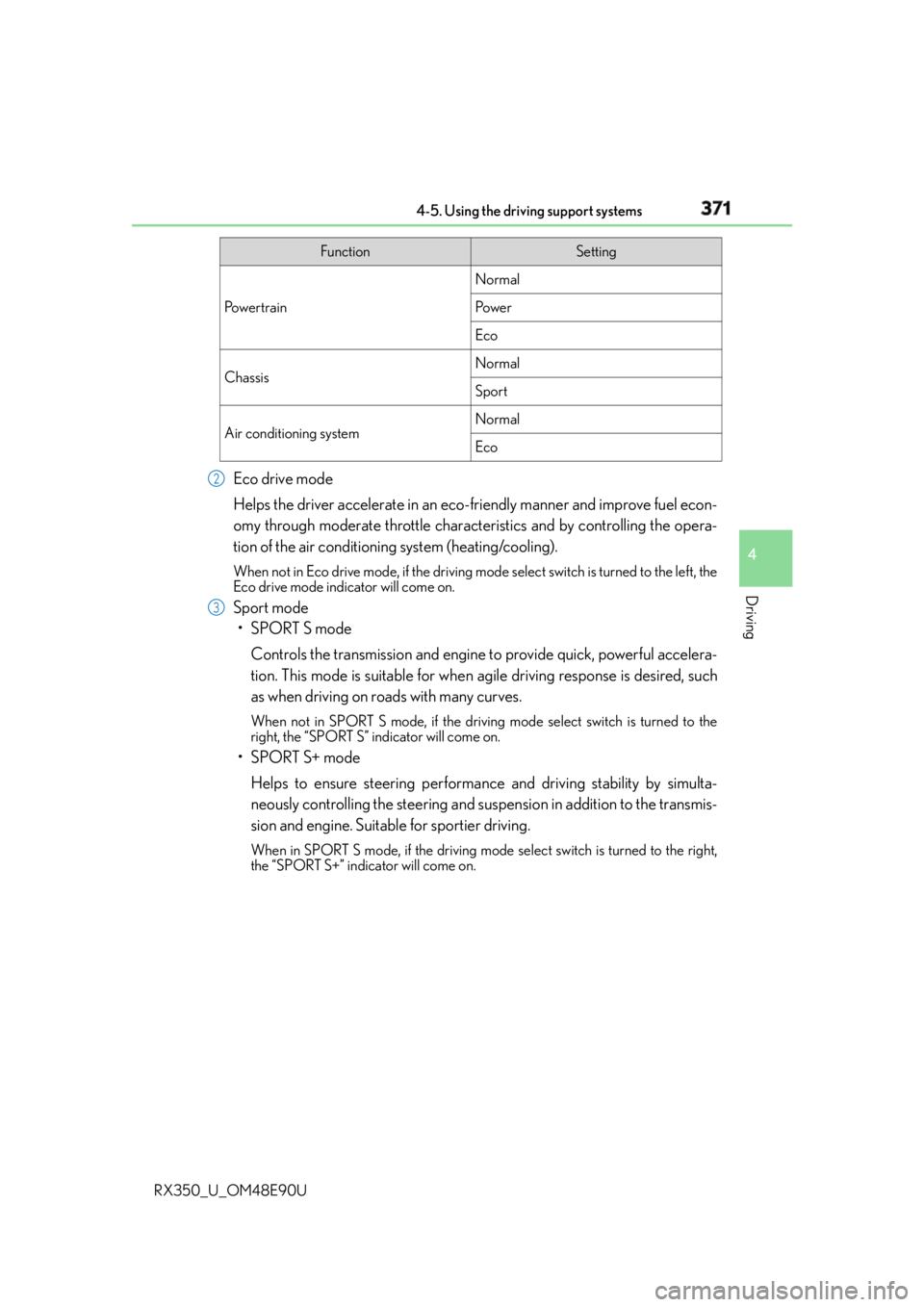
RX350_U_OM48E90U Eco drive mode
Helps the driver accelerate in an eco- friendly manner and improve fuel econ-
omy through moderate throttle characteristics and by controlling the opera-
tion of the air conditioning system (heating/cooling). When not in Eco drive mode, if the driving mode select switch is tu rned to the left, the
Eco drive mode indicator will come on.
Sport mode
•SPORT S mode
Controls the transmission and engine to provide quick, powerful accelera-
tion. This mode is suitable for when agile driving response is desired, such
as when driving on roads with many curves. When not in SPORT S mode, if the driving mode select switch is turned to the
right, the “SPORT S” indicator will come on.
•SPORT S+ mode
Helps to ensure steering performanc e and driving stability by simulta-
neously controlling the steering and suspen sion in addition to the transmis-
sion and engine. Suitable for sportier driving. When in SPORT S mode, if the driving mode select switch is turned to the right,
the “SPORT S+” indicator will come on. Function Setting
Po w e r t r a i n Normal
Po w e r
Eco
Chassis Normal
Sport
Air conditioning system Normal
Eco2
3
Page 372 of 748

372 4-5. Using the driving support systems
RX350_U_OM48E90U ■
Operation of the air conditioning system in Eco drive mode
Eco drive mode controls the heating/cooling operations and fan speed of the air condi-
tioning system to enhance fuel efficiency. To improve air conditioning performance,
adjust the fan speed or turn off Eco drive mode. ■
Automatic deactivation of sport mode and customized mode
If the engine switch is turned off after dr iving in sport mode or customized mode, the
drive mode will be changed to normal mode. ■
Driving mode pop-up display (12.3-inch display only)
When the driving mode is changed, the selected driving mode will be temporarily dis-
played on the side display. ( P. 4 9 2 )
Page 476 of 748
476
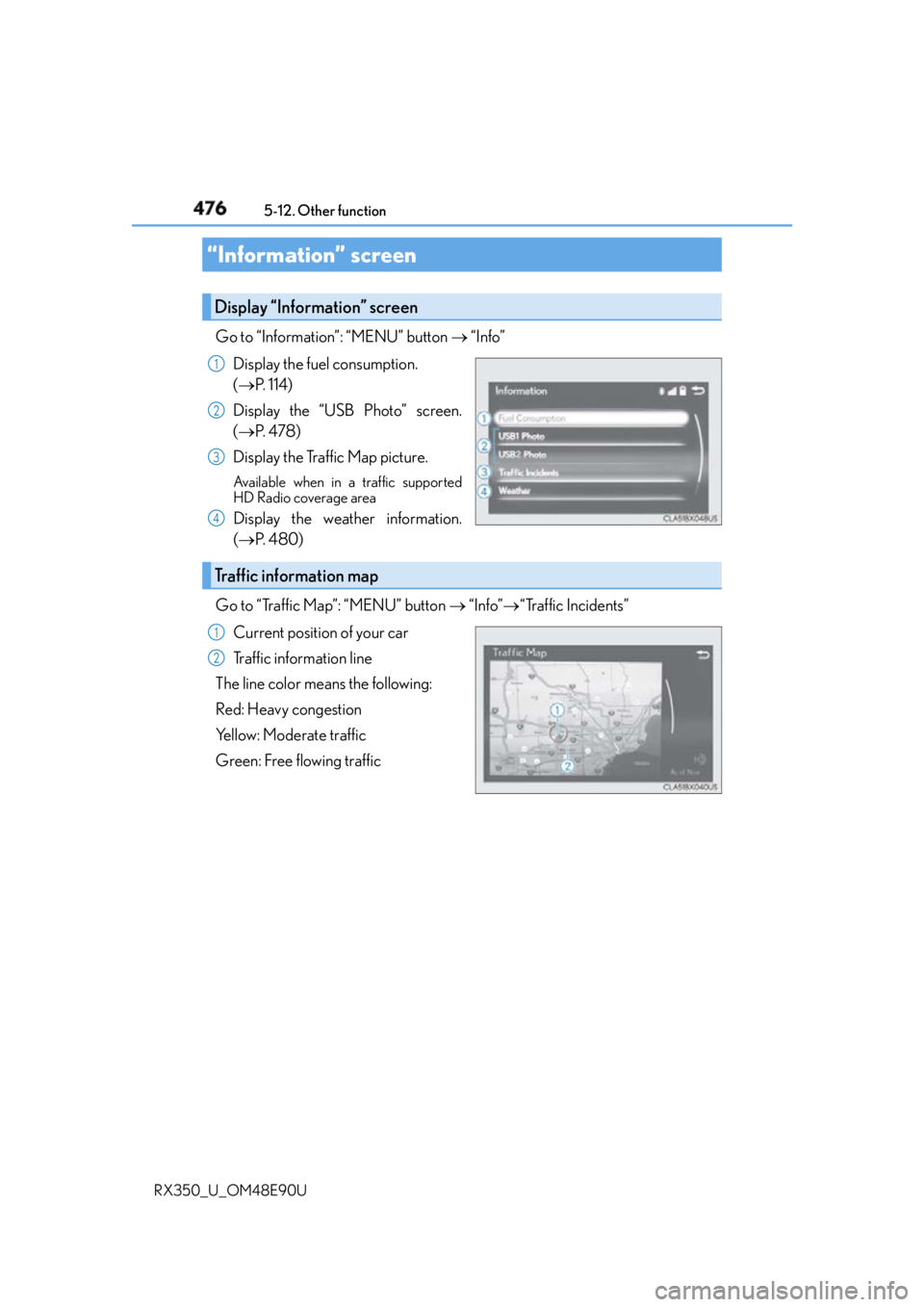
RX350_U_OM48E90U 5-12. Other function
Go to “Information”: “MENU” button “Info”
Display the fuel consumption.
( P. 1 1 4 )
Display the “USB Photo” screen.
( P. 4 7 8 )
Display the Traffic Map picture. Available when in a traffic supported
HD Radio coverage area
Display the weather information.
( P. 4 8 0 )
Go to “Traffic Map”: “MENU” button “Info” “Traffic Incidents”
Current position of your car
Traffic information line
The line color means the following:
Red: Heavy congestion
Yellow: Moderate traffic
Green: Free flowing traffic“Information” screen Display “Information” screen 1
2
3
4
Traffic information map 1
2