steering LEXUS RX350 2016 Repair Manual
[x] Cancel search | Manufacturer: LEXUS, Model Year: 2016, Model line: RX350, Model: LEXUS RX350 2016Pages: 748, PDF Size: 12.36 MB
Page 299 of 748

2994-5. Using the driving support systems
4
Driving
RX350_U_OM48E90U ■
Temporary cancellation of functions
When operation conditions are no longer me t, a function may be temporarily canceled.
However, when the operation conditions are met again, operation of the function is auto-
matically restored. ( P. 2 9 8 )■
Steering assist function
Depending on the vehicle speed, lane depart ure situation, road conditions, etc., the
operation of the functions may not be reco gnized or the functions may not operate.■
Lane departure alert function
The warning buzzer may be difficult to hear due to external noise, audio playback, etc.
Also, it may be difficult to feel steering wheel vibrations due to the road conditions, etc. ■
Hands off steering wheel alert
When the system determines that the driver has removed their hands from the steering
wheel while the steering assist function is operating, a warning message is displayed on
the multi-information displa y and the buzzer sounds.■
White (yellow) lines are on ly on one side of road
The LDA system will not operate for the side on which white (yellow) lines could not be
recognized.
Page 313 of 748
3134-5. Using the driving support systems
4
Driving
RX350_U_OM48E90U ●
Motorcycles traveling in the same lane ●
When water or snow thrown up by the surrounding vehicles hinders the detecting of
the sensor
■
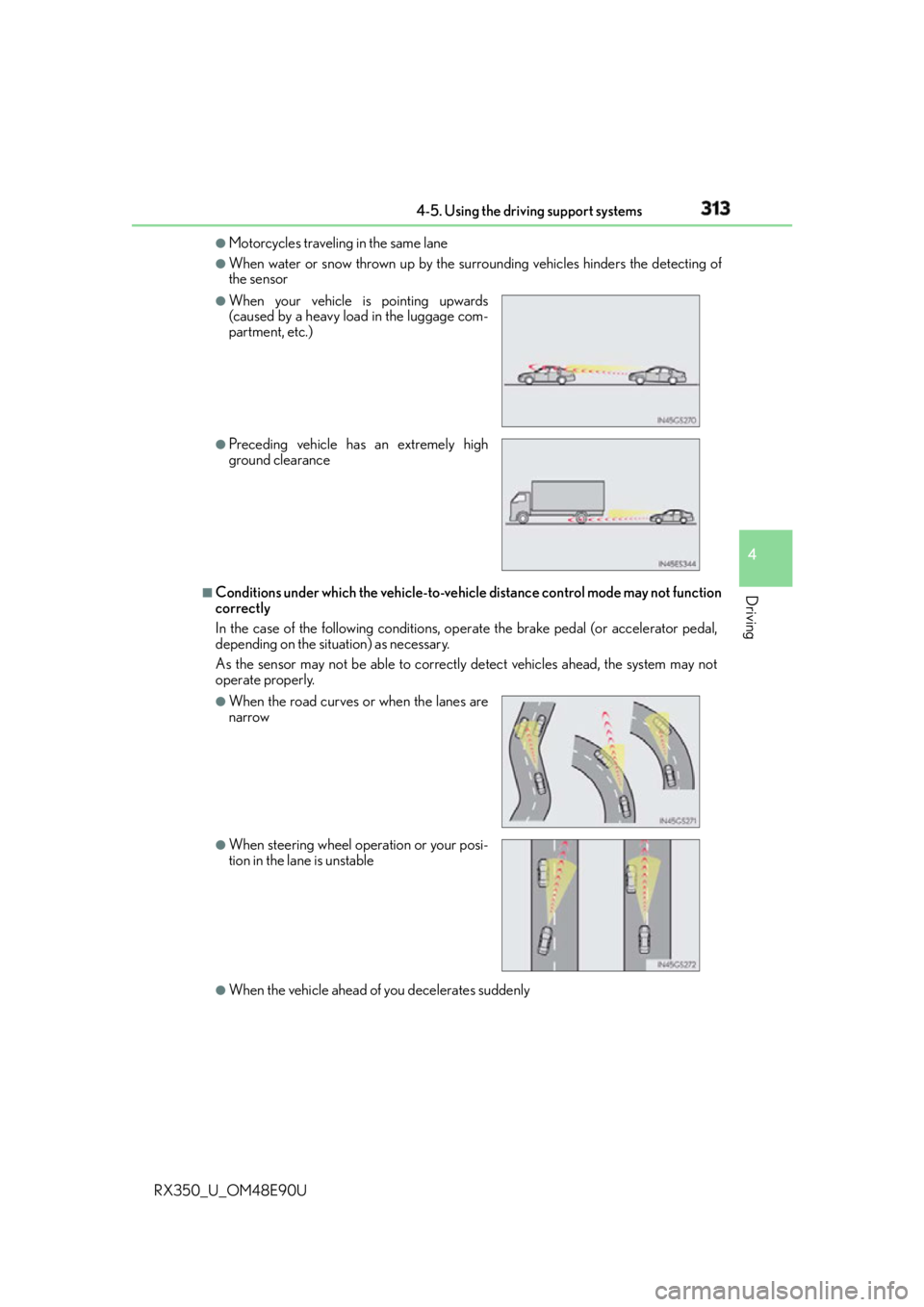
Conditions under which the ve hicle-to-vehicle distance co ntrol mode may not function
correctly
In the case of the following conditions, op erate the brake pedal (or accelerator pedal,
depending on the situ ation) as necessary.
As the sensor may not be able to correctly detect vehicles ahead, the system may not
operate properly.
●
When the vehicle ahead of you decelerates suddenly ●
When your vehicle is pointing upwards
(caused by a heavy load in the luggage com-
partment, etc.) ●
Preceding vehicle has an extremely high
ground clearance
●
When the road curves or when the lanes are
narrow
●
When steering wheel operation or your posi-
tion in the lane is unstable
Page 325 of 748
3254-5. Using the driving support systems
4
Driving
RX350_U_OM48E90U ■
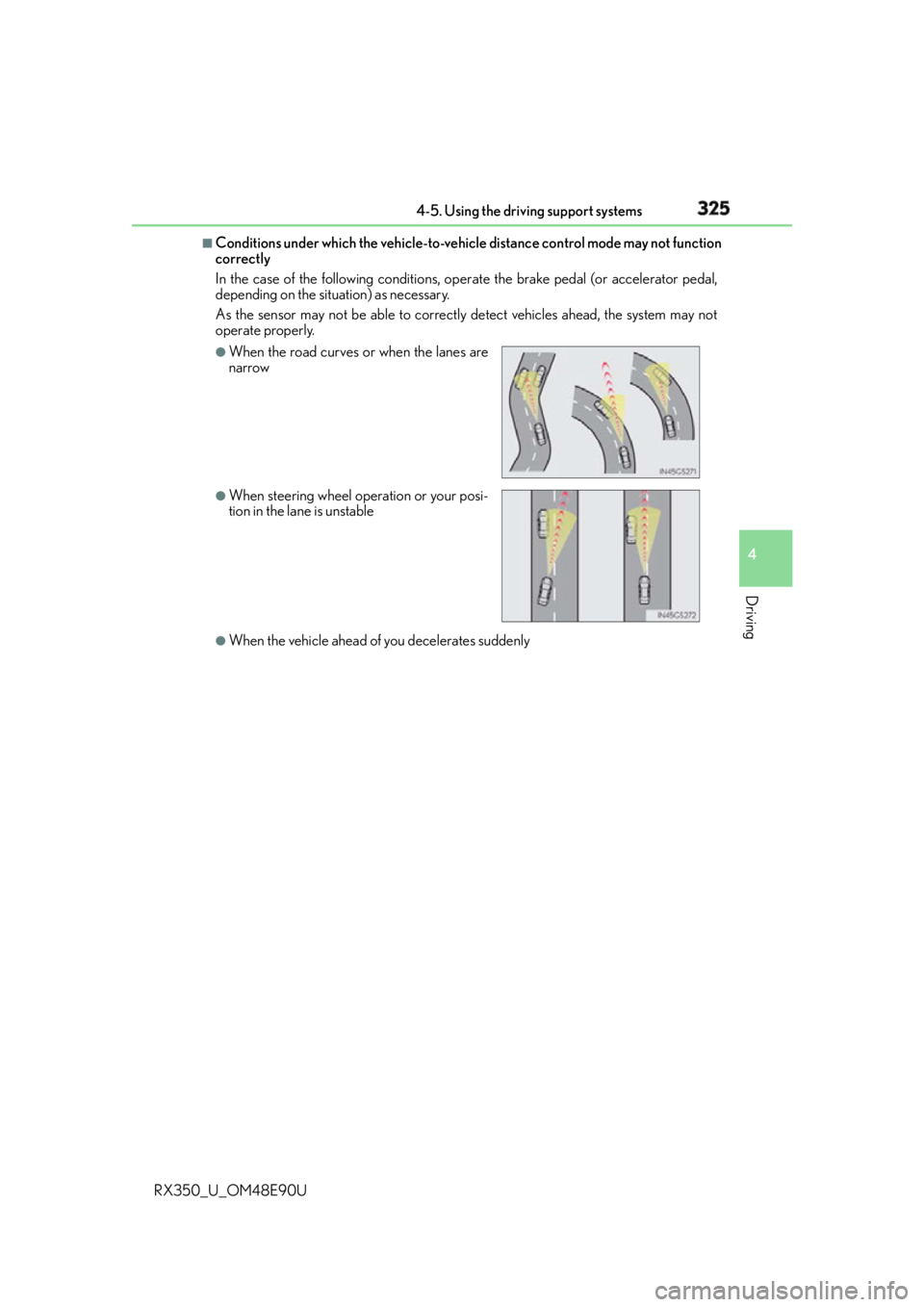
Conditions under which the ve hicle-to-vehicle distance co ntrol mode may not function
correctly
In the case of the following conditions, op erate the brake pedal (or accelerator pedal,
depending on the situ ation) as necessary.
As the sensor may not be able to correctly detect vehicles ahead, the system may not
operate properly.
●
When the vehicle ahead of you decelerates suddenly ●
When the road curves or when the lanes are
narrow ●
When steering wheel operation or your posi-
tion in the lane is unstable
Page 340 of 748
340 4-5. Using the driving support systems
RX350_U_OM48E90U ■
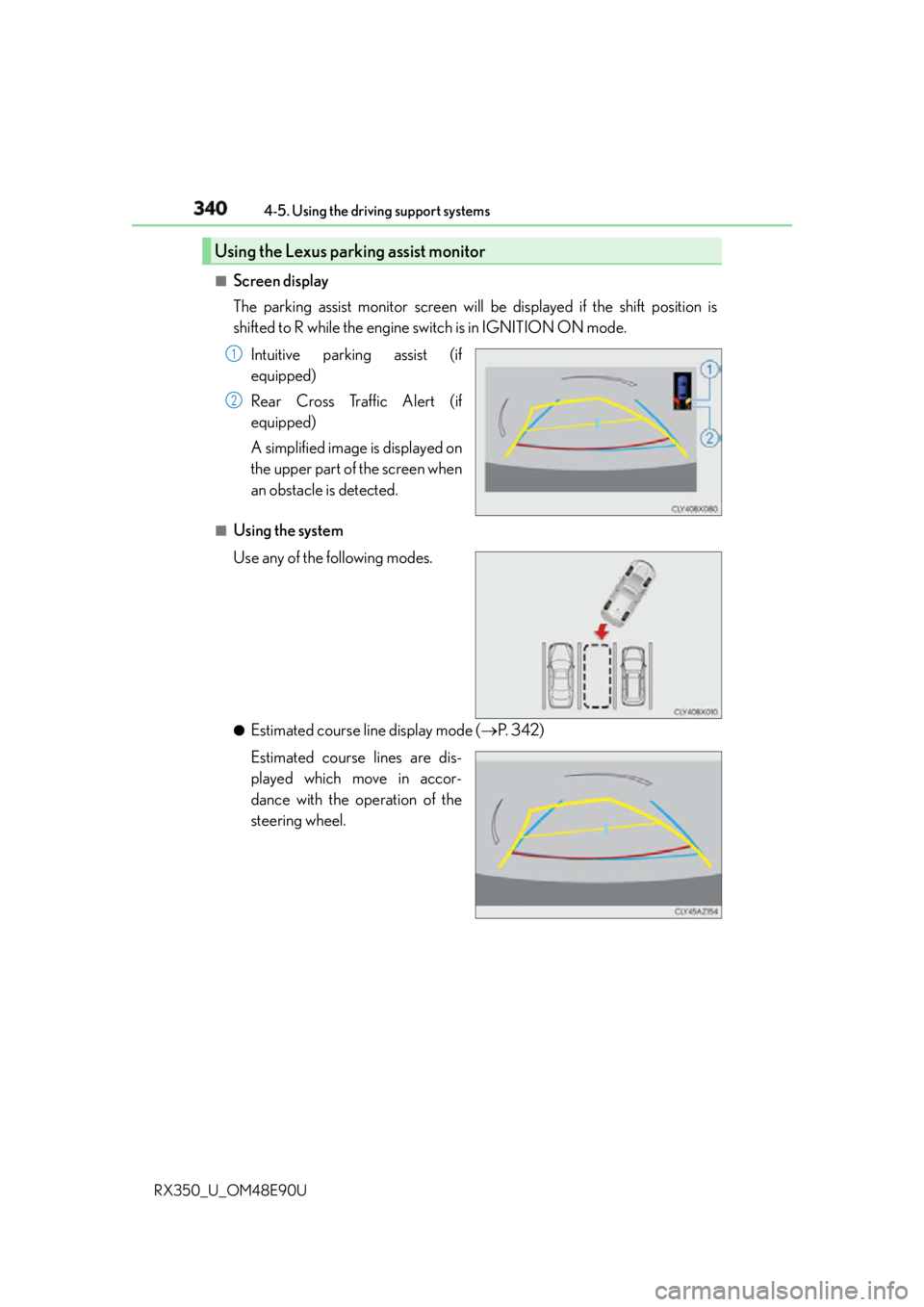
Screen display
The parking assist monitor screen will be displayed if the shift position is
shifted to R while the engine switch is in IGNITION ON mode.
Intuitive parking assist (if
equipped)
Rear Cross Traffic Alert (if
equipped)
A simplified image is displayed on
the upper part of the screen when
an obstacle is detected.■
Using the system
Use any of the following modes.
●
Estimated course line display mode ( P. 3 4 2 )
Estimated course lines are dis-
played which move in accor-
dance with the operation of the
steering wheel.Using the Lexus parking assist monitor 1
2
Page 341 of 748
3414-5. Using the driving support systems
4
Driving
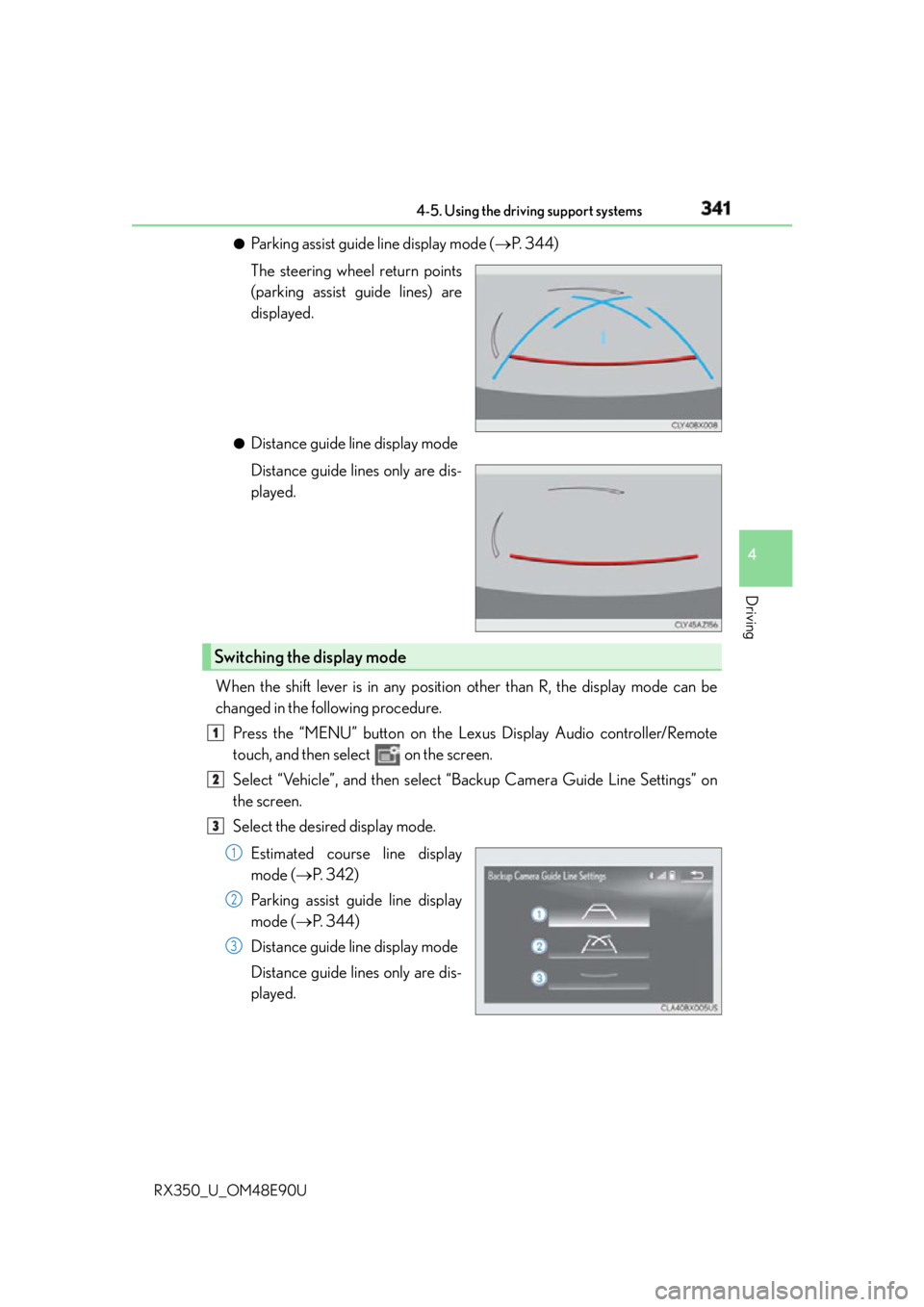
RX350_U_OM48E90U ●
Parking assist guide line display mode ( P. 344)
The steering wheel return points
(parking assist guide lines) are
displayed. ●
Distance guide line display mode
Distance guide lines only are dis-
played.
When the shift lever is in any position other than R, the display mode can be
changed in the following procedure.
Press the “MENU” button on the Le xus Display Audio controller/Remote
touch, and then select on the screen.
Select “Vehicle”, and then select “B ackup Camera Guide Line Settings” on
the screen.
Select the desired display mode.
Estimated course line display
mode ( P. 3 4 2 )
Parking assist guide line display
mode ( P. 3 4 4 )
Distance guide line display mode
Distance guide lines only are dis-
played.Switching the display mode 1
2
3
1
2
3
Page 342 of 748
342 4-5. Using the driving support systems
RX350_U_OM48E90U ■
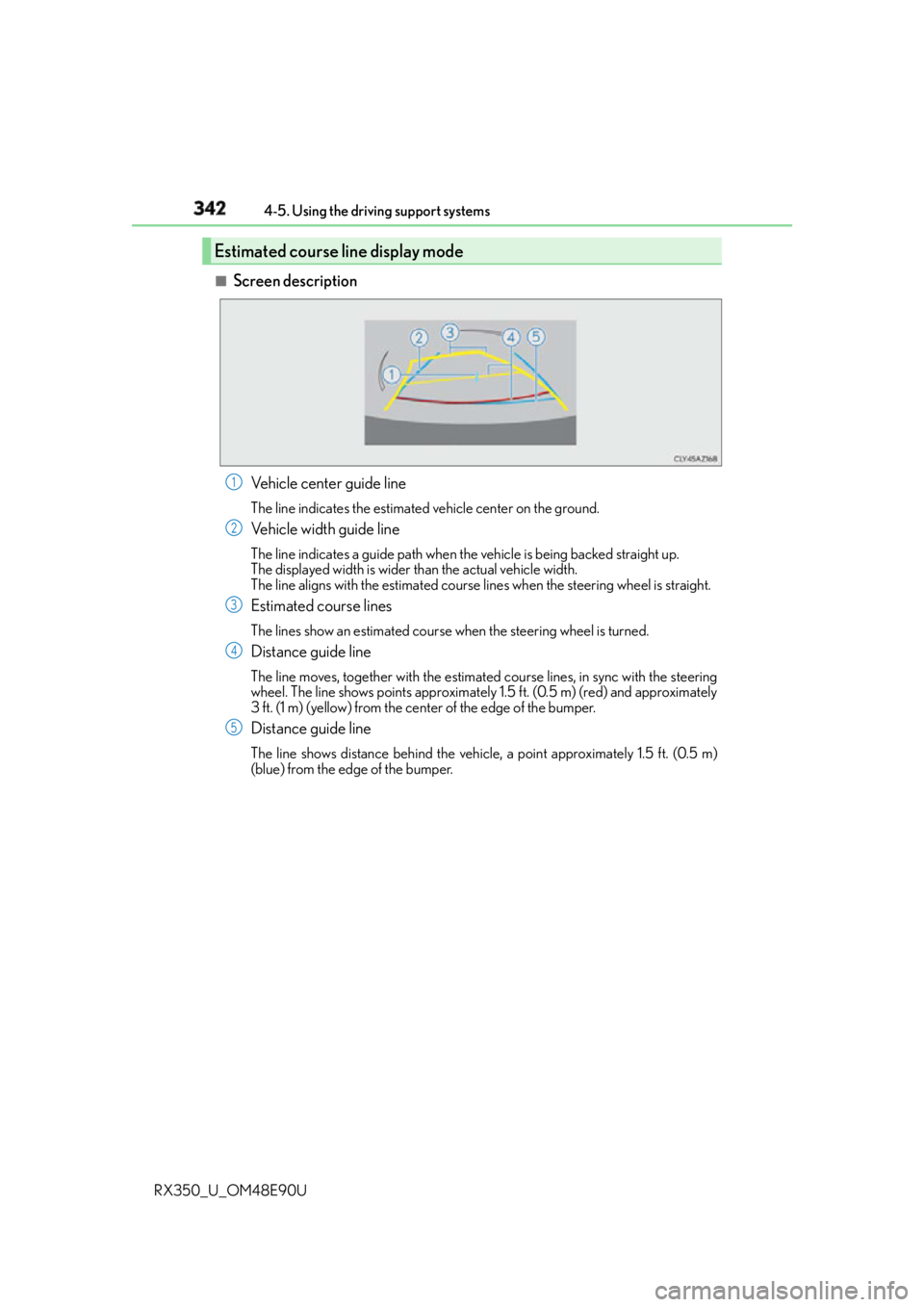
Screen description
Vehicle center guide line The line indicates the estimated vehicle center on the ground.
Vehicle width guide line The line indicates a guide path when the vehicle is being backed straight up.
The displayed width is wider than the actual vehicle width.
The line aligns with the estimated course lines when the steering wheel is straight.
Estimated course lines The lines show an estimated course when the steering wheel is turned.
Distance guide line The line moves, together with the estimated course lines, in sync with the steering
wheel. The line shows points approximately 1.5 ft. (0.5 m) (red) and approximately
3 ft. (1 m) (yellow) from the center of the edge of the bumper.
Distance guide line The line shows distance behind the vehicle, a point approximately 1.5 ft. (0.5 m)
(blue) from the edge of the bumper.Estimated course line display mode 1
2
3
4
5
Page 343 of 748
3434-5. Using the driving support systems
4
Driving
RX350_U_OM48E90U ■
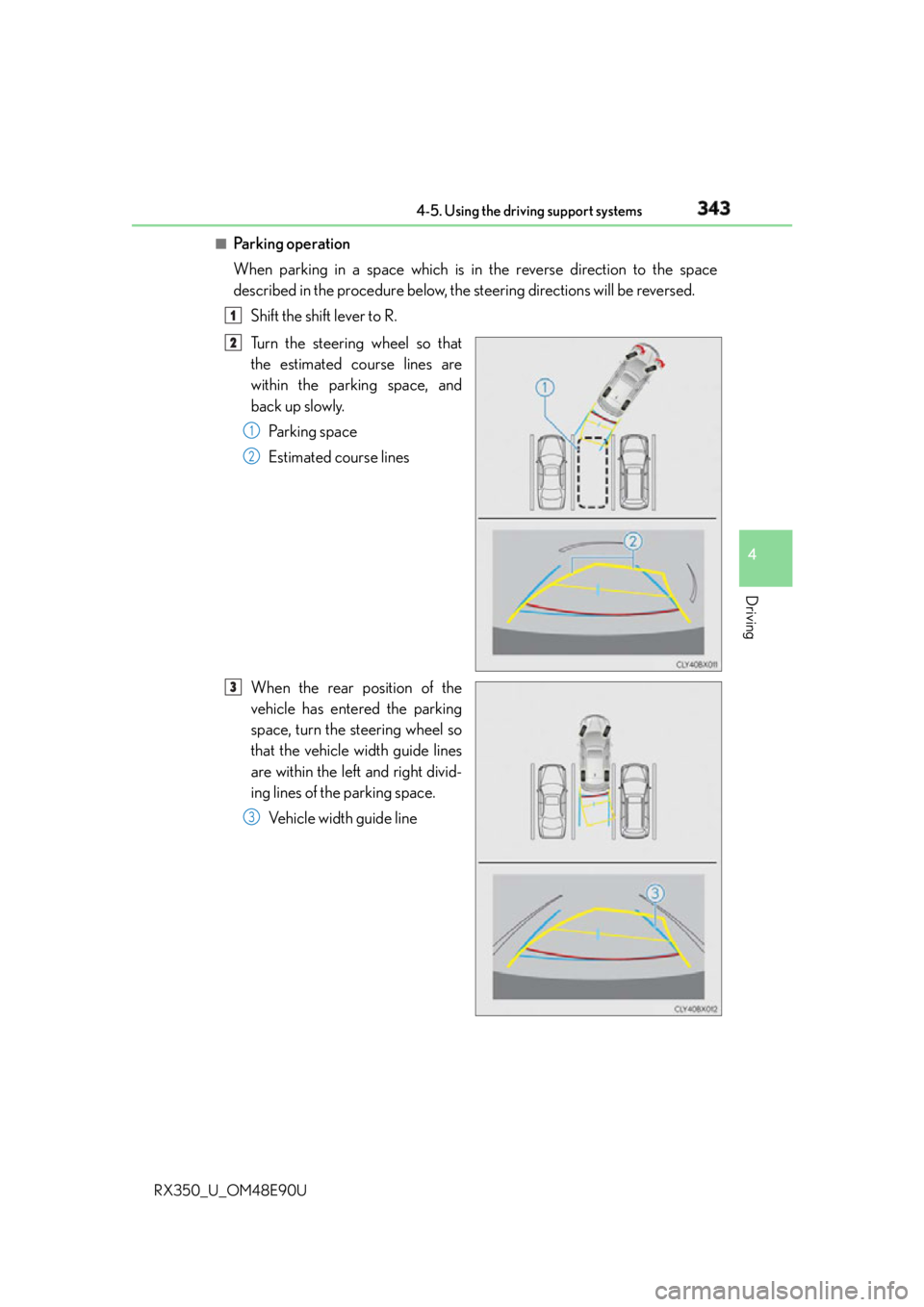
Pa r k i n g o p e ra t i o n
When parking in a space which is in the reverse direction to the space
described in the procedure below, the steering directions will be reversed.
Shift the shift lever to R.
Turn the steering wheel so that
the estimated course lines are
within the parking space, and
back up slowly.
Parking space
Estimated course lines
When the rear position of the
vehicle has entered the parking
space, turn the steering wheel so
that the vehicle width guide lines
are within the left and right divid-
ing lines of the parking space.
Vehicle width guide line 1
2
1
2
3
3
Page 344 of 748
344 4-5. Using the driving support systems
RX350_U_OM48E90U Once the vehicle width guide lines and the parking space lines are parallel,
straighten the steering wheel and back up slowly until the vehicle has com-
pletely entered the parking space.
Stop the vehicle in an appropri ate place, and finish parking.■
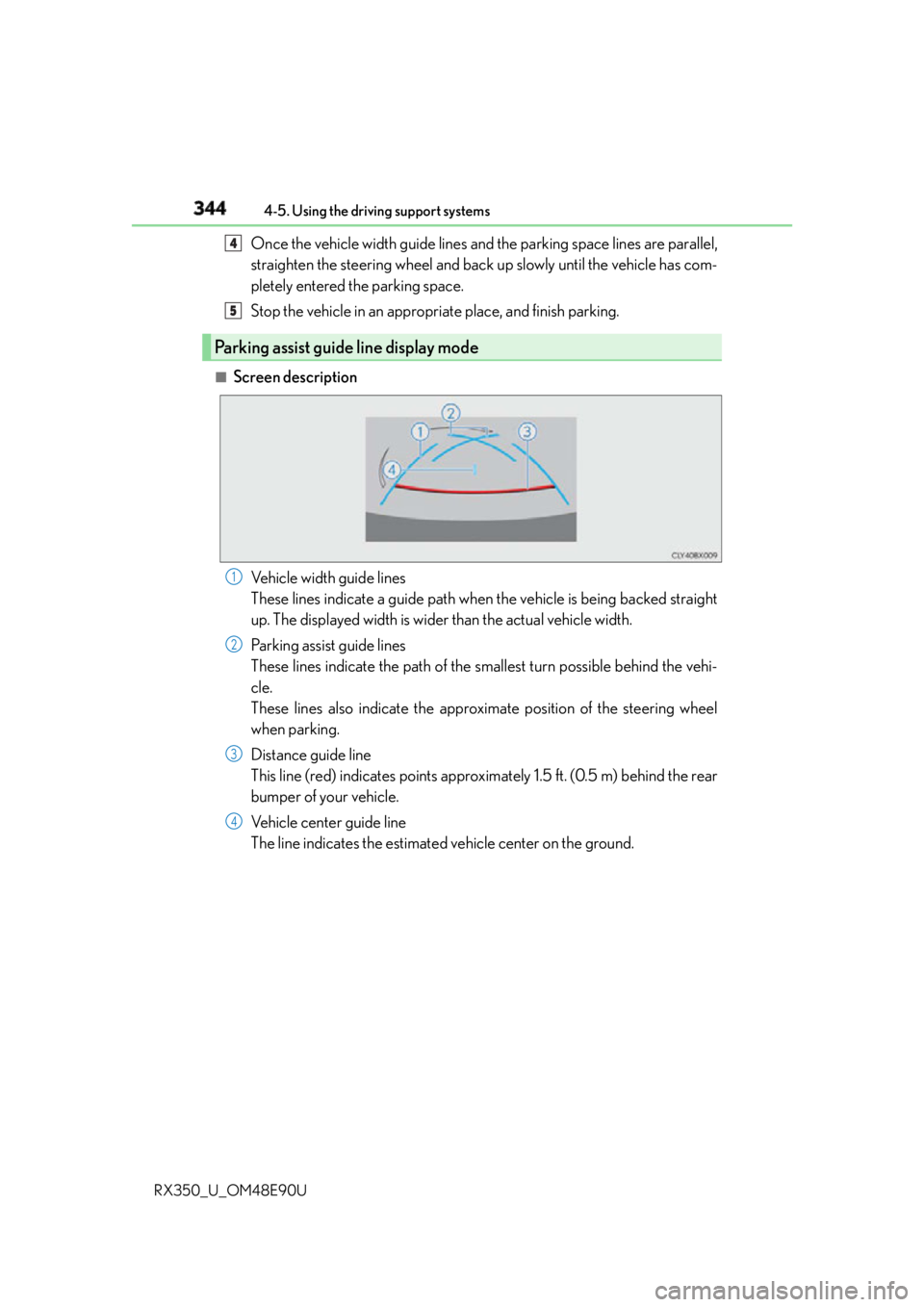
Screen description
Vehicle width guide lines
These lines indicate a guide path when the vehicle is being backed straight
up. The displayed width is wider than the actual vehicle width.
Parking assist guide lines
These lines indicate the path of the smallest turn possible behind the vehi-
cle.
These lines also indicate the approximate position of the steering wheel
when parking.
Distance guide line
This line (red) indicates points approxim ately 1.5 ft. (0.5 m) behind the rear
bumper of your vehicle.
Vehicle center guide line
The line indicates the estimated vehicle center on the ground.Parking assist guide line display mode 4
5
1
2
3
4
Page 345 of 748
3454-5. Using the driving support systems
4
Driving
RX350_U_OM48E90U ■
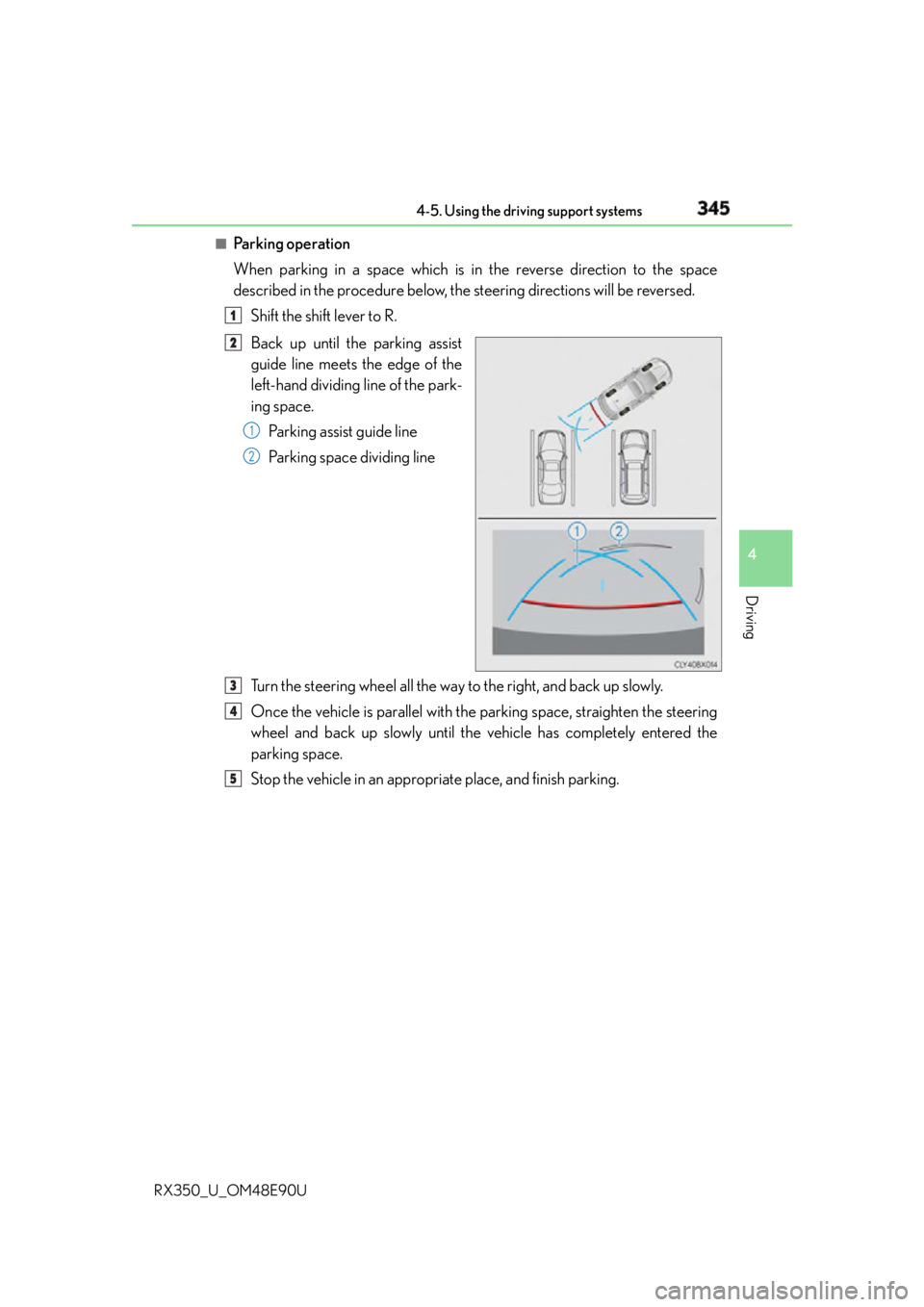
Pa r k i n g o p e ra t i o n
When parking in a space which is in the reverse direction to the space
described in the procedure below, the steering directions will be reversed.
Shift the shift lever to R.
Back up until the parking assist
guide line meets the edge of the
left-hand dividing line of the park-
ing space.
Parking assist guide line
Parking space dividing line
Turn the steering wheel all the way to the right, and back up slowly.
Once the vehicle is parallel with the parking space, straighten the steering
wheel and back up slowly until the vehicle has completely entered the
parking space.
Stop the vehicle in an appropri ate place, and finish parking.1
2
1
2
3
4
5
Page 352 of 748
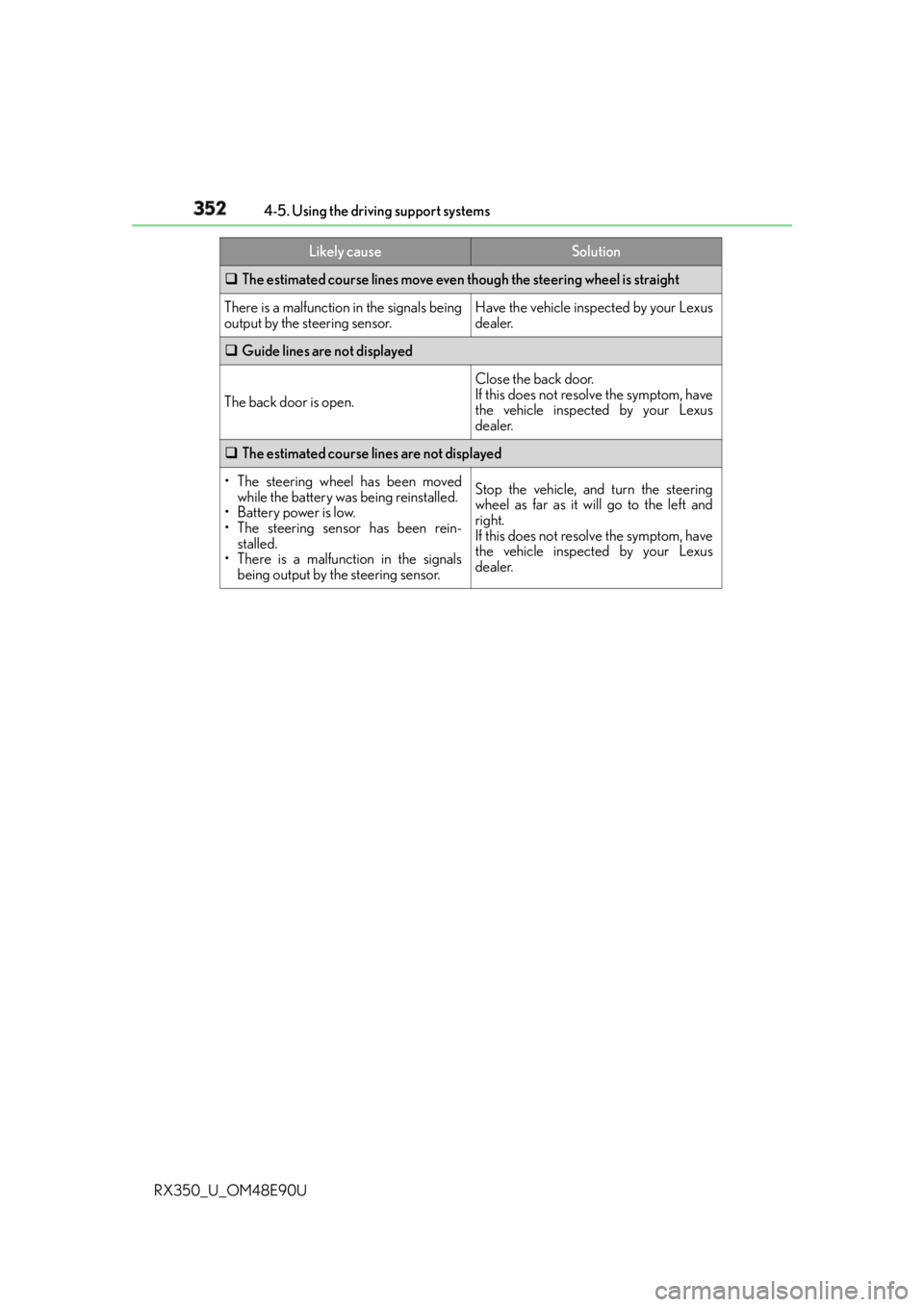
352 4-5. Using the driving support systems
RX350_U_OM48E90U The estimated course lines move even though the steering wheel is straight
There is a malfunction in the signals being
output by the steering sensor. Have the vehicle inspected by your Lexus
dealer.
Guide lines are not displayed
The back door is open. Close the back door.
If this does not resolve the symptom, have
the vehicle inspected by your Lexus
dealer.
The estimated course lines are not displayed
• The steering wheel has been moved
while the battery was being reinstalled.
• Battery power is low.
• The steering sensor has been rein-
stalled.
• There is a malfunction in the signals
being output by the steering sensor. Stop the vehicle, and turn the steering
wheel as far as it will go to the left and
right.
If this does not resolve the symptom, have
the vehicle inspected by your Lexus
dealer.Likely cause Solution