air condition LEXUS RX350 2016 Owners Manual
[x] Cancel search | Manufacturer: LEXUS, Model Year: 2016, Model line: RX350, Model: LEXUS RX350 2016Pages: 748, PDF Size: 12.36 MB
Page 5 of 748

5 1
9875432
10
RX350_U_OM48E90U 65-11. Bluetooth ®
What to do if...
(Troubleshooting) ....................467
Bluetooth ®
..................................... 471
5-12. Other function
“Information” screen.................. 476
USB photo .....................................478
Weather information ................480
Voice command system ........... 481
6-1. Basic operation of the
Remote Touch screen
Remote Touch .............................488
12.3-inch display ........................ 492
6-2. Using the air conditioning
system and defogger
Lexus Climate Concierge...... 494
Automatic air conditioning
system .......................................... 495
Heated steering wheel/
seat heaters/
seat ventilators .........................505
6-3. Using the interior lights
Interior lights list .........................508
• Interior lights ..........................509
• Personal lights ........................ 510 6-4. Using the storage features
List of storage features ..............512
• Glove box .................................513
• Console box ............................513
• Cup holders .............................514
• Door pockets...........................515
• Bottle holders ..........................515
• Coin box ....................................516
• Auxiliary boxes ....................... 517
Luggage compartment
features ........................................ 518
6-5. Using the other interior
features
Other interior features ............ 523
• Sun visors ................................ 523
• Vanity mirrors ........................ 523
• Clock .........................................524
• Wireless charger...................524
•Power outlets
(12 VDC)...................................531
•Power outlet
(120 VAC) .............................. 532
• Front passenger footwell
hooks ........................................ 533
• Rear door sunshades ......... 534
• Armrest.................................... 534
• Assist grips ............................. 535
• Coat hooks............................. 535
Garage door opener ............... 536
Compass ....................................... 543
LEXUS Enform Safety
Connect.......................................547
LEXUS Enform Remote ......... 552
LEXUS Enform Service
Connect...................................... 5546
Interior features
Page 6 of 748

TABLE OF CONTENTS
6
RX350_U_OM48E90U 7-1. Maintenance and care
Cleaning and protecting
the vehicle exterior ................ 556
Cleaning and protecting
the vehicle inte rior.................... 561
7-2. Maintenance
Maintenance
requirements ............................ 564
General maintenance.............. 566
Emission inspection and
maintenance (I/M)
programs .................................... 569
7-3. Do-it-yourself
maintenance
Do-it-yourself service
precautions................................ 570
Hood ................................................572
Positioning a floor jack..............573
Engine compartment ................ 574
Tires.................................................. 584
Tire inflation pressure ............... 593
Wheels ........................................... 596
Air conditioning filter ............... 598
Windshield wiper inserts ......... 601
Electronic key battery.............. 603
Checking and replacing
fuses.............................................. 605
Headlight aim ..............................608
Light bulbs ......................................610 8-1. Essential information
Emergency flashers ...................624
If your vehicle has to be
stopped in an
emergency ................................ 625
8-2. Steps to take in an
emergency
If your vehicle needs to
be towed ......................................626
If you think something is
wrong........................................... 632
Fuel pump shut off
system .......................................... 633
If a warning light turns
on or a warning buzzer
sounds ......................................... 634
If a warning message is
displayed ...................................... 641
If you have a flat tire .................. 646
If the engine will not start ........ 658
If the shift lever cannot be
shifted from P ........................... 660
If the electronic key does
not operate properly ............... 661
If the vehicle battery is
discharged ................................. 665
If your vehicle overheats ......... 668
If the vehicle becomes
stuck ............................................... 6717
Maintenance and care 8
When trouble arises
Page 10 of 748

10
RX350_U_OM48E90U This vehicle is equipped with an event data recorder (EDR). The main purpose of an EDR
is to record, in certain crash or near crash-like situations, such as an air bag deployment
or hitting a road obstacle, data that will as sist in understanding how a vehicle’s systems
performed. The EDR is designed to record data related to vehicl e dynamics and safety
systems for a short period of time , typically 30 seconds or less.
The EDR in this vehicle is desi gned to record such data as:
• How various systems in your vehicle were operating;
• Whether or not the driver and passenger safety belts were buckled/fastened;
• How far (if at all) the driver was depressing the accelerator and/or brake pedal; and,
• How fast the vehicle was traveling.
These data can help provide a better unde rstanding of the circumstances in which
crashes and injuries occur.
NOTE: EDR data are recorded by your vehicle only if a non-trivial crash situation occurs;
no data are recorded by the EDR under normal driving conditions and no personal data
(e.g., name, gender, age, and crash location) are recorded. However, other parties, such
as law enforcement, could combine the EDR data with the type of personally identifying
data routinely acquired duri ng a crash investigation.
To read data recorded by an EDR, special equipment is required, and access to the vehi-
cle or the EDR is needed. In addition to the vehicle manufacturer, other parties, such as
law enforcement, that have the special equipm ent, can read the information if they have
access to the vehicle or the EDR. ●
Disclosure of the EDR data
Lexus will not disclose the data recorded in an EDR to a third party except when:
• An agreement from the vehicle’s owner (or the lessee for a leased vehicle) is
obtained
• In response to an official request by the police, a court of law or a government
agency
• For use by Lexus in a law suit
However, if necessary, Lexus may:
• Use the data for research on vehicle safety performance
• Disclose the data to a third party for research purposes without disclosing informa-
tion about the specific vehicle or vehicle ownerEvent data recorder
Page 17 of 748

17Pictorial index
RX350_U_OM48E90U Multi-information display . . . . . . . . . . . . . . . . . . . . . . . . . . . . . . . . . . . . . . . . . . . . P. 89 Display . . . . . . . . . . . . . . . . . . . . . . . . . . . . . . . . . . . . . . . . . . . . . . . . . . . . . . . . . . . . . . . . . . P. 89
When the warning messages are displayed . . . . . . . . . . . . . . . . . . . . . . . . . . . . . P. 641
Parking brake switch . . . . . . . . . . . . . . . . . . . . . . . . . . . . . . . . . . . . . . . . . . . . . . . . P. 235 Applying/releasing. . . . . . . . . . . . . . . . . . . . . . . . . . . . . . . . . . . . . . . . . . . . . . . . P. 235, 236
Precautions against winter season . . . . . . . . . . . . . . . . . . . . . . . . . . . . . . . . . . . . . . P. 381
Warning buzzer/message . . . . . . . . . . . . . . . . . . . . . . . . . . . . . . . . . . . . . . . . . . P. 237, 641
Turn signal lever. . . . . . . . . . . . . . . . . . . . . . . . . . . . . . . . . . . . . . . . . . . . . . . . . . . . . . P. 234Headlight switch . . . . . . . . . . . . . . . . . . . . . . . . . . . . . . . . . . . . . . . . . . . . . . . . . . . . . . . . . .P. 241
Headlights/side marker light s/parking lights/tail lights/
license plate lights/daytime running li ghts . . . . . . . . . . . . . . . . . . . . . . . . . . . . . . . P. 241
Fog lights . . . . . . . . . . . . . . . . . . . . . . . . . . . . . . . . . . . . . . . . . . . . . . . . . . . . . . . . . . . . . . . P. 249
Windshield wiper and washer switch. . . . . . . . . . . . . . . . . . . . . . . . . . P. 250, 256 Usage . . . . . . . . . . . . . . . . . . . . . . . . . . . . . . . . . . . . . . . . . . . . . . . . . . . . . . . . . . . . P. 250, 256
Adding washer fluid . . . . . . . . . . . . . . . . . . . . . . . . . . . . . . . . . . . . . . . . . . . . . . . . . . . P. 58 3
Emergency flasher switch . . . . . . . . . . . . . . . . . . . . . . . . . . . . . . . . . . . . . . . . . . . P. 624
Hood lock release lever . . . . . . . . . . . . . . . . . . . . . . . . . . . . . . . . . . . . . . . . . . . . . P. 572
Tilt and telescopic steering control switch . . . . . . . . . . . . . . . . . . . . . . . . . . . P. 169Adjustment . . . . . . . . . . . . . . . . . . . . . . . . . . . . . . . . . . . . . . . . . . . . . . . . . . . . . . . . . . . . . P. 169
Driving position memory
* 1
. . . . . . . . . . . . . . . . . . . . . . . . . . . . . . . . . . . . . . . . . . . . . P. 162
Air conditioning system . . . . . . . . . . . . . . . . . . . . . . . . . . . . . . . . . . . . . . . . . . . . . P. 495 Usage . . . . . . . . . . . . . . . . . . . . . . . . . . . . . . . . . . . . . . . . . . . . . . . . . . . . . . . . . . . . . . . . . .P. 495
Rear window defogger . . . . . . . . . . . . . . . . . . . . . . . . . . . . . . . . . . . . . . . . . . . . . . . . P. 500
Audio system
* 2
Audio system . . . . . . . . . . . . . . . . . . . . . . . . . . . . . . . . . . . . . . . . . . . . . . . . . . . . . . . . . . P. 390
Hands-free system . . . . . . . . . . . . . . . . . . . . . . . . . . . . . . . . . . . . . . . . . . . . . . . . . . . . . P. 4 50
* 1
: If equipped
* 2
: For vehicles with a navigation system, refer to “NAVIGATION SYSTEM OWNER’S
MANUAL”.4
5
6
7
8
9
10
11
12
Page 44 of 748

44 1-1. For safe use
RX350_U_OM48E90U ■
If the SRS airbags deploy (inflate) ●
Slight abrasions, burns, bruising etc., may be sustained from SRS airbags, due to the
extremely high speed deployment (inflation) by hot gases. ●
A loud noise and white powder will be emitted. ●
Parts of the airbag module (steering wheel hub, airbag cover and inflator) as well as the
front seats, parts of th e front and rear pillars, and roof side rails, may be hot for several
minutes. The airbag itself may also be hot. ●
The windshield may crack. ●
For Lexus Enform Safety Connect subscribers, if the SRS airb ags deploy or in the event
of a severe rear-end collision, the system is designed to send an emergency call to the
response center, notifying them of the vehicl e’s location (without needing to push the
“SOS” button) and an agent will attempt to speak with the occupants to ascertain the
level of emergency and assistance required . If the occupants are unable to communi-
cate, the agent automatically treats the call as an emergency and helps to dispatch the
necessary emergency services. ( P. 5 4 7 )■
SRS airbag deployment conditions (SRS front airbags) ●
The SRS front airbags will deploy in the event of an impact that exceeds the set threshold
level (the level of force corresponding to an approximately 12-18 mph [20-30 km/h]
frontal collision with a fixed wall that does not move or deform).
However, this threshold velocity will be considerably higher in the following situations:
• If the vehicle strikes an object, such as a parked vehicle or sign pole, which can move
or deform on impact
• If the vehicle is involved in an underride collision, such as a collision in which the
front of the vehicle “underrides”, or goes under, the bed of a truck●
Depending on the type of collision, it is possib le that only the seat belt pretensioners will
activate. ●
The SRS front airbags for the front passenger will not activate if there is no passenger
sitting in the front passenger seat. However, the SRS front airbags for the front passen-
ger may deploy if luggage is put in the seat, even if the se at is unoccupied. ( P. 4 9 )●
The SRS seat cushion airbag on the front passenger seat will not operate if the occu-
pant is not wearing a seat belt. ■
SRS airbag deployment conditions (S RS side and curtain shield airbags)●
The SRS side and curtain shield airbags wi ll deploy in the even t of an impact that
exceeds the set threshol d level (the level of force corresponding to the impact force
produced by an approximately 3300 lb. [1 500 kg] vehicle colliding with the vehicle
cabin from a direction perpendicular to the vehicle orientation at an approximate
speed of 12 -18 mph [20 -30 km/h]). ●
The SRS curtain shield airbags will deploy in the event of vehicle rollover. ●
The SRS side and curtain shield airbags will deploy in the event of a severe frontal colli-
sion.
Page 45 of 748
451-1. For safe use
1
For safety and security
RX350_U_OM48E90U ■
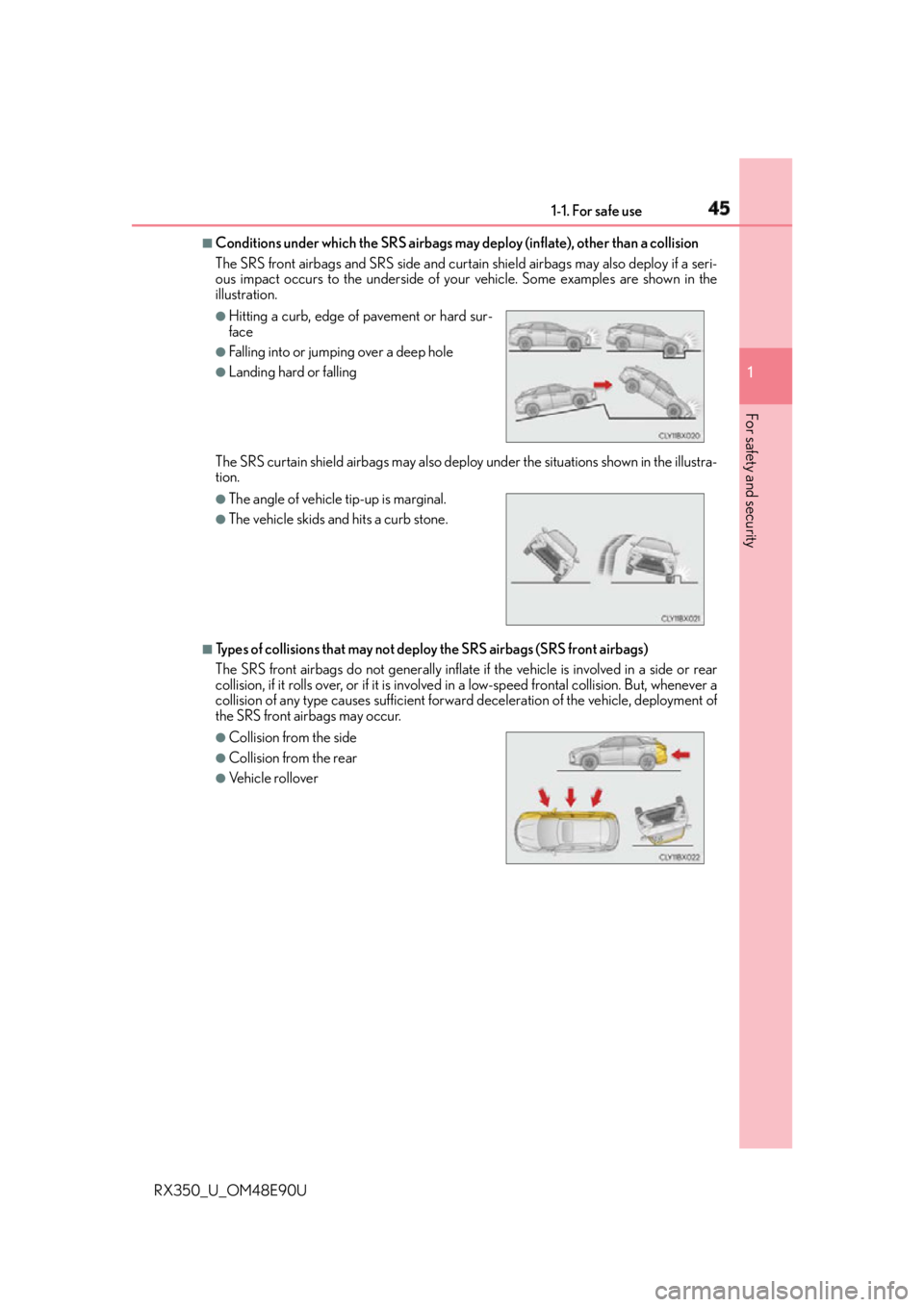
Conditions under which the SRS airbags may deploy (inflate), ot her than a collision
The SRS front airbags and SRS side and curtain shield airbags may also deploy if a seri-
ous impact occurs to the underside of your vehicle. Some examples are shown in the
illustration.
The SRS curtain shield airbags may also deploy under the situations shown in the illustra-
tion.
■
Types of collisions that may not deploy the SRS airbags (SRS front airbags)
The SRS front airbags do not gene rally inflate if the vehicle is involved in a side or rear
collision, if it rolls over, or if it is involved in a low-speed frontal collision. But, whenever a
collision of any type causes sufficient forwar d deceleration of the vehicle, deployment of
the SRS front airbags may occur. ●
Hitting a curb, edge of pavement or hard sur-
face ●
Falling into or jumping over a deep hole ●
Landing hard or falling ●
The angle of vehicle tip-up is marginal. ●
The vehicle skids and hits a curb stone.
●
Collision from the side ●
Collision from the rear ●
Vehicle rollover
Page 49 of 748
491-1. For safe use
1
For safety and security
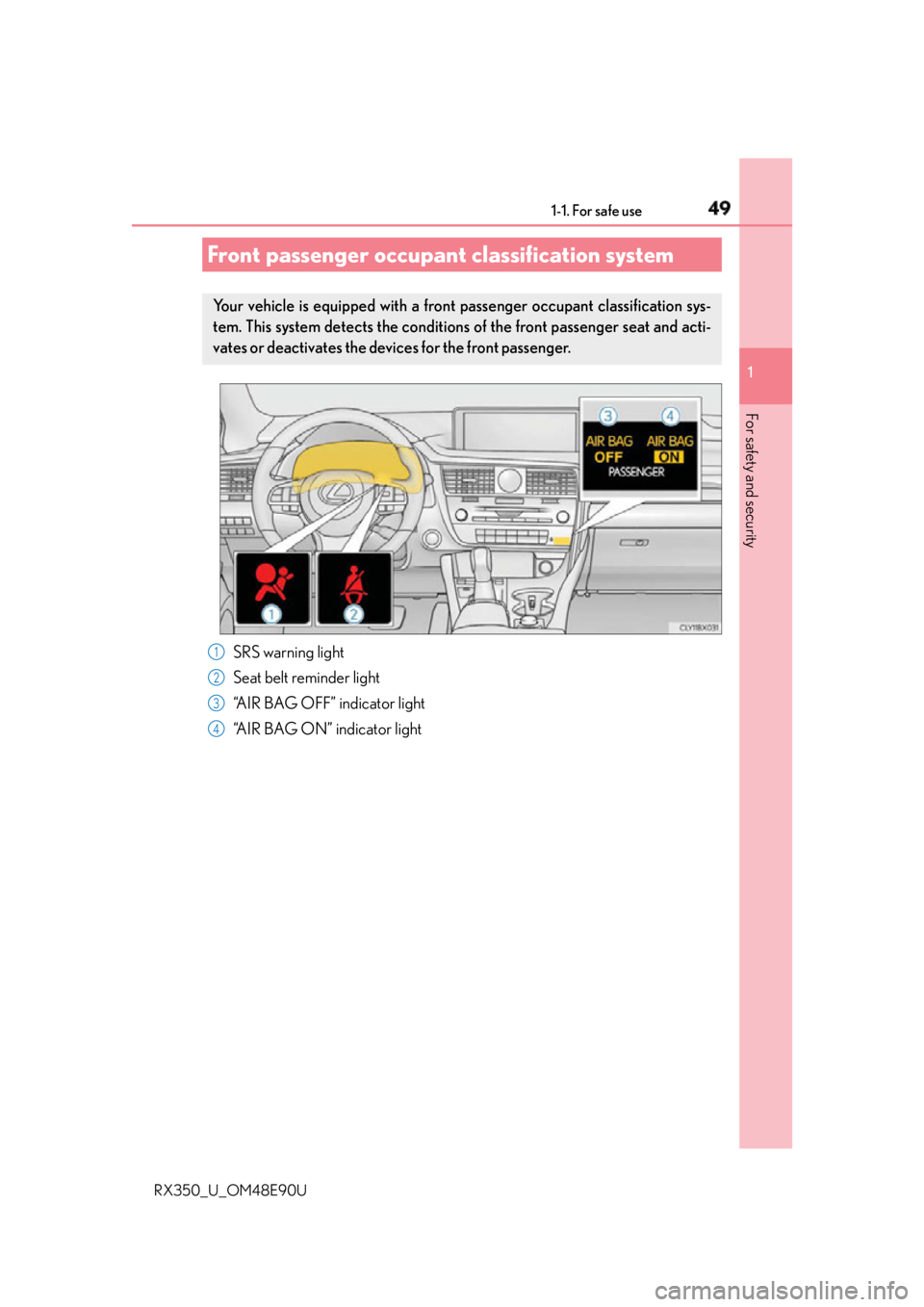
RX350_U_OM48E90U SRS warning light
Seat belt reminder light
“AIR BAG OFF” indicator light
“AIR BAG ON” indicator lightFront passenger occupant classification system Your vehicle is equipped with a front passenger occupant classification sys-
tem. This system detects the conditions of the front passenger seat and acti-
vates or deactivates the devices for the front passenger.
1
2
3
4
Page 50 of 748
50 1-1. For safe use
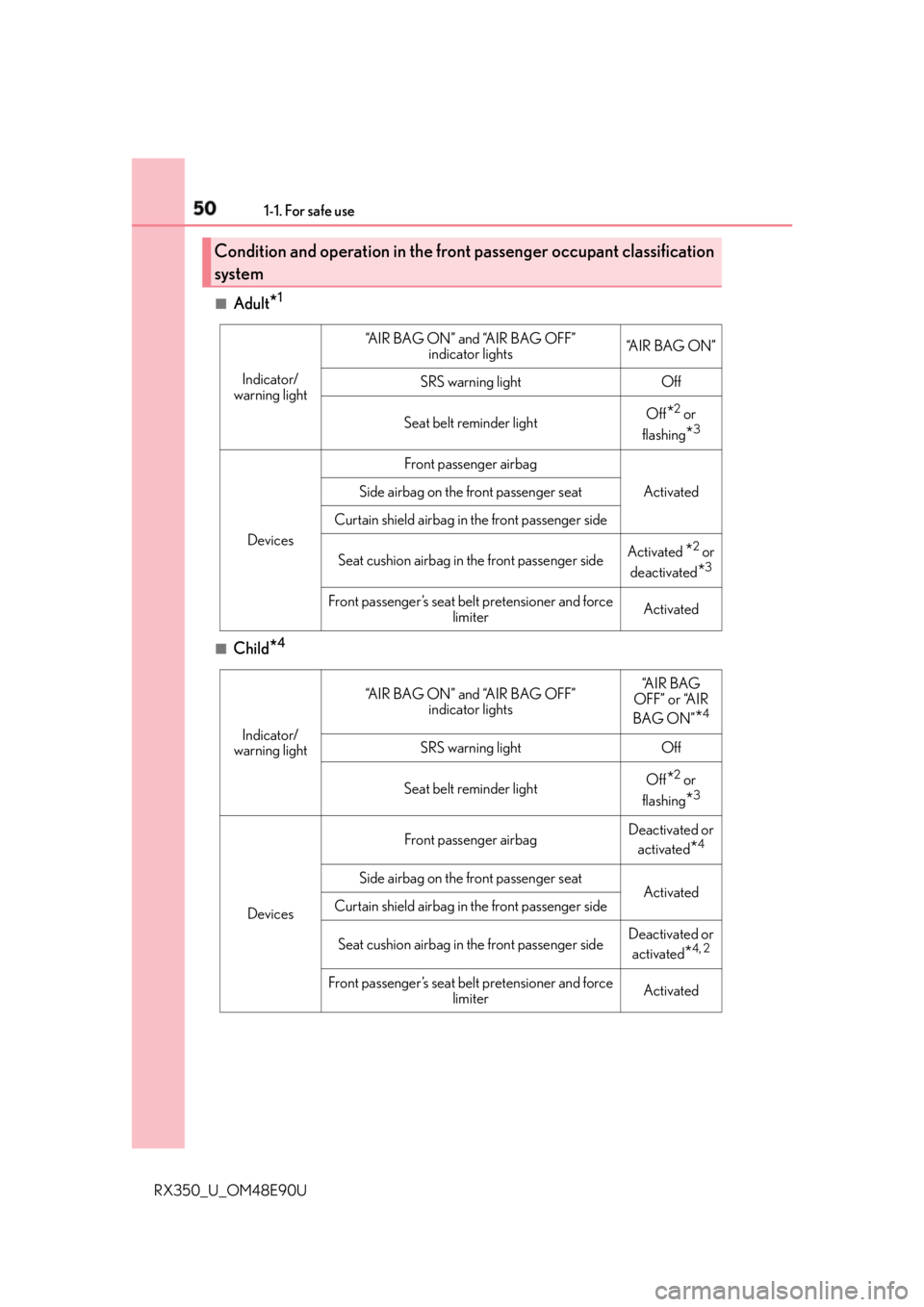
RX350_U_OM48E90U ■
Adult
* 1
■
Child
* 4Condition and operation in the front passenger occupant classification
system Indicator/
warning light “A I R B A G O N ” a n d “A I R B A G O F F ”
indicator lights “A I R B A G O N ”
SRS warning light Off
Seat belt reminder light Off
* 2
or
flashing
* 3
Devices Front passenger airbag
ActivatedSide airbag on the front passenger seat
Curtain shield airbag in the front passenger side
Seat cushion airbag in the front passenger side Activated
* 2
or
deactivated
* 3
Front passenger’s seat belt pretensioner and force
limiter Activated
Indicator/
warning light “A I R B A G O N ” a n d “A I R B A G O F F ”
indicator lights “A I R B A G
OFF” or “AIR
BAG ON”
* 4
SRS warning light Off
Seat belt reminder light Off
* 2
or
flashing
* 3
Devices Front passenger airbag Deactivated or
activated
* 4
Side airbag on the front passenger seat
Activated
Curtain shield airbag in the front passenger side
Seat cushion airbag in the front passenger side Deactivated or
activated
* 4, 2
Front passenger’s seat belt pretensioner and force
limiter Activated
Page 148 of 748
148 3-2. Opening, closing and locking the doors
RX350_U_OM48E90U ■
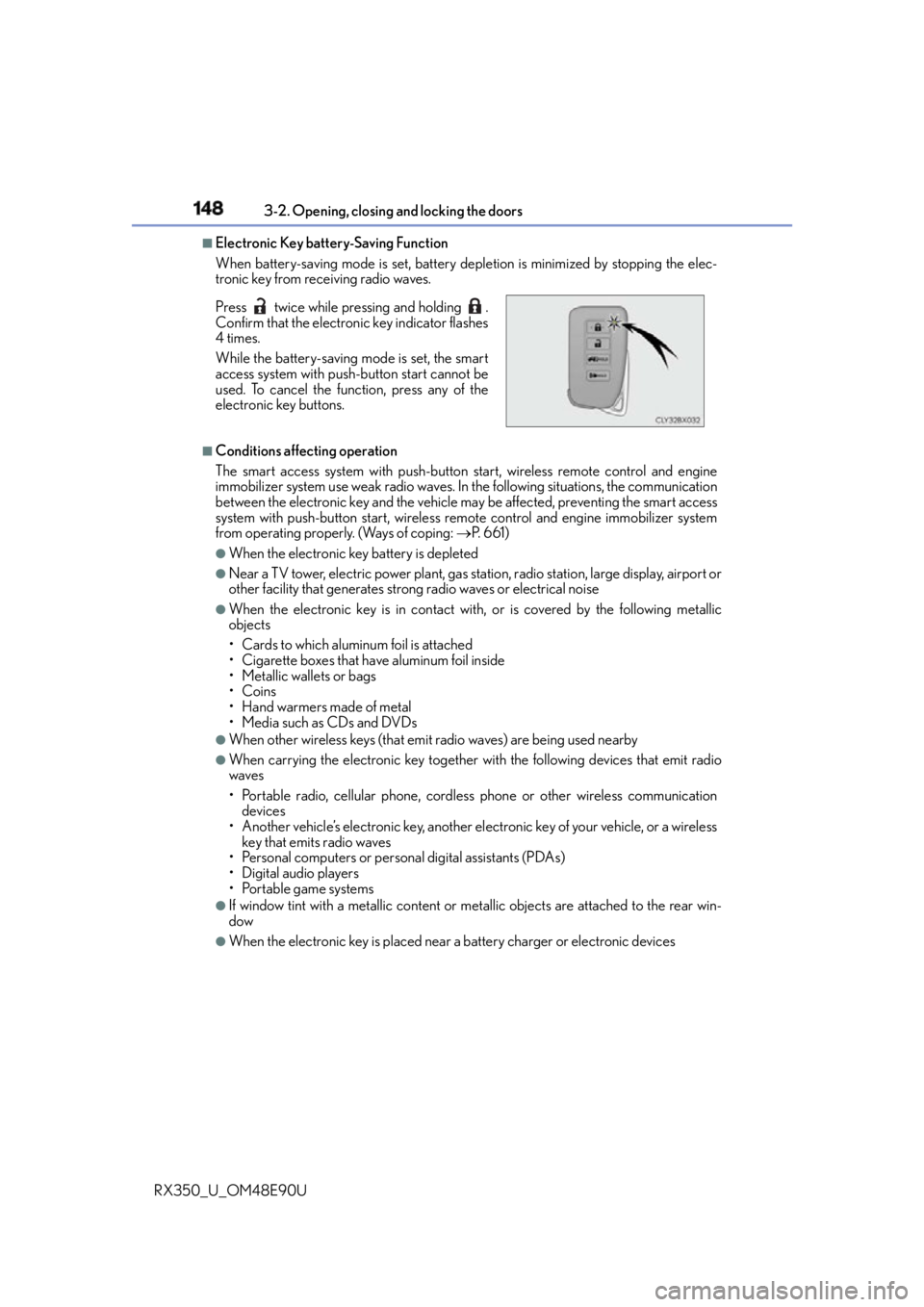
Electronic Key battery-Saving Function
When battery-saving mode is set, battery depletion is minimized by stopping the elec-
tronic key from receiving radio waves.
■
Conditions affe cting operation
The smart access system with push-button start, wireless remote control and engine
immobilizer system use weak radio waves. In the following situatio ns, the communication
between the electronic key and the vehicle ma y be affected, preventing the smart access
system with push-button start, wireless remote control and engine immobilizer system
from operating properly. (Ways of coping: P. 6 6 1 )●
When the electronic key battery is depleted ●
Near a TV tower, electric powe r plant, gas station, radio stat ion, large display, airport or
other facility that generates strong radio waves or electrical noise ●
When the electronic key is in contact wi th, or is covered by the following metallic
objects
• Cards to which aluminum foil is attached
• Cigarette boxes that have aluminum foil inside
• Metallic wallets or bags
•Coins
•Hand warmers made of metal
• Media such as CDs and DVDs ●
When other wireless keys (that emit radio waves) are being used nearby ●
When carrying the electronic key together with the following devices that emit radio
waves
• Portable radio, cellular phone, cordless phone or other wireless communication
devices
• Another vehicle’s electronic key, another el ectronic key of your vehicle, or a wireless
key that emits radio waves
• Personal computers or person al digital assistants (PDAs)
• Digital audio players
• Portable game systems ●
If window tint with a metallic content or me tallic objects are attached to the rear win-
dow ●
When the electronic key is placed near a battery charger or electronic devicesPress twice while pressing and holding .
Confirm that the electronic key indicator flashes
4 times.
While the battery-saving mode is set, the smart
access system with push-button start cannot be
used. To cancel the function, press any of the
electronic key buttons.
Page 286 of 748

286 4-5. Using the driving support systems
RX350_U_OM48E90U WA R N I N G ■
Before using LKA system
Do not rely solely upon the LKA system. LKA is not a system which automatically
drives the vehicle or reduces the amount of attention that must be paid to the area in
front of the vehicle. The driver must always assume full responsibility for driving safely
by always paying careful attention to the surrounding conditions and operate the steer-
ing wheel to correct the path of the vehicle. Also, make sure to take adequate breaks
when fatigued, such as from driv ing for a long period of time.
Failure to perform appropriate driving operat ions and pay careful attention may lead to
an accident, resulting in death or serious injury. ■
To avoid operating LKA by mistake
When not using the LKA system, use the LKA switch to turn the system off. ■
Situations unsuitable for LKA
Do not use the LKA system in the following situations.
The system may not operate properly and le ad to an accident, resulting in death or
serious injury. ●
A spare tire, tire chains, etc., are equipped. ●
When the tires have been excessively worn, or when the tire inflation pressure is low. ●
Tires which differ by structure, manufa cturer, brand or tread pattern are used.●
Objects or patterns that could be mistaken for white (yellow) lines are present on the
side of the road (guardrails, curbs, reflective poles, etc.).●
Vehicle is driven on a snow-covered road. ●
White (yellow) lines are difficult to see due to rain, snow, fog, dust, etc. ●
Asphalt repair marks, white (y ellow) line marks, etc., are present due to road repair.●
Vehicle is driven in a temporary lane or restricted lane due to construction work. ●
Vehicle is driven on a road surface which is slippery due to rainy weather, fallen snow,
freezing, etc. ●
Vehicle is driven in traffic lanes other than on highways and freeways. ●
Vehicle is driven in a construction zone. ●
When your vehicle is towing a trailer or during emergency towing ■
Preventing LKA system malfunctions and operations performed by mistake●
Do not modify the headlights or place stickers, etc., on the surface of the lights. ●
Do not modify the suspension etc. If the suspension etc. needs to be replaced, con-
tact your Lexus dealer. ●
Do not install or place anything on the hood or grille. Also, do not install a grille guard
(bull bars, kangaroo bar, etc.). ●
If your windshield needs repair s, contact your Lexus dealer.