high beam LEXUS RX350 2016 Owners Manual
[x] Cancel search | Manufacturer: LEXUS, Model Year: 2016, Model line: RX350, Model: LEXUS RX350 2016Pages: 748, PDF Size: 12.36 MB
Page 3 of 748

3 1
9875432
10
RX350_U_OM48E90U 64-1. Before driving
Driving the vehicle ......................192
Cargo and luggage...................200
Vehicle load limits ...................... 204
Trailer towing (vehicles with
towing package) ..................... 205
Trailer towing (vehicles
without towing package) ...... 218
Dinghy towing ...............................219
4-2. Driving procedures
Engine (ign ition) switch ........... 220
Automatic transmission
(vehicles without paddle
shift switches) ........................... 225
Automatic transmission
(vehicles with paddle
shift switches) ........................... 229
Turn signal lever .......................... 234
Parking brake .............................. 235
Brake Hold ................................... 239
4-3. Operating the lights and
wipers
Headlight switch .......................... 241
Automatic High Beam..............245
Fog light switch ............................249
Windshield wipers and
washer ......................................... 250
Rear window wiper and
washer ......................................... 256 4-4. Refueling
Opening the fuel tank
cap ................................................ 258
4-5. Using the driving
support systems
Lexus Safety System+ ...............262
PCS
(Pre-Collision System) ..........270
LKA
(Lane-Keeping Assist) .......... 283
LDA (Lane Departure
Alert with steering
control)........................................ 293
Dynamic radar cruise
control with full-speed
range ............................................ 302
Dynamic radar cruise
control ...........................................314
Cruise control ............................. 326
Intuitive parking assist .............. 330
Lexus parking assist
monitor........................................ 339
BSM
(Blind Spot Monitor) ............. 355
• BSM function......................... 359
• RCTA function ...................... 363
Driving mode select
switch ........................................... 369
All-wheel drive lock switch.....373
Driving assist systems ............... 374
4-6. Driving tips
Winter driving tips .....................380
Utility vehicle pr ecautions...... 3844
Driving
Page 18 of 748
18 Pictorial index
RX350_U_OM48E90U ■ Switches
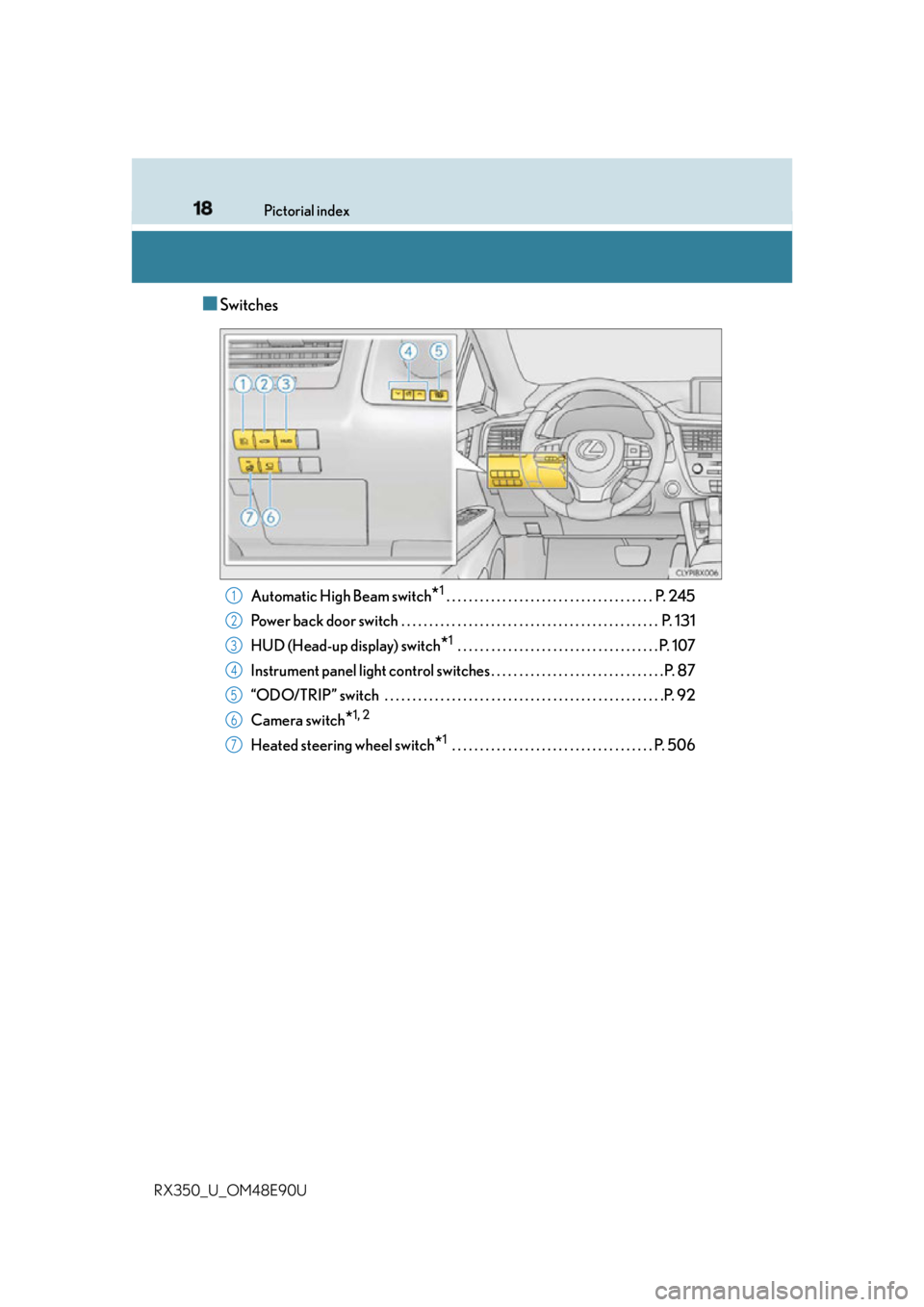
Automatic High Beam switch
* 1
. . . . . . . . . . . . . . . . . . . . . . . . . . . . . . . . . . . . . P. 245
Power back door switch . . . . . . . . . . . . . . . . . . . . . . . . . . . . . . . . . . . . . . . . . . . . . . P. 131
HUD (Head-up display) switch
* 1
. . . . . . . . . . . . . . . . . . . . . . . . . . . . . . . . . . . . P. 107
Instrument panel light control swit ches . . . . . . . . . . . . . . . . . . . . . . . . . . . . . . . P. 87
“ODO/TRIP” switch . . . . . . . . . . . . . . . . . . . . . . . . . . . . . . . . . . . . . . . . . . . . . . . . . .P. 92
Camera switch
* 1, 2
Heated steering wheel switch
* 1
. . . . . . . . . . . . . . . . . . . . . . . . . . . . . . . . . . . . P. 5061
2
3
4
5
6
7
Page 82 of 748
82 2. Instrument cluster
RX350_U_OM48E90U * 1
: These lights turn on when the engine switch is turned to IGNITION ON mode to
indicate that a system check is being perfor med. They will turn off after the engine is
started, or after a few seconds. There may be a malfunction in a system if the lights do
not turn on, or turn off. Have the vehicle inspected by your Lexus dealer.
* 2
: The light flashes to indicate a malfunction.
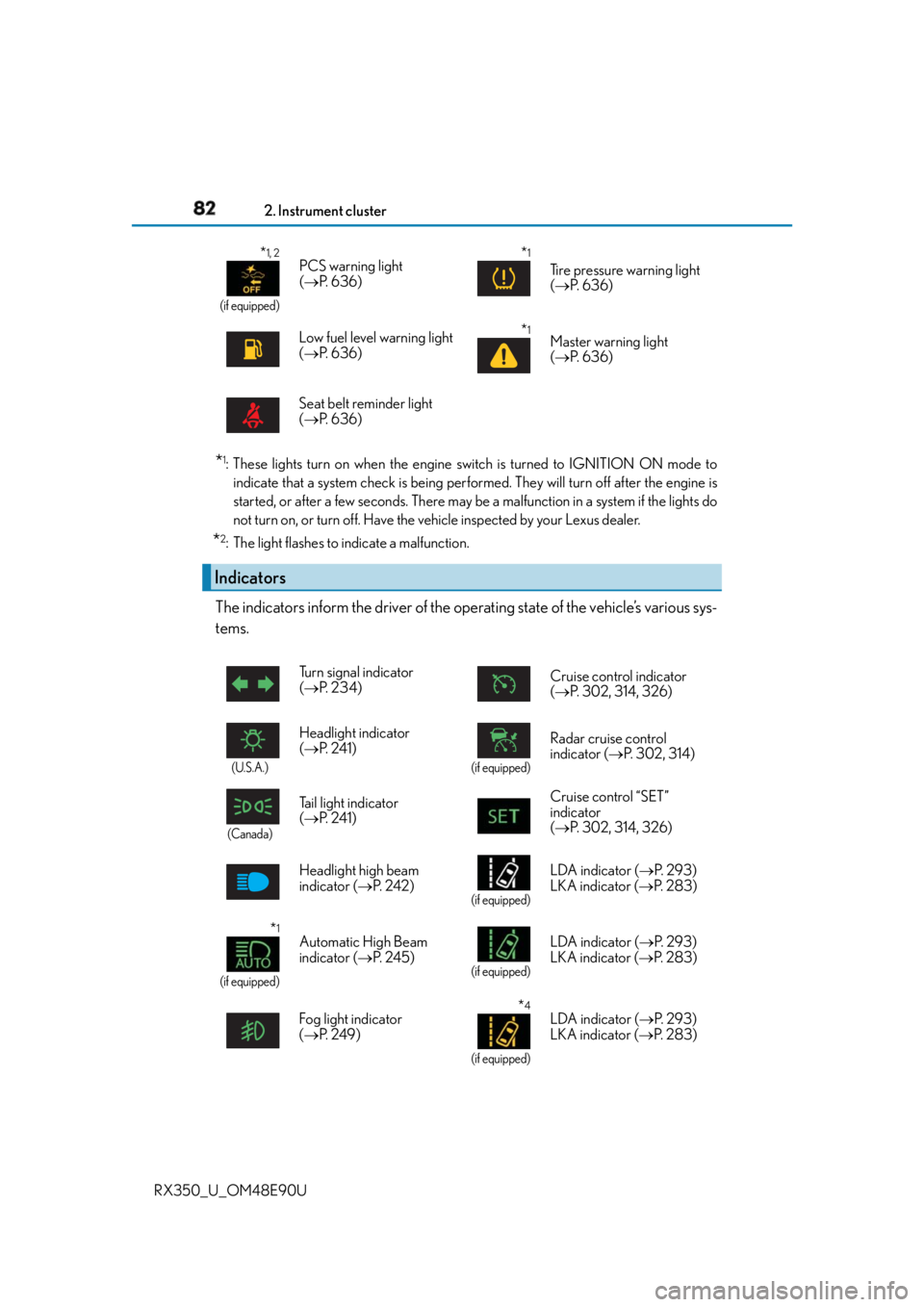
The indicators inform the driver of the op erating state of the vehicle’s various sys-
tems. * 1, 2
(if equipped)
PCS warning light
( P. 636)
* 1
Tire pressure warning light
( P. 636)
Low fuel level warning light
( P. 636)
* 1
Master warning light
( P. 636)
Seat belt reminder light
( P. 636)
Indicators Turn signal indicator
( P. 2 3 4 ) Cruise control indicator
( P. 302, 314, 326)
(U.S.A.)
Headlight indicator
( P. 2 4 1 ) (if equipped)
Radar cruise control
indicator ( P. 302, 314)
(Canada)
Tail light indicator
( P. 2 4 1 ) Cruise control “SET”
indicator
( P. 302, 314, 326)
Headlight high beam
indicator ( P. 2 4 2 ) (if equipped)
LDA indicator ( P. 2 9 3 )
LKA indicator ( P. 2 8 3 )
* 1
(if equipped) Automatic High Beam
indicator ( P. 2 4 5 ) (if equipped)
LDA indicator ( P. 2 9 3 )
LKA indicator ( P. 2 8 3 )
Fog light indicator
( P. 2 4 9 ) * 4
(if equipped)LDA indicator ( P. 2 9 3 )
LKA indicator ( P. 2 8 3 )
Page 191 of 748
191
4 Driving
RX350_U_OM48E90U 4-3. Operating the lights and
wipers
Headlight switch ...........................241
Automatic High Beam ............. 245
Fog light switch............................ 249
Windshield wipers and
washer......................................... 250
Rear window wiper and
washer..........................................256
4-4. Refueling
Opening the fuel tank
cap ................................................ 258
4-5. Using the driving
support systems
Lexus Safety System+............... 262
PCS
(Pre-Collision System) .......... 270
LKA
(Lane-Keeping Assist) ..........283
LDA (Lane Departure
Alert with steering
control) ........................................ 293 Dynamic radar cruise
control with full-speed
range ............................................302
Dynamic radar cruise
control .......................................... 314
Cruise control ............................. 326
Intuitive parking assist ..............330
Lexus parking assist
monitor ........................................ 339
BSM
(Blind Spot Moni tor).............. 355
• BSM function ......................... 359
• RCTA function ...................... 363
Driving mode select
switch ........................................... 369
All-wheel drive lock
switch ........................................... 373
Driving assist systems................ 374
4-6. Driving tips
Winter driving tips .................... 380
Utility vehicle
precautions ................................384
Page 242 of 748
242 4-3. Operating the lights and wipers
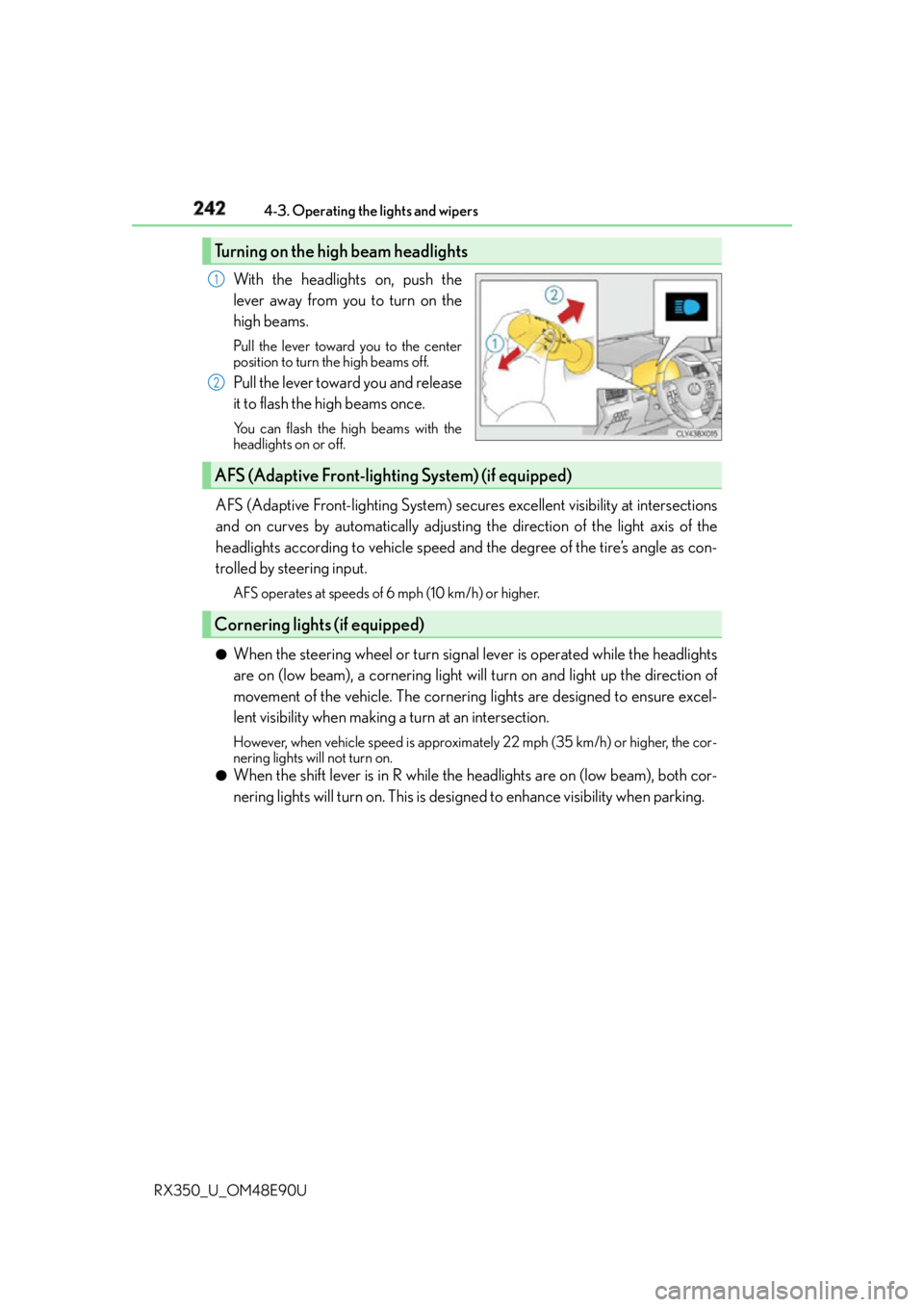
RX350_U_OM48E90U With the headlights on, push the
lever away from you to turn on the
high beams. Pull the lever toward you to the center
position to turn the high beams off.
Pull the lever toward you and release
it to flash the high beams once. You can flash the high beams with the
headlights on or off.
AFS (Adaptive Front-lighting System) secure s excellent visibility at intersections
and on curves by automatically adjusting the direction of the light axis of the
headlights according to vehicle speed and the degree of the tire’s angle as con-
trolled by steering input. AFS operates at speeds of 6 mph (10 km/h) or higher.
●
When the steering wheel or turn signal lever is operated while the headlights
are on (low beam), a cornering light w ill turn on and light up the direction of
movement of the vehicle. The cornerin g lights are designed to ensure excel-
lent visibility when making a turn at an intersection.However, when vehicle speed is approximately 22 mph (35 km/h) or higher, the cor-
nering lights will not turn on.●
When the shift lever is in R while the headlights are on (low beam), both cor-
nering lights will turn on. This is desi gned to enhance visibility when parking.Turning on the high beam headlights 1
2
AFS (Adaptive Front-lighting System) (if equipped)
Cornering lights (if equipped)
Page 245 of 748
2454-3. Operating the lights and wipers
4
Driving
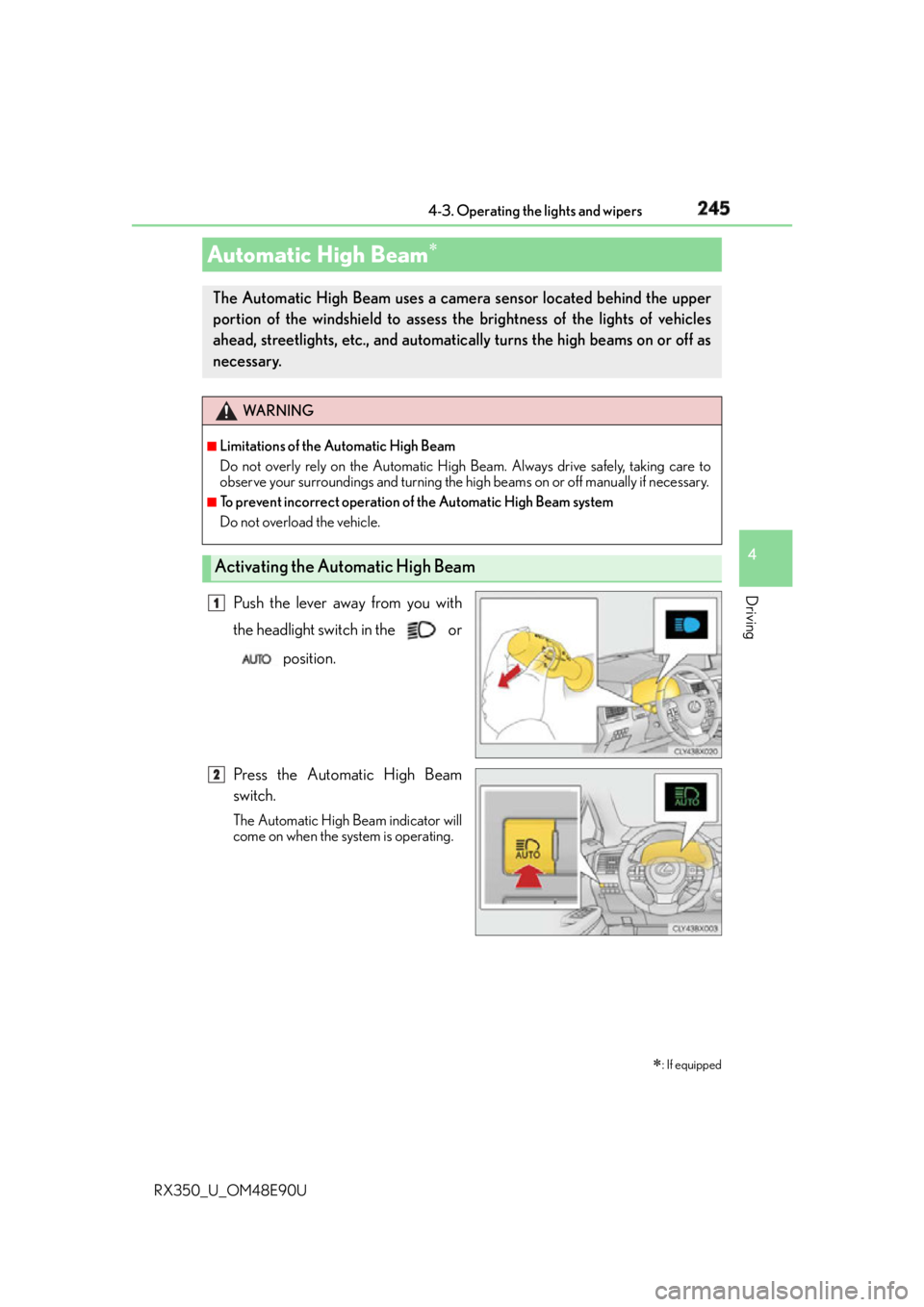
RX350_U_OM48E90U Push the lever away from you with
the headlight switch in the or
position.
Press the Automatic High Beam
switch. The Automatic High Beam indicator will
come on when the system is operating.Automatic High Beam
: If equippedThe Automatic High Beam uses a came ra sensor located behind the upper
portion of the windshield to assess th e brightness of the lights of vehicles
ahead, streetlights, etc., and automatica lly turns the high beams on or off as
necessary. WA R N I N G ■
Limitations of the Automatic High Beam
Do not overly rely on the Automatic High Beam. Always drive safely, taking care to
observe your surroundings and turning the high beams on or off manually if necessary. ■
To prevent incorrect operation of the Automatic High Beam system
Do not overload the vehicle.
Activating the Automatic High Beam 1
2
Page 246 of 748
246 4-3. Operating the lights and wipers
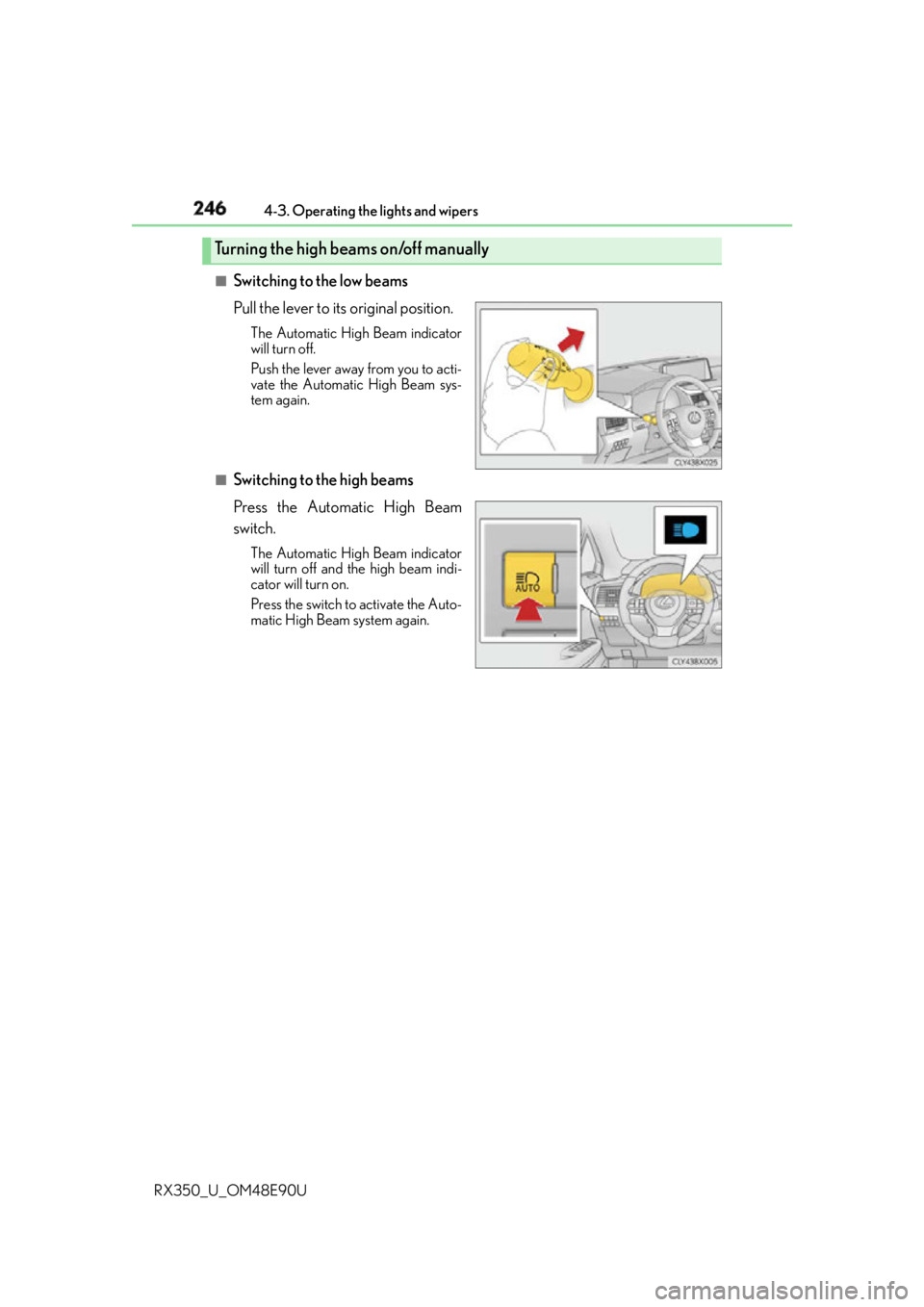
RX350_U_OM48E90U ■
Switching to the low beams
Pull the lever to its original position. The Automatic High Beam indicator
will turn off.
Push the lever away from you to acti-
vate the Automatic High Beam sys-
tem again.
■
Switching to the high beams
Press the Automatic High Beam
switch. The Automatic High Beam indicator
will turn off and the high beam indi-
cator will turn on.
Press the switch to activate the Auto-
matic High Beam system again.Turning the high beams on/off manually
Page 247 of 748

2474-3. Operating the lights and wipers
4
Driving
RX350_U_OM48E90U ■
Conditions to turn the high beams on/off automatically ●
When all of the following conditions are met, the high beams will be turned on automat-
ically (after approximately 1 second):
• The vehicle speed is approximately 21 mph (34 km/h) or more.
• The area ahead of the vehicle is dark.
• There are no vehicles ahead with headlights or tail lights turned on.
• There are few streetlights on the road ahead. ●
If any of the following conditions is met, the high beams will turn off automatically:
• The vehicle speed is below approximately 17 mph (27 km/h).
• The area ahead of the vehicle is not dark.
• Vehicles ahead have their headli ghts or tail lights turned on.
• There are many streetlights on the road ahead. ■
Camera sensor dete ction information●
The high beams may not be automatically turned off in the fo llowing situations:
• When a vehicle suddenly appears from around a curve
• When the vehicle is cut in front of by another vehicle
• When vehicles ahead cannot be detected du e to repeated curves, road dividers or
roadside trees
• When vehicles ahead appear in a faraway lane on a wide road
• When the lights of vehicles ahead are not on ●
The high beams may be turned off if a vehicl e ahead that is using fog lights without its
headlights turned on is detected. ●
House lights, street lights, traffic signals, and illuminated billboards or signs and other
reflective objects may cause the high beams to change to the low beams, or the low
beams to remain on. ●
The following factors may affect the amount of time taken for the high beams to turn on
or off:
• The brightness of the headlights, fog li ghts, and tail lights of vehicles ahead
• The movement and direction of vehicles ahead
• When a vehicle ahead only has operational lights on one side
• When a vehicle ahead is a two-wheeled vehicle
• The condition of the road (gradient, curve, condition of the road surface, etc.)
• The number of passengers and amount of luggage in the vehicle ●
The high beams may turn on or off unexpectedly.●
Bicycles or similar vehicles may not be detected.
Page 248 of 748
248 4-3. Operating the lights and wipers
RX350_U_OM48E90U ●
In the following situations the system may not be able to correctly detect the surround-
ing brightness level. This may cause the lo w beams to remain on or the high beams to
flash or dazzle pedestrians or vehicles ahead. In such a case, it is necessary to manually
switch between the high and low beams.
• When driving in inclement weather (hea vy rain, snow, fog, sandstorms, etc.)
• When the windshield is obscured by fog, mist, ice, dirt, etc.
• When the windshield is cracked or damaged
• When the camera sensor is deformed or dirty
• When the temperature of the camera sensor is extremely high
• When the surrounding brightness level is equa l to that of headlights, tail lights or fog
lights
• When headlights or tail lights of vehicles ah ead are turned off, dirty, changing color,
or not aimed properly
• When the vehicle is hit by water, snow, dust, etc. from a preceding vehicle
• When driving through an area of intermit tently changing brightness and darkness
• When frequently and repeatedly driving ascending/descending roads, or roads with
rough, bumpy or uneven surfaces (such as stone-paved roads, gravel roads, etc.)
•When frequently and repe atedly taking curves or driving on a winding road
• When there is a highly reflective object ahead of the vehicle, such as a sign or mirror
• When the back of a preceding vehicle is hi ghly reflective, such as a container on a
truck
• When the vehicle's headlights are damaged or dirty, or are not aimed properly
• When the vehicle is listing or titling due to a flat tire, a trailer being towed, etc.
• When the headlights are changed between the high beams and low beams repeat-
edly in an abnormal manner
• When the driver believes that the high beams may be flashing or dazzling pedestri-
ans or other drivers■
Temporarily lowering sensor sensitivity
The sensitivity of the sensor can be temporarily lowered.
Turn the engine switch off while the following conditions are met.
• The headlight switch is in or .
• The headlight switch lever is in high beam position.
• Automatic High Beam switch is on.
Turn the engine switch to IGNITION ON mode.
Within 30 seconds after , re peat pulling the headlight sw itch lever to the original
position then pushing it to the high beam po sition quickly 10 times, then leave the lever
in high beam position.
If the sensitivity is changed, the Automatic High Beam indicator is turn on and off 3
times.
Automatic High Beam (headlights) may turn on even the vehicle is stopped.1
2
3 2
4
Page 262 of 748
262
RX350_U_OM48E90U 4-5. Using the driving support systems
◆ PCS (Pre-Collision System)
P. 2 7 0
◆ LKA (Lane-Keeping Assist)
P. 2 8 3
◆ LDA (Lane Departure Alert with steering control)
P. 2 9 3
◆ Automatic High Beam
P. 2 4 5
◆ Dynamic radar cruise control with full-speed range
P. 3 0 2
◆ Dynamic radar cruise control
P. 3 1 4Lexus Safety System+
: If equippedThe Lexus Safety System+ consists of the following drive assist systems and
contributes to a safe and comfo rtable driving experience:
WA R N I N G ■
Lexus Safety System+
The Lexus Safety System+ is designed to operate under the assumption that the driver
will drive safely, and is designed to help reduce the impact to the occupants and the
vehicle in the case of a collision or assist the driver in normal driving conditions.
As there is a limit to the degree of recognition accuracy and control performance that
this system can provide, do not overly rely on this system. The driver is always responsi-
ble for paying attention to the vehicl e's surroundings and driving safely.