fuel LEXUS RX350 2019 User Guide
[x] Cancel search | Manufacturer: LEXUS, Model Year: 2019, Model line: RX350, Model: LEXUS RX350 2019Pages: 777, PDF Size: 12.44 MB
Page 95 of 777
94 2. Instrument cluster
RX350/RX350L_U ■
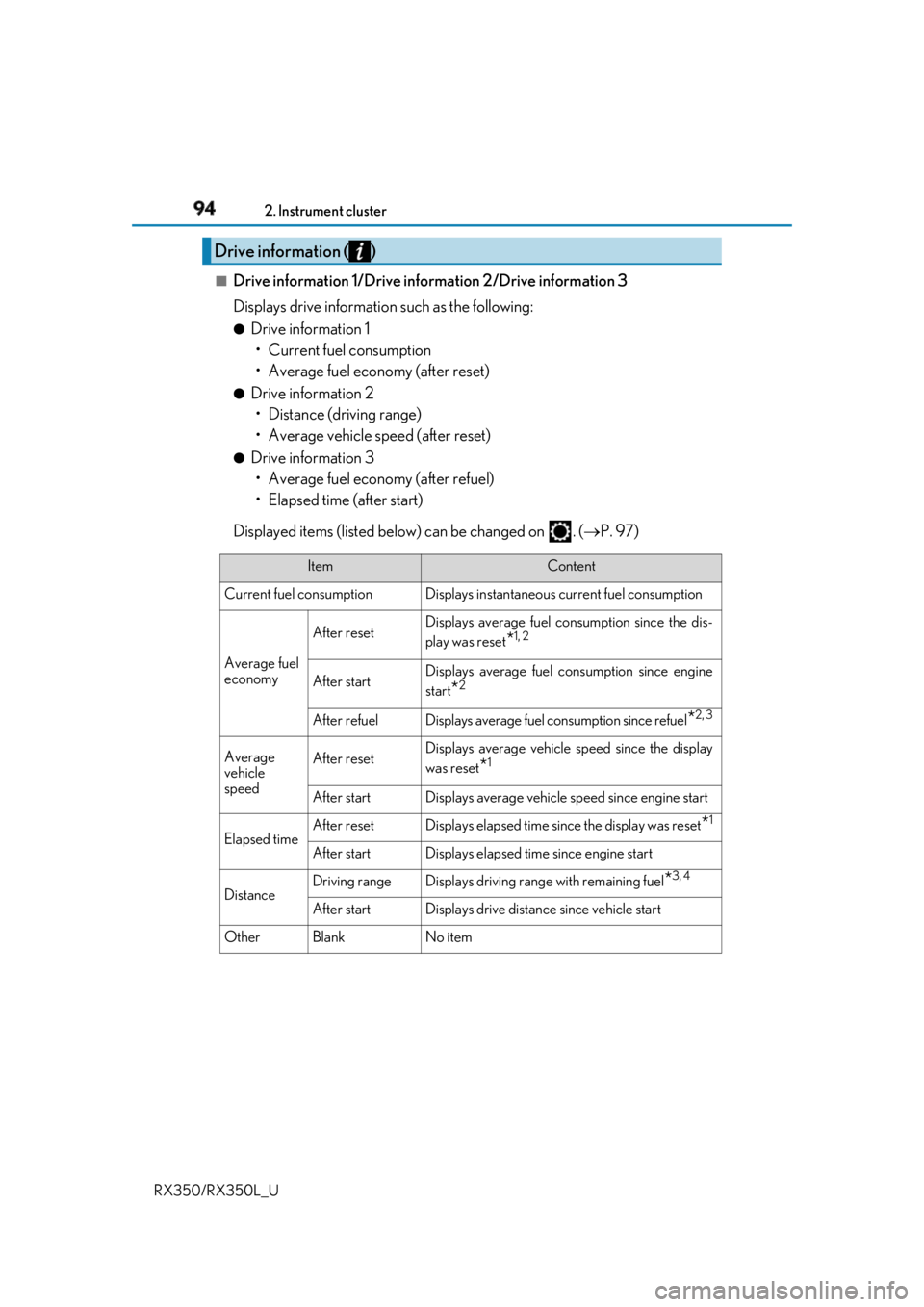
Drive information 1/Drive information 2/Drive information 3
Displays drive informatio n such as the following:●
Drive information 1
• Current fuel consumption
• Average fuel economy (after reset) ●
Drive information 2
• Distance (driving range)
• Average vehicle speed (after reset) ●
Drive information 3
• Average fuel economy (after refuel)
• Elapsed time (after start)
Displayed items (listed below) can be changed on . ( P. 97)Drive information ( )
Item Content
Current fuel consumption Displays in stantaneous current fuel consumption
Average fuel
economy After reset Displays average fuel consumption since the dis-
play was reset
* 1, 2
After start Displays average fuel consumption since engine
start
* 2
After refuel Displays average fuel consumption since refuel
* 2, 3
Average
vehicle
speed After reset Displays average vehicle speed since the display
was reset
* 1
After start Displays average vehicle speed since engine start
Elapsed time After reset Displays elapsed time since the display was reset
* 1
After start Displays elapsed time since engine start
Distance Driving range Displays driving rang e with remaining fuel
* 3, 4
After start Displays drive distance since vehicle start
Other Blank No item
Page 96 of 777

952. Instrument cluster
2
Instrument cluster
RX350/RX350L_U * 1
:Resetting: P. 92
* 2
: Use the displayed fuel consumption as a reference.
* 3
: When only a small amount of fuel is added to the tank, the display may not be
updated.
When refueling, turn the engine switch off. If the vehicle is refueled without turning the
engine switch off, the display may not be updated.
* 4
: This distance is computed based on your average fuel consumption. As a result, the
actual distance that can be driven may differ from that displayed.■
Eco Driving Indicator
P. 105■
Sway warning
Detects the sway of the vehicle within a lane, which is often associated with a
decrease in the driver's at tention level, and displays the decrease in attention
using a bar display.
The shorter the bar length, the more the driver may need to rest. This display is a part of the LKA (Lan e-Keeping Assist) system. The display is
enabled when the operating conditions of the vehicle sway warning are met.
( P. 291)■
AWD Control (if equipped)
Displays the driving force applie d to each wheel using segments.
The greater the number of segments di splayed, the greater the driving force
applied.
Page 115 of 777
114 2. Instrument cluster
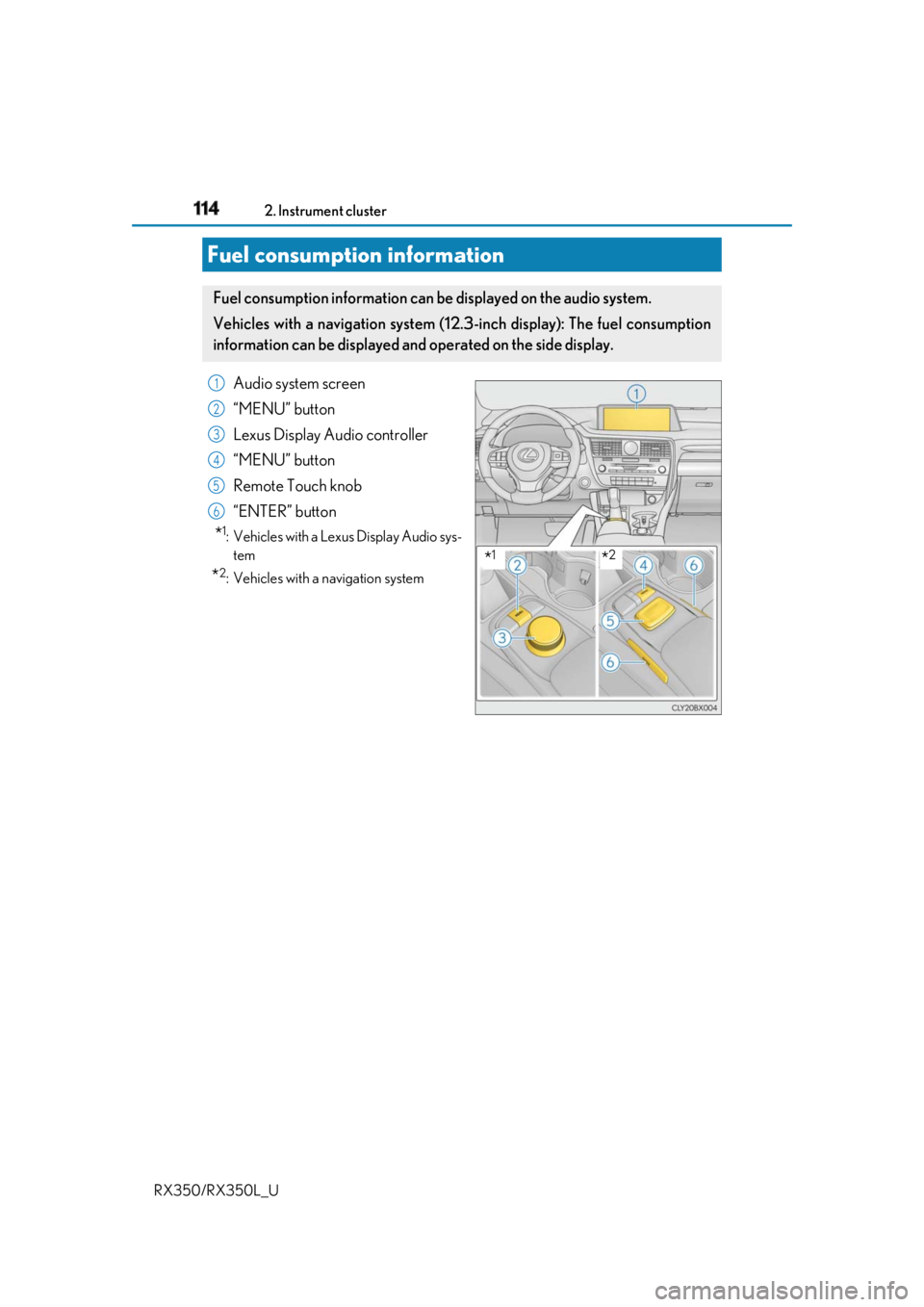
RX350/RX350L_U Audio system screen
“MENU” button
Lexus Display Audio controller
“MENU” button
Remote Touch knob
“ENTER” button
* 1
: Vehicles with a Lexus Display Audio sys-
tem
* 2
: Vehicles with a navigation system
Fuel consumption information Fuel consumption information can be displayed on the audio system.
Vehicles with a navigation system (1 2.3-inch display): Th e fuel consumption
information can be displayed and operated on the side display.
* 1
* 21
2
3
4
5
6
Page 116 of 777
1152. Instrument cluster
2
Instrument cluster
RX350/RX350L_U
Lexus Display Audio screen
Press the “MENU” button on the Lexus Display Audio controller, then select
“Info” on the “Menu” screen, and then select “Fuel Consumption”.If the “Trip Information” screen does not appear, move the controller to the right and
select “Trip Information”.
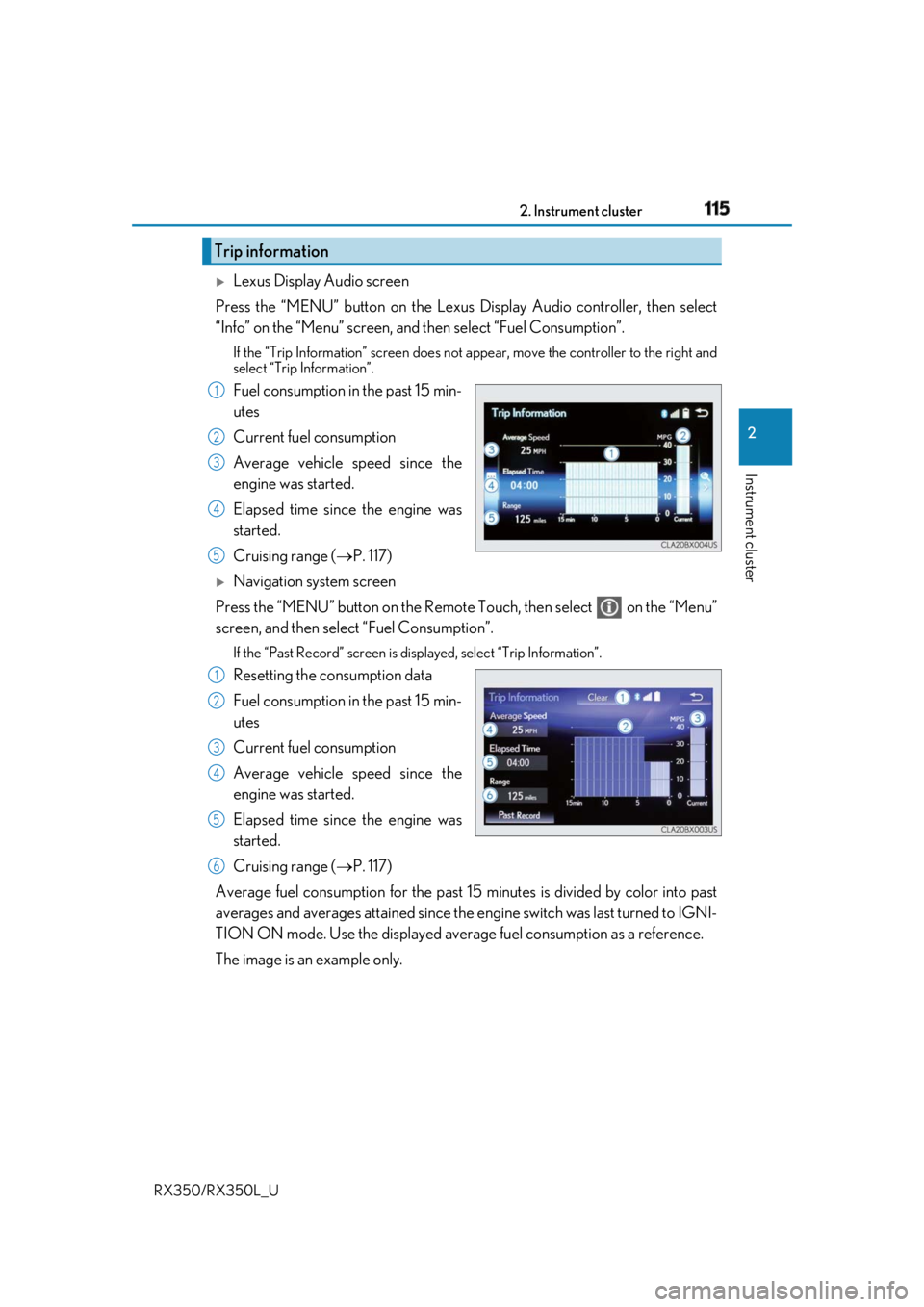
Fuel consumption in the past 15 min-
utes
Current fuel consumption
Average vehicle speed since the
engine was started.
Elapsed time since the engine was
started.
Cruising range ( P. 117)
Navigation system screen
Press the “MENU” button on the Remote Touch, then select on the “Menu”
screen, and then select “Fuel Consumption”. If the “Past Record” screen is disp layed, select “Trip Information”.
Resetting the consumption data
Fuel consumption in the past 15 min-
utes
Current fuel consumption
Average vehicle speed since the
engine was started.
Elapsed time since the engine was
started.
Cruising range ( P. 117)
Average fuel consumption for the past 15 minutes is divided by color into past
averages and averages attained since the engine switch was last turned to IGNI-
TION ON mode. Use the displayed average fuel consumption as a reference.
The image is an example only.Trip information 1
2
3
4
5
1
2
3
4
5
6
Page 117 of 777
116 2. Instrument cluster
RX350/RX350L_U
Lexus Display Audio screen
Press the “MENU” button on the Lexus Display Audio controller, then select
“Info” on the “Menu” screen, and then select “Fuel Consumption”.If the “Past Record” screen does not appe ar, move the controller to the right and
select “Past Record”.
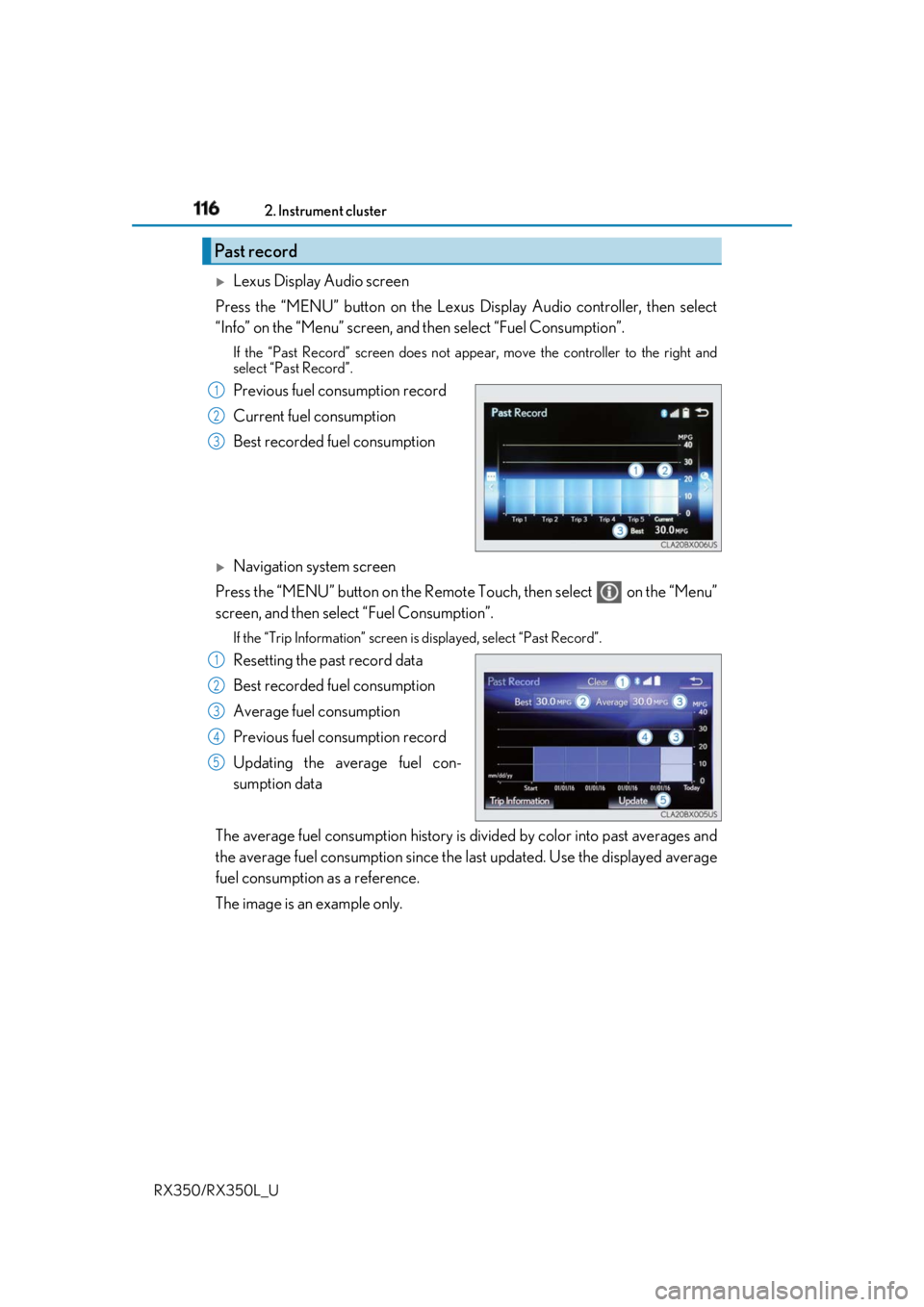
Previous fuel consumption record
Current fuel consumption
Best recorded fuel consumption
Navigation system screen
Press the “MENU” button on the Remote Touch, then select on the “Menu”
screen, and then select “Fuel Consumption”. If the “Trip Information” screen is displayed, select “Past Record”.
Resetting the past record data
Best recorded fuel consumption
Average fuel consumption
Previous fuel consumption record
Updating the average fuel con-
sumption data
The average fuel consumption history is di vided by color into past averages and
the average fuel consumption since the last updated. Use the displayed average
fuel consumption as a reference.
The image is an example only.Past record 1
2
3
1
2
3
4
5
Page 118 of 777

1172. Instrument cluster
2
Instrument cluster
RX350/RX350L_U ■
Updating the past record data
Vehicles with a Lexus Display Audio system
Update the average fuel consumption by mo ving the controller to the left and select
“Update” to measure the curre nt fuel consumption again.
Vehicles with a navigation system
Update the average fuel cons umption by selecting “Update” to measure the current fuel
consumption again. ■
Resetting the data
Vehicles with a Lexus Display Audio system
The fuel consumption data can be deleted by moving the controller to the left and select
“Clear”.
Vehicles with a navigation system
The fuel consumption data can be deleted by selecting “Clear”. ■
Cruising range
Displays the estimated maximum distance that can be driven with the quantity of fuel
remaining.
This distance is computed based on your average fuel consumption.
As a result, the actual distance that can be driven may differ from that displayed.
Page 119 of 777
118 2. Instrument cluster
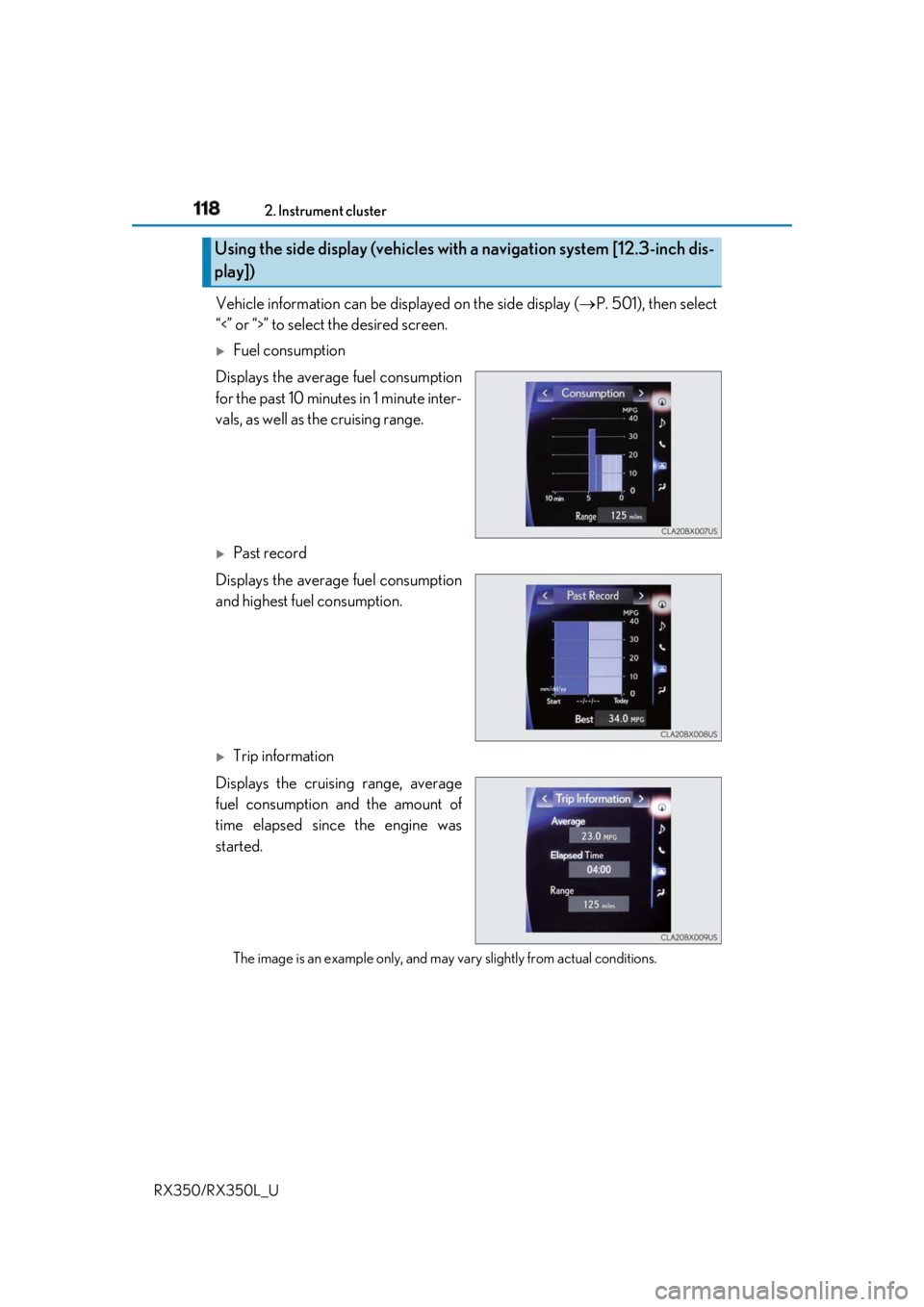
RX350/RX350L_U Vehicle information can be displayed on the side display ( P. 501), then select
“<” or “>” to select the desired screen.
Fuel consumption
Displays the average fuel consumption
for the past 10 minutes in 1 minute inter-
vals, as well as the cruising range.
Past record
Displays the average fuel consumption
and highest fuel consumption.
Trip information
Displays the cruising range, average
fuel consumption and the amount of
time elapsed since the engine was
started.
The image is an example only, and may va ry slightly from actual conditions.Using the side display (vehicles with a navigation system [12.3-inch dis-
play])
Page 202 of 777

201
4 Driving
RX350/RX350L_U 4-3. Operating the lights and
wipers
Headlight switch .........................252
Automatic High Beam .............256
Fog light switch .......................... 260
Windshield wipers and
washer........................................... 261
Rear window wiper and
washer.......................................... 267
4-4. Refueling
Opening the fuel tank
cap .................................................269 4-5. Using the driving support
systems
Lexus Safety System+ .............. 274
PCS
(Pre-Collision System) .......... 281
LKA
(Lane-Keeping A ssist) ........... 291
Dynamic radar cruise
control with full-speed
range ........................................... 300
BSM (Blind Spot Monitor) ...... 313
• BSM function ...........................317
• RCTA function....................... 321
Intuitive parking assist .............. 326
Intelligent Clearance Sonar
(ICS) ............................................. 336
Lexus parking assist
monitor ........................................ 357
Driving mode select
switch ........................................... 373
All-wheel drive lock
switch ........................................... 377
Driving assist systems .............. 378
4-6. Driving tips
Winter driving tips .....................384
Utility vehicle
precautions............................... 388
Page 205 of 777

204 4-1. Before driving
RX350/RX350L_U ■
Breaking in your new Lexus
To extend the life of the vehicle, observin g the following precautions is recommended:●
For the first 200 miles (300 km):
Avoid sudden stops. ●
For the first 500 miles (800 km):
Do not tow a trailer. ●
For the first 1000 miles (1600 km):
• Do not drive at extremely high speeds.
• Avoid sudden acceleration.
• Do not drive continuously in low gears.
• Do not drive at a constant speed for extended periods.■
Operating your vehicle in a foreign country
Comply with the relevant vehicle registration laws and confirm the availability of the cor-
rect fuel. ( P. 700)■
Eco-friendly driving
P. 111
Page 216 of 777
2154-1. Before driving
4
Driving
RX350/RX350L_U Contact your Lexus dealer for further in formation about additional requirements
such as a towing kit, etc.Trailer towing (vehicles with towing package) Your vehicle is designed primarily as a passenger-and-load-carrying vehicle.
Towing a trailer can have an adverse im pact on handling, performance, brak-
ing, durability, and fuel consumption. Fo r your safety and the safety of others,
you must not overload your vehicle or trailer. You must also ensure that you
are using appropriate towing equipment, that the towing equipment has been
installed correctly and used properly, and that you employ the requisite driv-
ing habits.
Vehicle-trailer stability and braking pe rformance are affected by trailer sta-
bility, brake performance and setting, tr ailer brakes, the hitch and hitch sys-
tems (if equipped).
To tow a trailer safely, use extreme ca re and drive the vehicle in accordance
with your trailer’s characteri stics and operating conditions.
Lexus warranties do not apply to damage or malfunction caused by towing a
trailer for commercial purposes.