service LEXUS RX350 2019 User Guide
[x] Cancel search | Manufacturer: LEXUS, Model Year: 2019, Model line: RX350, Model: LEXUS RX350 2019Pages: 777, PDF Size: 12.44 MB
Page 390 of 777

3894-6. Driving tips
4
Driving
RX350/RX350L_U Your vehicle is not designed to be driv en off-road. However, in the event that
off-road driving cannot be avoided, please observe the following precautions to
help avoid the areas prohibited to vehicles. ●
Drive your vehicle only in areas wher e off-road vehicles are permitted to
travel. ●
Respect private property. Get owner’s permission before entering private
property. ●
Do not enter areas that are closed. Honor gates, barriers and signs that
restrict travel. ●
Stay on established road s. When conditions are wet, driving techniques
should be changed or travel dela yed to prevent damage to roads.■
Additional information for off-road driving
For owners in U.S. mainland, Hawaii and Puerto Rico:
To obtain additional information pertaining to driving your vehicle off-road, consult the
following organizations. ●
State and Local Parks and Recreation Departments ●
State Motor Vehicle Bureau ●
Recreational Vehicle Clubs ●
U.S. Forest Service and Bu reau of Land ManagementOff-road driving
Page 391 of 777
390 4-6. Driving tips
RX350/RX350L_U WARNING ■
Off-road driving precautions
Always observe the following precautions to minimize the risk of death, serious injury
or damage to your vehicle: ●
Drive carefully when off the road. Do not ta ke unnecessary risks by driving in danger-
ous places. ●
Do not grip the steering wheel spokes when driving off-road. A bad bump could jerk
the wheel and injure your hands. Keep both hands and especially your thumbs on the
outside of the rim. ●
Always check your brakes for effectiveness immediately after driving in sand, mud,
water or snow. ●
After driving through tall grass, mud, rock , sand, rivers, etc., check that there is no
grass, bush, paper, rags, stone, sand, etc. adhering or trapped on the underbody.
Clear off any such matter from the underbody. If the vehicle is used with these materi-
als trapped or adhering to the underbody, a breakdown or fire could occur. ●
When driving off-road or in rugged terrain , do not drive at excessive speeds, jump,
make sharp turns, strike obje cts, etc. This may cause loss of control or vehicle rollover
causing death or serious injury. You are also risking expensive damage to your vehi-
cle’s suspension and chassis.
NOTICE ■
To prevent water damage
Take all necessary safety measures to ensure that water damage to the engine or other
components does not occur. ●
Water entering the engine air intake will cause severe engine damage.●
Water entering the automatic transmission will cause deterioration in shift quality,
locking up of your transmission accompan ied by vibration, and ultimately damage.●
Water can wash the grease from wheel be arings, causing rusting and premature fail-
ure, and may also enter the differential, transmission and transfer (AWD models only)
case, reducing the gear oi l’s lubricating qualities.■
When you drive through water
If driving through water, such as when cro ssing shallow streams, first check the depth of
the water and the bottom of the riverbed for firmness. Drive slowly and avoid deep
water. ■
Inspection after off-road driving ●
Sand and mud that has accumulated around brake discs may affect braking efficiency
and may damage brake system components. ●
Always perform a maintenance inspection afte r each day of off-road driving that has
taken you through rough terrain, sand, mud, or water. For scheduled maintenance
information, refer to the “Warranty and Services Guide/Owner’s Manual Supple-
ment/Scheduled Maintenance”.
Page 423 of 777
422 5-4. Using the radio
RX350/RX350L_U HD Radio™ Technology is the digital evolution of analog AM/FM radio. Your
radio product has a special receiver which allows it to receive digital broadcasts
(where available) in addition to the analog broadcasts it already receives.
Digital broadcasts have better sound qua lity than analog broadcasts as digital
broadcasts provide free, crystal clear audio with no static or distortion. For more
information, and a guide to available radio stations and programming, refer to
www.hdradio.com
.
“HD Radio features included in Lexus radios:
Digital Sound - HD Radio broadcasts deliver crystal-clear, digital audio quality to
listeners.
HD2/HD3 Channels - FM stations can prov ide additional digital only audio pro-
gramming with expanded content and format choices on HD2/HD3 channels.
PSD - Program Service Data (PSD) gives you on-screen information such as art-
ist name and song title.
iTunes Tagging - Listeners can tag (store) songs they like for later review and pur-
chase through iTunes.
Artist Experience - Images related to the broadcast are displayed on the radio
screen, such as album cover art and station logos.”HD Radio™ Technology
HD Radio Technology manufactured under license from iBiquity Digital Corpora-
tion. U.S. and Foreign Patents. HD Radio™ and the HD, HD Radio, and “Arc” logos
are proprietary trademarks of iBiquity Digital Corp.
Page 424 of 777
4235-4. Using the radio
5
Lexus Display Audio system
RX350/RX350L_U ■
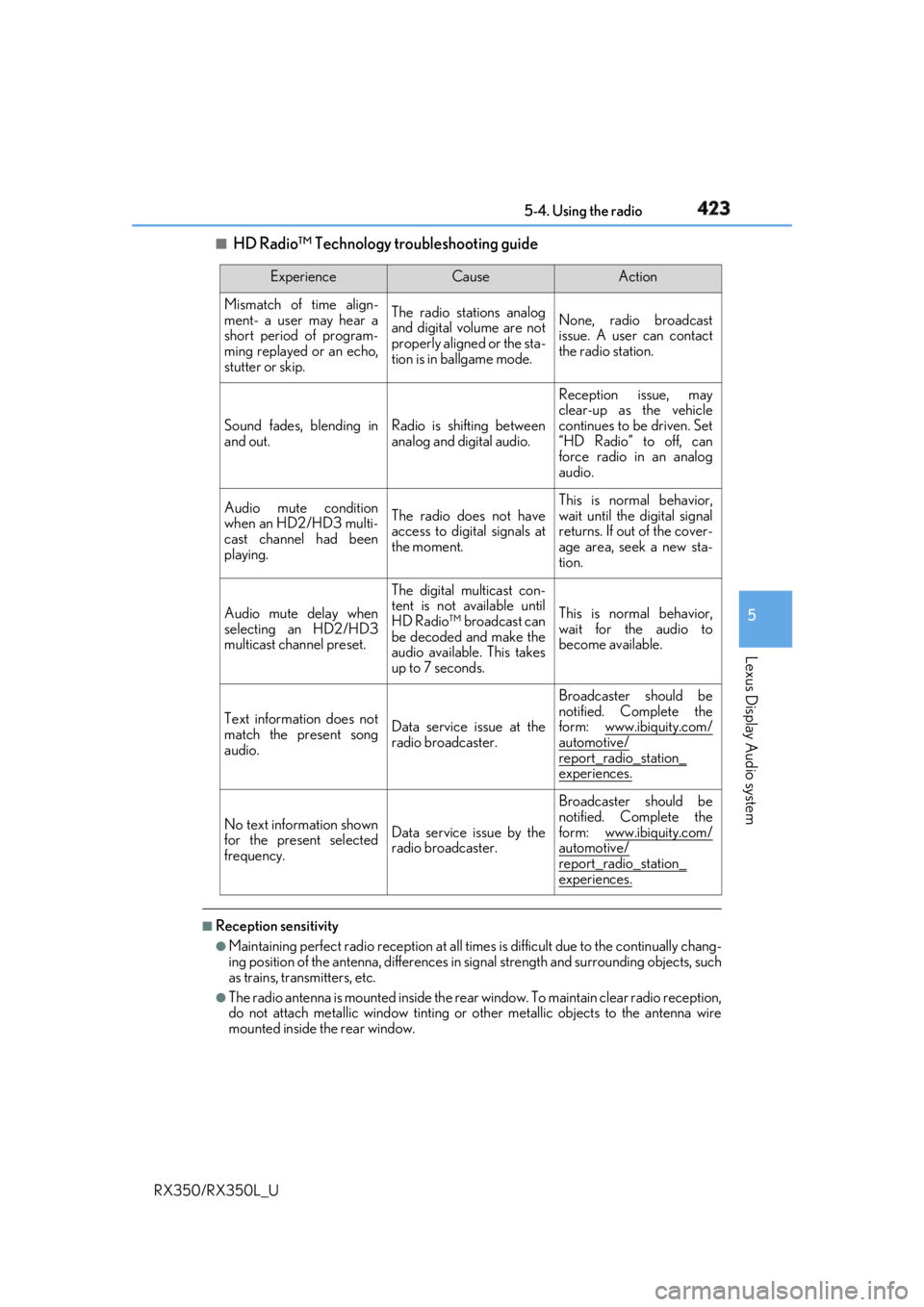
HD Radio™ Technology troubleshooting guide
■
Reception sensitivity ●
Maintaining perfect radio recept ion at all times is difficult due to the continually chang-
ing position of the antenna, differences in si gnal strength and surrounding objects, such
as trains, transmitters, etc. ●
The radio antenna is mounted inside the rear window. To maintain clear radio reception,
do not attach metallic window tinting or other metallic objects to the antenna wire
mounted inside the rear window. Experience Cause Action
Mismatch of time align-
ment- a user may hear a
short period of program-
ming replayed or an echo,
stutter or skip. The radio stations analog
and digital volume are not
properly aligned or the sta-
tion is in ballgame mode. None, radio broadcast
issue. A user can contact
the radio station.
Sound fades, blending in
and out. Radio is shifting between
analog and digital audio. Reception issue, may
clear-up as the vehicle
continues to be driven. Set
“HD Radio” to off, can
force radio in an analog
audio.
Audio mute condition
when an HD2/HD3 multi-
cast channel had been
playing. The radio does not have
access to digital signals at
the moment. This is normal behavior,
wait until the digital signal
returns. If out of the cover-
age area, seek a new sta-
tion.
Audio mute delay when
selecting an HD2/HD3
multicast channel preset. The digital multicast con-
tent is not available until
HD Radio™ broadcast can
be decoded and make the
audio available. This takes
up to 7 seconds. This is normal behavior,
wait for the audio to
become available.
Text information does not
match the present song
audio. Data service issue at the
radio broadcaster. Broadcaster should be
notified. Complete the
form: www.ibiquity.com/
automotive/
report_radio_station_
experiences.
No text information shown
for the present selected
frequency. Data service issue by the
radio broadcaster. Broadcaster should be
notified. Complete the
form: www.ibiquity.com/
automotive/
report_radio_station_
experiences.
Page 459 of 777

458 5-9. Bluetooth ®
Phone
RX350/RX350L_U You can transfer the phone numbers in a Bluetooth ®
phone to the system.
Operation methods differ between PBAP (Phone Book Access Profile) compat-
ible and PBAP incompatible Bluetooth ®
phones. If the cellular phone does not
support either PBAP or OPP (Object Pu sh Profile) service, you cannot transfer
contacts.
Press the off-hook switch on the steering wheel. If the phonebook is empty, a message will be displayed.
For a PBAP compatible Bluetooth ®
phone and “Automatic Transfer” is off
To enable automatic transfer of new contacts from a cellular phone every time
it is connected, select “Always”. ( P. 468)
Select “Once” if you want to transf er new contacts from a cellular phone.
For a PBAP incompatible and OPP compatible Bluetooth ®
phone
Select “Transfer” and operate your ce llular phone to transfer new contacts
from a cellular phone.
Select “Add” if you want to add a new contact manually.When the phonebook is empty 1
2
2
Page 462 of 777
4615-9. Bluetooth ®
Phone
5
Lexus Display Audio system
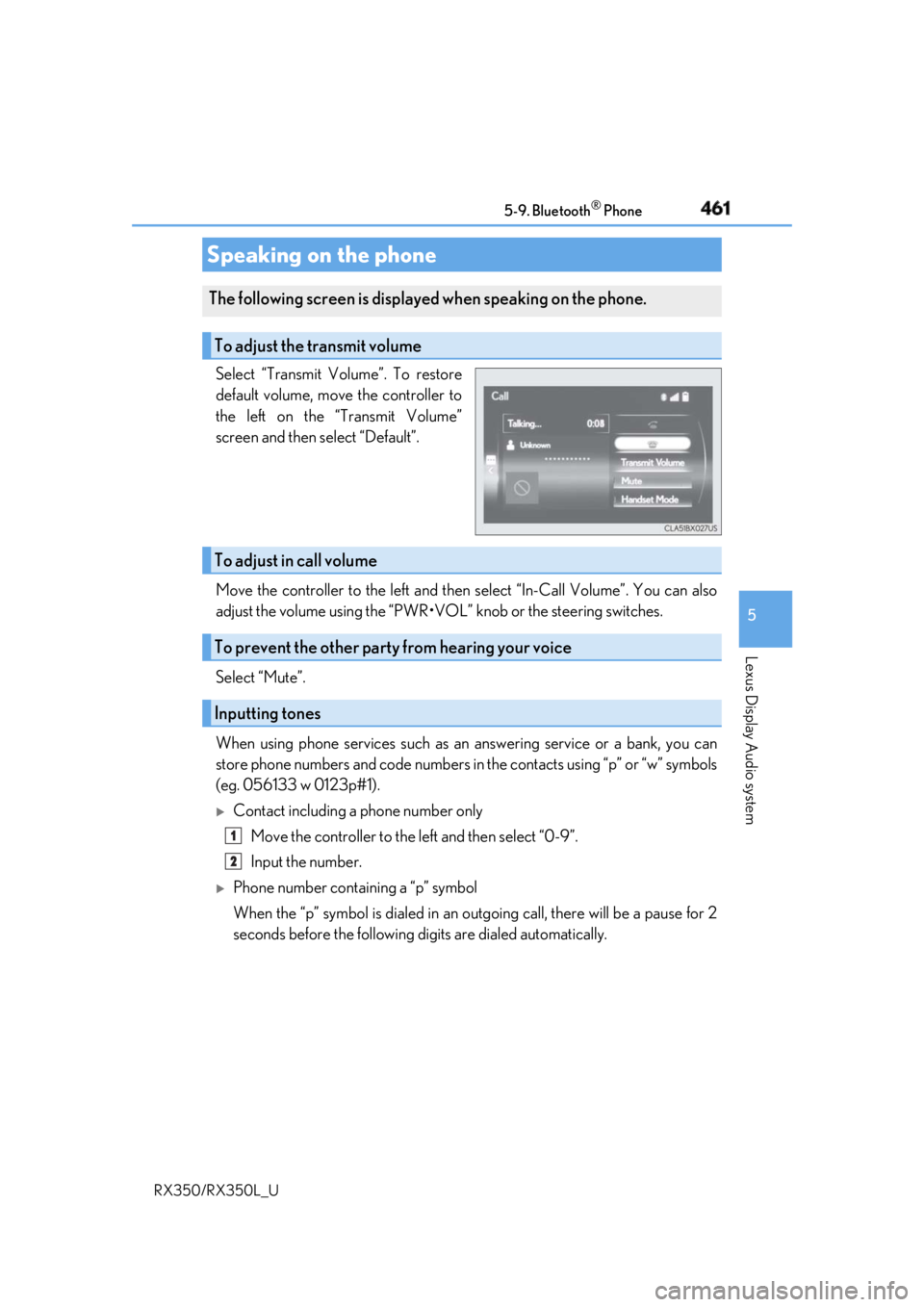
RX350/RX350L_U Select “Transmit Volume”. To restore
default volume, move the controller to
the left on the “Transmit Volume”
screen and then select “Default”.
Move the controller to the left and then select “In-Call Volume”. You can also
adjust the volume using the “PWR•VOL ” knob or the steering switches.
Select “Mute”.
When using phone services such as an answering service or a bank, you can
store phone numbers and code numbers in the contacts using “p” or “w” symbols
(eg. 056133 w 0123p#1).
Contact including a phone number only
Move the controller to the left and then select “0-9”.
Input the number.
Phone number containing a “p” symbol
When the “p” symbol is dialed in an ou tgoing call, there will be a pause for 2
seconds before the following di gits are dialed automatically.Speaking on the phone The following screen is displayed when speaking on the phone.
To adjust the transmit volume
To adjust in call volume
To prevent the other party from hearing your voice
Inputting tones 1
2
Page 470 of 777
4695-10. Phonebook
5
Lexus Display Audio system
RX350/RX350L_U ■
Return to the default settings
Move the controller to the left and select “Default”.
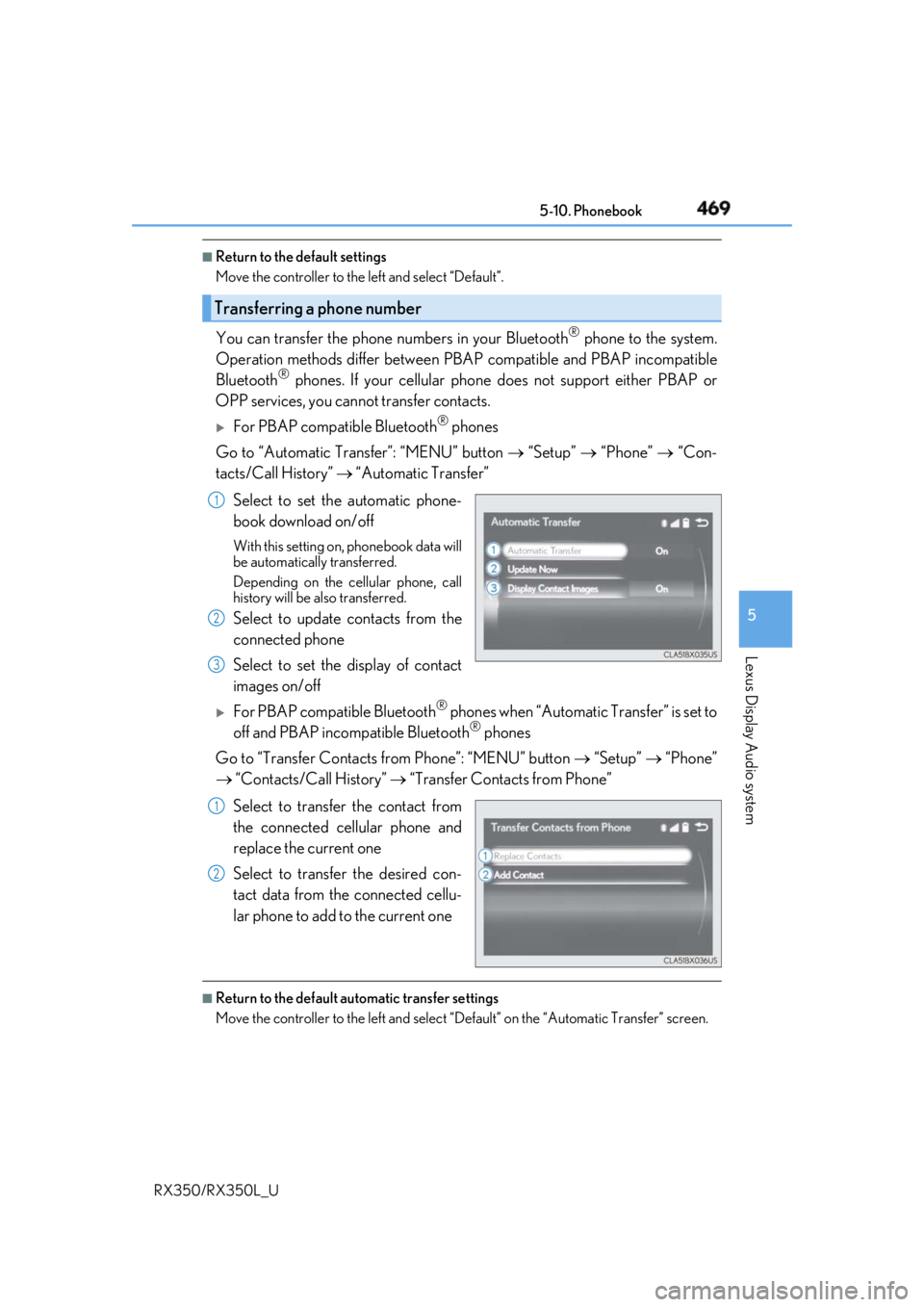
You can transfer the phone numbers in your Bluetooth ®
phone to the system.
Operation methods differ between PBAP compatible and PBAP incompatible
Bluetooth ®
phones. If your cellular phone does not support either PBAP or
OPP services, you canno t transfer contacts.
For PBAP compatible Bluetooth ®
phones
Go to “Automatic Transfer”: “MENU” button “Setup” “Phone” “Con-
tacts/Call History” “Automatic Transfer”
Select to set the automatic phone-
book download on/off With this setting on, phonebook data will
be automatically transferred.
Depending on the cellular phone, call
history will be also transferred.
Select to update contacts from the
connected phone
Select to set the display of contact
images on/off
For PBAP compatible Bluetooth ®
phones when “Automatic Transfer” is set to
off and PBAP incompatible Bluetooth ®
phones
Go to “Transfer Contacts from Phone”: “MENU” button “Setup” “Phone”
“Contacts/Call History” “Transfer Contacts from Phone”
Select to transfer the contact from
the connected cellular phone and
replace the current one
Select to transfer the desired con-
tact data from the connected cellu-
lar phone to add to the current one ■
Return to the default automatic transfer settings
Move the controller to the left and select “D efault” on the “Automatic Transfer” screen.Transferring a phone number 1
2
3
1
2
Page 471 of 777
470 5-10. Phonebook
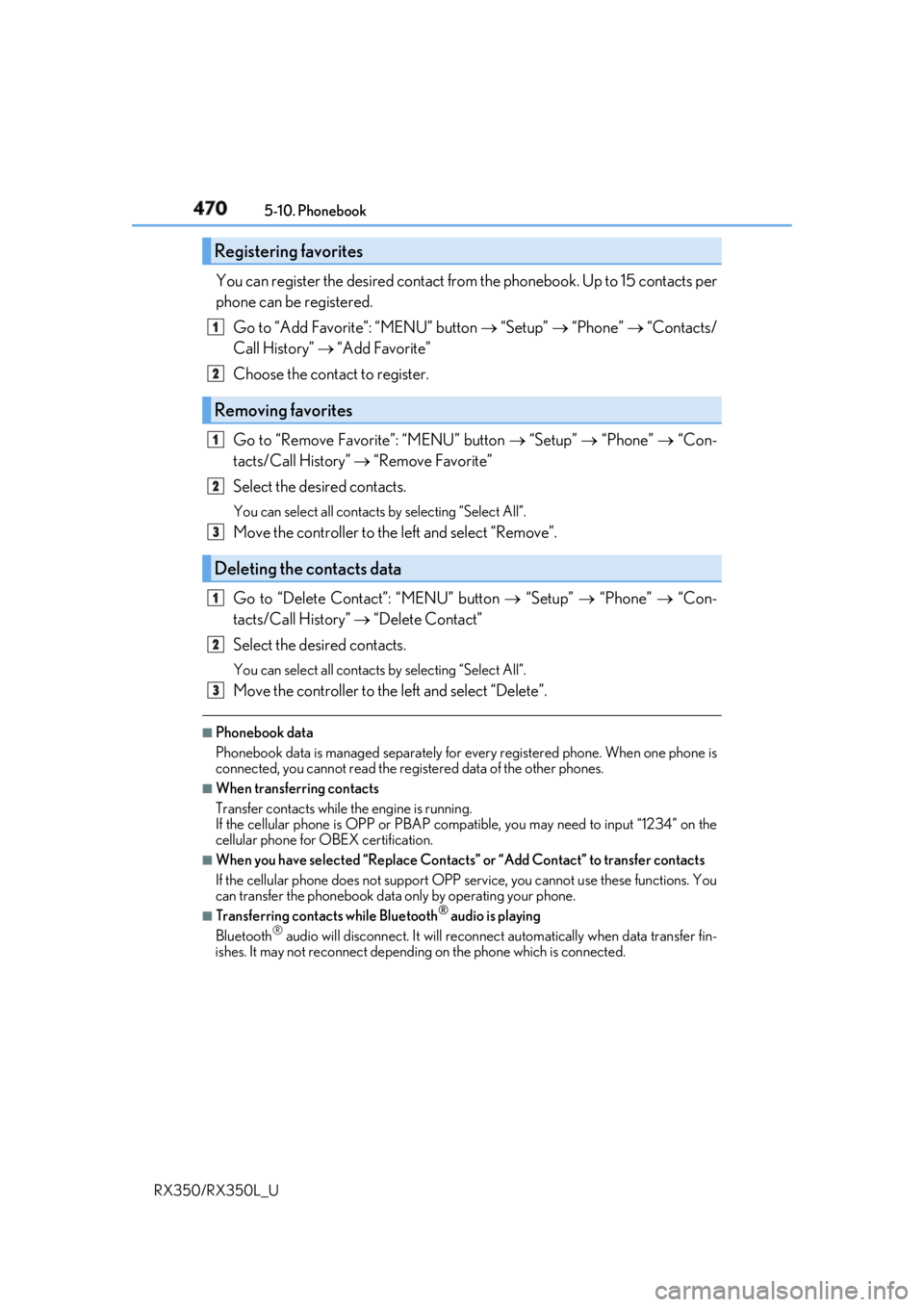
RX350/RX350L_U You can register the desired contact from the phonebook. Up to 15 contacts per
phone can be registered.
Go to “Add Favorite”: “MENU” button “Setup” “Phone” “Contacts/
Call History” “Add Favorite”
Choose the contact to register.
Go to “Remove Favorite”: “MENU” button “Setup” “Phone” “Con-
tacts/Call History” “Remove Favorite”
Select the desired contacts. You can select all contacts by selecting “Select All”.
Move the controller to the left and select “Remove”.
Go to “Delete Contact ”: “MENU” button “Setup” “Phone” “Con-
tacts/Call History” “Delete Contact”
Select the desired contacts. You can select all contacts by selecting “Select All”.
Move the controller to the left and select “Delete”.■
Phonebook data
Phonebook data is managed separately for every registered phone. When one phone is
connected, you cannot read the registered data of the other phones. ■
When transferring contacts
Transfer contacts while the engine is running.
If the cellular phone is OPP or PBAP compatible, you may need to input “1234” on the
cellular phone for OB EX certification.■
When you have selected “Replace Contacts” or “Add Contact” to transfer contacts
If the cellular phone does not support OPP service, you cannot use these functions. You
can transfer the phonebook data only by operating your phone. ■
Transferring contacts while Bluetooth ®
audio is playing
Bluetooth ®
audio will disconnect. It will reconnect automatically when data transfer fin-
ishes. It may not reconnect dependin g on the phone which is connected.Registering favorites 1
2
Removing favorites
Deleting the contacts data 1
2
3
1
2
3
Page 474 of 777
4735-11. Bluetooth ®
5
Lexus Display Audio system
RX350/RX350L_U
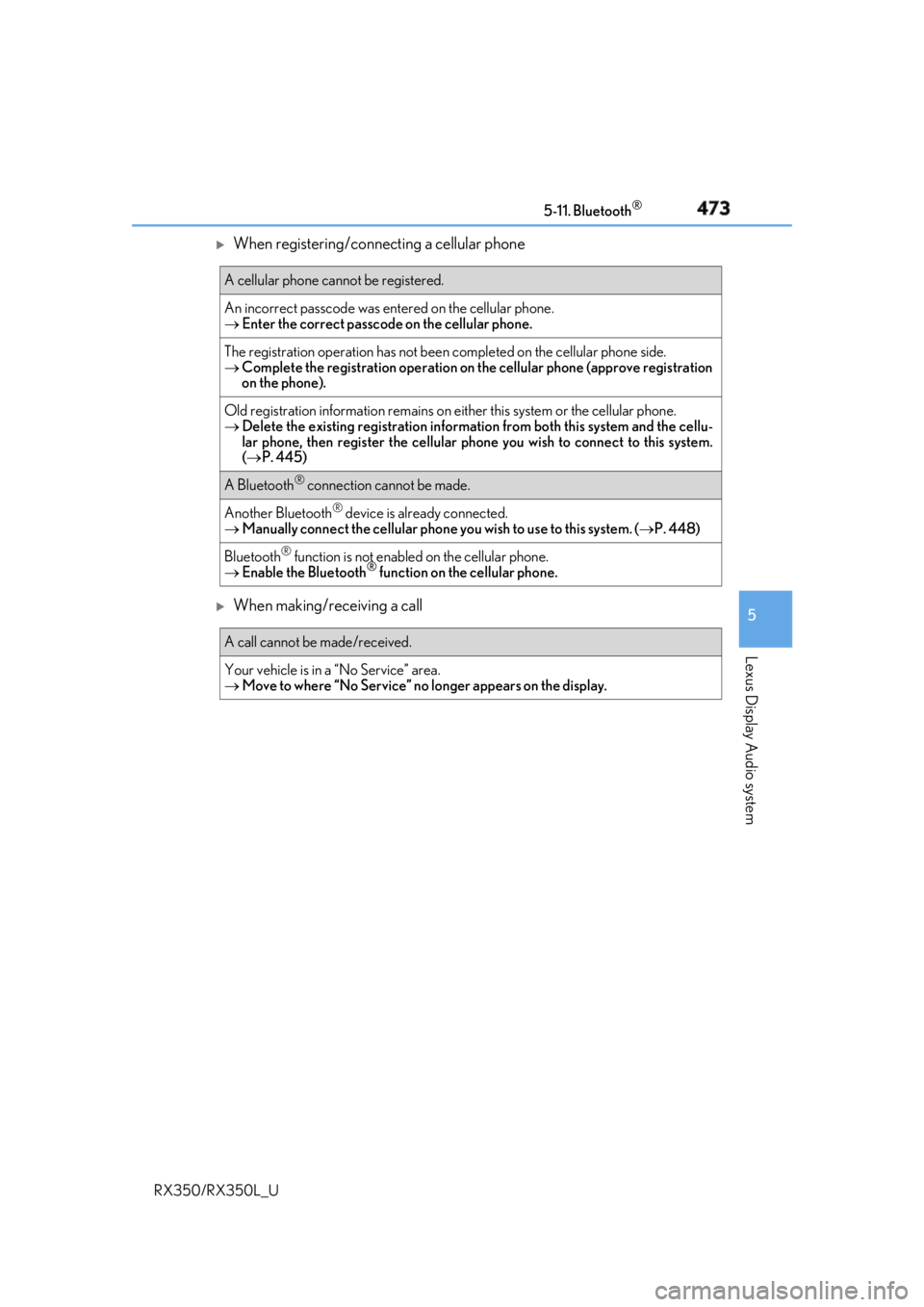
When registering/connecting a cellular phone
When making/receiving a call A cellular phone cannot be registered.
An incorrect passcod e was entered on the cellular phone.
Enter the correct passcode on the cellular phone.
The registration operation has not been completed on the cellular phone side.
Complete the registration operation on the cellular phone (approve registration
on the phone).
Old registration information remains on either this system or the cellular phone.
Delete the existing registration informat ion from both this system and the cellu-
lar phone, then register the cellular phone you wish to connect to this system.
( P. 445)
A Bluetooth ®
connection cannot be made.
Another Bluetooth ®
device is already connected.
Manually connect the cellular phone you wish to use to this system. ( P. 448)
Bluetooth ®
function is not enabled on the cellular phone.
Enable the Bluetooth ®
function on the cellular phone.
A call cannot be made/received.
Your vehicle is in a “No Service” area.
Move to where “No Service” no longer appears on the display.
Page 477 of 777

476 5-11. Bluetooth ®
RX350/RX350L_U ■
When using the Bluetooth ®
audio system●
In the following situations, the system may not function.
• If the portable audio player is turned off
• If the portable audio player is not connected
• If the portable audio player’s battery is low ●
There may be a delay if a cellular phon e connection is made during Bluetooth ®
audio
play. ●
Depending on the type of portable audio play er that is connected to the system, opera-
tion may differ slight ly and certain functions may not be available.■
When using the hands-free system ●
The audio system is mu ted when making a call.●
If both parties speak at the same time, it may be difficult to hear.●
If the received call volume is over ly loud, an echo may be heard.
If the Bluetooth ®
phone is too close to the system, quality of the sound may deteriorate
and connection status may deteriorate. ●
In the following situations, it may be difficult to hear the other party:
• When driving on unpaved roads
• When driving at high speeds
• If a window is open
• If the air conditioning is blow ing directly on the microphone
• If there is interference from the network of the cellular phone●
Depending on the type phone, certain functions may not be available. ■
Conditions under which th e system will not operate●
If using a cellular phone that does not support Bluetooth ®
●
If the cellular phone is turned off ●
If you are outside of cellular phone service coverage ●
If the cellular phone is not connected ●
If the cellular phone’s battery is low ●
When outgoing calls are controlled, due to heavy traffic on phone lines, etc. ●
When the cellular phone itself cannot be used ●
When transferring phonebook da ta from the cellular phoneBluetooth ®