wheel LEXUS RX350 2019 User Guide
[x] Cancel search | Manufacturer: LEXUS, Model Year: 2019, Model line: RX350, Model: LEXUS RX350 2019Pages: 777, PDF Size: 12.44 MB
Page 42 of 777
42 1-1. For safe use
RX350/RX350L_U ■
If the SRS airbags deploy (inflate) ●
Slight abrasions, burns, brui sing etc., may be sustained from SRS airbags, due to the
extremely high speed deployment (inflation) by hot gases. ●
A loud noise and white powder will be emitted. ●
Parts of the airbag module (steering wheel hub, airbag cover and inflator) as well as the
front seats, parts of the front and rear pillars, and roof side rails, may be hot for several
minutes. The airbag itself may also be hot. ●
The windshield may crack. ●
For Lexus Enform Safety Connect subscribers, if any of the following situations occur,
the system is designed to send an emerge ncy call to the response center, notifying
them of the vehicle’s location (without needing to push the “SOS” button) and an agent
will attempt to speak with the occupants to ascertain the level of emergency and assis-
tance required. If the occupants are unable to communicate, the agent automatically
treats the call as an emergency and helps to dispatch the necessary emergency ser-
vices. ( P. 568)
• An SRS airbag is deployed.
• A seat belt pretensioner is activated.
• The vehicle is involved in a severe rear-end collision.WARNING ■
Modification and disposal of SRS airbag system components
Do not dispose of your vehicle or perform any of the following modifications without
consulting your Lexus dealer. The SRS airb ags may malfunction or deploy (inflate)
accidentally, causing death or serious injury. ●
Installation, removal, disassembly and repair of the SRS airbags ●
Repairs, modifications, removal or replacement of the steering wheel, instrument
panel, dashboard, seats or seat upholstery, front, side and rear pillars, roof side rails,
front door panels, front door trims, or front door speakers ●
Modifications to the front door panel (such as making a hole in it) ●
Repairs or modifications of the front fend er, front bumper, or side of the occupant
compartment ●
Installation of a grille guard (bull bars, ka ngaroo bar, etc.), snow plows, winches or
roof luggage carrier ●
Modifications to the vehicle’s suspension system ●
Installation of electronic devices such as mobile two-way radios and CD players●
Modifications to your vehicle for a person with a physical disability
Page 46 of 777
46 1-1. For safe use
RX350/RX350L_U ●
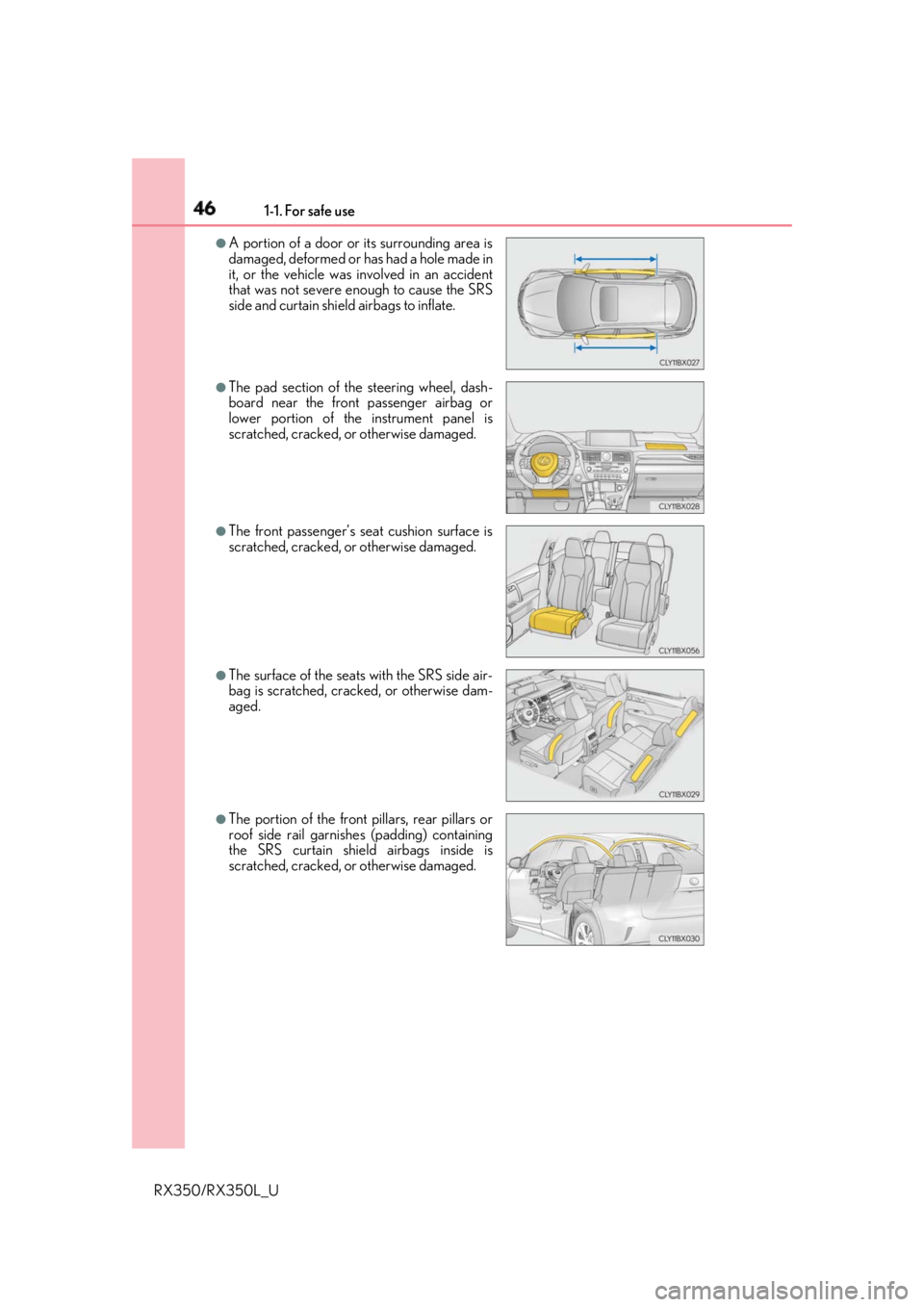
A portion of a door or its surrounding area is
damaged, deformed or has had a hole made in
it, or the vehicle was involved in an accident
that was not severe enough to cause the SRS
side and curtain shield airbags to inflate. ●
The pad section of the steering wheel, dash-
board near the front passenger airbag or
lower portion of the instrument panel is
scratched, cracked, or otherwise damaged. ●
The front passenger’s se at cushion surface is
scratched, cracked, or otherwise damaged.
●
The surface of the seats with the SRS side air-
bag is scratched, crac ked, or otherwise dam-
aged.
●
The portion of the front pillars, rear pillars or
roof side rail garnishes (padding) containing
the SRS curtain shield airbags inside is
scratched, cracked, or otherwise damaged.
Page 84 of 777
832. Instrument cluster
2
Instrument cluster
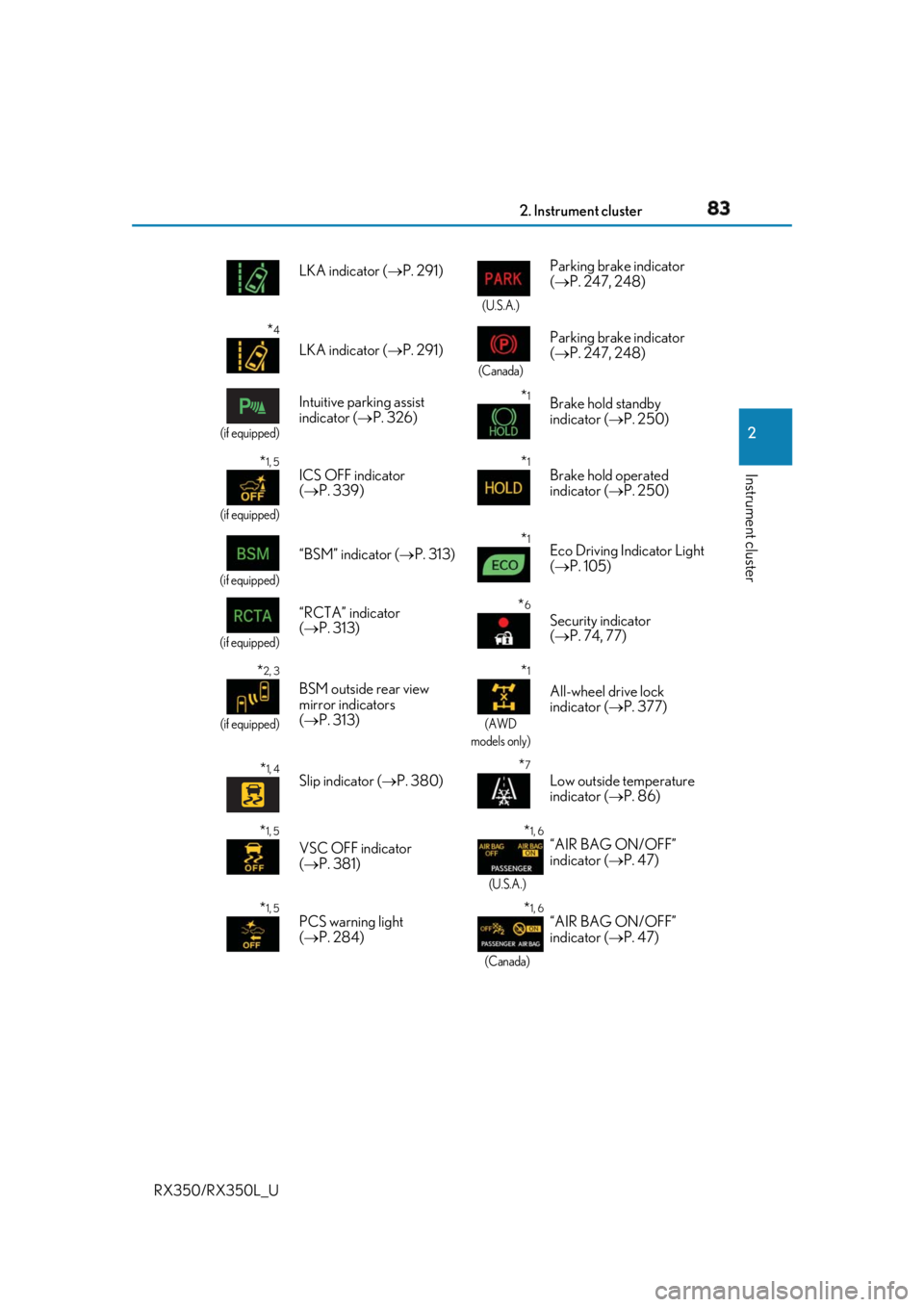
RX350/RX350L_U LKA indicator ( P. 291) (U.S.A.)
Parking brake indicator
( P. 247, 248)
* 4
LKA indicator ( P. 291) (Canada)
Parking brake indicator
( P. 247, 248)(if equipped)
Intuitive parking assist
indicator ( P. 326)
* 1
Brake hold standby
indicator ( P. 250)
* 1, 5
(if equipped)
ICS OFF indicator
( P. 339)
* 1
Brake hold operated
indicator ( P. 250)
(if equipped)
“BSM” indicator ( P. 313)
* 1
Eco Driving Indicator Light
( P. 105)
(if equipped)
“RCTA” indicator
( P. 313)
* 6
Security indicator
( P. 74, 77)
* 2, 3
(if equipped)
BSM outside rear view
mirror indicators
( P. 313) * 1
(AWD
models only)
All-wheel drive lock
indicator ( P. 377)
* 1, 4
Slip indicator ( P. 380)
* 7
Low outside temperature
indicator ( P. 86)
* 1, 5
VSC OFF indicator
( P. 381) * 1, 6
(U.S.A.)
“AIR BAG ON/OFF”
indicator ( P. 47)
* 1, 5
PCS warning light
( P. 284) * 1, 6
(Canada)“AIR BAG ON/OFF”
indicator ( P. 47)
Page 96 of 777

952. Instrument cluster
2
Instrument cluster
RX350/RX350L_U * 1
:Resetting: P. 92
* 2
: Use the displayed fuel consumption as a reference.
* 3
: When only a small amount of fuel is added to the tank, the display may not be
updated.
When refueling, turn the engine switch off. If the vehicle is refueled without turning the
engine switch off, the display may not be updated.
* 4
: This distance is computed based on your average fuel consumption. As a result, the
actual distance that can be driven may differ from that displayed.■
Eco Driving Indicator
P. 105■
Sway warning
Detects the sway of the vehicle within a lane, which is often associated with a
decrease in the driver's at tention level, and displays the decrease in attention
using a bar display.
The shorter the bar length, the more the driver may need to rest. This display is a part of the LKA (Lan e-Keeping Assist) system. The display is
enabled when the operating conditions of the vehicle sway warning are met.
( P. 291)■
AWD Control (if equipped)
Displays the driving force applie d to each wheel using segments.
The greater the number of segments di splayed, the greater the driving force
applied.
Page 98 of 777
972. Instrument cluster
2
Instrument cluster
RX350/RX350L_U ◆ Changing settings
Use the meter control switches on th e steering wheel to change settings.
Press or to select .
Operate the switches to select a desired item.
Change the setting by referring to the message displayed on the screen.
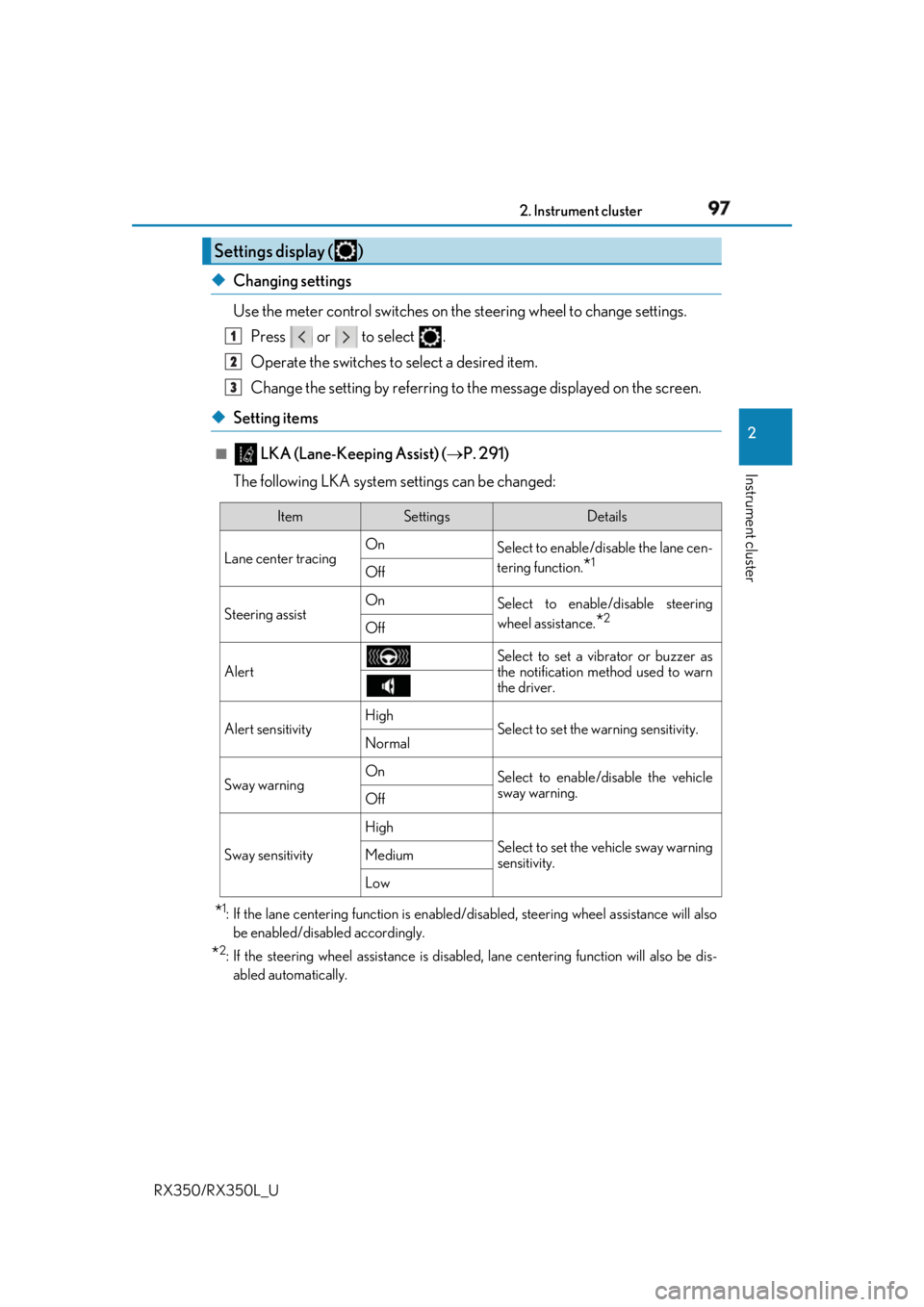
◆ Setting items ■
LKA (Lane-Keeping Assist) ( P. 291)
The following LKA system settings can be changed:
* 1
: If the lane centering function is enabled/ disabled, steering wheel assistance will also
be enabled/disabled accordingly.
* 2
: If the steering wheel assistance is disabled, lane cent ering function will also be dis-
abled automatically.Settings display ( ) 1
2
3
Item Settings Details
Lane center tracing On
Select to enable/dis able the lane cen-
tering function.
* 1
Off
Steering assist On
Select to enable/disable steering
wheel assistance.
* 2
Off
Alert Select to set a vibrator or buzzer as
the notification method used to warn
the driver.
Alert sensitivity High
Select to set the warning sensitivity.
Normal
Sway warning On
Select to enable/disable the vehicle
sway warning.
Off
Sway sensitivity High
Select to set the vehicle sway warning
sensitivity.Medium
Low
Page 120 of 777
119
3 Operation of
each component
RX350/RX350L_U 3-1. Key information
Keys .................................................. 120
3-2. Opening, closing and
locking the doors
Side doors .......................................124
Power back door ........................ 130
Smart access system with
push-button start ...................... 146
3-3. Adjusting the seats
Front seats...................................... 156
Rear seats........................................157
Driving position memory .......... 172
Head restraints ............................. 177
3-4. Adjusting the steering
wheel and mirrors
Steering wheel ............................. 180
Inside rear view mirror ............. 182
Outside rear view mirrors....... 184
3-5. Opening, closing the
windows and moon roof
Power windows ........................... 187
Moon roof ........................................ 191
Panoramic moon roof ............... 195
Page 157 of 777
156
RX350/RX350L_U 3-3. Adjusting the seats
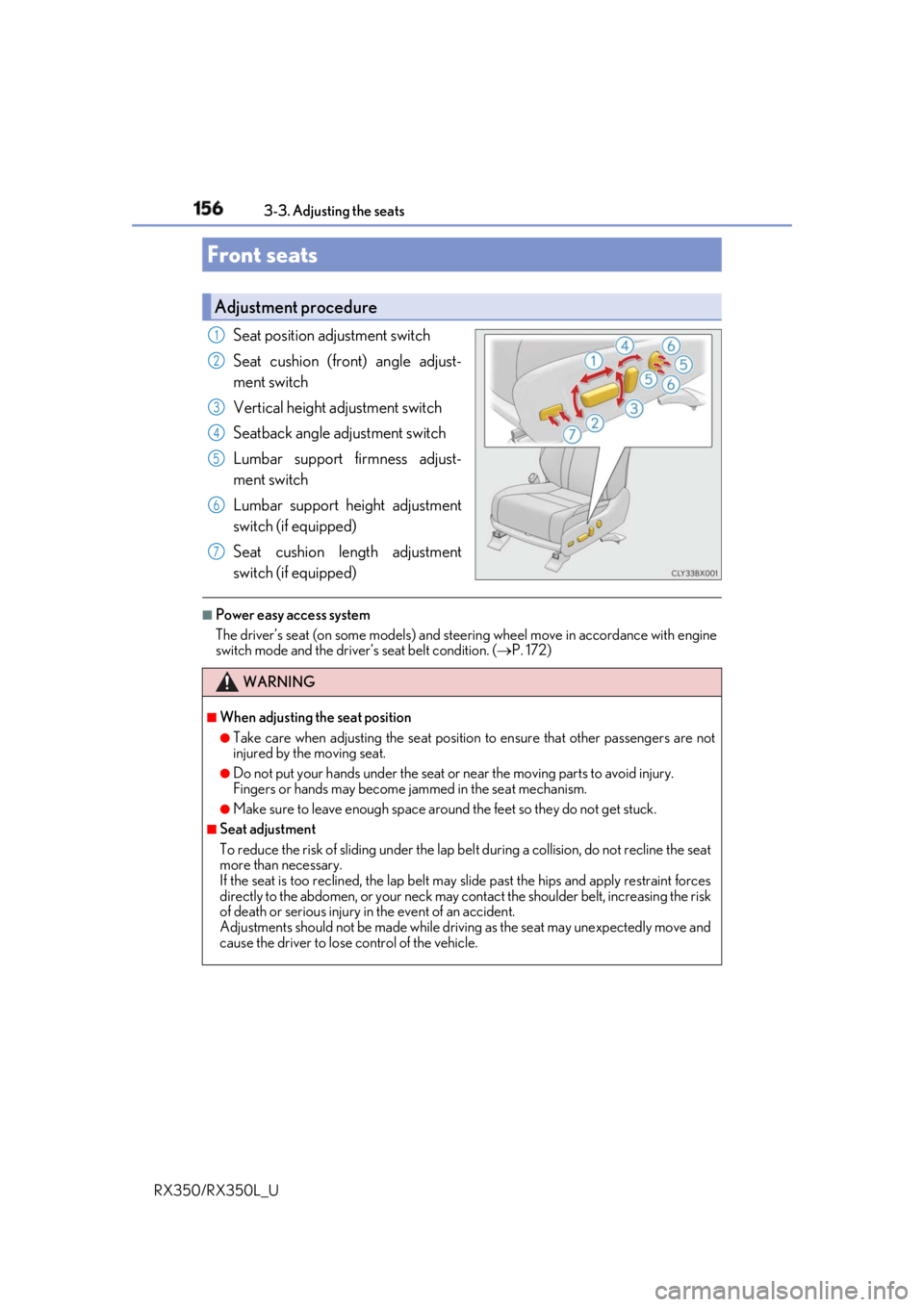
Seat position adjustment switch
Seat cushion (front) angle adjust-
ment switch
Vertical height adjustment switch
Seatback angle adjustment switch
Lumbar support firmness adjust-
ment switch
Lumbar support height adjustment
switch (if equipped)
Seat cushion length adjustment
switch (if equipped) ■
Power easy access system
The driver’s seat (on some models) and steering wheel move in accordance with engine
switch mode and the driver’s seat belt condition. ( P. 172)Front seats Adjustment procedure 1
2
3
4
5
6
7
WARNING ■
When adjusting the seat position ●
Take care when adjusting the seat position to ensure that other passengers are not
injured by the moving seat. ●
Do not put your hands under the seat or near the moving parts to avoid injury.
Fingers or hands may become jammed in the se at mechanism.●
Make sure to leave enough space around the feet so they do not get stuck. ■
Seat adjustment
To reduce the risk of sliding under the lap be lt during a collision, do not recline the seat
more than necessary.
If the seat is too reclined, the lap belt may slide past the hips and apply restraint forces
directly to the abdomen, or your neck may contact the shou lder belt, increasing the risk
of death or serious injury in the event of an accident.
Adjustments should not be made while drivin g as the seat may unexpectedly move and
cause the driver to lose control of the vehicle.
Page 173 of 777
172 3-3. Adjusting the seats
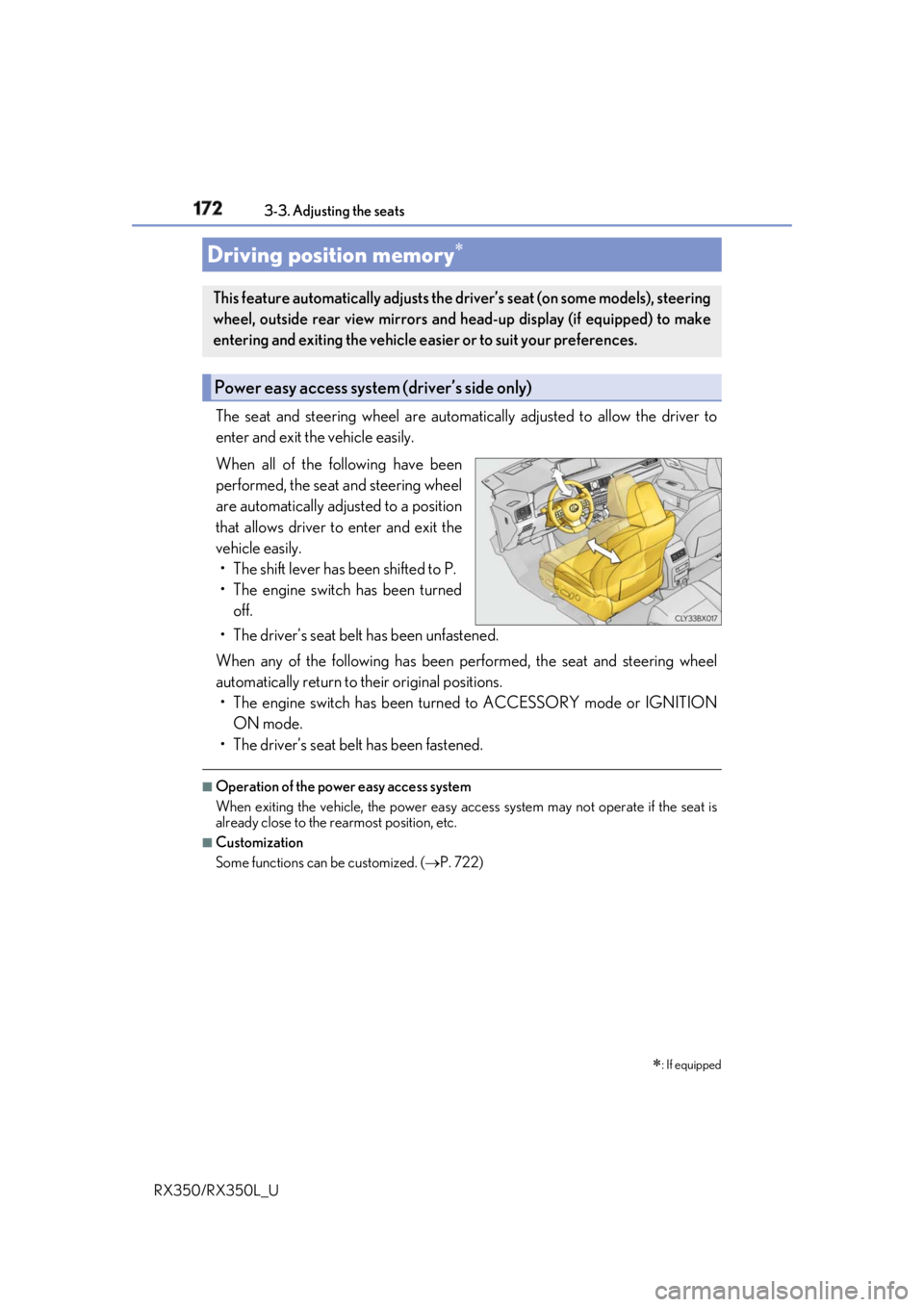
RX350/RX350L_U The seat and steering wheel are automati cally adjusted to allow the driver to
enter and exit the vehicle easily.
When all of the following have been
performed, the seat and steering wheel
are automatically adjusted to a position
that allows driver to enter and exit the
vehicle easily.
• The shift lever has been shifted to P.
• The engine switch has been turned
off.
• The driver’s seat belt has been unfastened.
When any of the following has been performed, the seat and steering wheel
automatically return to their original positions.
• The engine switch has been turn ed to ACCESSORY mode or IGNITION
ON mode.
• The driver’s seat belt has been fastened. ■
Operation of the power easy access system
When exiting the vehicle, the power easy ac cess system may not operate if the seat is
already close to the rearmost position, etc. ■
Customization
Some functions can be customized. ( P. 722)Driving position memory
: If equippedThis feature automatically adjusts the driver’s seat (on some models), steering
wheel, outside rear view mirrors and head-up display (if equipped) to make
entering and exiting the vehicle easi er or to suit your preferences.
Power easy access system (driver’s side only)
Page 174 of 777
1733-3. Adjusting the seats
3
Operation of each component
RX350/RX350L_U Your preferred driving position (the positi on of the driver’s seat, steering wheel,
outside rear view mirrors and head-up display
* ) can be recorded and recalled
by pressing a button.
Three different driving positions can be recorded into memory.
* : If equipped ■
Recording procedure
Check that the shift lever is in P.
Turn the engine switch to IGNITION ON mode.
Adjust the driver’s seat, steering wh eel, outside rear view mirrors and
head-up display (if equipped) to the desired positions.
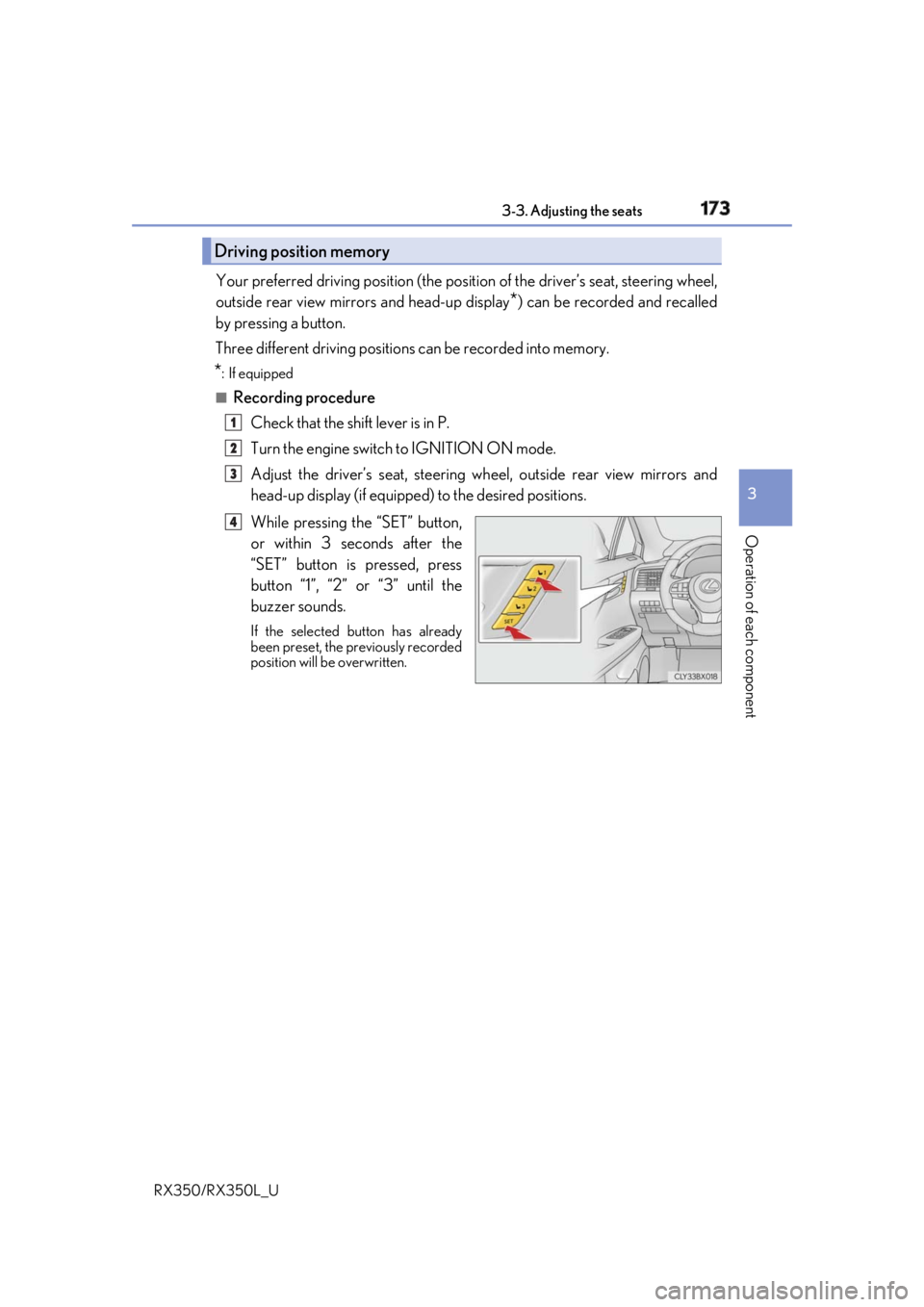
While pressing the “SET” button,
or within 3 seconds after the
“SET” button is pressed, press
button “1”, “2” or “3” until the
buzzer sounds. If the selected button has already
been preset, the previously recorded
position will be overwritten.Driving position memory 1
2
3
4
Page 175 of 777
174 3-3. Adjusting the seats
RX350/RX350L_U ■
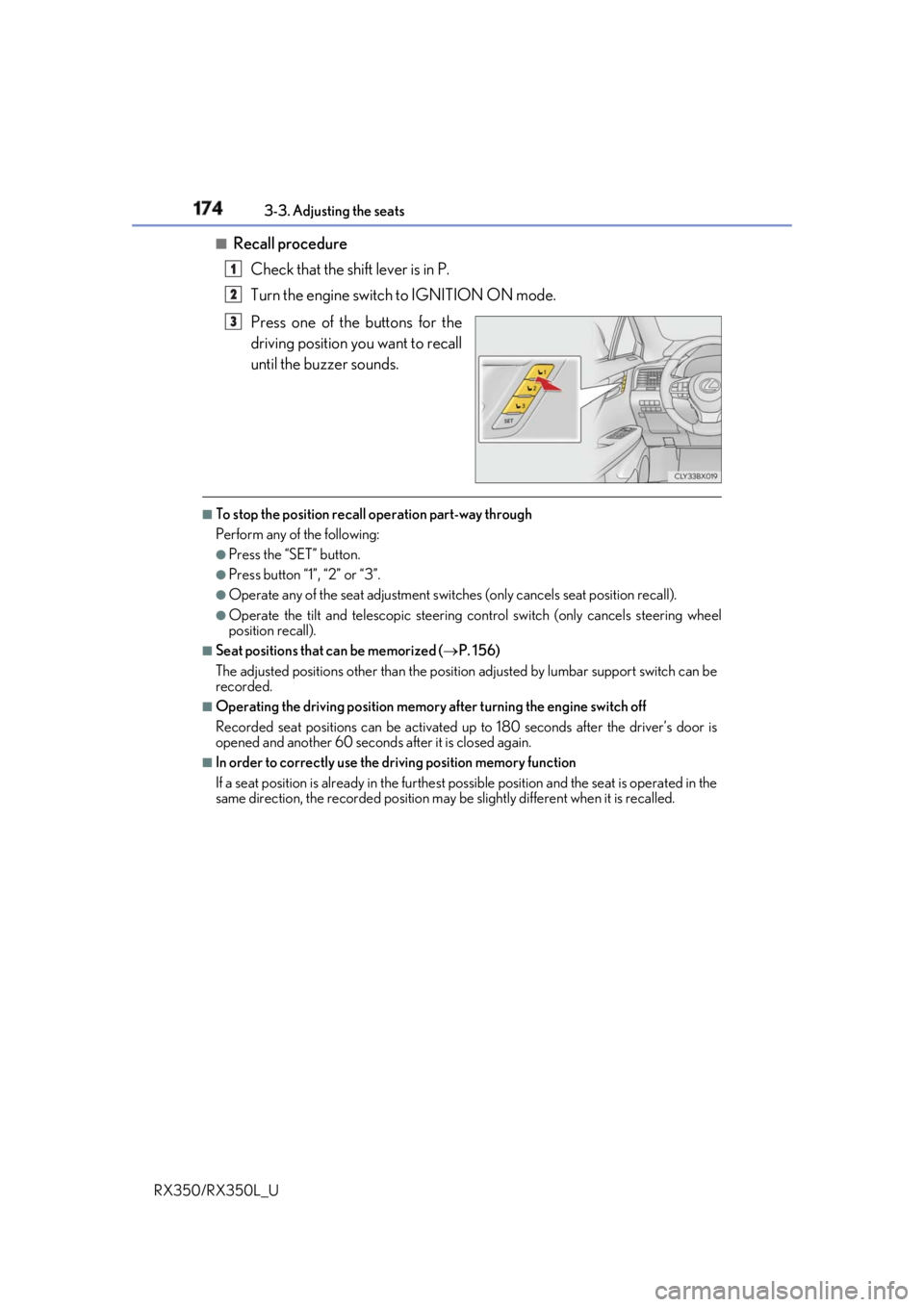
Recall procedure
Check that the shift lever is in P.
Turn the engine switch to IGNITION ON mode.
Press one of the buttons for the
driving position you want to recall
until the buzzer sounds. ■
To stop the position recall operation part-way through
Perform any of the following: ●
Press the “SET” button. ●
Press button “1”, “2” or “3”. ●
Operate any of the seat adjustment switches (only cancels seat position recall). ●
Operate the tilt and telescopic steering control switch (only cancels steering wheel
position recall). ■
Seat positions that can be memorized ( P. 156)
The adjusted positions other than the position adjusted by lumbar support switch can be
recorded. ■
Operating the driving position memory after turning the engine switch off
Recorded seat positions can be activated up to 180 seconds after the driver’s door is
opened and another 60 seconds after it is closed again. ■
In order to correctly use the dr iving position memory function
If a seat position is already in the furthest po ssible position and the seat is operated in the
same direction, the recorded position may be slightly di fferent when it is recalled.1
2
3