radio LEXUS RX350 2019 Owner's Manual
[x] Cancel search | Manufacturer: LEXUS, Model Year: 2019, Model line: RX350, Model: LEXUS RX350 2019Pages: 777, PDF Size: 12.44 MB
Page 422 of 777
4215-4. Using the radio
5
Lexus Display Audio system
RX350/RX350L_U When “HD Radio” is set to “On”, availabl e stations with HD Radio channels are
marked with “HD)”.
In AM or FM mode, select a station marked with “HD)”.
Turn the “TUNE•SCROLL” knob to select an HD Radio channel.HD Radio channels can also be selected by selecting “Mul ticast” on the menu screen.
( P. 417)
Select in to the desired channel using one of the following methods.■
Turning up/down the channel
Press and hold the “ PRST” or “TRACK ” button or turn the
“TUNE•SCROLL” knob. ■
Preset channels
Select the desired preset channel by pressing the “ PRST” or “TRACK ”
button or controller. ■
Channel list
Move the controller to the right an d selecting “Select a SAT Category”.
Selecting a desired category of cha nnel and selecting a desired channel.
Search for desired stations or channel.
Select and hold one of the pr eset until you hear a beep.■
Display the song information
Move the controller to the right and selecting “Text”.■
Display the Additional information (HD radio)
Move the controller to the right and selecting “Additional Information”.Selecting an HD Radio channel
Selecting a channel (XM Satellite Radio)
Setting presets
Display the text message 1
2
1
2
1
2
Page 423 of 777
422 5-4. Using the radio
RX350/RX350L_U HD Radio™ Technology is the digital evolution of analog AM/FM radio. Your
radio product has a special receiver which allows it to receive digital broadcasts
(where available) in addition to the analog broadcasts it already receives.
Digital broadcasts have better sound qua lity than analog broadcasts as digital
broadcasts provide free, crystal clear audio with no static or distortion. For more
information, and a guide to available radio stations and programming, refer to
www.hdradio.com
.
“HD Radio features included in Lexus radios:
Digital Sound - HD Radio broadcasts deliver crystal-clear, digital audio quality to
listeners.
HD2/HD3 Channels - FM stations can prov ide additional digital only audio pro-
gramming with expanded content and format choices on HD2/HD3 channels.
PSD - Program Service Data (PSD) gives you on-screen information such as art-
ist name and song title.
iTunes Tagging - Listeners can tag (store) songs they like for later review and pur-
chase through iTunes.
Artist Experience - Images related to the broadcast are displayed on the radio
screen, such as album cover art and station logos.”HD Radio™ Technology
HD Radio Technology manufactured under license from iBiquity Digital Corpora-
tion. U.S. and Foreign Patents. HD Radio™ and the HD, HD Radio, and “Arc” logos
are proprietary trademarks of iBiquity Digital Corp.
Page 424 of 777
4235-4. Using the radio
5
Lexus Display Audio system
RX350/RX350L_U ■
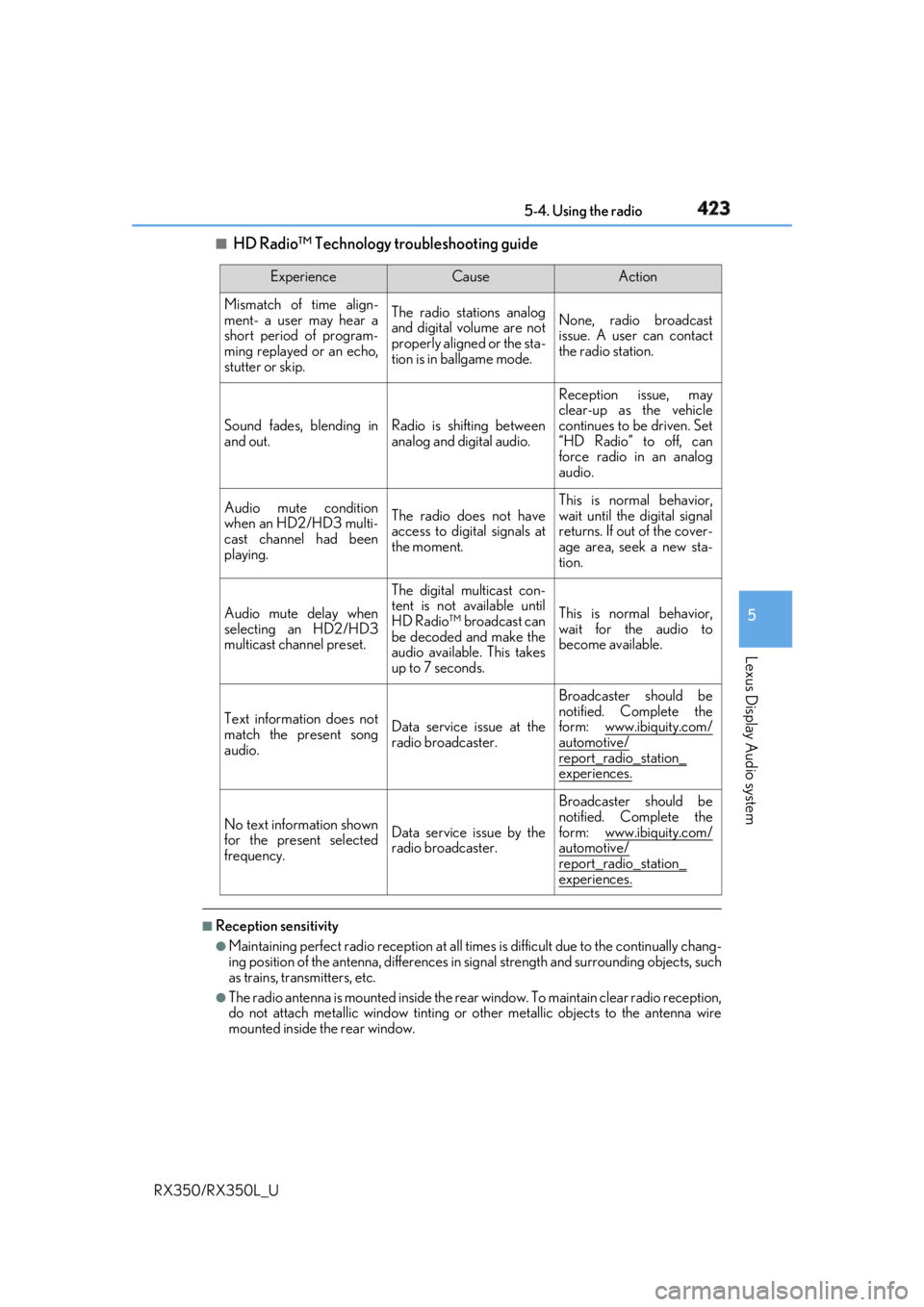
HD Radio™ Technology troubleshooting guide
■
Reception sensitivity ●
Maintaining perfect radio recept ion at all times is difficult due to the continually chang-
ing position of the antenna, differences in si gnal strength and surrounding objects, such
as trains, transmitters, etc. ●
The radio antenna is mounted inside the rear window. To maintain clear radio reception,
do not attach metallic window tinting or other metallic objects to the antenna wire
mounted inside the rear window. Experience Cause Action
Mismatch of time align-
ment- a user may hear a
short period of program-
ming replayed or an echo,
stutter or skip. The radio stations analog
and digital volume are not
properly aligned or the sta-
tion is in ballgame mode. None, radio broadcast
issue. A user can contact
the radio station.
Sound fades, blending in
and out. Radio is shifting between
analog and digital audio. Reception issue, may
clear-up as the vehicle
continues to be driven. Set
“HD Radio” to off, can
force radio in an analog
audio.
Audio mute condition
when an HD2/HD3 multi-
cast channel had been
playing. The radio does not have
access to digital signals at
the moment. This is normal behavior,
wait until the digital signal
returns. If out of the cover-
age area, seek a new sta-
tion.
Audio mute delay when
selecting an HD2/HD3
multicast channel preset. The digital multicast con-
tent is not available until
HD Radio™ broadcast can
be decoded and make the
audio available. This takes
up to 7 seconds. This is normal behavior,
wait for the audio to
become available.
Text information does not
match the present song
audio. Data service issue at the
radio broadcaster. Broadcaster should be
notified. Complete the
form: www.ibiquity.com/
automotive/
report_radio_station_
experiences.
No text information shown
for the present selected
frequency. Data service issue by the
radio broadcaster. Broadcaster should be
notified. Complete the
form: www.ibiquity.com/
automotive/
report_radio_station_
experiences.
Page 425 of 777
424 5-4. Using the radio
RX350/RX350L_U
Page 426 of 777
4255-4. Using the radio
5
Lexus Display Audio system
RX350/RX350L_U
Page 427 of 777
426 5-4. Using the radio
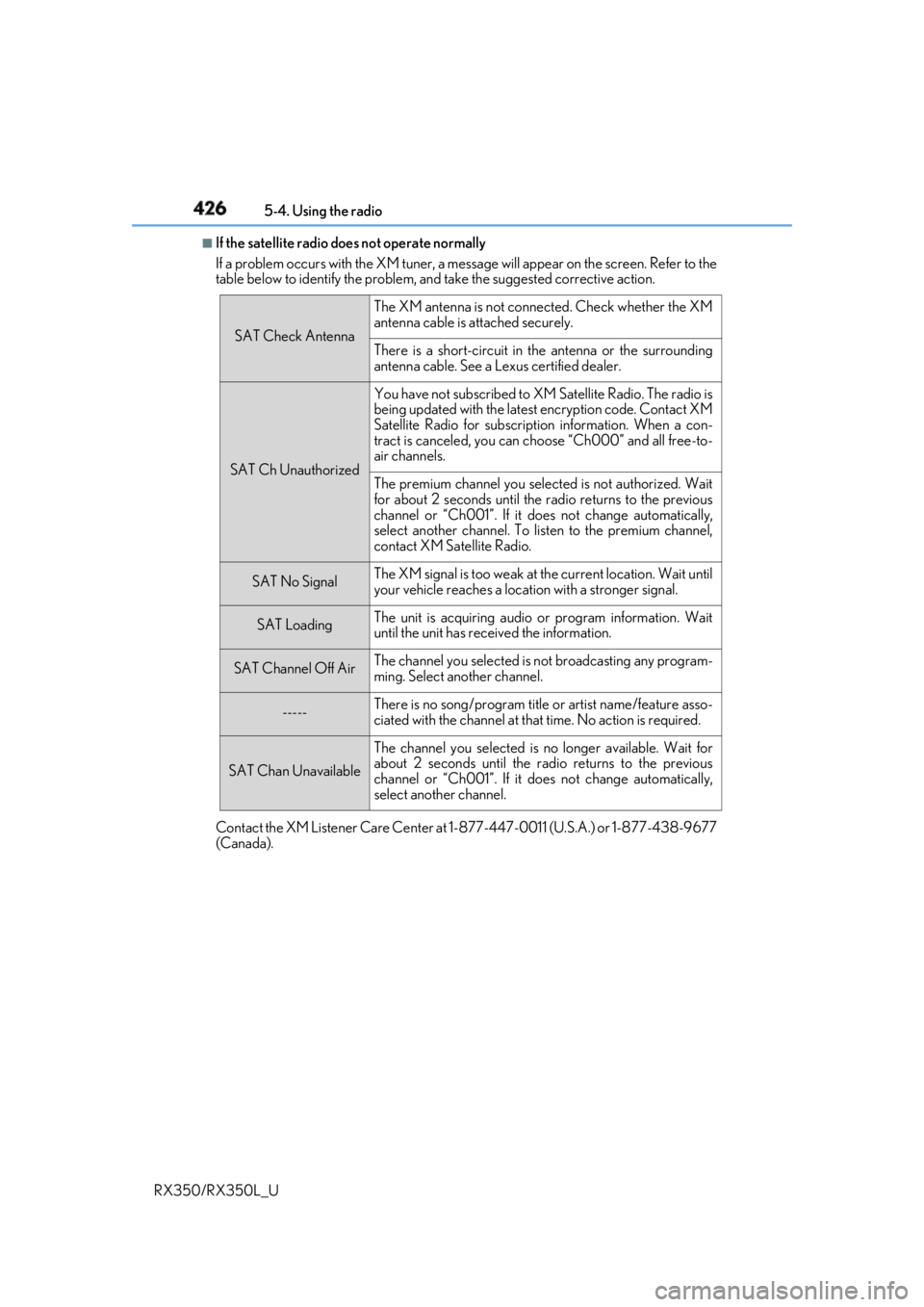
RX350/RX350L_U ■
If the satellite radio does not operate normally
If a problem occurs with the XM tuner, a message will appear on the screen. Refer to the
table below to identify the problem, an d take the suggested corrective action.
Contact the XM Listener Care Center at 1-877-447-0011 (U.S.A.) or 1-877-438-9677
(Canada). SAT Check Antenna The XM antenna is not connected. Check whether the XM
antenna cable is attached securely.
There is a short-circuit in the antenna or the surrounding
antenna cable. See a Lexus certified dealer.
SAT Ch Unauthorized You have not subscribed to XM Satellite Radio. The radio is
being updated with the latest encryption code. Contact XM
Satellite Radio for subscripti on information. When a con-
tract is canceled, you can choose “Ch000” and all free-to-
air channels.
The premium channel you selected is not authorized. Wait
for about 2 seconds until the radio returns to the previous
channel or “Ch001”. If it does not change automatically,
select another channel. To listen to the premium channel,
contact XM Satellite Radio.
SAT No Signal The XM signal is too weak at the current location. Wait until
your vehicle reaches a location with a stronger signal.
SAT Loading The unit is acquiring audio or program information. Wait
until the unit has rece ived the information.
SAT Channel Off Air The channel you selected is not broadcasting any program-
ming. Select another channel.
----- There is no song/program title or artist name/feature asso-
ciated with the channel at that time. No action is required.
SAT Chan Unavailable The channel you selected is no longer available. Wait for
about 2 seconds until the radio returns to the previous
channel or “Ch001”. If it does not change automatically,
select another channel.
Page 482 of 777
4815-11. Bluetooth ®
5
Lexus Display Audio system
RX350/RX350L_U WARNING ■
While driving
Do not operate the portable audio player, ce llular phone or connect a device to the
Bluetooth ®
system.■
Caution regarding interference with electronic devices●
Your audio unit is fitted with Bluetooth ®
antennas. People with implantable cardiac
pacemakers, cardiac resynchronization ther apy-pacemakers or implantable cardio-
verter defibrillators should maintain a re asonable distance between themselves and
the Bluetooth ®
antennas. The radio waves may affe ct the operation of such devices.●
Before using Bluetooth ®
devices, users of any electrical medical device other than
implantable cardiac pacemakers, cardiac resynchronization therapy-pacemakers or
implantable cardioverter defi brillators should consult the manufacturer of the device
for information about its operation under th e influence of radio waves. Radio waves
could have unexpected effects on the operation of such medical devices.
NOTICE ■
When leaving the vehicle
Do not leave your portable au dio player or cellular phone in the vehicle. The inside of
the vehicle may become hot, causing damage to the portable audio player or cellular
phone.
Page 483 of 777
482
RX350/RX350L_U 5-12. Other function
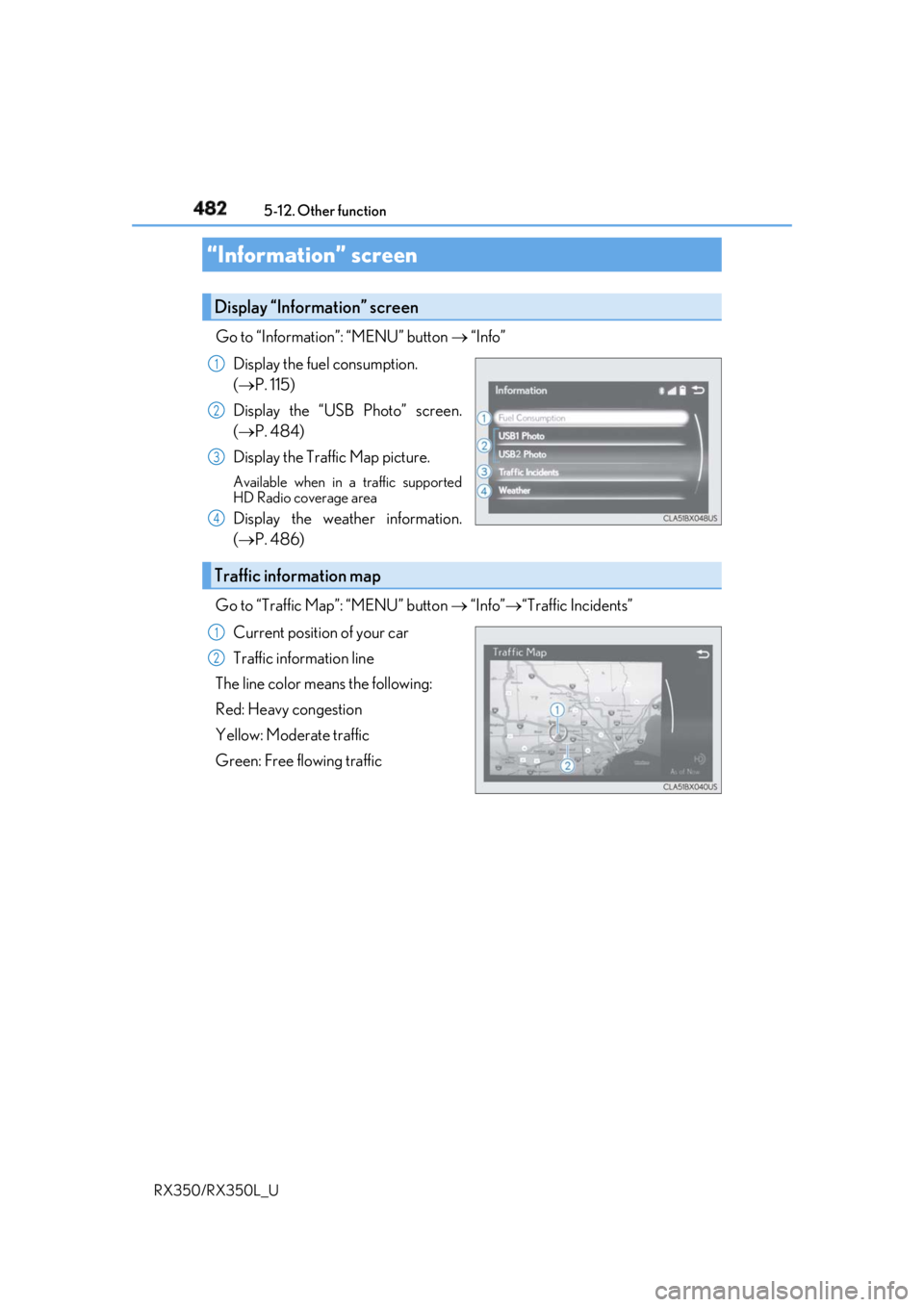
Go to “Information”: “MENU” button “Info”
Display the fuel consumption.
( P. 115)
Display the “USB Photo” screen.
( P. 484)
Display the Traffic Map picture. Available when in a traffic supported
HD Radio coverage area
Display the weather information.
( P. 486)
Go to “Traffic Map”: “MENU” button “Info” “Traffic Incidents”
Current position of your car
Traffic information line
The line color means the following:
Red: Heavy congestion
Yellow: Moderate traffic
Green: Free flowing traffic“Information” screen Display “Information” screen 1
2
3
4
Traffic information map 1
2
Page 487 of 777
486 5-12. Other function
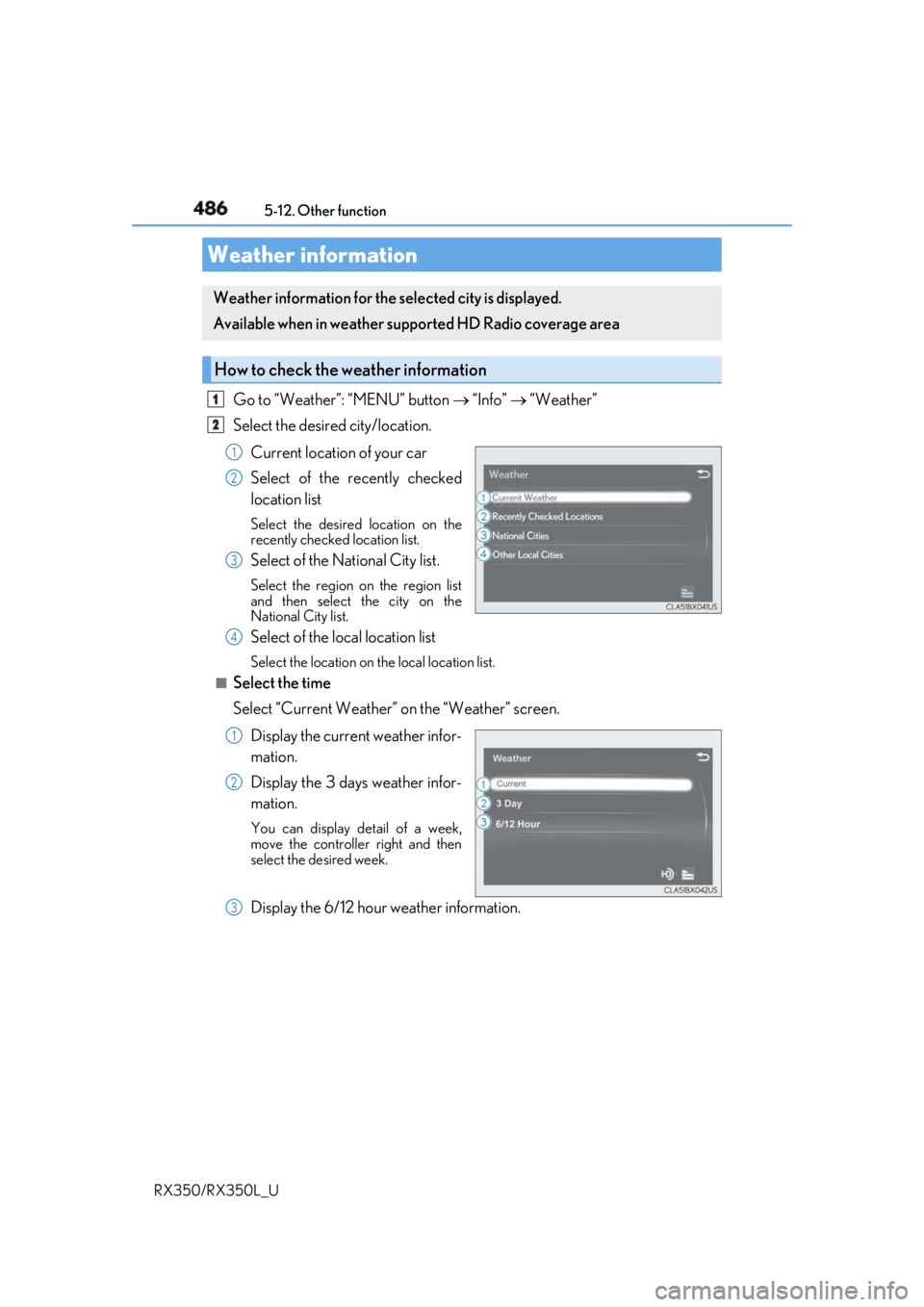
RX350/RX350L_U Go to “Weather”: “MENU” button “Info” “Weather”
Select the desired city/location.
Current location of your car
Select of the recently checked
location list Select the desired location on the
recently checked location list.
Select of the National City list. Select the region on the region list
and then select the city on the
National City list.
Select of the local location list Select the location on th e local location list.■
Select the time
Select “Current Weather” on the “Weather” screen.
Display the current weather infor-
mation.
Display the 3 days weather infor-
mation. You can display detail of a week,
move the controlle r right and then
select the desired week.
Display the 6/12 hour weather information.Weather information Weather information for the selected city is displayed.
Available when in weather suppo rted HD Radio coverage area
How to check the weather information 1
2
1
2
3
4
1
2
3
Page 492 of 777
4915-12. Other function
5
Lexus Display Audio system
RX350/RX350L_U
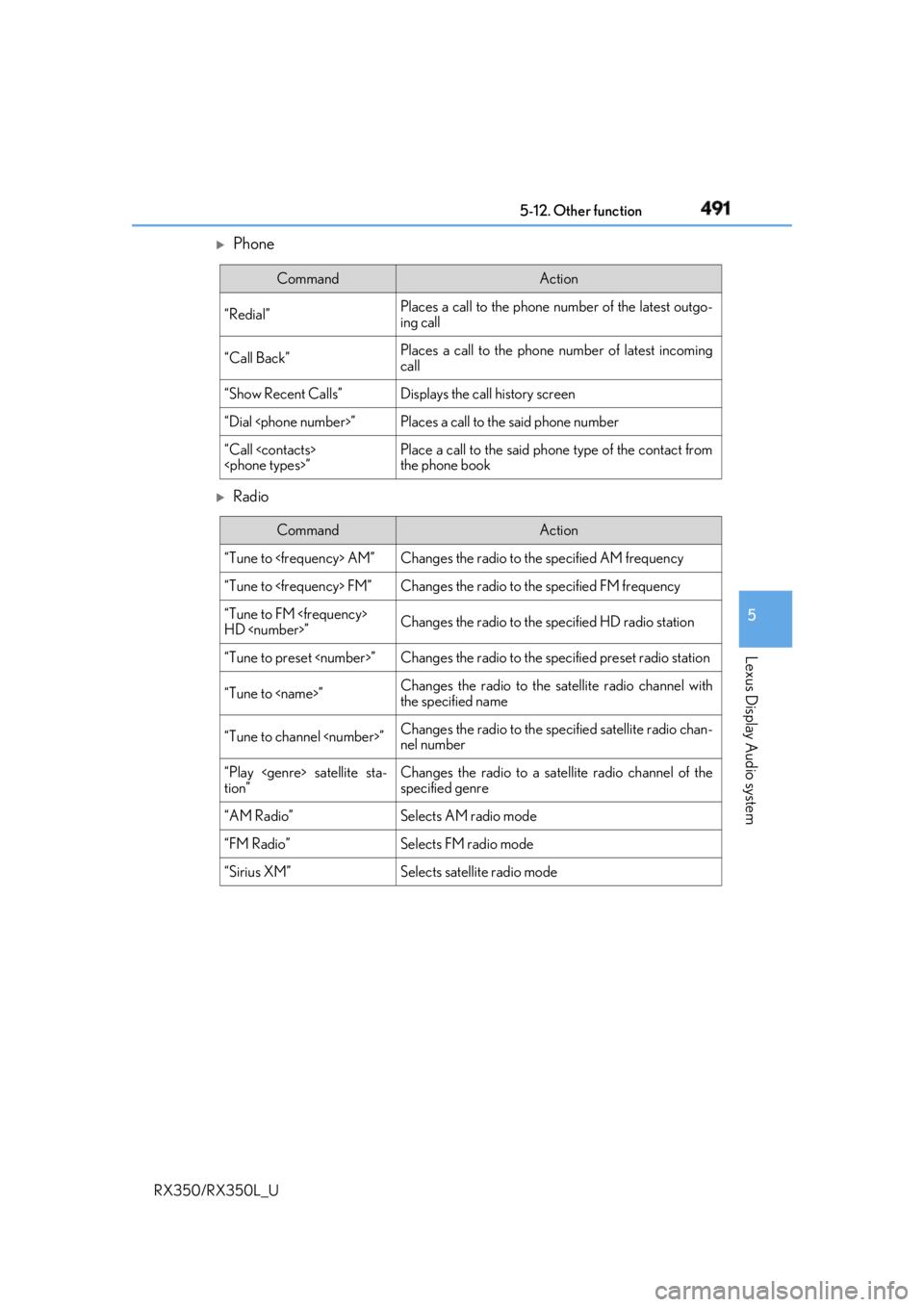
Phone
Radio Command Action
“Redial” Places a call to the phone number of the latest outgo-
ing call
“Call Back” Places a call to the phone number of latest incoming
call
“Show Recent Calls” Displays the call history screen
“Dial
“Call
the phone book
Command Action
“Tune to
“Tune to
“Tune to FM
HD
“Tune to preset
“Tune to
the specified name
“Tune to channel
nel number
“Play
tion” Changes the radio to a satellite radio channel of the
specified genre
“AM Radio” Selects AM radio mode
“FM Radio” Selects FM radio mode
“Sirius XM” Selects satellit e radio mode