light LEXUS RX350 2019 Workshop Manual
[x] Cancel search | Manufacturer: LEXUS, Model Year: 2019, Model line: RX350, Model: LEXUS RX350 2019Pages: 777, PDF Size: 12.44 MB
Page 171 of 777
170 3-3. Adjusting the seats
RX350/RX350L_U WARNING ■
Seat adjustment ●
Second-row seats: To reduce the risk of s liding under the lap belt during a collision,
do not recline the seat more than necessary.
If the seat is reclined excessively, the la p belt may slide past the hips and apply
restraint forces directly to the abdomen, or your neck may contact the shoulder belt,
increasing the risk of de ath or serious injury in the event of an accident.●
Adjustments should not be made while dr iving as the seat may unexpectedly move
and cause the driver to lose control of the vehicle. ■
After adjusting the rear seats
Observe the following precautions.
Failure to do so may result in death or serious injury.●
Manual seats: Make sure that the rear se atback is securely locked in position by
lightly pushing it back and forth. ●
Check that the seat belts are not twisted or caught between or behind in the rear
seatback. ■
Jam protection function (power seats)
Observe the following precautions.
Failure to do so may result in death or serious injury.●
Never use any part of your body to intentionally activate the jam protection function. ●
The jam protection function may not operate if something is caug ht just before the
fully folded position. Be careful so th at fingers, etc. do not get caught.●
The jam protection function may not operat e depending on the shape or position of
the obstruction. Be careful so that fingers, etc. do not get caught.■
Precautions for third-row seat (RX350L)
When operating a third-row seat, make sure to press and hold the sw itch until the third-
row seat seatback is complete ly folded/upright. Do not use a third-row seat in a posi-
tion other than the completely upright position, as doing so may lead to death or seri-
ous injury in an accident. (If the switch is released while the seatback is still moving, a
buzzer will sound continuously until the seatback is complete ly folded/upright.)
Page 175 of 777
174 3-3. Adjusting the seats
RX350/RX350L_U ■
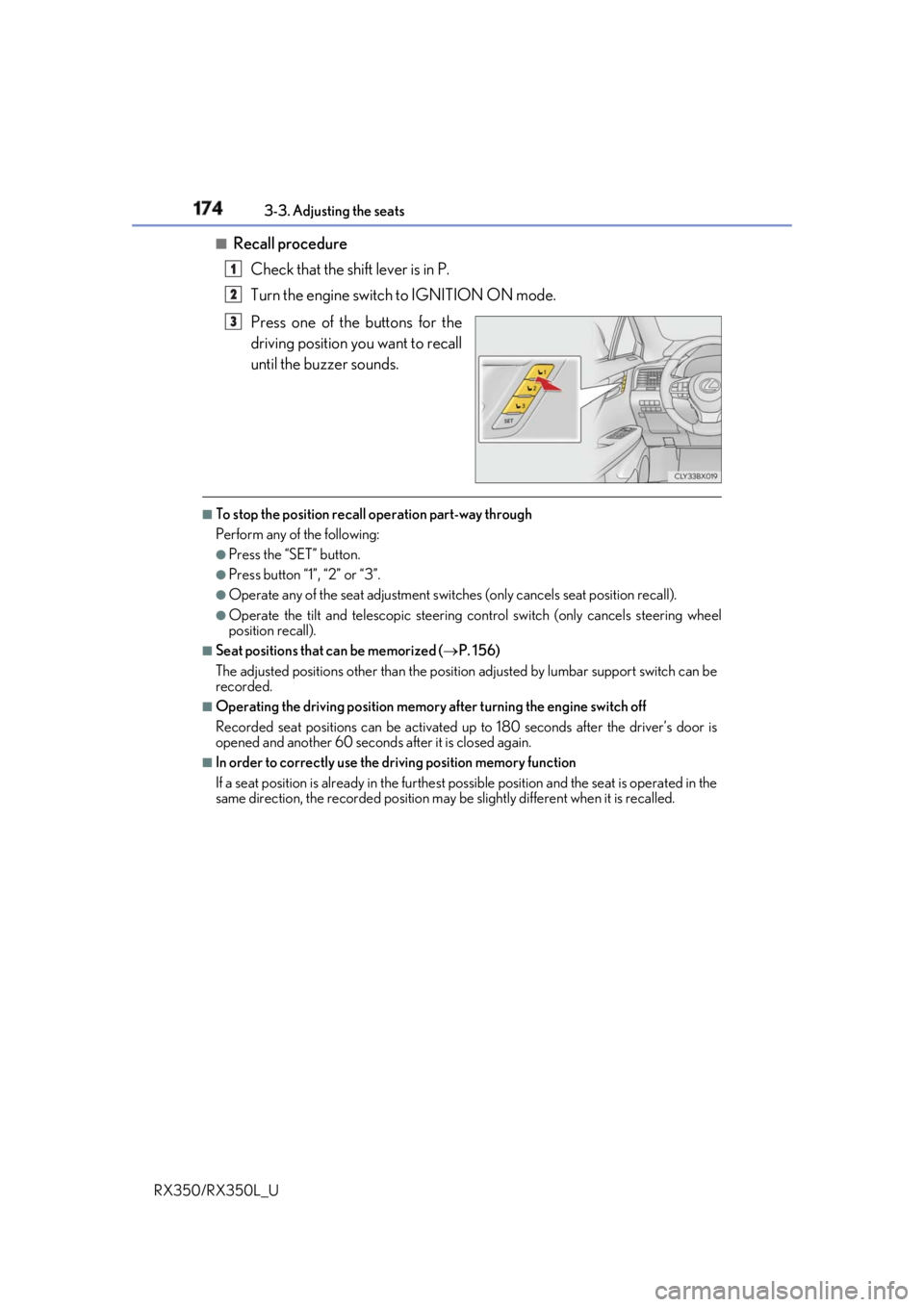
Recall procedure
Check that the shift lever is in P.
Turn the engine switch to IGNITION ON mode.
Press one of the buttons for the
driving position you want to recall
until the buzzer sounds. ■
To stop the position recall operation part-way through
Perform any of the following: ●
Press the “SET” button. ●
Press button “1”, “2” or “3”. ●
Operate any of the seat adjustment switches (only cancels seat position recall). ●
Operate the tilt and telescopic steering control switch (only cancels steering wheel
position recall). ■
Seat positions that can be memorized ( P. 156)
The adjusted positions other than the position adjusted by lumbar support switch can be
recorded. ■
Operating the driving position memory after turning the engine switch off
Recorded seat positions can be activated up to 180 seconds after the driver’s door is
opened and another 60 seconds after it is closed again. ■
In order to correctly use the dr iving position memory function
If a seat position is already in the furthest po ssible position and the seat is operated in the
same direction, the recorded position may be slightly di fferent when it is recalled.1
2
3
Page 176 of 777
1753-3. Adjusting the seats
3
Operation of each component
RX350/RX350L_U Each electronic key can be registered to recall your preferred driving position.■
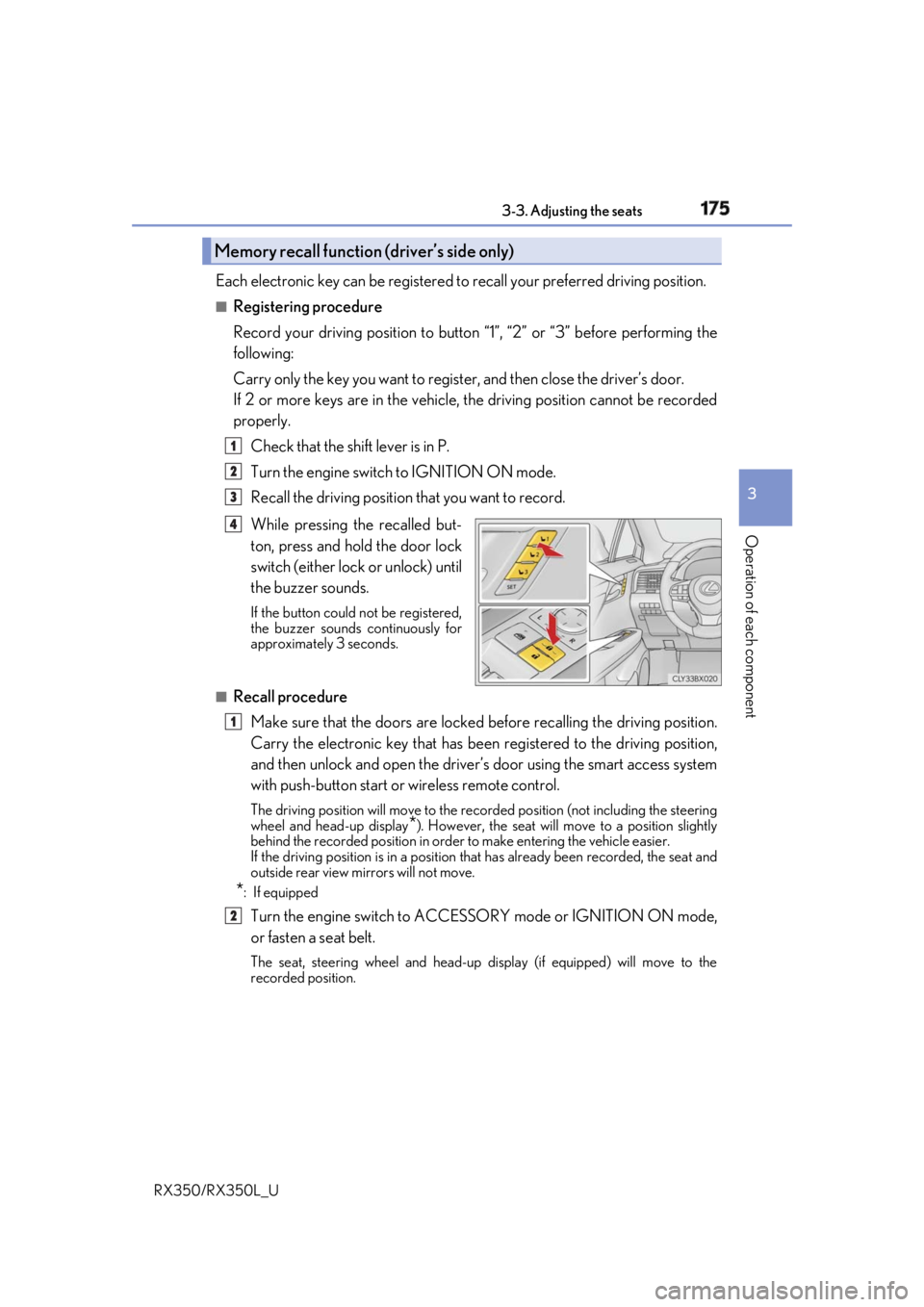
Registering procedure
Record your driving position to button “1”, “2” or “3” before performing the
following:
Carry only the key you want to regist er, and then close the driver’s door.
If 2 or more keys are in the vehicle, the driving position cannot be recorded
properly.
Check that the shift lever is in P.
Turn the engine switch to IGNITION ON mode.
Recall the driving position that you want to record.
While pressing the recalled but-
ton, press and hold the door lock
switch (either lock or unlock) until
the buzzer sounds. If the button could not be registered,
the buzzer sounds continuously for
approximately 3 seconds.
■
Recall procedure
Make sure that the doors are locked before recalling the driving position.
Carry the electronic key that has been registered to the driving position,
and then unlock and open the driver’s door using the smart access system
with push-button start or wireless remote control. The driving position will move to the recorded position (not including the steering
wheel and head-up display
* ). However, the seat will move to a position slightly
behind the recorded position in order to make entering the vehicle easier.
If the driving position is in a position th at has already been recorded, the seat and
outside rear view mirrors will not move.
* : If equipped
Turn the engine switch to ACCESS ORY mode or IGNITION ON mode,
or fasten a seat belt. The seat, steering wheel and head-up display (if equipped) will move to the
recorded position.Memory recall function (driver’s side only) 1
2
3
4
1
2
Page 183 of 777
182 3-4. Adjusting the steering wheel and mirrors
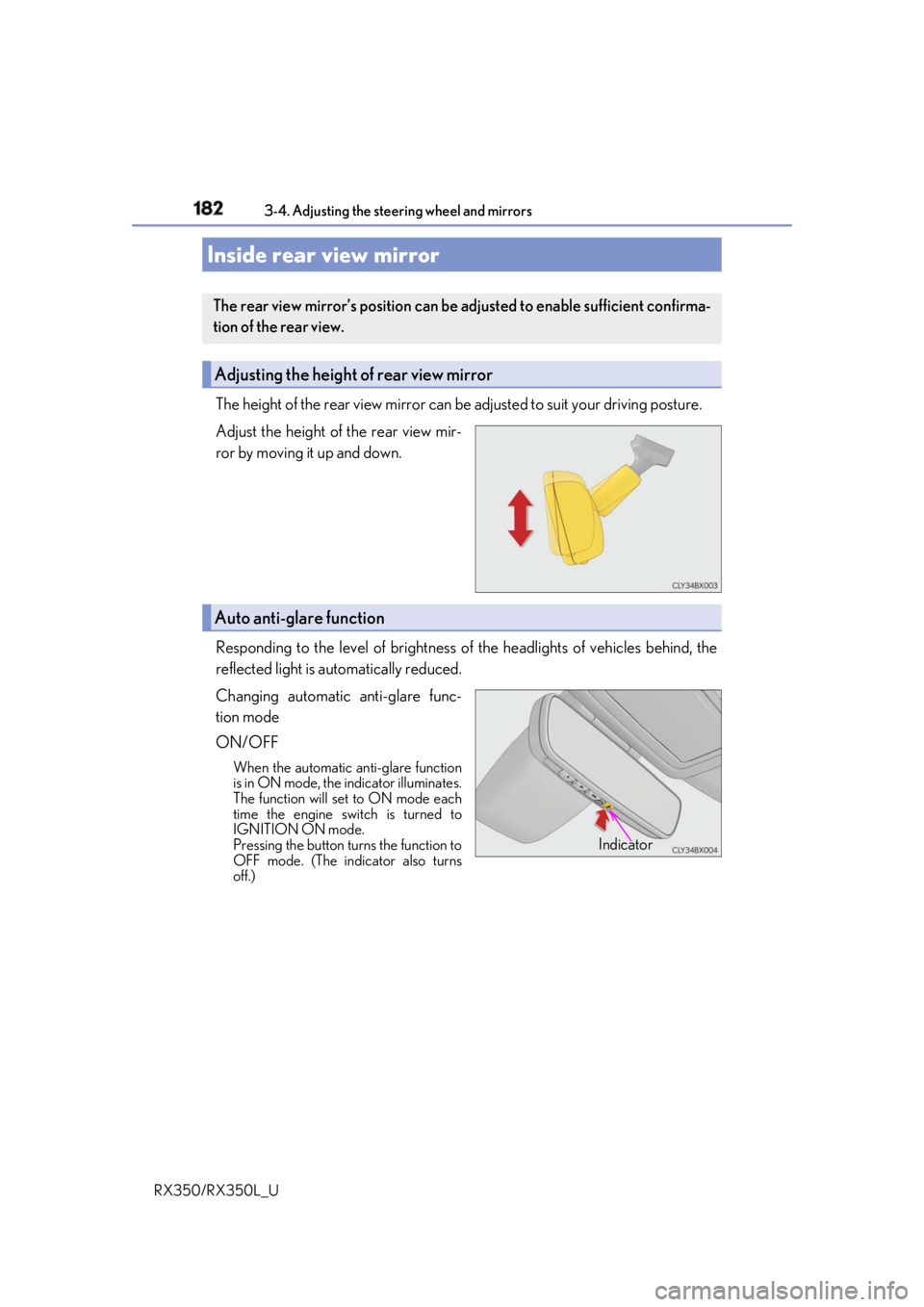
RX350/RX350L_U The height of the rear view mirror can be adjusted to suit your driving posture.
Adjust the height of the rear view mir-
ror by moving it up and down.
Responding to the level of brightness of the headlights of vehicles behind, the
reflected light is automatically reduced.
Changing automatic anti-glare func-
tion mode
ON/OFF When the automatic anti-glare function
is in ON mode, the indicator illuminates.
The function will set to ON mode each
time the engine switch is turned to
IGNITION ON mode.
Pressing the button turns the function to
OFF mode. (The indicator also turns
off.)Inside rear view mirror The rear view mirror’s position can be adjusted to enable sufficient confirma-
tion of the rear view.
Adjusting the height of rear view mirror
Auto anti-glare function
Indicator
Page 187 of 777
186 3-4. Adjusting the steering wheel and mirrors
RX350/RX350L_U ■
Mirror angle can be adjusted when
The engine switch is in ACCESSORY or IGNITION ON mode. ■
When disconnecting and reconnecting batter y terminals (vehicles with an automatic
folding/extending mirror function)
The automatic folding/extending mirror function will return to off as default. To turn the
function on, press the switch again to select on. ■
When the mirrors are fogged up
The outside rear view mirrors can be cleare d using the mirror defoggers. Turn on the
rear window defogger to turn on the outside rear view mirror defoggers. ( P. 513)■
Automatic adjustment of the mirror angle (if equipped)
A desired mirror face angle can be entered to memory and recalled automatically by the
driving position memory. ( P. 172)■
Auto anti-glare function (if equipped)
When the anti-glare inside re ar view mirror is set to automatic mode, the outside rear
view mirrors will activate in conjunction with the anti-glare inside rear view mirror to
reduce reflected light. ( P. 182)■
Using automatic mode in cold weather (if equipped)
When automatic mode is used in cold weather, the door mirror could freeze up and
automatic stowing and return may not be possible. In this case, remove any ice and snow
from the door mirror, then either operate th e mirror using manual mode or move the mir-
ror by hand. ■
Customization
Some functions can be customized. ( P. 722)
WARNING ■
Important points while driving
Observe the following precautions while driving.
Failing to do so may result in loss of control of the vehicle and cause an accident, result-
ing in death or serious injury. ●
Do not adjust the mirrors while driving. ●
Do not drive with the mirrors folded. ●
Both the driver and passenger side mirrors must be extended and properly adjusted
before driving. ■
When a mirror is moving
To avoid personal injury and mirror malfunctio n, be careful not to get your hand caught
by the moving mirror. ■
When the mirror defoggers are operating
Do not touch the rear view mirror surfaces, as they can become very hot and burn you.
Page 188 of 777
187
3
Operation of each component
RX350/RX350L_U 3-5. Opening, closing the windows and moon roof
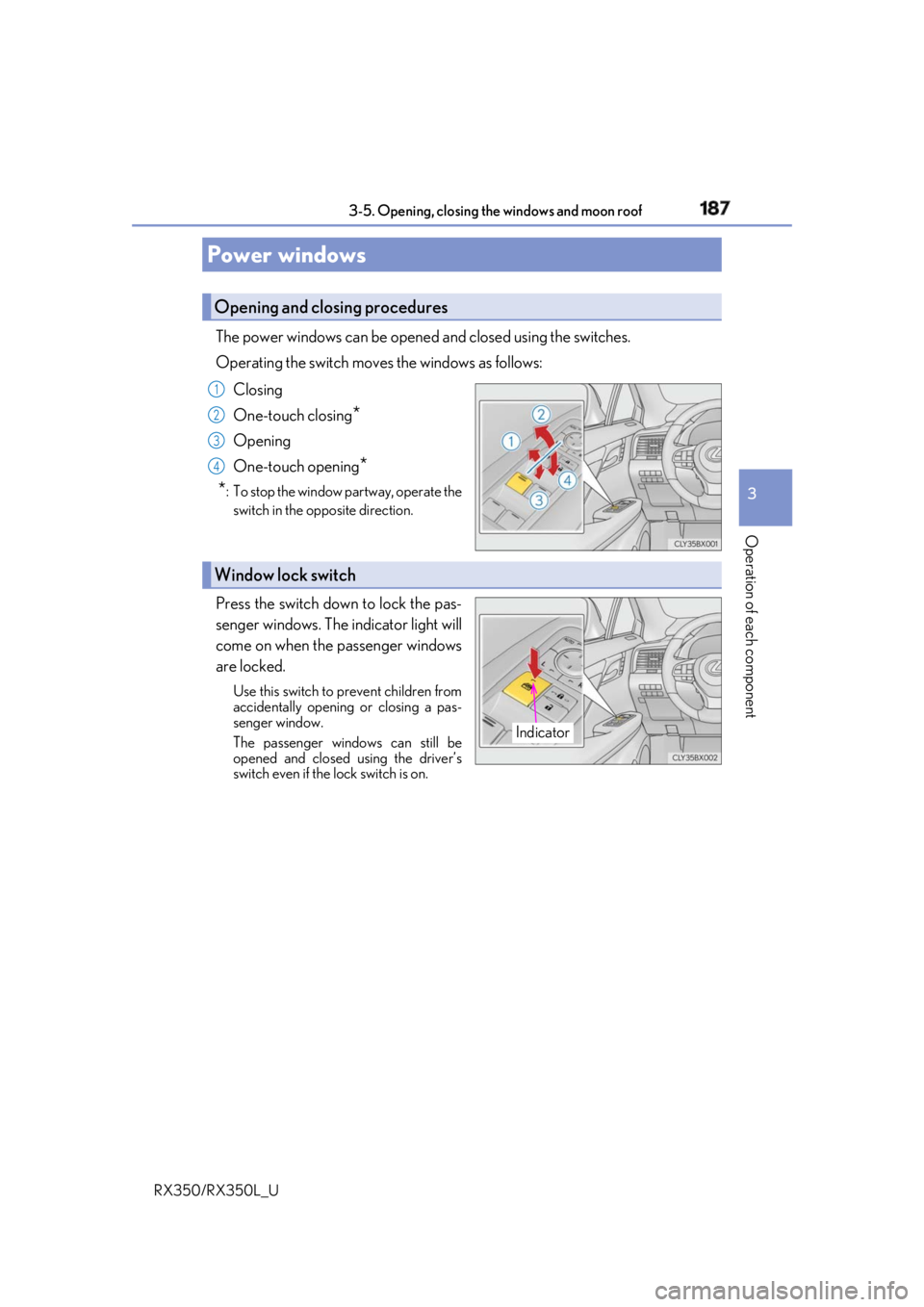
The power windows can be opened and closed using the switches.
Operating the switch move s the windows as follows:
Closing
One-touch closing
*Opening
One-touch opening
*
* : To stop the window partway, operate the
switch in the op posite direction.
Press the switch down to lock the pas-
senger windows. The indicator light will
come on when the passenger windows
are locked. Use this switch to prevent children from
accidentally opening or closing a pas-
senger window.
The passenger windows can still be
opened and closed using the driver’s
switch even if the lock switch is on.Power windows Opening and closing procedures 1
2
3
4
Window lock switch
Indicator
Page 189 of 777

188 3-5. Opening, closing the windows and moon roof
RX350/RX350L_U ■
The power windows can be operated when
The engine switch is in IGNITION ON mode. ■
Operating the power windows after turning the engine off
The power windows can be operated for ap proximately 45 seconds even after the
engine switch is turned to ACCESSORY mode or turned off. They cannot, however, be
operated once either front door is opened. ■
Jam protection function
If an object becomes jammed between the window and the window frame while the win-
dow is closing, window movement is stop ped and the window is opened slightly.■
Catch protection function
If an object becomes caught between the door and window while the window is opening,
window movement is stopped. ■
When the window cannot be opened or closed
When the jam protection functi on or catch protection func tion operates unusually and
the door window cannot be opened or closed, perform the following operations with the
power window switch of that door. ●
Stop the vehicle. With the engine switch in IGNITION ON mode, within 4 seconds of
the jam protection function or catch protecti on function activating, continuously oper-
ate the power window switch in the one-to uch closing direction or one-touch opening
direction so that the door wind ow can be opened and closed.●
If the door window cannot be opened and closed even when performing the above
operations, perform the following procedure for function initialization.
Turn the engine switch to IGNITION ON mode.
Pull and hold the power window switch in the one-touch closing direction and com-
pletely close the door window.
Release the power window sw itch for a moment, resume pulling the switch in the
one-touch closing direction, and hold it there for approximately 6 seconds or more.
Press and hold the power window switch in the one-touch opening direction. After
the door window is completely opened, cont inue holding the switch for an additional
1 second or more.
Release the power window switch for a mo ment, resume pushing the switch in the
one-touch opening direction, and hold it there for approximately 4 seconds or
more.
Pull and hold the power window switch in the one-touch closing direction again.
After the door window is completely clos ed, continue holding the switch for a fur-
ther 1 second or more.
If you release the switch while the window is moving, start again from the beginning.
If the window reverses and cannot be fully cl osed or opened, have the vehicle inspected
by your Lexus dealer. 1
2
3
4
5
6
Page 192 of 777
1913-5. Opening, closing the windows and moon roof
3
Operation of each component
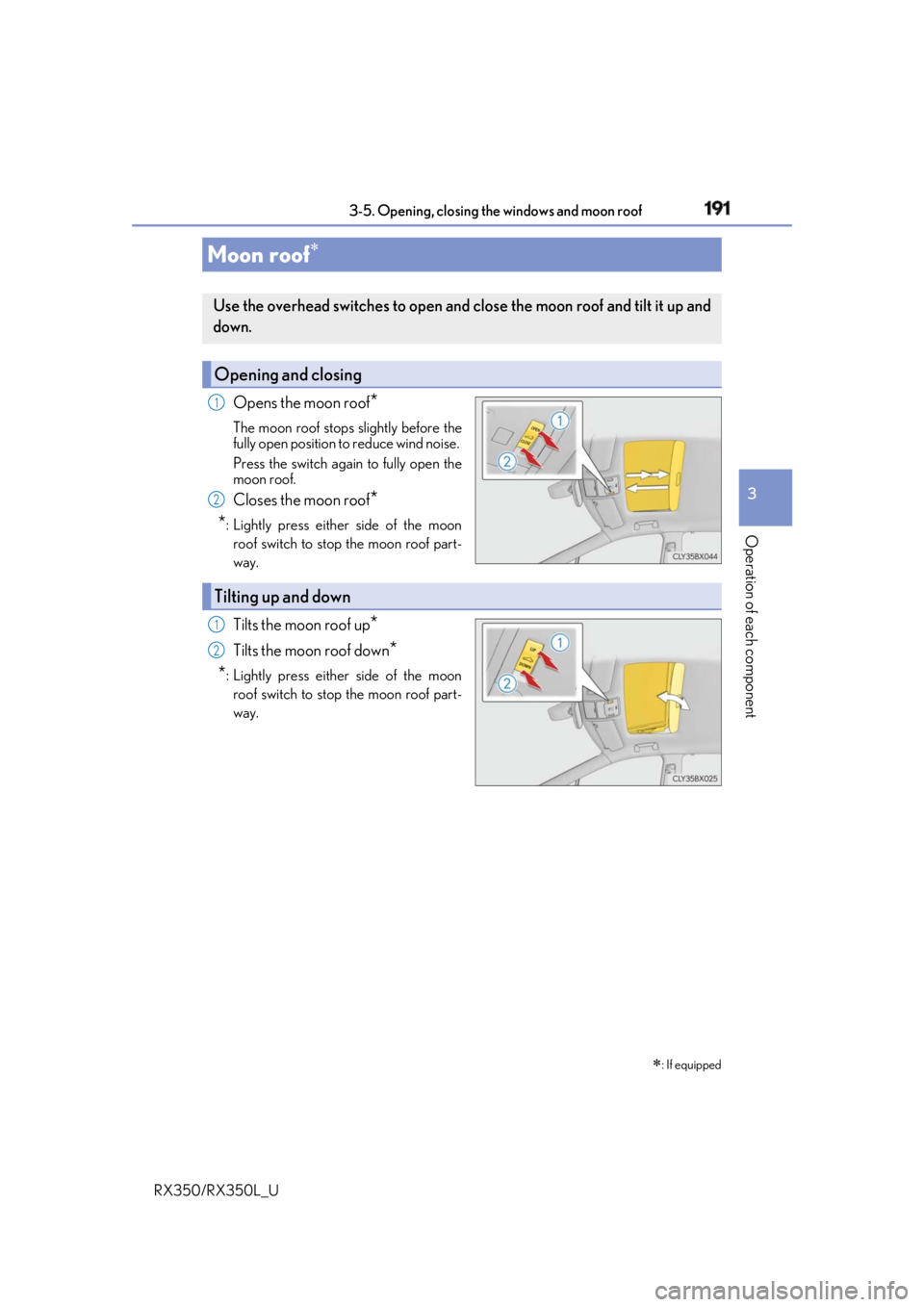
RX350/RX350L_U Opens the moon roof
*The moon roof stops slightly before the
fully open position to reduce wind noise.
Press the switch again to fully open the
moon roof.
Closes the moon roof
*
* : Lightly press either side of the moon
roof switch to stop the moon roof part-
way.
Tilts the moon roof up
*Tilts the moon roof down
*
* : Lightly press either side of the moon
roof switch to stop the moon roof part-
way.Moon roof
: If equippedUse the overhead switches to open and close the moon roof and tilt it up and
down.
Opening and closing 1
2
Tilting up and down 1
2
Page 193 of 777

192 3-5. Opening, closing the windows and moon roof
RX350/RX350L_U ■
The moon roof can be operated when
The engine switch is in IGNITION ON mode. ■
Operating the moon roof after turning the engine off
The moon roof can be operated for approximat ely 45 seconds after the engine switch is
turned to ACCESSORY mode or turned off. It cannot, however, be operated once the
driver’s door is opened. ■
Jam protection function
If an object is detected between the moon r oof and the frame while the moon roof is clos-
ing or tilting down, travel is stopped and the moon roof opens slightly. ■
Sunshade
The sunshade can be opened and closed manually. Howe ver, the sunshade will open
automatically when the moon roof is opened. ■
Door lock linked moon roof operation ●
The moon roof can be opened and closed using the mechanical key.
* ( P. 685)●
The moon roof can be opened us ing the wireless remote control.
* ( P. 124)
* : These settings must be customized at your Lexus dealer.
Page 194 of 777
1933-5. Opening, closing the windows and moon roof
3
Operation of each component
RX350/RX350L_U ■
When the moon roof does not close normally
Perform the following procedure: ●
If the moon roof closes but then re-opens slightly
Stop the vehicle.
Press and hold the “CLOSE” switch.
* 1
The moon roof will close, reopen an d pause for approximately 10 seconds.
* 2
Then it
will close again, tilt up and pause for approx imately 1 second. Finally, it will tilt down,
open and close.
Check to make sure that the moon roof is completely closed and then release the
switch. ●
If the moon roof tilts do wn but then tilts back up
Stop the vehicle.
Press and hold the “UP” switch
* 1
until the moon roof moves into the tilt up position
and stops.
Release the “UP” switch once and then press and hold the “UP” switch again.
* 1
The moon roof will pause fo r approximately 10 seconds in the tilt up position.
* 2
Then it will adjust slightly and pause for approximately 1 second. Finally, it will tilt
down, open and close.
Check to make sure that the moon roof is completely closed and then release the
switch.
* 1
: If the switch is released at the incorrect time, the pr ocedure will have to be per-
formed again from the beginning.
* 2
: If the switch is released after the above mentioned 10 second pause, automatic
operation will be disabled. In that case, press and hold the “CLOSE” or “UP” switch,
and the moon roof will tilt up and pause for approximately 1 second. Then it will tilt
down, open and close. Check to make sure that the moon roof is completely closed
and then release the switch.
If the moon roof does not fully close even after performing the above procedure cor-
rectly, have the vehicle inspected by your Lexus dealer. ■
Alarm
The alarm may be triggered if the alarm is se t and the moon roof is closed using the door
lock linked moon roof operation function. ( P. 77)■
Moon roof open warning buzzer
A buzzer sounds and a message is shown on the multi-information display in the instru-
ment cluster when the engine switch is turned off and the driver’s door is opened with the
moon roof open. ■
Customization
Some functions can be customized. ( P. 722)1
2
3
1
2
3
4