ECO mode LEXUS RX350 2019 Repair Manual
[x] Cancel search | Manufacturer: LEXUS, Model Year: 2019, Model line: RX350, Model: LEXUS RX350 2019Pages: 777, PDF Size: 12.44 MB
Page 449 of 777
448 5-7. Connecting Bluetooth ®
RX350/RX350L_U When you register a phone, auto conn ection will be activated. It is recom-
mended to have the system set to this mode and leave the Bluetooth ®
phone in a
place where a good connection can be established.
When the engine switch is turned to ACCESSORY or IGNITION ON mode,
the system will search for a nearby cellular phone you have registered.
Next, the system automatically connects with the most recent phone that was
connected. The connected result is displayed.
When automatic connection priority is se t to on and there is more than one reg-
istered Bluetooth ®
phone available, the system will automatically connect to the
Bluetooth ®
phone with the highest priority. ( P. 450)
When auto connection has failed or “Bluetooth
* 1
Power” is turned off, you must
connect the Bluetooth ®
device manually.
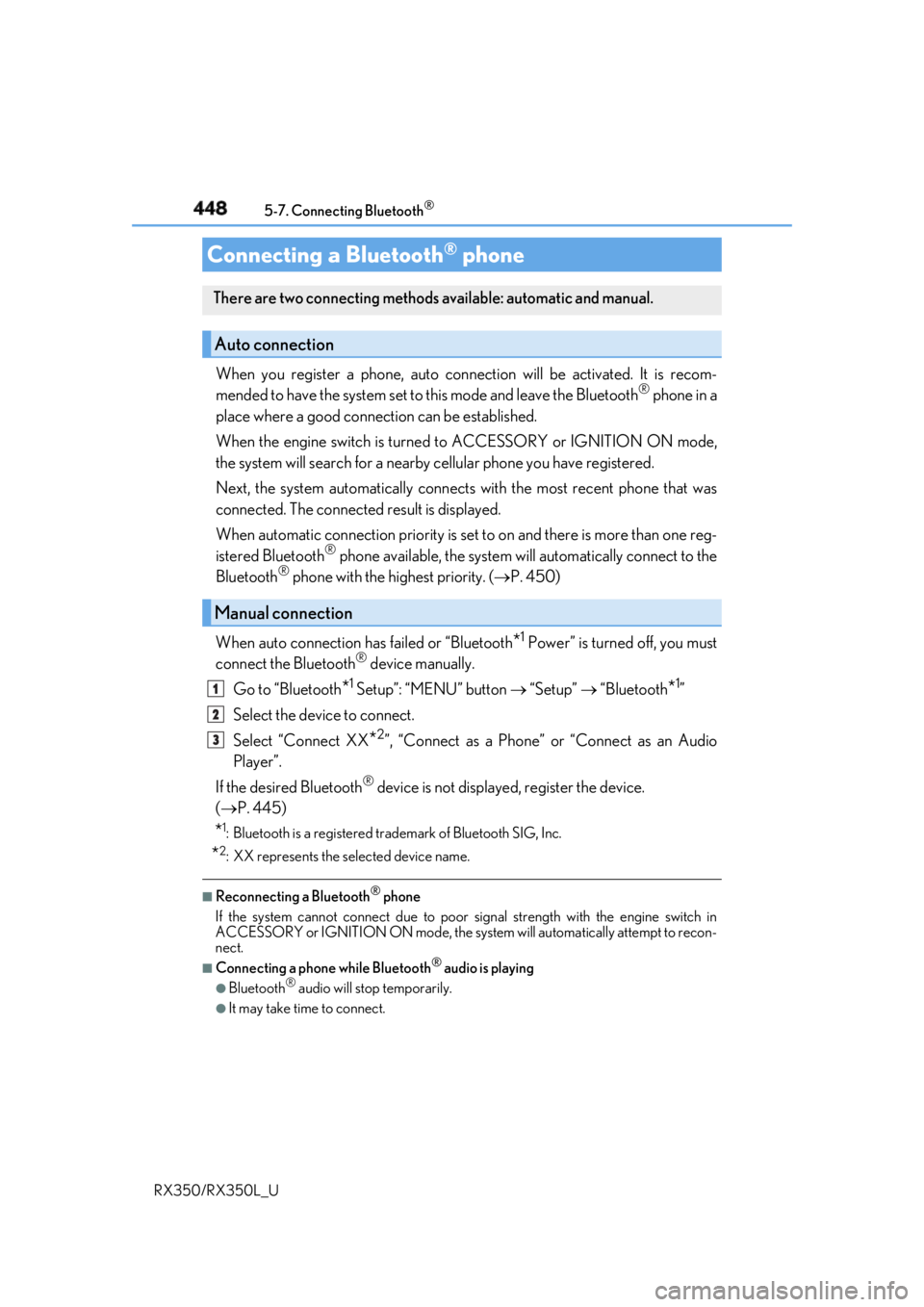
Go to “Bluetooth
* 1
Setup”: “MENU” button “Setup” “Bluetooth
* 1
”
Select the device to connect.
Select “Connect XX
* 2
”, “Connect as a Phone” or “Connect as an Audio
Player”.
If the desired Bluetooth ®
device is not displayed, register the device.
( P. 445)
* 1
: Bluetooth is a registered trademark of Bluetooth SIG, Inc.
* 2
: XX represents the selected device name. ■
Reconnecting a Bluetooth ®
phone
If the system cannot connect due to poor signal strength with the engine switch in
ACCESSORY or IGNITION ON mode, the syst em will automatically attempt to recon-
nect. ■
Connecting a phone while Bluetooth ®
audio is playing●
Bluetooth ®
audio will stop temporarily.●
It may take time to connect.Connecting a Bluetooth ®
phoneThere are two connecting methods available: automatic and manual.
Auto connection
Manual connection 1
2
3
Page 479 of 777

478 5-11. Bluetooth ®
RX350/RX350L_U ■
Compatible models
The Bluetooth ®
audio system supports portable audi o players with the following specifi-
cations ●
Bluetooth ®
specifications:
Ver. 2.0 or higher (Recommend ed: Ver. 3.0 +EDR or higher)●
Profiles:
• A2DP (Advanced Audio Distribution Profile) Ver. 1.0, or higher
(Recommended: Ver. 1.3 or higher)
This is a profile to transmit stereo audio or high quality sound to the audio system.
• AVRCP (Audio/Video Remote Cont rol Profile) Ver. 1.0 or higher
(Recommended: Ver. 1.5 or higher)
This is a profile to allow re mote control the A/V equipment.
However, please note that some functions may be limited depending on the type of por-
table audio player connected.
The hands-free system supports cellular ph ones with the following specifications.●
Bluetooth ®
specification:
Ver. 2.0 or higher (Recommend ed: Ver. 3.0 +EDR or higher)●
Profiles:
• HFP (Hands Free Profile) Ver. 1.0 or higher (Recommended: Ver. 1.6 or higher)
This is a profile to allow hands-free phone calls using a cellular phone or head set. It
has outgoing and incoming call functions.
• OPP (Object Push Profile) Ver. 1.1 or higher (Recommended: Ver. 1.2)
This is a profile to transfer phonebook data. When a Bluetooth ®
compatible cellular
phone has both PBAP and OPP, OPP cannot be used.
• PBAP (Phone Book Access Profile) Ver. 1.0 or higher (Recommended: Ver. 1.1)
This is a profile to transfer phonebook data.
• MAP (Message Access Pr ofile) Ver.1.0 or higher
This is a profile to using phone message.
If the cellular phone does not support HFP, yo u cannot register it wi th the hands-free sys-
tem. OPP, PBAP or MAP services must be selected individually.■
Reconnecting the portable audio player
If the portable audio player is disconnected due to poor reception when the engine
switch is in ACCESSORY or IGNITION ON mode, the system automatically recon-
nects the portable audio player.
If you have switched off the portable audio pl ayer yourself, follow the instructions below
to reconnect: ●
Select the portable audio player again ●
Enter the portable audio player ■
When you sell your car
Be sure to delete your personal data. ( P. 409)
Page 499 of 777
498 6-1. Basic operation of the Remote Touch screen
RX350/RX350L_U ■
Screen display during low temperatures
When the ambient temperature is extremely low, screen response may be delayed even
if the Remote Touch is operated.
WARNING ■
When using the Remote Touch ●
Do not allow fingers, fingernails or hair to become caught in the Remote Touch as this
may cause an injury. ●
Be careful when selecting the Remote Touch in extreme temperatures as it may
become very hot or cold due to the temperature inside the vehicle.
NOTICE ■
To prevent damage to the Remote Touch ●
Do not allow the Remote Touch to come into contact with food, liquid, stickers or lit
cigarettes as doing so may cause it to change color, emit a strange odor or stop func-
tioning. ●
Do not subject the Remote Touch to excessive pressure or strong impact as the knob
may bend or break off. ●
Do not allow coins, contact lenses or ot her such items to be come caught in the
Remote Touch as this may cause it to stop functioning. ●
Items of clothing may rip if they become caught on the Remote Touch knob. ●
If your hand or any object is on the Remote Touch knob when the engine switch is in
ACCESSORY mode, the Remote Touch knob may not operate properly.
Page 507 of 777
506 6-2. Using the air conditio ning system and defogger
RX350/RX350L_U
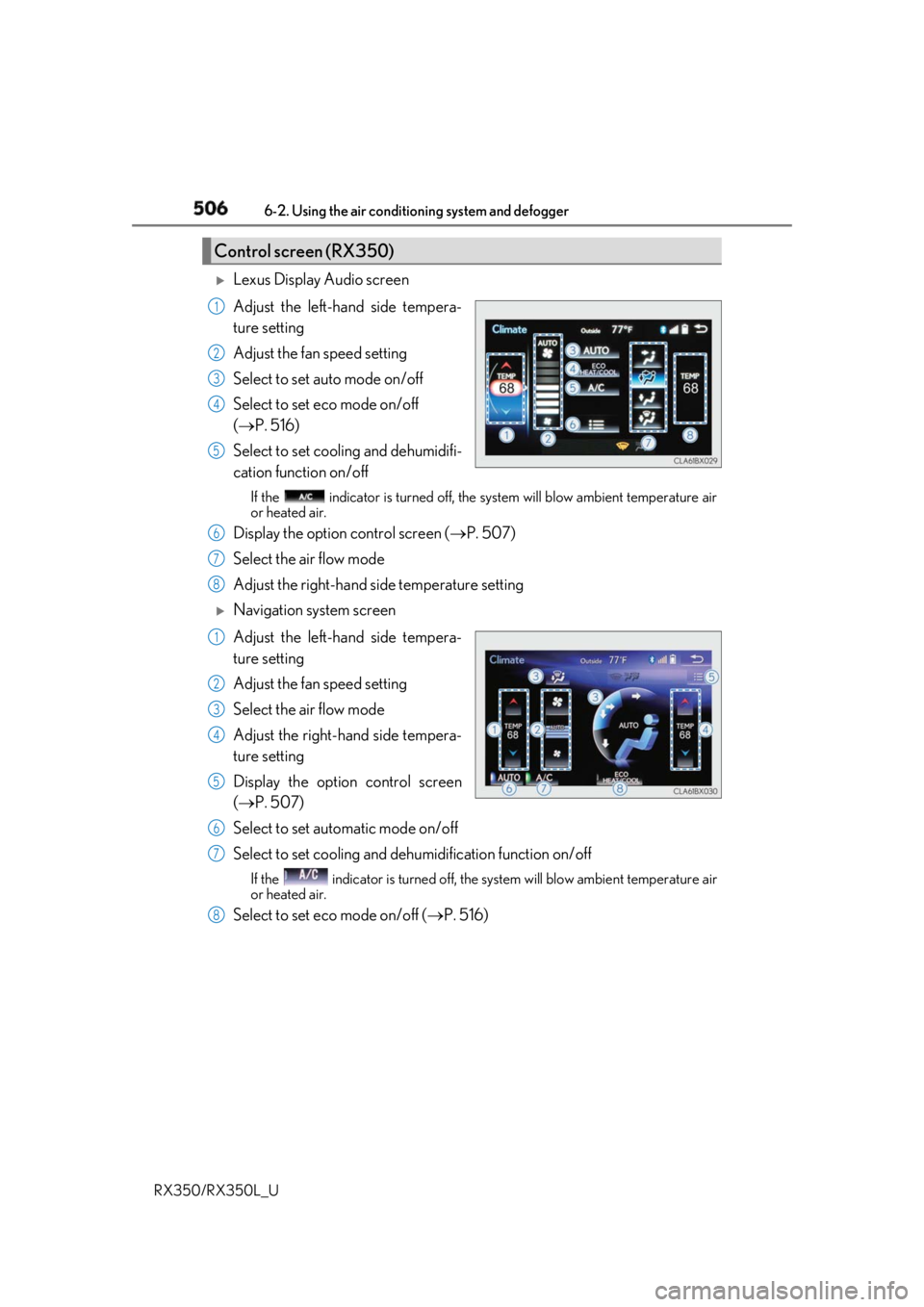
Lexus Display Audio screen
Adjust the left-hand side tempera-
ture setting
Adjust the fan speed setting
Select to set auto mode on/off
Select to set eco mode on/off
( P. 516)
Select to set cooling and dehumidifi-
cation function on/off If the indicator is turned off, the system will blow ambi ent temperature air
or heated air.
Display the option control screen ( P. 507)
Select the air flow mode
Adjust the right-hand side temperature setting
Navigation system screen
Adjust the left-hand side tempera-
ture setting
Adjust the fan speed setting
Select the air flow mode
Adjust the right-hand side tempera-
ture setting
Display the option control screen
( P. 507)
Select to set automatic mode on/off
Select to set cooling and de humidification function on/offIf the indicator is turned off, the system will blow ambient temperature air
or heated air.
Select to set eco mode on/off ( P. 516)Control screen (RX350) 1
2
3
4
5
6
7
8
1
2
3
4
5
6
7
8
Page 509 of 777
508 6-2. Using the air conditio ning system and defogger
RX350/RX350L_U
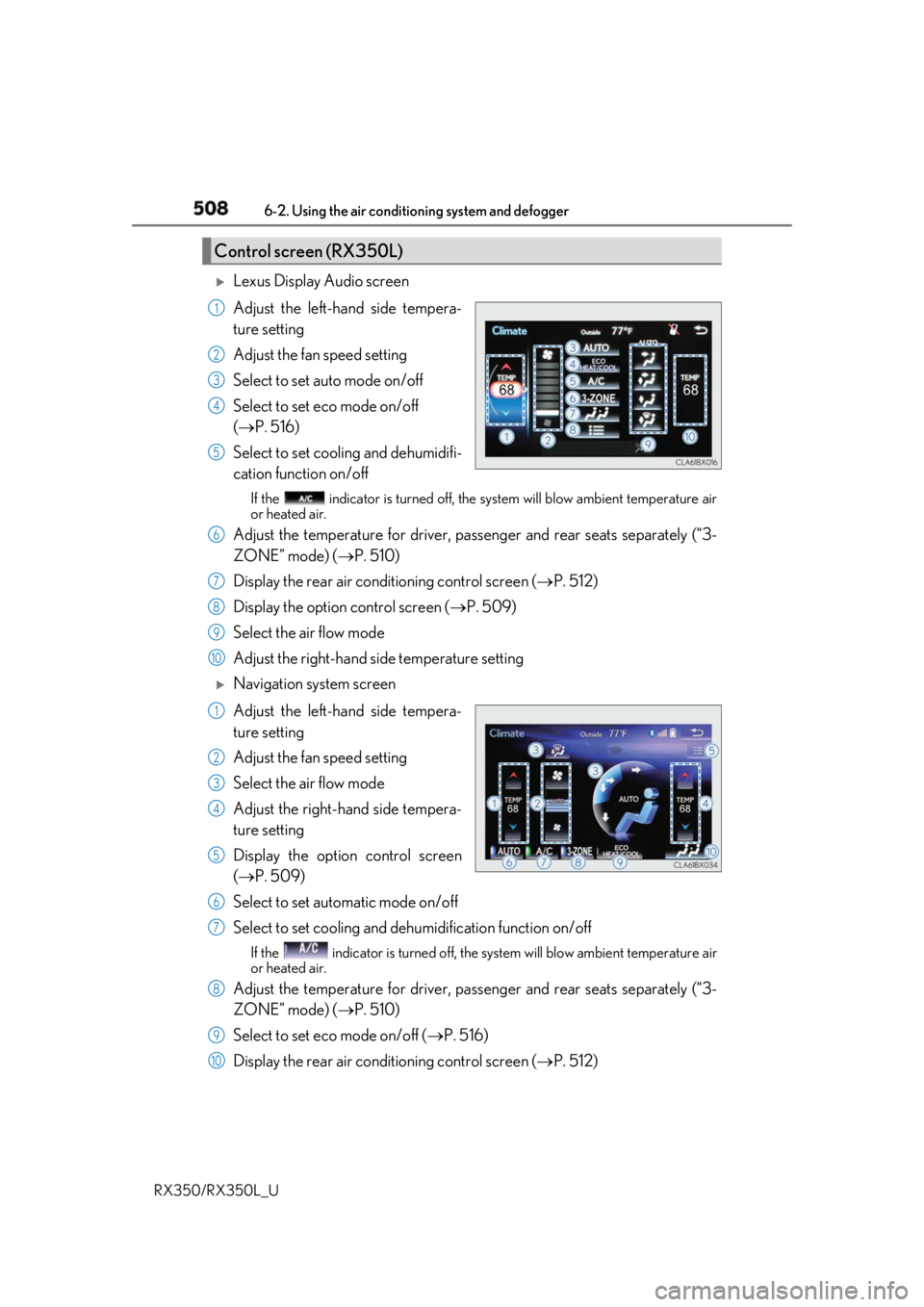
Lexus Display Audio screen
Adjust the left-hand side tempera-
ture setting
Adjust the fan speed setting
Select to set auto mode on/off
Select to set eco mode on/off
( P. 516)
Select to set cooling and dehumidifi-
cation function on/off If the indicator is turned off, the system will blow ambi ent temperature air
or heated air.
Adjust the temperature for driver, passe nger and rear seats separately (“3-
ZONE” mode) ( P. 510)
Display the rear air condit ioning control screen ( P. 512)
Display the option control screen ( P. 509)
Select the air flow mode
Adjust the right-hand side temperature setting
Navigation system screen
Adjust the left-hand side tempera-
ture setting
Adjust the fan speed setting
Select the air flow mode
Adjust the right-hand side tempera-
ture setting
Display the option control screen
( P. 509)
Select to set automatic mode on/off
Select to set cooling and de humidification function on/offIf the indicator is turned off, the system will blow ambient temperature air
or heated air.
Adjust the temperature for driver, passe nger and rear seats separately (“3-
ZONE” mode) ( P. 510)
Select to set eco mode on/off ( P. 516)
Display the rear air condit ioning control screen ( P. 512)Control screen (RX350L) 1
2
3
4
5
6
7
8
9
10
1
2
3
4
5
6
7
8
9
10
Page 517 of 777

516 6-2. Using the air conditio ning system and defogger
RX350/RX350L_U ■
When the outside temperature exceeds 75 F (24 C) and the air conditioning system
is on ●
In order to reduce the air co nditioning power consumption, the air conditioning system
may switch to recirculated air mode automatically.
This may also reduce fuel consumption. ●
Recirculated air mode is selected as a defaul t mode when the engine switch is turned to
IGNITION ON mode. ●
It is possible to switch to outside air mode at any time by pressing the outside/recircu-
lated air mode button. ■
Automatic mode for air intake control (if equipped)
In automatic mode, the system detects exhaust gas and other pollutants and automati-
cally switches between outside air and recirculated air modes.
When the dehumidification function is off, and the fan is operating, turning automatic
mode on will activate the dehumidification function. ■
Fogging up of the windows ●
The windows will easily fog up when the humidity in the vehicle is high. Selecting “A/C”
will dehumidify the air from the outlets and defog the windshield effectively. ●
If you turn “A/C” off, the windows may fog up more easily. ●
The windows may fog up if the recirculated air mode is used. ■
Outside/recirculated air mode ●
When driving on dusty roads such as tunnels or in heavy traffic, set the outside/recircu-
lated air mode button to the recirculated air mode. This is effective in preventing out-
side air from enteri ng the vehicle interior. During cooling operation, setting the
recirculated air mode will also cool the vehicle interior effectively. ●
Outside/recirculated air mode may automa tically switch depending on the tempera-
ture setting or the inside temperature. ■
When the outside temperature is low
The dehumidification function may not operate even when “A/C” is selected. ■
Operation of the air conditioning system in Eco drive mode ●
In the Eco drive mode, the air conditioning sy stem is controlled as follows to prioritize
fuel efficiency
• Engine speed and compressor operation controlled to restrict heating/cooling
capacity
• Fan speed restricted when automatic mode is selected ●
To improve air conditioning performanc e, perform the following operations:
• Adjust the fan speed
• Turn off Eco drive mode
Page 518 of 777
5176-2. Using the air conditioning system and defogger
6
Interior features
RX350/RX350L_U ■
Ventilation and air conditioning odors ●
To let fresh air in, set the air conditioning system to the outside air mode. ●
During use, various odors from inside and outside the vehicle may enter into and accu-
mulate in the air conditioning system. This may then cause odor to be emitted from the
vents. ●
To reduce potential odors from occurring:
• It is recommended that the air conditioning system be set to outside air mode prior
to turning the vehicle off.
• The start timing of the blower may be dela yed for a short period of time immediately
after the air conditioning system is started in automatic mode.■
Air conditioning filter
P. 618 ■
Customization
Some functions can be customized. ( P. 722)
WARNING ■
To prevent the windshield from fogging up ●
Do not use during cool air operation in extremely humid weather. The differ-
ence between the temperature of the outside air and that of the windshield can cause
the outer surface of the windshield to fog up, blocking your vision.
■
To prevent burns ●
Do not touch the rear view mirror surfaces when the outside rear view mirror defog-
gers are on. ●
Do not touch the glass at lower part of the windshield or to the side of the front pillars
when the windshield wiper de-icer is on. (if equipped)
NOTICE ■
To prevent battery discharge
Do not leave the air conditioni ng system on longer than necessary when the engine is
off. ●
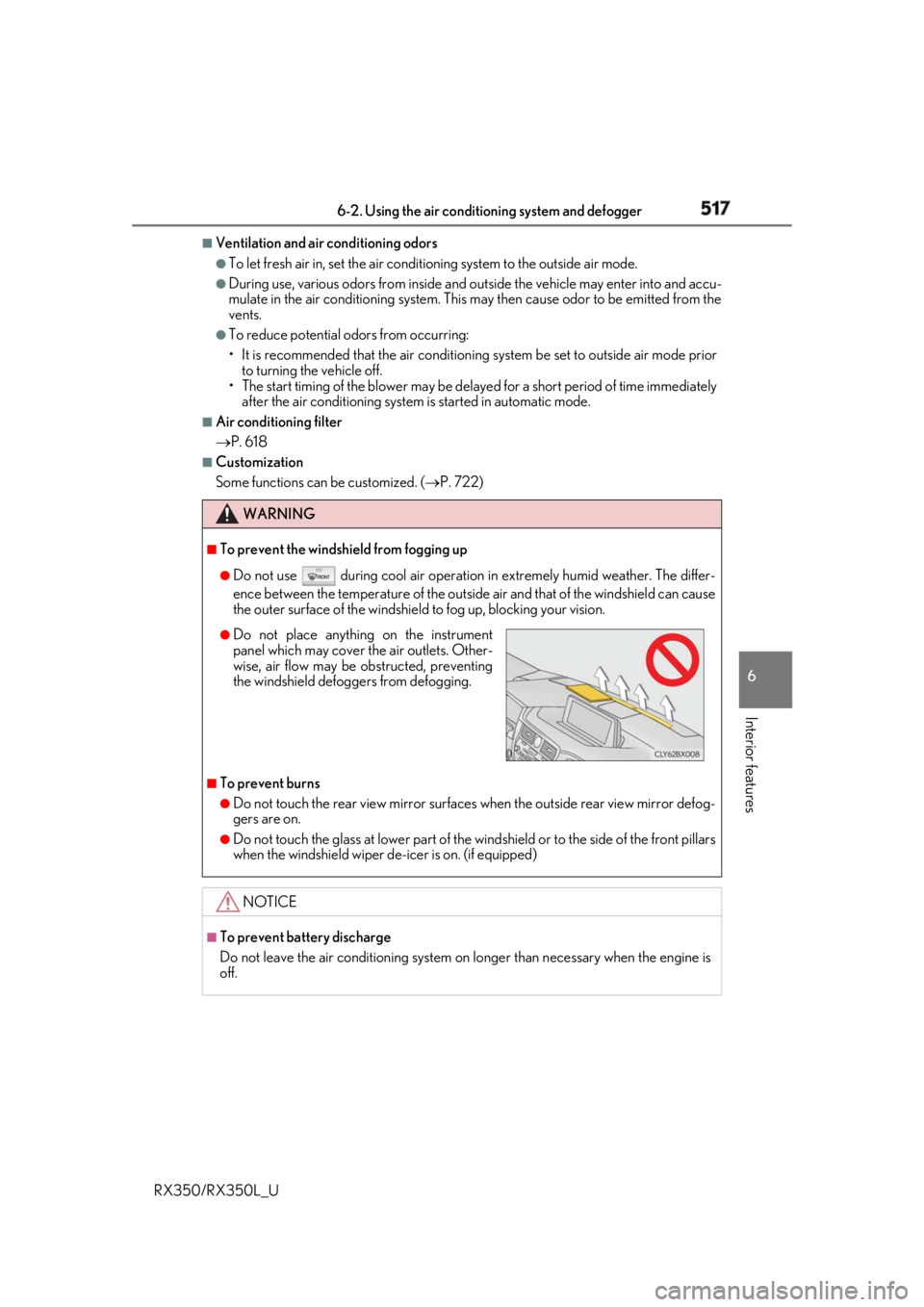
Do not place anything on the instrument
panel which may cover th e air outlets. Other-
wise, air flow may be obstructed, preventing
the windshield defoggers from defogging.
Page 524 of 777
5236-2. Using the air conditioning system and defogger
6
Interior features
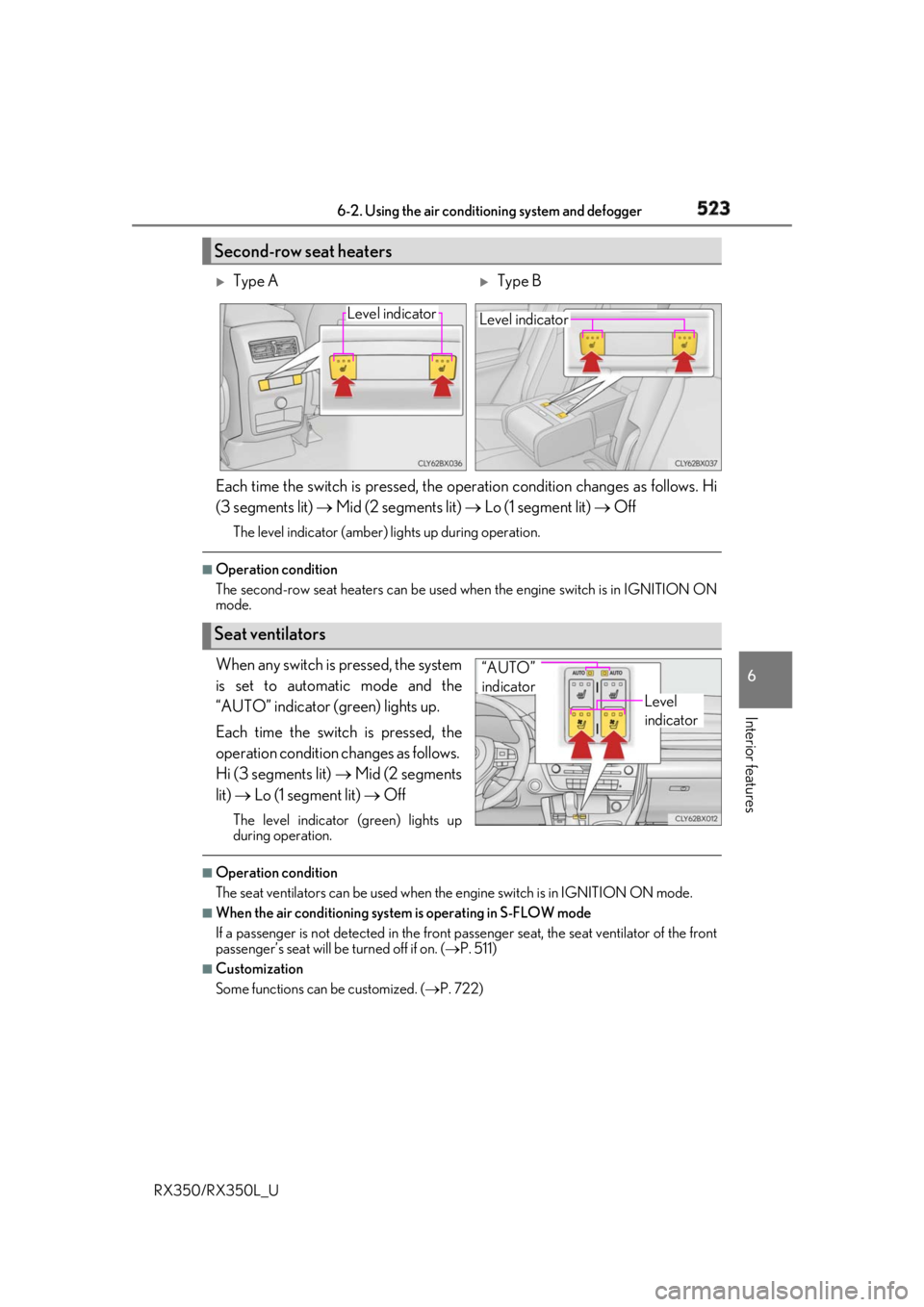
RX350/RX350L_U Each time the switch is pressed, the operation condition changes as follows. Hi
(3 segments lit) Mid (2 segments lit) Lo (1 segment lit) OffThe level indicator (amber) lights up during operation.■
Operation condition
The second-row seat heaters can be used when the engine switch is in IGNITION ON
mode.
When any switch is pressed, the system
is set to automatic mode and the
“AUTO” indicator (green) lights up.
Each time the switch is pressed, the
operation cond ition changes as follows.
Hi (3 segments lit) Mid (2 segments
lit) Lo (1 segment lit) OffThe level indicator (green) lights up
during operation. ■
Operation condition
The seat ventilators can be used when the engine switch is in IGNITION ON mode.■
When the air conditioning system is operating in S-FLOW mode
If a passenger is not detected in the front passenger seat, the seat ventilator of the front
passenger’s seat will be turned off if on. ( P. 511)■
Customization
Some functions can be customized. ( P. 722)Second-row seat heaters
Type A
Type BLevel indicator
Level indicator
Seat ventilators Level
indicator“AUTO”
indicator
Page 547 of 777
546 6-5. Using the other interior features
RX350/RX350L_U ■
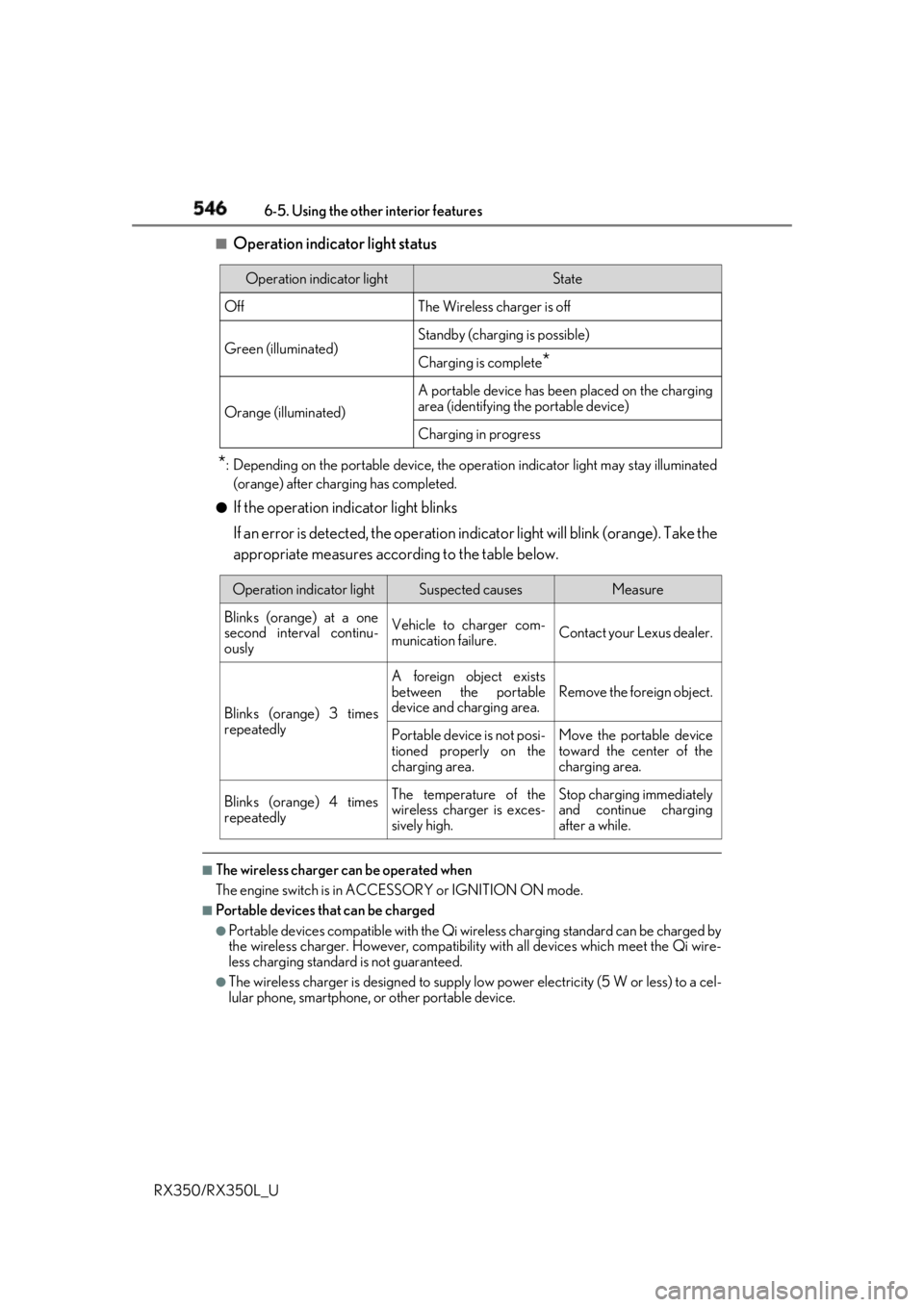
Operation indicator light status
* : Depending on the portable device, the oper ation indicator light may stay illuminated
(orange) after charging has completed.●
If the operation indicator light blinks
If an error is detected, the operation in dicator light will blink (orange). Take the
appropriate measures according to the table below.
■
The wireless charger can be operated when
The engine switch is in ACCESSORY or IGNITION ON mode. ■
Portable devices t hat can be charged●
Portable devices compatible with the Qi wireless charging standard can be charged by
the wireless charger. However, compatibility with all devices which meet the Qi wire-
less charging standard is not guaranteed. ●
The wireless charger is designed to supply low power electricity (5 W or less) to a cel-
lular phone, smartphone, or other portable device.Operation indicator light State
Off The Wireless charger is off
Green (illuminated) Standby (charging is possible)
Charging is complete
*Orange (illuminated) A portable device has been placed on the charging
area (identifying the portable device)
Charging in progress
Operation indicator light Suspected causes Measure
Blinks (orange) at a one
second interval continu-
ously Vehicle to charger com-
munication failure. Contact your Lexus dealer.
Blinks (orange) 3 times
repeatedly A foreign object exists
between the portable
device and charging area. Remove the foreign object.
Portable device is not posi-
tioned properly on the
charging area. Move the portable device
toward the center of the
charging area.
Blinks (orange) 4 times
repeatedly The temperature of the
wireless charger is exces-
sively high. Stop charging immediately
and continue charging
after a while.
Page 571 of 777
570 6-5. Using the other interior features
RX350/RX350L_U ■
Safety Connect Serv ices Information●
Phone calls using the vehicles Bluetooth ®
technology will not be possible during Safety
Connect. ●
Safety Connect is available be ginning Fall 2009 on select Lexus models (in the contig-
uous United States only). Contact with th e Safety Connect respon se center is depen-
dent upon the telematics device being in operative condition, cellular connection
availability, and GPS sa tellite signal receptio n, which can limit the ability to reach the
response center or receive emergency se rvice support. Enro llment and Telematics
Subscription Service Agreement required. A va riety of subscription terms is available;
charges vary by subscription term selected and location. ●
Automatic Collision Notification, Emergenc y Assistance and Stolen Vehicle Location
will function in the United States, includin g Hawaii and Alaska, Puerto Rico and in Can-
ada, and Enhanced Roadside Assistance will function in the United States, Puerto Rico
and in Canada. ●
Automatic Collision Notification, Emergency Assistance, Stolen Vehicle Location and
Enhanced Roadside Assistance will not func tion in the United States Virgin Islands.
No Safety Connect services will function outs ide of the United States in countries other
than Canada.
For vehicles first sold in the USVI, no Safety Connect services will function in and out-
side the United States Virgin Islands. ●
Safety Connect services are not subject to section 255 of the Telecommunications Act
and the device is not TTY compatible. ■
Languages
The Safety Connect response ce nter will offer support in mu ltiple languages. The Safety
Connect system will offer voice prompts in English, Spanish and French. Please indicate
your language of ch oice when enrolling.■
When contacting the response center
You may be unable to contact the resp onse center if the network is busy.
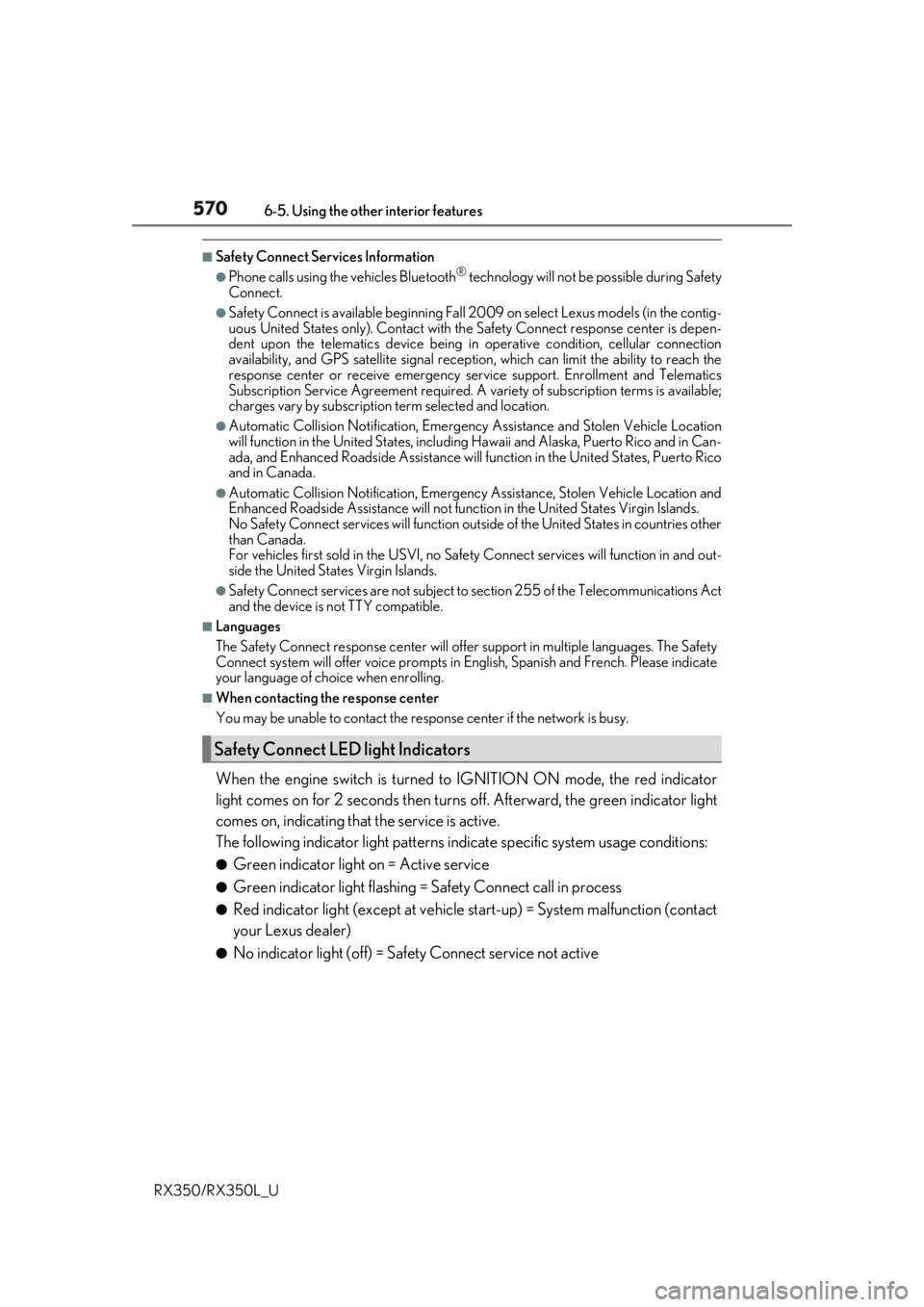
When the engine switch is turned to IGNITION ON mode, the red indicator
light comes on for 2 seconds then turns off. Afterward, the green indicator light
comes on, indicating that the service is active.
The following indicator light patterns indicate specific system usage conditions: ●
Green indicator light on = Active service ●
Green indicator light flashing = Safety Connect call in process●
Red indicator light (except at vehicle start-up) = System malfunction (contact
your Lexus dealer) ●
No indicator light (off) = Safety Connect service not activeSafety Connect LED light Indicators