brake LEXUS RX350 2019 Manual PDF
[x] Cancel search | Manufacturer: LEXUS, Model Year: 2019, Model line: RX350, Model: LEXUS RX350 2019Pages: 777, PDF Size: 12.44 MB
Page 347 of 777
346 4-5. Using the driving support systems
RX350/RX350L_U ■
If the Intelligent Clearance Sonar function operates unnecessarily such as at a railroad
crossing
Even in the event that the Intelligent Cleara nce Sonar function operates unnecessarily,
such as at a railroad crossing, brake cont rol will be canceled afte r approximately 2 sec-
onds, allowing you to proceed forward and leave the area, Brake control can also be
canceled by depressing the brake pedal. Depressing the accelerator pedal again will
allow you to proceed forward and leave the area. ■
Situations in which the Intelligent Cleara nce Sonar Brake function may not operate
properly
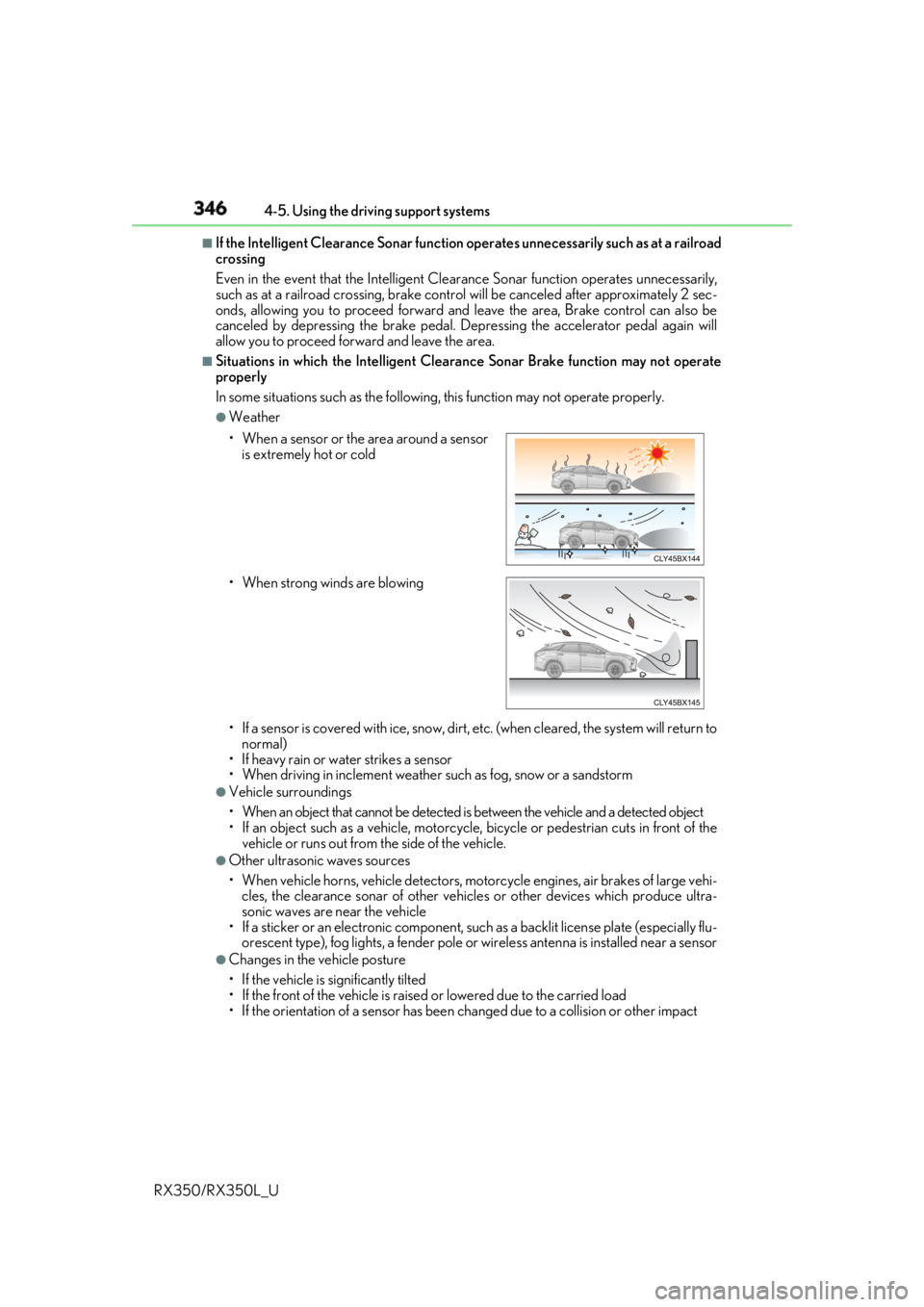
In some situations such as the following , this function may not operate properly.●
Weather
• If a sensor is covered with ice, snow, dirt, etc. (when cleared, the system will return to
normal)
• If heavy rain or water strikes a sensor
• When driving in inclemen t weather such as fog, snow or a sandstorm●
Vehicle surroundings
• When an object that cannot be detected is between the vehicle and a detected object
• If an object such as a vehicle, motorcycle, bicycle or pedestrian cuts in front of the
vehicle or runs out from the side of the vehicle. ●
Other ultrasonic waves sources
• When vehicle horns, vehicle detectors, motorcycle engines, air brakes of large vehi-
cles, the clearance sonar of other vehicles or other devices which produce ultra-
sonic waves are near the vehicle
• If a sticker or an electronic component, su ch as a backlit license plate (especially flu-
orescent type), fog lights, a fender pole or wireless antenna is installed near a sensor●
Changes in the vehicle posture
• If the vehicle is significantly tilted
• If the front of the vehicle is raised or lowered due to the carried load
• If the orientation of a sens or has been changed due to a collision or other impact• When a sensor or the area around a sensor
is extremely hot or cold
• When strong winds are blowing
Page 349 of 777
348 4-5. Using the driving support systems
RX350/RX350L_U WARNING ■
Limitations of the Intelligent Clearance Sonar system
Do not overly rely on the system, as doing so may lead to an accident.●
The driver is solely responsi ble for safe driving. Always drive carefully, taking care to
observe your surroundings. The Intelligent Clearance Sonar system is designed to
provide support to lessen the severity of collisions. However, it may not operate in
some situations. ●
The Intelligent Clearance Sonar system is not designed to stop the vehicle com-
pletely. Additionally, even if the system has stopped the vehicle, it is necessary to
depress the brake pedal immediately as brak e control will be canc eled after approxi-
mately 2 seconds. ■
To ensure the Intelligent Clearance Sonar system can operate properly
Observe the following precauti ons regarding the sensors ( P. 339). Failure to do so
may cause a sensor to not operate pr operly, and may cause an accident.●
Do not modify, disassemble or paint the sensors. ●
Do not replace a sensor with a part other than a genuine part. ●
Do not subject a sensor or its surro unding area to a strong impact.●
Do not damage the sensors, and always keep them clean.
Observe the following precautions regarding the radar sensors ( P. 316). Failure to
do so may cause a radar sensor to not op erate properly, and may cause an accident.●
Do not modify, disassemble or paint the sensors. ●
Do not replace a radar sensor with a part other than a genuine part.●
Do not subject a radar sensor or its surrounding area to a strong impact.●
Do not damage the radar sensors, and alwa ys keep the radar sensors and their sur-
rounding area on the bumper clean. ■
Handling the suspension
Do not modify the suspension, as changes to the height or inclinat ion of the vehicle may
prevent the sensors from detecting objects co rrectly or cause the system to not oper-
ate or operate unnecessarily.
Page 351 of 777

350 4-5. Using the driving support systems
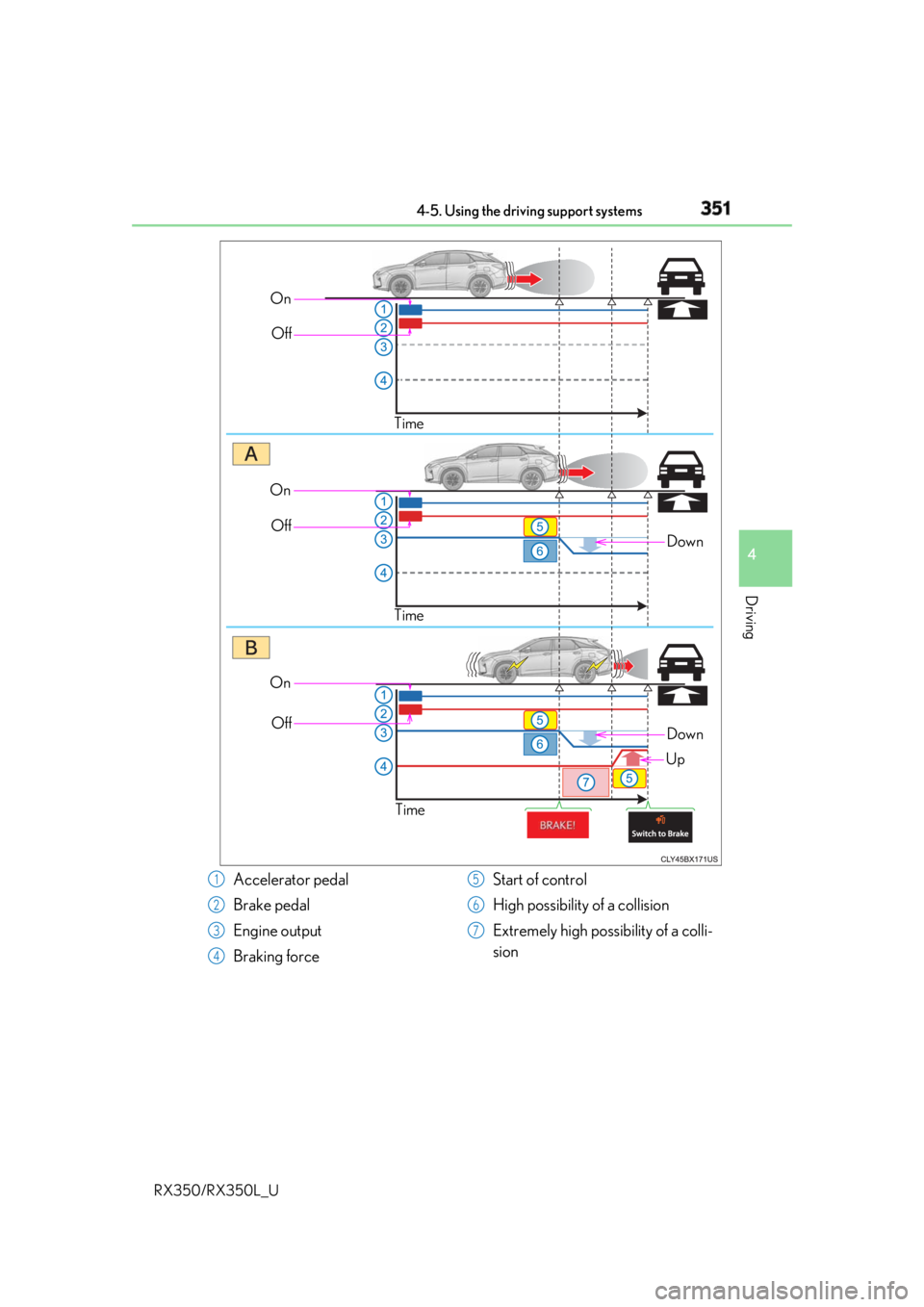
RX350/RX350L_U If the Rear Cross Traffic Auto Brake function detects that a collision with an
approaching vehicle is possible, the engine output will be restricted to restrain
any increase in vehicle speed. (Engine ou tput restriction control: See A below.)
Additionally, if the accelerator pedal continues to be depressed, the brakes will
be applied automatically to reduce the vehicle speed. (Brake control: See B
below.)Rear Cross Traffic Auto Brake function (if equipped)
Page 352 of 777
3514-5. Using the driving support systems
4
Driving
RX350/RX350L_U On
Off
Time
DownOn
Off
Time
On
Off
Time Down
Up
Accelerator pedal
Brake pedal
Engine output
Braking force Start of control
High possibility of a collision
Extremely high possibility of a colli-
sion1
2
3
4 5
6
7
Page 353 of 777

352 4-5. Using the driving support systems
RX350/RX350L_U ■
The Rear Cross Traffic Auto Brake function will operate when
The function will operate when the ICS O FF indicator is not illuminated or flashing
( P. 339, 347) and all of the following conditions are met: ●
Engine output restriction control
• The Intelligent Clearance Son ar with Rear Cross Traffi c Auto Brake is enabled.
• The vehicle speed is 10 mph (15 km/h) or less.
• The shift lever is in R.
• The system determines that a stronger than normal brake operation is necessary to
avoid a collision with an approaching vehicle. ●
Brake control
• Engine output restriction control is operating.
• The system determines that an emergenc y brake operation is necessary to avoid a
collision with an approaching vehicle.■
The Rear Cross Traffic Auto Brake function will stop operating when
The function will stop operating if an y of the following conditions are met:●
Engine output restriction control
• The Intelligent Clearance Sonar with Rear Cross Traffic Auto Brake is disabled.
• The collision becomes avoidable with normal brake operation.
• A vehicle is no longer approaching from th e right or left at the rear of the vehicle.●
Brake control
• The Intelligent Clearance Sonar with Rear Cross Traffic Auto Brake is disabled.
• Approximately 2 seconds elapse after the vehicle is stopped by brake control.
• The brake pedal is depressed after the vehicle is stopped by brake control.
• A vehicle is no longer approaching from th e right or left at the rear of the vehicle.■
Detection area of the Rear Cross Traffic Auto Brake function
The detection area of the Rear Cross Traffic Auto Brake function differs from the detec-
tion area of the RCTA function ( P. 323).
Therefore, even if the RCTA function detect s a vehicle and provides an alert, the Rear
Cross Traffic Auto Brake function may not start operating. ■
If the Rear Cross Traffic Auto Brake function has operated
If the vehicle is stopped due to operation of the Rear Cross Traffic Auto Brake function,
the Rear Cross Traffic Auto Brake function will be disabled and the ICS OFF indicator
will illuminate.
Page 354 of 777
3534-5. Using the driving support systems
4
Driving
RX350/RX350L_U ■
Re-enabling the Rear Cross Traffic Auto Brake function
To re-enable the Rear Cross Traffic Auto Brake function when it is disabled during opera-
tion of the Rear Cross Traffic Auto Brake function, either enable the system again ( P.
339), or turn the engine switch off and then back to IGNITION ON mode.
Additionally, if there is no longer a vehicle ap proaching from the right or left at the rear of
the vehicle, or if the traveling direction of the vehicle changes (such as changing from
moving forward to backing up or from backin g up to moving forward), the system will be
re-enabled automatically. ■
Conditions under which the Rear Cross Traffic Auto Brake function will not detect a
vehicle
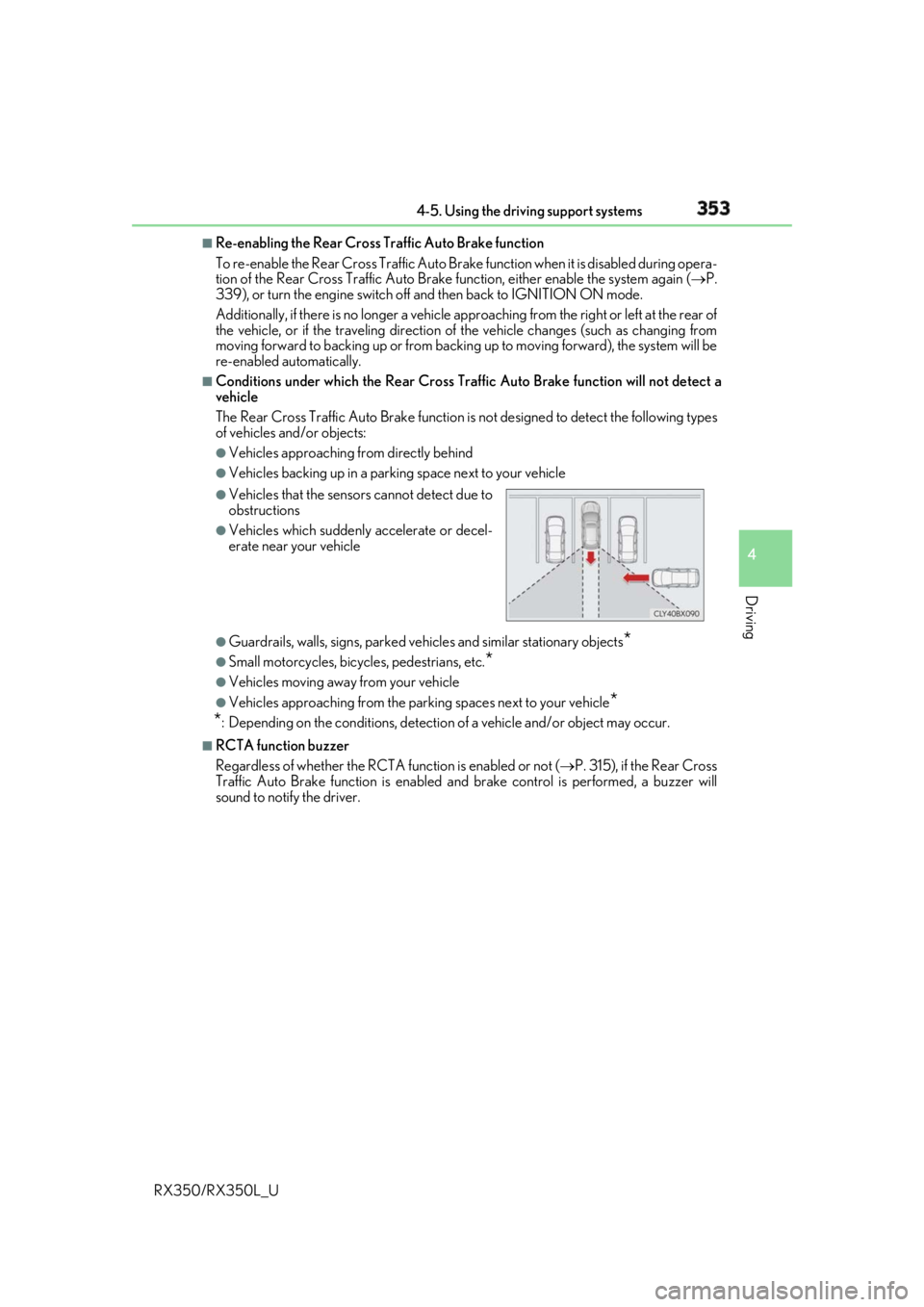
The Rear Cross Traffic Auto Brake function is not designed to detect the following types
of vehicles and/or objects: ●
Vehicles approaching from directly behind ●
Vehicles backing up in a parkin g space next to your vehicle
●
Guardrails, walls, signs, parked vehi cles and similar stationary objects
*●
Small motorcycles, bicycles, pedestrians, etc.
*●
Vehicles moving away from your vehicle ●
Vehicles approaching from the parking spaces next to your vehicle
*
* : Depending on the conditions, detection of a vehicle and/or object may occur.■
RCTA function buzzer
Regardless of whether the RCTA function is enabled or not ( P. 315), if the Rear Cross
Traffic Auto Brake function is enabled and brake control is performed, a buzzer will
sound to notify the driver. ●
Vehicles that the sensors cannot detect due to
obstructions ●
Vehicles which suddenly accelerate or decel-
erate near your vehicle
Page 355 of 777
354 4-5. Using the driving support systems
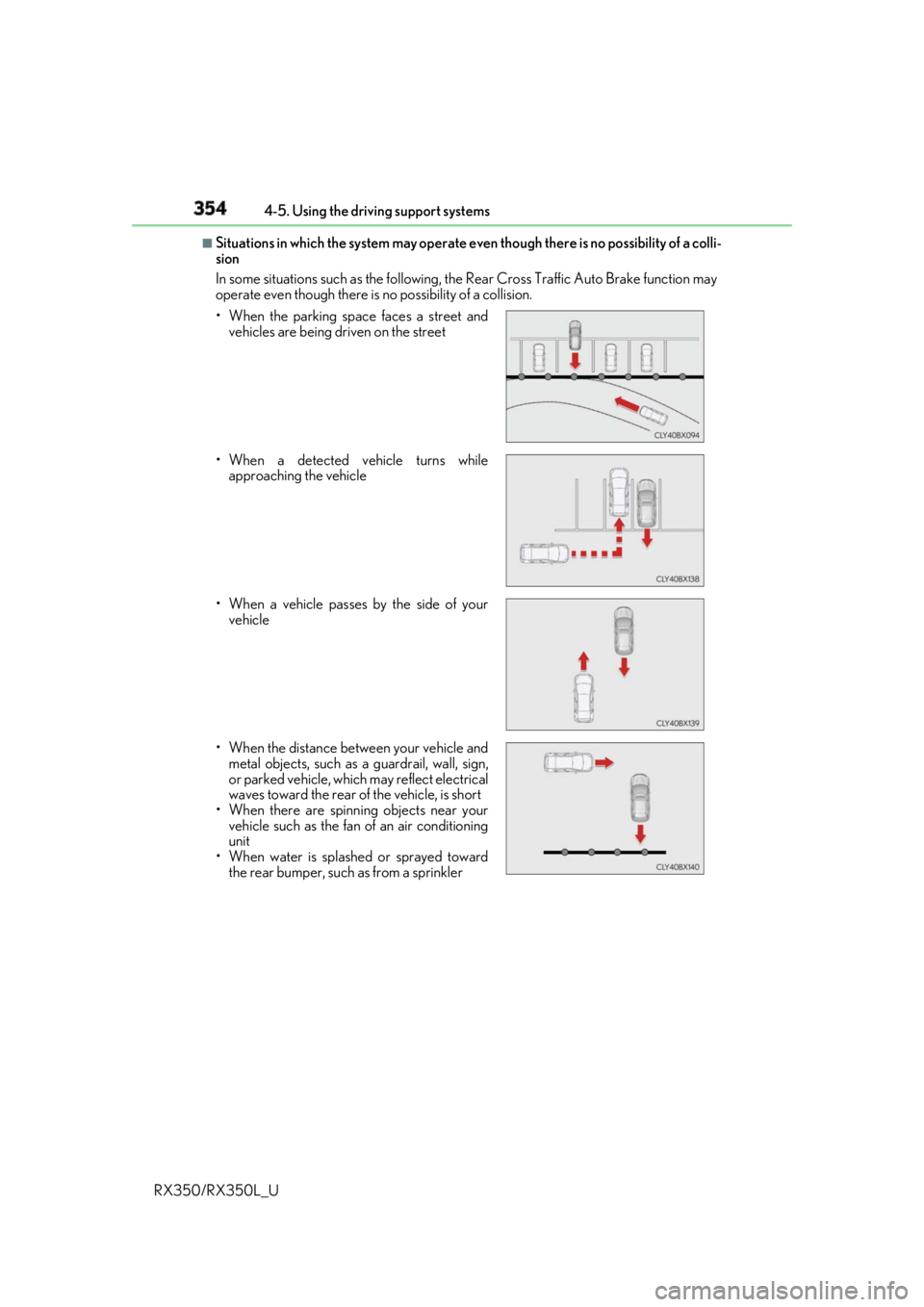
RX350/RX350L_U ■
Situations in which the system may operate ev en though there is no possibility of a colli-
sion
In some situations such as the following, th e Rear Cross Traffic Auto Brake function may
operate even though there is no possibility of a collision.
• When the parking space faces a street and
vehicles are being driven on the street
• When a detected vehicle turns while
approaching the vehicle
• When a vehicle passes by the side of your
vehicle
• When the distance between your vehicle and
metal objects, such as a guardrail, wall, sign,
or parked vehicle, which may reflect electrical
waves toward the rear of the vehicle, is short
• When there are spinni ng objects near your
vehicle such as the fan of an air conditioning
unit
• When water is splash ed or sprayed toward
the rear bumper, such as from a sprinkler
Page 356 of 777
3554-5. Using the driving support systems
4
Driving
RX350/RX350L_U ■
Situations in which the Rear Cross Traffic Auto Brake function may not operate prop-
erly
In some situations such as the following , this function may not operate properly.●
Objects and vehicles which the radar sensors are not designed to detect
• Stationary objects
• Vehicles which are moving away from your vehicle
• Pedestrians, motorcycles, bicycles, etc.
*• Objects which are extremely close to a radar sensor
• Vehicles which are approaching from the right or left at the rear of the vehicle at a
traveling speed of less than approximately 5 mph (8 km/h)
• Vehicles which are approaching from the right or left at the rear of the vehicle at a
traveling speed of more than approximately 15 mph (24 km/h)
* : Depending on conditions, detection of a vehicle and/or object may occur.●
Situations in which the radar sensors may not be able to detect an object
• When a sensor or the area around a sensor is extremely hot or cold
• If the rear bumper is covere d with ice, snow, dirt, etc.
• If heavy rain or water strikes the vehicle
• When the detection area of a radar sensor is obstructed by an adjacent vehicle
• If the vehicle is significantly tilted
• If towing eyelets are installed
• If the suspension has been modified or tires of a size othe r than specified are
installed
• If the front of the vehicle is raised or lowered due to the carried load
• If a sticker or an electronic component, su ch as a backlit license plate (especially flu-
orescent type), fog lights, a fender pole or wireless antenna is installed near a radar
sensor
• If the orientation of a rada r sensor has been changed due to a collision or other
impact or removal and installation
• When multiple vehicles are approaching wi th only a small gap between each vehicle
• When a vehicle is approaching at high speed ●
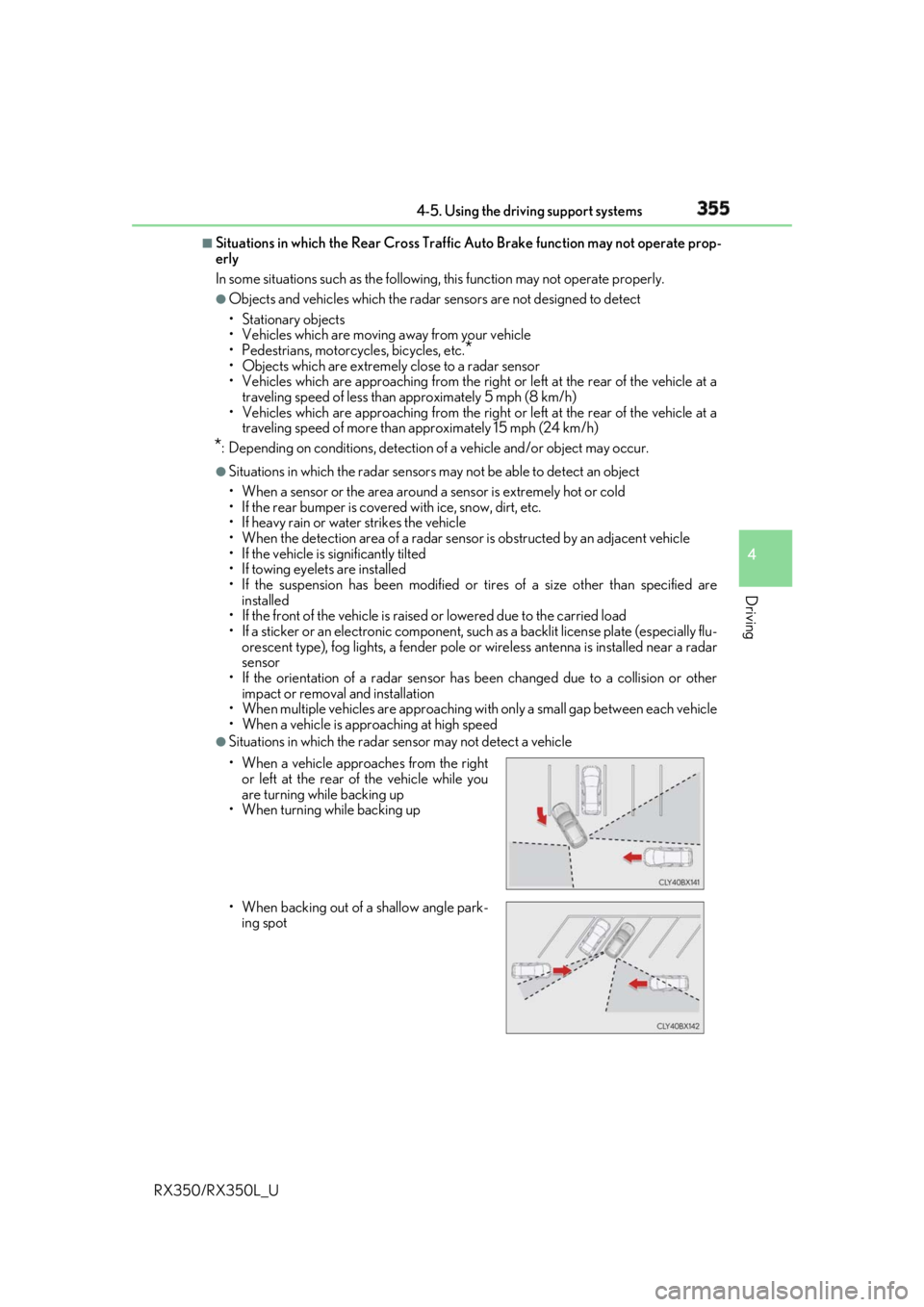
Situations in which the radar sensor may not detect a vehicle
• When a vehicle approaches from the right
or left at the rear of the vehicle while you
are turning while backing up
• When turning while backing up
• When backing out of a shallow angle park-
ing spot
Page 372 of 777
3714-5. Using the driving support systems
4
Driving
RX350/RX350L_U WARNING ■
When using the Lexus parking assist monitor system
The parking assist monitor is a supplemental device intended to assist the driver when
backing up. When backin g up, be sure to check visually behind and all around the vehi-
cle before proceeding.
Observe the following precautions to avoid an accident that could result in death or
serious injuries. ●
Never depend on the parking assist monitor entirely when backing up. The image
and the position of the guide lines displaye d on the screen may differ from the actual
state.
Use caution, just as you woul d when backing up any vehicle.●
Be sure to back up slowly, depressing the brake pedal to control vehicle speed. ●
If you seem likely to hit nearby vehicles, obstacles, people or mount the shoulder,
depress the brake pedal to stop the vehicle. ●
The instructions given are only guidelines.
When and how much to turn the steering wheel will vary according to traffic condi-
tions, road surface conditions, vehicle condit ion, etc. when parking. It is necessary to
be fully aware of this before using the parking assist system. ●
When parking, be sure to check that the parking space will accommodate your vehi-
cle before maneuvering into it. ●
Do not use the parking assist monitor in the following cases:
• On icy or slick road surfaces, or in snow
• When using tire chains or emergency tires
• When the back door is not closed completely
• On roads that are not flat or stra ight, such as curves or slopes.●
In low temperatures, the screen may darken or the image may become faint. The
image could distort when the vehicle is movi ng, or you may become unable to see the
image on the screen. Be sure to check dire ct visually and with the mirrors all around
the vehicle before proceeding. ●
If the tire sizes are changed, the position of the guide lines displayed on the screen
may change. ●
The camera uses a special lens. The distances between objects and pedestrians that
appear in the image displayed on the screen will differ from the actual distances.
( P. 365) ●
Estimated course line display mode: If the st eering wheel is stra ight and the vehicle
width guide lines and the estimated course lines are not in alignment, have the vehicle
inspected by your Lexus dealer.
Page 378 of 777
3774-5. Using the driving support systems
4
Driving
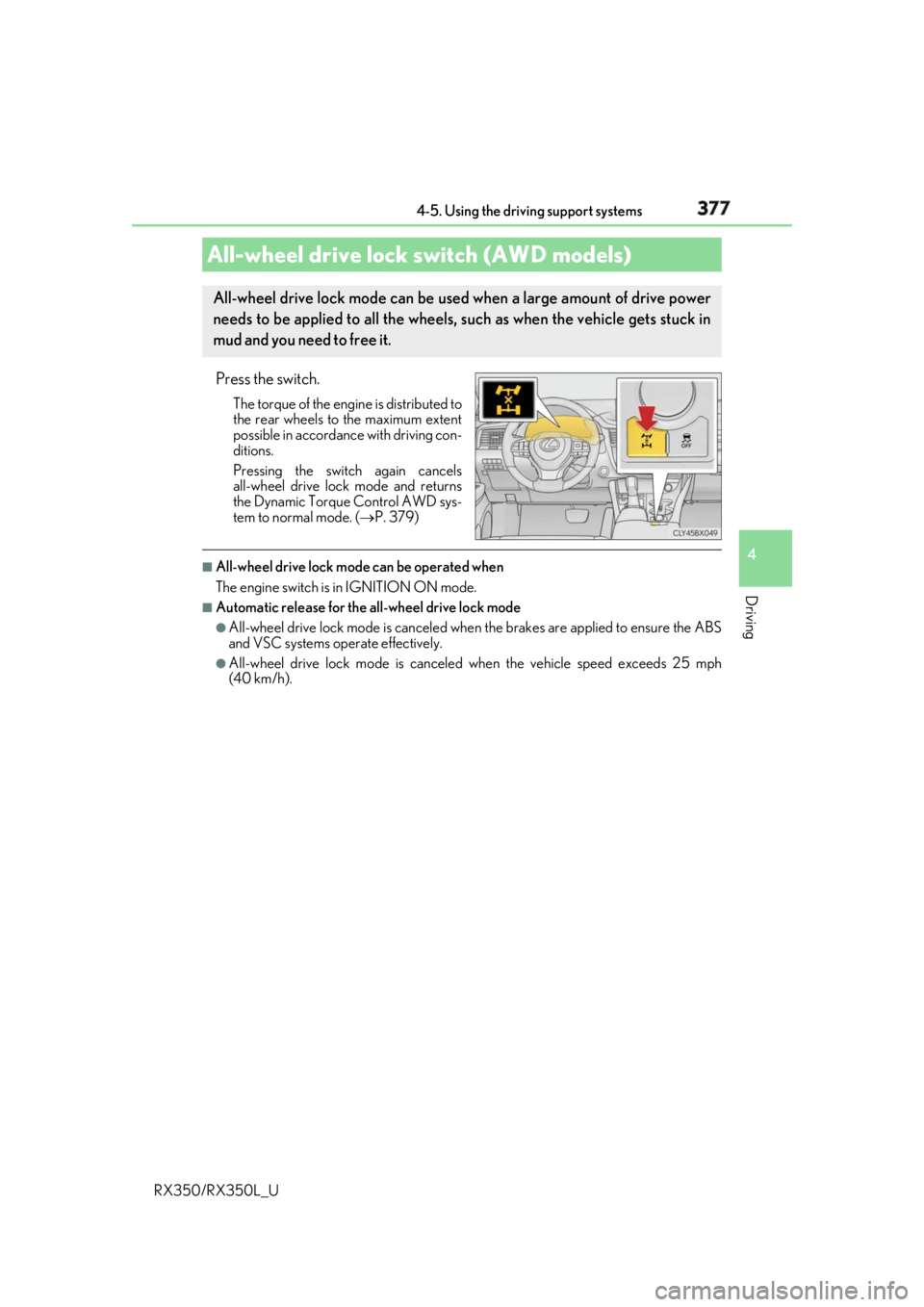
RX350/RX350L_U Press the switch. The torque of the engine is distributed to
the rear wheels to the maximum extent
possible in accordance with driving con-
ditions.
Pressing the switch again cancels
all-wheel drive lock mode and returns
the Dynamic Torque Control AWD sys-
tem to normal mode. ( P. 379)■
All-wheel drive lock mode can be operated when
The engine switch is in IGNITION ON mode. ■
Automatic release for the all-wheel drive lock mode●
All-wheel drive lock mode is canceled when the brakes are applied to ensure the ABS
and VSC systems operate effectively. ●
All-wheel drive lock mode is canceled when the vehicle speed exceeds 25 mph
(40 km/h).All-wheel drive lock switch (AWD models) All-wheel drive lock mode can be used when a large amount of drive power
needs to be applied to all the wheels, such as when the vehicle gets stuck in
mud and you need to free it.