light LEXUS RX350 2020 Owners Manual
[x] Cancel search | Manufacturer: LEXUS, Model Year: 2020, Model line: RX350, Model: LEXUS RX350 2020Pages: 516, PDF Size: 17.3 MB
Page 279 of 516
2794-5. Using the driving support systems
4
Driving
function has occurred.
• Vibrations may be felt through the vehicle body and steering.
• A motor sound may be heard also after the vehicle comes to a stop.
• The brake pedal may pulsate slightly after
the ABS is activated.
• The brake pedal may move down slightly after the ABS is activated.
■Active Cornering Assist operation
sounds and vibrations
When the Active Cornering Assist is oper-
ated, operation sounds and vibrations may
be generated from the brake system, but
this is not a malfunction.
■EPS operation sound
When the steering wheel is operated, a
motor sound (whirring sound) may be
heard. This does not indicate a malfunction.
■Reduced effectiveness of the EPS sys-
tem
The effectiveness of the EPS system is
reduced to prevent the system from over-
heating when there is frequent steering
input over an extended period of time. The
steering wheel may feel heavy as a result.
Should this occur, re frain from excessive
steering input or stop the vehicle and turn
the engine off. The EPS system should
return to normal within 10 minutes.
■Automatic reactivation of TRAC, Trailer
Sway Control and VSC systems
After turning the TRAC, Trailer Sway Con-
trol and VSC systems off, the systems will
be automatically re-enabled in the following
situations:
●When the engine switch is turned off
●If only the TRAC system is turned off, the
TRAC will turn on when vehicle speed
increases
If both the TRAC and VSC systems are
turned off, automatic re-enabling will not
occur when vehicle speed increases.
■Operating conditions of Active Corner-
ing Assist
The system operates when the following
occurs.
●TRAC/VSC can operate
●The driver is attempting to accelerate
while turning
●The system detects that the vehicle is
drifting to the outer side
●The brake pedal is released
■Secondary Collision Brake operating
conditions
The system operates when the SRS airbag
sensor detects a collision while the vehicle
is in motion.
However, the system does not operate in
any of the following situations.
●The vehicle speed is below 6 mph (10
km/h)
●Components are damaged
■Secondary Collision Brake automatic
cancellation
The system is automatically canceled in any
of the following situations.
●The vehicle speed drops below approxi-
mately 6 mph (10 km/h)
●A certain amount of time elapses during
operation
●The accelerator pedal is depressed a
large amount
WARNING
■The ABS does not operate effectively
when
●The limits of tire gripping performance
have been exceeded (such as exces-
sively worn tires on a snow covered
road).
●The vehicle hydroplanes while driving
at high speed on wet or slick roads.
■Stopping distance when the ABS is
operating may exceed that of normal
conditions
The ABS is not designed to shorten the
vehicle’s stopping di stance. Always main-
tain a safe distance from the vehicle in
front of you, especially in the following
situations:
●When driving on dirt, gravel or
snow-covered roads
Page 280 of 516
2804-5. Using the driving support systems
WARNING
●When driving with tire chains
●When driving over bumps in the road
●When driving over roads with potholes
or uneven surfaces
■TRAC/VSC may not operate effec-
tively when
Directional control and power may not
be achievable while driving on slippery
road surfaces, even if the TRAC/VSC
system is operating. Drive the vehicle
carefully in conditions where stability and
power may be lost.
■Active Cornering Assist does not
operate effectively when
●Do not overly rely on Active Corner-
ing Assist. Active Cornering Assist
may not operate effectively when
accelerating down slopes or driving on
slippery road surfaces.
●When Active Cornering Assist fre-
quently operates, Active Cornering
Assist may temporarily stop operating
to ensure proper operation of the
brakes, TRAC and VSC.
■Hill-start assist control does not oper-
ate effectively when
●Do not overly rely on hill-start assist
control. Hill-start assist control may
not operate effectively on steep
inclines and roads covered with ice.
●Unlike the parking brake, hill-start
assist control is not intended to hold
the vehicle stationary for an extended
period of time. Do not attempt to use
hill-start assist control to hold the vehi-
cle on an incline, as doing so may lead
to an accident.
■When the TRAC/VSC/Trailer Sway
Control is activated
The slip indicator light flashes. Always
drive carefully. Re ckless driving may
cause an accident. Exercise particular
care when the indicator light flashes.
■When the TRAC/VSC/Trailer Sway
Control systems are turned off
●Be especially careful and drive at a
speed appropriate to the road condi-
tions. As these are the systems to help
ensure vehicle stab ility and driving
force, do not turn the
TRAC/VSC/Trailer Sway Control sys-
tems off unless necessary.
●Trailer Sway Control is part of the VSC
system and will not operate if VSC is
turned off or experiences a malfunc-
tion.
■Replacing tires
Make sure that all ti res are of the speci-
fied size, brand, tread pattern and total
load capacity. In addition, make sure that
the tires are inflated to the recom-
mended tire inflation pressure level.
The ABS, TRAC, Trailer Sway Control
and VSC systems will not function cor-
rectly if different tire s are installed on the
vehicle.
Contact your Lexus dealer for further
information when replacing tires or
wheels.
■Handling of tires and the suspension
Using tires with any kind of problem or
modifying the suspensi on will affect the
driving assist systems, and may cause a
system to malfunction.
■Trailer Sway Control precaution
The Trailer Sway Control system is not
able to reduce trailer sway in all situa-
tions. Depending on many factors such
as the conditions of the vehicle, trailer,
road surface and driving environment,
the Trailer Sway Control system may not
be effective. Refer to your trailer owner’s
manual for information on how to tow
your trailer properly.
Page 283 of 516
2834-6. Driving tips
4
Driving
immediately to prevent it from
freezing.
To ensure proper operation of the
climate control system fan, remove
any snow that has accumulated on
the air inlet vents in front of the
windshield.
Check for and remove any excess
ice or snow that may have accumu-
lated on the exterior lights, vehicle’s
roof, chassis, around the tires or on
the brakes.
Remove any snow or mud from the
bottom of your shoes before getting
in the vehicle.
Accelerate the vehicle slowly, keep a
safe distance between you and the
vehicle ahead, and drive at a reduced
speed suitable to road conditions.
Park the vehicle and move the shift
lever to P without setting the park-
ing brake. The parking brake may
freeze up, preventing it from being
released. If the vehicle is parked
without setting the parking brake,
make sure to block the wheels. Fail-
ure to do so may be dangerous
because it may cause the vehicle to
move unexpectedly, possibly lead-
ing to an accident.
When the parking brake is in automatic
mode, release the parking brake after shift-
ing the shift lever to P. ( P.186)
If the vehicle is parked without set-
ting the parking brake, confirm that
the shift lever cannot be moved out
of P
*.
*: The shift lever will be locked if it is
attempted to be shifted from P to any
other position with out depressing the
brake pedal. If the shift lever can be
shifted from P, there may be a problem
with the shift lock system. Have the vehi-
cle inspected by your Lexus dealer
immediately.
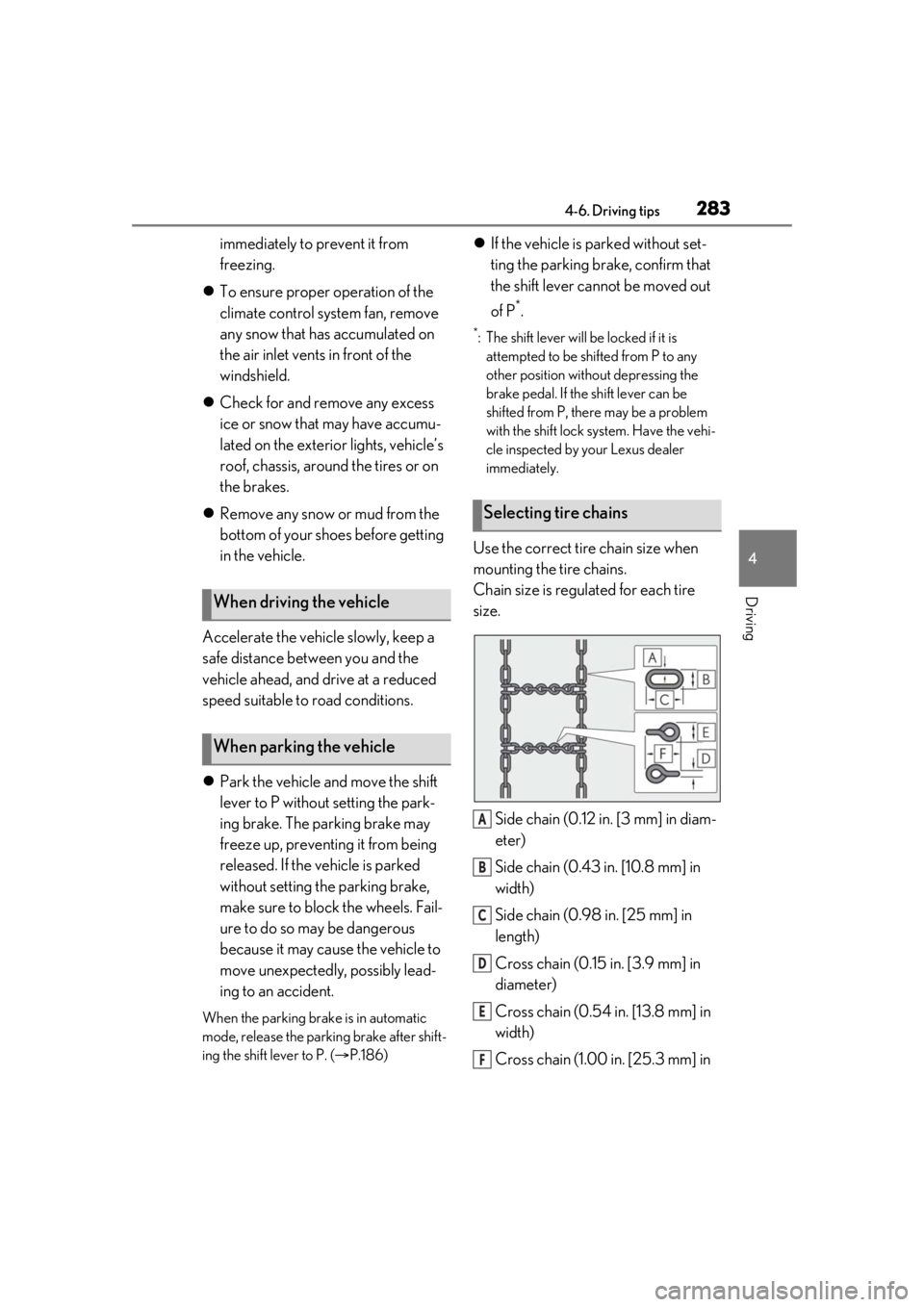
Use the correct tire chain size when
mounting the tire chains.
Chain size is regulated for each tire
size.
Side chain (0.12 in. [3 mm] in diam-
eter)
Side chain (0.43 in. [10.8 mm] in
width)
Side chain (0.98 in. [25 mm] in
length)
Cross chain (0.15 in. [3.9 mm] in
diameter)
Cross chain (0.54 in. [13.8 mm] in
width)
Cross chain (1.00 in. [25.3 mm] in
When driving the vehicle
When parking the vehicle
Selecting tire chains
A
B
C
D
E
F
Page 289 of 516
289
5
5
Interior features
Interior features
.5-1. Remote Touch/DisplayRemote Touch ............................ 290
Center Display ........................... 292
5-2. Lexus Climate Concierge Lexus Climate Concierge ..... 295
5-3. Using the air conditioning system and defogger
Front automatic air conditioning system ......................................... 296
Rear automatic air conditioning system ......................................... 307
Heated steering wheel/seat heat- ers/seat ventilators ................. 310
5-4. Using the interior lights Interior lights list.......................... 313
5-5. Using the storage features List of storage features............. 316
Luggage compartment features ........................................................ 322
5-6. Using the other interior features Other interior features ........... 327
Garage door opener............... 339
Compass....................................... 346
Page 304 of 516

3045-3. Using the air conditioning system and defogger
1Press the automatic mode switch or
select “AUTO” on the sub function
menu. ( P.300)
2 Press the outside/recirculated air
mode switch to switch to automatic
air intake mode. (if equipped)
The air conditioning system automatically
switches between outside air and recircu-
lated air modes.
3Adjust the temperature setting.
4 To stop the operation, press the off
switch or select “OFF” on the sub
function menu. ( P.300)
If the fan speed settin g or air flow modes
are operated, the automatic mode indica-
tor goes off. However, automatic mode for
functions other than th at operated is main-
tained.
■Using automatic mode
Fan speed is adjusted automatically accord-
ing to the temperature setting and the
ambient conditions.
Therefore, the fan may stop for a while until
warm or cool air is ready to flow immedi-
ately after the automatic mode switch is
pressed or “AUTO” is selected.
Cool air may blow around the upper body
even when the heater is on due to sunlight.
■Automatic mode for air intake control (if
equipped)
In automatic mode, the system detects
exhaust gas and other pollutants and auto-
matically switches between outside air and
recirculated air modes.
When the dehumidification function is off,
and the fan is operating, turning automatic
mode on will activate the dehumidification
function.
In S-FLOW mode, priority for the air-
flow is given to the front seats, reducing
the airflow and air co nditioning effect
on the rear seats. When in S-FLOW
mode, airflow from the rear air condi-
tioning system is stopped. (RX350L)
Operation in S-FLOW mode differs
according to the following conditions:
Priority is given to the driver’s seat
only when:
Manual S-FLOW mode: When no
passenger is judged to be in the
front passenger seat.
Automatic S-FLOW mode: When
no passengers are judged to be in
the front passenger seat or rear
seats.
Priority is given to the front seats
when: Manual S-FLOW mode is
selected or no passengers are
judged to be in the rear seats when
in automatic S-FLOW mode.
S-FLOW mode will be disabled
when: A passenger is judged to be
in a rear seat when in automatic
S-FLOW mode.
Depending on the set temperature, opera-
tion in S-FLOW mode may not change as
described above.
When certain conditions are met and pri-
ority is given to the driver’s seat only, the
temperature indicator for the front passen-
ger side will turn off.
How the system judges if a passenger is in
the vehicle: P.305
The following S-FLOW modes are
available:
Using automatic modeS-FLOW mode
Page 309 of 516
3095-3. Using the air conditioning system and defogger
5
Interior features
Center Display
1 Select “Rear AUTO” on the sub
function menu. ( P.307)
2 To stop the operat ion, select “Rear
off” on the sub function menu.
( P.307)
If the fan speed setting or air flow
modes are operated , the automatic
mode indicator goes off. However,
automatic mode for functions other
than that operated is maintained.
Rear air conditioning system control
panel
1 Press “AUTO” on the rear air con-
ditioning system control panel.
2 To stop the operation, select “OFF”
on the rear air conditioning system
control panel.
If the fan speed setting or air flow
modes are operated , the automatic
mode indicator goes off. However,
automatic mode for functions other
than that operated is maintained.
■Using automatic mode
Fan speed is adjusted automatically accord-
ing to the temperature setting and the
ambient conditions.
Therefore, the fan may stop for a while until
warm or cool air is ready to flow immedi-
ately after “Rear AUTO” is selected or
“AUTO” is touched.
Cool air may blow around the upper body
even when the heater is on due to sunlight.
The temperature setting of the rear
seats can be adjusted using the follow-
ing methods:
When the “3-ZONE” indicator is
off: Adjust the driver’s seat tempera-
ture.
Adjust the temperature setting of each
rear seat using the Ce nter Display or rear
air conditioning system control panel.
Adjust the temperature setting of
rear seats using the Center Display
(rear air conditioning control
screen) or rear air conditioning sys-
tem control panel.
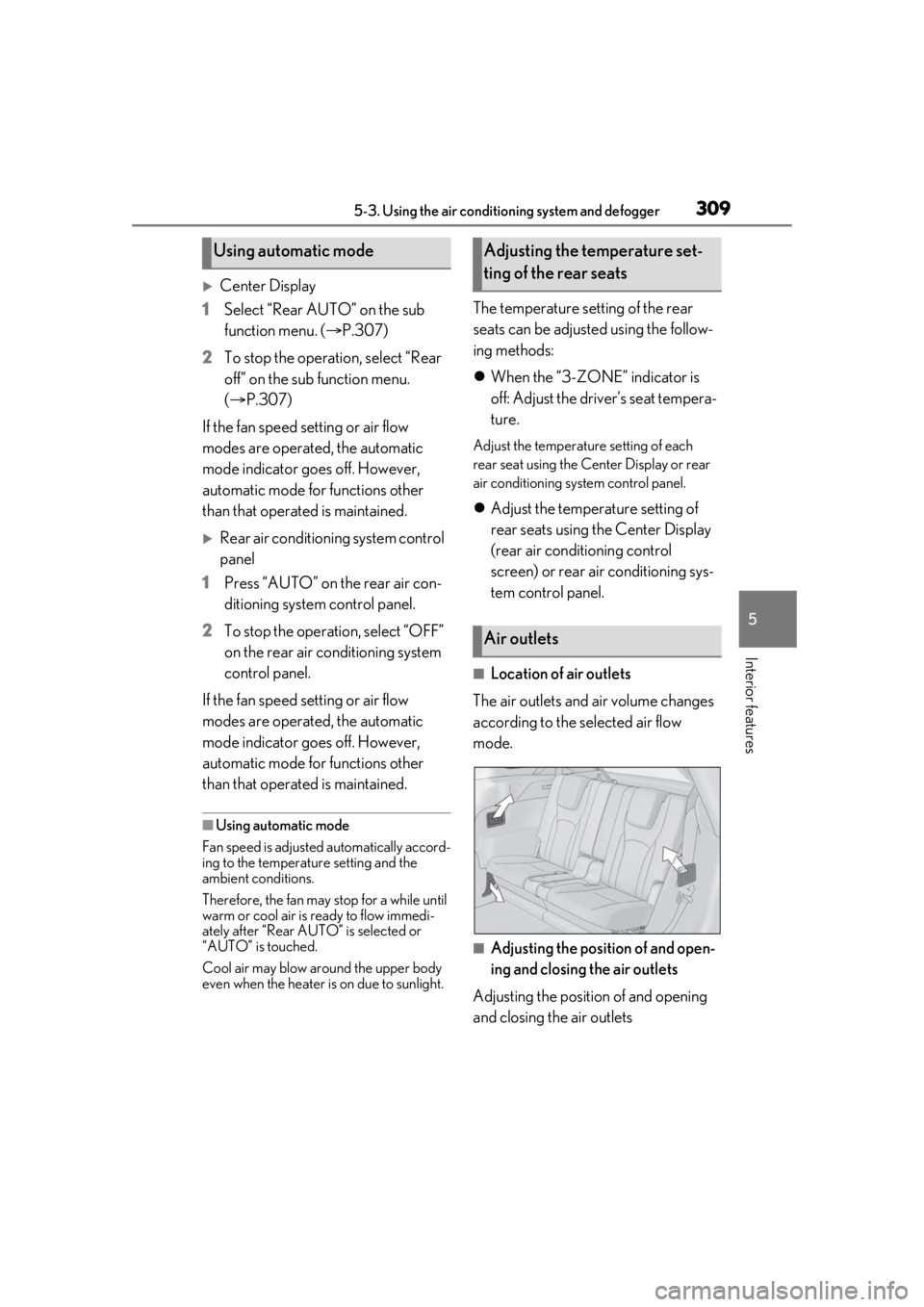
■Location of air outlets
The air outlets and air volume changes
according to the selected air flow
mode.
■Adjusting the position of and open-
ing and closing the air outlets
Adjusting the position of and opening
and closing the air outlets
Using automatic modeAdjusting the temperature set-
ting of the rear seats
Air outlets
Page 311 of 516
3115-3. Using the air conditioning system and defogger
5
Interior features
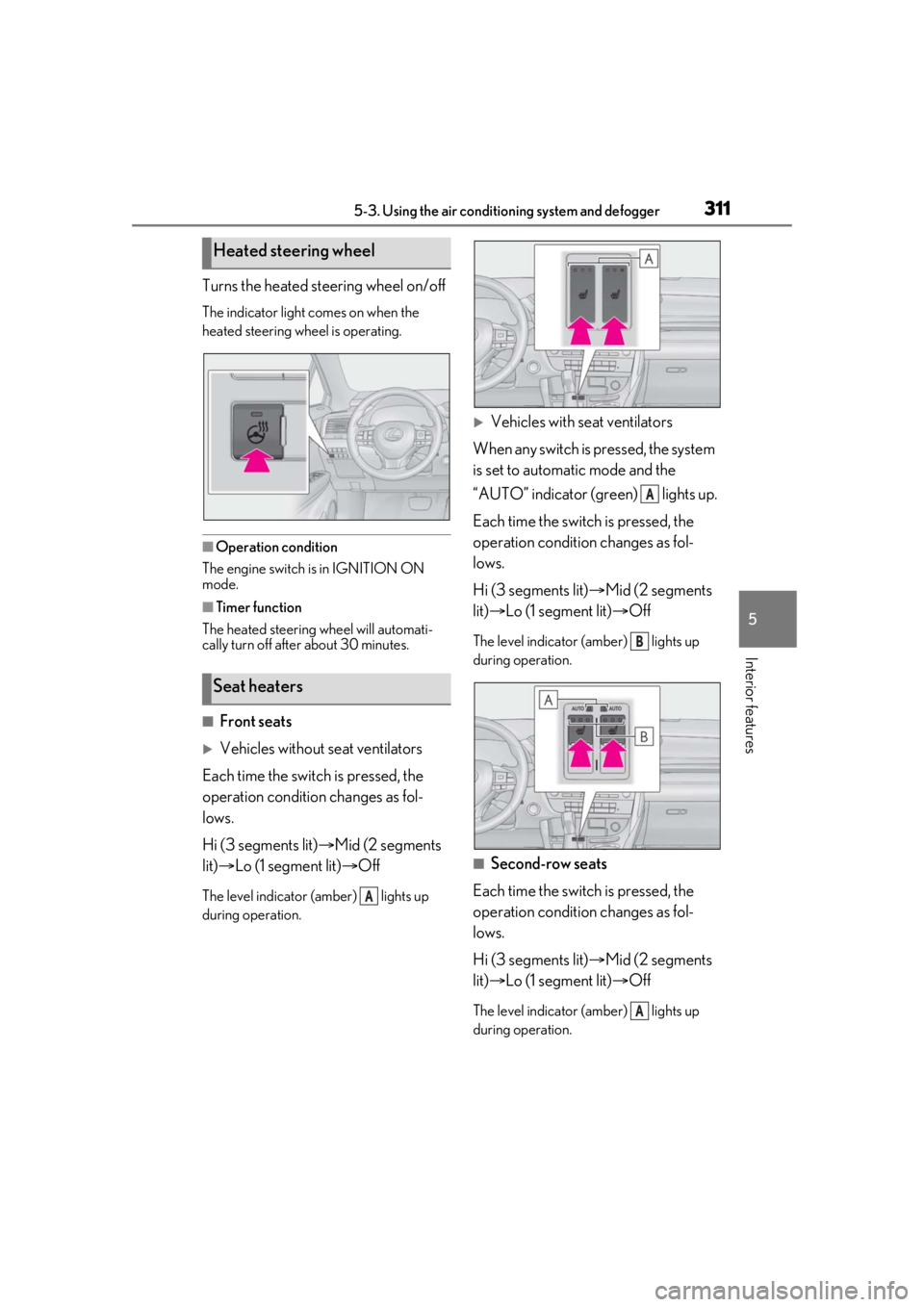
Turns the heated steering wheel on/off
The indicator light comes on when the
heated steering wheel is operating.
■Operation condition
The engine switch is in IGNITION ON
mode.
■Timer function
The heated steering wheel will automati-
cally turn off after about 30 minutes.
■Front seats
Vehicles without seat ventilators
Each time the switch is pressed, the
operation condition changes as fol-
lows.
Hi (3 segments lit) Mid (2 segments
lit) Lo (1 segment lit) Off
The level indicator (amber) lights up
during operation.
Vehicles with seat ventilators
When any switch is pressed, the system
is set to automatic mode and the
“AUTO” indicator (green) lights up.
Each time the switch is pressed, the
operation condition changes as fol-
lows.
Hi (3 segments lit) Mid (2 segments
lit) Lo (1 segment lit) Off
The level indicator (amber) lights up
during operation.
■Second-row seats
Each time the switch is pressed, the
operation condition changes as fol-
lows.
Hi (3 segments lit) Mid (2 segments
lit) Lo (1 segment lit) Off
The level indicator (amber) lights up
during operation.
Heated steering wheel
Seat heaters
A
A
B
A
Page 312 of 516
3125-3. Using the air conditioning system and defogger
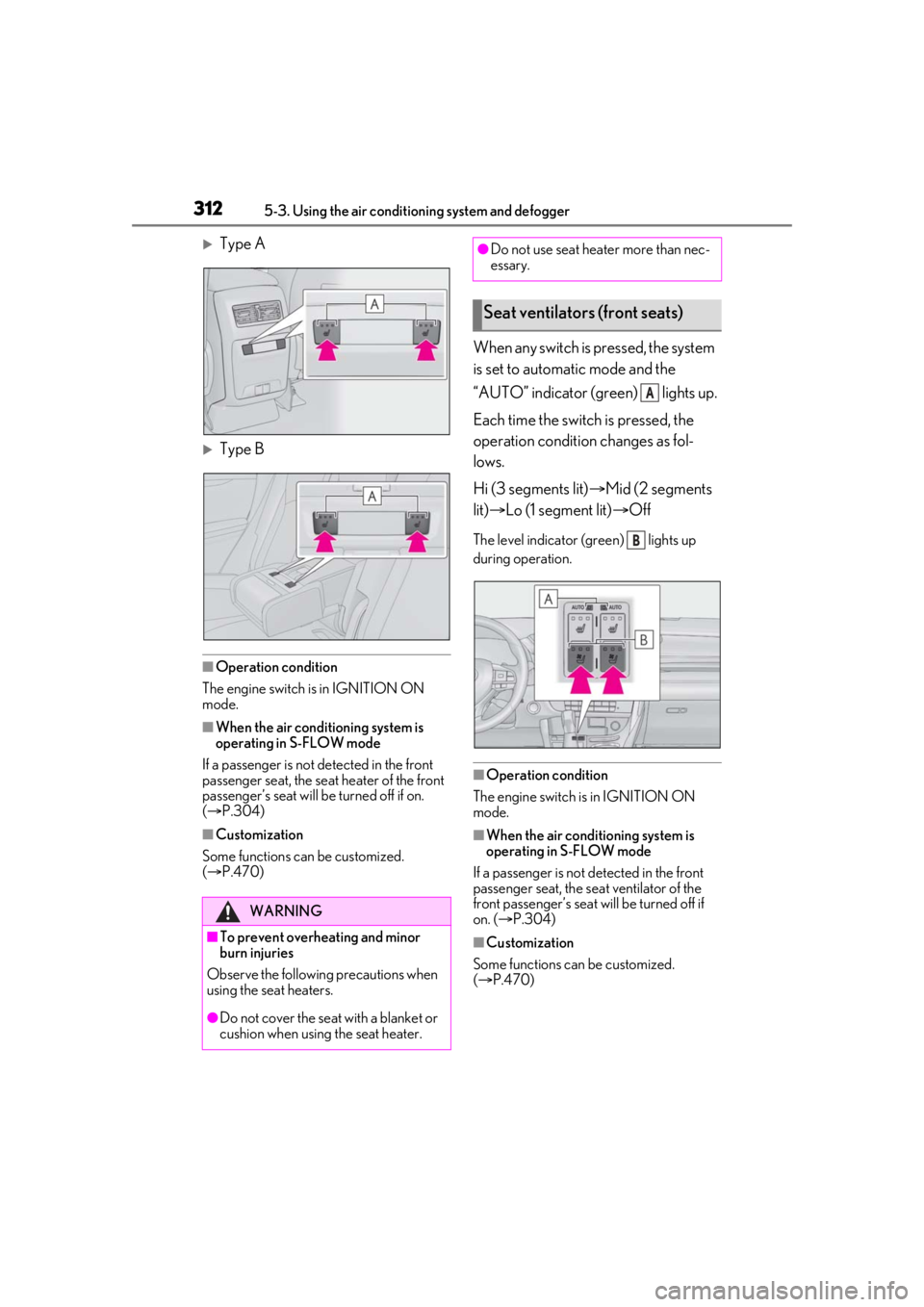
Type A
Type B
■Operation condition
The engine switch is in IGNITION ON
mode.
■When the air conditioning system is
operating in S-FLOW mode
If a passenger is not detected in the front
passenger seat, the seat heater of the front
passenger’s seat will be turned off if on.
( P.304)
■Customization
Some functions can be customized.
( P.470)
When any switch is pressed, the system
is set to automatic mode and the
“AUTO” indicator (green) lights up.
Each time the switch is pressed, the
operation condition changes as fol-
lows.
Hi (3 segments lit) Mid (2 segments
lit) Lo (1 segment lit) Off
The level indicator (green) lights up
during operation.
■Operation condition
The engine switch is in IGNITION ON
mode.
■When the air conditioning system is
operating in S-FLOW mode
If a passenger is not detected in the front
passenger seat, the se at ventilator of the
front passenger’s seat will be turned off if
on. ( P.304)
■Customization
Some functions can be customized.
( P.470)
WARNING
■To prevent overheating and minor
burn injuries
Observe the following precautions when
using the seat heaters.
●Do not cover the seat with a blanket or
cushion when using the seat heater.
●Do not use seat heater more than nec-
essary.
Seat ventilators (front seats)
A
B
Page 313 of 516
3135-4. Using the interior lights
5
Interior features
5-4.Using the interior lights
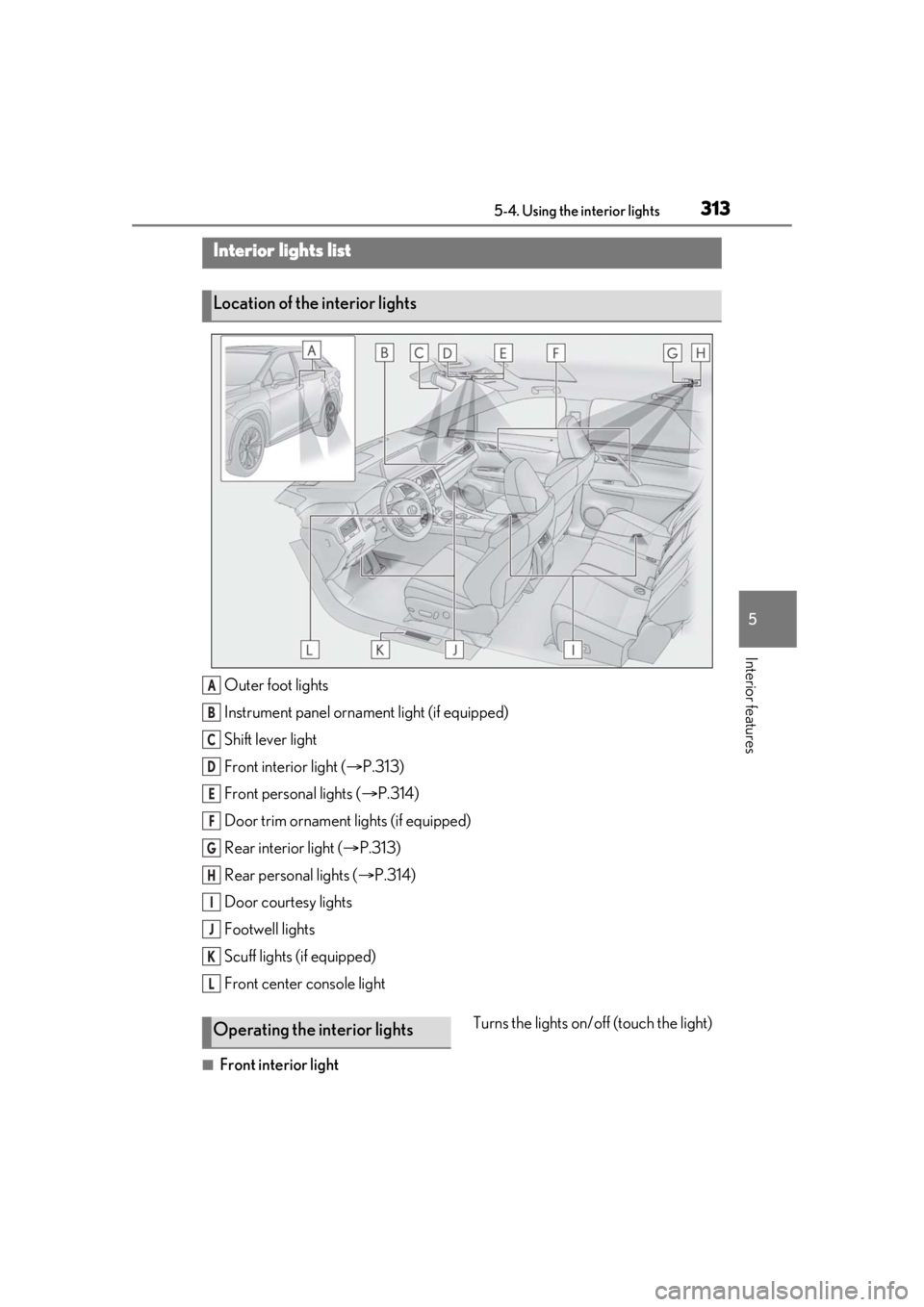
Outer foot lights
Instrument panel ornament light (if equipped)
Shift lever light
Front interior light (P.313)
Front personal lights ( P.314)
Door trim ornament lights (if equipped)
Rear interior light ( P.313)
Rear personal lights ( P.314)
Door courtesy lights
Footwell lights
Scuff lights (if equipped)
Front center console light
■Front interior light Turns the lights on/off (touch the light)
Interior lights list
Location of the interior lights
A
B
C
D
E
F
G
H
I
J
K
L
Operating the interior lights
Page 314 of 516
3145-4. Using the interior lights
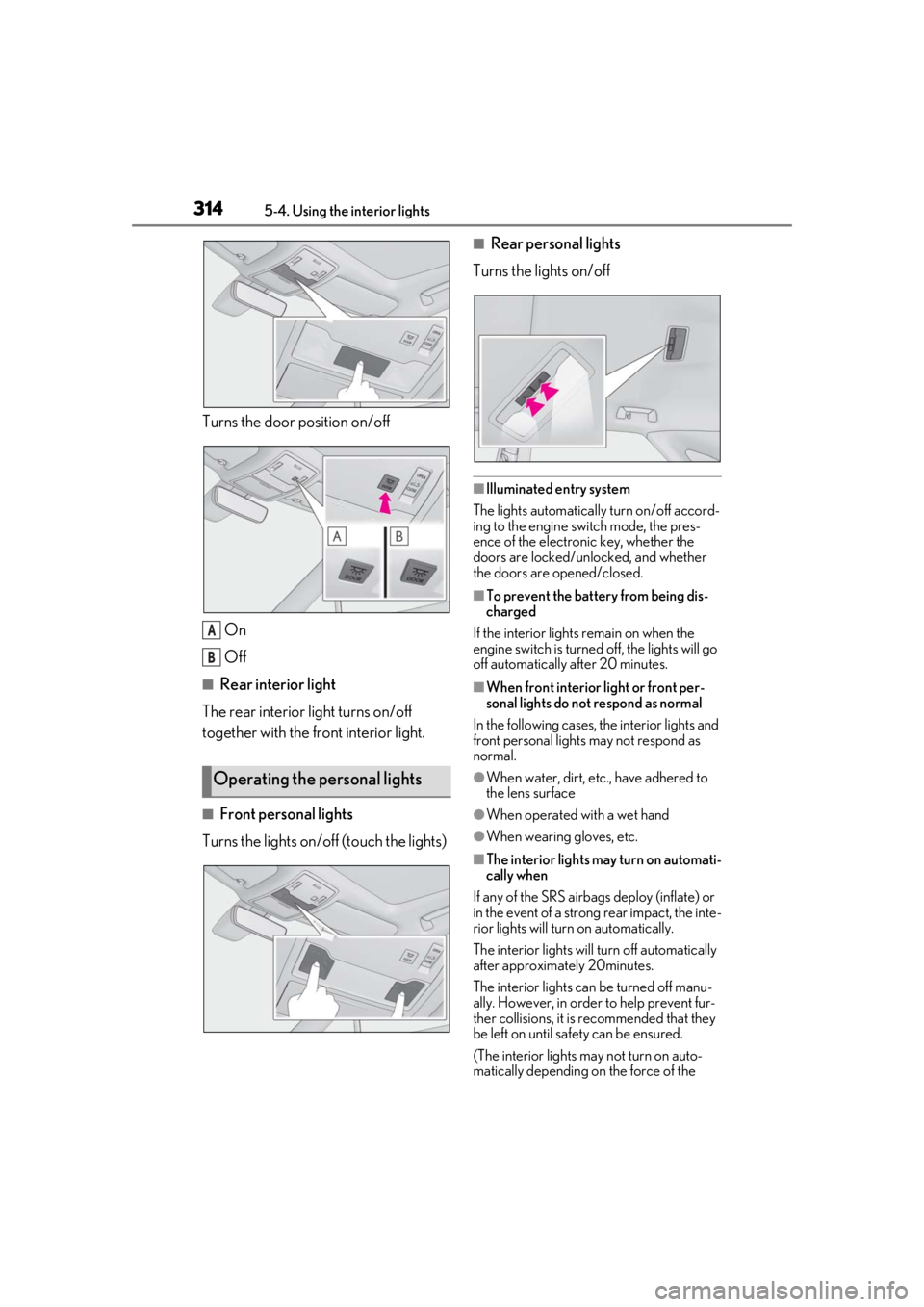
Turns the door position on/off
On
Off
■Rear interior light
The rear interior light turns on/off
together with the front interior light.
■Front personal lights
Turns the lights on/off (touch the lights)
■Rear personal lights
Turns the lights on/off
■Illuminated entry system
The lights automatically turn on/off accord-
ing to the engine switch mode, the pres-
ence of the electronic key, whether the
doors are locked/unlocked, and whether
the doors are opened/closed.
■To prevent the battery from being dis-
charged
If the interior lights remain on when the
engine switch is turned off, the lights will go
off automatically after 20 minutes.
■When front interior light or front per-
sonal lights do not respond as normal
In the following cases, the interior lights and
front personal lights may not respond as
normal.
●When water, dirt, etc., have adhered to
the lens surface
●When operated with a wet hand
●When wearing gloves, etc.
■The interior lights may turn on automati-
cally when
If any of the SRS airbag s deploy (inflate) or
in the event of a strong rear impact, the inte-
rior lights will turn on automatically.
The interior lights will turn off automatically
after approximately 20minutes.
The interior lights can be turned off manu-
ally. However, in order to help prevent fur-
ther collisions, it is recommended that they
be left on until sa fety can be ensured.
(The interior lights may not turn on auto-
matically depending on the force of the
Operating the personal lights
A
B