warning LEXUS RX350 2020 Owners Manual
[x] Cancel search | Manufacturer: LEXUS, Model Year: 2020, Model line: RX350, Model: LEXUS RX350 2020Pages: 516, PDF Size: 17.3 MB
Page 239 of 516
2394-5. Using the driving support systems
4
Driving
*:If equipped
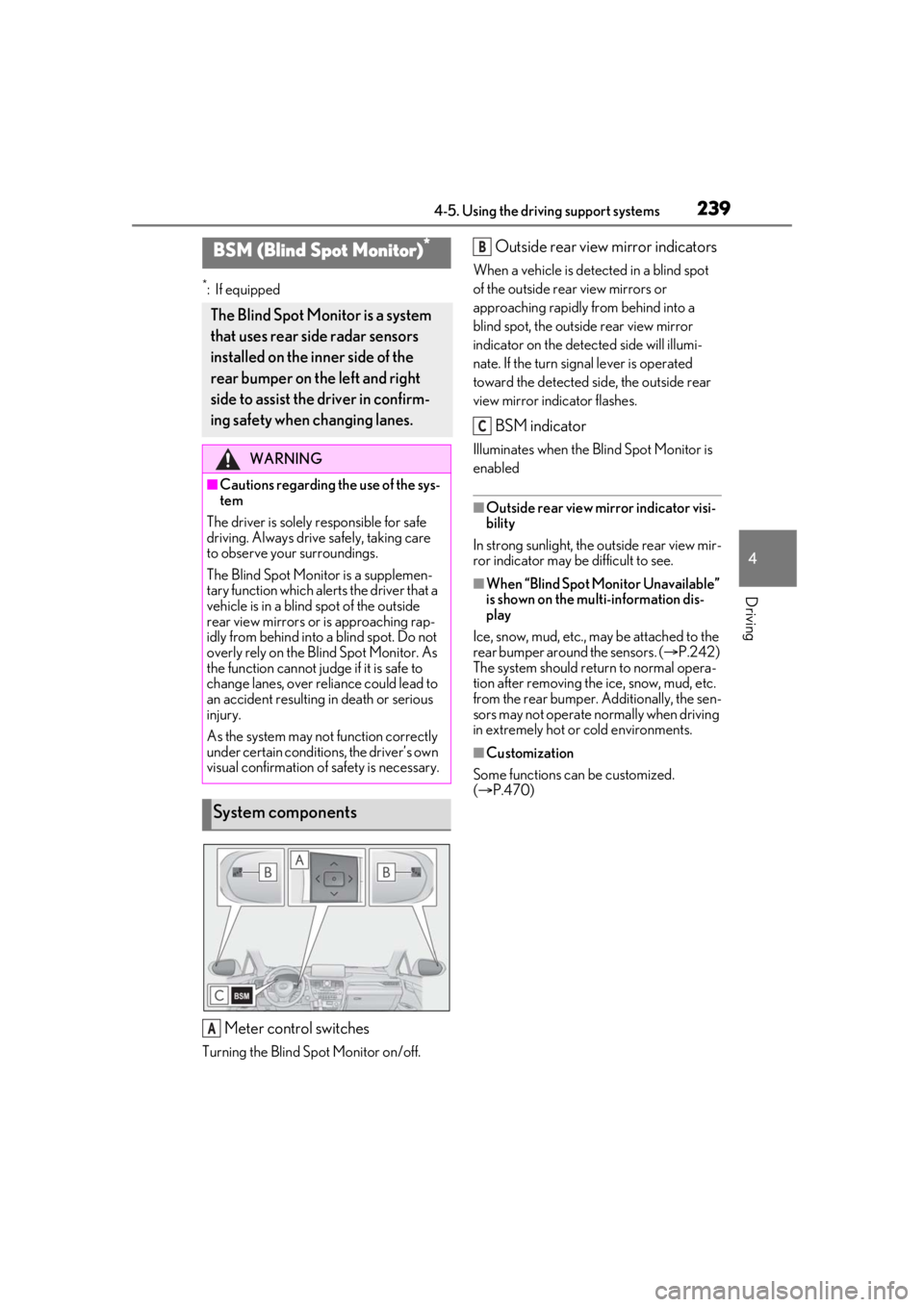
Meter control switches
Turning the Blind Spot Monitor on/off.
Outside rear view mirror indicators
When a vehicle is detected in a blind spot
of the outside rear view mirrors or
approaching rapidly from behind into a
blind spot, the outside rear view mirror
indicator on the detected side will illumi-
nate. If the turn signal lever is operated
toward the detected side, the outside rear
view mirror indicator flashes.
BSM indicator
Illuminates when the Blind Spot Monitor is
enabled
■Outside rear view mirror indicator visi-
bility
In strong sunlight, the outside rear view mir-
ror indicator may be difficult to see.
■When “Blind Spot Monitor Unavailable”
is shown on the multi-information dis-
play
Ice, snow, mud, etc., may be attached to the
rear bumper around the sensors. ( P.242)
The system should return to normal opera-
tion after removing the ice, snow, mud, etc.
from the rear bumper. Additionally, the sen-
sors may not operate normally when driving
in extremely hot or cold environments.
■Customization
Some functions can be customized.
( P.470)
BSM (Blind Spot Monitor)*
The Blind Spot Monitor is a system
that uses rear side radar sensors
installed on the inner side of the
rear bumper on the left and right
side to assist the driver in confirm-
ing safety when changing lanes.
WARNING
■Cautions regarding the use of the sys-
tem
The driver is solely responsible for safe
driving. Always driv e safely, taking care
to observe your surroundings.
The Blind Spot Monitor is a supplemen-
tary function which alerts the driver that a
vehicle is in a blind spot of the outside
rear view mirrors or is approaching rap-
idly from behind into a blind spot. Do not
overly rely on the Blind Spot Monitor. As
the function cannot judge if it is safe to
change lanes, over reliance could lead to
an accident resulting in death or serious
injury.
As the system may not function correctly
under certain conditions, the driver’s own
visual confirmation of safety is necessary.
System components
A
B
C
Page 242 of 516
2424-5. Using the driving support systems
Use the meter control switches to turn
on/off the function.
WARNING
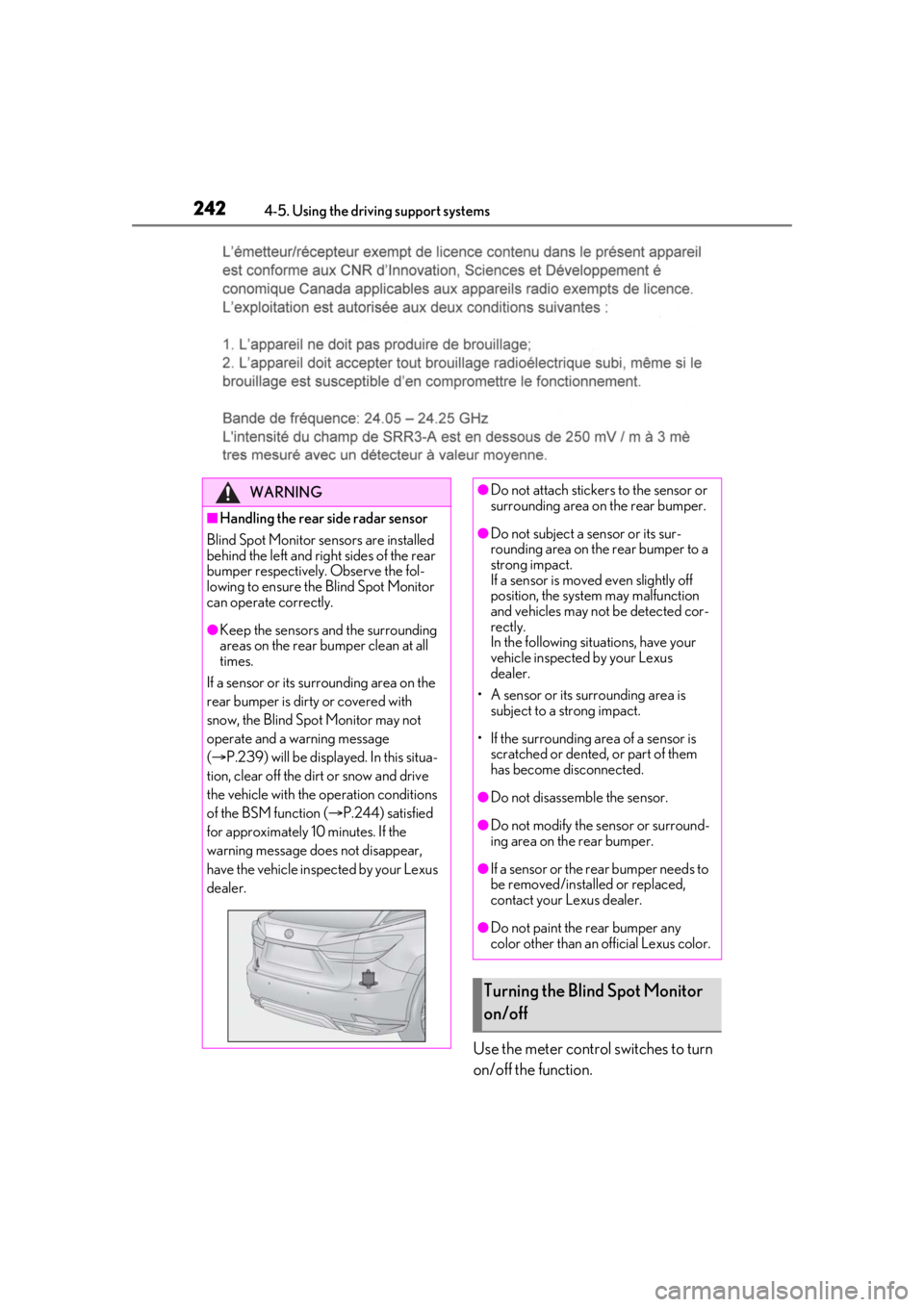
■Handling the rear side radar sensor
Blind Spot Monitor se nsors are installed
behind the left and right sides of the rear
bumper respectively. Observe the fol-
lowing to ensure the Blind Spot Monitor
can operate correctly.
●Keep the sensors and the surrounding
areas on the rear bumper clean at all
times.
If a sensor or its su rrounding area on the
rear bumper is dirty or covered with
snow, the Blind Spot Monitor may not
operate and a warning message
( P.239) will be displayed. In this situa-
tion, clear off the dirt or snow and drive
the vehicle with the operation conditions
of the BSM function ( P.244) satisfied
for approximately 10 minutes. If the
warning message does not disappear,
have the vehicle inspected by your Lexus
dealer.
●Do not attach stickers to the sensor or
surrounding area on the rear bumper.
●Do not subject a sensor or its sur-
rounding area on the rear bumper to a
strong impact.
If a sensor is moved even slightly off
position, the system may malfunction
and vehicles may not be detected cor-
rectly.
In the following situations, have your
vehicle inspected by your Lexus
dealer.
• A sensor or its surrounding area is subject to a strong impact.
• If the surrounding area of a sensor is scratched or dented, or part of them
has become disconnected.
●Do not disassemble the sensor.
●Do not modify the sensor or surround-
ing area on the rear bumper.
●If a sensor or the rear bumper needs to
be removed/installed or replaced,
contact your Lexus dealer.
●Do not paint the rear bumper any
color other than an official Lexus color.
Turning the Blind Spot Monitor
on/off
Page 245 of 516
2454-5. Using the driving support systems
4
Driving
• When there is a significant difference in height between your vehicle and the
vehicle that enters the detection area
• Immediately after the Blind Spot Monitor is turned on
●Instances of the Blind Spot Monitor
unnecessarily detecting a vehicle and/or
object may increase in the following situ-
ations:
• When the sensor is misaligned due to a strong impact to the sensor or its sur-
rounding area
• When the distance between your vehicle and a guardrail, wall, etc. that enters the
detection area is short
• When driving up an d down consecutive
steep inclines, such as hills, dips in the
road, etc.
• When vehicle lanes are narrow, or when driving on the edge of a lane, and a vehi-
cle traveling in a lane other than the adja-
cent lanes enters the detection area
• When driving on roads with sharp bends,
consecutive curves, or uneven surfaces
• When the tires are slipping or spinning
• When the distance between your vehicle and a following vehicle is short
• When an accessory (such as a bicycle carrier) is installed to the rear of the vehi-
cle
*: If equipped
■Intuitive parking assist (if
equipped)
Ultrasonic sensors are used to detect
static objects in the detection area
when driving at a low speed or backing
up. ( P.247)
■RCTA (Rear Cross Traffic Alert)
function (if equipped)
Rear side radar sensors are used to
detect approaching vehicles in the
detection areas behind the vehicle
when backing up. ( P.253)
■Adjusting the buzzer volume
The buzzer volume can be adjusted on
the multi-information display. The vol-
ume of buzzers for the intuitive parking
assist and RCTA function will be
PKSA (Parking Support
Alert)*
The Parking Support Alert system
consists of the following functions
that operate when driving at a low
speed or backing up, such as when
parking. When the system deter-
mines that the possibility of a colli-
sion with a detected object or such
as a wall is high, a warning operates
to urge the driver to take evasive
action.
PKSA (Parking Support Alert)
system
Setting the buzzer volume
Page 248 of 516

2484-5. Using the driving support systems
Center Display (vehicles with a Pan-
oramic view monitor)
A graphic will be displayed on the Center
Display.
Use the meter control switches to
enable/disable the Lexus parking
assist-sensor. ( P.80)
1 Press or to select .
2 Press or to select “PKSA”
and then press .
3 Press or to select and
then press .
When the intuitive parking assist func-
tion is disabled, the intuitive parking
assist OFF indicator ( P.70) illumi-
nates. To re-enable the system, select on
the multi-information display, select
and turn it on. If the system is dis-
abled, it will remain off even if the
engine switch is turned to IGNITION
ON mode after the engine switch has
been turned off.
Turning intuitive parking assist
on/off
WARNING
■When using the intuitive parking
assist
Observe the following precautions.
Failing to do so may result in the vehicle
being unable to be driven safely and pos-
sibly cause an accident.
●Do not use the sensor at speeds in
excess of 6 mph (10 km/h).
●The sensors’ detection areas and reac-
tion times are limited. When moving
forward or reversin g, check the areas
surrounding the vehicle (especially the
sides of the vehicl e) for safety, and
drive slowly, using the brake to control
the vehicle’s speed.
●Do not install accessories within the
sensors’ detection areas.
●The area directly under the bumpers is
not detected.
Thin posts or objects lower than the
sensor may not be detected when
approached, even if they have been
detected once.
■When to disable the function
In the following situations, disable the
function as it may operate even though
there is no possibility of a collision.
●The vehicle is equipped with a fender
pole, wireless antenna or fog lights.
●The front or rear bumper or a sensor
receives a strong impact.
●A non-genuine Lexus suspension
(lowered suspension, etc.) is installed.
Page 249 of 516
2494-5. Using the driving support systems
4
Driving
■The system can be operated when
●The engine switch is in IGNITION ON mode.
●Intuitive parking assist function is on.
●The vehicle speed is less than about 6
mph (10 km/h).
●A shift lever other than P.
■Setting the buzzer volume
The buzzer volume can be adjusted on the
multi-information display. ( P.245)
■If “Parking Assist Unavailable” is dis-
played on the multi-information display
●Water may be continuously flowing over
the sensor surface, such as in a heavy
rain. When the system determines that it
is normal, the system will return to nor-
mal.
●Initialization may not have been per-
formed after a battery terminal was dis-
connected and reconnected. Initialize the
system. ( P.249) If this message contin-
ues to be displayed even after initializa-
tion, have the vehicle inspected by your
Lexus dealer.
■If “Parking Assist Unavailable Clean
Parking Assist Sensor” is displayed on
the multi-information display
A sensor may be covered with ice, snow,
dirt, etc. Remove the ice, snow, dirt, etc.,
from the sensor to return the system to nor-
mal.
Also, due to ice forming on a sensor at low
temperatures, a warn ing message may be
displayed or the sensor may not be able to
detect an object. Once the ice melts, the
system will return to normal.
■If a battery terminal has been discon-
nected and reconnected
The system needs to be initialized. To initial-
ize the system, drive the vehicle straight
ahead for 5 seconds or more at a speed of
approximately 22 mph (35 km/h) or more.
■Sensor detection information
●The following situations may occur
during use.
• The sensor's detection areas are limited
to the areas around the vehicle front and
rear bumpers.
• Depending on the shape of the object
WARNING
●Towing eyelets are installed.
●A backlit licence pl ate is installed.
■When using intuitive parking assist
In the following situations, the system
may not function correctly due to a sen-
sor malfunction, etc. Have the vehicle
checked by your Lexus dealer.
●The intuitive parking assist operation
display flashes or shows continuously,
and a buzzer sounds when no objects
are detected.
●If the area around a sensor collides
with something, or is subjected to
strong impact.
●If the bumper or grille collides with
something.
●If the display flashes or is displayed
continuously and a buzzer does not
sound, except when the mute function
has been turned on.
●If a display error occurs, first check the
sensor.
If the error occurs even when there is
no ice, snow or mud on the sensor, it is
likely that the sensor is malfunctioning.
■Notes when washing the vehicle
Do not apply intensive bursts of water or
steam to the sensor area.
Doing so may result in the sensor mal-
functioning.
●When using a high pressure washer to
wash the vehicle, do not spray the sen-
sors directly, as doing so may cause a
sensor to malfunction.
●When using steam to clean the vehicle,
do not direct steam too close to the
sensors as doing so may cause a sen-
sor to malfunction.
Page 250 of 516
2504-5. Using the driving support systems
and other factors, the detection distance
may shorten, or detection may be impos-
sible.
• There will be a short delay between object detection and display. Even at low
speeds, there is a possibility that the
object will come within the sensor’s
detection areas before the display is
shown and the warning beep sounds.
• It might be difficult to hear the buzzer due to the volume of the audio system or air
flow noise of the air conditioning system.
• It may be difficult to hear the buzzer if buzzers for other systems are sounding.
■Conditions under which the function
may not function correctly
Certain vehicle conditions and the sur-
rounding environment may affect the ability
of a sensor to correctly detect objects. Par-
ticular instances where this may occur are
listed below.
●There is dirt, snow or ice on a sensor.
(Cleaning the sensors will resolve this
problem.)
●A sensor is frozen. (Thawing the area will
resolve this problem.)
In especially cold weather, if a sensor is
frozen the sensor display may be dis-
played abnormally, or objects, such as a
wall, may not be detected.
●A sensor is covered in any way.
●When a sensor or the area around a sen-
sor is extremely hot or cold.
●On an extremely bumpy road, on an
incline, on gravel, or on grass.
●The vicinity of the vehicle is noisy due to
vehicle horns, motorcycle engines, air
brakes of large vehicles, or other loud
noises producing ultrasonic waves.
●There is another vehicle equipped with
parking assist sensors in the vicinity.
●A sensor is coated with a sheet of spray
or heavy rain.
●If a sensor is hit by a large amount of
water, such as when driving on a flooded
road.
●If the vehicle is significantly tilted.
●The vehicle is approaching a tall or
curved curb.
●If objects draw too close to the sensor.
■Objects which may not be properly
detected
The shape of the object may prevent the
sensor from detectin g it. Pay particular
attention to the following objects:
●Wires, fences, ropes, etc.
●Cotton, snow and other materials that
absorb sound waves
●Sharply-angled objects
●Low objects
●Tall objects with upper sections project-
ing outwards in the direction of your vehi-
cle
People may not be de tected if they are
wearing certain types of clothing.
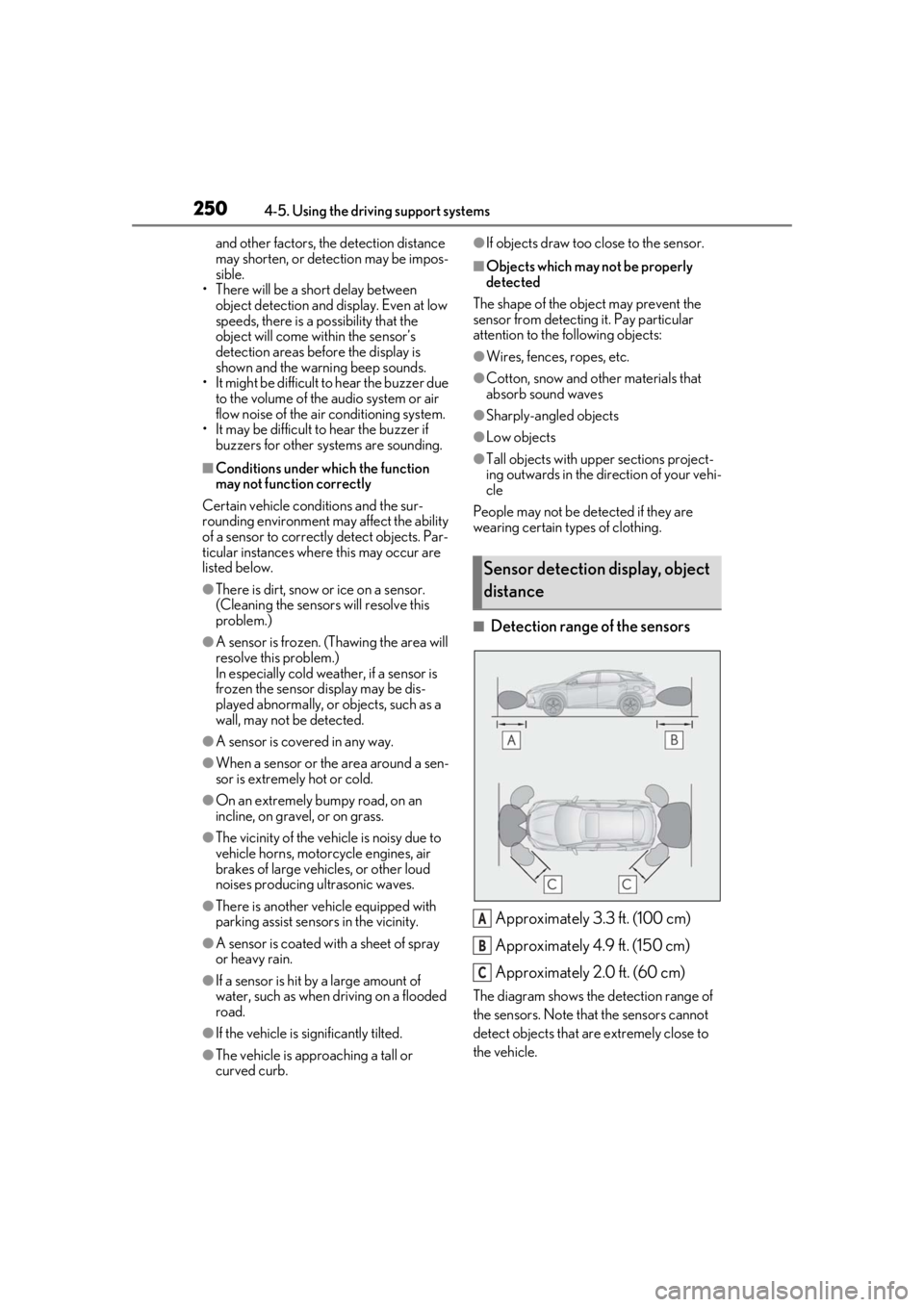
■Detection range of the sensors
Approximately 3.3 ft. (100 cm)
Approximately 4.9 ft. (150 cm)
Approximately 2.0 ft. (60 cm)
The diagram shows the detection range of
the sensors. Note that the sensors cannot
detect objects that are extremely close to
the vehicle.
Sensor detection display, object
distance
A
B
C
Page 254 of 516
2544-5. Using the driving support systems
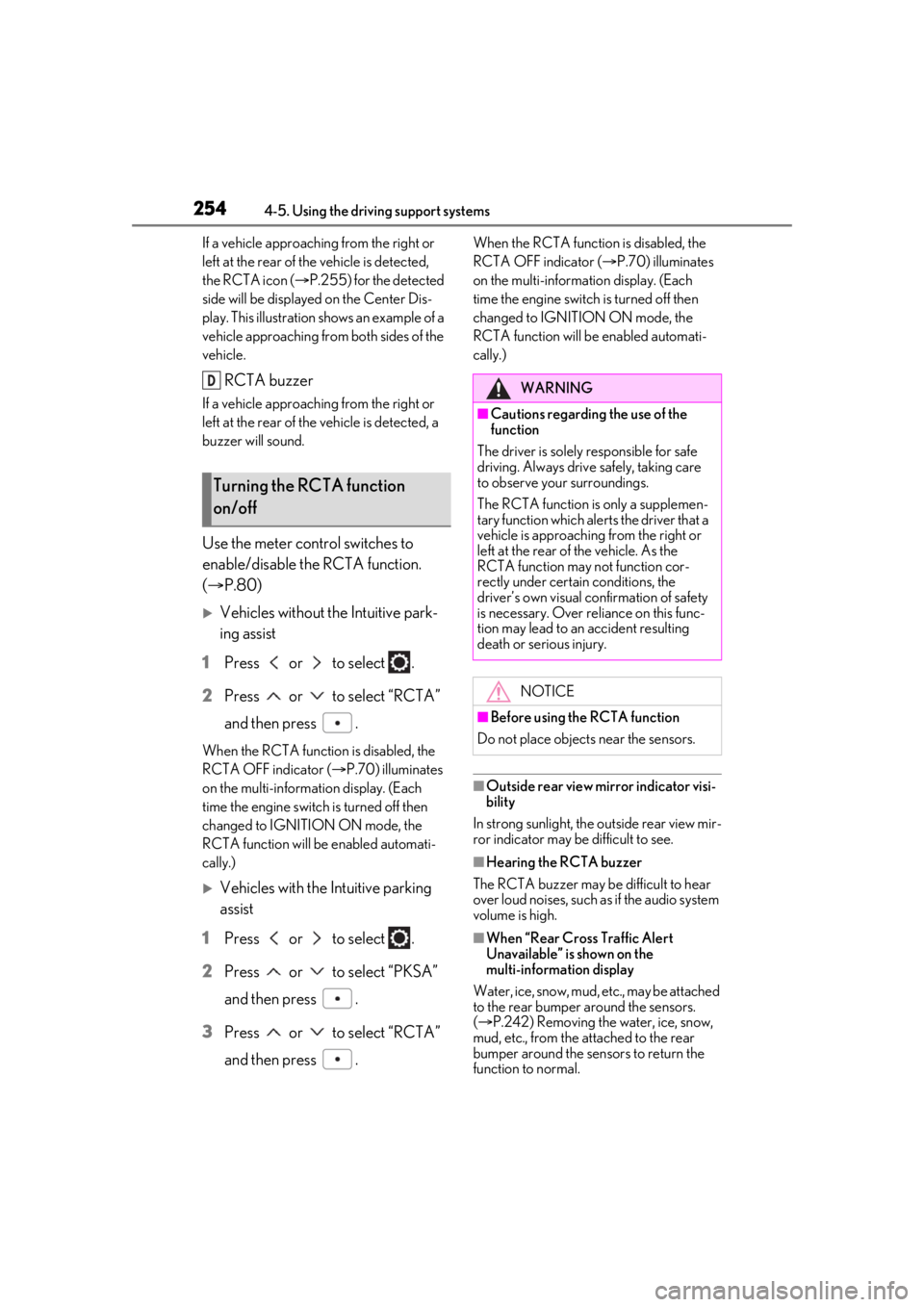
If a vehicle approaching from the right or
left at the rear of the vehicle is detected,
the RCTA icon (P.255) for th e detected
side will be displayed on the Center Dis-
play. This illustration shows an example of a
vehicle approaching from both sides of the
vehicle.
RCTA buzzer
If a vehicle approaching from the right or
left at the rear of the vehicle is detected, a
buzzer will sound.
Use the meter control switches to
enable/disable the RCTA function.
( P.80)
Vehicles without the Intuitive park-
ing assist
1 Press or to select .
2 Press or to select “RCTA”
and then press .
When the RCTA function is disabled, the
RCTA OFF indicator ( P.70) illuminates
on the multi-information display. (Each
time the engine switch is turned off then
changed to IGNITION ON mode, the
RCTA function will be enabled automati-
cally.)
Vehicles with the Intuitive parking
assist
1 Press or to select .
2 Press or to select “PKSA”
and then press .
3 Press or to select “RCTA”
and then press .
When the RCTA function is disabled, the
RCTA OFF indicator ( P.70) illuminates
on the multi-informat ion display. (Each
time the engine switch is turned off then
changed to IGNITION ON mode, the
RCTA function will be enabled automati-
cally.)
■Outside rear view mirror indicator visi-
bility
In strong sunlight, the outside rear view mir-
ror indicator may be difficult to see.
■Hearing the RCTA buzzer
The RCTA buzzer may be difficult to hear
over loud noises, such as if the audio system
volume is high.
■When “Rear Cross Traffic Alert
Unavailable” is shown on the
multi-information display
Water, ice, snow, mud, etc., may be attached
to the rear bumper around the sensors.
( P.242) Removing the water, ice, snow,
mud, etc., from the attached to the rear
bumper around the sensors to return the
function to normal.
Turning the RCTA function
on/off
DWARNING
■Cautions regarding the use of the
function
The driver is solely responsible for safe
driving. Always drive safely, taking care
to observe your surroundings.
The RCTA function is only a supplemen-
tary function which alerts the driver that a
vehicle is approaching from the right or
left at the rear of the vehicle. As the
RCTA function may not function cor-
rectly under certai n conditions, the
driver’s own visual confirmation of safety
is necessary. Over re liance on this func-
tion may lead to an accident resulting
death or serious injury.
NOTICE
■Before using the RCTA function
Do not place objects near the sensors.
Page 258 of 516
2584-5. Using the driving support systems
*:If equipped
■Parking Support Brake function
(static objects) (if equipped)
Ultrasonic sensors are used to detect
static objects, such as a wall, in the
detection area when driving at a low
speed or backing up. ( P.264)
■Parking Support Brake function
(rear-crossing vehicles) (if
equipped)
Rear radar sensors are used to detect
approaching vehicles in the detection
area behind the vehicle when backing
up. ( P.270) The Parking Support Brake can be
enabled/disabled on the multi-informa-
tion display. All of the Parking Support
Brake functions (static objects and
rear-crossing vehicles) are
enabled/disabled simultaneously.
PKSB (Parking Support
Brake)*
The Parking Support Brake system
consists of the following functions
that operate when driving at a low
speed or backing up, such as when
parking. When the system deter-
mines that the possibility of a colli-
sion with a detected object is high, a
warning operates to urge the driver
to take evasive action. If the system
determines that the possibility of a
collision with a detected object is
extremely high, the brakes are
automatically applied to help avoid
the collision or help reduce the
impact of the collision.
PKSB (Parking Support Brake)
system
WARNING
■Limitations of the Parking Support
Brake system
Do not overly rely on the system, as
doing so may lead to an accident.
●The driver is solely responsible for safe
driving. Always drive carefully, taking
care to observe your surroundings.
The Parking Support Brake system is
designed to provide support to lessen
the severity of collisions. However, it
may not operate in some situations.
●The Parking Support Brake system is
not designed to stop the vehicle com-
pletely. Additionally, even if the system
has stopped the vehicl e, it is necessary
to depress the brake pedal immedi-
ately as brake control will be canceled
after approximately 2 seconds.
NOTICE
■If “Parking Support Brake Unavail-
able” is displayed on the multi-infor-
mation display and the PKSB OFF
indicator is flashing
If this message is displayed immediately
after the engine swit ch is changed to
IGNITION ON mode, operate the vehi-
cle carefully, paying attention to your sur-
roundings. It may be necessary to drive
the vehicle for a certain amount of time
before the system returns to normal. (If
the system is not return to normal after
driving for a while, clean the sensors and
their surrounding area on the bumpers.)
Enabling/Disabling the Parking
Support Brake
Page 259 of 516
2594-5. Using the driving support systems
4
Driving
Use the meter control switches to
enable/disable the parking support
brake. (P.80)
1 Press or to select .
2 Press or to select
and then press .
When the Parking Support Brake is dis-
abled, the PKSB OFF indicator ( P.70)
illuminates on the multi-information dis-
play.
To re-enable the system when it was dis-
abled, select on the multi-information
display, select and turn it on. If the
system is disabled, it will remain off even if
the engine switch is turned to IGNITION
ON mode after the engine switch has
been turned off.
If the engine output restriction control or
brake control operates, a buzzer will sound
and a message will be displayed on the
Center Display and multi-information dis-
play, to alert the driver. On vehicles with a
head-up display, the head-up display (if
equipped) will display the same message
as the multi-information display.
Depending on the situation, engine output
restriction control will operate to either
limit acceleration or restrict output as
much as possible.
Engine output restriction control is
operating (acceleration restriction)
Acceleration greater than a certain
amount is restricted by the system.
Center Display (Panoramic view monitor)
(If equipped): No warning displayed
Multi-information display: “Object Detected Acceleration Reduced”
PKSB OFF indicator: Not illuminated
Buzzer: Does not sound
Engine output restriction control is
operating (output restricted as
much as possible)
The system has determined that stron-
ger-than-normal brake operation is neces-
sary.
Center Display (Panoramic view monitor)
(If equipped): “BRAKE!”
Multi-information display: “BRAKE!”
PKSB OFF indicator: Not illuminated
Buzzer: Short beep
Brake control is operating
The system determined that emergency
braking is necessary.
Center Display (Panoramic view monitor)
(If equipped): “BRAKE!”
Multi-information display: “BRAKE!”
PKSB OFF indicator: Not illuminated
Buzzer: Short beep
Vehicle stopped by system opera-
tion
The vehicle has been stopped by brake
control operation.
Center Display (Panoramic view monitor)
(If equipped): “Press Brake Pedal”
Multi-information display: “Switch to
Brake” (If the accelerator pedal is not
depressed, “Press Brake Pedal” will be dis-
played.)
PKSB OFF indicator: Illuminated
Buzzer: Short beep
Displays and buzzers for engine
output restriction control and
brake control
Page 264 of 516
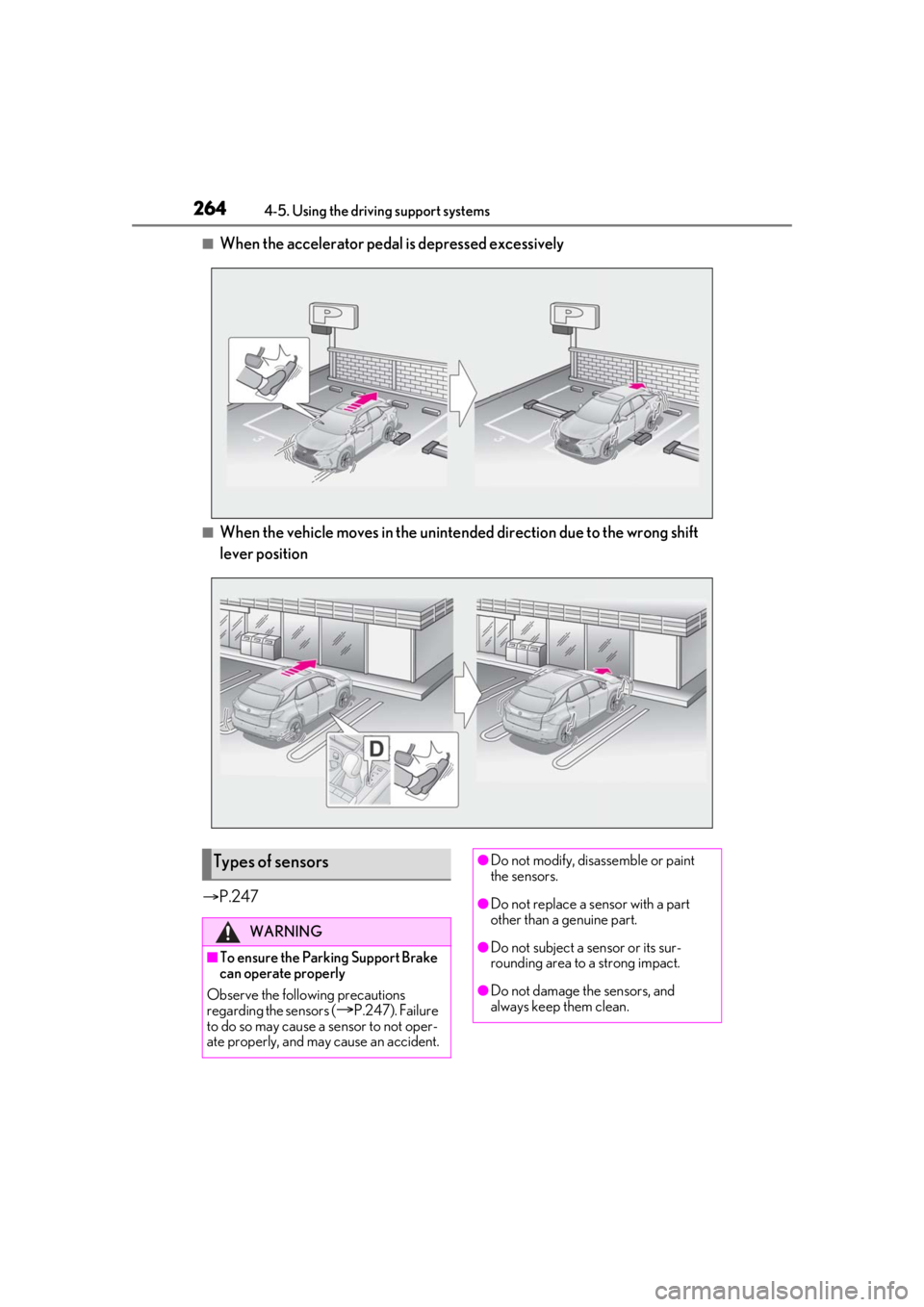
2644-5. Using the driving support systems
■When the accelerator pedal is depressed excessively
■When the vehicle moves in the unintend ed direction due to the wrong shift
lever position
P.247
Types of sensors
WARNING
■To ensure the Parking Support Brake
can operate properly
Observe the following precautions
regarding the sensors (
P.247). Failure
to do so may cause a sensor to not oper-
ate properly, and may cause an accident.
●Do not modify, disassemble or paint
the sensors.
●Do not replace a sensor with a part
other than a genuine part.
●Do not subject a sensor or its sur-
rounding area to a strong impact.
●Do not damage the sensors, and
always keep them clean.