brake LEXUS RX350 2020 User Guide
[x] Cancel search | Manufacturer: LEXUS, Model Year: 2020, Model line: RX350, Model: LEXUS RX350 2020Pages: 516, PDF Size: 17.3 MB
Page 82 of 516
822-1. Instrument cluster
The greater the number of segments
displayed, the greater the driving force
applied.
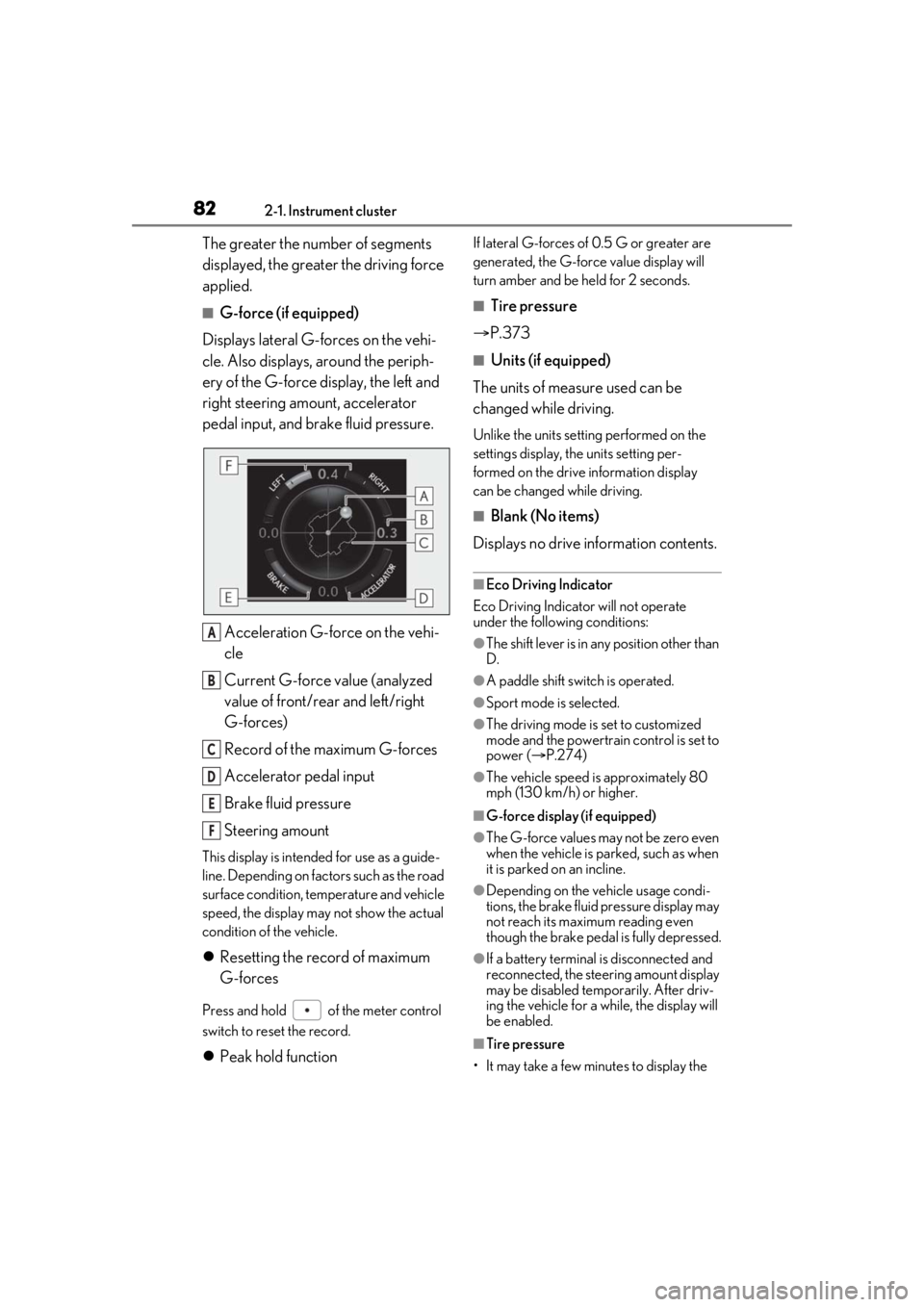
■G-force (if equipped)
Displays lateral G-forces on the vehi-
cle. Also displays, around the periph-
ery of the G-force display, the left and
right steering amount, accelerator
pedal input, and brake fluid pressure.
Acceleration G-force on the vehi-
cle
Current G-force value (analyzed
value of front/rear and left/right
G-forces)
Record of the maximum G-forces
Accelerator pedal input
Brake fluid pressure
Steering amount
This display is intended for use as a guide-
line. Depending on factors such as the road
surface condition, temperature and vehicle
speed, the display may not show the actual
condition of the vehicle.
Resetting the record of maximum
G-forces
Press and hold of the meter control
switch to reset the record.
Peak hold function
If lateral G-forces of 0.5 G or greater are
generated, the G-forc e value display will
turn amber and be held for 2 seconds.
■Tire pressure
P.373
■Units (if equipped)
The units of measure used can be
changed while driving.
Unlike the units sett ing performed on the
settings display, th e units setting per-
formed on the drive information display
can be changed while driving.
■Blank (No items)
Displays no drive information contents.
■Eco Driving Indicator
Eco Driving Indicator will not operate
under the following conditions:
●The shift lever is in an y position other than
D.
●A paddle shift swit ch is operated.
●Sport mode is selected.
●The driving mode is set to customized
mode and the powertrain control is set to
power (P.274)
●The vehicle speed is approximately 80
mph (130 km/h) or higher.
■G-force display (if equipped)
●The G-force values may not be zero even
when the vehicle is parked, such as when
it is parked on an incline.
●Depending on the vehicle usage condi-
tions, the brake fluid pressure display may
not reach its maximum reading even
though the brake pedal is fully depressed.
●If a battery terminal is disconnected and
reconnected, the steeri ng amount display
may be disabled temporarily. After driv-
ing the vehicle for a while, the display will
be enabled.
■Tire pressure
• It may take a few minutes to display the
A
B
C
D
E
F
Page 86 of 516
862-1. Instrument cluster
*:If equipped
Illustrations used in this text are intended as examples, and may differ from the image that is
actually displayed by the head-up display.
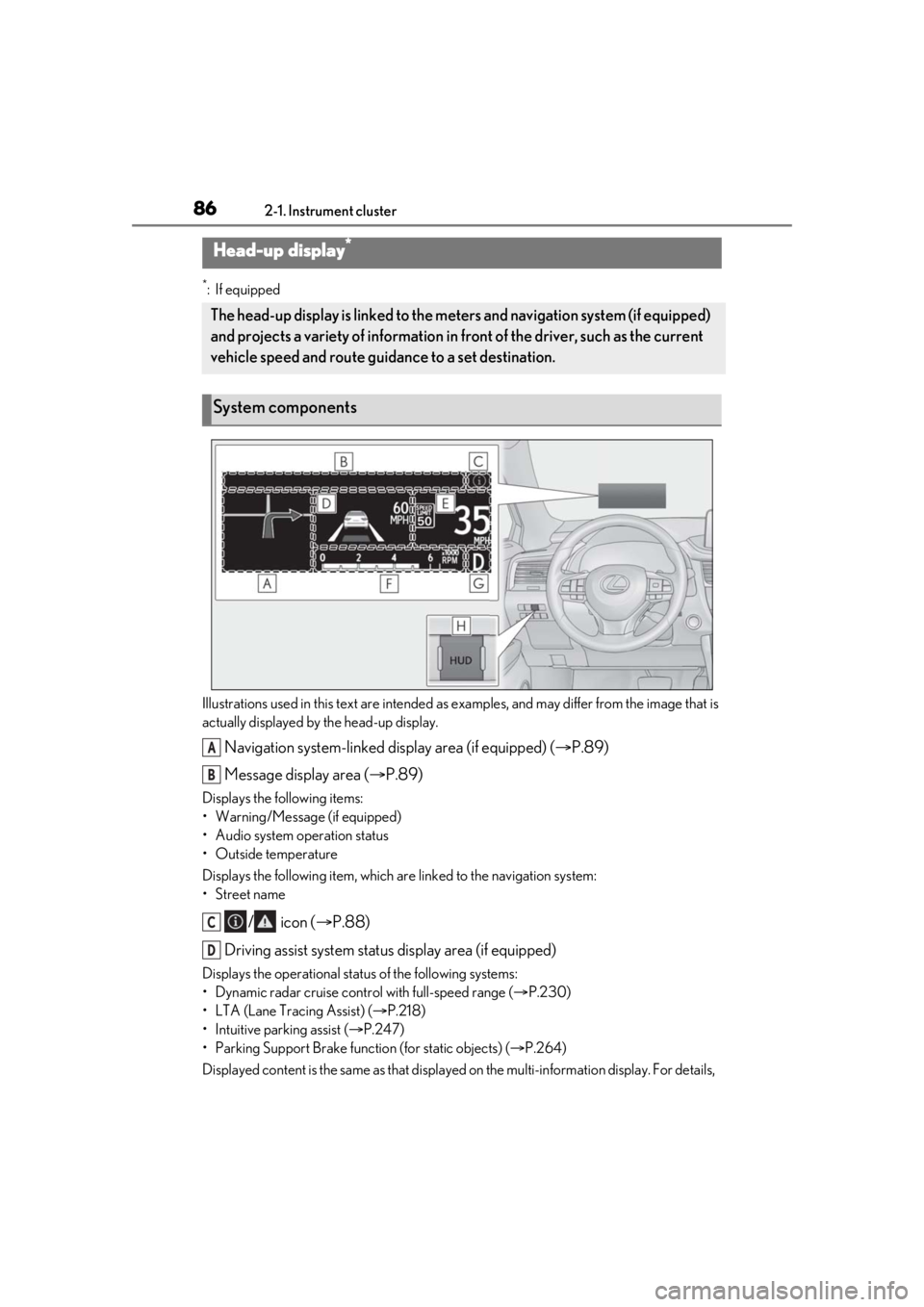
Navigation system-linked display area (if equipped) ( P.89)
Message display area ( P.89)
Displays the following items:
• Warning/Message (if equipped)
• Audio system operation status
• Outside temperature
Displays the following item, which ar e linked to the navigation system:
•Street name
/ icon ( P.88)
Driving assist system status display area (if equipped)
Displays the operational stat us of the following systems:
• Dynamic radar cruise control with full-speed range ( P.230)
• LTA (Lane Tracing Assist) ( P.218)
• Intuitive parking assist ( P.247)
• Parking Support Brake function (for static objects) (P.264)
Displayed content is the same as that displaye d on the multi-information display. For details,
Head-up display*
The head-up display is linked to the meters and navigation system (if equipped)
and projects a variety of information in front of the driver, such as the current
vehicle speed and route guidance to a set destination.
System components
A
B
C
D
Page 89 of 516

892-1. Instrument cluster
2
Vehicle status information and indicators
( P.422)
: Information icon
Displayed when a suggestion/advice
pop-up display is displayed on the
multi-information display. ( P.84)
Displays the following items in the
appropriate situation:
■Warning/Message (if equipped)
Displays the following system warn-
ing/messages:
PCS (Pre-Collision System)
( P.211)
Parking Support Brake function (for
static objects) ( P.264)
Dynamic radar cruise control with
full-speed range ( P.230)
Brake Override System ( P.157)
Drive-Start Control ( P.157)
Details of content displayed on the
head-up display may differ from that dis-
played on the multi-information display. For
details, refer to the explanation of each sys-
tem.
■Audio system operation status
Displayed when the audio system is
operated.
■Outside temperature
Displayed in the following situations:
When the engine switch is turned to
IGNITION ON mode
When the low outside temperature
indicator is flashing
Displayed content is the same as that displayed on the multi-information dis-
play. For details, refer to the explana-
tion of the outside temperature display
on the multi-information display.
(
P.77)
Displays the following items which are
linked to the navigation system:
■Street name
The name of the street that the vehicle
is currently driving on is displayed on
the bottom of the display area.
When the navigation system is per-
forming route guidance, the name of
the next street will be displayed on the
top of the display area.
■Street name display (vehicles with a nav-
igation system)
Only street names which are included in the
map data will be displayed.
Displays the following items which are
linked to the navigation system:
■Route guidance to destination
Displayed when the navigation system
is performing route guidance. When
approaching an intersection, an arrow
will be displayed to indicate the sug-
gested direction of travel.
■Compass
Displays the direction of travel.
Message display area
Navigation system-linked dis-
play area (if equipped)
Page 105 of 516

1053-2. Opening, closing and locking the doors
3
Before driving
for the operation to occur.Kick sensor
Hands Free Power Back Door
operation detection area
3 When the kick sensor detects that
your foot is pulled back, a buzzer
will sound and the power back door
will automatically fully open/close.
If kick operation is performed again in the
middle of back door operating, the opera-
tion will stop.
■Hands free close & lock function*
(vehicles with Hands Free Power
Back Door)
*: This setting can be customized by your
Lexus dealer.
If the power back door is closed using a
Hands Free Power Back Door close
operation, all of the doors will be
locked at the same time.
A different buzzer than the normal one will
sound before the power back door begins
to close. The door lock operation signals
will operate to indicate that the power back
door has closed and all of the doors have
locked simultaneously.
If a Hands Free Power Back Door opera-
tion is performed while the power back
door is operating, the power back door will
stop.
If a Hands Free Power Back Door opera- tion is performed again, the power back
door will open.
■Luggage compartment lights
●The luggage compartment lights turn on
when the back door is opened.
●When the engine switch
is turned off, the
lights will go off automatically after 20
minutes.
■Power back door operating conditions
If the following conditions are met with the
power back door operation enabled, the
power back door can be opened and
closed automatically.
●When an electronic key is being carried
and the back door opener switch is
pressed
*
●When the wireless remote control is
used*
●When the engine swit ch is in IGNITION
ON mode, the vehicle speed must be
lower than 2 mph (3 km/h) and one of
the following conditions must be met in
addition to the above conditions:
• The parking brake is engaged.
• The brake pedal is depressed.
• The shift lever is in P.
*: When the operation of the power back
door when it is locked has been disabled
by a customized setting, operate the
power back door after it has been
unlocked.
■Close & lock function operating condi-
tions
This function can be operated when all of
the following conditions are met:
• An electronic key is not detected within the vehicle.
• All of the doors other than the power back door are closed.
• The engine switch is off.
■Hands Free Power Back Door operating
conditions (if equipped)
●The Hands Free Power Back Door (kick
sensor) setting is on.
A
B
Page 123 of 516
1233-3. Adjusting the seats
3
Before driving
Rear seats
WARNING
■When a rear seatback is folded
Observe the following precautions.
Failure to do so may result in death or
serious injury.
●Do not fold down the rear seatbacks
while driving.
●Stop the vehicle on level ground, apply
the parking brake and shift the shift
lever to P.
●Do not allow anyone to sit on a folded
rear seatback or in the luggage com-
partment while driving.
●Do not allow children to enter the lug-
gage compartment.
■When operating the rear seatback
Observe the following precautions.
Failure to do so may result in death or
serious injury.
●Make sure that passengers are clear of
the rear seatback before operating it.
●To prevent hands and other body parts
from being caught, keep them away
from the gaps in the seats and the mov-
ing parts of the seat s when operating a
rear seatback.
●Power seat: Do not let children oper-
ate the rear seatback. Other passen-
gers may get caught in the seat.
●Power seat: Make sure that all passen-
gers are clear of a seat before folding
it. Do not let passeng ers sit in the seat
while it is being folded.
■Seat adjustment
Second-row seats: To reduce the risk of
sliding under the lap belt during a colli-
sion, do not recline the seat more than
necessary.
If the seat is reclin ed excessively, the lap
belt may slide past the hips and apply
restraint forces directly to the abdomen,
or your neck may contact the shoulder
belt, increasing the ri sk of death or seri-
ous injury in the event of an accident.
■After adjusting the rear seats
Observe the following precautions.
Failure to do so may result in death or
serious injury.
●Make sure that the rear seatback is
securely locked in position by lightly
pushing it back and forth.
●Check that the seat belts are not
twisted or caught between or behind
in the rear seatback.
●Arrange the seat belts in the proper
positions for ready use.
■Jam protection function (power seat)
Observe the following precautions.
Failure to do so may result in death or
serious injury.
●Never use any part of your body to
intentionally activa te the jam protec-
tion function.
●The jam protection function may not
operate if something is caught just
before the fully folded position. Be
careful so that finger s, etc. do not get
caught.
●The jam protection function may not
operate depending on the shape or
position of the obstruction. Be careful
so that fingers, etc. do not get caught.
Page 129 of 516
1293-3. Adjusting the seats
3
Before driving
A buzzer will sound and then the operation
will start. When the operation is com-
pleted, the buzzer will sound twice again.
To stop the operation partway, press either
side of the switch fo r the operating seat.
Any rear seat operation switch for the
operating seat, regardless of location, can
be used to stop the operation. (A buzzer
may sound depending on the position that
the rear seatback is stopped.)
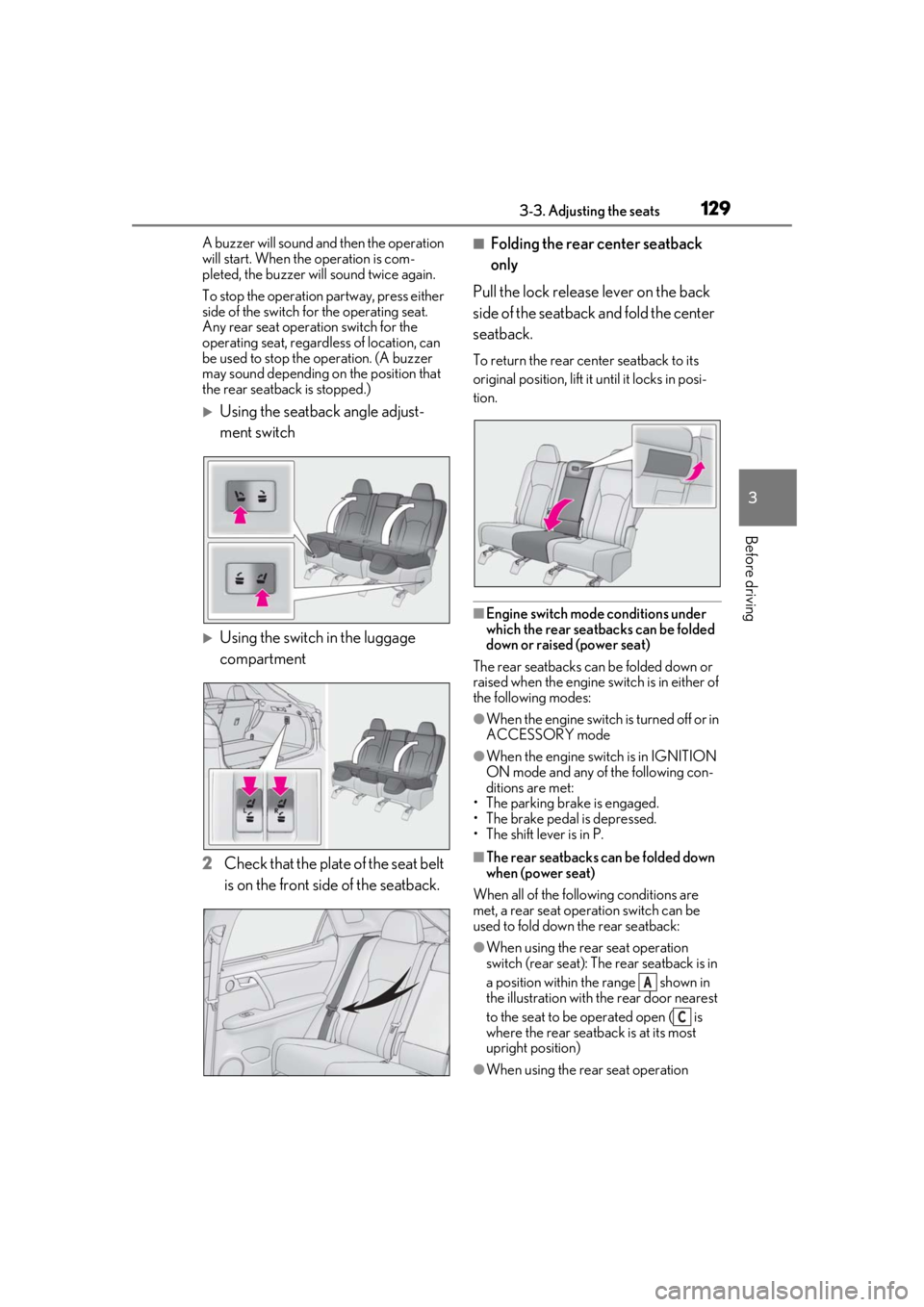
Using the seatback angle adjust-
ment switch
Using the switch in the luggage
compartment
2 Check that the plate of the seat belt
is on the front side of the seatback.
■Folding the rear center seatback
only
Pull the lock release lever on the back
side of the seatback and fold the center
seatback.
To return the rear center seatback to its
original position, lift it until it locks in posi-
tion.
■Engine switch mode conditions under
which the rear seatbacks can be folded
down or raised (power seat)
The rear seatbacks can be folded down or
raised when the engine sw itch is in either of
the following modes:
●When the engine switch is turned off or in
ACCESSORY mode
●When the engine swit ch is in IGNITION
ON mode and any of the following con-
ditions are met:
• The parking brake is engaged.
• The brake pedal is depressed.
• The shift lever is in P.
■The rear seatbacks can be folded down
when (power seat)
When all of the following conditions are
met, a rear seat operation switch can be
used to fold down the rear seatback:
●When using the rear seat operation
switch (rear seat): The rear seatback is in
a position within the range shown in
the illustration with th e rear door nearest
to the seat to be operated open ( is
where the rear seatback is at its most
upright position)
●When using the rear seat operation
A
C
Page 155 of 516
155
4
4
Driving
Driving
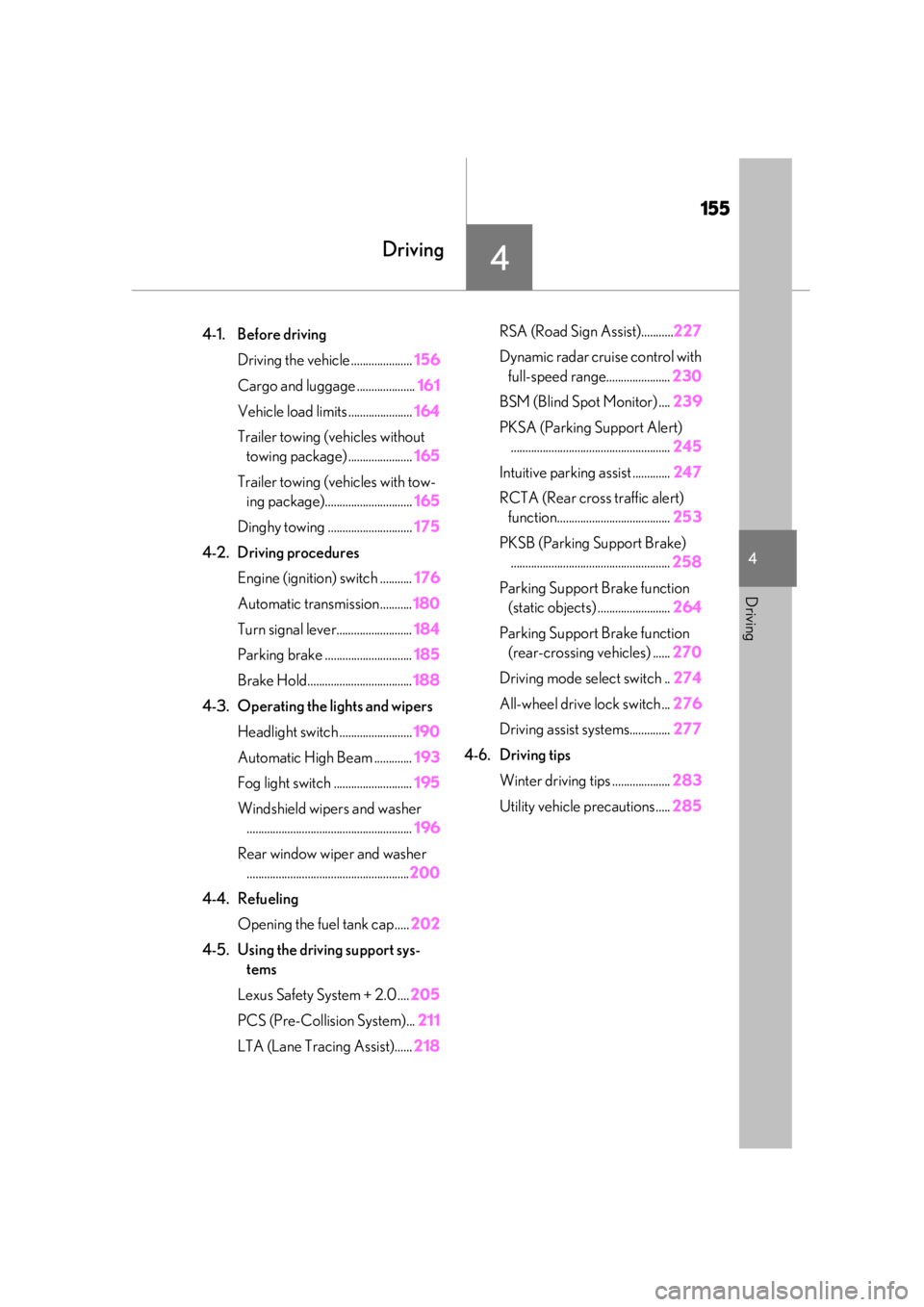
.4-1. Before drivingDriving the vehicle ..................... 156
Cargo and luggage .................... 161
Vehicle load limits ...................... 164
Trailer towing (vehicles without towing package) ...................... 165
Trailer towing (vehicles with tow- ing package).............................. 165
Dinghy towing ............................. 175
4-2. Driving procedures Engine (ignition) switch ........... 176
Automatic transmission........... 180
Turn signal lever.......................... 184
Parking brake .............................. 185
Brake Hold.................................... 188
4-3. Operating the lights and wipers Headlight switch ......................... 190
Automatic High Beam ............. 193
Fog light switch ........................... 195
Windshield wipers and washer ......................................................... 196
Rear window wiper and washer ........................................................ 200
4-4. Refueling Opening the fuel tank cap..... 202
4-5. Using the driving support sys- tems
Lexus Safety System + 2.0 .... 205
PCS (Pre-Collision System)... 211
LTA (Lane Tracing Assist)...... 218RSA (Road Sign Assist)...........227
Dynamic radar cruise control with
full-speed range...................... 230
BSM (Blind Spot Monitor) .... 239
PKSA (Parking Support Alert) ....................................................... 245
Intuitive parking assist ............. 247
RCTA (Rear cross traffic alert) function....................................... 253
PKSB (Parking Support Brake) ....................................................... 258
Parking Support Brake function (static objects) ......................... 264
Parking Support Brake function (rear-crossing vehicles) ...... 270
Driving mode select switch .. 274
All-wheel drive lock switch ... 276
Driving assist systems.............. 277
4-6. Driving tips Winter driving tips .................... 283
Utility vehicle precautions..... 285
Page 156 of 516
1564-1. Before driving
4-1.Before driving
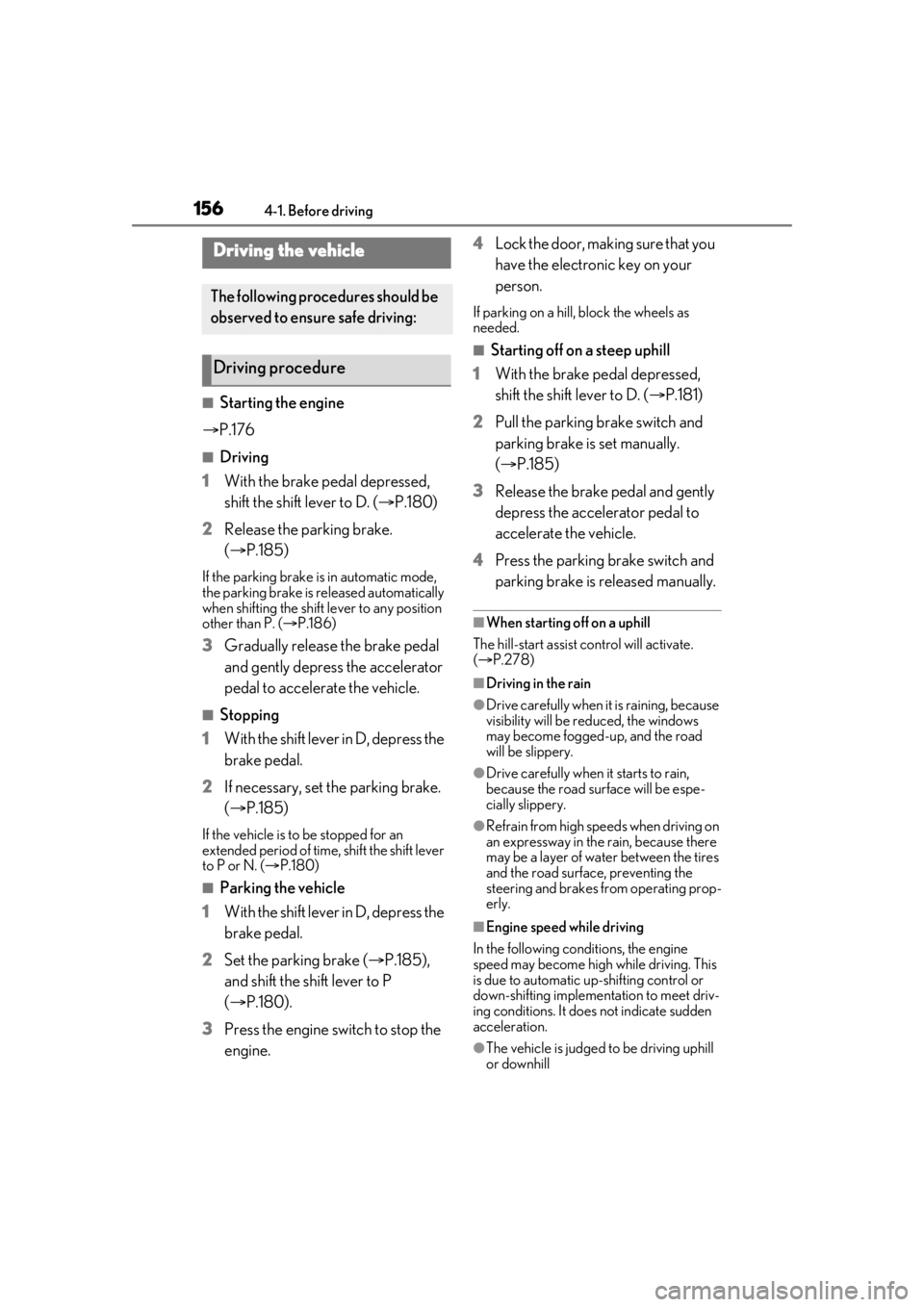
■Starting the engine
P.176
■Driving
1 With the brake pedal depressed,
shift the shift lever to D. ( P.180)
2 Release the parking brake.
(P.185)
If the parking brake is in automatic mode,
the parking brake is released automatically
when shifting the shift lever to any position
other than P. ( P.186)
3 Gradually release the brake pedal
and gently depress the accelerator
pedal to accelerate the vehicle.
■Stopping
1 With the shift lever in D, depress the
brake pedal.
2 If necessary, set the parking brake.
(P.185)
If the vehicle is to be stopped for an
extended period of time, shift the shift lever
to P or N. ( P.180)
■Parking the vehicle
1 With the shift lever in D, depress the
brake pedal.
2 Set the parking brake ( P.185),
and shift the shift lever to P
( P.180).
3 Press the engine switch to stop the
engine. 4
Lock the door, making sure that you
have the electronic key on your
person.
If parking on a hill, block the wheels as
needed.
■Starting off on a steep uphill
1 With the brake pedal depressed,
shift the shift lever to D. ( P.181)
2 Pull the parking brake switch and
parking brake is set manually.
(P.185)
3 Release the brake pedal and gently
depress the accelerator pedal to
accelerate the vehicle.
4 Press the parking brake switch and
parking brake is released manually.
■When starting off on a uphill
The hill-start assist control will activate.
( P.278)
■Driving in the rain
●Drive carefully when it is raining, because
visibility will be reduced, the windows
may become fogged-up, and the road
will be slippery.
●Drive carefully when it starts to rain,
because the road surface will be espe-
cially slippery.
●Refrain from high speeds when driving on
an expressway in the rain, because there
may be a layer of wa ter between the tires
and the road surface, preventing the
steering and brakes from operating prop-
erly.
■Engine speed while driving
In the following conditions, the engine
speed may become high while driving. This
is due to automatic up-shifting control or
down-shifting implementation to meet driv-
ing conditions. It does not indicate sudden
acceleration.
●The vehicle is judged to be driving uphill
or downhill
Driving the vehicle
The following procedures should be
observed to ensure safe driving:
Driving procedure
Page 157 of 516
1574-1. Before driving
4
Driving
●When the accelerator pedal is released
●When the brake pedal is depressed while
sport mode is selected
■Restraining the engine output (Brake
Override System)
●When the accelerator and brake pedals
are depressed at the same time, the
engine output may be restrained.
●A warning message is displayed on the
multi-information display and head-up
display (if equipped) while the system is
operating.
■Restraining sudden start (Drive-Start
Control)
●When the following unusual operation is
performed, the engine output may be
restrained.
• When the shift lever is shifted from R to D, D to R, N to R, P to D, or P to R (D
includes M) with the accelerator pedal
depressed, a warning message appears
on the multi-information display and
head-up display (if equipped). If a warn-
ing message is shown on the multi-infor-
mation display and head-up display (if
equipped), read the message and follow
the instructions.
• When the accelerator pedal is depressed
too much while the vehicle is in reverse.
●While Drive-Start Control is being acti-
vated, your vehicle may have trouble
escaping from the mud or fresh snow. In
such case, deactivate TRAC ( P.279)
to cancel Drive-Start Control so that the
vehicle may become able to escape from
the mud or fresh snow.
■Breaking in your new Lexus
To extend the life of the vehicle, observing
the following precautions is recommended:
●For the first 200 miles (300 km):
Avoid sudden stops.
●For the first 500 miles (800 km):
Do not tow a trailer.
●For the first 1000 miles (1600 km):
• Do not drive at extremely high speeds.
• Avoid sudden acceleration.
• Do not drive continuously in low gears.
• Do not drive at a constant speed for extended periods.
■Operating your vehicle in a foreign
country
Comply with the relevant vehicle registra-
tion laws and confirm the availability of the
correct fuel. ( P.454)
■Eco-friendly driving
P.81
WARNING
Observe the following precautions.
Failure to do so may result in death or
serious injury.
■When starting the vehicle
Always keep your foot on the brake
pedal while stopped the engine running.
This prevents the vehicle from creeping.
■When driving the vehicle
●Do not drive if you are unfamiliar with
the location of the brake and accelera-
tor pedals to avoid depressing the
wrong pedal.
• Accidentally depressing the accelera- tor pedal instead of the brake pedal
will result in sudden acceleration that
may lead to an accident.
• When backing up, you may twist your body around, leading to a difficulty in
operating the pedals. Make sure to
operate the pedals properly.
• Make sure to keep a correct driving posture even when moving the vehicle
only slightly. This allows you to depress
the brake and accelerator pedals
properly.
• Depress the brake pedal using your right foot. Depressing the brake pedal
using your left foot may delay
response in an emer gency, resulting in
an accident.
Page 158 of 516

1584-1. Before driving
WARNING
●Do not drive the vehicle over or stop
the vehicle near flammable materials.
The exhaust system and exhaust gases
can be extremely hot. These hot parts
may cause a fire if there is any flamma-
ble material nearby.
●During normal driving, do not turn off
the engine. Turning the engine off
while driving will not cause loss of
steering or braking control, but the
power assist to these systems will be
lost. This will make it more difficult to
steer and brake, so you should pull
over and stop the vehicle as soon as it
is safe to do so.
However, in the event of an emer-
gency, such as if it becomes impossible
to stop the vehicle in the normal way:
P.404
●Use engine braking (downshift) to
maintain a safe speed when driving
down a steep hill.
Using the brakes continuously may
cause the brakes to overheat and lose
effectiveness. (
P.180)
●Do not adjust the positions of the
steering wheel, the seat, or the inside
or outside rear view mirrors while driv-
ing.
Doing so may result in a loss of vehicle
control.
●Always check that all passengers’
arms, heads or other parts of their
body are not outside the vehicle.
●AWD models: Do not drive the vehicle
off-road.
This is not an AWD vehicle designed
for off-road driving. Proceed with all
due caution if it becomes unavoidable
to drive off-road.
●Do not drive across a river or through
other bodies of water.
This may cause electric/electronic
components to short circuit, damage
the engine or cause other serious
damage to the vehicle.
●Do not drive in excess of the speed
limit. Even if the legal speed limit per-
mits it, do not drive over 85 mph (140
km/h) unless your vehicle has
high-speed capability tires. Driving
over 85 mph (140 km /h) may result in
tire failure, loss of control and possible
injury. Be sure to consult a tire dealer
to determine whether the tires on your
vehicle are high-speed capability tires
or not before driving at such speeds.
■When driving on slippery road sur-
faces
●Sudden braking, acceleration and
steering may cause tire slippage and
reduce your ability to control the vehi-
cle.
●Sudden acceleration, engine braking
due to shifting, or changes in engine
speed could cause the vehicle to skid.
●After driving through a puddle, lightly
depress the brake pedal to make sure
that the brakes are functioning prop-
erly. Wet brake pads may prevent the
brakes from functioning properly. If the
brakes on only one side are wet and
not functioning properly, steering con-
trol may be affected.
■When shifting the shift lever
●Do not let the vehicle roll backward
while the shift lever is in a driving posi-
tion, or roll forward while the shift lever
is in R.
Doing so may cause the engine to stall
or lead to poor brake and steering
performance, resulting in an accident
or damage to the vehicle.
●Do not shift the shif t lever to P while
the vehicle is moving.
Doing so can damage the transmission
and may result in a loss of vehicle con-
trol.
●Do not shift the shift lever to R while
the vehicle is moving forward.
Doing so can damage the transmission
and may result in a loss of vehicle con-
trol.