equipped LEXUS RX350 2021 Owners Manual
[x] Cancel search | Manufacturer: LEXUS, Model Year: 2021, Model line: RX350, Model: LEXUS RX350 2021Pages: 508, PDF Size: 10.33 MB
Page 417 of 508
4177-2. Steps to take in an emergency
7
When trouble arises
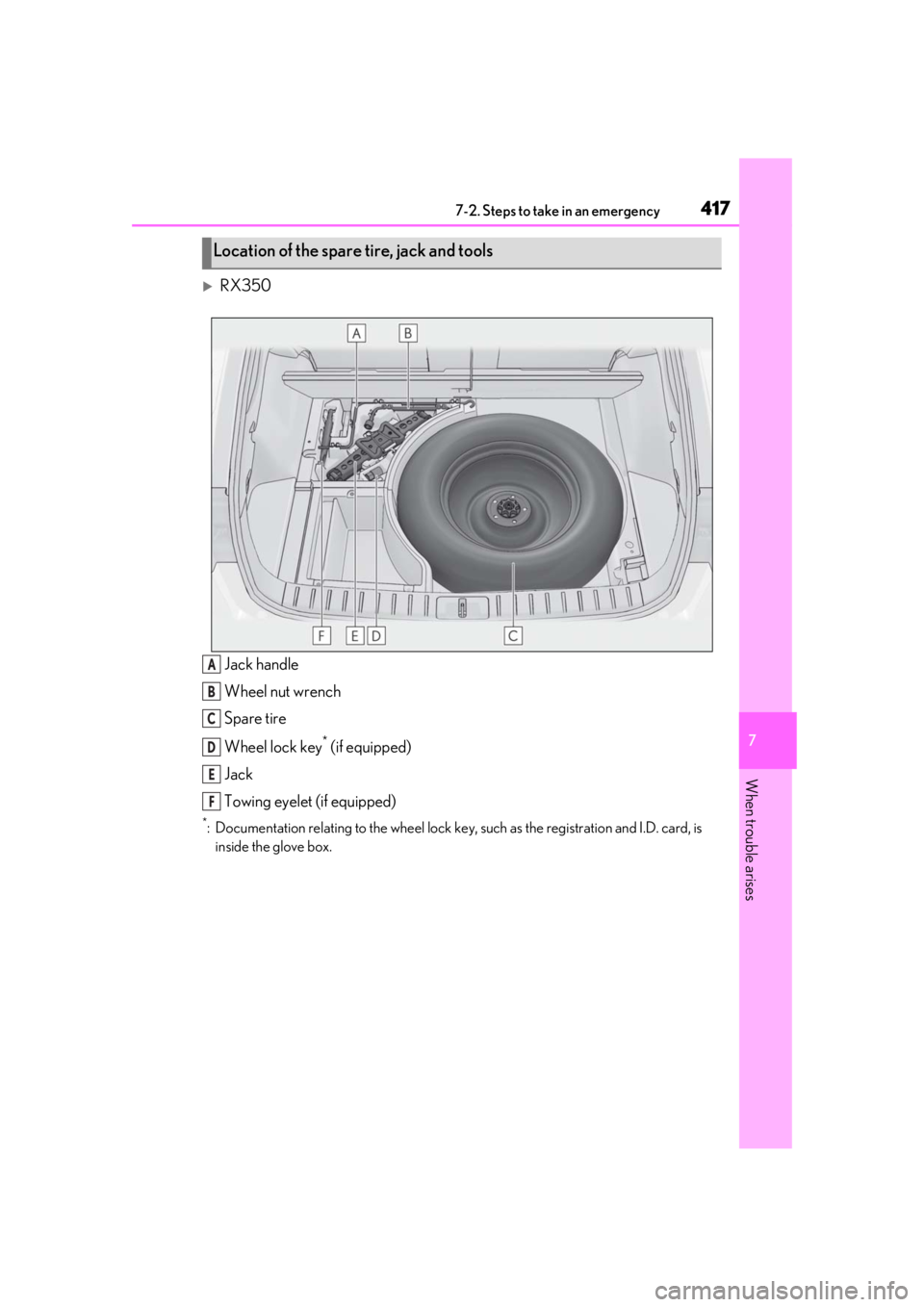
RX350Jack handle
Wheel nut wrench
Spare tire
Wheel lock key
* (if equipped)
Jack
Towing eyelet (if equipped)
*: Documentation relating to the wheel lock key, such as the registration and I.D. card, is
inside the glove box.
Location of the spare tire, jack and tools
A
B
C
D
E
F
Page 419 of 508

4197-2. Steps to take in an emergency
7
When trouble arises
When replacing tires on a vehicle with
wheel lock nuts, use the following pro-
cedures to remove and install the
wheel lock nuts. The wheel lock key is
stored in the tray inside the luggage
compartment. Always return the wheel
lock key to its original position after
use, so that it does not get lost.
■Removal
For ease of removal, the wheel lock nut
should always be the first one loos-
ened.
1 Place the wheel lock key on top of
the wheel lock nut, turning until the
wheel lock key and wheel lock nut
patterns engage.
2 Place the wheel nut wrench on the
wheel lock key, and while applying
pressure on the wheel lock key,
loosen the wheel lock nut.
■Installation
For ease of installation, the wheel lock nut should always be the last one tight-
ened.
1
By hand, install a wheel lock nut on
each wheel.
2 Place the wheel lock key on top of
the wheel lock nut, turning until the
wheel lock key and wheel lock nut
patterns engage.
3 Place the wheel nut wrench on the
wheel lock key, and while applying
pressure on the wheel lock key,
tighten the wheel lock nut to the
recommended torque.
1 Secure the deck board using the
hook. ( P.319)
2 Disengage the hook and take out
the jack.
RX350: Remove the wheel nut wrench
and then the jack.
RX350L: Remove the jack handle and
then the jack.
WARNING
●Do not raise the vehicle while some-
one is inside.
●When raising the vehicle, do not put an
object on or under the jack.
●Do not raise the vehicle to a height
greater than that required to replace
the tire.
●Use a jack stand if it is necessary to get
under the vehicle.
●When lowering the vehicle, make sure
that there is no-one near the vehicle. If
there are people nearby, warn them
vocally before lowering.
Wheel lock nut (if equipped)
NOTICE
Do not use an impact wrench. Using an
impact wrench may cause permanent
damage to wheel lock nut and wheel lock
key. If in doubt about wheel lock applica-
tion, contact your Lexus dealer.
Taking out the jack
Page 426 of 508
4267-2. Steps to take in an emergency
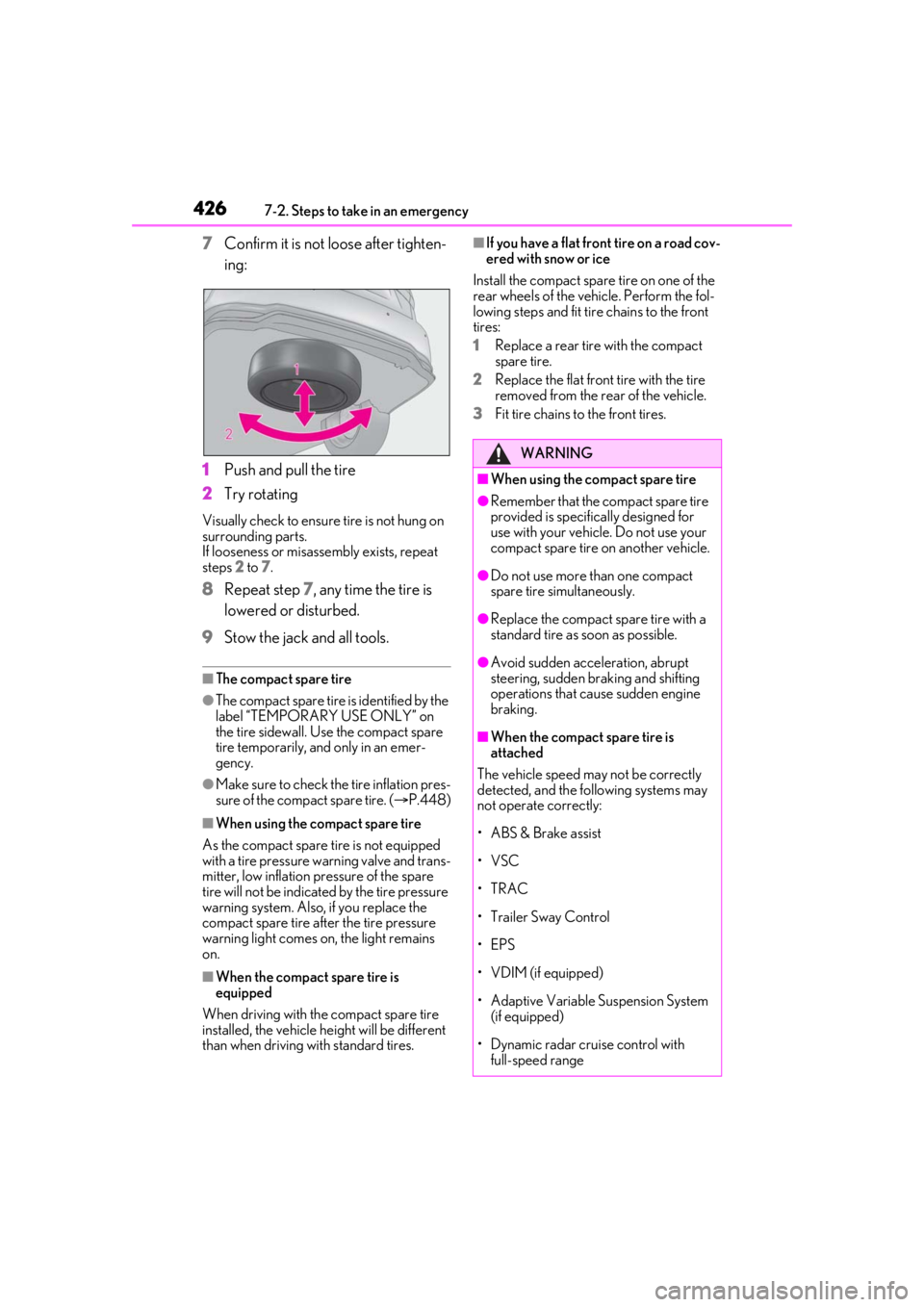
7Confirm it is not loose after tighten-
ing:
1 Push and pull the tire
2 Try rotating
Visually check to ensure tire is not hung on
surrounding parts.
If looseness or misassembly exists, repeat
steps 2 to 7.
8 Repeat step 7, any time the tire is
lowered or disturbed.
9 Stow the jack and all tools.
■The compact spare tire
●The compact spare tire is identified by the
label “TEMPORARY USE ONLY” on
the tire sidewall. Use the compact spare
tire temporarily, and only in an emer-
gency.
●Make sure to check the tire inflation pres-
sure of the compact spare tire. ( P.448)
■When using the compact spare tire
As the compact spare tire is not equipped
with a tire pressure warning valve and trans-
mitter, low inflation pressure of the spare
tire will not be indicated by the tire pressure
warning system. Also, if you replace the
compact spare tire after the tire pressure
warning light comes on, the light remains
on.
■When the compact spare tire is
equipped
When driving with the compact spare tire
installed, the vehicle he ight will be different
than when driving with standard tires.
■If you have a flat front tire on a road cov-
ered with snow or ice
Install the compact spare tire on one of the
rear wheels of the vehicle. Perform the fol-
lowing steps and fit tire chains to the front
tires:
1 Replace a rear tire with the compact
spare tire.
2 Replace the flat front tire with the tire
removed from the rear of the vehicle.
3 Fit tire chains to the front tires.
WARNING
■When using the compact spare tire
●Remember that the compact spare tire
provided is specific ally designed for
use with your vehicle. Do not use your
compact spare tire on another vehicle.
●Do not use more than one compact
spare tire simultaneously.
●Replace the compact spare tire with a
standard tire as soon as possible.
●Avoid sudden acceleration, abrupt
steering, sudden br aking and shifting
operations that cause sudden engine
braking.
■When the compact spare tire is
attached
The vehicle speed may not be correctly
detected, and the following systems may
not operate correctly:
• ABS & Brake assist
•VSC
•TRAC
• Trailer Sway Control
•EPS
•VDIM (if equipped)
• Adaptive Variable Suspension System (if equipped)
• Dynamic radar cruise control with full-speed range
Page 427 of 508
4277-2. Steps to take in an emergency
7
When trouble arises
WARNING
• PCS (Pre-Collision System)
• LTA (Lane Tracing Assist)
• RSA (Road Sign Assist) (if equipped)
•Automatic High Beam
• AFS (Adaptive Front-lighting System) (if equipped)
• Tire pressure warning system
• Intuitive parking assist (if equipped)
• PKSB (Parking Support Brake) (if equipped)
• Lexus parking assist monitor (if equipped)
• Panoramic view monitor (if equipped)
• BSM (Blind Spot Monitor) (if equipped)
• Navigation system (if equipped)
Also, not only can the following system
not be utilized fully, but it may even nega-
tively affect the drive-train components:
• AWD system (AWD models)
■Speed limit when using the compact
spare tire
Do not drive at speeds in excess of 50
mph (80 km/h) when a compact spare
tire is installed on the vehicle.
The compact spare tire is not designed
for driving at high speeds. Failure to
observe this precaution may lead to an
accident causing deat h or serious injury.
■After using the tools and jack
Before driving, make sure all the tools
and jack are securely in place in their
storage location to reduce the possibility
of personal injury during a collision or
sudden braking.
NOTICE
■Be careful when driving over bumps
with the compact spare tire installed
on the vehicle
The vehicle becomes lower when driving
with the compact spar e tire compared to
when driving with standard tires. Be
careful when driving over uneven road
surfaces.
■Driving with tire chains and the com-
pact spare tire
Do not fit tire chains to the compact
spare tire. Tire chains may damage the
vehicle body and adversely affect driving
performance.
■When replacing the tires
When removing or fitting the wheels,
tires or the tire pr essure warning valve
and transmitter, contact your Lexus
dealer as the tire pressure warning valve
and transmitter may be damaged if not
handled correctly.
■When stowing the flat tire (RX350L)
●Ensure that there is no object caught
between the tire and the vehicle
underbody.
●Securely tighten the spare tire clamp
bolt to hold the spare wheel carrier by
the hook.
●Stow the flat tire in the spare tire loca-
tion. Failure to do so may cause dam-
age to the spare tire carrier. Proper
storage reduces the possibility of injury
in a collision or during sudden braking.
●Have the flat tire repaired and the
spare tire replaced with it as soon as
possible.
Page 432 of 508
4327-2. Steps to take in an emergency
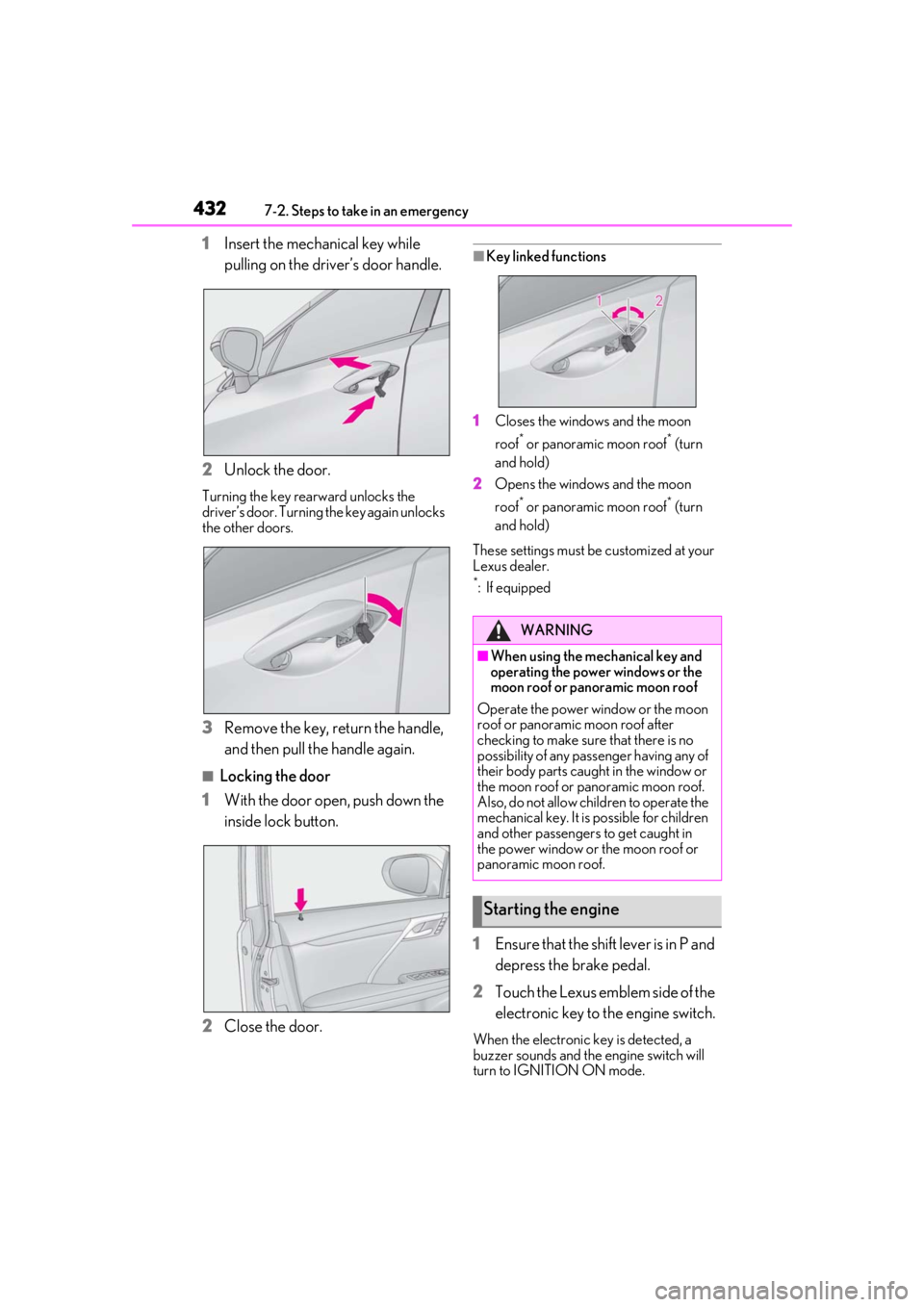
1Insert the mechanical key while
pulling on the driver’s door handle.
2 Unlock the door.
Turning the key rearward unlocks the
driver’s door. Turning the key again unlocks
the other doors.
3Remove the key, return the handle,
and then pull the handle again.
■Locking the door
1 With the door open, push down the
inside lock button.
2 Close the door.
■Key linked functions
1 Closes the windows and the moon
roof
* or panoramic moon roof* (turn
and hold)
2 Opens the windows and the moon
roof
* or panoramic moon roof* (turn
and hold)
These settings must be customized at your
Lexus dealer.
*: If equipped
1 Ensure that the shift lever is in P and
depress the brake pedal.
2 Touch the Lexus emblem side of the
electronic key to the engine switch.
When the electronic key is detected, a
buzzer sounds and the engine switch will
turn to IGNITION ON mode.
WARNING
■When using the mechanical key and
operating the power windows or the
moon roof or panoramic moon roof
Operate the power window or the moon
roof or panoramic moon roof after
checking to make sure that there is no
possibility of any passe nger having any of
their body parts caught in the window or
the moon roof or panoramic moon roof.
Also, do not allow children to operate the
mechanical key. It is possible for children
and other passengers to get caught in
the power window or the moon roof or
panoramic moon roof.
Starting the engine
Page 456 of 508
4568-1. Specifications
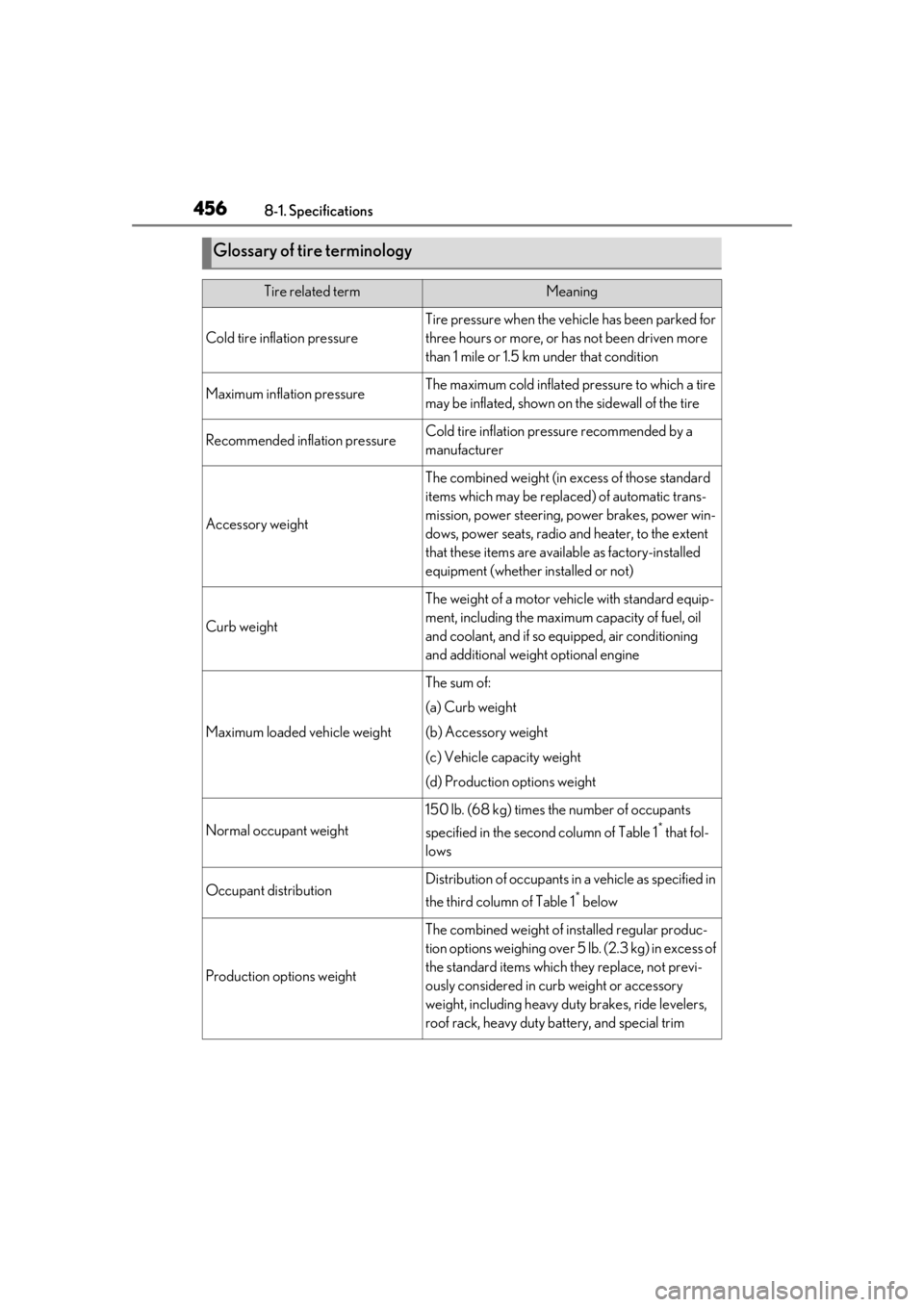
Glossary of tire terminology
Tire related termMeaning
Cold tire inflation pressure
Tire pressure when the vehicle has been parked for
three hours or more, or has not been driven more
than 1 mile or 1.5 km under that condition
Maximum inflation pressureThe maximum cold inflated pressure to which a tire
may be inflated, shown on the sidewall of the tire
Recommended inflation pressureCold tire inflation pressure recommended by a
manufacturer
Accessory weight
The combined weight (in excess of those standard
items which may be replaced) of automatic trans-
mission, power steering, power brakes, power win-
dows, power seats, radio and heater, to the extent
that these items are available as factory-installed
equipment (whether installed or not)
Curb weight
The weight of a motor vehicle with standard equip-
ment, including the maximum capacity of fuel, oil
and coolant, and if so equipped, air conditioning
and additional weight optional engine
Maximum loaded vehicle weight
The sum of:
(a) Curb weight
(b) Accessory weight
(c) Vehicle capacity weight
(d) Production options weight
Normal occupant weight
150 lb. (68 kg) times the number of occupants
specified in the second column of Table 1
* that fol-
lows
Occupant distributionDistribution of occupants in a vehicle as specified in
the third column of Table 1
* below
Production options weight
The combined weight of installed regular produc-
tion options weighing over 5 lb. (2.3 kg) in excess of
the standard items which they replace, not previ-
ously considered in curb weight or accessory
weight, including heavy duty brakes, ride levelers,
roof rack, heavy duty battery, and special trim
Page 463 of 508
4638-2. Customization
8
Vehicle specifications
*2: The default setting varies according to country.
*3:Except F SPORT models
*4:F SPORT models
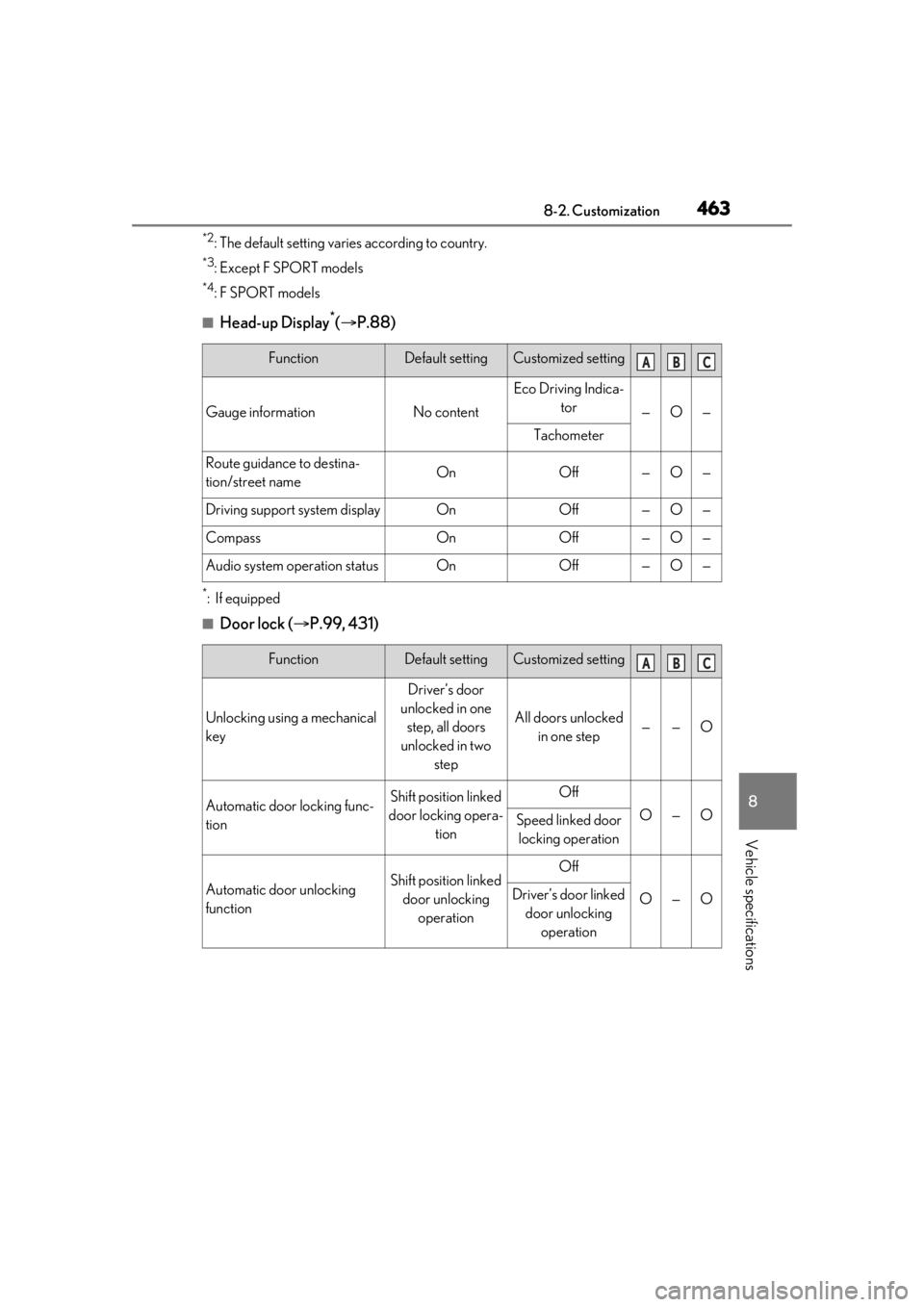
■Head-up Display*( P.88)
*:If equipped
■Door lock ( P.99, 431)
FunctionDefault settingCustomized setting
Gauge informationNo content
Eco Driving Indica-
tor
—O—
Tachometer
Route guidance to destina-
tion/street nameOnOff—O—
Driving support system displayOnOff—O—
CompassOnOff—O—
Audio system operation statusOnOff—O—
FunctionDefault settingCustomized setting
Unlocking using a mechanical
key
Driver’s door
unlocked in one step, all doors
unlocked in two step
All doors unlocked in one step——O
Automatic door locking func-
tionShift position linked
door locking opera- tionOff
O—OSpeed linked door locking operation
Automatic door unlocking
functionShift position linked door unlocking operationOff
O—ODriver’s door linked door unlocking operation
ABC
ABC
Page 464 of 508

4648-2. Customization
■Power back door (P.103)
*:If equipped
■Smart access system with push-button start and wireless remote control
( P.99, 115)
■Smart access system with push-button start ( P.99, 115)
FunctionDefault settingCustomized setting
Power back doorOnOff—O—
Power back door opening
position51 to 5O——
Buzzer volumeLevel 3Level 1—O—Level 2
Kick sensor*OnOff—O—
Hands free close & lock func-
tion
*OffOn——O
FunctionDefault settingCustomized setting
Operation buzzer volume5OffO—O1 to 7
Operation signal (Emergency
flashers)OnOffO—O
Time elapsed before automatic
door lock function is activated
if door is not opened after
being unlocked
60 seconds
Off
O—O30 seconds
120 seconds
Open door warning buzzerOffOn——O
Reservation lockOnOff——O
FunctionDefault settingCustomized setting
Smart access system with
push-button startOnOff——O
ABC
ABC
ABC
Page 466 of 508
4668-2. Customization
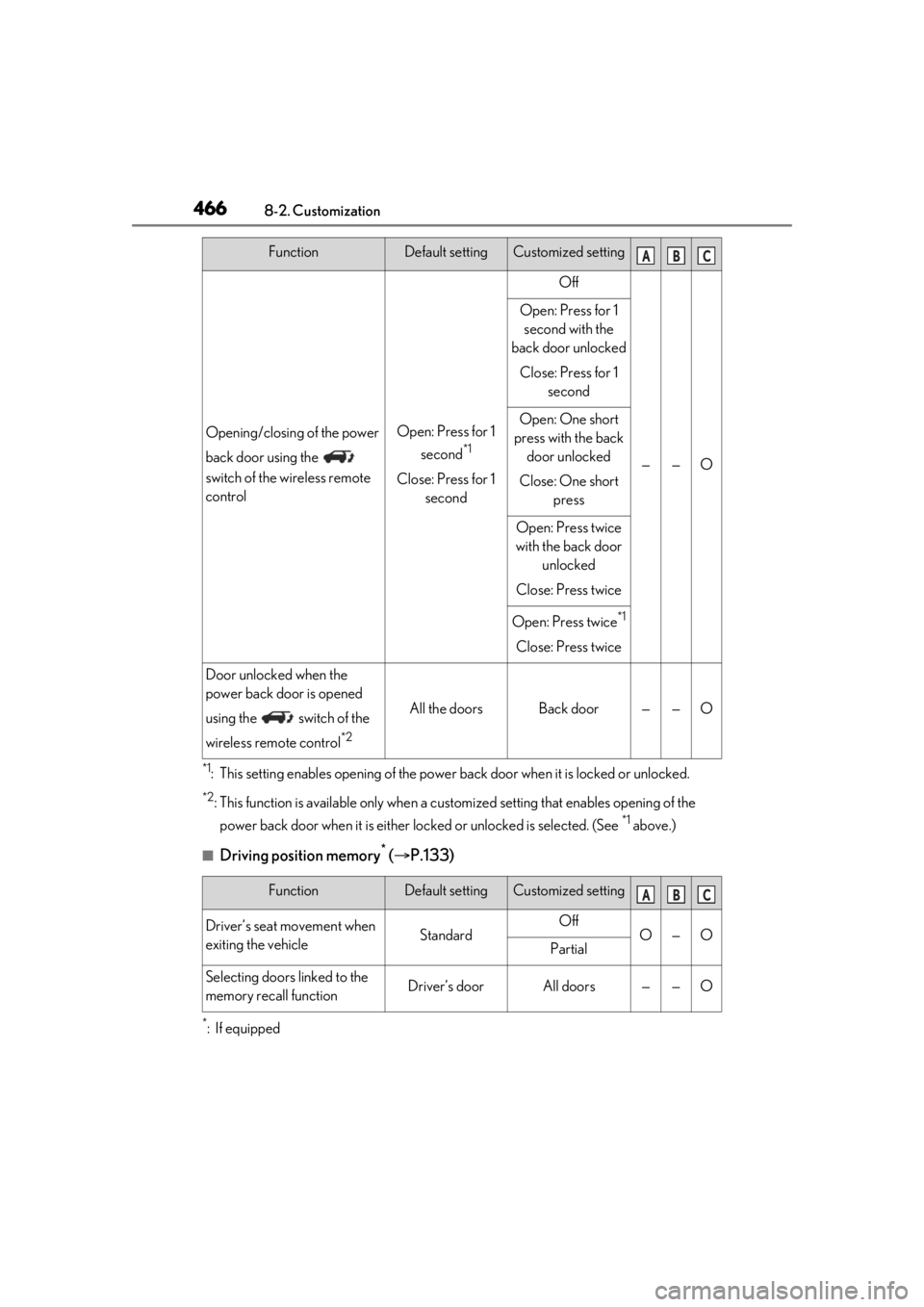
*1: This setting enables opening of the power back door when it is locked or unlocked.
*2: This function is available only when a customized setting that en ables opening of the
power back door when it is either lo cked or unlocked is selected. (See
*1 above.)
■Driving position memory* ( P.133)
*:If equipped
Opening/closing of the power
back door using the
switch of the wireless remote
controlOpen: Press for 1
second
*1
Close: Press for 1 second
Off
——O
Open: Press for 1 second with the
back door unlocked
Close: Press for 1 second
Open: One short
press with the back door unlocked
Close: One short press
Open: Press twice
with the back door unlocked
Close: Press twice
Open: Press twice*1
Close: Press twice
Door unlocked when the
power back door is opened
using the switch of the
wireless remote control
*2
All the doorsBack door——O
FunctionDefault settingCustomized setting
Driver’s seat movement when
exiting the vehicleStandardOffO—OPartial
Selecting doors linked to the
memory recall functionDriver’s doorAll doors——O
FunctionDefault settingCustomized settingABC
ABC
Page 467 of 508
4678-2. Customization
8
Vehicle specifications
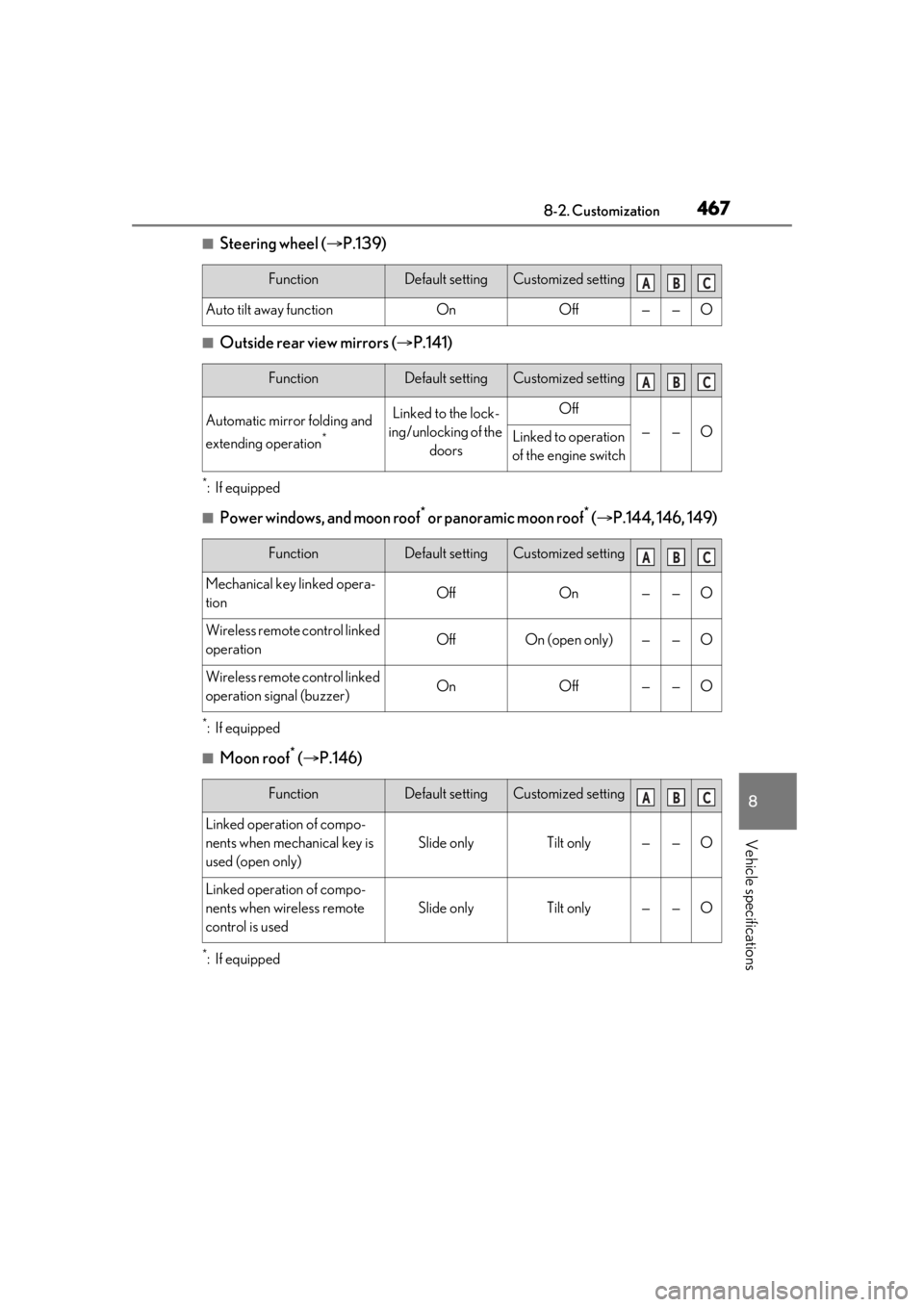
■Steering wheel (P.139)
■Outside rear view mirrors ( P.141)
*:If equipped
■Power windows, and moon roof* or panoramic moon roof* ( P.144, 146, 149)
*:If equipped
■Moon roof* ( P.146)
*:If equipped
FunctionDefault settingCustomized setting
Auto tilt away functionOnOff——O
FunctionDefault settingCustomized setting
Automatic mirror folding and
extending operation
*
Linked to the lock-
ing/unlocking of the doorsOff
——OLinked to operation
of the engine switch
FunctionDefault settingCustomized setting
Mechanical key linked opera-
tionOffOn——O
Wireless remote control linked
operationOffOn (open only)——O
Wireless remote control linked
operation signal (buzzer)OnOff——O
FunctionDefault settingCustomized setting
Linked operation of compo-
nents when mechanical key is
used (open only)
Slide onlyTilt only——O
Linked operation of compo-
nents when wireless remote
control is used
Slide onlyTilt only——O
ABC
ABC
ABC
ABC