head up display LEXUS RX350 2021 Owner's Manual
[x] Cancel search | Manufacturer: LEXUS, Model Year: 2021, Model line: RX350, Model: LEXUS RX350 2021Pages: 508, PDF Size: 10.33 MB
Page 217 of 508
2174-5. Using the driving support systems
4
Driving
WARNING
●When your vehicle is towing a trailer
(vehicles with towing package) or
during emergency towing.
■Preventing LTA system malfunctions
and operations performed by mistake
●Do not modify the headlights or place
stickers, etc. on the surface of the
lights.
●Do not modify the suspension etc. If
the suspension etc. needs to be
replaced, contact your Lexus dealer.
●Do not install or place anything on the
hood or grille. Also, do not install a
grille guard (bull bars, kangaroo bar,
etc.).
●If your windshield needs repairs, con-
tact your Lexus dealer.
■Conditions in which functions may
not operate properly
In the following situations, the functions
may not operate properly and the vehicle
may depart from its lane. Drive safely by
always paying careful attention to your
surroundings and operate the steering
wheel to correct the path of the vehicle
without relying solely on the functions.
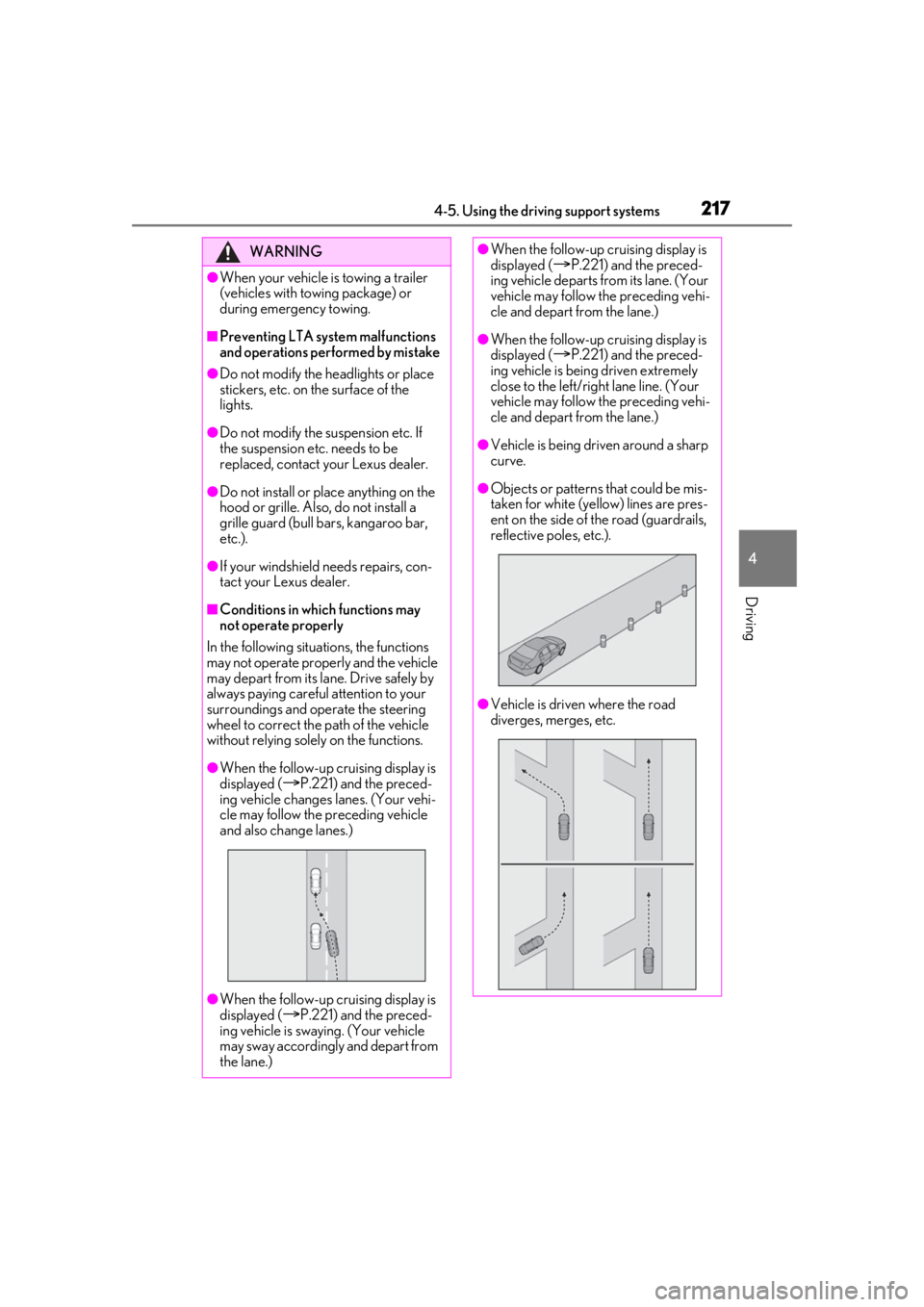
●When the follow-up cruising display is
displayed (
P.221) and the preced-
ing vehicle changes lanes. (Your vehi-
cle may follow the preceding vehicle
and also change lanes.)
●When the follow-up cruising display is
displayed (
P.221) and the preced-
ing vehicle is swaying. (Your vehicle
may sway accordingly and depart from
the lane.)
●When the follow-up cruising display is
displayed (P.221) and the preced-
ing vehicle departs from its lane. (Your
vehicle may follow the preceding vehi-
cle and depart from the lane.)
●When the follow-up cruising display is
displayed (
P.221) and the preced-
ing vehicle is being driven extremely
close to the left/right lane line. (Your
vehicle may follow the preceding vehi-
cle and depart from the lane.)
●Vehicle is being driven around a sharp
curve.
●Objects or patterns that could be mis-
taken for white (yellow) lines are pres-
ent on the side of the road (guardrails,
reflective poles, etc.).
●Vehicle is driven where the road
diverges, merges, etc.
Page 233 of 508
2334-5. Using the driving support systems
4
Driving
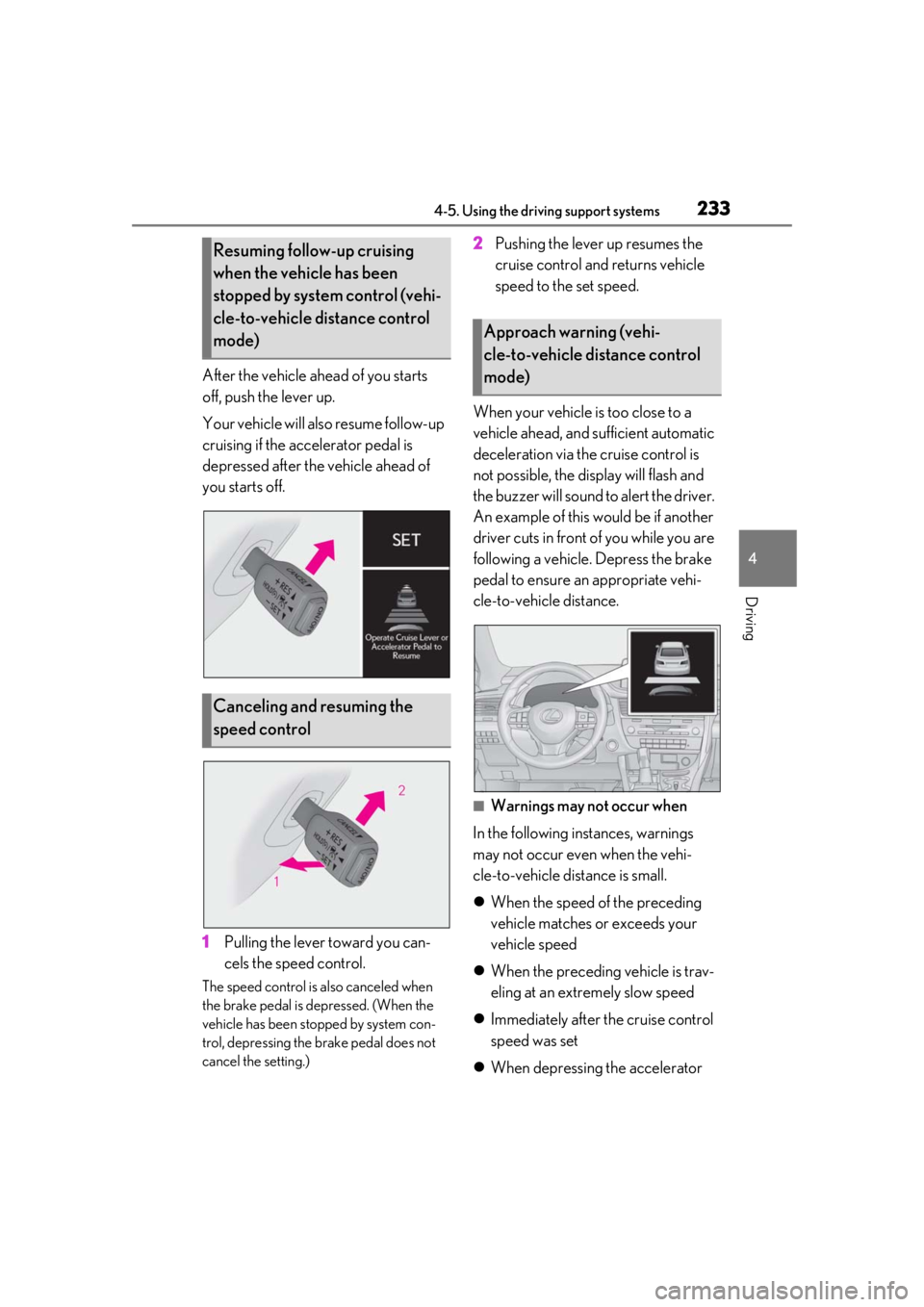
After the vehicle ahead of you starts
off, push the lever up.
Your vehicle will also resume follow-up
cruising if the accelerator pedal is
depressed after the vehicle ahead of
you starts off.
1Pulling the lever toward you can-
cels the speed control.
The speed control is also canceled when
the brake pedal is depressed. (When the
vehicle has been stopped by system con-
trol, depressing the brake pedal does not
cancel the setting.)
2Pushing the lever up resumes the
cruise control and returns vehicle
speed to the set speed.
When your vehicle is too close to a
vehicle ahead, and sufficient automatic
deceleration via the cruise control is
not possible, the display will flash and
the buzzer will sound to alert the driver.
An example of this would be if another
driver cuts in front of you while you are
following a vehicle. Depress the brake
pedal to ensure an appropriate vehi-
cle-to-vehicle distance.
■Warnings may not occur when
In the following instances, warnings
may not occur even when the vehi-
cle-to-vehicle distance is small.
When the speed of the preceding
vehicle matches or exceeds your
vehicle speed
When the preceding vehicle is trav-
eling at an extremely slow speed
Immediately after the cruise control
speed was set
When depressing the accelerator
Resuming follow-up cruising
when the vehicle has been
stopped by system control (vehi-
cle-to-vehicle distance control
mode)
Canceling and resuming the
speed control
Approach warning (vehi-
cle-to-vehicle distance control
mode)
Page 244 of 508
2444-5. Using the driving support systems
*:If equipped
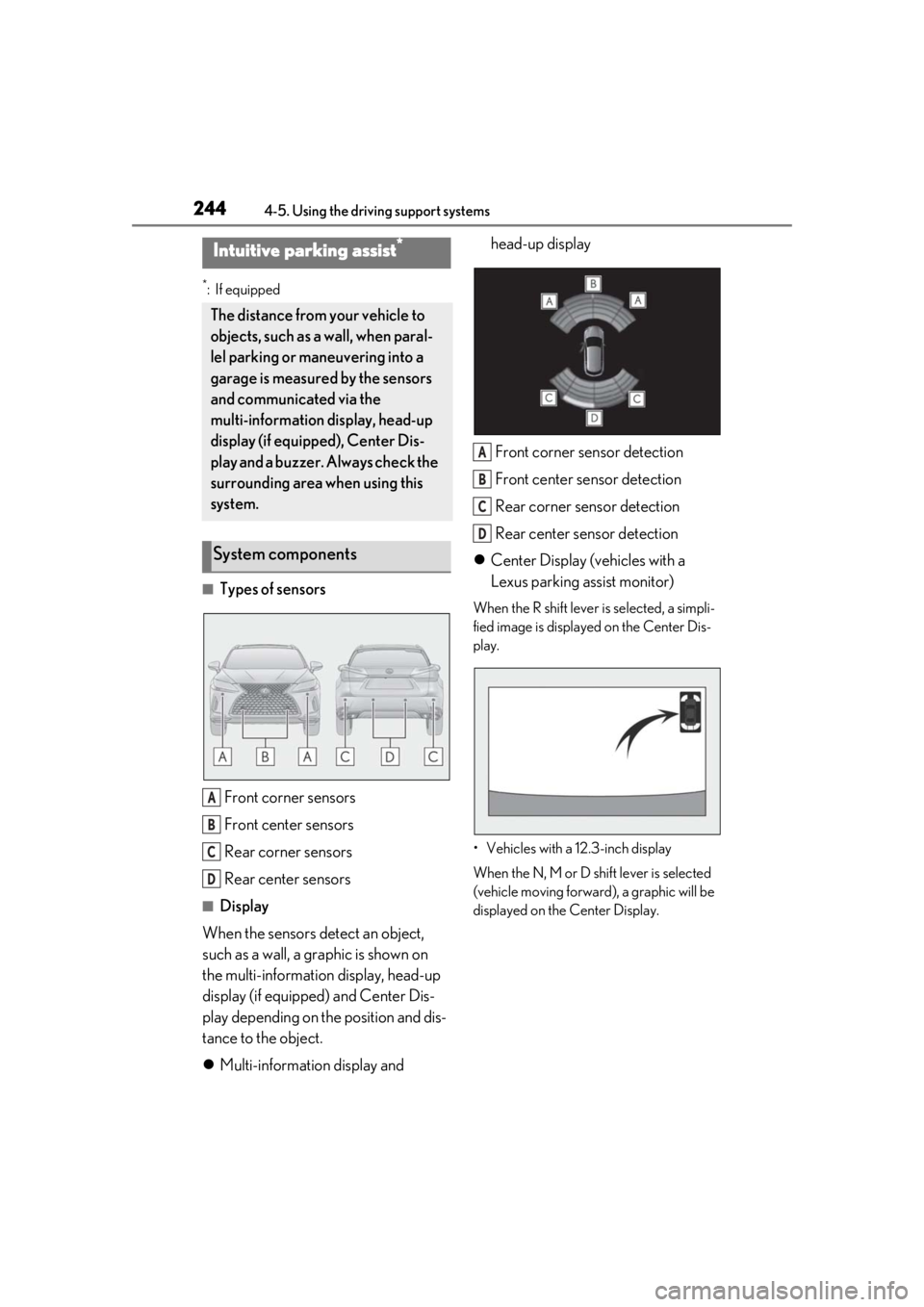
■Types of sensorsFront corner sensors
Front center sensors
Rear corner sensors
Rear center sensors
■Display
When the sensors detect an object,
such as a wall, a graphic is shown on
the multi-information display, head-up
display (if equipped) and Center Dis-
play depending on the position and dis-
tance to the object.
Multi-information display and head-up display
Front corner sensor detection
Front center sensor detection
Rear corner sensor detection
Rear center sensor detection
Center Display (vehicles with a
Lexus parking assist monitor)
When the R shift lever is selected, a simpli-
fied image is displayed on the Center Dis-
play.
• Vehicles with a 12.3-inch display
When the N, M or D shift lever is selected
(vehicle moving forward), a graphic will be
displayed on the Center Display.
Intuitive parking assist*
The distance from your vehicle to
objects, such as a wall, when paral-
lel parking or maneuvering into a
garage is measured by the sensors
and communicated via the
multi-information display, head-up
display (if equipped), Center Dis-
play and a buzzer. Always check the
surrounding area when using this
system.
System components
A
B
C
D
A
B
C
D
Page 246 of 508

2464-5. Using the driving support systems
■The system can be operated when
●The engine switch is in IGNITION ON mode.
●Intuitive parking assist function is on.
●The vehicle speed is less than about 6
mph (10 km/h).
●A shift lever other than P.
■Setting the buzzer volume
The buzzer volume can be adjusted on the
multi-information display. ( P.242)
■If “Parking Assist Unavailable” is dis-
played on the multi-information display
●Water may be continuously flowing over
the sensor surface, such as in a heavy
rain. When the system determines that it
is normal, the system will return to nor-
mal.
●Initialization may not have been per-
formed after a battery terminal was dis-
connected and reconnected. Initialize the
system. ( P.246) If this message contin-
ues to be displayed even after initializa-
tion, have the vehicle inspected by your
Lexus dealer.
■If “Parking Assist Unavailable Clean
Parking Assist Sensor” is displayed on
the multi-information display
A sensor may be covered with ice, snow,
dirt, etc. Remove the ice, snow, dirt, etc.,
from the sensor to return the system to nor-
mal.
Also, due to ice forming on a sensor at low
temperatures, a warn ing message may be
displayed or the sensor may not be able to
detect an object. Once the ice melts, the
system will return to normal.
■If a battery terminal has been discon-
nected and reconnected
The system needs to be initialized. To initial-
ize the system, drive the vehicle straight
ahead for 5 seconds or more at a speed of
approximately 22 mph (35 km/h) or more.
■Sensor detection information
●The following situations may occur
during use.
• The sensor's detection areas are limited
to the areas around the vehicle front and
rear bumpers.
• Depending on the shape of the object
WARNING
●Towing eyelets are installed.
●A backlit licence pl ate is installed.
■When using intuitive parking assist
In the following situations, the system
may not function correctly due to a sen-
sor malfunction, etc. Have the vehicle
checked by your Lexus dealer.
●The intuitive parking assist operation
display flashes or shows continuously,
and a buzzer sounds when no objects
are detected.
●If the area around a sensor collides
with something, or is subjected to
strong impact.
●If the bumper or grille collides with
something.
●If the display flashes or is displayed
continuously and a buzzer does not
sound, except when the mute function
has been turned on.
●If a display error occurs, first check the
sensor.
If the error occurs even when there is
no ice, snow or mud on the sensor, it is
likely that the sensor is malfunctioning.
■Notes when washing the vehicle
Do not apply intensive bursts of water or
steam to the sensor area.
Doing so may result in the sensor mal-
functioning.
●When using a high pressure washer to
wash the vehicle, do not spray the sen-
sors directly, as doing so may cause a
sensor to malfunction.
●When using steam to clean the vehicle,
do not direct steam too close to the
sensors as doing so may cause a sen-
sor to malfunction.
Page 248 of 508

2484-5. Using the driving support systems
The range of the sensors may change depending on the shape of the object, etc.
■Multi-information display, head-up display (if equipped) and Center Display
When an object is detected by a sensor, the approximate distance to the object will
be displayed on the multi-information display, Center Di splay, and head-up display
(if equipped). (As the distan ce to the object becomes sh ort, the distance segments
may blink.)
Approximate distance to object: 4. 9 ft. (150 cm) to 2.0 ft. (60 cm)
*(Rear center
sensor)
*: Automatic buzzer mute function is enabled. ( P.249)
Approximate distance to object: 3. 3 ft. (100 cm) to 2.0 ft. (60 cm)* (Front cen-
ter sensor)
*: Automatic buzzer mute function is enabled. ( P.249)
Approximate distance to object: 2. 0 ft. (60 cm) to 1.5 ft. (45 cm)*
*: Automatic buzzer mute function is enabled. ( P.249)
Approximate distance to object: 1. 5 ft. (45 cm) to 1.0 ft. (30 cm)*
Multi-information displayCenter DisplayHead-up display
Multi-information displayCenter DisplayHead-up display
Multi-information displayCenter DisplayHead-up display
Page 249 of 508

2494-5. Using the driving support systems
4
Driving
*: Automatic buzzer mute function is enabled. (P.249)
Approximate distance to object: 1. 0 ft. (30 cm) to 0.5 ft. (15 cm)*1
*1: Automatic buzzer mute function is disabled. ( P.249)
*2: The distance segments will blink slowly.
Approximate distance to object: Less than 0.5 ft. (15 cm)*1
*1: Automatic buzzer mute function is disabled. ( P.249)
*2: The distance segmen ts will blink rapidly.
■Buzzer operation and distance to
an object
A buzzer sounds when the sensors are
operating.
The buzzer beeps faster as the vehi-
cle approaches an object. When the
vehicle comes within the following
distance of the object, the buzzer
sounds continuously:
Approximately 1.0 ft. (30 cm)
When 2 or more objects are
detected simultaneously, the buzzer sounds for the nearest object. If one
or more objects come within
approximately 1.0 ft. (30 cm) of the
vehicle, the buzzer will repeat a long
tone, followed by fast beeps.
Automatic buzzer mute function:
After a buzzer begins sounding, if
the distance between the vehicle
and the detected object does not
become shorter, the buzzer will be
muted automatically. (However, if
the distance between the vehicle
and object is 1.0 ft. (30 cm) or less,
Multi-information displayCenter DisplayHead-up display
Multi-information display*2Center Display*2Head-up display
Multi-information display*2Center Display*2Head-up display
Page 256 of 508

2564-5. Using the driving support systems
Use the meter control switches to
enable/disable the parking support
brake. (P.82)
1 Press or to select .
2 Press or to select
and then press .
When the Parking Support Brake is dis-
abled, the PKSB OFF indicator ( P.72)
illuminates on the multi-information dis-
play.
To re-enable the system when it was dis-
abled, select on the multi-information
display, select and turn it on. If the
system is disabled, it will remain off even if
the engine switch is turned to IGNITION
ON mode after the engine switch has
been turned off.
If the engine output restriction control or
brake control operates, a buzzer will sound
and a message will be displayed on the
Center Display and multi-information dis-
play, to alert the driver. On vehicles with a
head-up display, the head-up display (if
equipped) will display the same message
as the multi-information display.
Depending on the situation, engine output
restriction control will operate to either
limit acceleration or restrict output as
much as possible.
Engine output restriction control is
operating (acceleration restriction)
Acceleration greater than a certain
amount is restricted by the system.
Center Display (Panoramic view monitor)
(If equipped): No warning displayed
Multi-information display: “Object Detected Acceleration Reduced”
PKSB OFF indicator: Not illuminated
Buzzer: Does not sound
Engine output restriction control is
operating (output restricted as
much as possible)
The system has determined that stron-
ger-than-normal brake operation is neces-
sary.
Center Display (Panoramic view monitor)
(If equipped): “BRAKE!”
Multi-information display: “BRAKE!”
PKSB OFF indicator: Not illuminated
Buzzer: Short beep
Brake control is operating
The system determined that emergency
braking is necessary.
Center Display (Panoramic view monitor)
(If equipped): “BRAKE!”
Multi-information display: “BRAKE!”
PKSB OFF indicator: Not illuminated
Buzzer: Short beep
Vehicle stopped by system opera-
tion
The vehicle has been stopped by brake
control operation.
Center Display (Panoramic view monitor)
(If equipped): “Press Brake Pedal”
Multi-information display: “Switch to
Brake” (If the accelerator pedal is not
depressed, “Press Brake Pedal” will be dis-
played.)
PKSB OFF indicator: Illuminated
Buzzer: Short beep
Displays and buzzers for engine
output restriction control and
brake control
Page 259 of 508

2594-5. Using the driving support systems
4
Driving
sarily, brake control can be canceled by
depressing the brake pedal or waiting for
approximately 2 seconds for it to automati-
cally be canceled. Then, the vehicle can be
operated by depressing the accelerator
pedal.
■Re-enabling the Parking Support Brake
To re-enable the Parking Support Brake
when it has been disabled due to system
operation perform any of the following
operations.
At this time, the PKSB OFF indicator will
turn off. (P.74)
●Turn the PKSB (Parking Support Brake)
on ( P.256)
●The shift lever is in P.
●Drive with no operation targets in the
traveling direction of the vehicle
●Change the traveling direction of the
vehicle
■If “Parking Support Brake Unavailable”
is displayed on th e multi-information
display and the PKSB OFF indicator is
flashing
●If this message is displayed only when the
shift lever is in any position other than R, a
sensor on the front or rear bumper may
be dirty. Clean the sensors and their sur-
rounding area on the bumpers.
●Initialization may no t have been per-
formed after a battery terminal was dis-
connected and reconnec ted. Initialize the
system. ( P.260)
If this message continues to be displayed
even after init ialization, have the vehicle
inspected by your Lexus dealer.
■If “Parking Assist Unavailable” and
“Parking Assist Unavailable Clean
Parking Assist Sensor” are displayed on
the multi-informatio n display and the
PKSB OFF indicator is flashing
●A sensor may be covered with ice, snow,
dirt, etc. Remove the ice, snow, dirt, etc.,
from the sensor to return the system to
normal.
If this message is shown even after
removing dirt from the sensor, or shown
when the sensor was not dirty to begin
with, have the vehicle inspected by your Lexus dealer.
●A sensor may be frozen. Once the ice
melts, the system wi
ll return to normal.
●Water may be continuo usly flowing over
the sensor surface, such as in a heavy
rain. When the system determines that it
is normal, the system will return to nor-
mal.
■If a battery terminal has been discon-
nected and reconnected
The system needs to be initialized. To initial-
ize the system, drive the vehicle straight
ahead for 5 seconds or more at a speed of
approximately 22 mph (35 km/h) or more.
Additionally, for vehicles with the Parking
Support Brake function, turn the steering
wheel fully to the left and right with the vehi-
cle stopped.
Page 340 of 508
3405-6. Using the other interior features
*:If equipped
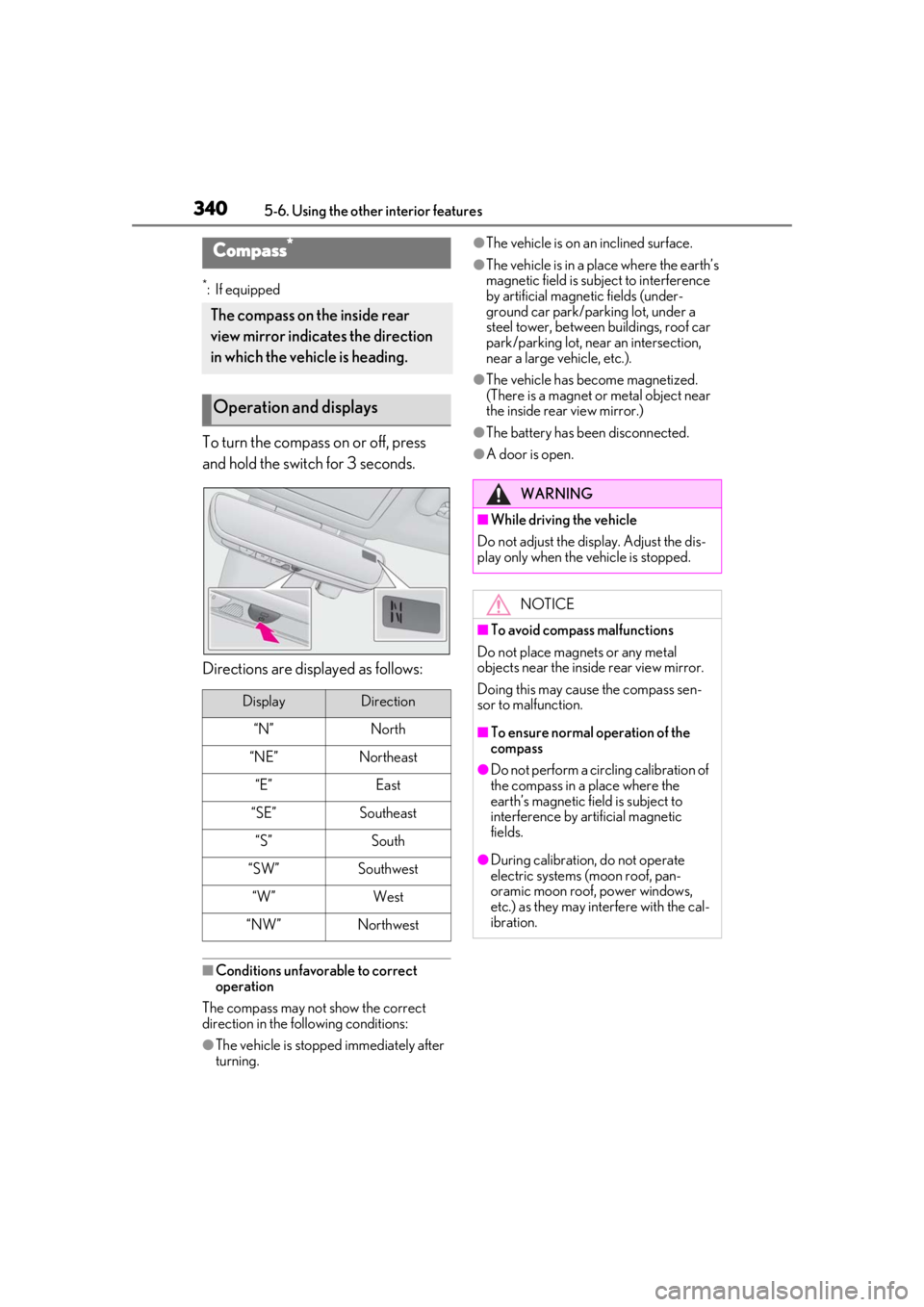
To turn the compass on or off, press
and hold the switch for 3 seconds.
Directions are displayed as follows:
■Conditions unfavorable to correct
operation
The compass may not show the correct
direction in the following conditions:
●The vehicle is stopped immediately after
turning.
●The vehicle is on an inclined surface.
●The vehicle is in a place where the earth’s
magnetic field is subject to interference
by artificial magnetic fields (under-
ground car park/parking lot, under a
steel tower, between buildings, roof car
park/parking lot, near an intersection,
near a large vehicle, etc.).
●The vehicle has become magnetized.
(There is a magnet or metal object near
the inside rear view mirror.)
●The battery has been disconnected.
●A door is open.
Compass*
The compass on the inside rear
view mirror indicates the direction
in which the vehicle is heading.
Operation and displays
DisplayDirection
“N”North
“NE”Northeast
“E”East
“SE”Southeast
“S”South
“SW”Southwest
“W”West
“NW”Northwest
WARNING
■While driving the vehicle
Do not adjust the display. Adjust the dis-
play only when the vehicle is stopped.
NOTICE
■To avoid compass malfunctions
Do not place magnets or any metal
objects near the inside rear view mirror.
Doing this may cause the compass sen-
sor to malfunction.
■To ensure normal operation of the
compass
●Do not perform a circling calibration of
the compass in a place where the
earth’s magnetic field is subject to
interference by artificial magnetic
fields.
●During calibration, do not operate
electric systems (moon roof, pan-
oramic moon roof, power windows,
etc.) as they may interfere with the cal-
ibration.
Page 414 of 508
4147-2. Steps to take in an emergency
In some situations, the master warning light and warning buzzer may not oper-
ate as specified. In this case, follow the instructions displayed in the warning
message.
If a warning light comes on or flashes at the same time that a warning message is
displayed, take corrective actio n according to the warning light. ( P.403)
*: A buzzer sounds the first time a message is shown on the multi-information display.
■Warning messages
The warning messages explained below
may differ from the actual messages
according to operation conditions and vehi-
cle specifications.
■Warning buzzer
In some cases, the bu zzer may not be heard
due to being in a noisy location or audio
sound.
■If “Shift to P Before Exiting Vehicle” is
displayed
Message is displayed when the driver’s
door is opened withou t turning the engine
switch off with the shift lever in any position
other than P.
Shift the shift lever to P.
■If “Power Turned Off to Save Battery” is
displayed
This message is displayed when the power
was cut off due to the automatic power off
function. The next time the engine is started,
increase the engine speed slightly and
maintain it at that speed for approximately
5 minutes to recharge the battery.
■If “AWD System Overheated Switching
to 2WD Mode” or “AWD System Over-
heated 2WD Mode Engaged” is dis-
played (AWD models)
This message may be displayed when driv-
ing under extremely high load conditions.
Drive the vehicle at low speeds or stop the
vehicle in a safe place with the engine run-
ning until the me ssage is cleared.
If the message is not cleared, have the vehi-
cle inspected by your Lexus dealer.
■If “Headlight System Malfunction Visit
Your Dealer” is displayed
The following systems may be malfunction-
ing. Have the vehicle inspected by your
Lexus dealer immediately.
●The LED headlight system
●AFS (Adaptive Front-lighting System) (if
equipped)
●The automatic headlight leveling system
●Automatic High Beam
■If “Radar Cruise Control Unavailable
See Owner's Manual” is displayed
The dynamic radar cruise control with
full-speed range system is suspended tem-
porarily or until the problem shown in the
message is re solved. (causes and coping
methods: P.207)
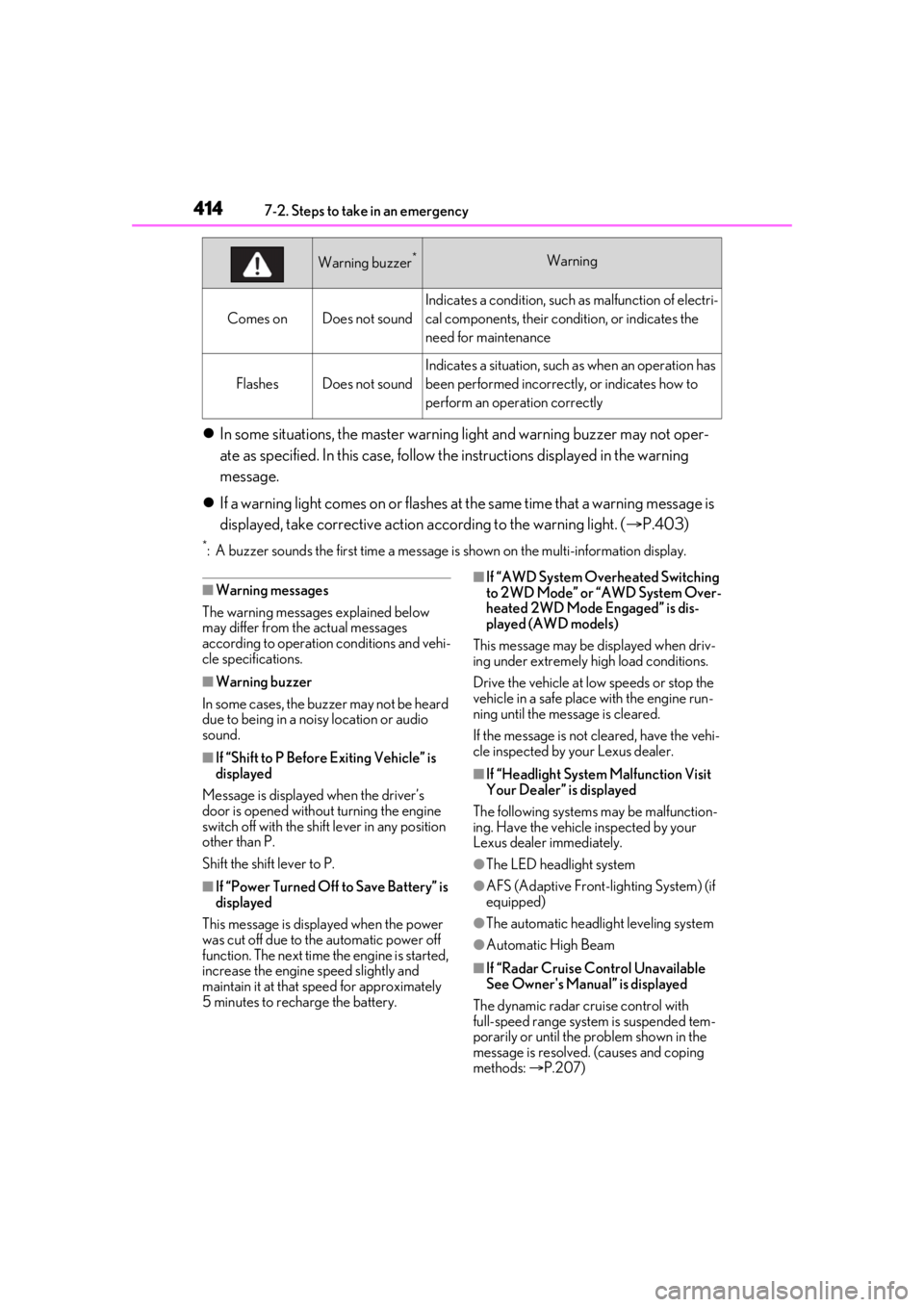
Comes onDoes not sound
Indicates a condition, such as malfunction of electri-
cal components, their cond ition, or indicates the
need for maintenance
FlashesDoes not sound
Indicates a situation, such as when an operation has
been performed incorrectly, or indicates how to
perform an operation correctly
Warning buzzer*Warning