air conditioning LEXUS RX350 2021 Owners Manual
[x] Cancel search | Manufacturer: LEXUS, Model Year: 2021, Model line: RX350, Model: LEXUS RX350 2021Pages: 508, PDF Size: 10.33 MB
Page 3 of 508
3TABLE OF CONTENTS
1
2
3
4
5
6
7
8
9
Trailer towing (vehicles with towing package) ........................................ 163
Dinghy towing ................................ 173
4-2. Driving procedures Engine (ignition) switch .............. 174
Automatic transmission.............. 178
Turn signal lever............................. 182
Parking brake ................................. 183
Brake Hold....................................... 186
4-3. Operating the lights and wipers Headlight switch ............................ 188
AHB (Automatic High Beam) ............................................................. 191
Fog light switch .............................. 194
Windshield wipers and washer ............................................................ 194
Rear window wiper and washer ............................................................ 199
4-4. Refueling Opening the fuel tank cap........ 200
4-5. Using the driving support systems Lexus Safety System + 2.0 ....... 203
PCS (Pre-Collision System).... 209
LTA (Lane Tracing Assist)......... 216
RSA (Road Sign Assist) ............. 225
Dynamic radar crui se control with
full-speed range......................... 227
BSM (Blind Spot Monitor) ....... 236
PKSA (Parking Support Alert) ........................................................... 242
Intuitive parking assist ................ 244
RCTA (Rear cross traffic alert) function .......................................... 250
PKSB (Parking Support Brake) ........................................................... 255Parking Support Brake function
(static objects) .............................. 261
Parking Support Brake function (rear-crossing vehicles) ......... 267
Driving mode select switch ....... 271
All-wheel drive lock switch...... 273
Driving assist systems ................. 274
4-6. Driving tips Winter driving tips ....................... 280
Utility vehicle precautions........ 282
5-1. Remote Touch/Display Remote Touch............................... 286
Center Display.............................. 288
5-2. Lexus Climate Concierge Lexus Climate Concierge.......... 291
5-3. Using the air conditioning system and defogger
Front automatic air conditioning system ............................................. 292
Rear automatic air conditioning system ............................................ 303
Heated steering wheel/seat heat- ers/seat ventilators................... 306
5-4. Using the interior lights Interior lights list ........................... 309
5-5. Using the storage features List of storage features ................ 312
Luggage c
ompartment features
............................................................ 317
5-6. Using the other interior features Other interior features ............... 322
Garage door opener ................. 334
Compass ......................................... 340
5Interior features
Page 4 of 508

4TABLE OF CONTENTS
6-1. Maintenance and careCleaning and protecting the vehi-cle exterior ................................... 344
Cleaning and protecting the vehi- cle interior .................................... 347
6-2. Maintenance Maintenance requirements ..... 350
General maintenance ................. 351
Emission inspection and mainte- nance (I/M) programs ............ 354
6-3. Do-it-yourself maintenance Do-it-yourself service precautions........................................................... 355
Hood.................................................. 357
Positioning a floor jack............... 357
Engine compartment.................. 359
Tires ................................................... 365
Tire inflation pressure ................. 373
Wheels.............................................. 374
Air conditioning filter..................376
Windshield wiper inserts........... 378
Electronic key battery ................ 379
Checking and replacing fuses ............................................................ 381
Headlight aim................................. 382
Light bulbs ....................................... 384
7-1. Essential information Emergency flashers..................... 394
If your vehicle has to be stopped in an emergency ............................. 394If the vehicle is trapped in rising
water .............................................. 395
7-2. Steps to take in an emergency If your vehicle needs to be towed.......................................................... 397
If you think something is wrong ........................................................... 401
Fuel pump shut off system ........ 402
If a warning light turns on or a warn- ing buzzer sounds..................... 403
If a warning messa ge is displayed
............................................................ 412
If you have a flat tire ..................... 416
If the engine will not start .......... 428
If you lose your keys.................... 430
If the fuel filler door cannot be opened .......................................... 430
If the electronic key does not oper- ate properly ................................... 431
If the vehicle battery is discharged .......................................................... 433
If your vehicle overheats ........... 437
If the vehicle becomes stuck ... 439
8-1. Specifications Maintenance data (fuel, oil level, etc.) .................................................. 442
Fuel information............................ 450
Tire information ............................ 452
8-2. Customization Customizable features ............... 461
8-3. Initialization Items to initialize ........................... 474
6Maintenance and care
7When trouble arises
8Vehicle specifications
Page 15 of 508

15Pictorial index
Parking brake switch .............................................................................................P.183
Applying/releasing ........................................................................................................... P.183
Precautions for winter season .. .................................................................................... P.281
Warning buzzer/messages............................................................................................P.412
Turn signal lever ......................................................................................................P.182
Headlight switch..................................................................................................... P.188
Headlights/side marker lights/parking lights/tail lights/license plate lights/daytime
running lights ................................................................................................................. ...... P.188
Fog lights
*1............................................................................................................................ P.1 94
Windshield wiper and washer switch ...................................................... P.194, 199
Usage.......................................................................................................................... .. P.194, 199
Adding washer fluid ......................................................................................................... P.3 64
Warning messages ............................................................................................................P.4 12
Emergency flasher switch ...................................................................................P.394
Hood lock release lever ....................................................................................... P.357
Tilt and telescopic steering contro l switch................................ .................... .. P.139
Adjustment ..................................................................................................................... ...... P.139
Driving position memory
*1............................................................................................. P.133
Air conditioning system .......................................................................................P.292
Usage.......................................................................................................................... ........... P.292
Rear window defogger................................................................................................... P.292
Audio system
*2
*1
: If equipped
*2: Refer to “NAVIGATION AND MULTIMEDIA SYSTEM OWNER’S MANUAL”.
E
F
G
H
I
J
K
L
Page 20 of 508
20Pictorial index
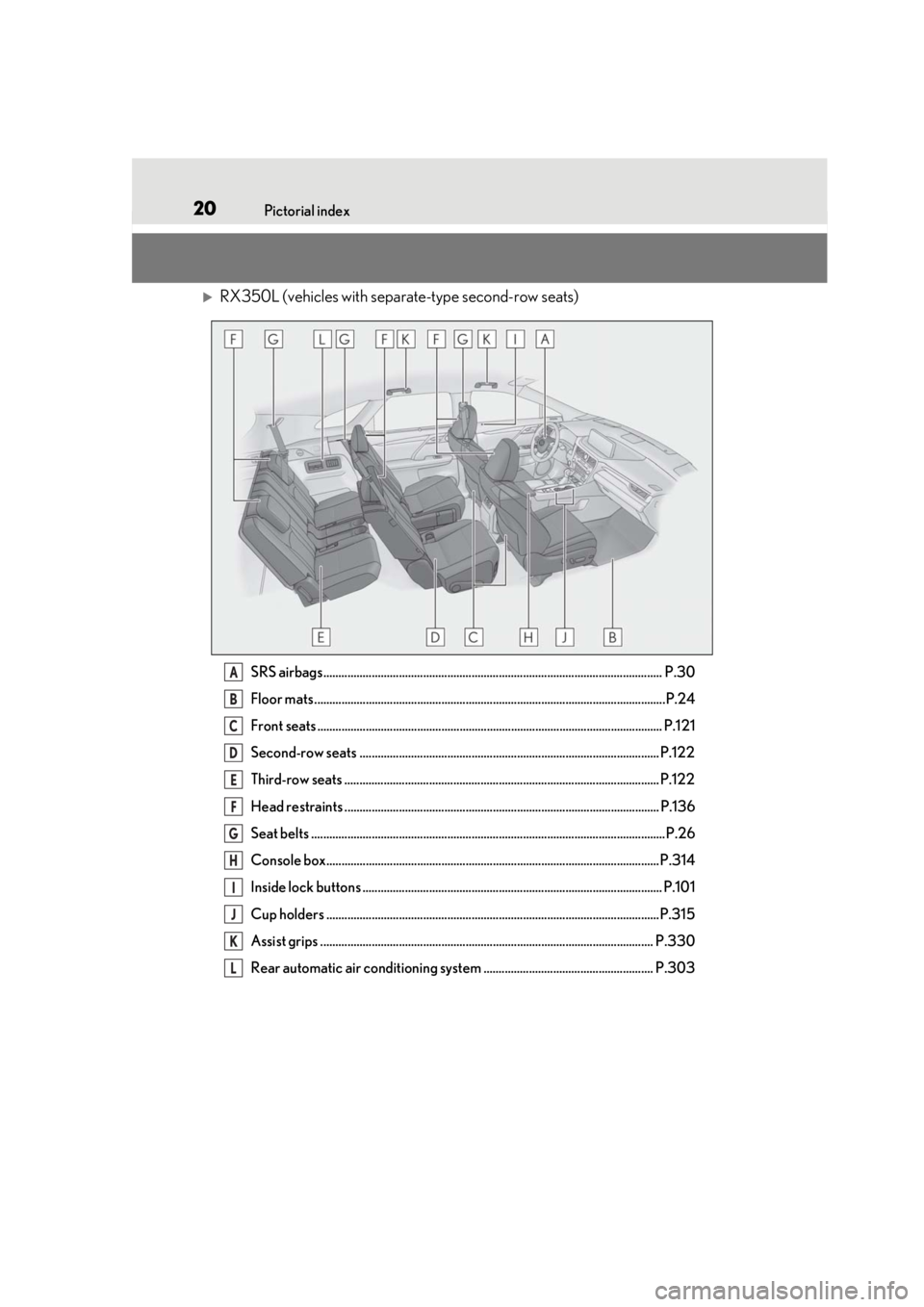
RX350L (vehicles with separate-type second-row seats)
SRS airbags................................................................................................................ P.30
Floor mats ....................................................................................................................P.24
Front seats .................................................................................................................. P. 121
Second-row seats ................................................................................................... P.122
Third-row seats ........................................................................................................ P.122
Head restraints ........................................................................................................ P.136
Seat belts ..................................................................................................................... P.26
Console box.............................................................................................................. P.314
Inside lock buttons ................................................................................................... P.101
Cup holders ..............................................................................................................P.315
Assist grips .............................................................................................................. P.330
Rear automatic air conditioning system ........................................................ P.303A
B
C
D
E
F
G
H
I
J
K
L
Page 21 of 508
21Pictorial index
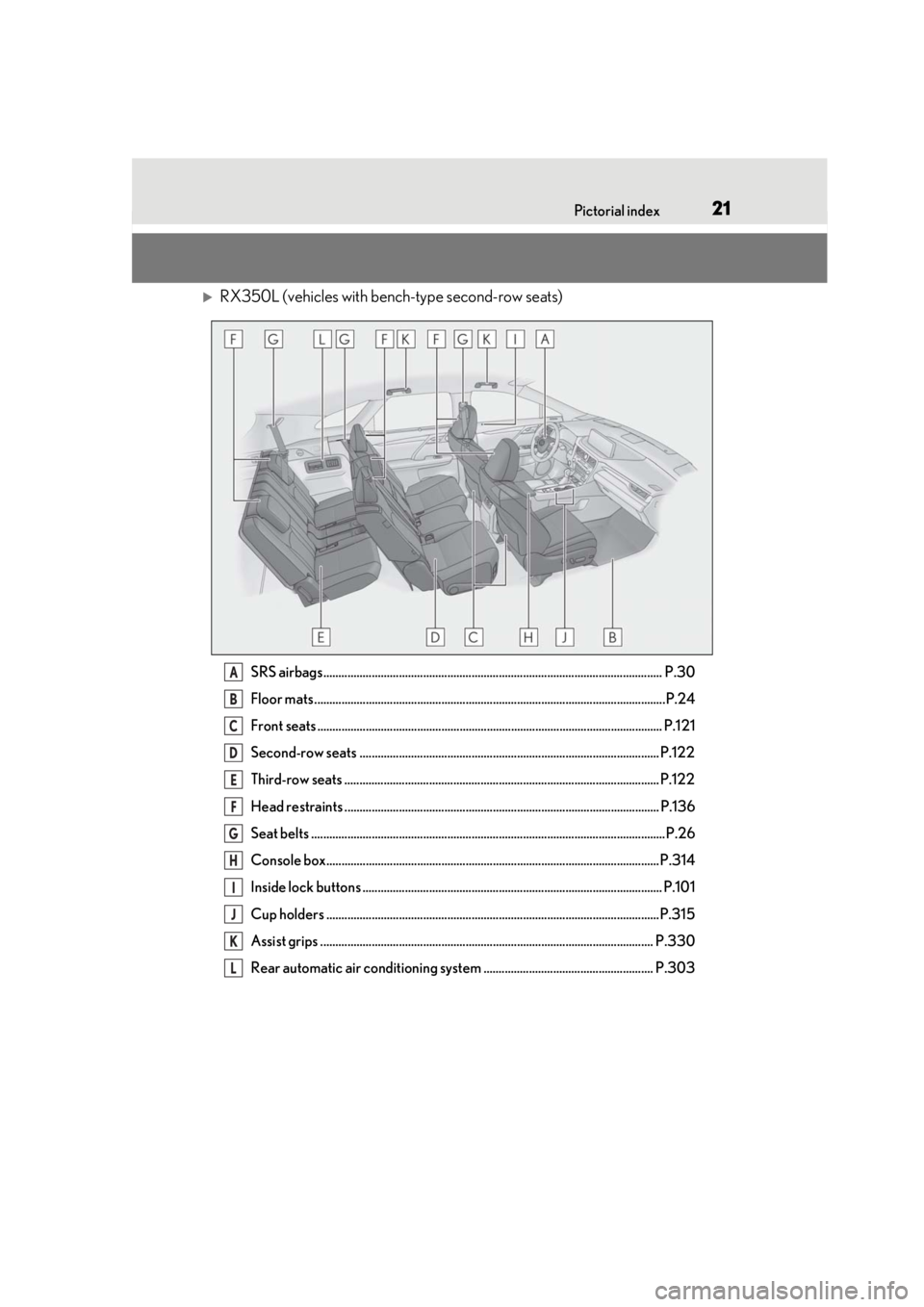
RX350L (vehicles with bench-type second-row seats)
SRS airbags................................................................................................................ P.30
Floor mats ....................................................................................................................P.24
Front seats .................................................................................................................. P. 121
Second-row seats ................................................................................................... P.122
Third-row seats ........................................................................................................ P.122
Head restraints ........................................................................................................ P.136
Seat belts ..................................................................................................................... P.26
Console box.............................................................................................................. P.314
Inside lock buttons ................................................................................................... P.101
Cup holders ..............................................................................................................P.315
Assist grips .............................................................................................................. P.330
Rear automatic air conditioning system ........................................................ P.303A
B
C
D
E
F
G
H
I
J
K
L
Page 172 of 508

1724-1. Before driving
mance when using engine braking,
do not put the transmission in D. If in
the M mode, the transmission shift
range position must be in 6 or lower.
( P.178)
Instability happens more frequently
when descending steep or long
downhill grades. Before descend-
ing, slow down and downshift. Do
not make sudden downshifts while
descending steep or long downhill
grades.
Avoid holding the brake pedal down
too long or applying the brakes too
frequently. This could cause the
brakes to overheat and result in
reduced braking efficiency.
Due to the added load of the trailer,
your vehicle’s engine may overheat
on hot days (at temperatures over
85°F [30°C]) when driving up a
long or steep grade. If the engine
coolant temperature gauge indi-
cates overheating, immediately turn
off the air conditioning (if in use),
pull your vehicle off the road and
stop in a safe spot. ( P.437)
Always place wheel blocks under
both the vehicle’s and the trailer’s
wheels when parking. Put the trans-
mission in P and apply the parking
brake. Avoid parking on a slope, but
if unavoidable, do so only after per-
forming the following:
1 Apply the brakes and keep them
applied. 2
Have someone place wheel blocks
under both the vehicle’s and trailer’s
wheels.
3 When the wheel blocks are in
place, release the brakes slowly
until the blocks absorb the load.
4 Shift into P and apply the parking
brake.
5 Turn off the engine.
When restarting after parking on a
slope:
1 With the transmission in P, start the
engine. Be sure to keep the brake
pedal depressed.
2 Shift into a forward gear. If revers-
ing, shift into R.
3 If the parking brake is in manual
mode, release the parking brake.
(P.183)
4 Release the brake pedal, and slowly
pull or back away from the wheel
blocks. Stop and apply the brakes.
5 Have someone retrieve the blocks.
Page 208 of 508

2084-5. Using the driving support systems
●In the following situations, if the situation has changed (or the vehicle has been driven for
some time) and the normal operating conditions are detected, the message will disappear
and the system will become operational.
If the message does not disappear, contact your Lexus dealer.
• When the temperature around the radar sensor is outside of the operational range, such
as when the vehicle is in the sun or in an extremely cold environment
• When the front camera cannot detect objects in front of the vehicle, such as when driving
in the dark, snow, or fog, or when brig ht lights are shining into the front camera
When the temperature around the front
camera is outside of the operational range,
such as when the vehicle is in the sun or in an
extremely cold environment
If the front camera is hot, such as after the
vehicle had been parked in the sun, use the
air conditioning system to decrease the tem-
perature around the front camera.
If a sunshade was used when the vehicle
was parked, depending on its type, the sun-
light reflected from the surface of the sun-
shade may cause the temperature of the
front camera to become excessively high.
If the front camera is cold, such after the
vehicle is parked in an extremely cold envi-
ronment, use the air conditioning system to
increase the temperature around the front
camera.
The area in front of the front camera is
obstructed, such as when the hood is open
or a sticker is attached to the part of the
windshield in front of the front camera.
Close the hood, remove the sticker, etc. to
clear the obstruction.
SituationActions
Page 247 of 508

2474-5. Using the driving support systems
4
Driving
and other factors, the detection distance
may shorten, or detection may be impos-
sible.
• There will be a short delay between object detection and display. Even at low
speeds, there is a possibility that the
object will come within the sensor’s
detection areas before the display is
shown and the warning beep sounds.
• It might be difficult to hear the buzzer due to the volume of the audio system or air
flow noise of the air conditioning system.
• It may be difficult to hear the buzzer if buzzers for other systems are sounding.
■Conditions under which the function
may not function correctly
Certain vehicle conditions and the sur-
rounding environment may affect the ability
of a sensor to correctly detect objects. Par-
ticular instances where this may occur are
listed below.
●There is dirt, snow or ice on a sensor.
(Cleaning the sensors will resolve this
problem.)
●A sensor is frozen. (Thawing the area will
resolve this problem.)
In especially cold weather, if a sensor is
frozen the sensor display may be dis-
played abnormally, or objects, such as a
wall, may not be detected.
●A sensor is covered in any way.
●When a sensor or the area around a sen-
sor is extremely hot or cold.
●On an extremely bumpy road, on an
incline, on gravel, or on grass.
●The vicinity of the vehicle is noisy due to
vehicle horns, motorcycle engines, air
brakes of large vehicles, or other loud
noises producing ultrasonic waves.
●There is another vehicle equipped with
parking assist sensors in the vicinity.
●A sensor is coated with a sheet of spray
or heavy rain.
●If a sensor is hit by a large amount of
water, such as when driving on a flooded
road.
●If the vehicle is significantly tilted.
●The vehicle is approaching a tall or
curved curb.
●If objects draw too close to the sensor.
■Objects which may not be properly
detected
The shape of the object may prevent the
sensor from detectin g it. Pay particular
attention to the following objects:
●Wires, fences, ropes, etc.
●Cotton, snow and other materials that
absorb sound waves
●Sharply-angled objects
●Low objects
●Tall objects with upper sections project-
ing outwards in the direction of your vehi-
cle
People may not be de tected if they are
wearing certain types of clothing.
■Detection range of the sensors
Approximately 3.3 ft. (100 cm)
Approximately 4.9 ft. (150 cm)
Approximately 2.0 ft. (60 cm)
The diagram shows the detection range of
the sensors. Note that the sensors cannot
detect objects that are extremely close to
the vehicle.
Sensor detection display, object
distance
A
B
C
Page 270 of 508
2704-5. Using the driving support systems
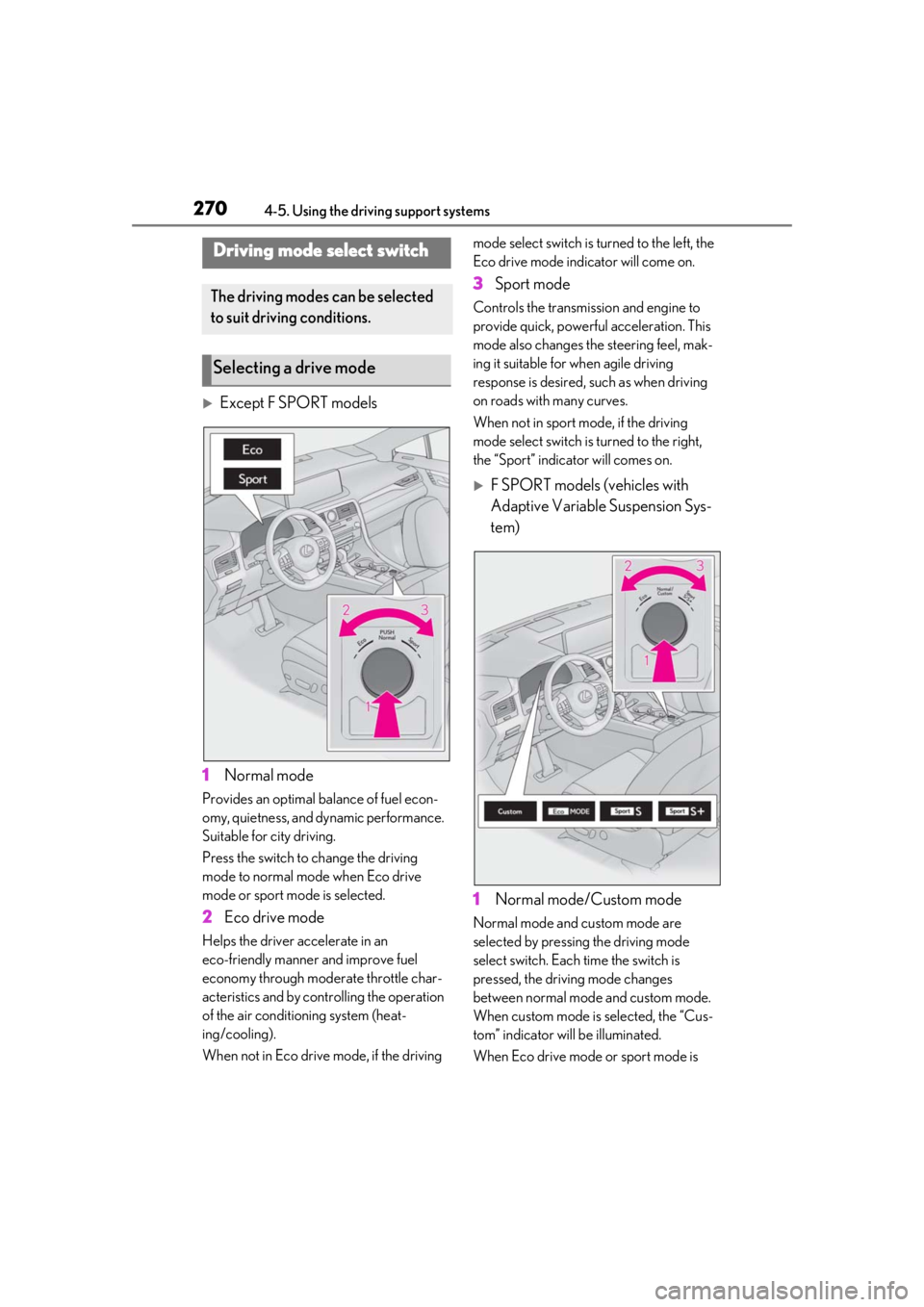
Except F SPORT models
1 Normal mode
Provides an optimal ba lance of fuel econ-
omy, quietness, and dynamic performance.
Suitable for city driving.
Press the switch to change the driving
mode to normal mode when Eco drive
mode or sport mode is selected.
2 Eco drive mode
Helps the driver accelerate in an
eco-friendly manner and improve fuel
economy through moderate throttle char-
acteristics and by controlling the operation
of the air conditioning system (heat-
ing/cooling).
When not in Eco drive mode, if the driving mode select switch is
turned to the left, the
Eco drive mode indicator will come on.
3 Sport mode
Controls the transmission and engine to
provide quick, powerful acceleration. This
mode also changes the steering feel, mak-
ing it suitable for when agile driving
response is desired, such as when driving
on roads with many curves.
When not in sport mode, if the driving
mode select switch is turned to the right,
the “Sport” indicator will comes on.
F SPORT models (vehicles with
Adaptive Variable Suspension Sys-
tem)
1 Normal mode/Custom mode
Normal mode and custom mode are
selected by pressing the driving mode
select switch. Each time the switch is
pressed, the driving mode changes
between normal mode and custom mode.
When custom mode is selected, the “Cus-
tom” indicator will be illuminated.
When Eco drive mode or sport mode is
Driving mode select switch
The driving modes can be selected
to suit driving conditions.
Selecting a drive mode
Page 271 of 508
2714-5. Using the driving support systems
4
Driving
selected, pressing the switch changes the
driving mode to normal mode.
•Normal mode
Provides an optimal ba lance of fuel econ-
omy, quietness, and dynamic performance.
Suitable for city driving.
•Custom mode
Allows you to drive with the following func-
tions set to your preferred settings. Cus-
tom mode settings can only be changed on
the drive mode customization display of
the Center Display. ( P.288)
2 Eco drive mode
Helps the driver accelerate in an
eco-friendly manner and improve fuel
economy through moderate throttle char-
acteristics and by controlling the operation
of the air conditioning system (heat-
ing/cooling).
When not in Eco drive mode, if the driving
mode select switch is turned to the left, the
Eco drive mode indicator will come on.
3Sport mode
•Sport S mode
Controls the transmission and engine to
provide quick, powerful acceleration. This
mode is suitable for when agile driving
response is desired, such as when driving
on roads with many curves.
When not in Sport S mode, if the driving mode select switch is turned to the right,
the “Sport S” indicator will come on.
•Sport S+ mode
Helps to ensure stee
ring performance and
driving stability by simultaneously con-
trolling the steering and suspension in
addition to the transmission and engine.
Suitable for sportier driving.
When in Sport S mode, if the driving mode
select switch is turned to the right, the
“Sport S+” indicator will come on.
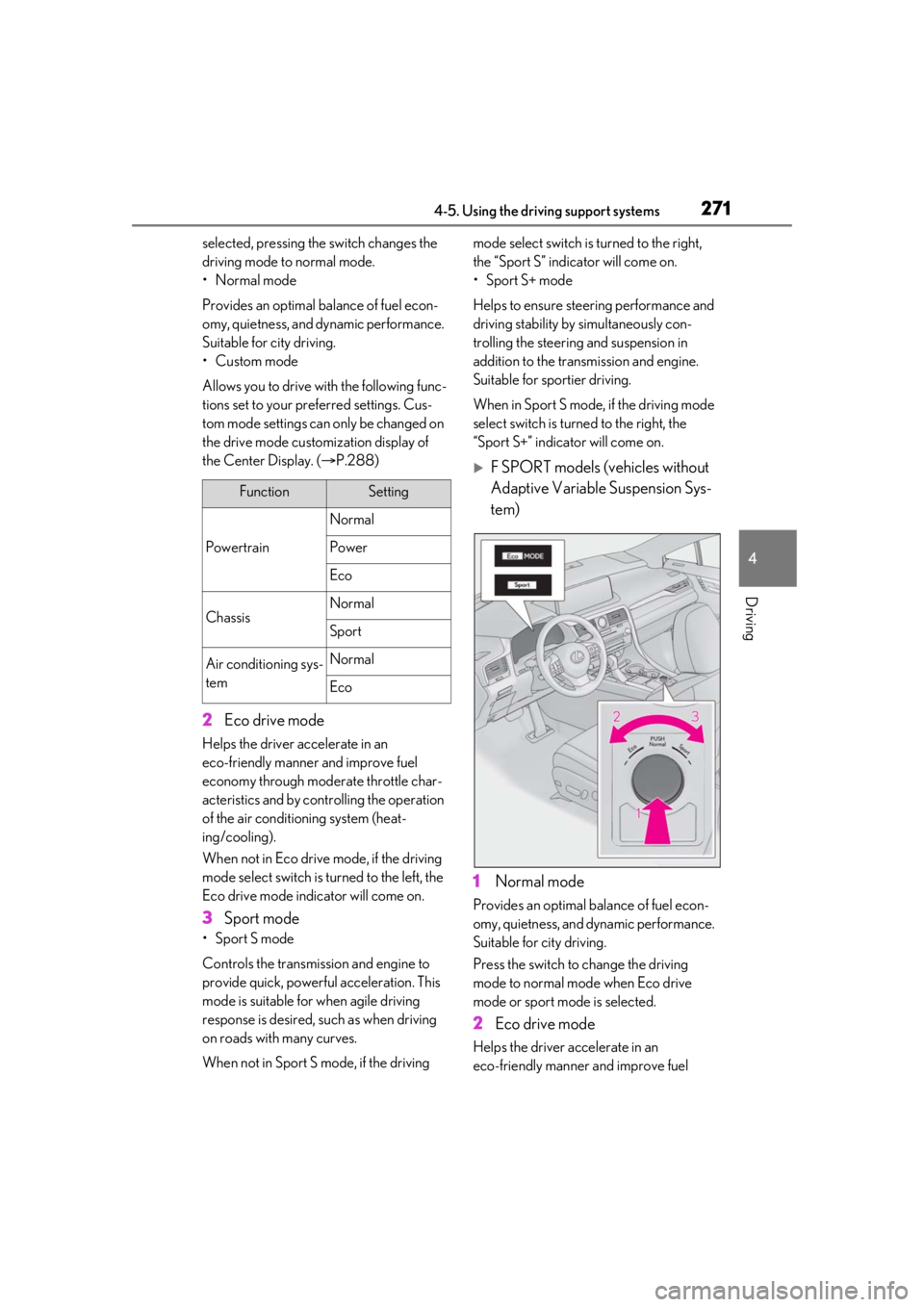
F SPORT models (vehicles without
Adaptive Variable Suspension Sys-
tem)
1 Normal mode
Provides an optimal ba lance of fuel econ-
omy, quietness, and dynamic performance.
Suitable for city driving.
Press the switch to change the driving
mode to normal mode when Eco drive
mode or sport mode is selected.
2 Eco drive mode
Helps the driver ac celerate in an
eco-friendly manner and improve fuel
FunctionSetting
Powertrain
Normal
Power
Eco
ChassisNormal
Sport
Air conditioning sys-
temNormal
Eco