warning LEXUS RX350 2022 Owners Manual
[x] Cancel search | Manufacturer: LEXUS, Model Year: 2022, Model line: RX350, Model: LEXUS RX350 2022Pages: 508, PDF Size: 26.2 MB
Page 260 of 508
2584-5. Using the driving support systems
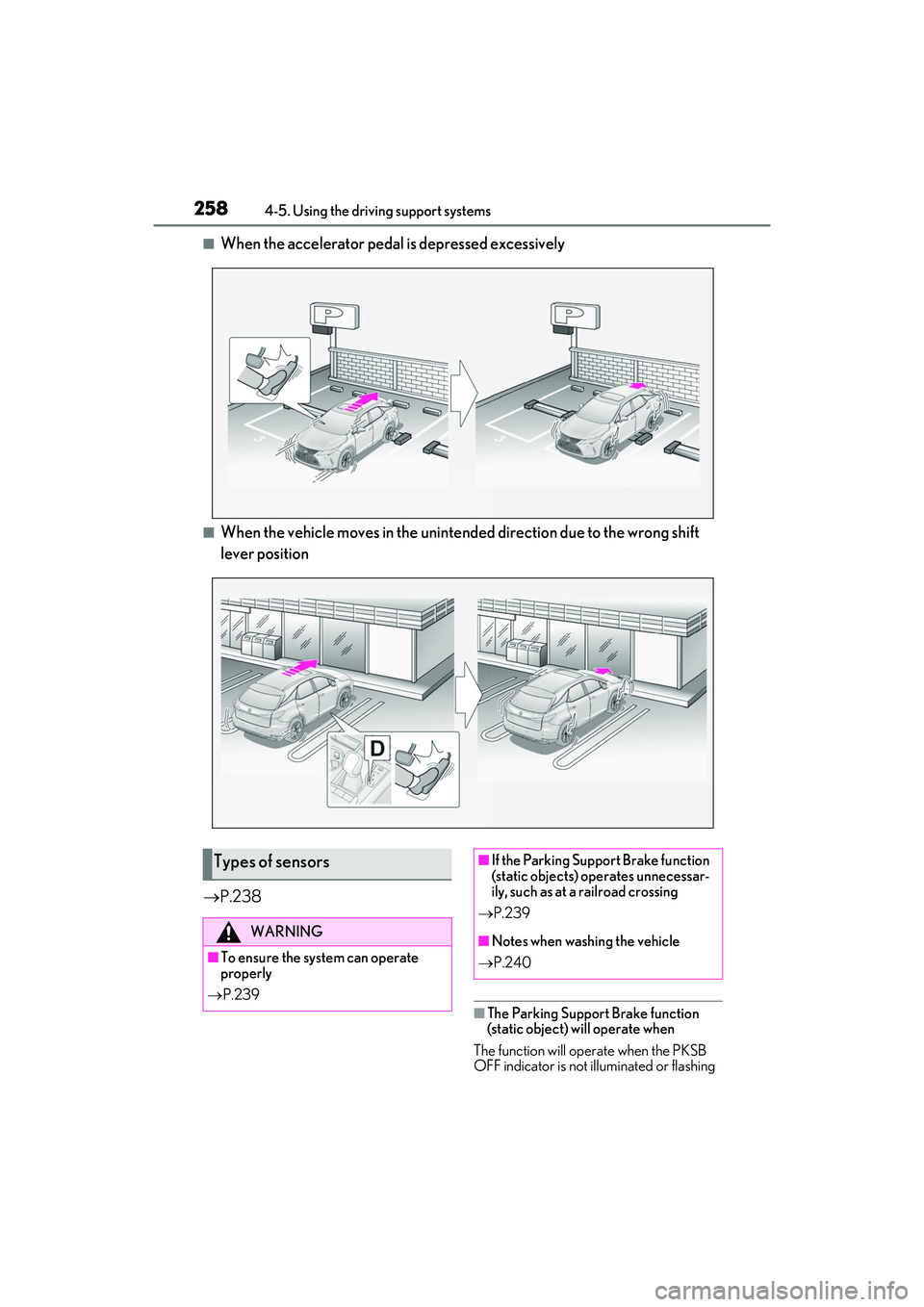
■When the accelerator pedal is depressed excessively
■When the vehicle moves in the unintend ed direction due to the wrong shift
lever position
P.238
■The Parking Support Brake function
(static object) will operate when
The function will operate when the PKSB
OFF indicator is not illuminated or flashing
Types of sensors
WARNING
■To ensure the system can operate
properly
P.239
■If the Parking Support Brake function
(static objects) operates unnecessar-
ily, such as at a railroad crossing
P.239
■Notes when washing the vehicle
P.240
Page 261 of 508
2594-5. Using the driving support systems
4
Driving
( P.71, 72) and all of the following condi-
tions are met:
●Engine output restriction control
• The Parking Support Brake is enabled.
• The vehicle speed is approximately 9 mph (15 km/h) or less.
• There is a static ob ject in the traveling
direction of the vehicle and approxi-
mately 6 to 13 ft. (2 to 4 m) away.
• The Parking Support Brake determines that a stronger-than-normal brake opera-
tion is necessary to avoid a collision.
●Brake control
• Engine output restriction control is oper- ating.
• The Parking Support Brake determines
that an immediate br ake operation is nec-
essary to avoid a collision.
■The Parking Support Brake function
(static objects) will stop operating when
The function will stop operating if any of the
following conditions are met:
●Engine output restriction control
• The Parking Support Brake is disabled.
• The system determines that the collision
has become avoidable with normal brake
operation.
• The static object is no longer approxi-
mately 6 to 13 ft. (2 to 4 m) away from the
vehicle or in the traveling direction of the
vehicle.
●Brake control
• The Parking Support Brake is disabled.
• Approximately 2 seconds have elapsed since the vehicle was stopped by brake
control.
• The brake pedal is depressed after the vehicle is stopped by brake control.
• The static object is no longer approxi-
mately 6 to 13 ft. (2 to 4 m) away from the
vehicle or in the traveling direction of the
vehicle.
■Detection range of the Parking Support
Brake function (static objects)
The detection range of the Parking Support
Brake function (static objects) differs from
the detection range of the intuitive parking
assist. ( P.242) Therefore, even if the intui-
tive parking assist de tects an object and
provides a warning, the Parking Support
Brake function (static objects) may not start operating.
■Situations in which the system may not
operate properly
P.241
■Situations in which the system may
operate even if there is no possibility of a
collision
P.241
Page 262 of 508
2604-5. Using the driving support systems
*:If equipped
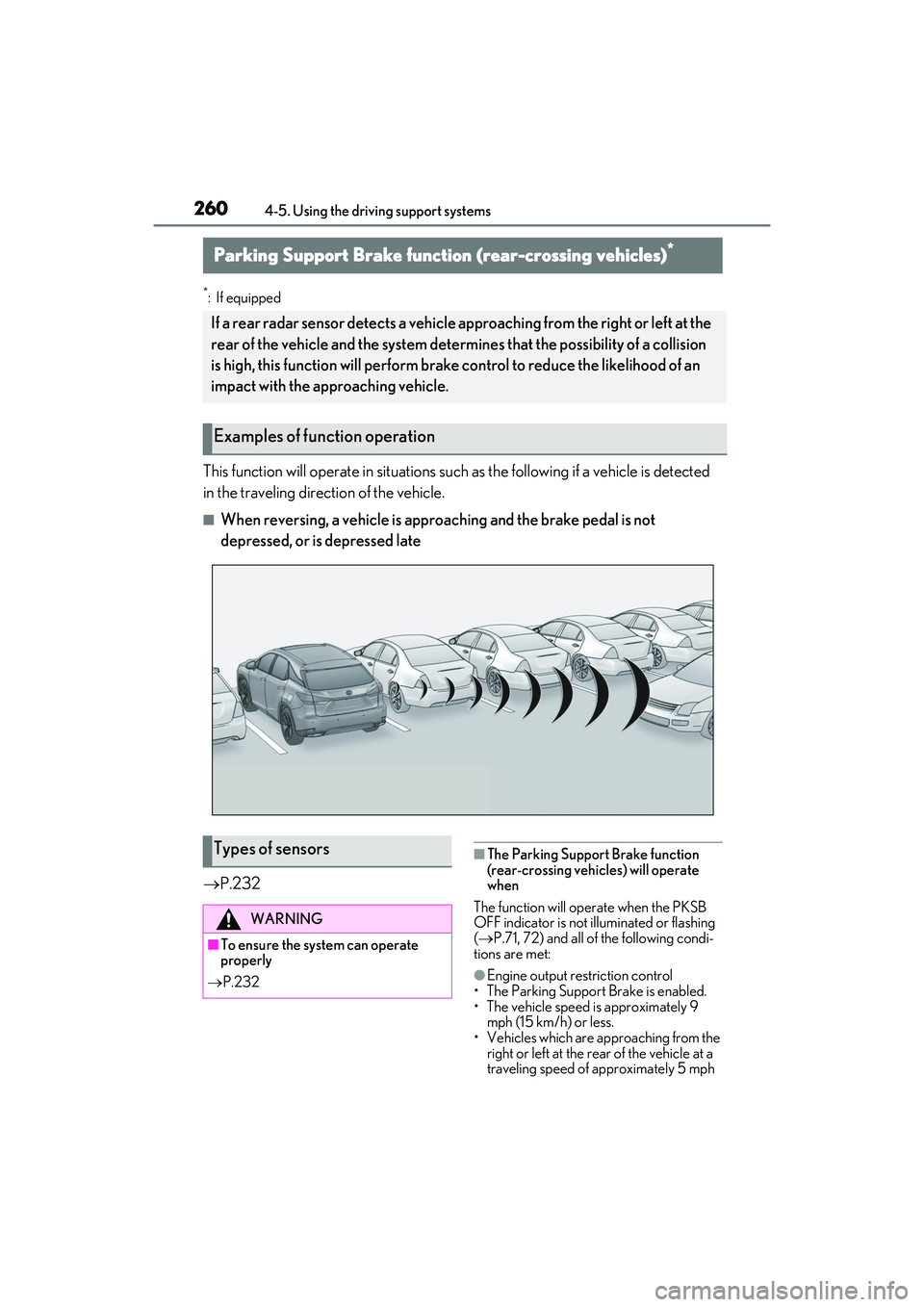
This function will operate in situations such as the followi ng if a vehicle is detected
in the traveling direction of the vehicle.
■When reversing, a vehicle is app roaching and the brake pedal is not
depressed, or is depressed late
P.232
■The Parking Support Brake function
(rear-crossing vehicles) will operate
when
The function will operate when the PKSB
OFF indicator is not illuminated or flashing
( P.71, 72) and all of the following condi-
tions are met:
●Engine output restriction control
• The Parking Support Brake is enabled.
• The vehicle speed is approximately 9 mph (15 km/h) or less.
• Vehicles which are ap proaching from the
right or left at the rear of the vehicle at a
traveling speed of approximately 5 mph
Parking Support Brake function (rear-crossing vehicles)*
If a rear radar sensor detects a vehicle a pproaching from the right or left at the
rear of the vehicle and the system determ ines that the possibility of a collision
is high, this function will perform brak e control to reduce the likelihood of an
impact with the approaching vehicle.
Examples of function operation
Types of sensors
WARNING
■To ensure the system can operate
properly
P.232
Page 269 of 508
2674-5. Using the driving support systems
4
Driving
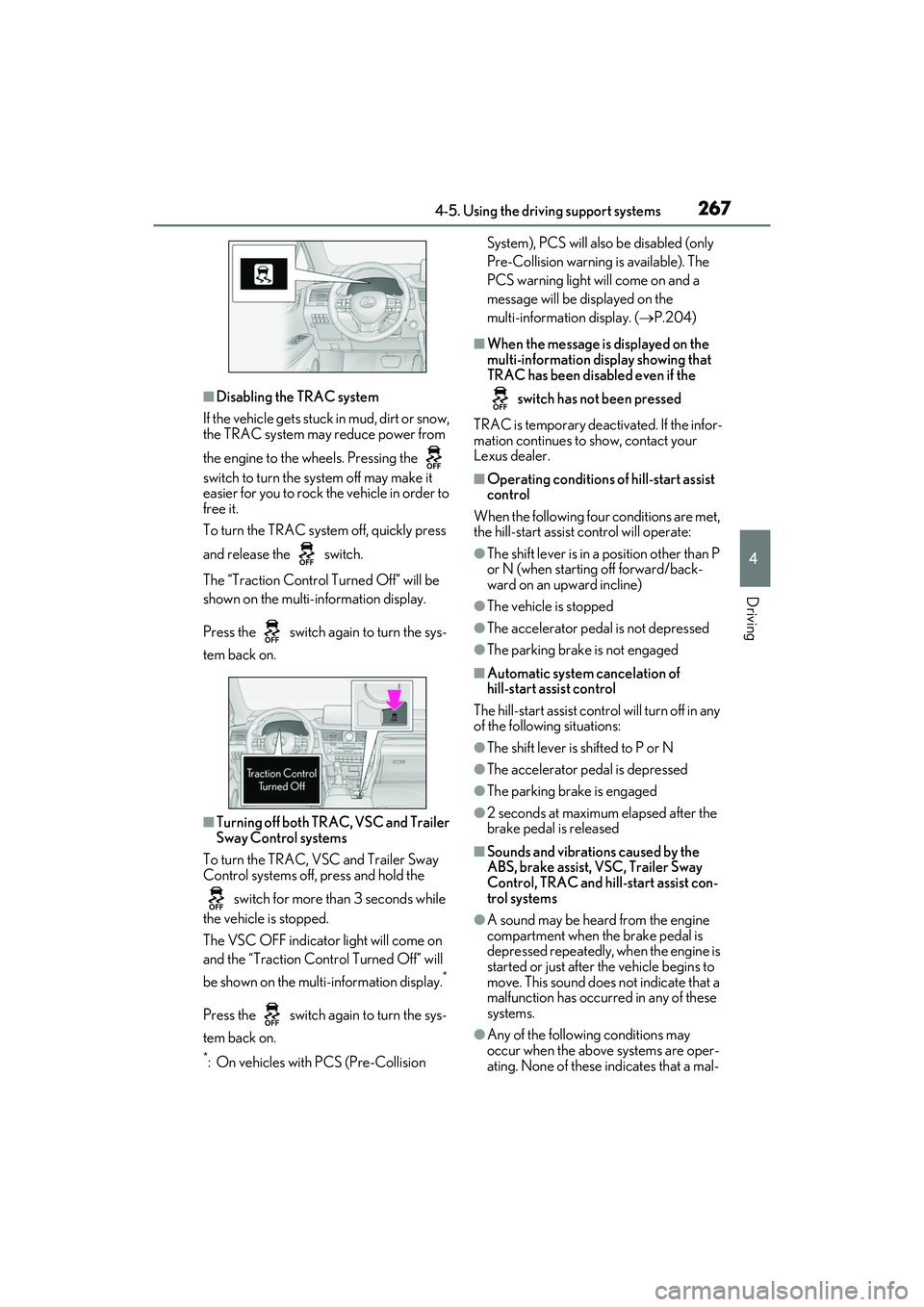
■Disabling the TRAC system
If the vehicle gets stuck in mud, dirt or snow,
the TRAC system may reduce power from
the engine to the wheels. Pressing the
switch to turn the sy stem off may make it
easier for you to rock the vehicle in order to
free it.
To turn the TRAC system off, quickly press
and release the switch.
The “Traction Control Turned Off” will be
shown on the multi-information display.
Press the switch again to turn the sys-
tem back on.
■Turning off both TRAC, VSC and Trailer
Sway Control systems
To turn the TRAC, VSC and Trailer Sway
Control systems off, press and hold the
switch for more th an 3 seconds while
the vehicle is stopped.
The VSC OFF indicator light will come on
and the “Traction Control Turned Off” will
be shown on the mult i-information display.
*
Press the switch again to turn the sys-
tem back on.
*: On vehicles with PCS (Pre-Collision System), PCS will also be disabled (only
Pre-Collision warning is available). The
PCS warning light will come on and a
message will be di
splayed on the
multi-information display. ( P.204)
■When the message is displayed on the
multi-information display showing that
TRAC has been disabled even if the
switch has not been pressed
TRAC is temporary deactivated. If the infor-
mation continues to show, contact your
Lexus dealer.
■Operating conditions of hill-start assist
control
When the following four conditions are met,
the hill-start assist control will operate:
●The shift lever is in a position other than P
or N (when starting off forward/back-
ward on an upward incline)
●The vehicle is stopped
●The accelerator pedal is not depressed
●The parking brake is not engaged
■Automatic system cancelation of
hill-start assist control
The hill-start assist control will turn off in any
of the following situations:
●The shift lever is shifted to P or N
●The accelerator pedal is depressed
●The parking brake is engaged
●2 seconds at maximum elapsed after the
brake pedal is released
■Sounds and vibrations caused by the
ABS, brake assist, VSC, Trailer Sway
Control, TRAC and hill-start assist con-
trol systems
●A sound may be heard from the engine
compartment when the brake pedal is
depressed repeatedly, when the engine is
started or just after the vehicle begins to
move. This sound does not indicate that a
malfunction has occurred in any of these
systems.
●Any of the followin g conditions may
occur when the above systems are oper-
ating. None of these indicates that a mal-
Page 270 of 508
2684-5. Using the driving support systems
function has occurred.
• Vibrations may be felt through the vehicle body and steering.
• A motor sound may be heard also after the vehicle comes to a stop.
• The brake pedal may pulsate slightly after
the ABS is activated.
• The brake pedal may move down slightly after the ABS is activated.
■Active Cornering Assist operation
sounds and vibrations
When the Active Cornering Assist is oper-
ated, operation sounds and vibrations may
be generated from the brake system, but
this is not a malfunction.
■EPS operation sound
When the steering wheel is operated, a
motor sound (whirring sound) may be
heard. This does not indicate a malfunction.
■Reduced effectiveness of the EPS sys-
tem
The effectiveness of the EPS system is
reduced to prevent the system from over-
heating when there is frequent steering
input over an extended period of time. The
steering wheel may feel heavy as a result.
Should this occur, refrain from excessive
steering input or stop the vehicle and turn
the engine off. The EPS system should
return to normal within 10 minutes.
■Automatic reactivation of TRAC, Trailer
Sway Control and VSC systems
After turning the TRAC, Trailer Sway Con-
trol and VSC systems off, the systems will
be automatically re-enabled in the following
situations:
●When the engine switch is turned off
●If only the TRAC system is turned off, the
TRAC will turn on when vehicle speed
increases
If both the TRAC and VSC systems are
turned off, automatic re-enabling will not
occur when vehicle speed increases.
■Operating conditions of Active Corner-
ing Assist
The system operates when the following
occurs.
●TRAC/VSC can operate
●The driver is attempting to accelerate
while turning
●The system detects th at the vehicle is
drifting to the outer side
●The brake pedal is released
■Secondary Collision Brake operating
conditions
The system operates when the SRS airbag
sensor detects a collision while the vehicle
is in motion.
However, the system does not operate in
any of the following situations.
●The vehicle speed is below 6 mph (10
km/h)
●Components are damaged
■Secondary Collision Brake automatic
cancellation
The system is automatically canceled in any
of the following situations.
●The vehicle speed drops below approxi-
mately 6 mph (10 km/h)
●A certain amount of time elapses during
operation
●The accelerator pedal is depressed a
large amount
WARNING
■The ABS does not operate effectively
when
●The limits of tire gripping performance
have been exceeded (such as exces-
sively worn tires on a snow covered
road).
●The vehicle hydroplanes while driving
at high speed on wet or slick roads.
■Stopping distance when the ABS is
operating may exceed that of normal
conditions
The ABS is not designed to shorten the
vehicle’s stopping di stance. Always main-
tain a safe distance from the vehicle in
front of you, especially in the following
situations:
●When driving on dirt, gravel or
snow-covered roads
Page 271 of 508
2694-5. Using the driving support systems
4
Driving
WARNING
●When driving with tire chains
●When driving over bumps in the road
●When driving over roads with potholes
or uneven surfaces
■TRAC/VSC may not operate effec-
tively when
Directional control and power may not
be achievable while driving on slippery
road surfaces, even if the TRAC/VSC
system is operating. Drive the vehicle
carefully in conditions where stability and
power may be lost.
■Active Cornering Assist does not
operate effectively when
●Do not overly rely on Active Corner-
ing Assist. Active Cornering Assist
may not operate effectively when
accelerating down slopes or driving on
slippery road surfaces.
●When Active Cornering Assist fre-
quently operates, Active Cornering
Assist may temporarily stop operating
to ensure proper operation of the
brakes, TRAC and VSC.
■Hill-start assist control does not oper-
ate effectively when
●Do not overly rely on hill-start assist
control. Hill-start assist control may
not operate effectively on steep
inclines and roads covered with ice.
●Unlike the parking brake, hill-start
assist control is not intended to hold
the vehicle stationary for an extended
period of time. Do not attempt to use
hill-start assist control to hold the vehi-
cle on an incline, as doing so may lead
to an accident.
■When the TRAC/VSC/Trailer Sway
Control is activated
The slip indicator light flashes. Always
drive carefully. Re ckless driving may
cause an accident. Exercise particular
care when the indicator light flashes.
■When the TRAC/VSC/Trailer Sway
Control systems are turned off
●Be especially careful and drive at a
speed appropriate to the road condi-
tions. As these are the systems to help
ensure vehicle stability and driving
force, do not turn the
TRAC/VSC/Trailer Sway Control sys-
tems off unless necessary.
●Trailer Sway Control is part of the VSC
system and will not operate if VSC is
turned off or expe riences a malfunc-
tion.
■Replacing tires
Make sure that all ti res are of the speci-
fied size, brand, tread pattern and total
load capacity. In addition, make sure that
the tires are inflated to the recom-
mended tire inflat ion pressure level.
The ABS, TRAC, Trailer Sway Control
and VSC systems will not function cor-
rectly if different tires are installed on the
vehicle.
Contact your Lexus dealer for further
information when replacing tires or
wheels.
■Handling of tires and the suspension
Using tires with any kind of problem or
modifying the suspensi on will affect the
driving assist systems, and may cause a
system to malfunction.
■Trailer Sway Control precaution
The Trailer Sway Control system is not
able to reduce trailer sway in all situa-
tions. Depending on many factors such
as the conditions of the vehicle, trailer,
road surface and driving environment,
the Trailer Sway Control system may not
be effective. Refer to your trailer owner’s
manual for information on how to tow
your trailer properly.
Page 272 of 508
2704-5. Using the driving support systems
WARNING
■If trailer sway occurs
Observe the following precautions.
Failing to do so may cause death or seri-
ous injury.
●Firmly grip the stee ring wheel. Steer
straight ahead. Do not try to control
trailer sway by turning the steering
wheel.
●Begin releasing the accelerator pedal
immediately but very gradually to
reduce speed.
Do not increase speed. Do not apply
vehicle brakes.
If you make no extreme correction with
the steering or brakes, your vehicle and
trailer should stabilize.
■Secondary Collision Brake
Do not rely solely upon the Secondary
Collision Brake. This system is designed
to help reduce the possibility of further
damage due to a secondary collision,
however, that effect changes according
to various conditions. Overly relying on
the system may result in death or serious
injury.
Page 273 of 508
2714-6. Driving tips
4
Driving
4-6.Driving tips
Use fluids that are appropriate to
the prevailing outside temperatures.
•Engine oil
• Engine coolant
•Washer fluid
Have a service technician inspect
the condition of the battery.
Have the vehicle fitted with four
snow tires or purchase a set of tire
chains for the front tires.
Ensure that all tires ar e of the specified size
and the same brand, and that chains match
the size of the tires.
Perform the following according to the
driving conditions:
Do not try to forcibly open a window
or move a wiper that is frozen. Pour
warm water over the frozen area to
melt the ice. Wipe away the water
Winter driving tips
Carry out the necessary prepara-
tions and inspections before driving
the vehicle in winter. Always drive
the vehicle in a manner appropriate
to the prevailing weather condi-
tions.
Pre-winter preparations
WARNING
■Driving with snow tires
Observe the following precautions to
reduce the risk of accidents.
Failure to do so may result in a loss of
vehicle control and cause death or seri-
ous injury.
●Use tires of the specified size.
●Maintain the recommended level of air
pressure.
●Do not drive in excess of 75 mph (120
km/h), regardless of the type of snow
tires being used.
●Use snow tires on all, not just some
wheels.
■Driving with tire chains
Observe the following precautions to
reduce the risk of accidents.
Failure to do so may result in the vehicle
being unable to be driven safely, and may
cause death or serious injury.
●Do not drive in excess of the speed
limit specified for the tire chains being
used, or 30 mph (50 km/h), which-
ever is lower.
●Avoid driving on bumpy road surfaces
or over potholes.
●Avoid sudden acceleration, abrupt
steering, sudden braking and shifting
operations that cause sudden engine
braking.
●Slow down sufficiently before entering
a curve to ensure that vehicle control is
maintained.
●Do not use the LTA (Lane Tracing
Assist) system.
NOTICE
■Repairing or replacing snow tires
Request repairs or replacement of snow
tires from your Lexus dealer or legitimate
tire retailers.
This is because the removal and attach-
ment of snow tires affects the operation
of the tire pressure warning valves and
transmitters.
Before driving the vehicle
Page 275 of 508
2734-6. Driving tips
4
Driving
length)
Regulations regarding the use of tire
chains vary depending on location and
type of road. Always check local regu-
lations before installing chains.
■Tire chain installation
Observe the following precautions when
installing and removing chains:
●Install and remove tire chains in a safe
location.
●Install tire chains on the front tires only.
Do not install tire chains on the rear tires.
●Install tire chains on fr ont tires as tightly as
possible. Retighten chains after driving
1/4 1/2 mile (0.5 1.0 km).
●Install tire chains following the instruc-
tions provided with the tire chains.
To enable the windshield wipers to be
lifted when heavy snow or icy condi-
tions are expected, change the rest
position of the windshield wipers from
the retracted position below the hood
to the service position using the wiper
lever. ( P.192)
Specific design characteristics give
it a higher center of gravity than
ordinary passenger cars. This vehi-
cle design feature causes this type
of vehicle to be more likely to
rollover. And, utility vehicles have a
significantly higher rollover rate
than other types of vehicles.
An advantage of th e higher ground
clearance is a better view of the
road allowing you to anticipate
problems.
It is not designed for cornering at
the same speeds as ordinary pas-
senger cars any more than
low-slung sports cars are designed
to perform satisfactorily under
off-road conditions. Therefore,
sharp turns at excessive speeds may
cause the vehicle to rollover.
Regulations on the use of tire
chains
NOTICE
■Fitting tire chains
The tire pressure warning valves and
transmitters may not function correctly
when tire chains are fitted.
Windshield wipers
Utility vehicle precautions
This vehicle belongs to the utility
vehicle class, which has higher
ground clearance and narrower
tread in relation to the height of its
center of gravity.
Utility vehicle feature
WARNING
■Utility vehicle precautions
Always observe the following precau-
tions to minimize the risk of death, seri-
ous injury or damage to your vehicle:
Page 276 of 508
2744-6. Driving tips
Your vehicle is not designed to be
driven off-road. However, in the event
that off-road driving cannot be
avoided, please observe the following
precautions to help avoid the areas
prohibited to vehicles.
Drive your vehicle only in areas
where off-road vehicles are permit-
ted to travel.
Respect private property. Get
owner’s permission before entering
private property.
Do not enter areas that are closed.
Honor gates, barriers and signs that
restrict travel.
Stay on established roads. When
conditions are wet, driving tech-
niques should be changed or travel
delayed to prevent damage to
roads.
■Additional information for off-road driv-
ing
For owners in U.S. mainland, Hawaii and
Puerto Rico:
To obtain additional information pertaining
to driving your vehicle off-road, consult the
following organizations.
●State and Local Parks and Recreation
Departments
●State Motor Vehicle Bureau
●Recreational Vehicle Clubs
●U.S. Forest Service and Bureau of Land
Management
WARNING
●In a rollover crash, an unbelted person
is significantly more likely to die than a
person wearing a seat belt. Therefore,
the driver and all passengers should
always fasten th eir seat belts.
●Avoid sharp turns or abrupt maneu-
vers, if at all possible.
Failure to operate this vehicle correctly
may result in loss of control or vehicle
rollover causing death or serious
injury.
●Loading cargo on the roof luggage
carrier will make the center of the
vehicle gravity higher. Avoid high
speeds, sudden starts, sharp turns,
sudden braking or abrupt maneuvers,
otherwise it may result in loss of con-
trol or vehicle rollover due to failure to
operate this vehicle correctly.
●Always slow down in gusty crosswinds.
Because of its profile and higher cen-
ter of gravity, your vehicle is more sen-
sitive to side winds than an ordinary
passenger car. Slowing down will allow
you to have better control.
●Do not drive horizontally across steep
slopes. Driving straig ht up or straight
down is preferred. Your vehicle (or any
similar off-road vehicle) can tip over
sideways much more easily than for-
ward or backward.
Off-road driving
WARNING
■Off-road driving precautions
Always observe the following precau-
tions to minimize the risk of death, seri-
ous injury or damage to your vehicle:
●Drive carefully when off the road. Do
not take unnecessary risks by driving in
dangerous places.
●Do not grip the steering wheel spokes
when driving off-road. A bad bump
could jerk the wheel and injure your
hands. Keep both hands and especially
your thumbs on the outside of the rim.
●Always check your brakes for effec-
tiveness immediately after driving in
sand, mud, water or snow.