fuel LEXUS RX350 2022 User Guide
[x] Cancel search | Manufacturer: LEXUS, Model Year: 2022, Model line: RX350, Model: LEXUS RX350 2022Pages: 508, PDF Size: 26.2 MB
Page 77 of 508

752-1. Instrument cluster
2
Vehicle status information and indicators
■Locations of gauges and meters
Except F SPORT models
The units used on the meters may differ depending on the target region.
Engine coolant temperature gauge
Displays the engine coolant temperature
Tachometer
Displays the engine speed in revolutions per minute
Outside temperature
Displays the outside temperature within the range of -40°F (-40°C) to 122°F (50°C). Low
outside temperature indicator comes on when the ambient temperature is 37°F (3°C) or
lower.
Multi-information display
Presents the driver with a variety of vehicle data (P.79)
Displays warning messages in case of a malfunction (P.402)
Clock
Time displayed is linked to the analog clock on the instrument panel. (P.323)
Speedometer
Fuel gauge
Displays the quantity of fuel remaining in the tank
Shift position display ( P.174)
Gauges and meters
Meter display
A
B
C
D
E
F
G
H
Page 78 of 508

762-1. Instrument cluster
Odometer and trip meter display (P.78)
F SPORT models
The units used on the meters may differ depending on the target region.
Outside temperature
Displays the outside temperature within the range of -40°F (-40°C) to 122°F (50°C). Low
outside temperature indicator comes on when the ambient temperature is 37°F (3°C) or
lower.
Multi-information display
Presents the driver with a variety of vehicle data ( P.79)
Displays warning messages in case of a malfunction (P.402)
Tachometer
Displays the engine speed in revolutions per minute
When sport mode is se lected for the driving mode, the periphery of the tachometer will
change color and the scale of the tachometer will be emphasized.
Speedometer
Engine coolant temperature gauge
Displays the engine coolant temperature
Fuel gauge
Displays the quantity of fuel remaining in the tank
Shift position display ( P.174)
Odometer and trip meter display ( P.78)
Clock
Time displayed is linked to the analog clock on the instrument panel. (P.323)
■Rev indicator (F SPORT models) When the engine speed reaches a set
I
A
B
C
D
E
F
G
H
I
Page 82 of 508

802-1. Instrument cluster
The multi-information display is oper-
ated using the meter control switches.: Select menu icons
: Change displayed content,
scroll up/down the screen and
move the cursor
Press: Enter/Set
Press and hold: Reset
Return to the previous screen
Pressing and holding the switch will display
the first screen of the selected menu icon.
Press: Display the top screen
Press and hold: Register current
screen as the top screen
Call sending/receiving and history
display
Linked with the hands-free system, sending
or receiving call is displayed. For details
regarding the hands-fr ee system, refer to
the “NAVIGATION AND MULTIMEDIA
SYSTEM OWNER’S MANUAL”.
■Registering a top screen
The displayed top screen can be
changed to a registered screen of your
choice. To register a screen as the top
screen, display the desired screen and
press and hold .
A message asking to confirm if reg-
istration is desired will be displayed.
If the selected screen cannot be
registered, a registration failure
message will be displayed.
When no screen has been regis-
tered, the drive information screen
will be displayed.
■Content displayed as drive infor-
mation
Displays drive information such as the
following:
Drive information 1
• Current fuel consumption
• Average fuel economy (after reset)
Drive information 2
• Distance (driving range)
• Average vehicle speed (after reset)
Drive information 3
• Average fuel economy (after refuel)
• Elapsed time (after start)
Displayed items (listed below) can be
changed on . ( P.83)
Current fuel consumption
Displays instantaneou s current fuel con-
sumption
WARNING
■The information display at low tem-
peratures
P.77
Changing the meter display
A
B
C
D
E
Drive information
Page 83 of 508

812-1. Instrument cluster
2
Vehicle status information and indicators
Average fuel economy
After reset: Displays average fuel con-
sumption since the display was reset
*1, 2
After start: Displays average fuel con-
sumption since engine start
*2
After refuel: Displays average fuel con-
sumption since refuel
*2, 3
Average vehicle speed
After reset: Displays average vehicle
speed since the display was reset
*1
After start: Displays average vehicle speed
since engine start
Elapsed time
After reset: Displays elapsed time since the
display was reset
*1
After start: Displays elapsed time since
engine start
Distance
Driving range: Displays driving range with
remaining fuel
*3, 4
After start: Displays drive distance since
vehicle start
Other
Blank: No item
*1: To reset, display the desired item and
press and hold of the meter con-
trol switch.
If both of the displayed items are reset-
table, a message will be displayed ask-
ing which item(s) to reset.
*2: Use the displayed fuel consumption as a reference.
*3: When only a small amount of fuel is added to the tank, the display may not
be updated.
When refueling, turn the engine switch
off. If the vehicle is refueled without turning the engine switch off, the display
may not be updated.
*4: This distance is computed based on
your average fuel consumption. As a
result, the actual distance that can be
driven may differ from that displayed.
■Eco Driving Indicator
Eco Driving Indicator Light
During Eco-friendly acceleration (Eco
driving), the Eco Driving Indicator Light
will turn on. When the acceleration
exceeds the Zone of Ec o driving, or when
the vehicle is stopped, the light turns off.
Eco Driving Indicator Zone Display
Suggests the Zone of Eco driving with cur-
rent Eco driving ratio based on accelera-
tion.
Eco driving ratio based on acceler-
ation
If the acceleration exceeds the Zone of
Eco driving, the right side of the Eco Driv-
ing Indicator Zone Display will illuminate.
Zone of Eco driving
■AWD Control (if equipped)
Displays the driving force applied to
each wheel using segments.
A
B
C
D
Page 92 of 508

902-1. Instrument cluster
■Eco Driving IndicatorEco Driving Indicator Zone Display
Eco driving ratio based on acceler-
ation
Zone of Eco driving
Displayed content is th e same as that dis-
played on the multi-information display
(Eco Driving Indicator). For details, refer to
P.81.
■Tachometer
Displays the engine speed in revolu-
tions per minute.
Center Display
“MENU” button
Touchpad
■Trip information
Press the “MENU” button on the
Remote Touch, then select on the
Eco Driving Indicator/Tachome-
ter
A
B
C
Fuel consumption informa-
tion
Fuel consumption information can
be displayed on the Center Display.
Vehicles with a 12 .3-inch display:
The fuel consumption information
can be displayed and operated on
the side display.
System components
Consumption
A
B
C
Page 93 of 508

912-1. Instrument cluster
2
Vehicle status information and indicators
menu screen.
If a screen other than “Trip Information”
is displayed, select “Trip Information”.
This system can also be operated by
the touch screen.
Resetting the consumption data
Fuel consumption in the past 15
minutes
Current fuel consumption
Average vehicle speed since the
engine was started.
Elapsed time since the engine was
started.
Cruising range
Average fuel consumption for the past
15 minutes is divided by color into past
averages and averages attained since
the engine switch was last turned to
IGNITION ON mode. Use the dis-
played average fuel consumption as a
reference.
The image is an example only, and may
vary slightly from actual conditions.
■History
Press the “MENU” button on the
Remote Touch, then select on the
menu screen. If a screen other than “History” is dis-
played, select “History”.
This system can also be operated by
the touch screen.
Best recorded fuel consumption
Latest fuel consumption
Previous fuel consumption record
Resetting the history data
Updating the latest fuel consump-
tion data
The average fuel consumption history
is divided by color into past averages
and the average fuel consumption
since the last updated. Use the dis-
played average fuel consumption as a
reference.
The image is an example only, and may
vary slightly from actual conditions.
■Updating the history data
Update the latest fuel consumption by
selecting “Update” to measure the current
fuel consumption again.
■Resetting the data
The fuel consumption data can be deleted
by selecting “Clear”.
■Cruising range
Displays the estimated maximum distance
that can be driven with the quantity of fuel
remaining.
A
B
C
D
E
F
A
B
C
D
E
Page 94 of 508
922-1. Instrument cluster
This distance is computed based on your
average fuel consumption.
As a result, the actual distance that can be
driven may differ fr om that displayed.
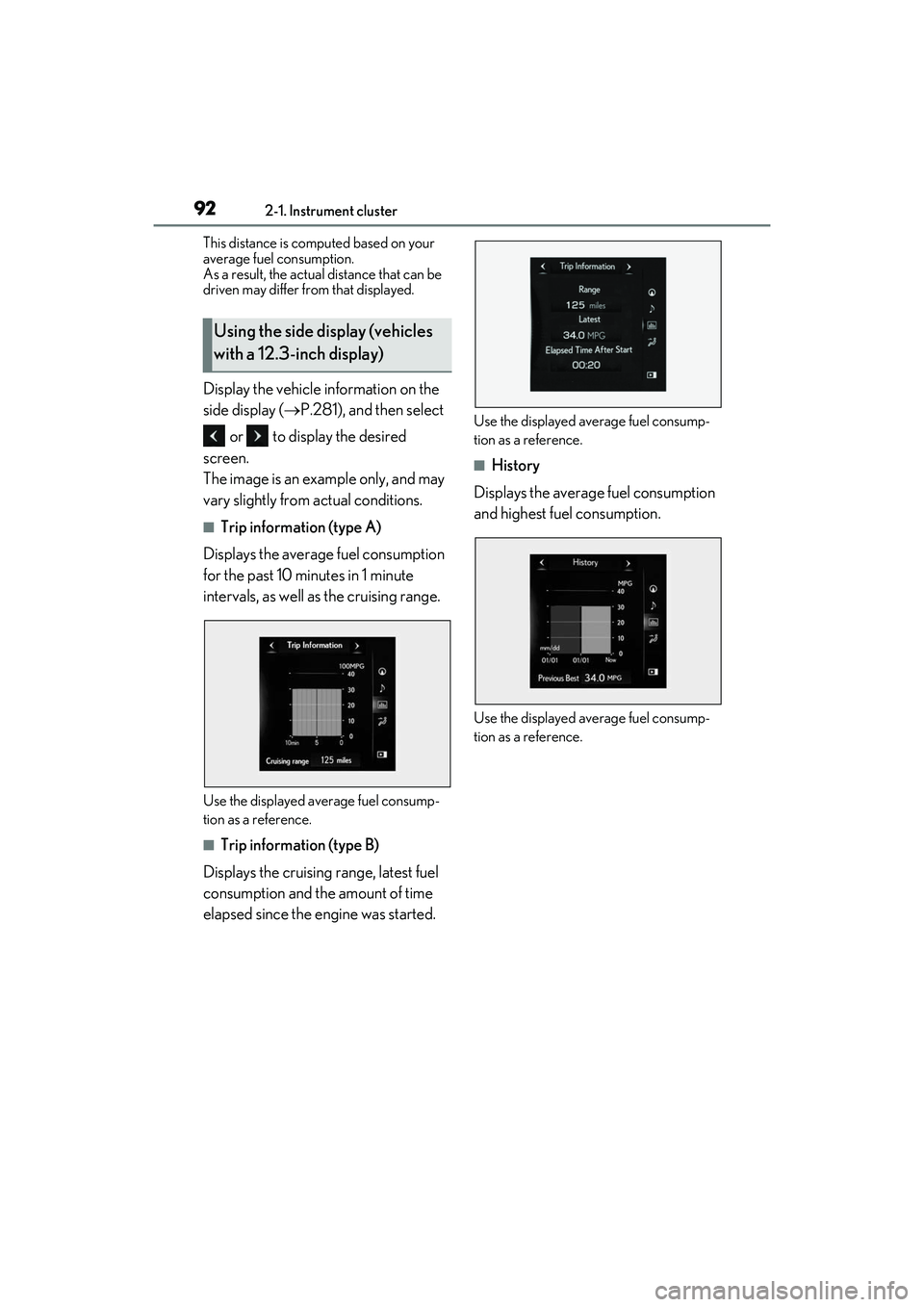
Display the vehicle information on the
side display (P.281), and then select
or to display the desired
screen.
The image is an example only, and may
vary slightly from actual conditions.
■Trip information (type A)
Displays the average fuel consumption
for the past 10 minutes in 1 minute
intervals, as well as the cruising range.
Use the displayed average fuel consump-
tion as a reference.
■Trip information (type B)
Displays the cruising range, latest fuel
consumption and the amount of time
elapsed since the engine was started.
Use the displayed average fuel consump-
tion as a reference.
■History
Displays the average fuel consumption
and highest fuel consumption.
Use the displayed average fuel consump-
tion as a reference.
Using the side display (vehicles
with a 12.3-inch display)
Page 151 of 508

149
4
4
Driving
Driving
.4-1. Before drivingDriving the vehicle ..................... 150
Cargo and luggage ................... 155
Vehicle load limits ...................... 158
Trailer towing (vehicles without towing package) ...................... 159
Trailer towing (vehicles with tow- ing package).............................. 159
Dinghy towing ............................. 169
4-2. Driving procedures Engine (ignition) switch ........... 170
Automatic transmission........... 174
Turn signal lever.......................... 178
Parking brake .............................. 179
Brake Hold.................................... 182
4-3. Operating the lights and wipers Headlight switch ......................... 184
AHB (Automatic High Beam) ......................................................... 187
Fog light switch ........................... 190
Windshield wipers and washer ......................................................... 190
Rear window wiper and washer ......................................................... 194
4-4. Refueling Opening the fuel tank cap...... 195
4-5. Using the driving support sys- tems
Lexus Safety System + 2.0 ..... 198
PCS (Pre-Collision System) ........................................................ 204LTA (Lane Tracing Assist) .......
211
RSA (Road Sign Assist).......... 220
Dynamic radar cruise control with full-speed range....................... 222
BSM (Blind Spot Monitor) .... 232
PKSA (Parking Support Alert) ....................................................... 236
Intuitive parking assist ............. 238
RCTA (Rear cross traffic alert) function....................................... 245
PKSB (Parking Support Brake) ........................................................ 251
Parking Support Brake function (static objects) ......................... 257
Parking Support Brake function (rear-crossing vehicles) ...... 260
Driving mode select switch .. 262
All-wheel drive lock switch ... 264
Driving assist systems.............. 265
4-6. Driving tips Winter driving tips ...................... 271
Utility vehicle precautions..... 273
Page 153 of 508

1514-1. Before driving
4
Driving
●When the accelerator pedal is released
●When the brake pedal is depressed while
sport mode is selected
■Restraining the engine output (Brake
Override System)
●When the accelerator and brake pedals
are depressed at the same time, the
engine output may be restrained.
●A warning message is displayed on the
multi-information display and head-up
display (if equipped) while the system is
operating.
■Restraining sudden start (Drive-Start
Control)
●When the following unusual operation is
performed, the engine output may be
restrained.
• When the shift lever is shifted from R to D, D to R, N to R, P to D, or P to R (D
includes M) with the accelerator pedal
depressed, a warning message appears
on the multi-information display and
head-up display (if equipped). If a warn-
ing message is shown on the multi-infor-
mation display and head-up display (if
equipped), read the message and follow
the instructions.
• When the accelerator pedal is depressed
too much while the vehicle is in reverse.
●While Drive-Start Control is being acti-
vated, your vehicle may have trouble
escaping from the mud or fresh snow. In
such case, deactivate TRAC ( P.267) to
cancel Drive-Start Control so that the
vehicle may become able to escape from
the mud or fresh snow.
■Breaking in your new Lexus
To extend the life of the vehicle, observing
the following precautions is recommended:
●For the first 200 miles (300 km):
Avoid sudden stops.
●For the first 500 miles (800 km):
Do not tow a trailer.
●For the first 1000 miles (1600 km):
• Do not drive at extremely high speeds.
• Avoid sudden acceleration.
• Do not drive continuously in low gears.
• Do not drive at a constant speed for extended periods.
■Operating your vehicle in a foreign
country
Comply with the relevant vehicle registra-
tion laws and confirm the availability of the
correct fuel. ( P.432)
■Eco-friendly driving
P.81
WARNING
Observe the following precautions.
Failure to do so may result in death or
serious injury.
■When starting the vehicle
Always keep your foot on the brake
pedal while stopped the engine running.
This prevents the vehicle from creeping.
■When driving the vehicle
●Do not drive if you are unfamiliar with
the location of the brake and accelera-
tor pedals to avoid depressing the
wrong pedal.
• Accidentally depressing the accelera- tor pedal instead of the brake pedal
will result in sudden acceleration that
may lead to an accident.
• When backing up, you may twist your body around, leading to a difficulty in
operating the pedals. Make sure to
operate the pedals properly.
• Make sure to keep a correct driving posture even when moving the vehicle
only slightly. This allows you to depress
the brake and accelerator pedals
properly.
• Depress the brake pedal using your right foot. Depressing the brake pedal
using your left foot may delay
response in an emer gency, resulting in
an accident.
Page 161 of 508

1594-1. Before driving
4
Driving
■Matching trailer ball height to trailer
coupler height
No matter which class of tow hitch applies,
Trailer towing (vehicles with-
out towing package)
Lexus does not recommend towing
a trailer with your vehicle. Lexus
also does not recommend the
installation of a tow hitch or the use
of a tow hitch carrier for a wheel-
chair, scooter, bicycle, etc. Your
vehicle is not desi gned for trailer
towing or for the use of tow hitch
mounted carriers.
Trailer towing (vehicles with
towing package)
Your vehicle is designed primarily
as a passenger-and-load-carrying
vehicle. Towing a tr ailer can have an
adverse impact on handling, per-
formance, braking, durability, and
fuel consumption. For your safety
and the safety of others, you must
not overload your vehicle or trailer.
You must also ensure that you are
using appropriate towing equip-
ment, that the towing equipment
has been installed correctly and
used properly, and that you employ
the requisite driving habits.
Vehicle-trailer stability and braking
performance are affe cted by trailer
stability, brake performance and
setting, trailer brakes, the hitch and
hitch systems (if equipped).
To tow a trailer safely, use extreme
care and drive the vehicle in accor-
dance with your tr ailer’s character-
istics and operating conditions.
Lexus warranties do not apply to
damage or malfunction caused by
towing a trailer for commercial pur-
poses.
Contact your Lexus dealer for fur-
ther information about additional
requirements such as a towing kit,
etc.