power steering LEXUS RX350 2022 User Guide
[x] Cancel search | Manufacturer: LEXUS, Model Year: 2022, Model line: RX350, Model: LEXUS RX350 2022Pages: 508, PDF Size: 26.2 MB
Page 154 of 508

1524-1. Before driving
WARNING
●Do not drive the vehicle over or stop
the vehicle near flammable materials.
The exhaust system and exhaust gases
can be extremely hot. These hot parts
may cause a fire if there is any flamma-
ble material nearby.
●During normal driving, do not turn off
the engine. Turning the engine off
while driving will not cause loss of
steering or braking control, but the
power assist to these systems will be
lost. This will make it more difficult to
steer and brake, so you should pull
over and stop the vehicle as soon as it
is safe to do so.
However, in the event of an emer-
gency, such as if it becomes impossible
to stop the vehicle in the normal way:
P.384
●Use engine braking (downshift) to
maintain a safe speed when driving
down a steep hill.
Using the brakes continuously may
cause the brakes to overheat and lose
effectiveness. (
P.174)
●Do not adjust the positions of the
steering wheel, the seat, or the inside
or outside rear view mirrors while driv-
ing.
Doing so may result in a loss of vehicle
control.
●Always check that all passengers’
arms, heads or other parts of their
body are not outside the vehicle.
●AWD models: Do not drive the vehicle
off-road.
This is not an AWD vehicle designed
for off-road driving. Proceed with all
due caution if it becomes unavoidable
to drive off-road.
●Do not drive across a river or through
other bodies of water.
This may cause electric/electronic
components to short circuit, damage
the engine or cause other serious
damage to the vehicle.
●Do not drive in excess of the speed
limit. Even if the legal speed limit per-
mits it, do not drive over 85 mph (140
km/h) unless your vehicle has
high-speed capability tires. Driving
over 85 mph (140 km/h) may result in
tire failure, loss of control and possible
injury. Be sure to consult a tire dealer
to determine whether the tires on your
vehicle are high-speed capability tires
or not before drivin g at such speeds.
■When driving on slippery road sur-
faces
●Sudden braking, acceleration and
steering may cause tire slippage and
reduce your ability to control the vehi-
cle.
●Sudden acceleration, engine braking
due to shifting, or changes in engine
speed could cause the vehicle to skid.
●After driving through a puddle, lightly
depress the brake pedal to make sure
that the brakes are functioning prop-
erly. Wet brake pads may prevent the
brakes from functioning properly. If the
brakes on only one side are wet and
not functioning properly, steering con-
trol may be affected.
■When shifting the shift lever
●Do not let the vehicle roll backward
while the shift lever is in a driving posi-
tion, or roll forward while the shift lever
is in R.
Doing so may cause the engine to stall
or lead to poor brake and steering
performance, resulting in an accident
or damage to the vehicle.
●Do not shift the shift lever to P while
the vehicle is moving.
Doing so can damage the transmission
and may result in a loss of vehicle con-
trol.
●Do not shift the shift lever to R while
the vehicle is moving forward.
Doing so can damage the transmission
and may result in a loss of vehicle con-
trol.
Page 156 of 508

1544-1. Before driving
WARNING
●Always apply the parking brake, shift
the shift lever to P, stop the engine and
lock the vehicle.
Do not leave the vehicle unattended
while the engine is running.
If the vehicle is parked with the shift
lever in P but the parking brake is not
set, the vehicle may start to move, pos-
sibly leading to an accident.
●Do not touch the exhaust pipes while
the engine is running or immediately
after turning the engine off.
Doing so may cause burns.
■When taking a nap in the vehicle
Always turn the engine off. Otherwise, if
you accidentally move the shift lever or
depress the accelerator pedal, this could
cause an accident or fire due to engine
overheating. Additionally, if the vehicle is
parked in a poorly ventilated area,
exhaust gases may collect and enter the
vehicle, leading to death or a serious
health hazard.
■When braking
●When the brakes are wet, drive more
cautiously.
Braking distance increases when the
brakes are wet, and this may cause one
side of the vehicle to brake differently
than the other side. Also, the parking
brake may not securely hold the vehi-
cle.
●If the brake booster device does not
operate, do not follow other vehicles
closely and avoid hills or sharp turns
that require braking.
In this case, braking is still possible, but
the brake pedal should be depressed
more firmly than usual. Also, the brak-
ing distance will increase. Have your
brakes fixed immediately.
●Do not pump the brake pedal if the
engine stalls.
Each push on the brake pedal uses up
the reserve for the power-assisted
brakes.
●The brake system consists of 2 individ-
ual hydraulic systems; if one of the sys-
tems fails, the other will still operate. In
this case, the brak e pedal should be
depressed more firmly than usual and
the braking distance will increase.
Have your brakes fixed immediately.
■If the vehicle becomes stuck (AWD
models)
Do not spin the wheels excessively when
any of the tires is up in the air, or the vehi-
cle is stuck in sand, mud, etc. This may
damage the driveline components or
propel the vehicle forward or backward,
causing an accident.
NOTICE
■When driving the vehicle
●Do not depress the accelerator and
brake pedals at the same time during
driving, as this may restrain the engine
output.
●Do not use the accelerator pedal or
depress the accelerator and brake
pedals at the same time to hold the
vehicle on a hill.
■When parking the vehicle
Always set the parking brake and shift
the shift lever to P. Failure to do so may
cause the vehicle to move or the vehicle
may accelerate suddenly if the accelera-
tor pedal is accidentally depressed.
■Avoiding damage to vehicle parts
●Do not turn the steering wheel fully in
either direction and hold it there for an
extended period of time.
Doing so may damage the power
steering motor.
●When driving over bumps on the road,
drive as slowly as possible to avoid
damaging the wheels, underside of the
vehicle, etc.
Page 162 of 508
1604-1. Before driving
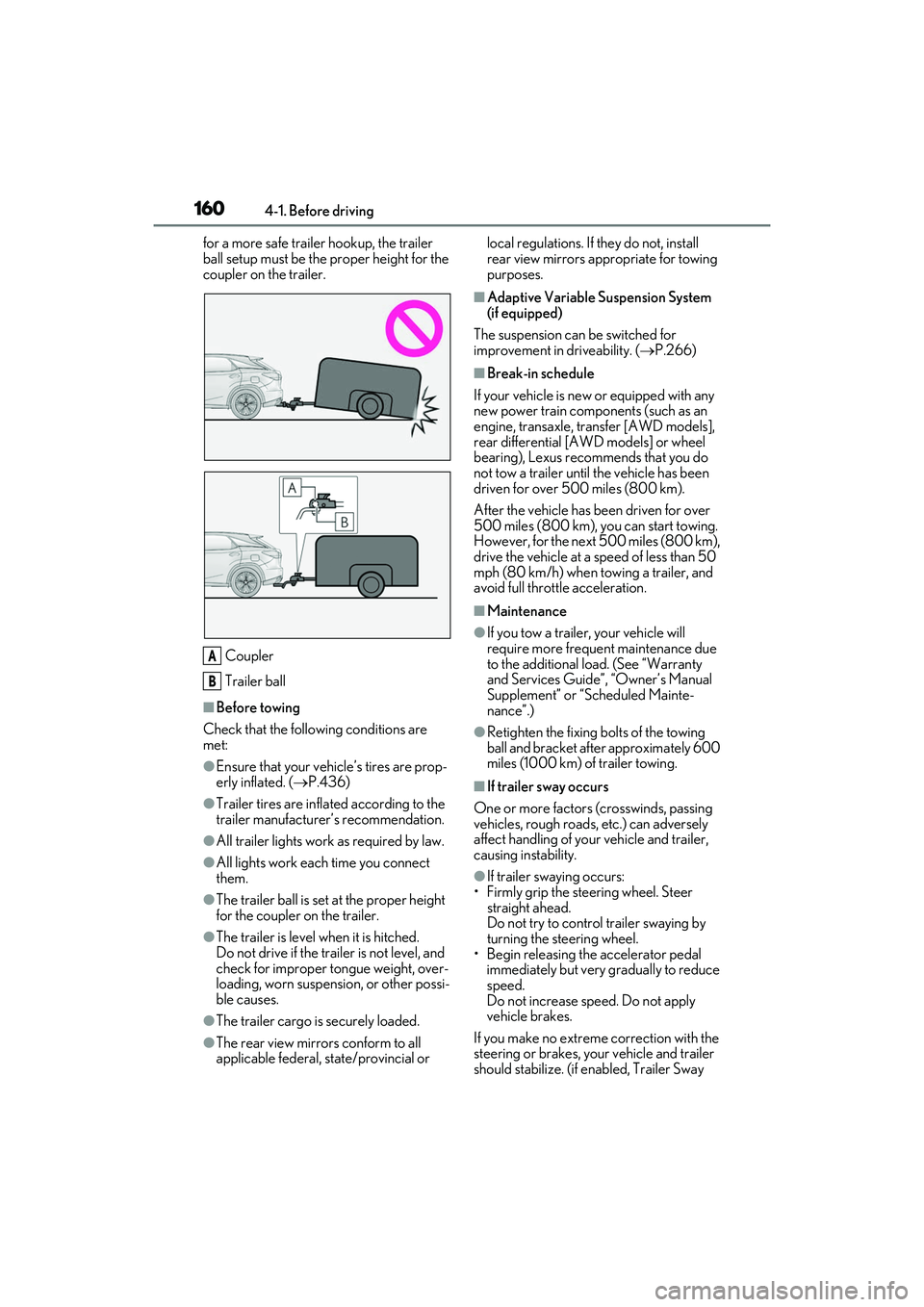
for a more safe trailer hookup, the trailer
ball setup must be the proper height for the
coupler on the trailer.
Coupler
Trailer ball
■Before towing
Check that the following conditions are
met:
●Ensure that your vehicle’s tires are prop-
erly inflated. ( P.436)
●Trailer tires are inflated according to the
trailer manufacturer’s recommendation.
●All trailer lights work as required by law.
●All lights work each time you connect
them.
●The trailer ball is set at the proper height
for the coupler on the trailer.
●The trailer is level when it is hitched.
Do not drive if the trailer is not level, and
check for improper tongue weight, over-
loading, worn suspension, or other possi-
ble causes.
●The trailer cargo is securely loaded.
●The rear view mirrors conform to all
applicable federal, state/provincial or local regulations. If
they do not, install
rear view mirrors appropriate for towing
purposes.
■Adaptive Variable Suspension System
(if equipped)
The suspension can be switched for
improvement in driveability. ( P.266)
■Break-in schedule
If your vehicle is new or equipped with any
new power train components (such as an
engine, transaxle, transfer [AWD models],
rear differential [AWD models] or wheel
bearing), Lexus recommends that you do
not tow a trailer until the vehicle has been
driven for over 500 miles (800 km).
After the vehicle has been driven for over
500 miles (800 km), you can start towing.
However, for the next 500 miles (800 km),
drive the vehicle at a speed of less than 50
mph (80 km/h) when towing a trailer, and
avoid full throttle acceleration.
■Maintenance
●If you tow a trailer, your vehicle will
require more frequent maintenance due
to the additional load. (See “Warranty
and Services Guide”, “Owner’s Manual
Supplement” or “Scheduled Mainte-
nance”.)
●Retighten the fixing bolts of the towing
ball and bracket after approximately 600
miles (1000 km) of trailer towing.
■If trailer sway occurs
One or more factors (crosswinds, passing
vehicles, rough roads, etc.) can adversely
affect handling of your vehicle and trailer,
causing instability.
●If trailer swaying occurs:
• Firmly grip the steering wheel. Steer straight ahead.
Do not try to control trailer swaying by
turning the steering wheel.
• Begin releasing th e accelerator pedal
immediately but very gradually to reduce
speed.
Do not increase speed. Do not apply
vehicle brakes.
If you make no extreme correction with the
steering or brakes, your vehicle and trailer
should stabilize. (if enabled, Trailer Sway
A
B
Page 174 of 508
1724-2. Driving procedures
1Stop the vehicle completely.
2 Set the parking brake ( P.179),
and shift the shift lever to P.
3 Press the engine switch.
4 Release the brake pedal and check
that the display on the meters is off.
■Automatic engine shut off feature
●The vehicle is equipped with a feature
that automatically shuts off the engine
when the shift lever is in P with the engine
running for an extended period.
●The engine will automatically shut off
after approximately 1 hour if it has been
left running while the shift lever is in P.
●The timer for the automatic engine shut
off feature will reset if the brake pedal is
depressed or if the shif t lever is in a posi-
tion other than P.
●After the vehicle is parked, if the door is
locked with the door lock switch ( P.99)
from the inside or the mechanical key
from the outside, the automatic engine
shut off feature will be disabled. The timer
for the automatic engine shut off feature
will be re-enabled if the driver’s door is
opened.
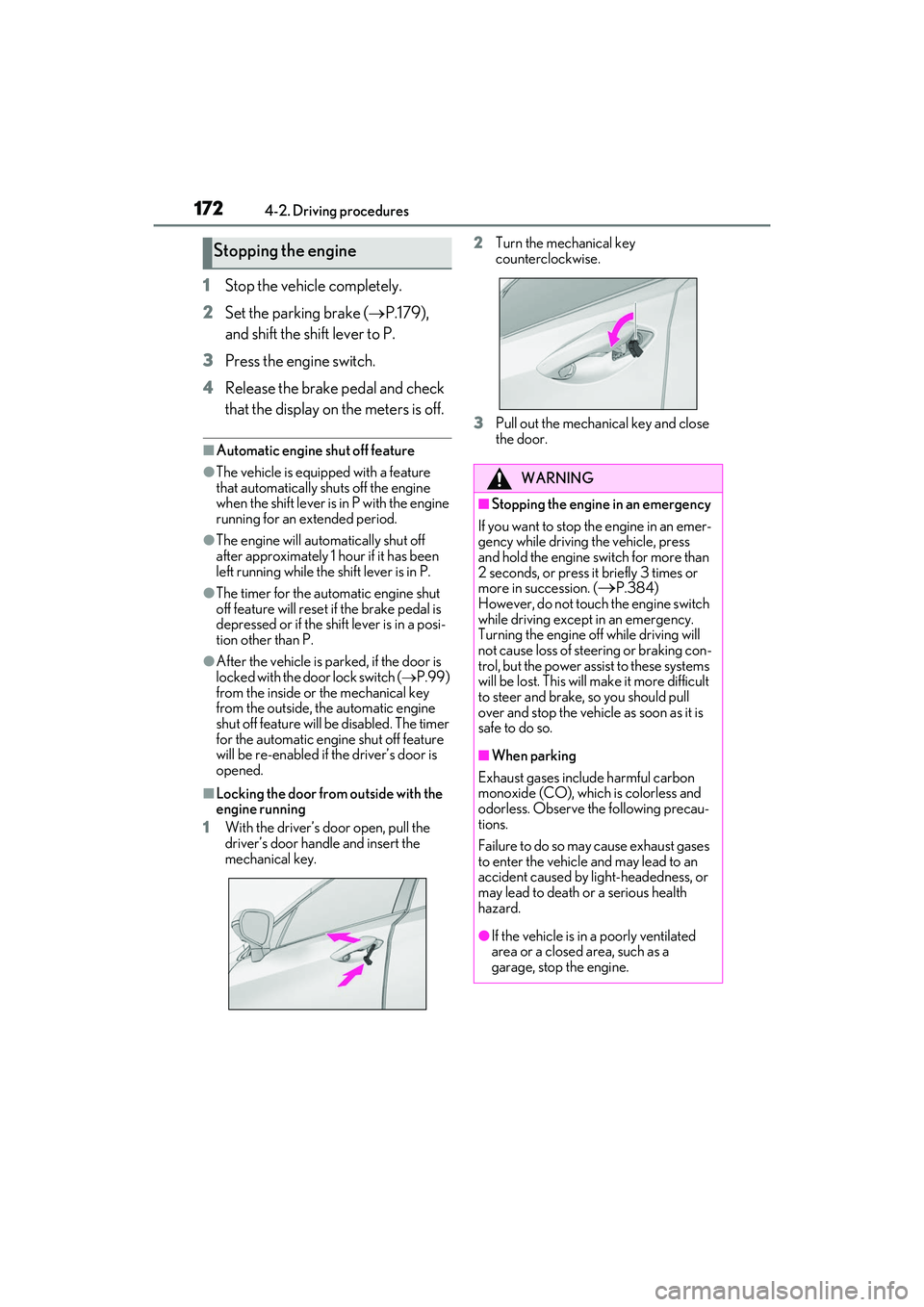
■Locking the door from outside with the
engine running
1 With the driver’s door open, pull the
driver’s door handle and insert the
mechanical key. 2
Turn the mechanical key
counterclockwise.
3 Pull out the mechanical key and close
the door.
Stopping the engine
WARNING
■Stopping the engine in an emergency
If you want to stop th e engine in an emer-
gency while driving the vehicle, press
and hold the engine switch for more than
2 seconds, or press it briefly 3 times or
more in succession. (
P.384)
However, do not touch the engine switch
while driving except in an emergency.
Turning the engine off while driving will
not cause loss of steering or braking con-
trol, but the power assist to these systems
will be lost. This will make it more difficult
to steer and brake, so you should pull
over and stop the vehicle as soon as it is
safe to do so.
■When parking
Exhaust gases include harmful carbon
monoxide (CO), which is colorless and
odorless. Observe the following precau-
tions.
Failure to do so may cause exhaust gases
to enter the vehicle and may lead to an
accident caused by light-headedness, or
may lead to death or a serious health
hazard.
●If the vehicle is in a poorly ventilated
area or a closed area, such as a
garage, stop the engine.
Page 264 of 508
2624-5. Using the driving support systems
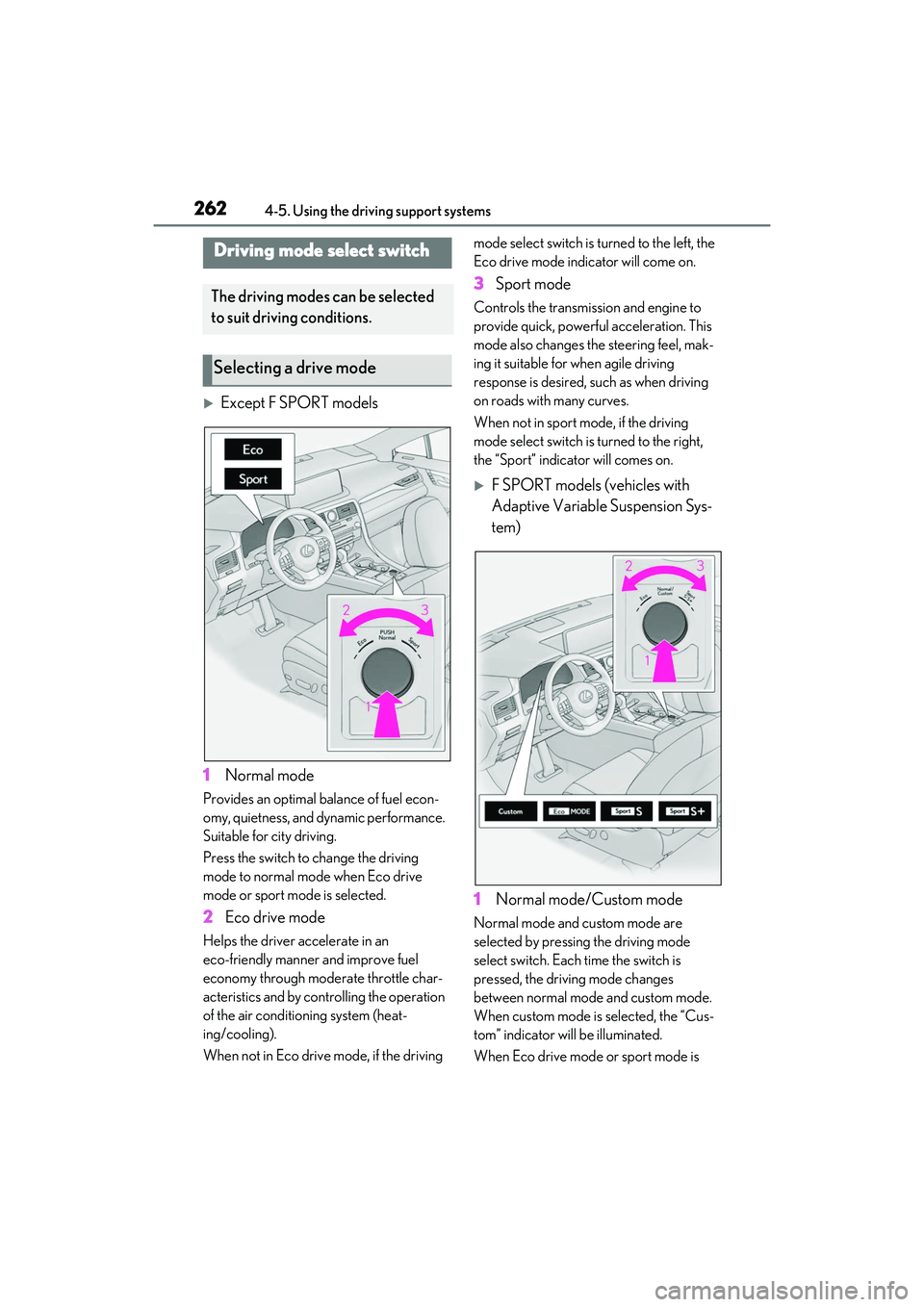
Except F SPORT models
1 Normal mode
Provides an optimal balance of fuel econ-
omy, quietness, and dynamic performance.
Suitable for city driving.
Press the switch to change the driving
mode to normal mode when Eco drive
mode or sport mode is selected.
2 Eco drive mode
Helps the driver accelerate in an
eco-friendly manner and improve fuel
economy through modera te throttle char-
acteristics and by controlling the operation
of the air conditioning system (heat-
ing/cooling).
When not in Eco drive mode, if the driving mode select switch is turned to the left, the
Eco drive mode indicator will come on.
3
Sport mode
Controls the transmission and engine to
provide quick, powerful acceleration. This
mode also changes the steering feel, mak-
ing it suitable for when agile driving
response is desired, such as when driving
on roads with many curves.
When not in sport mode, if the driving
mode select switch is turned to the right,
the “Sport” indicator will comes on.
F SPORT models (vehicles with
Adaptive Variable Suspension Sys-
tem)
1 Normal mode/Custom mode
Normal mode and custom mode are
selected by pressing the driving mode
select switch. Each time the switch is
pressed, the driving mode changes
between normal mode and custom mode.
When custom mode is selected, the “Cus-
tom” indicator will be illuminated.
When Eco drive mode or sport mode is
Driving mode select switch
The driving modes can be selected
to suit driving conditions.
Selecting a drive mode
Page 265 of 508
2634-5. Using the driving support systems
4
Driving
selected, pressing the switch changes the
driving mode to normal mode.
•Normal mode
Provides an optimal balance of fuel econ-
omy, quietness, and dynamic performance.
Suitable for city driving.
•Custom mode
Allows you to drive with the following func-
tions set to your preferred settings. Cus-
tom mode settings can only be changed on
the drive mode custom ization display of
the Center Display. ( P.280)
2Eco drive mode
Helps the driver accelerate in an
eco-friendly manner and improve fuel
economy through modera te throttle char-
acteristics and by controlling the operation
of the air conditioning system (heat-
ing/cooling).
When not in Eco drive mode, if the driving
mode select switch is turned to the left, the
Eco drive mode indicator will come on.
3 Sport mode
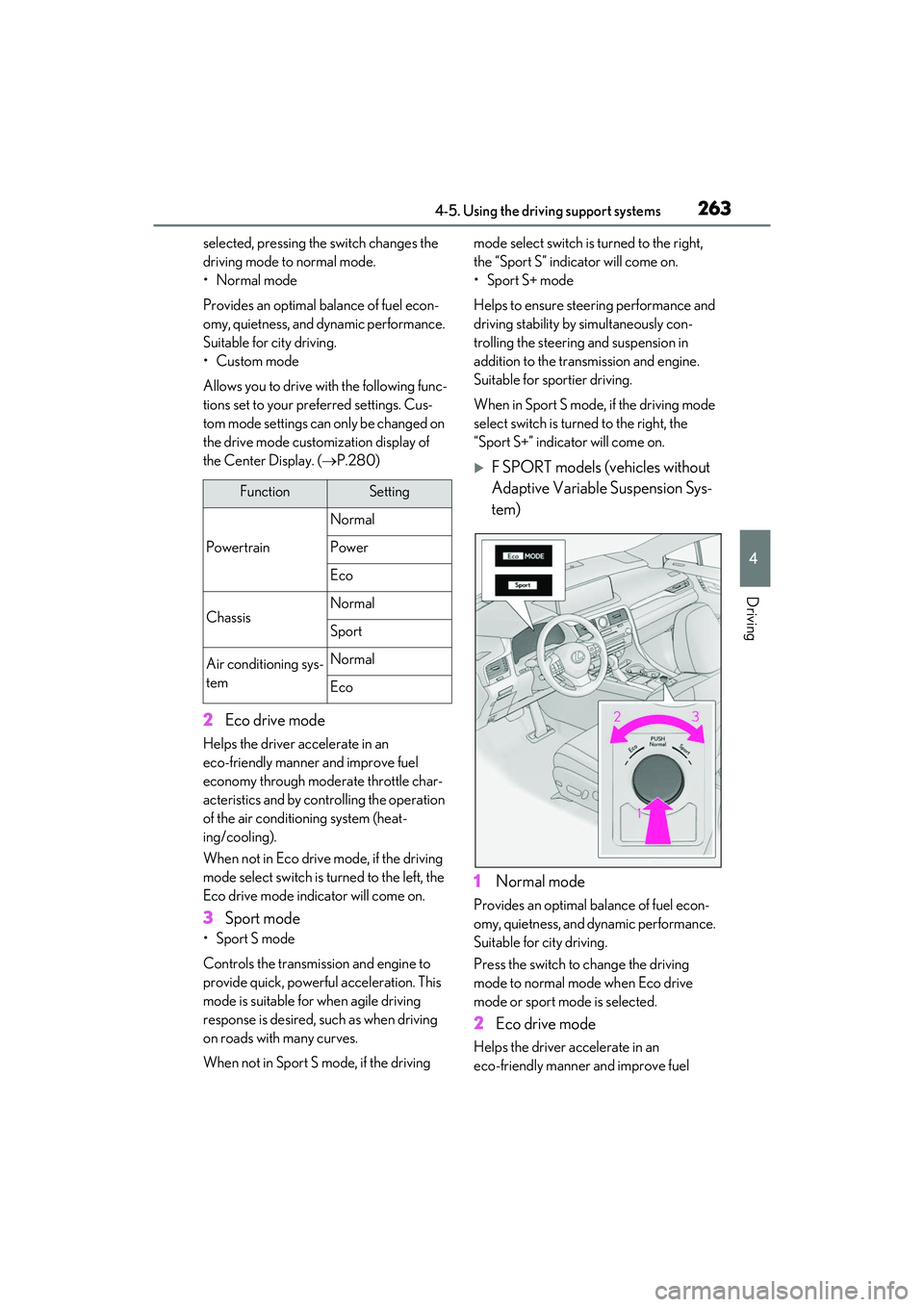
• Sport S mode
Controls the transmission and engine to
provide quick, powerful acceleration. This
mode is suitable for when agile driving
response is desired, such as when driving
on roads with many curves.
When not in Sport S mode, if the driving mode select switch is
turned to the right,
the “Sport S” indicator will come on.
• Sport S+ mode
Helps to ensure stee ring performance and
driving stability by simultaneously con-
trolling the steering and suspension in
addition to the transmission and engine.
Suitable for sportier driving.
When in Sport S mode, if the driving mode
select switch is turned to the right, the
“Sport S+” indicator will come on.
F SPORT models (vehicles without
Adaptive Variable Suspension Sys-
tem)
1 Normal mode
Provides an optimal balance of fuel econ-
omy, quietness, and dynamic performance.
Suitable for city driving.
Press the switch to change the driving
mode to normal mo de when Eco drive
mode or sport mode is selected.
2 Eco drive mode
Helps the driver accelerate in an
eco-friendly manner and improve fuel
FunctionSetting
Powertrain
Normal
Power
Eco
ChassisNormal
Sport
Air conditioning sys-
temNormal
Eco
Page 266 of 508
2644-5. Using the driving support systems
economy through moderate throttle char-
acteristics and by controlling the operation
of the air conditioning system (heat-
ing/cooling).
When not in Eco drive mode, if the driving
mode select switch is turned to the left, the
Eco drive mode indicator will come on.
3 Sport mode
Controls the transmission and engine to
provide quick, powerful acceleration. This
mode also changes the steering feel, mak-
ing it suitable for when agile driving
response is desired, such as when driving
on roads with many curves.
When not in sport mode, if the driving
mode select switch is turned to the right,
the “Sport” indicator will comes on.
■Operation of the air conditioning sys-
tem in Eco drive mode
Eco drive mode contro ls the heating/cool-
ing operations and fan speed of the air con-
ditioning system to enhance fuel efficiency.
To improve air condit ioning performance,
adjust the fan speed or turn off Eco drive
mode.
■Automatic deactivation of sport mode
and custom mode
If the engine switch is turned off after driv-
ing in sport mode or custom mode, the
drive mode will be changed to normal
mode.
■Driving mode pop-up display (12.3-inch
display only)
When the driving mode is changed, the
selected driving mode will be temporarily
displayed on the side display. (P.280)
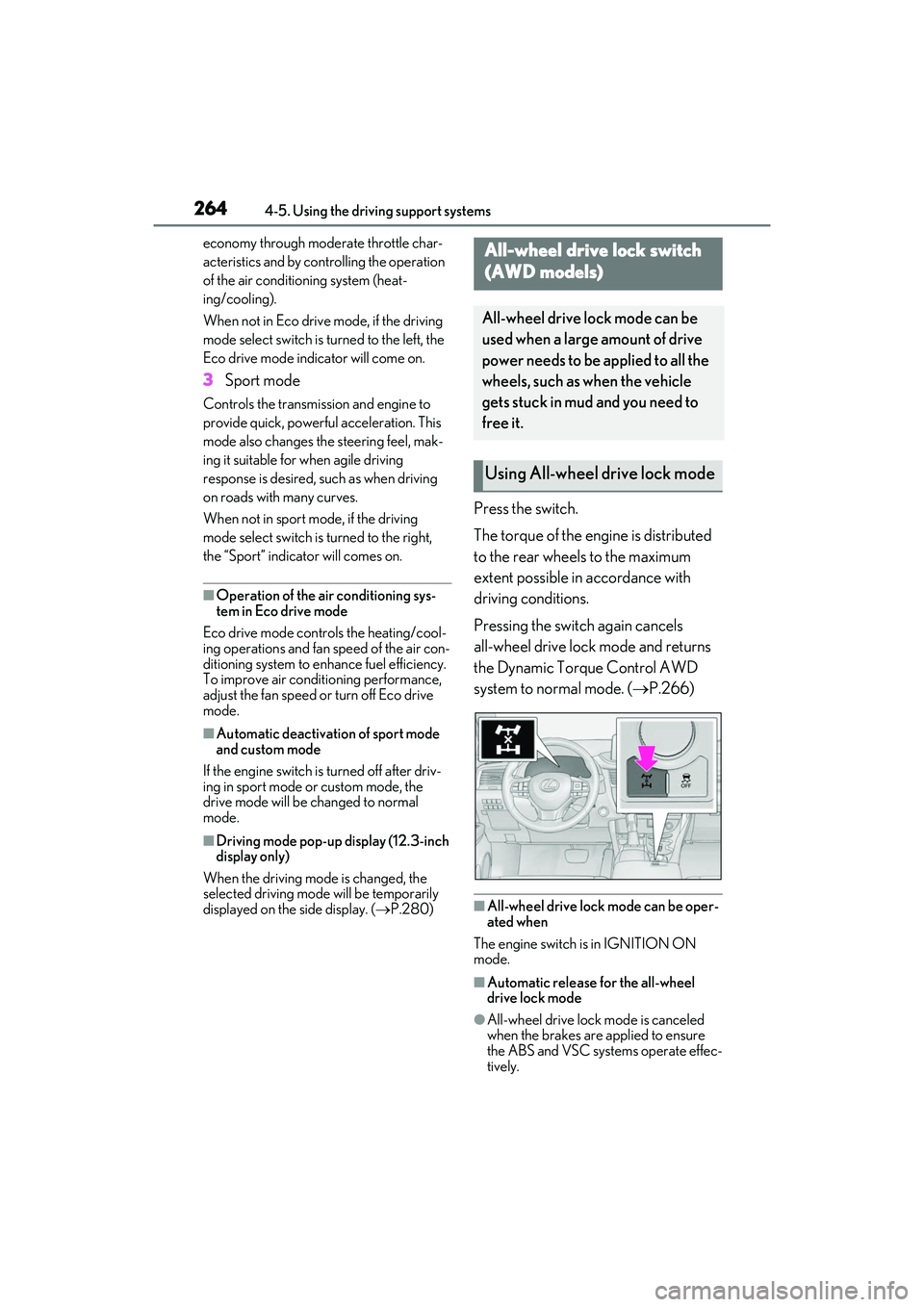
Press the switch.
The torque of the engine is distributed
to the rear wheels to the maximum
extent possible in accordance with
driving conditions.
Pressing the switch again cancels
all-wheel drive lock mode and returns
the Dynamic Torque Control AWD
system to normal mode. ( P.266)
■All-wheel drive lock mode can be oper-
ated when
The engine switch is in IGNITION ON
mode.
■Automatic release for the all-wheel
drive lock mode
●All-wheel drive lock mode is canceled
when the brakes are applied to ensure
the ABS and VSC systems operate effec-
tively.
All-wheel drive lock switch
(AWD models)
All-wheel drive lock mode can be
used when a large amount of drive
power needs to be applied to all the
wheels, such as when the vehicle
gets stuck in mud and you need to
free it.
Using All-wheel drive lock mode
Page 268 of 508
2664-5. Using the driving support systems
■Trailer Sway Control (if equipped)
Helps the driver to control trailer sway
by selectively applying brake pressure
for individual wheels and reducing
driving torque when trailer sway is
detected.
■TRAC (Traction Control)
Helps to maintain drive power and pre-
vent the drive wheels from spinning
when starting the vehicle or accelerat-
ing on slippery roads
■Active Cornering Assist (ACA)
Helps to prevent the vehicle from drift-
ing to the outer side by performing
inner wheel brake control when
attempting to accelerate while turning
■Hill-start assist control
Helps to reduce the backward move-
ment of the vehicle when starting on an
uphill
■EPS (Electric Power Steering)
Employs an electric motor to reduce
the amount of effort needed to turn the
steering wheel
■Dynamic Torque Control AWD
system (AWD models)
Automatically switches from
front-wheel drive to all-wheel drive
(AWD) according to the driving condi-
tions, helping to ensure reliable han-
dling and stability. Examples of
conditions where the system will switch
to AWD are when cornering, going
uphill, starting off or accelerating, and
when the road surface is slippery due
to snow, rain, etc.
■Adaptive Variable Suspension Sys-
tem (if equipped)
Controls the damping force of the
shock absorber of each wheel accord-
ing to the road and driving conditions,
helping achieve a comfortable ride,
excellent driveability and a high level of
stability.
If Sport S+ mode is selected using the
driving mode select switch, the damp-
ing force will become more suitable for
sporty driving. ( P.262)
■VDIM (Vehicle Dynamics Inte-
grated Management) (if equipped)
Provides integrated control of the
ABS, brake assist, TRAC, VSC,
hill-start assist control and EPS systems
Helps to maintain vehicle stability when
swerving on slippery road surfaces by
controlling the brakes, engine output
and steering assist.
■The Secondary Collision Brake
When the SRS airbag sensor detects a
collision and the system operates, the
brakes and brake lights are automati-
cally controlled to reduce the vehicle
speed and help reduce the possibility
of further damage due to a secondary
collision.
■When the TRAC/VSC/Trailer Sway
Control systems are operating
The slip indicator light will flash while the
TRAC/VSC/Trailer Sway Control systems
are operating.
Page 387 of 508
3857-1. Essential information
7
When trouble arises
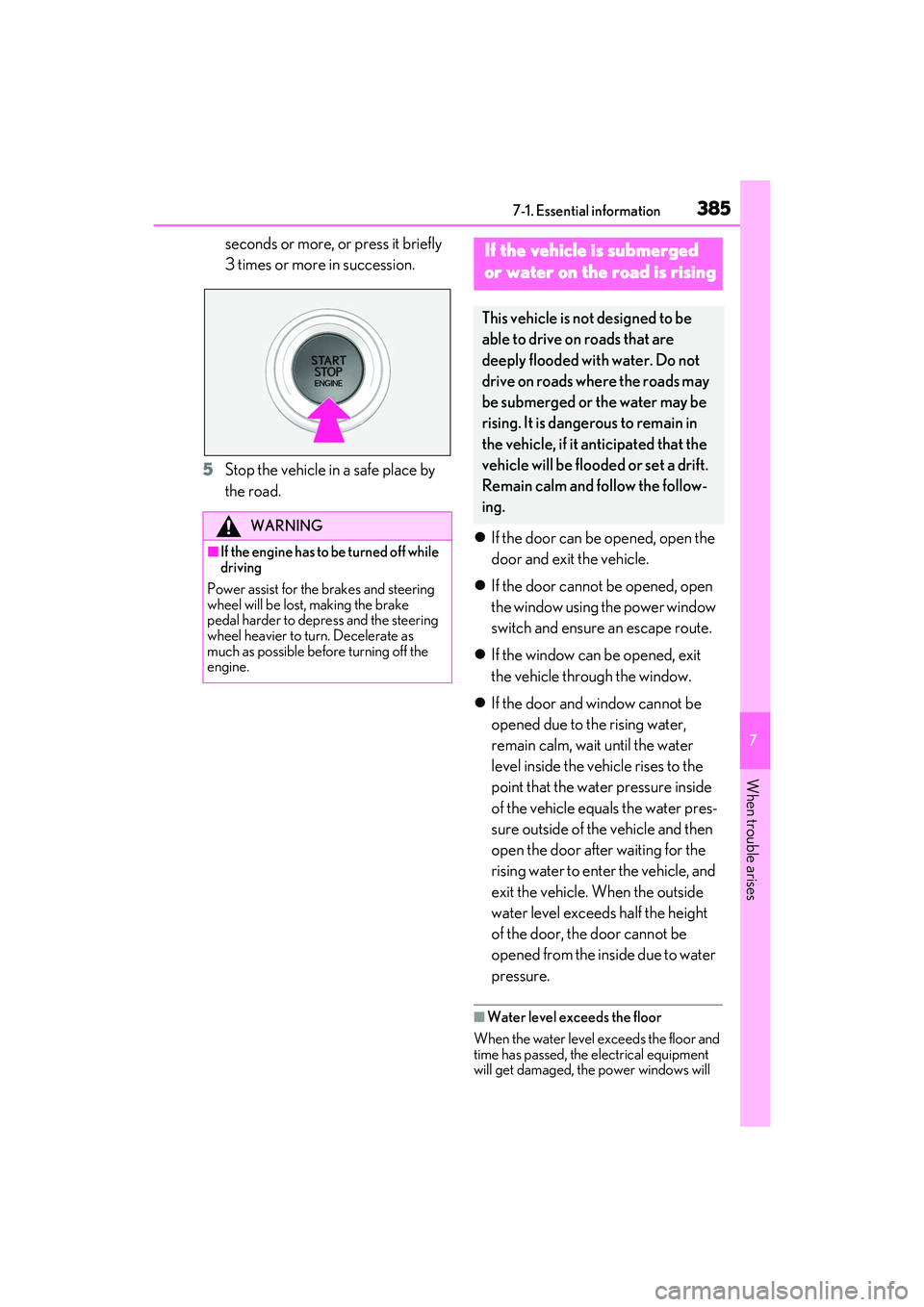
seconds or more, or press it briefly
3 times or more in succession.
5 Stop the vehicle in a safe place by
the road.
If the door can be opened, open the
door and exit the vehicle.
If the door cannot be opened, open
the window using the power window
switch and ensure an escape route.
If the window can be opened, exit
the vehicle through the window.
If the door and window cannot be
opened due to the rising water,
remain calm, wait until the water
level inside the vehicle rises to the
point that the water pressure inside
of the vehicle equals the water pres-
sure outside of the vehicle and then
open the door after waiting for the
rising water to enter the vehicle, and
exit the vehicle. When the outside
water level exceeds half the height
of the door, the door cannot be
opened from the inside due to water
pressure.
■Water level exceeds the floor
When the water level exceeds the floor and
time has passed, the electrical equipment
will get damaged, the power windows will
WARNING
■If the engine has to be turned off while
driving
Power assist for the brakes and steering
wheel will be lost, making the brake
pedal harder to depress and the steering
wheel heavier to turn. Decelerate as
much as possible before turning off the
engine.
If the vehicle is submerged
or water on the road is rising
This vehicle is no t designed to be
able to drive on roads that are
deeply flooded with water. Do not
drive on roads where the roads may
be submerged or the water may be
rising. It is dangerous to remain in
the vehicle, if it anticipated that the
vehicle will be flooded or set a drift.
Remain calm and follow the follow-
ing.
Page 392 of 508
3907-2. Steps to take in an emergency
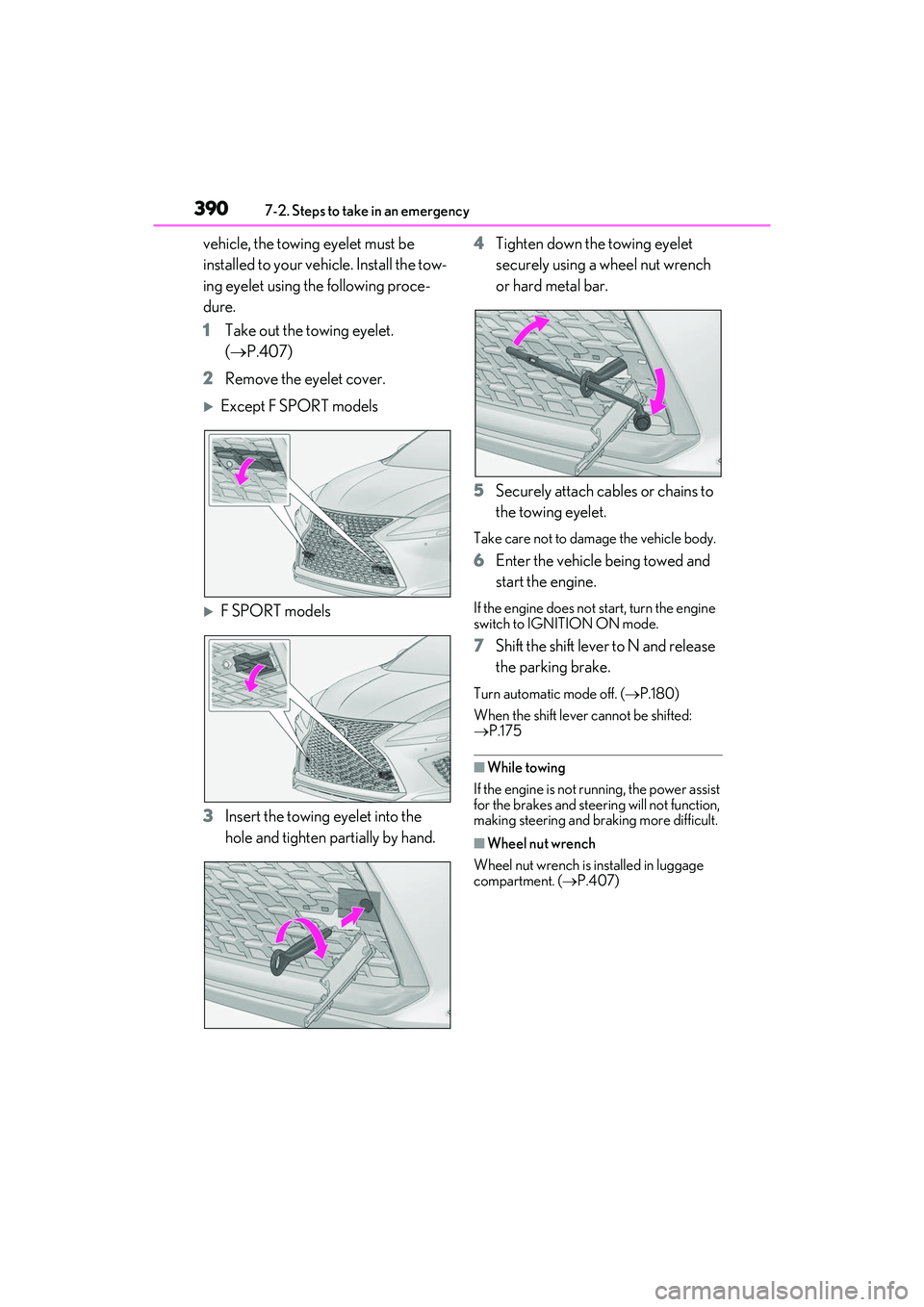
vehicle, the towing eyelet must be
installed to your vehicle. Install the tow-
ing eyelet using the following proce-
dure.
1 Take out the towing eyelet.
( P.407)
2 Remove the eyelet cover.
Except F SPORT models
F SPORT models
3 Insert the towing eyelet into the
hole and tighten partially by hand. 4
Tighten down the towing eyelet
securely using a wheel nut wrench
or hard metal bar.
5 Securely attach cables or chains to
the towing eyelet.
Take care not to damage the vehicle body.
6Enter the vehicle being towed and
start the engine.
If the engine does not start, turn the engine
switch to IGNITION ON mode.
7Shift the shift lever to N and release
the parking brake.
Turn automatic mode off. (P.180)
When the shift lever cannot be shifted:
P.175
■While towing
If the engine is not running, the power assist
for the brakes and steer ing will not function,
making steering and braking more difficult.
■Wheel nut wrench
Wheel nut wrench is installed in luggage
compartment. ( P.407)