start stop button LEXUS RX350 2022 User Guide
[x] Cancel search | Manufacturer: LEXUS, Model Year: 2022, Model line: RX350, Model: LEXUS RX350 2022Pages: 508, PDF Size: 26.2 MB
Page 185 of 508
1834-2. Driving procedures
4
Driving
play. The parking brake will then be set
automatically.
■Brake hold function
●If the brake pedal is left released for a
period of about 3 minutes after the sys-
tem has started holding the brake, the
parking brake will be set automatically. In
this case, a warning buzzer sounds and a
message is shown on the multi-informa-
tion display.
●To turn the system off while the system is
holding the brake, firmly depress the
brake pedal and press the button again.
●The brake hold function may not hold the
vehicle when the vehicle is on a steep
incline. In this situation, it may be neces-
sary for the driver to apply the brakes. A
warning buzzer will sound and the
multi-information display will inform the
driver of this situat ion. If a warning mes-
sage is shown on the multi-information
display, read the message and follow the
instructions.
■When the parking brake is set automati-
cally while the system is holding the
brakes
Perform any of the follo wing operations to
release the parking brake.
●Depress the accelerator pedal. (The
parking brake will not be released auto-
matically if the seat belt is not fastened.)
●Operate the parking brake switch with
the brake pedal depressed.
Make sure that the parking brake indicator
light goes off. ( P.179)
■When an inspection at your Lexus
dealer is necessary
When the brake hold standby indicator
(green) does not illuminate even when the
brake hold switch is pressed with the brake
hold system operating conditions met, the
system may be malfun ctioning. Have the
vehicle inspected at your Lexus dealer.
■If “Brake Hold Fault Depress Brake to
Deactivate Visit Your Dealer” or “Brake
Hold Malfunction Visit Your Dealer” is
displayed on the multi-information dis-
play
The system may be malfunctioning. Have
the vehicle inspected by your Lexus dealer.
■Warning messages and buzzers
Warning messages and buzzers are used to
indicate a system malfunction or to inform
the driver of the need for caution. If a warn-
ing message is shown on the multi-informa-
tion display, read the message and follow
the instructions.
■If the brake hold operated indicator
flashes
P.399
WARNING
■When the vehicle is on a steep incline
When using the brake hold system on a
steep incline exercise caution. The brake
hold function may not hold the vehicle in
such a situation.
■When stopped on a slippery road
The system cannot stop the vehicle when
the gripping ability of the tires has been
exceeded. Do not use the system when
stopped on a slippery road.
NOTICE
■When parking the vehicle
The brake hold system is not designed
for use when parking the vehicle for a
long period of time. Turning the engine
switch off while the system is holding the
brake may release the brake, which
would cause the vehicle to move. When
operating the engine switch, depress the
brake pedal, shift the shift lever to P and
set the parking brake.
Page 231 of 508
2294-5. Using the driving support systems
4
Driving
pedal
When constant speed control mode is
selected, your vehicle will maintain a
set speed without controlling the vehi-
cle-to-vehicle distance. Select this
mode only when vehicle-to-vehicle dis-
tance control mode does not function
correctly due to a dirty radar, etc.
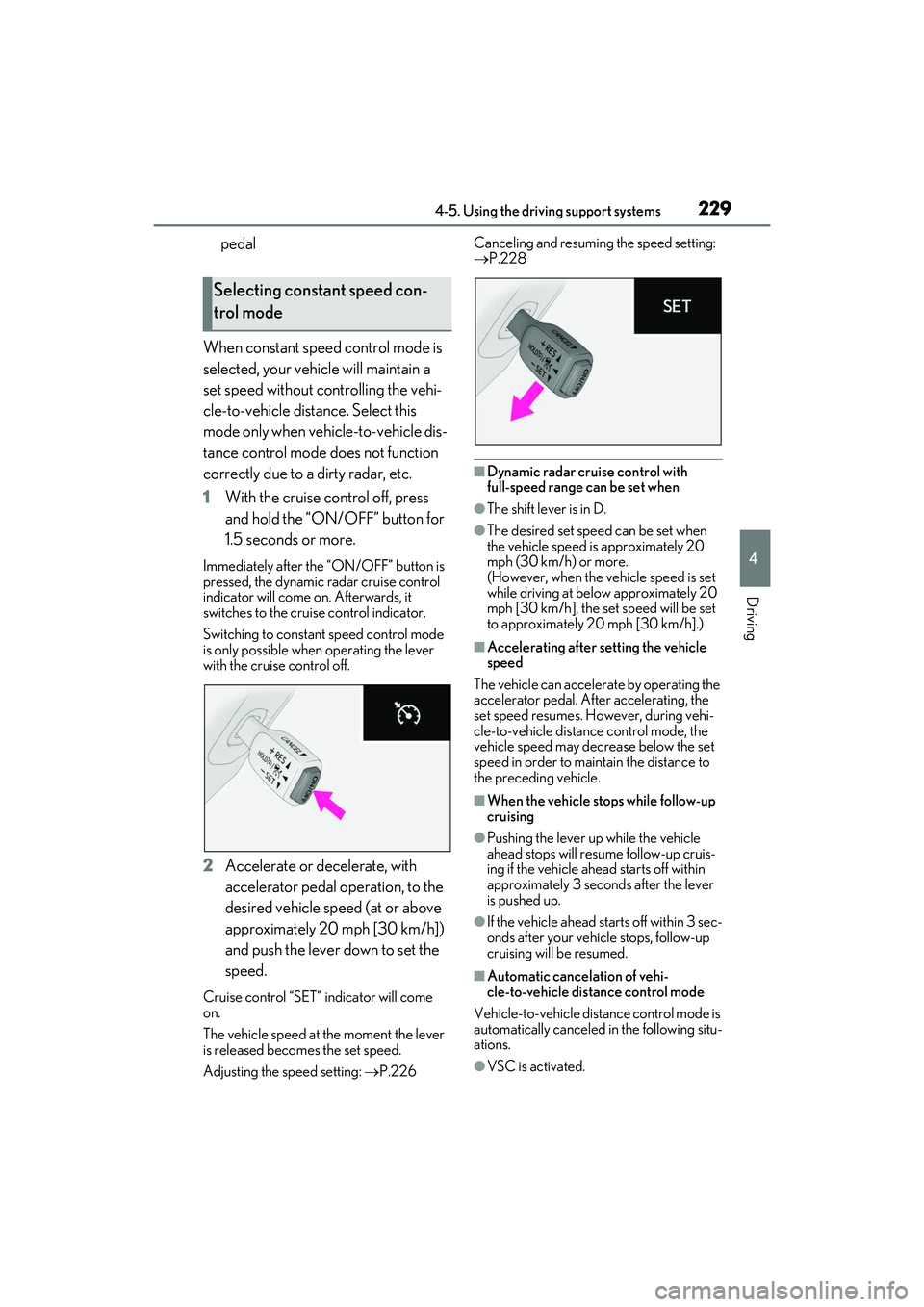
1 With the cruise control off, press
and hold the “ON/ OFF” button for
1.5 seconds or more.
Immediately after the “ON/OFF” button is
pressed, the dynamic radar cruise control
indicator will come on. Afterwards, it
switches to the cruise control indicator.
Switching to constant speed control mode
is only possible when operating the lever
with the cruise control off.
2 Accelerate or decelerate, with
accelerator pedal operation, to the
desired vehicle speed (at or above
approximately 20 mph [30 km/h])
and push the lever down to set the
speed.
Cruise control “SET” indicator will come
on.
The vehicle speed at the moment the lever
is released becomes the set speed.
Adjusting the sp eed setting: P.226 Canceling and resuming the speed setting:
P.228
■Dynamic radar cruise control with
full-speed range can be set when
●The shift lever is in D.
●The desired set spee
d can be set when
the vehicle speed is approximately 20
mph (30 km/h) or more.
(However, when the vehicle speed is set
while driving at belo w approximately 20
mph [30 km/h], the se t speed will be set
to approximately 20 mph [30 km/h].)
■Accelerating after setting the vehicle
speed
The vehicle can accelerate by operating the
accelerator pedal. After accelerating, the
set speed resumes. Ho wever, during vehi-
cle-to-vehicle distance control mode, the
vehicle speed may decrease below the set
speed in order to main tain the distance to
the preceding vehicle.
■When the vehicle stops while follow-up
cruising
●Pushing the lever up while the vehicle
ahead stops will resu me follow-up cruis-
ing if the vehicle ahead starts off within
approximately 3 seco nds after the lever
is pushed up.
●If the vehicle ahead starts off within 3 sec-
onds after your vehicle stops, follow-up
cruising will be resumed.
■Automatic cancelation of vehi-
cle-to-vehicle dist ance control mode
Vehicle-to-vehicle distance control mode is
automatically canceled in the following situ-
ations.
●VSC is activated.
Selecting constant speed con-
trol mode
Page 332 of 508
3305-6. Using the other interior features
blink twice, indicating that 2-way
communication is enabled.
If the indicators do not flash, perform 2 and
3 within the first 10 presses of the
HomeLink
® button after programming
has been completed.
2 Press a programmed HomeLink®
button to operate a garage door.
3 Within 1 minute of pressing the
HomeLink
® button, after the
garage door operation has
stopped, press the “Learn” or
“Smart” button on the garage door
opener motor. Within 5 seconds of
the establishment of 2-way com-
munication with the garage door
opener, both garage door opera-
tion indicators in the vehicle will
flash rapidly (green) and the light
on the garage door opener motor
will blink twice, indicating that
2-way communication is enabled.
■Reprogramming a single
HomeLink
® button
When the following procedure is per-
formed, buttons which already have
devices registered to them can be
overwritten:
1 With one hand, press and hold the
desired HomeLink
® button.
2 When the HomeLink
® indicator
starts flashing (orange), continue to
hold the HomeLink
® button and
perform “Programming
HomeLink
®” 1 (it takes 20 seconds
for the HomeLink
® indicator to
start flashing).
■Before programming
●Install a new battery in the transmitter.
●The battery side of the transmitter must
be pointed away from the HomeLink®.
Press the appropriate HomeLink®
button. The HomeLink
® indicator light
should turn on.
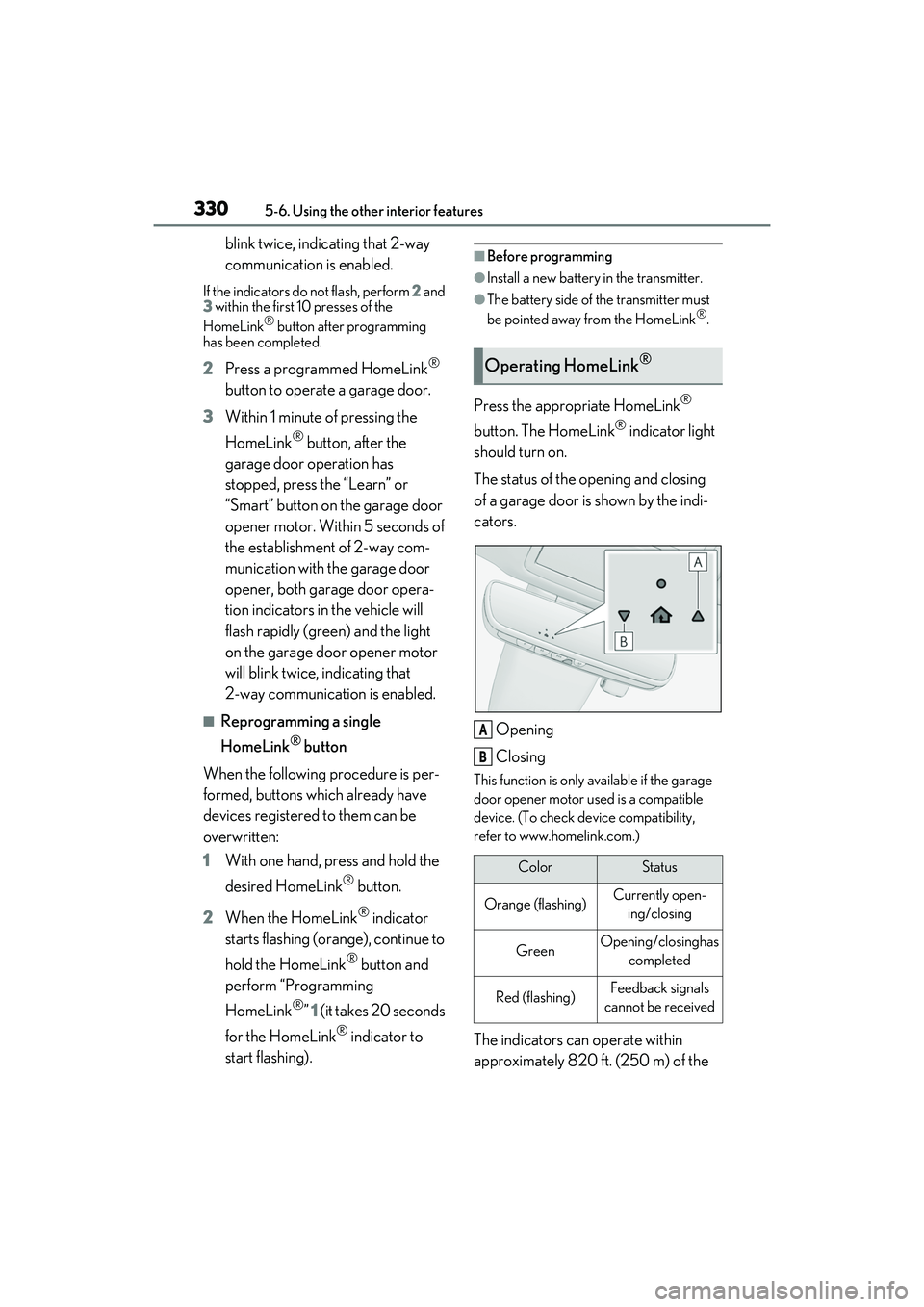
The status of the opening and closing
of a garage door is shown by the indi-
cators.
Opening
Closing
This function is only available if the garage
door opener motor used is a compatible
device. (To check de vice compatibility,
refer to www.homelink.com.)
The indicators can operate within
approximately 820 ft. (250 m) of the
Operating HomeLink®
ColorStatus
Orange (flashing)Currently open- ing/closing
GreenOpening/closing has completed
Red (flashing)Feedback signals
cannot be received
A
B
Page 424 of 508
4227-2. Steps to take in an emergency
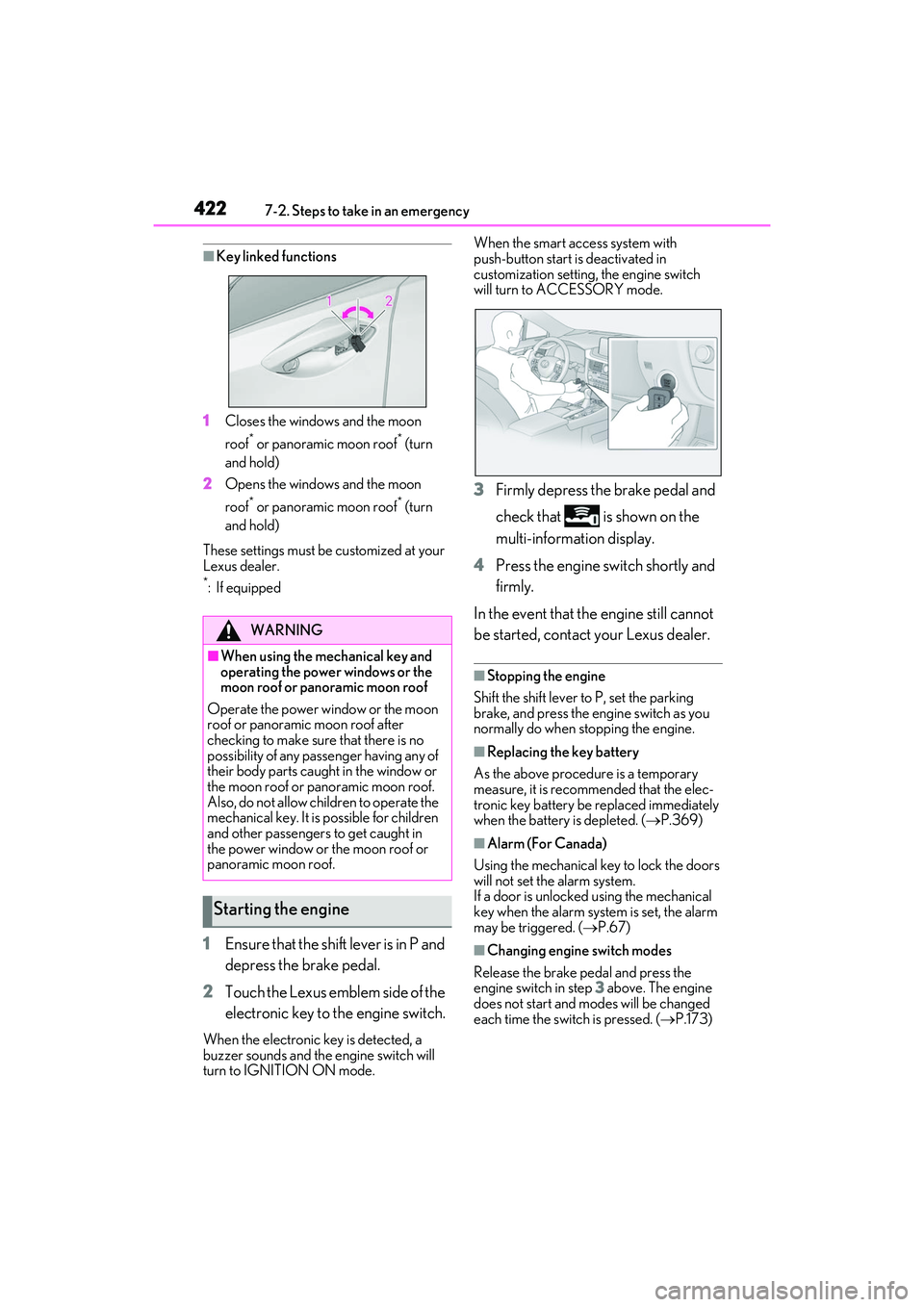
■Key linked functions
1 Closes the windows and the moon
roof
* or panoramic moon roof* (turn
and hold)
2 Opens the windows and the moon
roof
* or panoramic moon roof* (turn
and hold)
These settings must be customized at your
Lexus dealer.
*:If equipped
1 Ensure that the shift lever is in P and
depress the brake pedal.
2 Touch the Lexus emblem side of the
electronic key to the engine switch.
When the electronic key is detected, a
buzzer sounds and the engine switch will
turn to IGNITION ON mode. When the smart access system with
push-button start is deactivated in
customization setting,
the engine switch
will turn to ACCESSORY mode.
3 Firmly depress the brake pedal and
check that is shown on the
multi-information display.
4 Press the engine switch shortly and
firmly.
In the event that the engine still cannot
be started, contact your Lexus dealer.
■Stopping the engine
Shift the shift lever to P, set the parking
brake, and press the engine switch as you
normally do when st opping the engine.
■Replacing the key battery
As the above procedure is a temporary
measure, it is recommended that the elec-
tronic key battery be replaced immediately
when the battery is depleted. ( P.369)
■Alarm (For Canada)
Using the mechanical key to lock the doors
will not set the alarm system.
If a door is unlocked using the mechanical
key when the alarm system is set, the alarm
may be triggered. ( P.67)
■Changing engine switch modes
Release the brake pe dal and press the
engine switch in step 3 above. The engine
does not start and modes will be changed
each time the switch is pressed. ( P.173)
WARNING
■When using the mechanical key and
operating the power windows or the
moon roof or panoramic moon roof
Operate the power window or the moon
roof or panoramic moon roof after
checking to make sure that there is no
possibility of any passe nger having any of
their body parts caught in the window or
the moon roof or panoramic moon roof.
Also, do not allow ch ildren to operate the
mechanical key. It is possible for children
and other passengers to get caught in
the power window or the moon roof or
panoramic moon roof.
Starting the engine
Page 492 of 508

490Alphabetical Index
Shift lever light ..............................................300
Side airbags ...................................................... 30
Side doors...........................................................97
Side marker lightsLight switch .................................................... 184
Replacing light bulbs................................ 375
Side mirrors Adjustment...................................................... 137
BSM (Blind Sport Monitor) ................. 232
Folding ............................................................. 138
Linked mirror function when reversing........................................................................... 137
Mirror position memory........................... 129
RCTA function ............................................ 245
Side turn signal lights Replacing light bulbs................................ 375
Turn signal lever ...........................................178
Side windows ................................................. 140
Smart access system with push-button start Antenna location........................................... 113
Entry functions...................................... 97, 102
Starting the engine ......................................170
Smartphone holder..................................... 305
Snow tires ......................................................... 271
Spare tire......................................................... 406 Storage location ......................................... 407
Spark plug ...................................................... 434
Specifications ................................................ 430
Speedometer ....................................................75
Steering lock Column lock release....................................171
Steering lock system warning message.............................................................................171
Steering wheel Adjustment......................................................135
Heated steering wheel............................ 297
Meter control switches ..............................80
Power easy access system ..................... 129
Steering wheel position memory ........ 129
Stop lights Replacing light bulbs................................ 375 Storage features .......................................... 303
Stuck
If the vehicle becomes stuck ................428
Suggestion function....................................... 84
Sun visors ........................................................ 324
Sunshade Panoramic moon roof .............................. 145
Roof.....................................................................143
Switches Automatic High Beam switch .............. 187
Brake Hold switch...................................... 182
Door lock switches ......................................99
Driving mode select switch .................. 262
Driving position memory switches .....129
Dynamic radar cruise control with full-speed range switch ....................... 222
Electronic sunshade switch ................... 145
Emergency flashers switch .................. 384
Engine switch ................................................ 170
Fog light switch ............................................ 190
Garage door opener switches...........326
Heated steering wheel switch ............. 297
HUD (Head-up display) switch ............ 87
Ignition switch ............................................... 170
Instrument panel light control switches ............................................................................. 78
Intuitive parking assist switch ...............239
Light switches ............................................... 184
LTA (Lane Tracing Assist) switch ...... 215
Meter control switches ............................. 80
Moon roof switches....................................142
“ODO TRIP” switch .................................... 78
Outside rear view mi rror switches .....137
Paddle shift switches ........................176, 177
Panoramic moon roof switches .......... 145
Parking brake switch..................................179
PCS OFF switch ....................................... 206
PKSB (Parking Support Brake) switch .......................................................................... 252
Power window switches ......................... 140
RCTA switch ................................................ 246