airbag LEXUS RX350 2022 Owner's Manual
[x] Cancel search | Manufacturer: LEXUS, Model Year: 2022, Model line: RX350, Model: LEXUS RX350 2022Pages: 508, PDF Size: 26.2 MB
Page 43 of 508

411-1. For safe use
1
For safety and security
WARNING
●Do not put weight on the front passen-
ger seat by putting your hands or feet
on the front passenger seat seatback
from the rear passenger seat.
●Do not let a rear passenger lift the
front passenger seat with their feet or
press on the seatback with their legs.
●Do not put objects under the front pas-
senger seat.
●Do not recline the front passenger
seatback so far that it touches a rear
seat. This may cause the “AIR BAG
OFF” indicator light to be illuminated,
which indicates that the SRS airbags
for the front passenger will not activate
in the event of a seve re accident. If the
seatback touches the rear seat, return
the seatback to a position where it
does not touch the rear seat. Keep the
front passenger seatback as upright as
possible when the vehicle is moving.
Reclining the seatback excessively
may lessen the effectiveness of the
seat belt system.
●If an adult sits in the front passenger
seat, the “AIR BAG ON” indicator light
is illuminated. If the “AIR BAG OFF”
indicator is illuminated, ask the passen-
ger to sit up straight, well back in the
seat, feet on the floor, and with the seat
belt worn correctly. If the “AIR BAG
OFF” indicator still remains illumi-
nated, either ask the passenger to
move to the rear seat, or if that is not
possible, move the front passenger
seat fully rearward.
●When it is unavoidable to install a for-
ward-facing child restraint system on
the front passenger seat, install the
child restraint system on the front pas-
senger seat in the proper order.
(
P.46)
●Do not modify or remove the front
seats.
●Do not kick the front passenger seat or
subject it to severe impact. Otherwise,
the SRS warning light may come on to
indicate a malfunction of the front pas-
senger occupant cla ssification system.
In this case, contact your Lexus dealer
immediately.
●Child restraint system s installed on the
rear seat should not contact the front
seatbacks.
●Do not use a seat accessory, such as a
cushion and seat cover, that covers the
seat cushion surface.
●Do not modify or replace the uphol-
stery of the front seat.
Page 44 of 508

421-1. For safe use
■Adult*1
■Child*4
■Child restraint system with infant*5
Condition and operation in the front passenger occupant classification
system
Indicator/warning light
“AIR BAG ON” and “AIR BAG OFF” indi-cator lights“AIR BAG ON”
SRS warning lightOff
Driver’s and front passenger’s seat belt reminder lightOff*2 or flashing*3
Devices
Front passenger airbagActivated
Seat cushion airbag in the front passenger sideActivated*2 or deacti-
vated
*3
Indicator/warning light
“AIR BAG ON” and “AIR BAG OFF” indi- cator lights“AIR BAG OFF” or
“AIR BAG ON”
*4
SRS warning lightOff
Driver’s and front passenger’s seat belt reminder lightOff*2 or flashing*3
Devices
Front passenger airbagDeactivated or acti-
vated
*4
Seat cushion airbag in the front passenger sideDeactivated or acti-
vated
*4, 2
Indicator/warning light
“AIR BAG ON” and “AIR BAG OFF” indi- cator lights“AIR BAG OFF”*6
SRS warning lightOff
Driver’s and front passenger’s seat belt reminder lightOff*2 or flashing*3
Devices
Front passenger airbag
DeactivatedSeat cushion airbag in the front passenger side
Page 45 of 508

431-1. For safe use
1
For safety and security
■Unoccupied
■There is a malfunction in the system
*1: The system judges a person of adult size as an adult. When a smaller adult sits in the
front passenger seat, the system may not re cognize him/her as an adult depending on
his/her physique and posture.
*2: In the event the front passenger is wearing a seat belt.
*3: In the event the front passenger does not wear a seat belt.
*4: For some children, child in se at, child in booster seat or child in convertible seat, the sys-
tem may not recognize him/her as a child. F actors which may affect this can be the phy-
sique or posture.
*5: Never install a rear-facing child restraint system on the front passenger seat. A for-
ward-facing child restraint syst em should only be installed on the front passenger seat
when it is unavoidable. ( P.45)
*6: In case the indicator light is not illuminated, consult this manual on how to install the child
restraint system properly. ( P.46)
Indicator/warning light
“AIR BAG ON” and “AIR BAG OFF” indi-
cator lights“AIR BAG OFF”
SRS warning light
OffDriver’s and front passenger’s seat belt reminder light
Devices
Front passenger airbag
DeactivatedSeat cushion airbag in the front passenger side
Indicator/warning light
“AIR BAG ON” and “AIR BAG OFF” indi-cator lights“AIR BAG OFF”
SRS warning lightOn
Driver’s and front passenger’s seat belt reminder lightOff
Devices
Front passenger airbag
DeactivatedSeat cushion airbag in the front passenger side
Page 51 of 508
491-2. Child safety
1
For safety and security
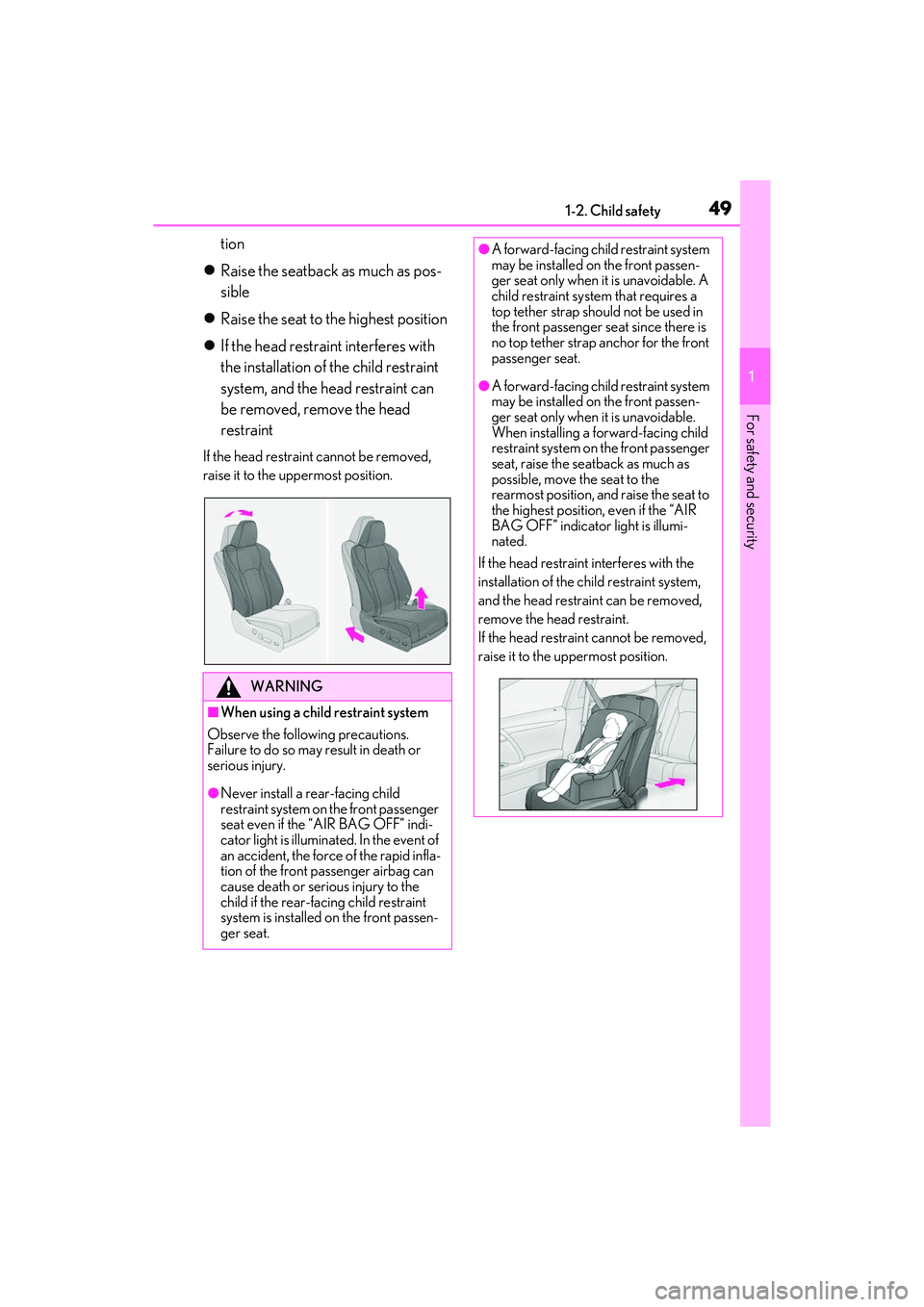
tion
Raise the seatback as much as pos-
sible
Raise the seat to the highest position
If the head restraint interferes with
the installation of the child restraint
system, and the head restraint can
be removed, remove the head
restraint
If the head restrain t cannot be removed,
raise it to the uppermost position.
WARNING
■When using a child restraint system
Observe the following precautions.
Failure to do so may result in death or
serious injury.
●Never install a re ar-facing child
restraint system on the front passenger
seat even if the “AIR BAG OFF” indi-
cator light is illuminated. In the event of
an accident, the force of the rapid infla-
tion of the front passenger airbag can
cause death or serious injury to the
child if the rear-facing child restraint
system is installed on the front passen-
ger seat.
●A forward-facing child restraint system
may be installed on the front passen-
ger seat only when it is unavoidable. A
child restraint system that requires a
top tether strap should not be used in
the front passenger se at since there is
no top tether strap anchor for the front
passenger seat.
●A forward-facing child restraint system
may be installed on the front passen-
ger seat only when it is unavoidable.
When installing a forward-facing child
restraint system on the front passenger
seat, raise the seatback as much as
possible, move the seat to the
rearmost position, and raise the seat to
the highest position, even if the “AIR
BAG OFF” indicator light is illumi-
nated.
If the head restraint interferes with the
installation of the ch ild restraint system,
and the head restraint can be removed,
remove the head restraint.
If the head restraint cannot be removed,
raise it to the uppermost position.
Page 52 of 508

501-2. Child safety
A child restraint system for a small
child or baby must itself be properly
restrained on the seat with the lap por-
tion of the lap/shoulder belt.
■Installing child restraint system
using a seat belt (child restraint
lock function belt)
Install the child restraint system in
accordance to the operation manual
enclosed with the child restraint sys-
tem.
■Rear-facing Infant seat/con-
vertible seat
1 Adjust the rear seat
If there is a gap between the child seat and
the seatback, adjust the seatback angle
until good contact is achieved.
2Place the child restraint system on
the rear seat facing the rear of the
vehicle.
3 Run the seat belt through the child
restraint system and insert the plate
WARNING
●Do not allow the child to lean his/her
head or any part of his/her body
against the door or the area of the seat,
front or rear pillars, or roof side rails
from which the SRS side airbags or
SRS curtain shield ai rbags deploy even
if the child is seated in the child
restraint system. It is dangerous if the
SRS side airbags and curtain shield
airbags inflate, and the impact could
cause death or serious injury to the
child.
●When a booster seat is installed,
always ensure that th e shoulder belt is
positioned across the center of the
child’s shoulder. T he belt should be
kept away from the child’s neck, but
not so that it could fall off the child’s
shoulder.
●Use child restraint sy stem suitable to
the age and size of the child and install
it to the rear seat.
●If the driver’s seat interferes with the
child restraint system and prevents it
from being attached correctly, attach
the child restraint system to the
right-hand rear seat.
●Adjust the front passenger seat so that
it does not interfere with the child
restraint system.
Child restraint system fixed with
a seat belt
Page 65 of 508

631-3. Lexus Enform
1
For safety and security
●Safety Connect is available beginning Fall
2009 on select Lexus models (in the
contiguous United St ates only). Contact
with the Safety Connect response center
is dependent upon th e telematics device
being in operative condition, cellular con-
nection availability, and GPS satellite sig-
nal reception, which ca n limit the ability to
reach the response center or receive
emergency service support. Enrollment
and Telematics Subscription Service
Agreement required. A variety of sub-
scription terms is available; charges vary
by subscription term selected and loca-
tion.
●Automatic Collision Notification, Emer-
gency Assistance and Stolen Vehicle
Location will function in the United
States, including Hawaii and Alaska,
Puerto Rico and in Canada, and
Enhanced Roadside Assistance will func-
tion in the United States, Puerto Rico and
in Canada.
●Automatic Collision Notification, Emer-
gency Assistance, Stolen Vehicle and
Enhanced Road Assistance will not func-
tion in the United States Virgin Islands.
For vehicles first sold in the USVI, no
Safety Connect services will function in
and outside the United States Virgin
Islands.
●Safety Connect services are not subject
to section 255 of the Telecommunica-
tions Act and the device is not TTY com-
patible.
■Languages
The Safety Connect re sponse center will
offer support in mult iple languages. The
Safety Connect system will offer voice
prompts in English, Spanish, and French.
Please indicate your language of choice
when enrolling.
■When contacting the response center
You may be unable to contact the response
center if the network is busy.
When the engine switch is turned to
IGNITION ON mode, the red indica-
tor light comes on for 2 seconds then
turns off. Afterward, the green indica-
tor light comes on, indicating that the
service is active.
The following indicator light patterns
indicate specific system usage condi-
tions:
Green indicator light on = Active
service
Green indicator light flashing =
Safety Connect call in process
Red indicator light (except at vehi-
cle start-up) = System malfunction
(contact your Lexus dealer)
No indicator light (off) = Safety
Connect service not active
■Automatic Collision Notification
In case of either airbag deployment or
severe rear-end collision, the system is
designed to automatically call the
response center. The responding agent
receives the vehicle’s location and
attempts to speak with the vehicle
occupants to assess the level of emer-
gency. If the occupants are unable to
communicate, the agent automatically
treats the call as an emergency, con-
tacts the nearest emergency services
provider to describe the situation, and
requests that assistance be sent to the
Safety Connect LED light Indi-
cators
Safety Connect services
Page 268 of 508
2664-5. Using the driving support systems
■Trailer Sway Control (if equipped)
Helps the driver to control trailer sway
by selectively applying brake pressure
for individual wheels and reducing
driving torque when trailer sway is
detected.
■TRAC (Traction Control)
Helps to maintain drive power and pre-
vent the drive wheels from spinning
when starting the vehicle or accelerat-
ing on slippery roads
■Active Cornering Assist (ACA)
Helps to prevent the vehicle from drift-
ing to the outer side by performing
inner wheel brake control when
attempting to accelerate while turning
■Hill-start assist control
Helps to reduce the backward move-
ment of the vehicle when starting on an
uphill
■EPS (Electric Power Steering)
Employs an electric motor to reduce
the amount of effort needed to turn the
steering wheel
■Dynamic Torque Control AWD
system (AWD models)
Automatically switches from
front-wheel drive to all-wheel drive
(AWD) according to the driving condi-
tions, helping to ensure reliable han-
dling and stability. Examples of
conditions where the system will switch
to AWD are when cornering, going
uphill, starting off or accelerating, and
when the road surface is slippery due
to snow, rain, etc.
■Adaptive Variable Suspension Sys-
tem (if equipped)
Controls the damping force of the
shock absorber of each wheel accord-
ing to the road and driving conditions,
helping achieve a comfortable ride,
excellent driveability and a high level of
stability.
If Sport S+ mode is selected using the
driving mode select switch, the damp-
ing force will become more suitable for
sporty driving. ( P.262)
■VDIM (Vehicle Dynamics Inte-
grated Management) (if equipped)
Provides integrated control of the
ABS, brake assist, TRAC, VSC,
hill-start assist control and EPS systems
Helps to maintain vehicle stability when
swerving on slippery road surfaces by
controlling the brakes, engine output
and steering assist.
■The Secondary Collision Brake
When the SRS airbag sensor detects a
collision and the system operates, the
brakes and brake lights are automati-
cally controlled to reduce the vehicle
speed and help reduce the possibility
of further damage due to a secondary
collision.
■When the TRAC/VSC/Trailer Sway
Control systems are operating
The slip indicator light will flash while the
TRAC/VSC/Trailer Sway Control systems
are operating.
Page 270 of 508
2684-5. Using the driving support systems
function has occurred.
• Vibrations may be felt through the vehicle body and steering.
• A motor sound may be heard also after the vehicle comes to a stop.
• The brake pedal may pulsate slightly after
the ABS is activated.
• The brake pedal may move down slightly after the ABS is activated.
■Active Cornering Assist operation
sounds and vibrations
When the Active Cornering Assist is oper-
ated, operation sounds and vibrations may
be generated from the brake system, but
this is not a malfunction.
■EPS operation sound
When the steering wheel is operated, a
motor sound (whirring sound) may be
heard. This does not indicate a malfunction.
■Reduced effectiveness of the EPS sys-
tem
The effectiveness of the EPS system is
reduced to prevent the system from over-
heating when there is frequent steering
input over an extended period of time. The
steering wheel may feel heavy as a result.
Should this occur, refrain from excessive
steering input or stop the vehicle and turn
the engine off. The EPS system should
return to normal within 10 minutes.
■Automatic reactivation of TRAC, Trailer
Sway Control and VSC systems
After turning the TRAC, Trailer Sway Con-
trol and VSC systems off, the systems will
be automatically re-enabled in the following
situations:
●When the engine switch is turned off
●If only the TRAC system is turned off, the
TRAC will turn on when vehicle speed
increases
If both the TRAC and VSC systems are
turned off, automatic re-enabling will not
occur when vehicle speed increases.
■Operating conditions of Active Corner-
ing Assist
The system operates when the following
occurs.
●TRAC/VSC can operate
●The driver is attempting to accelerate
while turning
●The system detects th at the vehicle is
drifting to the outer side
●The brake pedal is released
■Secondary Collision Brake operating
conditions
The system operates when the SRS airbag
sensor detects a collision while the vehicle
is in motion.
However, the system does not operate in
any of the following situations.
●The vehicle speed is below 6 mph (10
km/h)
●Components are damaged
■Secondary Collision Brake automatic
cancellation
The system is automatically canceled in any
of the following situations.
●The vehicle speed drops below approxi-
mately 6 mph (10 km/h)
●A certain amount of time elapses during
operation
●The accelerator pedal is depressed a
large amount
WARNING
■The ABS does not operate effectively
when
●The limits of tire gripping performance
have been exceeded (such as exces-
sively worn tires on a snow covered
road).
●The vehicle hydroplanes while driving
at high speed on wet or slick roads.
■Stopping distance when the ABS is
operating may exceed that of normal
conditions
The ABS is not designed to shorten the
vehicle’s stopping di stance. Always main-
tain a safe distance from the vehicle in
front of you, especially in the following
situations:
●When driving on dirt, gravel or
snow-covered roads
Page 303 of 508
3015-4. Using the interior lights
5
Interior features
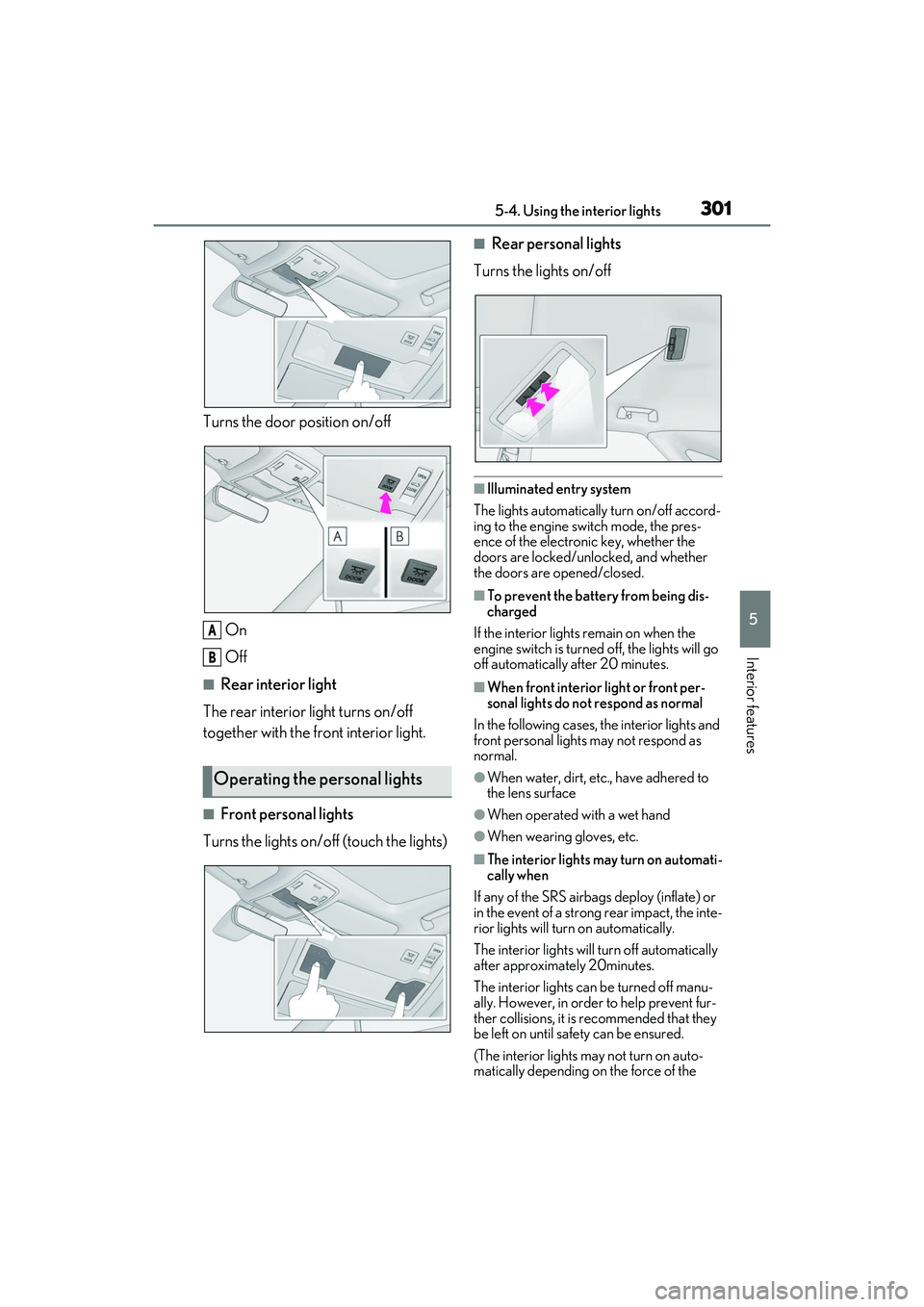
Turns the door position on/offOn
Off
■Rear interior light
The rear interior light turns on/off
together with the front interior light.
■Front personal lights
Turns the lights on/off (touch the lights)
■Rear personal lights
Turns the lights on/off
■Illuminated entry system
The lights automatically turn on/off accord-
ing to the engine switch mode, the pres-
ence of the electronic key, whether the
doors are locked/unlocked, and whether
the doors are opened/closed.
■To prevent the battery from being dis-
charged
If the interior lights remain on when the
engine switch is turned off, the lights will go
off automatically after 20 minutes.
■When front interior light or front per-
sonal lights do not respond as normal
In the following cases, the interior lights and
front personal lights may not respond as
normal.
●When water, dirt, etc., have adhered to
the lens surface
●When operated with a wet hand
●When wearing gloves, etc.
■The interior lights may turn on automati-
cally when
If any of the SRS airbag s deploy (inflate) or
in the event of a strong rear impact, the inte-
rior lights will turn on automatically.
The interior lights will turn off automatically
after approximately 20minutes.
The interior lights can be turned off manu-
ally. However, in order to help prevent fur-
ther collisions, it is recommended that they
be left on until sa fety can be ensured.
(The interior lights may not turn on auto-
matically depending on the force of the
Operating the personal lights
A
B
Page 325 of 508

3235-6. Using the other interior features
5
Interior features
The coat hooks are provided with the
rear assist grips.
The GPS clock's time is automatically
adjusted by utilizing GPS time infor-
mation.
For details, refer to “NAVIGATION AND
MULTIMEDIA SYSTEM OWNER’S
MANUAL”.
Please use as a power supply for elec-
tronic goods that use less than 12
VDC/10 A (power consumption of
120 W).
Observe the following when using
electronic goods:
Make sure that the power consump-
tion of all the connected power out-
lets on the instrument panel and in
the luggage compartment is less
than 120 W.
Make sure that the power consump-
tion of all the connected power out-
lets inside the console box is less
than 120 W.
On the instrument panel
Remove the cap.
Inside the console box
Open the lid.
NOTICE
■To prevent damage to the assist grip
Do not hang any heavy object or put a
heavy load on the assist grip.
Coat hooks
WARNING
■Items that must not be hung on the
hook
Do not hang coat hangers or other hard
or sharp objects on the hook. If the SRS
curtain shield airbags deploy, these items
may become projectiles, causing death
or serious injury.
Clock
Power outlets