lock LEXUS RX350 2022 Owner's Manual
[x] Cancel search | Manufacturer: LEXUS, Model Year: 2022, Model line: RX350, Model: LEXUS RX350 2022Pages: 508, PDF Size: 26.2 MB
Page 70 of 508

681-4. Theft deterrent system
●A person inside the vehicle opens a door
or hood, or unlocks the vehicle.
●The battery is recharged or replaced
when the vehicle is locked. ( P.424)
■Alarm-operated door lock
In the following cases, depending on the sit-
uation, the door may automatically lock to
prevent improper entry into the vehicle:
●When a person remaining in the vehicle
unlocks the door and the alarm is acti-
vated.
●While the alarm is activated, a person
remaining in the vehicle unlocks the door.
●When recharging or replacing the bat-
tery
NOTICE
■To ensure the system operates cor-
rectly
Do not modify or remove the system. If
modified or removed, the proper opera-
tion of the system cannot be guaranteed.
Page 75 of 508

732-1. Instrument cluster
2
Vehicle status information and indicators
Drive mode indicators
Except F SPORT models
F SPORT models
*1: These lights turn on when the engine
switch is turned to IGNITION ON
mode to indicate that a system check is
being performed. They will turn off after
the engine is started, or after a few sec-
onds. There may be a malfunction in a
system if a light does not come on, or
turn off. Have the vehicle inspected by
your Lexus dealer.
*2: This light comes on when the system is turned off.
*3: In order to confirm operation, the BSM
outside rear view mirror indicators illu-
minate in the following situations:
When the BSM function is enabled
on of the multi-information dis-
play, the engine switch is turned to
IGNITION ON mode.
When the engine switch is in IGNI-
TION ON mode, the BSM function
is enabled on of the multi-infor-
mation display.
If the system is functioning correctly,
the BSM outside rear view mirror indi-
cators will turn off after a few seconds.
If the BSM outside rear view mirror
indicators do not illuminate or do not
turn off, there may be a malfunction in
PKSB OFF indicator*1, 2 (if
equipped) ( P.252)
All-wheel drive lock indicator
*1
(AWD models only) ( P.264)
(flashes)
Slip indicator*1 (P.266)
VSC OFF indicator
*1, 2
( P.267)
Smart access system with
push-button start indicator
*5
( P.170)
(U.S.A.)
Parking brake indicator
(P.179)
(Canada)
Parking brake indicator
(P.179)
Brake hold standby indicator
*1
( P.182)
Brake hold operated indicator
*1
( P.182)
Eco Driving Indicator Light
*1
( P.81)
Low outside temperature indi-
cator
*6 ( P.75)
Security indicator
*7 ( P.66,
67)
(U.S.A.)
“AIR BAG ON/OFF”
indicator
*1, 7 ( P.40)
(Canada)
“AIR BAG ON/OFF”
indicator
*1, 7 ( P.40)
Eco drive mode indicator
( P.262)
Sport mode indicator (if
equipped) ( P.262)
Customize mode indicator
(P.262)
Eco drive mode indicator
( P.262)
Sport mode indicator (if
equipped) ( P.262)
Sport S mode indicator
( P.262)
Sport S+ mode indicator
( P.262)
Page 77 of 508

752-1. Instrument cluster
2
Vehicle status information and indicators
■Locations of gauges and meters
Except F SPORT models
The units used on the meters may differ depending on the target region.
Engine coolant temperature gauge
Displays the engine coolant temperature
Tachometer
Displays the engine speed in revolutions per minute
Outside temperature
Displays the outside temperature within the range of -40°F (-40°C) to 122°F (50°C). Low
outside temperature indicator comes on when the ambient temperature is 37°F (3°C) or
lower.
Multi-information display
Presents the driver with a variety of vehicle data (P.79)
Displays warning messages in case of a malfunction (P.402)
Clock
Time displayed is linked to the analog clock on the instrument panel. (P.323)
Speedometer
Fuel gauge
Displays the quantity of fuel remaining in the tank
Shift position display ( P.174)
Gauges and meters
Meter display
A
B
C
D
E
F
G
H
Page 78 of 508

762-1. Instrument cluster
Odometer and trip meter display (P.78)
F SPORT models
The units used on the meters may differ depending on the target region.
Outside temperature
Displays the outside temperature within the range of -40°F (-40°C) to 122°F (50°C). Low
outside temperature indicator comes on when the ambient temperature is 37°F (3°C) or
lower.
Multi-information display
Presents the driver with a variety of vehicle data ( P.79)
Displays warning messages in case of a malfunction (P.402)
Tachometer
Displays the engine speed in revolutions per minute
When sport mode is se lected for the driving mode, the periphery of the tachometer will
change color and the scale of the tachometer will be emphasized.
Speedometer
Engine coolant temperature gauge
Displays the engine coolant temperature
Fuel gauge
Displays the quantity of fuel remaining in the tank
Shift position display ( P.174)
Odometer and trip meter display ( P.78)
Clock
Time displayed is linked to the analog clock on the instrument panel. (P.323)
■Rev indicator (F SPORT models) When the engine speed reaches a set
I
A
B
C
D
E
F
G
H
I
Page 85 of 508

832-1. Instrument cluster
2
Vehicle status information and indicators
tire inflation pressure after the engine
switch is turned to IGNITION ON mode.
It may also take a few minutes to display
the tire inflation pressure after inflation
pressure has been adjusted.
• “---” may be displayed if the tire position information cannot be determined due to
unfavorable radio wave conditions.
• Tire inflation pressu re changes with tem-
perature. The displayed values may also
be different from the values measured
using a tire pressure gauge.
Select to display the following naviga-
tion system-linked information.
Route guidance
Compass display (heading-up dis-
play)
Select to enable selection of an audio
source or track on the meter using the
meter control switches.
Select to display the operational status
of the following systems:
LTA (Lane Tracing Assist) ( P.211)
RSA (Road Sign Assist) (if
equipped) ( P.220)
Dynamic radar cruise control with
full-speed range ( P.222)
■Meter display settings that can be
changed
Clock
Select to switch between 12-hour display
and 24-hour display.
Language
Select to change t he language displayed.
Units
Select to change the units of measure dis-
played.
Eco Driving Indicator Light
( P.81)
Select to enable/dis able the Eco Driving
Indicator Light.
Switch settings
Select to display how to change the top
screen.
Drive information 1/Drive informa-
tion 2/Drive information 3
Select to select up to 2 items ( P.80) that
will be displayed on each Drive information
screen (Drive information 1 screen, Drive
information 2 screen, and Drive informa-
tion 3 screen) respectively.
Pop-up display
Select to enable/dis able the pop-up dis-
play.
• Intersection guidance (if equipped)
• Incoming calls
• Brightness adjustment
Color (except F SPORT models)
Select to set the color of the cursor on the
multi-information display.
Needle (F SPORT models)
Navigation system-linked dis-
play (if equipped)
Audio system-linked display
Driving assist system information
Settings display
Page 95 of 508
93
3
3
Before driving
Before driving
.3-1. Key informationKeys ................................................... 94
3-2. Opening, closing and locking the doors
Side doors ....................................... 97
Power back door......................... 101
Smart access system with push-button start ...................... 113
3-3. Adjusting the seats Front seats ...................................... 117
Rear seats ....................................... 118
Driving position memory ........ 129
Head restraints............................ 132
3-4. Adjusting the steering wheel and mirrors
Steering wheel............................. 135
Inside rear view mirror............. 136
Outside rear view mirrors ...... 137
3-5. Opening, closing the windows and moon roof
Power windows........................... 140
Moon roof ..................................... 142
Panoramic moon roof .............. 145
Page 96 of 508
943-1. Key information
3-1.Key information
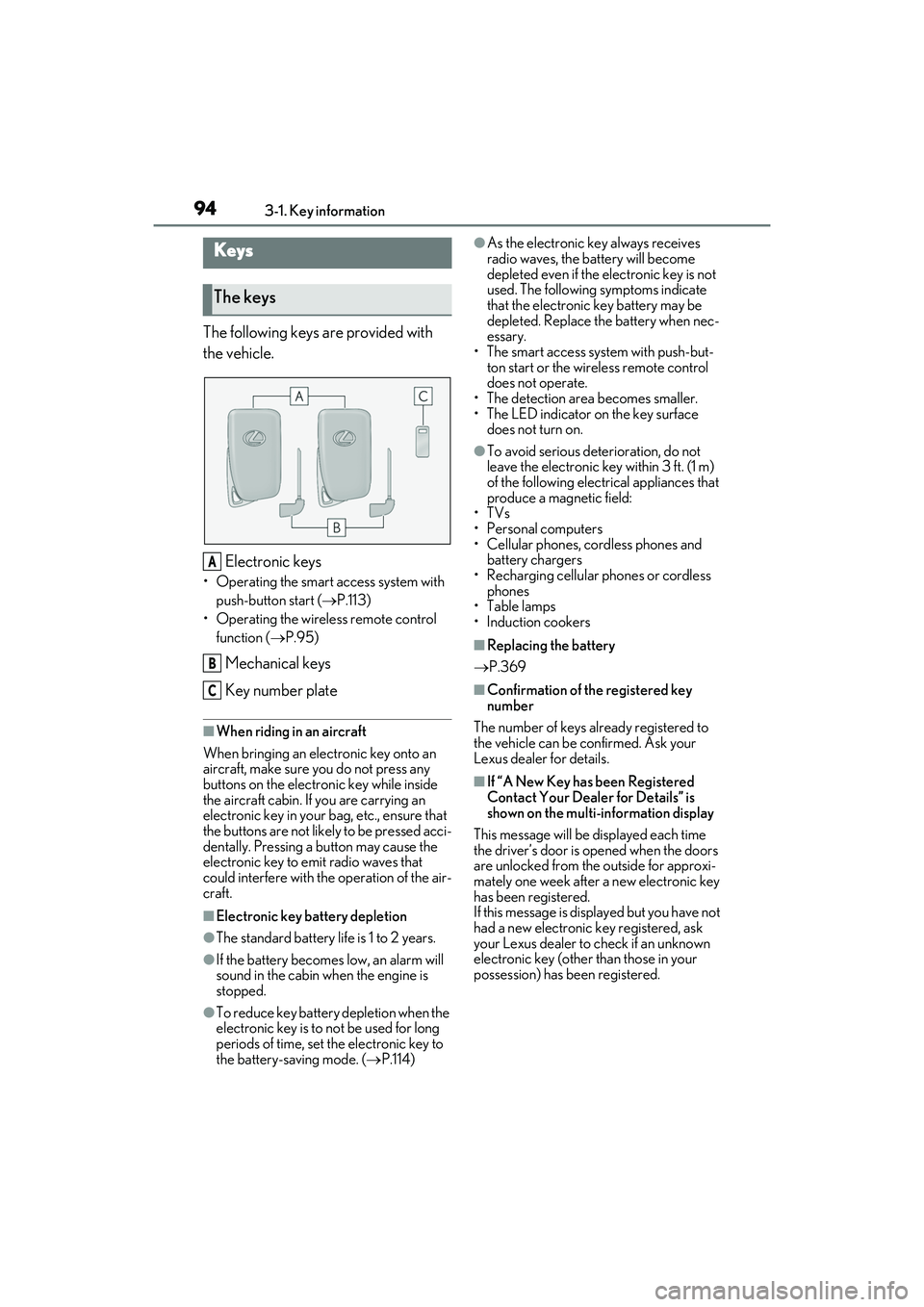
The following keys are provided with
the vehicle.Electronic keys
• Operating the smart access system with push-button start ( P.113)
• Operating the wireless remote control function ( P.95)
Mechanical keys
Key number plate
■When riding in an aircraft
When bringing an elec tronic key onto an
aircraft, make sure you do not press any
buttons on the electronic key while inside
the aircraft cabin. If you are carrying an
electronic key in your bag, etc., ensure that
the buttons are not likely to be pressed acci-
dentally. Pressing a button may cause the
electronic key to em it radio waves that
could interfere with the operation of the air-
craft.
■Electronic key battery depletion
●The standard battery life is 1 to 2 years.
●If the battery becomes low, an alarm will
sound in the cabin when the engine is
stopped.
●To reduce key battery depletion when the
electronic key is to not be used for long
periods of time, set the electronic key to
the battery-saving mode. ( P.114)
●As the electronic key always receives
radio waves, the battery will become
depleted even if the electronic key is not
used. The following symptoms indicate
that the electronic key battery may be
depleted. Replace the battery when nec-
essary.
• The smart access system with push-but- ton start or the wireless remote control
does not operate.
• The detection area becomes smaller.
•The LED indicator on the key surface
does not turn on.
●To avoid serious dete rioration, do not
leave the electronic key within 3 ft. (1 m)
of the following electrical appliances that
produce a magnetic field:
•TVs
• Personal computers
• Cellular phones, cordless phones and battery chargers
• Recharging cellular phones or cordless
phones
•Table lamps
• Induction cookers
■Replacing the battery
P.369
■Confirmation of the registered key
number
The number of keys already registered to
the vehicle can be confirmed. Ask your
Lexus dealer for details.
■If “A New Key has been Registered
Contact Your Dealer for Details” is
shown on the multi-information display
This message will be displayed each time
the driver’s door is opened when the doors
are unlocked from the outside for approxi-
mately one week after a new electronic key
has been registered.
If this message is disp layed but you have not
had a new electronic key registered, ask
your Lexus dealer to check if an unknown
electronic key (other than those in your
possession) has be en registered.
Keys
The keys
A
B
C
Page 97 of 508
953-1. Key information
3
Before driving
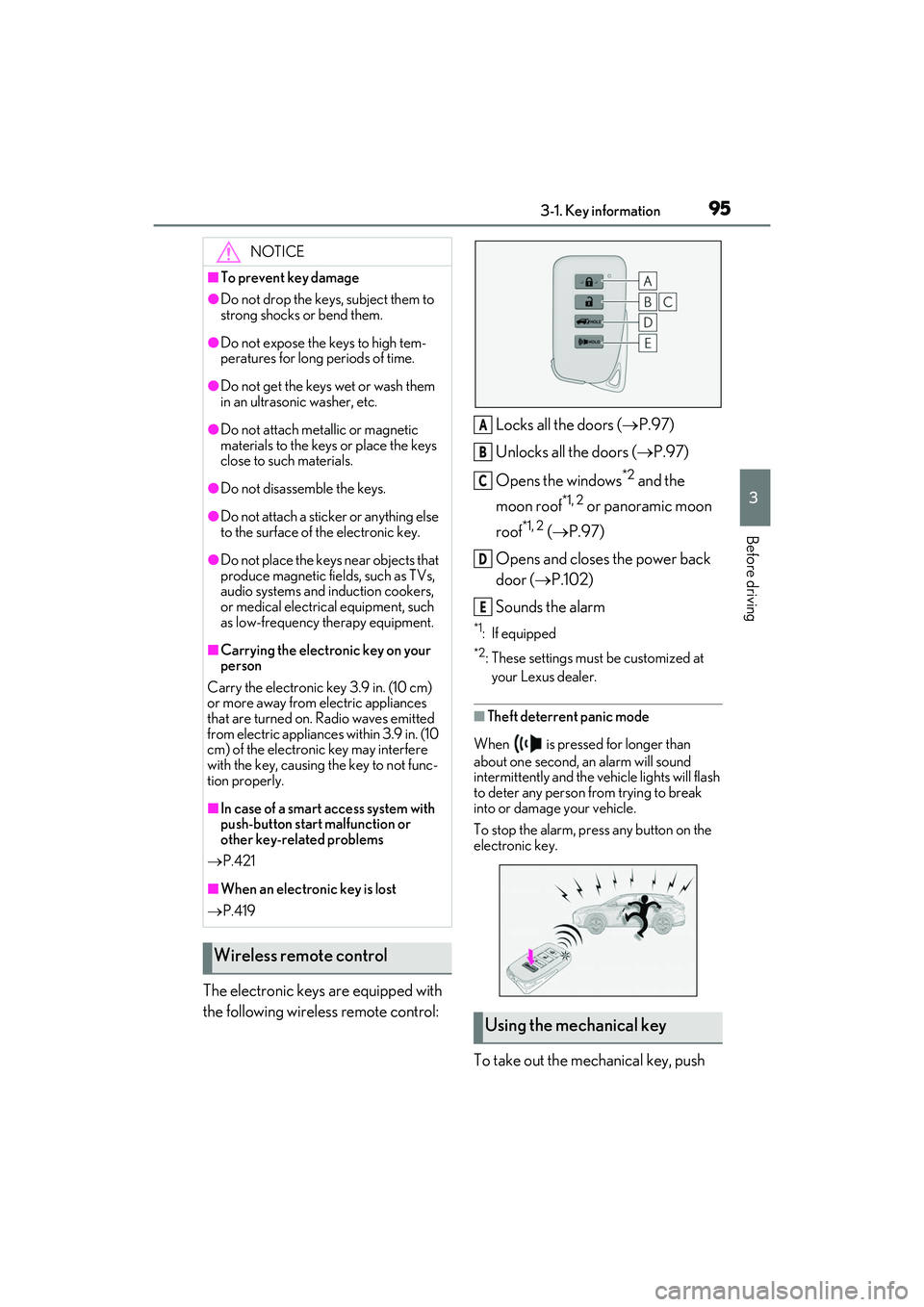
The electronic keys are equipped with
the following wireless remote control:Locks all the doors (
P.97)
Unlocks all the doors ( P.97)
Opens the windows
*2 and the
moon roof
*1, 2 or panoramic moon
roof
*1, 2 ( P.97)
Opens and closes the power back
door ( P.102)
Sounds the alarm
*1: If equipped
*2: These settings must be customized at
your Lexus dealer.
■Theft deterrent panic mode
When is pressed for longer than
about one second, an alarm will sound
intermittently and the vehicle lights will flash
to deter any person from trying to break
into or damage your vehicle.
To stop the alarm, pr ess any button on the
electronic key.
To take out the mechanical key, push
NOTICE
■To prevent key damage
●Do not drop the keys, subject them to
strong shocks or bend them.
●Do not expose the keys to high tem-
peratures for long periods of time.
●Do not get the keys wet or wash them
in an ultrasonic washer, etc.
●Do not attach meta llic or magnetic
materials to the keys or place the keys
close to such materials.
●Do not disassemb le the keys.
●Do not attach a sticker or anything else
to the surface of the electronic key.
●Do not place the keys near objects that
produce magnetic fields, such as TVs,
audio systems and induction cookers,
or medical electrical equipment, such
as low-frequency therapy equipment.
■Carrying the electronic key on your
person
Carry the electronic key 3.9 in. (10 cm)
or more away from electric appliances
that are turned on. Radio waves emitted
from electric applianc es within 3.9 in. (10
cm) of the electronic key may interfere
with the key, causing the key to not func-
tion properly.
■In case of a smart access system with
push-button start malfunction or
other key-related problems
P.421
■When an electronic key is lost
P.419
Wireless remote control
Using the mechanical key
A
B
C
D
E
Page 98 of 508
963-1. Key information
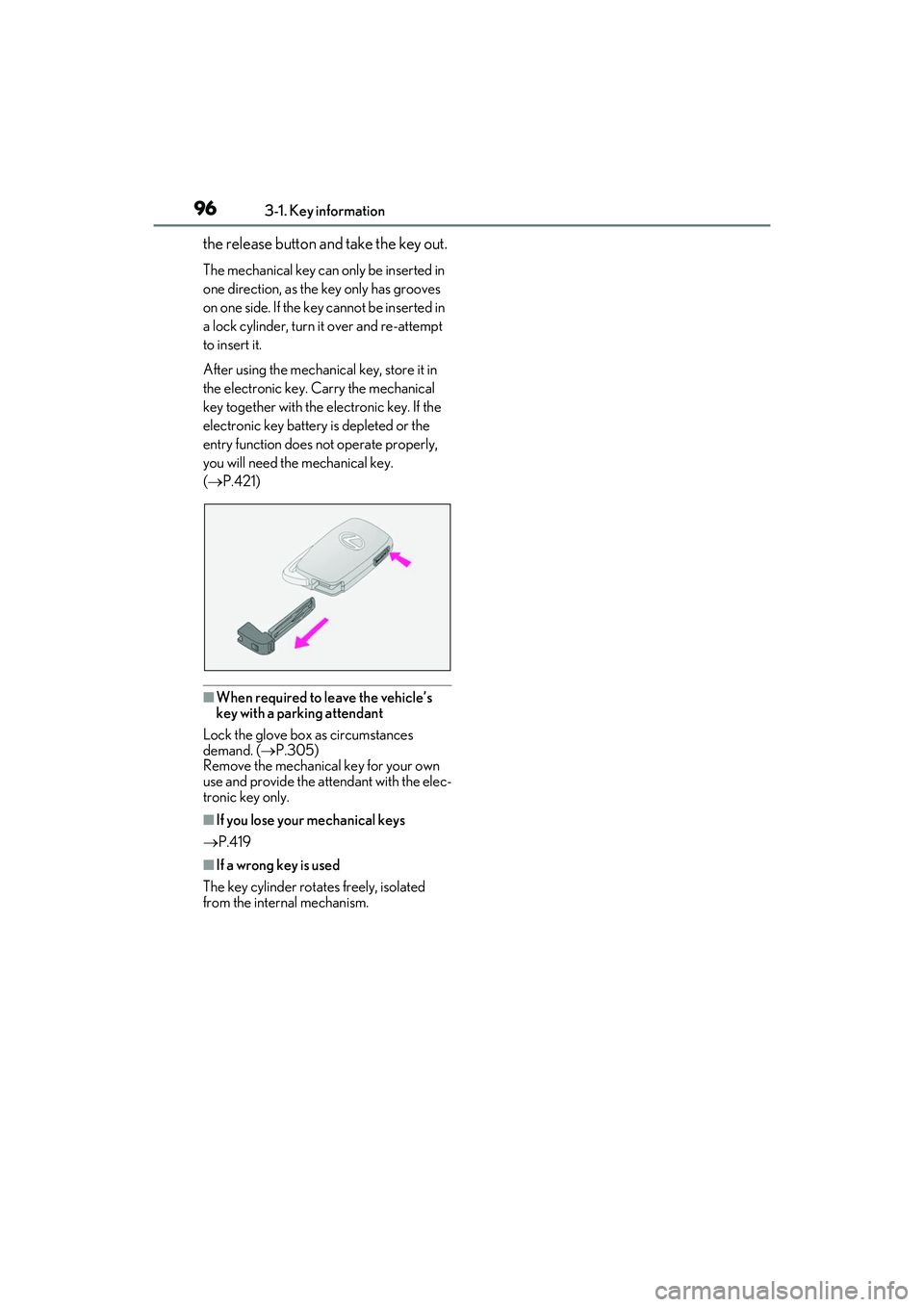
the release button and take the key out.
The mechanical key can only be inserted in
one direction, as the key only has grooves
on one side. If the key cannot be inserted in
a lock cylinder, turn it over and re-attempt
to insert it.
After using the mechanical key, store it in
the electronic key. Carry the mechanical
key together with the electronic key. If the
electronic key battery is depleted or the
entry function does not operate properly,
you will need the mechanical key.
( P.421)
■When required to leave the vehicle’s
key with a parking attendant
Lock the glove box as circumstances
demand. ( P.305)
Remove the mechanical key for your own
use and provide the attendant with the elec-
tronic key only.
■If you lose your mechanical keys
P.419
■If a wrong key is used
The key cylinder rotates freely, isolated
from the internal mechanism.
Page 99 of 508
973-2. Opening, closing and locking the doors
3
Before driving
3-2.Opening, closing and locking the doors
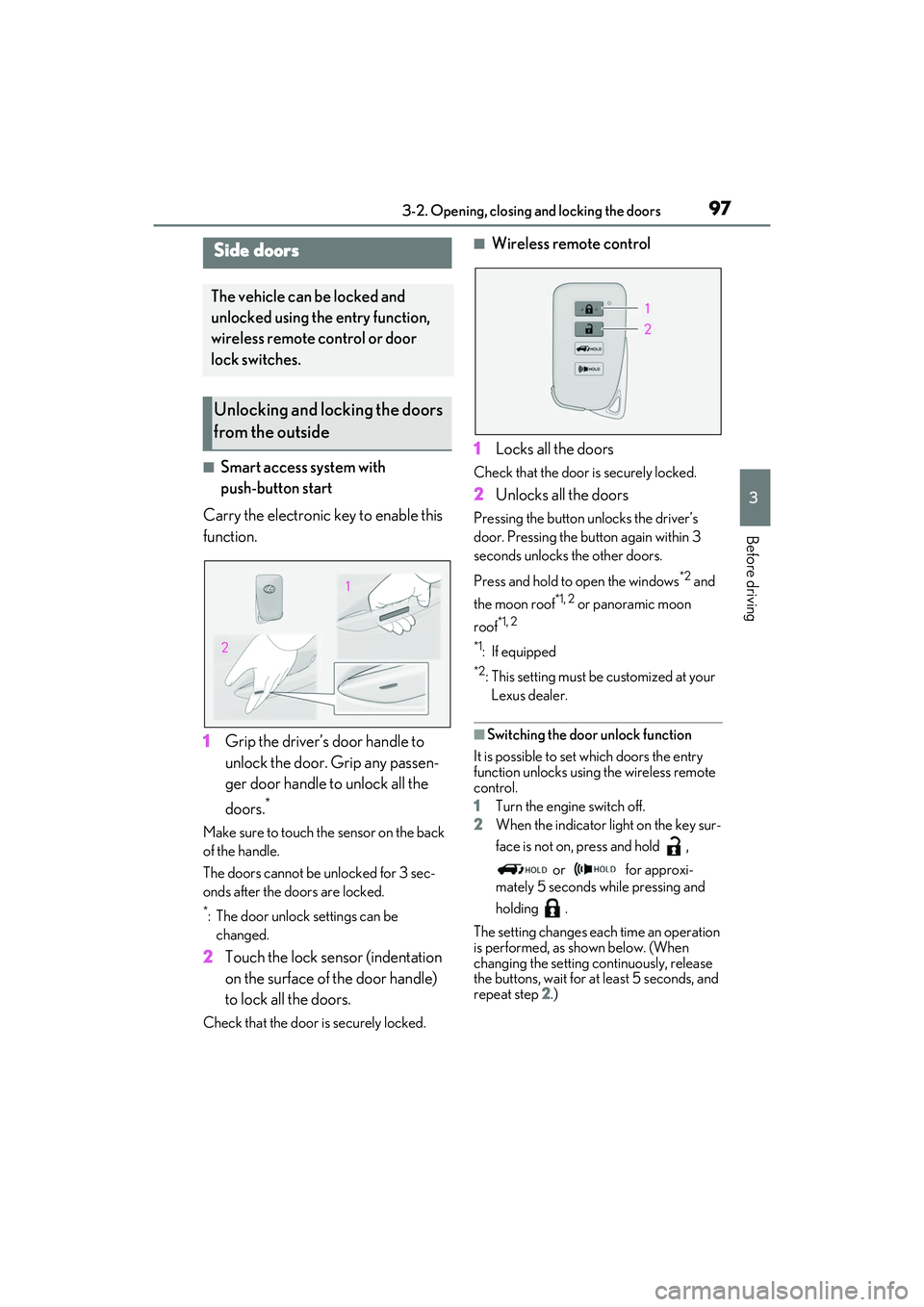
■Smart access system with
push-button start
Carry the electronic key to enable this
function.
1 Grip the driver’s door handle to
unlock the door. Grip any passen-
ger door handle to unlock all the
doors.
*
Make sure to touch the sensor on the back
of the handle.
The doors cannot be unlocked for 3 sec-
onds after the doors are locked.
*: The door unlock settings can be
changed.
2 Touch the lock sensor (indentation
on the surface of the door handle)
to lock all the doors.
Check that the door is securely locked.
■Wireless remote control
1 Locks all the doors
Check that the door is securely locked.
2Unlocks all the doors
Pressing the button unlocks the driver’s
door. Pressing the button again within 3
seconds unlocks the other doors.
Press and hold to open the windows
*2 and
the moon roof
*1, 2 or panoramic moon
roof
*1, 2
*1
: If equipped
*2: This setting must be customized at your
Lexus dealer.
■Switching the door unlock function
It is possible to set which doors the entry
function unlocks using the wireless remote
control.
1 Turn the engine switch off.
2 When the indicator light on the key sur-
face is not on, press and hold ,
or for approxi-
mately 5 seconds while pressing and
holding .
The setting changes each time an operation
is performed, as shown below. (When
changing the setting continuously, release
the buttons, wait for at least 5 seconds, and
repeat step 2 .)
Side doors
The vehicle can be locked and
unlocked using the entry function,
wireless remote control or door
lock switches.
Unlocking and locking the doors
from the outside