air conditioning LEXUS RX350 2022 Owners Manual
[x] Cancel search | Manufacturer: LEXUS, Model Year: 2022, Model line: RX350, Model: LEXUS RX350 2022Pages: 508, PDF Size: 26.2 MB
Page 5 of 508
3TABLE OF CONTENTS
1
2
3
4
5
6
7
8
9
Trailer towing (vehicles with towing package) ........................................ 159
Dinghy towing ................................ 169
4-2. Driving procedures Engine (ignition) switch .............. 170
Automatic transmission.............. 174
Turn signal lever............................. 178
Parking brake ................................. 179
Brake Hold....................................... 182
4-3. Operating the lights and wipers Headlight switch ............................ 184
AHB (Automatic High Beam) ............................................................ 187
Fog light switch .............................. 190
Windshield wipers and washer ............................................................ 190
Rear window wiper and washer ............................................................ 194
4-4. Refueling Opening the fuel tank cap......... 195
4-5. Using the driving support systems Lexus Safety System + 2.0 ........ 198
PCS (Pre-Collision System).... 204
LTA (Lane Tracing Assist).......... 211
RSA (Road Sign Assist) ............. 220
Dynamic radar crui se control with
full-speed range ......................... 222
BSM (Blind Spot Monitor) ....... 232
PKSA (Parking Support Alert) ........................................................... 236
Intuitive parking assist ................ 238
RCTA (Rear cross traffic alert) function .......................................... 245
PKSB (Parking Support Brake) ............................................................ 251Parking Support Brake function
(static objects) ............................ 257
Parking Support Brake function (rear-crossing vehicles) ......... 260
Driving mode select switch ...... 262
All-wheel drive lock switch......264
Driving assist systems ................ 265
4-6. Driving tips Winter driving tips ......................... 271
Utility vehicle precautions........ 273
5-1. Remote Touch/Display Remote Touch............................... 278
Center Display.............................. 280
5-2. Lexus Climate Concierge Lexus Climate Concierge........ 283
5-3. Using the air conditioning system and defogger
Front automatic air conditioning system ............................................ 284
Rear automatic air conditioning system ............................................ 294
Heated steering wheel/seat heat- ers/seat ventilators................... 297
5-4. Using the interior lights Interior lights list ........................... 300
5-5. Using the storage features List of storag e features .............. 303
Luggage compartment features .......................................................... 309
5-6. Using the other interior features Other interior features ................ 314
Garage door opener ................. 326
Compass .......................................... 331
5Interior features
Page 6 of 508
4TABLE OF CONTENTS
6-1. Maintenance and careCleaning and protecting the vehi-cle exterior ................................... 336
Cleaning and protecting the vehi- cle interior .................................... 339
6-2. Maintenance Maintenance requirements ..... 342
General maintenance ................ 343
Emission inspection and mainte- nance (I/M) programs ............ 346
6-3. Do-it-yourself maintenance Do-it-yourself service precautions........................................................... 347
Hood.................................................. 349
Positioning a floor jack............... 349
Engine compartment................... 351
Tires ................................................... 357
Tire inflation pressure................. 363
Wheels.............................................. 365
Air conditioning filter..................366
Windshield wiper inserts........... 368
Electronic key battery ................ 369
Checking and replacing fuses ............................................................ 371
Headlight aim................................. 372
Light bulbs ....................................... 374
7-1. Essential information Emergency flashers..................... 384
If your vehicle has to be stopped in an emergency ............................. 384If the vehicle is submerged or water
on the road is rising .................. 385
7-2. Steps to take in an emergency If your vehicle needs to be towed.......................................................... 387
If you think something is wrong ........................................................... 391
Fuel pump shut off system ........ 392
If a warning light turns on or a warn- ing buzzer sounds..................... 393
If a warning messa ge is displayed
.......................................................... 402
If you have a flat tire .................... 406
If the engine will not start ........... 418
If you lose your keys..................... 419
If the fuel filler door cannot be opened .......................................... 420
If the electronic key does not oper- ate properly ................................... 421
If the vehicle battery is discharged .......................................................... 423
If your vehicle overheats ........... 426
If the vehicle becomes stuck ... 428
8-1. Specifications Maintenance data (fuel, oil level, etc.) ................................................. 430
Fuel information............................ 438
Tire information ............................ 440
8-2. Customization Customizable features .............. 449
8-3. Initialization Items to initialize ........................... 462
6Maintenance and care
7When trouble arises
8Vehicle specifications
Page 17 of 508

15Pictorial index
Parking brake switch ............................................................................................. P.179
Applying/releasing ............................................................................................................P.179
Precautions for winter season ......................... ............................................................ P.272
Warning buzzer/messages.......................................................................................... P.402
Turn signal lever ...................................................................................................... P.178
Headlight switch......................................................................................................P.184
Headlights/side marker light s/parking lights/tail lights/license plate lights/daytime
running lights ................................................................................................................. ...... P.184
Fog lights
*1............................................................................................................................ P.1 90
Windshield wiper and washer switch ...................................................... P.190, 194
Usage.......................................................................................................................... .. P.190, 194
Adding washer fluid ......................................................................................................... P.3 56
Warning messages .......................................................................................................... P.402
Emergency flasher switch .................................................................................. P.384
Hood lock release lever .......................................................................................P.349
Tilt and telescopic steering control switch ......................................................P.135
Adjustment ..................................................................................................................... ...... P.135
Driving position memory
*1..............................................................................................P.129
Air conditioning system ...................................................................................... P.284
Usage.......................................................................................................................... ........... P.284
Rear window defogger................................................................................................... P.284
Audio system
*2
*1
: If equipped
*2: Refer to “NAVIGATION AND MULT IMEDIA SYSTEM OWNER’S MANUAL”.
E
F
G
H
I
J
K
L
Page 22 of 508
20Pictorial index
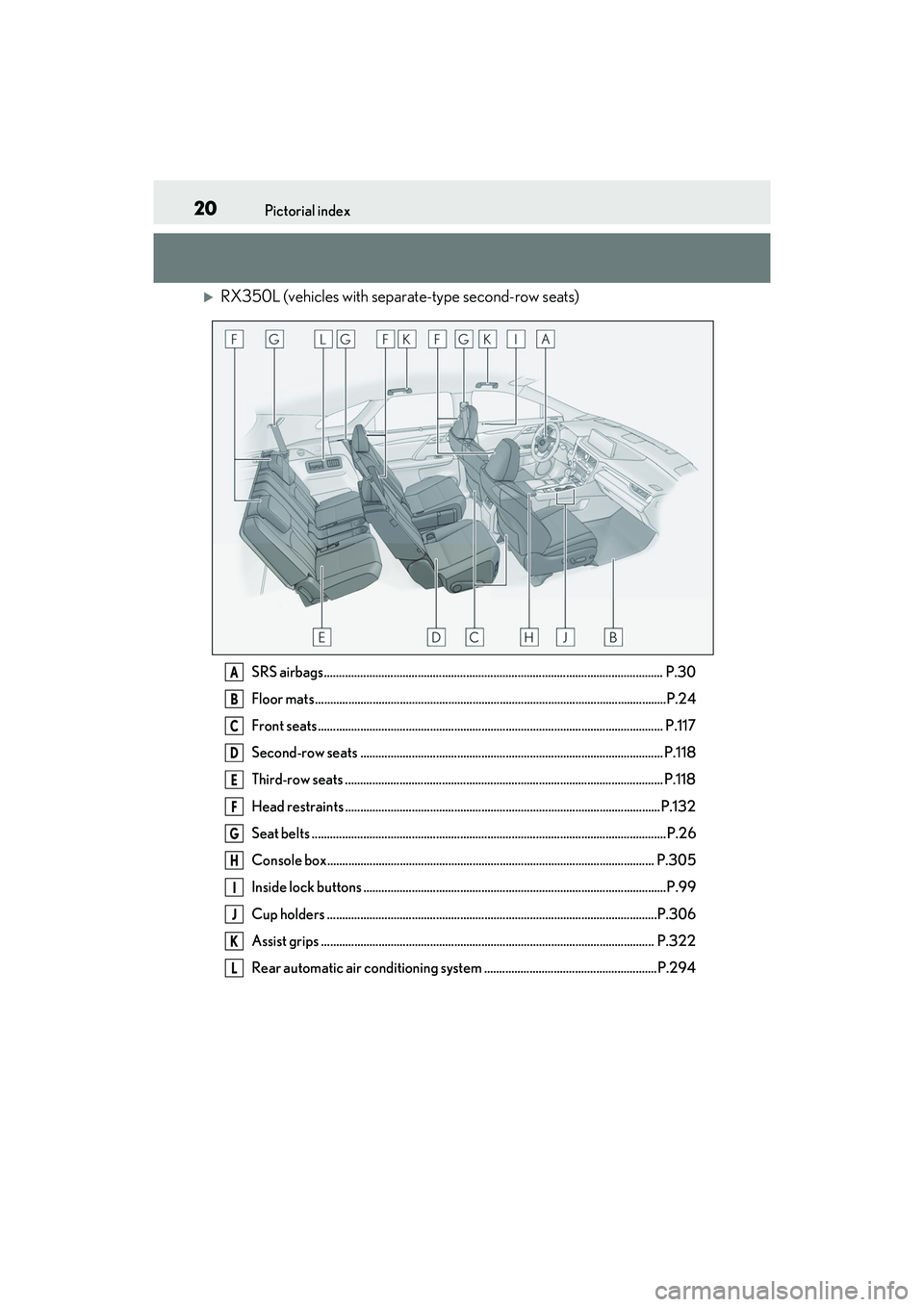
RX350L (vehicles with separate-type second-row seats)
SRS airbags................................................................................................................ P.30
Floor mats ....................................................................................................................P.24
Front seats .................................................................................................................. P. 117
Second-row seats .................................................................................................... P.118
Third-row seats ......................................................................................................... P.118
Head restraints ........................................................................................................P.132
Seat belts ..................................................................................................................... P.26
Console box............................................................................................................ P.305
Inside lock buttons ....................................................................................................P.99
Cup holders .............................................................................................................P.306
Assist grips .............................................................................................................. P.322
Rear automatic air conditioning system .........................................................P.294A
B
C
D
E
F
G
H
I
J
K
L
Page 23 of 508
21Pictorial index
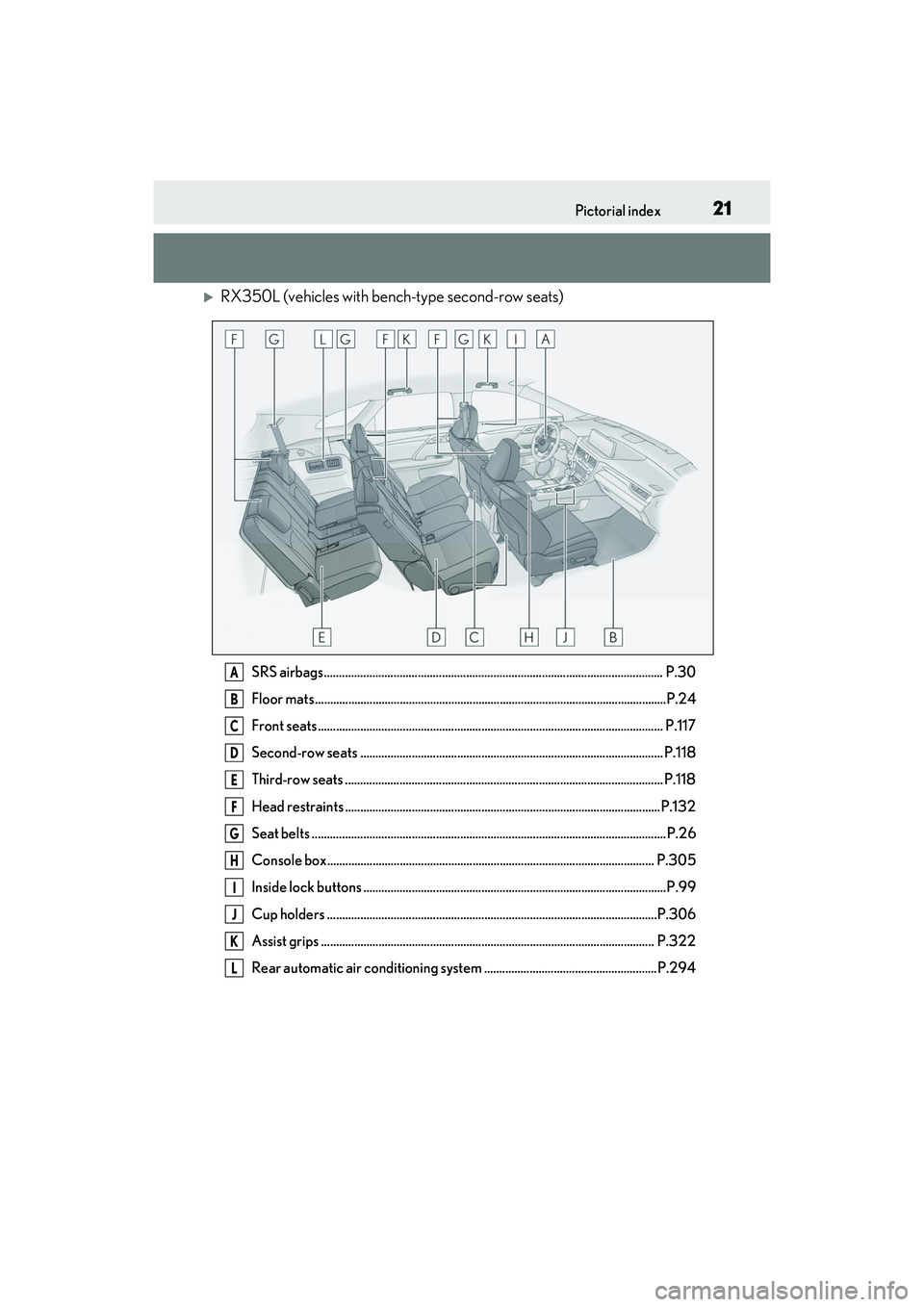
RX350L (vehicles with bench-type second-row seats)
SRS airbags................................................................................................................ P.30
Floor mats ....................................................................................................................P .24
Front seats .................................................................................................................. P. 117
Second-row seats .................................................................................................... P.118
Third-row seats ......................................................................................................... P.118
Head restraints ........................................................................................................P.132
Seat belts ..................................................................................................................... P.26
Console box............................................................................................................ P.305
Inside lock buttons ....................................................................................................P.99
Cup holders .............................................................................................................P.306
Assist grips .............................................................................................................. P.322
Rear automatic air conditioning system .........................................................P.294A
B
C
D
E
F
G
H
I
J
K
L
Page 170 of 508

1684-1. Before driving
mance when using engine braking,
do not put the transmission in D. If in
the M mode, the transmission shift
range position must be in 6 or lower.
( P.174)
Instability happens more frequently
when descending steep or long
downhill grades. Before descend-
ing, slow down and downshift. Do
not make sudden downshifts while
descending steep or long downhill
grades.
Avoid holding the brake pedal down
too long or applying the brakes too
frequently. This could cause the
brakes to overheat and result in
reduced braking efficiency.
Due to the added load of the trailer,
your vehicle’s engine may overheat
on hot days (at temperatures over
85°F [30°C]) when driving up a
long or steep grade. If the engine
coolant temperature gauge indi-
cates overheating, immediately turn
off the air conditioning (if in use),
pull your vehicle off the road and
stop in a safe spot. ( P.426)
Always place wheel blocks under
both the vehicle’s and the trailer’s
wheels when parking. Put the trans-
mission in P and apply the parking
brake. Avoid parking on a slope, but
if unavoidable, do so only after per-
forming the following:
1 Apply the brakes and keep them
applied. 2
Have someone place wheel blocks
under both the vehicle’s and trailer’s
wheels.
3 When the wheel blocks are in
place, release the brakes slowly
until the blocks absorb the load.
4 Shift into P and apply the parking
brake.
5 Turn off the engine.
When restarting after parking on a
slope:
1 With the transmission in P, start the
engine. Be sure to keep the brake
pedal depressed.
2 Shift into a forward gear. If revers-
ing, shift into R.
3 If the parking brake is in manual
mode, release the parking brake.
( P.179)
4 Release the brake pedal, and slowly
pull or back away from the wheel
blocks. Stop and apply the brakes.
5 Have someone retrieve the blocks.
Page 204 of 508

2024-5. Using the driving support systems
■If a warning message is displayed on the multi-information display
A system may be temporarily unavailable or there may be a malfunction in the system.
●In the following situations, perform the actions specified in the table. When the normal
operating conditions are detected, the message will disappear and the system will
become operational.
If the message does not disappear, contact your Lexus dealer.
SituationActions
When the area around a camera is covered
with dirt, moisture (f ogged up, covered with
condensation, ice, etc. ), or other foreign
matterUsing the wiper and A/C function, remove
the dirt and other attached matter.
( P.286)
When the temperature around the front
camera is outside of the operational range,
such as when the vehicle is in the sun or in an
extremely cold environment
If the front camera is hot, such as after the
vehicle had been parked in the sun, use the
air conditioning system to decrease the tem-
perature around the front camera.
If a sunshade was used when the vehicle
was parked, depending on its type, the sun-
light reflected from the surface of the sun-
shade may cause the temperature of the
front camera to become excessively high.
If the front camera is cold, such after the
vehicle is parked in an extremely cold envi-
ronment, use the air conditioning system to
increase the temperature around the front
camera.
Page 242 of 508

2404-5. Using the driving support systems
■The system can be operated when
●The engine switch is in IGNITION ON
mode.
●Intuitive parking assist function is on.
●The vehicle speed is less than about 6
mph (10 km/h).
●A shift lever other than P.
■Setting the buzzer volume
The buzzer volume can be adjusted on the
multi-information display. ( P.236)
■If “Parking Assist Unavailable” is dis-
played on the multi-information display
●Water may be continuo usly flowing over
the sensor surface, such as in a heavy
rain. When the system determines that it
is normal, the system will return to nor-
mal.
●Initialization may not have been per-
formed after a battery terminal was dis-
connected and reconnec ted. Initialize the system. (
P.240) If this message contin-
ues to be displayed even after initializa-
tion, have the vehicle inspected by your
Lexus dealer.
■If “Parking Assist Unavailable Clean
Parking Assist Sensor” is displayed on
the multi-information display
A sensor may be covered with ice, snow,
dirt, etc. Remove the ice, snow, dirt, etc.,
from the sensor to return the system to nor-
mal.
Also, due to ice forming on a sensor at low
temperatures, a warn ing message may be
displayed or the sensor may not be able to
detect an object. Once the ice melts, the
system will return to normal.
■If a battery terminal has been discon-
nected and reconnected
The system needs to be initialized. To initial-
ize the system, drive the vehicle straight
ahead for 5 seconds or more at a speed of
approximately 22 mph (35 km/h) or more.
■Sensor detection information
The following situations may occur during
use.
●The sensor's detection areas are limited
to the areas around the vehicle front and
rear bumpers.
●Depending on the sh ape of the object
and other factors, the detection distance
may shorten, or detection may be impos-
sible.
●There will be a short delay between
object detection and di splay. Even at low
speeds, there is a possibility that the
object will come wi thin the sensor’s
detection areas befo re the display is
shown and the warning beep sounds.
●It might be difficult to hear the buzzer due
to the volume of the audio system or air
flow noise of the air conditioning system.
●It may be difficult to hear the buzzer if
buzzers for other systems are sounding.
■Objects which the system may not be
properly detected
The shape of the object may prevent the
sensor from detecting it. Pay particular
attention to the following objects:
WARNING
■When to disable the function
In the following situations, disable the
function as it may operate even though
there is no possibility of a collision.
●Failing to observe the warnings above.
●A non-genuine Toyota suspension
(lowered suspension, etc.) is installed.
■Notes when washing the vehicle
Do not apply intensive bursts of water or
steam to the sensor area.
Doing so may result in the sensor mal-
functioning.
●When using a high pressure washer to
wash the vehicle, do not spray the sen-
sors directly, as doing so may cause a
sensor to malfunction.
●When using steam to clean the vehicle,
do not direct steam too close to the
sensors as doing so may cause a sen-
sor to malfunction.
Page 264 of 508
2624-5. Using the driving support systems
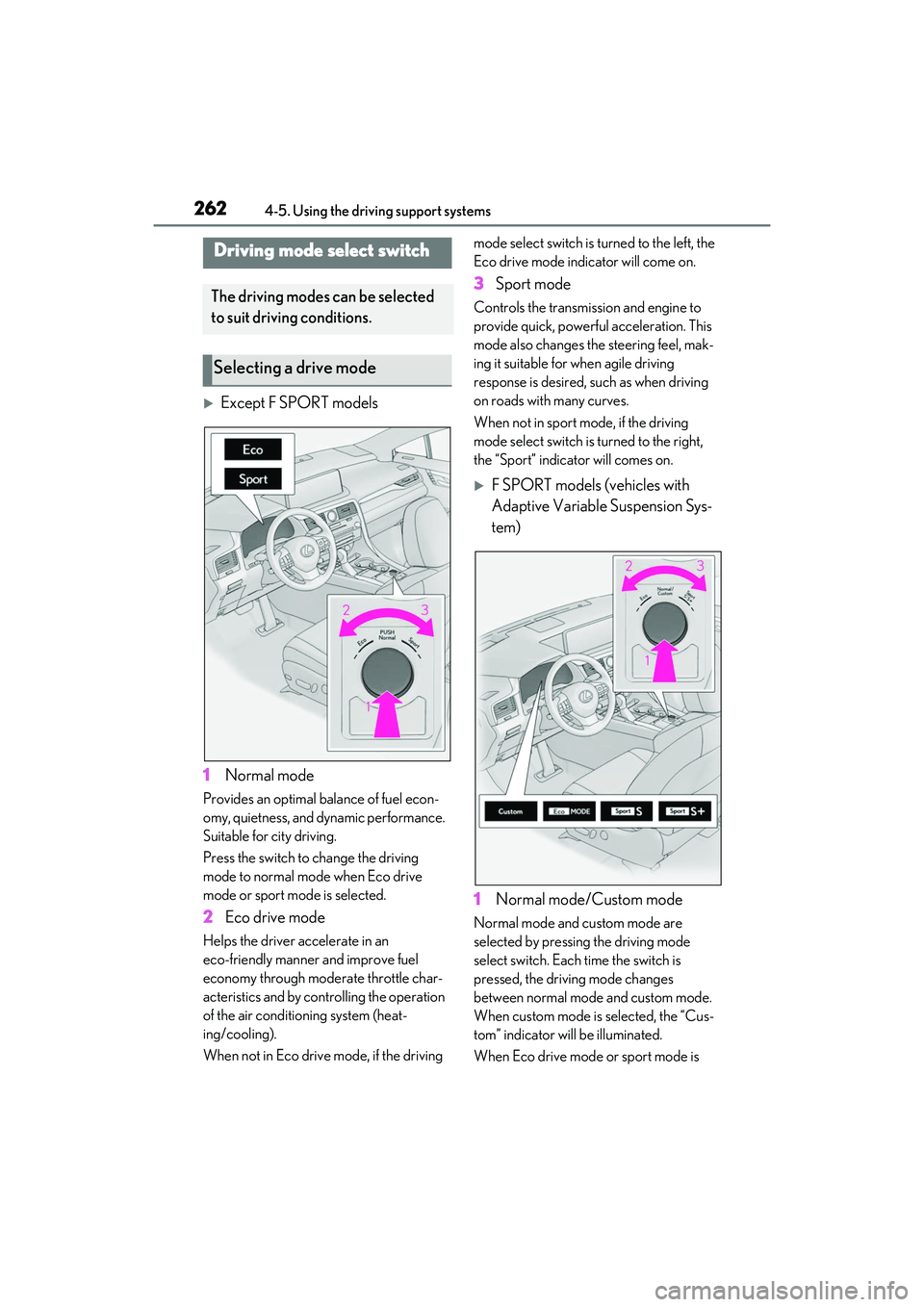
Except F SPORT models
1 Normal mode
Provides an optimal balance of fuel econ-
omy, quietness, and dynamic performance.
Suitable for city driving.
Press the switch to change the driving
mode to normal mode when Eco drive
mode or sport mode is selected.
2 Eco drive mode
Helps the driver accelerate in an
eco-friendly manner and improve fuel
economy through modera te throttle char-
acteristics and by controlling the operation
of the air conditioning system (heat-
ing/cooling).
When not in Eco drive mode, if the driving mode select switch is turned to the left, the
Eco drive mode indicator will come on.
3
Sport mode
Controls the transmission and engine to
provide quick, powerful acceleration. This
mode also changes the steering feel, mak-
ing it suitable for when agile driving
response is desired, such as when driving
on roads with many curves.
When not in sport mode, if the driving
mode select switch is turned to the right,
the “Sport” indicator will comes on.
F SPORT models (vehicles with
Adaptive Variable Suspension Sys-
tem)
1 Normal mode/Custom mode
Normal mode and custom mode are
selected by pressing the driving mode
select switch. Each time the switch is
pressed, the driving mode changes
between normal mode and custom mode.
When custom mode is selected, the “Cus-
tom” indicator will be illuminated.
When Eco drive mode or sport mode is
Driving mode select switch
The driving modes can be selected
to suit driving conditions.
Selecting a drive mode
Page 265 of 508
2634-5. Using the driving support systems
4
Driving
selected, pressing the switch changes the
driving mode to normal mode.
•Normal mode
Provides an optimal balance of fuel econ-
omy, quietness, and dynamic performance.
Suitable for city driving.
•Custom mode
Allows you to drive with the following func-
tions set to your preferred settings. Cus-
tom mode settings can only be changed on
the drive mode custom ization display of
the Center Display. ( P.280)
2Eco drive mode
Helps the driver accelerate in an
eco-friendly manner and improve fuel
economy through modera te throttle char-
acteristics and by controlling the operation
of the air conditioning system (heat-
ing/cooling).
When not in Eco drive mode, if the driving
mode select switch is turned to the left, the
Eco drive mode indicator will come on.
3 Sport mode
• Sport S mode
Controls the transmission and engine to
provide quick, powerful acceleration. This
mode is suitable for when agile driving
response is desired, such as when driving
on roads with many curves.
When not in Sport S mode, if the driving mode select switch is
turned to the right,
the “Sport S” indicator will come on.
• Sport S+ mode
Helps to ensure stee ring performance and
driving stability by simultaneously con-
trolling the steering and suspension in
addition to the transmission and engine.
Suitable for sportier driving.
When in Sport S mode, if the driving mode
select switch is turned to the right, the
“Sport S+” indicator will come on.
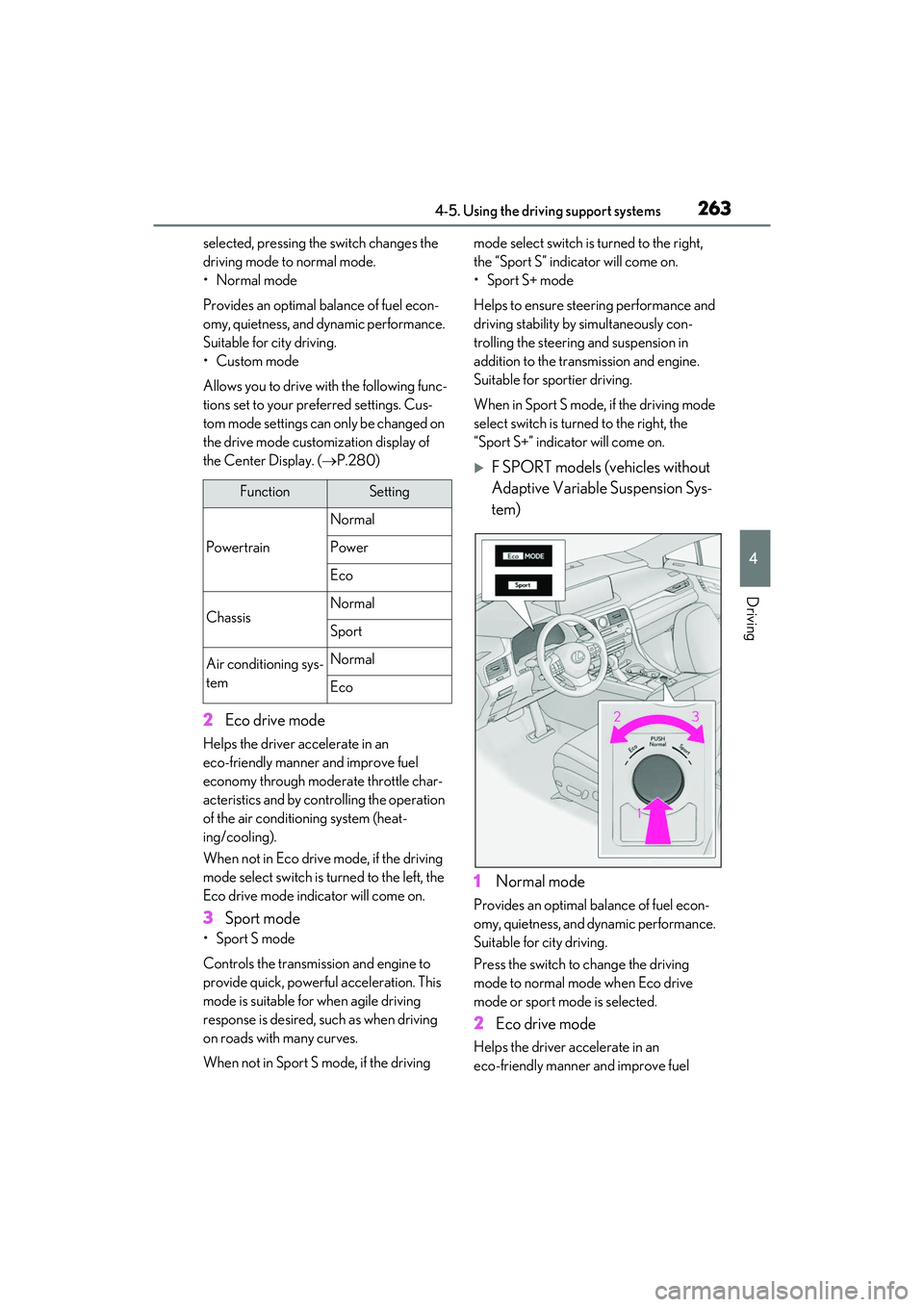
F SPORT models (vehicles without
Adaptive Variable Suspension Sys-
tem)
1 Normal mode
Provides an optimal balance of fuel econ-
omy, quietness, and dynamic performance.
Suitable for city driving.
Press the switch to change the driving
mode to normal mo de when Eco drive
mode or sport mode is selected.
2 Eco drive mode
Helps the driver accelerate in an
eco-friendly manner and improve fuel
FunctionSetting
Powertrain
Normal
Power
Eco
ChassisNormal
Sport
Air conditioning sys-
temNormal
Eco