tail light LEXUS RX350 2022 Owners Manual
[x] Cancel search | Manufacturer: LEXUS, Model Year: 2022, Model line: RX350, Model: LEXUS RX350 2022Pages: 508, PDF Size: 26.2 MB
Page 15 of 508

13Pictorial index
Precautions for winter season ....................................................................................... P.271
To prevent freezing (windshield wiper de-icer)
*...................................................P.291
Precautions for car wash ............................................................................................... P.337
Fuel filler door .......................................................................................................... P.195
Refueling method .............................................................................................................. P .195
Fuel type/fuel tank capacity ......................................................................................... P.432
Tires.......................................................................................................................... ..P.357
Tire size/inflation pressure ................................................................................P.357, 436
Winter tires/tire chains .................................................................................................... P.2 71
Checking/rotation/tire pressure warning system.............................................. P.357
Coping with flat tires........................................................................................................ P .406
Hood ..........................................................................................................................P .349
Opening ........................................................................................................................ ....... P.349
Engine oil ..................................................................................................................... ......... P.432
Coping with overheating ............................................................................................... P.426
Warning messages .......................................................................................................... P.402
Headlights/front turn signal lights/front side marker lights ............ P.178, 184
Side turn signal lights ............................................................................................. P.178
Parking lights/daytime running lights................ ...............................................P.184
Fog lights/cornering lights
*....................................................................... P.184, 190
Rear side marker lights .........................................................................................P.184
Stop/tail lights ..........................................................................................................P.184
Back-up lights/rear turn signal lights ............. ......................................... P.178, 184
Shifting the shift lever to R ...............................................................................................P.1 74
License plate lights .................................................................................................P.184
*:If equipped
Light bulbs of the exterior lights for driving
(Replacing method: P. 374, Watts: P.437)
E
F
G
H
I
J
K
L
M
N
O
Page 17 of 508

15Pictorial index
Parking brake switch ............................................................................................. P.179
Applying/releasing ............................................................................................................P.179
Precautions for winter season ......................... ............................................................ P.272
Warning buzzer/messages.......................................................................................... P.402
Turn signal lever ...................................................................................................... P.178
Headlight switch......................................................................................................P.184
Headlights/side marker light s/parking lights/tail lights/license plate lights/daytime
running lights ................................................................................................................. ...... P.184
Fog lights
*1............................................................................................................................ P.1 90
Windshield wiper and washer switch ...................................................... P.190, 194
Usage.......................................................................................................................... .. P.190, 194
Adding washer fluid ......................................................................................................... P.3 56
Warning messages .......................................................................................................... P.402
Emergency flasher switch .................................................................................. P.384
Hood lock release lever .......................................................................................P.349
Tilt and telescopic steering control switch ......................................................P.135
Adjustment ..................................................................................................................... ...... P.135
Driving position memory
*1..............................................................................................P.129
Air conditioning system ...................................................................................... P.284
Usage.......................................................................................................................... ........... P.284
Rear window defogger................................................................................................... P.284
Audio system
*2
*1
: If equipped
*2: Refer to “NAVIGATION AND MULT IMEDIA SYSTEM OWNER’S MANUAL”.
E
F
G
H
I
J
K
L
Page 74 of 508

722-1. Instrument cluster
*1: These lights turn on when the engine switch is turned to IGNITION ON
mode to indicate that a system check is
being performed. They will turn off after
the engine is started, or after a few sec-
onds. There may be a malfunction in a
system if a light does not come on, or
turn off. Have the vehicle inspected by
your Lexus dealer.
*2: This light illuminates on the multi-infor-mation display.
*3: Except F SPORT models: This light illu-minates on the multi-information dis-
play.
F SPORT models: This light illuminates
on the meter.
*4: This light illuminates on the center panel.
The indicators inform the driver of the
operating state of the vehicle’s various
systems.
(flashes)
Brake hold operated indicator*1
( P.399)
Master warning light
*1
( P.399)
WARNING
■If a safety system warning light does
not come on
Should a safety system light such as the
ABS and SRS warning lights not come on
when you start the engine, this could
mean that these systems are not available
to help protect you in an accident, which
could result in death or serious injury.
Have the vehicle inspected by your
Lexus dealer immediately if this occurs.
Indicators
Turn signal indicator ( P.178)
(U.S.A.)
Headlight indicator (P.184)
(Canada)
Tail light indicator ( P.184)
Headlight high beam indicator
( P.185)
Automatic High Beam indica-
tor
*1 ( P.187)
Fog light indicator (if equipped)
( P.190)
PCS warning light
*1, 2
( P.206)
Cruise control indicator
( P.229)
Dynamic radar cruise control
indicator ( P.222)
Cruise control “SET” indicator
( P.222)
(white)
LTA indicator ( P.215)
(green)
LTA indicator (P.215)
(orange)
(flashes)LTA indicator ( P.215)
BSM outside rear view mirror
indicators
*3, 4 (if equipped)
( P.232, 245)
BSM indicator (if equipped)
( P.232)
Intuitive parking assist OFF indi-
cator
*1, 2 (if equipped)
( P.239)
RCTA OFF indicator
*1, 2 (if
equipped) ( P.245)
Page 80 of 508
782-1. Instrument cluster
■Display items
Odometer
Displays the total distance the vehicle has
been driven.
Trip meter A/trip meter B
Displays the distance the vehicle has been
driven since the meter was last reset. Trip
meters A and B can be used to record and
display different distances independently.
Distance until next engine oil
change
Displays the distance the vehicle can be
driven until an oil change is necessary.
■Changing the display
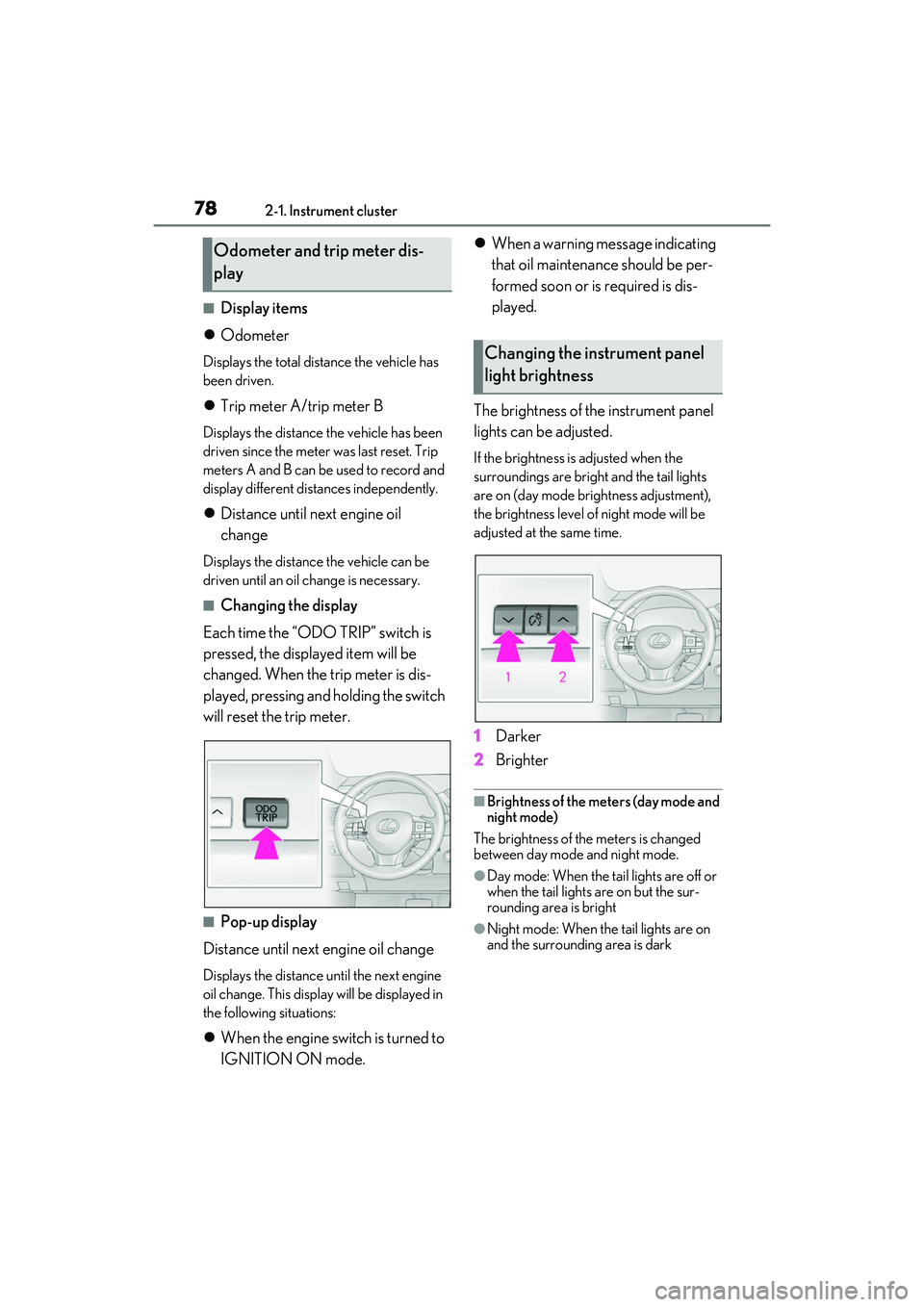
Each time the “ODO TRIP” switch is
pressed, the displayed item will be
changed. When the trip meter is dis-
played, pressing and holding the switch
will reset the trip meter.
■Pop-up display
Distance until next engine oil change
Displays the distance until the next engine
oil change. This display will be displayed in
the following situations:
When the engine switch is turned to
IGNITION ON mode.
When a warning message indicating
that oil maintenance should be per-
formed soon or is required is dis-
played.
The brightness of the instrument panel
lights can be adjusted.
If the brightness is adjusted when the
surroundings are bright and the tail lights
are on (day mode brightness adjustment),
the brightness level of night mode will be
adjusted at the same time.
1 Darker
2 Brighter
■Brightness of the meters (day mode and
night mode)
The brightness of the meters is changed
between day mode and night mode.
●Day mode: When the tail lights are off or
when the tail lights are on but the sur-
rounding area is bright
●Night mode: When the tail lights are on
and the surrounding area is dark
Odometer and trip meter dis-
play
Changing the instrument panel
light brightness
Page 118 of 508
1163-2. Opening, closing and locking the doors
detection area, it may take slightly longer
to unlock the doors af ter the door handle
is gripped.
●Fingernails may scrape against the door
during operation of the door handle. Be
careful not to injure fingernails or dam-
age the surface of the door.
■When the vehicle is not driven for
extended periods
●To prevent theft of the vehicle, do not
leave the electronic key within 6 ft. (2 m)
of the vehicle.
●The smart access syst em with push-but-
ton start can be deactivated in advance.
●Setting the electronic key to battery-sav-
ing mode helps to reduce key battery
depletion. ( P.114)
■To operate the system properly
Make sure to carry the electronic key when
operating the system. Do not get the elec-
tronic key too close to the vehicle when
operating the system from the outside of the
vehicle.
Depending on the position and holding
condition of the electronic key, the key may
not be detected correctly and the system
may not operate properly. (The alarm may
go off accidentally, or the door lock preven-
tion may not operate.)
■If the smart access system with
push-button start does not operate
properly
●If the doors cannot be locked or unlocked
and the back door cannot be opened,
perform the following.
• Bring the electronic key close to the door handle and perform a lock or unlock
operation.
• Bring the electronic key close to the but- ton on the back door ( P.102) and press
the button.
• Use the wireless remote control.
If the doors cannot be locked or unlocked
by perform the above, use the mechanical
key. ( P.421) However, if the mechanical
key is used while the alarm system is set, the
warning will sound. ( P.67)
●If the engine cannot be started, refer to
P.422
■Customization
Some functions can be customized.
( P.449)
■If the smart access system with
push-button start has been deactivated
in a customized setting
●Locking and unlocking the doors: Use
the wireless remote control or mechani-
cal key. ( P.97, 102, 421)
●Starting the engine and changing engine
switch modes: P.422
●Stopping the engine: P.172
WARNING
■Caution regarding interference with
electronic devices
●People with implantable cardiac pace-
makers, cardiac resynchronization
therapy-pacemakers or implantable
cardioverter defibrillators should keep
away from the smart access system
with push-button start antennas.
(P.113)
The radio waves may affect the opera-
tion of such device s. If necessary, the
entry function can be disabled. Ask
your Lexus dealer for details, such as
the frequency of radio waves and tim-
ing of the emitted radio waves. Then,
consult your doctor to see if you
should disable the entry function.
●Users of any electrical medical device
other than implantable cardiac pace-
makers, cardiac resynchronization
therapy-pacemakers or implantable
cardioverter defibril lators should con-
sult the manufacturer of the device for
information about it s operation under
the influence of radio waves.
Radio waves could have unexpected
effects on the operation of such medi-
cal devices.
Ask your Lexus dealer for details on
disabling the entry function.
Page 167 of 508
1654-1. Before driving
4
Driving
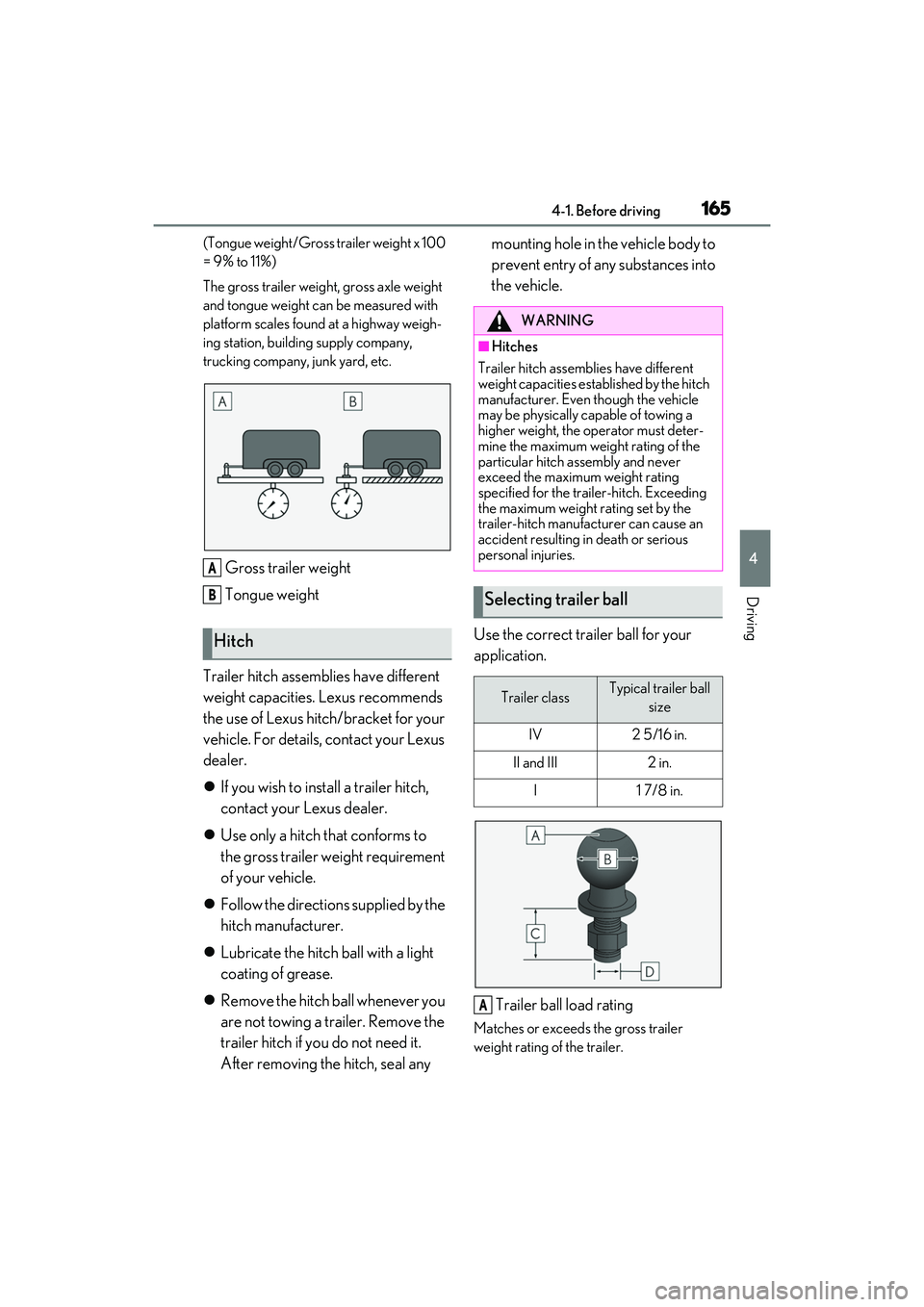
(Tongue weight/Gross trailer weight x 100
= 9% to 11%)
The gross trailer weight, gross axle weight
and tongue weight can be measured with
platform scales found at a highway weigh-
ing station, building supply company,
trucking company, junk yard, etc.
Gross trailer weight
Tongue weight
Trailer hitch assemblies have different
weight capacities. Lexus recommends
the use of Lexus hitch/bracket for your
vehicle. For details, contact your Lexus
dealer.
If you wish to install a trailer hitch,
contact your Lexus dealer.
Use only a hitch that conforms to
the gross trailer weight requirement
of your vehicle.
Follow the directions supplied by the
hitch manufacturer.
Lubricate the hitch ball with a light
coating of grease.
Remove the hitch ball whenever you
are not towing a trailer. Remove the
trailer hitch if you do not need it.
After removing the hitch, seal any mounting hole in the vehicle body to
prevent entry of any substances into
the vehicle.
Use the correct trailer ball for your
application.
Trailer ball load rating
Matches or exceeds the gross trailer
weight rating of the trailer.
Hitch
A
B
WARNING
■Hitches
Trailer hitch assemblies have different
weight capacities established by the hitch
manufacturer. Even though the vehicle
may be physically capable of towing a
higher weight, the operator must deter-
mine the maximum weight rating of the
particular hitch assembly and never
exceed the maximum weight rating
specified for the trailer-hitch. Exceeding
the maximum weight rating set by the
trailer-hitch manufacturer can cause an
accident resulting in death or serious
personal injuries.
Selecting trailer ball
Trailer classTypical trailer ball size
IV2 5/16 in.
II and III2 in.
I1 7/8 in.
A
Page 168 of 508

1664-1. Before driving
Ball diameter
Matches the size of the trailer coupler.
Most couplers are stamped with the
required trailer ball size.
Shank length
Protrudes beyond the bottom of the lock
washer and nut by at least 2 threads.
Shank diameter
Matches the ball mount hole diameter size.
Weight carrying ball position
• RX350 : 44.96 in. (1142 mm)
• RX350L : 49.72 in. (1263 mm)
Hitch receiver pin hole position
• RX350 : 35.94 in. (913 mm)
• RX350L : 45.08 in. (1145 mm)
Use the wire harness stored in the rear
end under body.
■Auto current cut-off function
In case of over current, the auto cut-off
function stops the power flowing to the
trailer lights to prevent damage to the vehi-
cle’s electrical system.
This function is activ ated when the rated
current of any of the following trailer light
circuit components is exceeded:
●Tail lights: maximum 7.8 A
●Stop/turn signal light (right): maximum
4.5 A
●Stop/turn signal light (left): maximum 4.5
A
■When the auto current cut function is
activated
If a trailer light does not come on due to the
activation of the auto current cut function,
the light system will need to be reset.
Follow the reset procedure shown below.
●If a tail light does not come on, turn off the
headlight switch.
●If the right-side stop/turn signal light does
not come on, put the turn signal in the off
position or remove foot from the brake
pedal.
●If the left-side stop/t urn signal light does
not come on, put the turn signal in the off
position or remove foot from the brake
pedal.
If the emergency flashers do not operate,
press the emergency flasher switch to turn
them off.
After the light system is reset, operate the
light switches again to see if the lights oper-
ate normally.
If the lights do not operate normally, have
Positions for towing hitch
receiver and hitch ball
Connecting trailer lights
B
C
D
A
B
Page 186 of 508
1844-3. Operating the lights and wipers
4-3.Operating the lights and wipers
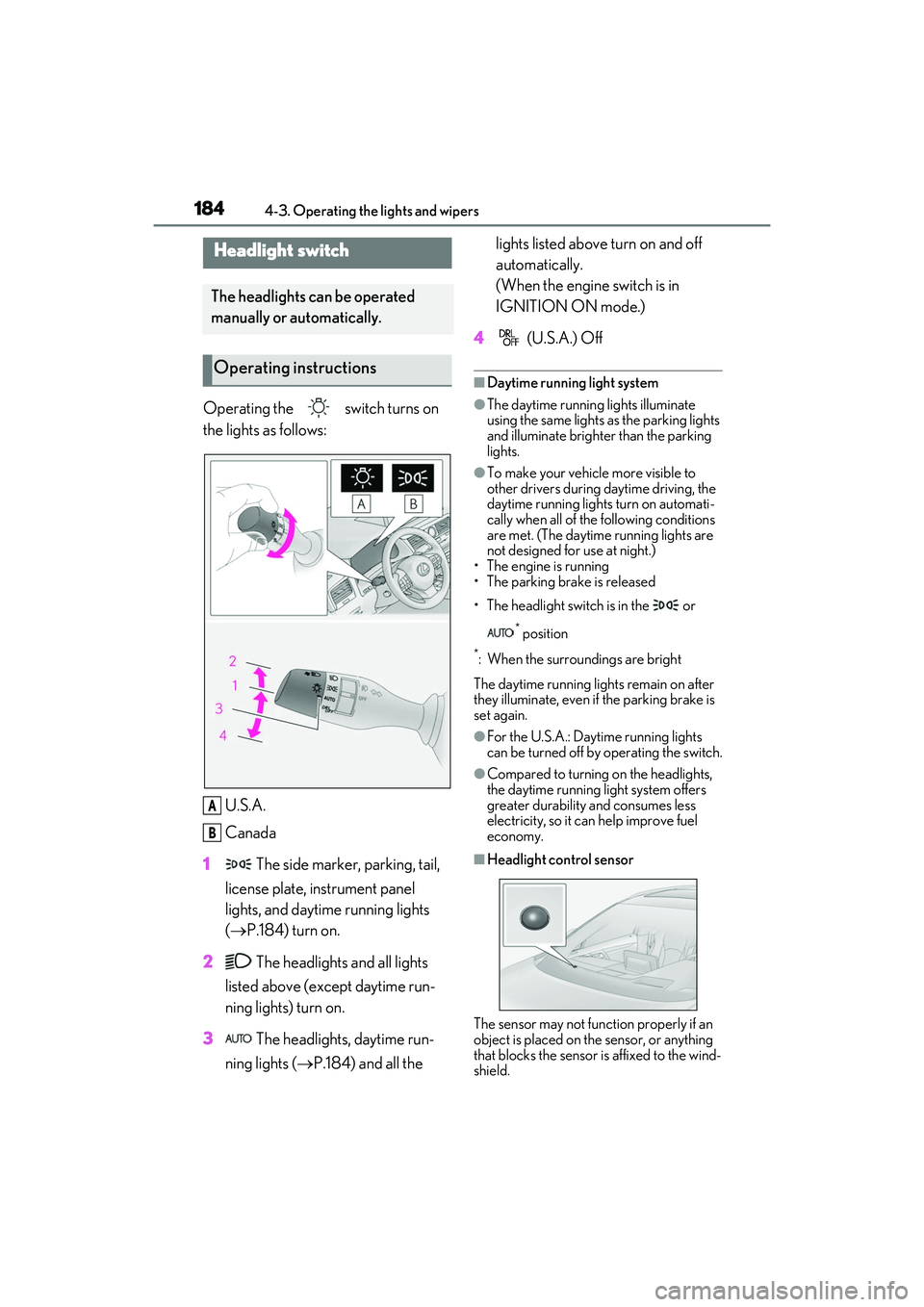
Operating the switch turns on
the lights as follows:U.S.A.
Canada
1 The side marker, parking, tail,
license plate, instrument panel
lights, and daytime running lights
( P.184) turn on.
2 The headlights and all lights
listed above (except daytime run-
ning lights) turn on.
3 The headlights, daytime run-
ning lights ( P.184) and all the lights listed above turn on and off
automatically.
(When the engine switch is in
IGNITION ON mode.)
4 (U.S.A.) Off
■Daytime running light system
●The daytime running lights illuminate
using the same lights as the parking lights
and illuminate brighter than the parking
lights.
●To make your vehicle more visible to
other drivers during daytime driving, the
daytime running lights turn on automati-
cally when all of the following conditions
are met. (The daytime running lights are
not designed for use at night.)
• The engine is running
• The parking brake is released
• The headlight switch is in the or
* position
*: When the surroundings are bright
The daytime running lights remain on after
they illuminate, even if the parking brake is
set again.
●For the U.S.A.: Daytime running lights
can be turned off by operating the switch.
●Compared to turning on the headlights,
the daytime running light system offers
greater durability and consumes less
electricity, so it can help improve fuel
economy.
■Headlight control sensor
The sensor may not function properly if an
object is placed on the sensor, or anything
that blocks the sensor is affixed to the wind-
shield.
Headlight switch
The headlights can be operated
manually or automatically.
Operating instructions
A
B
Page 187 of 508
1854-3. Operating the lights and wipers
4
Driving
Doing so interferes with the sensor detect-
ing the level of ambient light and may cause
the automatic headlight system to malfunc-
tion.
■Automatic light off system
●When the headlights come on: The head-
lights and tail lights tu rn off 30 seconds
after a door is opened and closed if the
engine switch is turned to ACCESSORY
mode or turned off. (The lights turn off
immediately if on the key is pressed
after all the doors are locked.)
●When only the tail lights are on: The tail
lights turn off automatically if the engine
switch is turned to ACCESSORY mode
or turned off and the driver’s door is
opened.
To turn the lights on again, turn the engine
switch to IGNITION ON mode, or turn the
light switch off once and then back to
or .
■Automatic headlight leveling system (if
equipped)
The level of the headlights is automatically
adjusted according to the number of pas-
sengers and the loading condition of the
vehicle to ensure that the headlights do not
interfere with other road users.
■Light reminder buzzer
A buzzer sounds when the engine switch is
turned off or turned to ACCESSORY
mode and the driver’s door is opened while
the lights are turned on.
■Welcome lighting
If the headlight switch is turned to and
the surrounding area is dark, unlocking the
doors using the smart access system with
push-button start or wireless remote con-
trol will turn the parking lights and tail lights
on automatically.
■Windshield wiper linked headlight illu-
mination
When driving during daytime with the
headlight switch turned to , if the wind-
shield wipers are used, the headlights will turn on automatically after several seconds
to help enhance the visibility of your vehicle.
■Battery-saving function
In order to prevent the battery of the vehicle
from discharging, if the headlights and/or
tail lights are on when the engine switch is
turned off the battery saving function will
operate and automatically turn off all the
lights after approximately 20 minutes.
When the engine switch is turned to IGNI-
TION ON mode, the battery-saving func-
tion will be disabled.
When any of the following are performed,
the battery-saving function is canceled
once and then reactivated. All the lights will
turn off automatically 20 minutes after the
battery- saving function has been reacti-
vated:
●When the headlight switch is operated
●When a door is opened or closed
■Customization
Some functions can be customized.
( P.449)
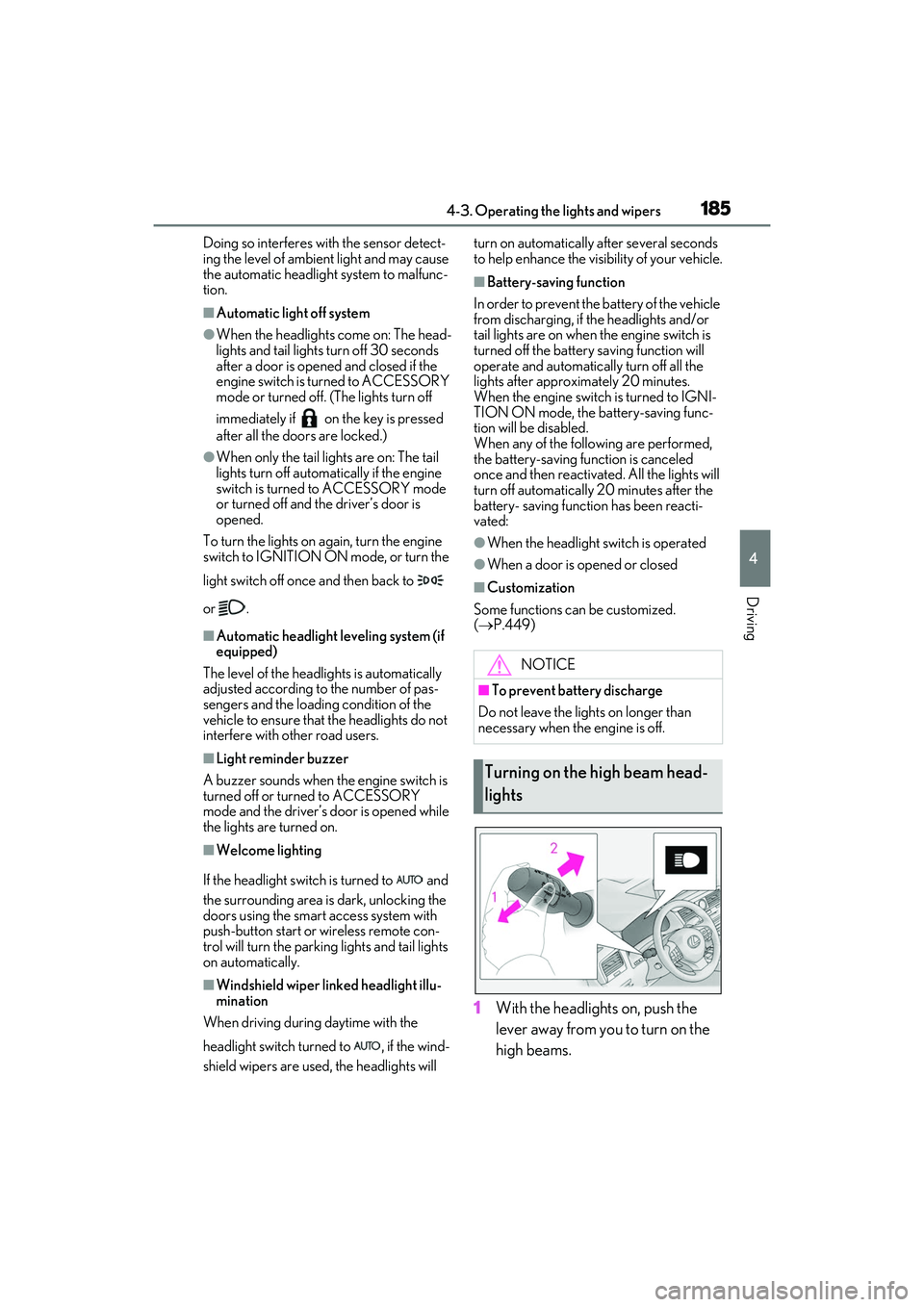
1 With the headlights on, push the
lever away from you to turn on the
high beams.
NOTICE
■To prevent battery discharge
Do not leave the lights on longer than
necessary when the engine is off.
Turning on the high beam head-
lights
Page 189 of 508
1874-3. Operating the lights and wipers
4
Driving
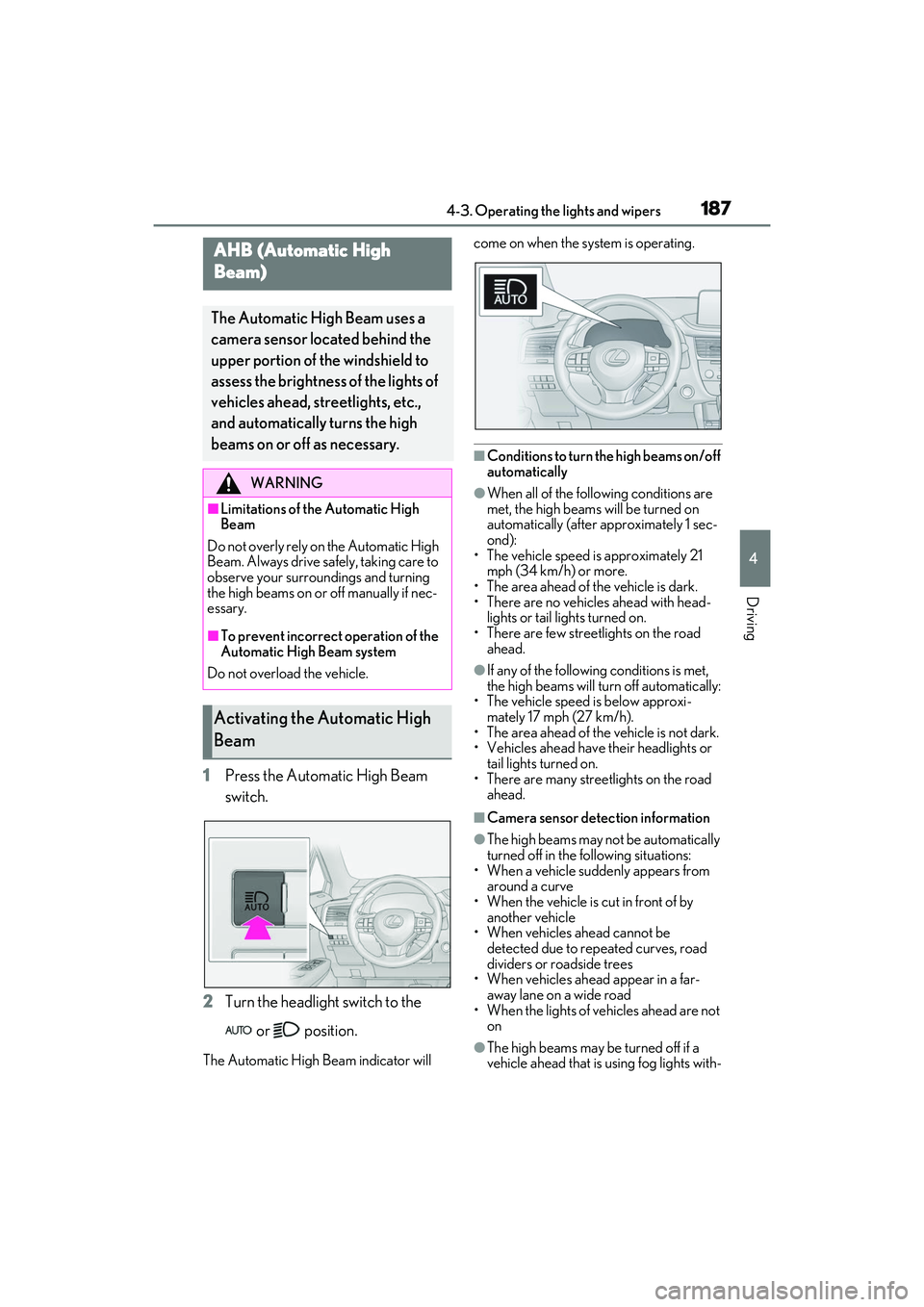
1Press the Automatic High Beam
switch.
2 Turn the headlight switch to the
or position.
The Automatic High Beam indicator will come on when the system is operating.
■Conditions to turn the high beams on/off
automatically
●When all of the follo
wing conditions are
met, the high beams will be turned on
automatically (after approximately 1 sec-
ond):
• The vehicle speed is approximately 21 mph (34 km/h) or more.
• The area ahead of the vehicle is dark.
• There are no vehicles ahead with head- lights or tail lights turned on.
• There are few streetlights on the road ahead.
●If any of the following conditions is met,
the high beams will turn off automatically:
• The vehicle speed is below approxi-
mately 17 mph (27 km/h).
• The area ahead of the vehicle is not dark.
• Vehicles ahead have their headlights or tail lights turned on.
• There are many streetlights on the road ahead.
■Camera sensor dete ction information
●The high beams may not be automatically
turned off in the following situations:
• When a vehicle suddenly appears from around a curve
• When the vehicle is cut in front of by
another vehicle
• When vehicles ahead cannot be detected due to repeated curves, road
dividers or roadside trees
• When vehicles ahead appear in a far- away lane on a wide road
• When the lights of vehicles ahead are not
on
●The high beams may be turned off if a
vehicle ahead that is using fog lights with-
AHB (Automatic High
Beam)
The Automatic High Beam uses a
camera sensor located behind the
upper portion of the windshield to
assess the brightness of the lights of
vehicles ahead, streetlights, etc.,
and automatically turns the high
beams on or off as necessary.
WARNING
■Limitations of the Automatic High
Beam
Do not overly rely on the Automatic High
Beam. Always drive sa fely, taking care to
observe your surroundings and turning
the high beams on or off manually if nec-
essary.
■To prevent incorrect operation of the
Automatic High Beam system
Do not overload the vehicle.
Activating the Automatic High
Beam