steering LEXUS RX350L 2019 User Guide
[x] Cancel search | Manufacturer: LEXUS, Model Year: 2019, Model line: RX350L, Model: LEXUS RX350L 2019Pages: 777, PDF Size: 13.14 MB
Page 82 of 777
812. Instrument cluster
2
Instrument cluster
RX350/RX350L_U
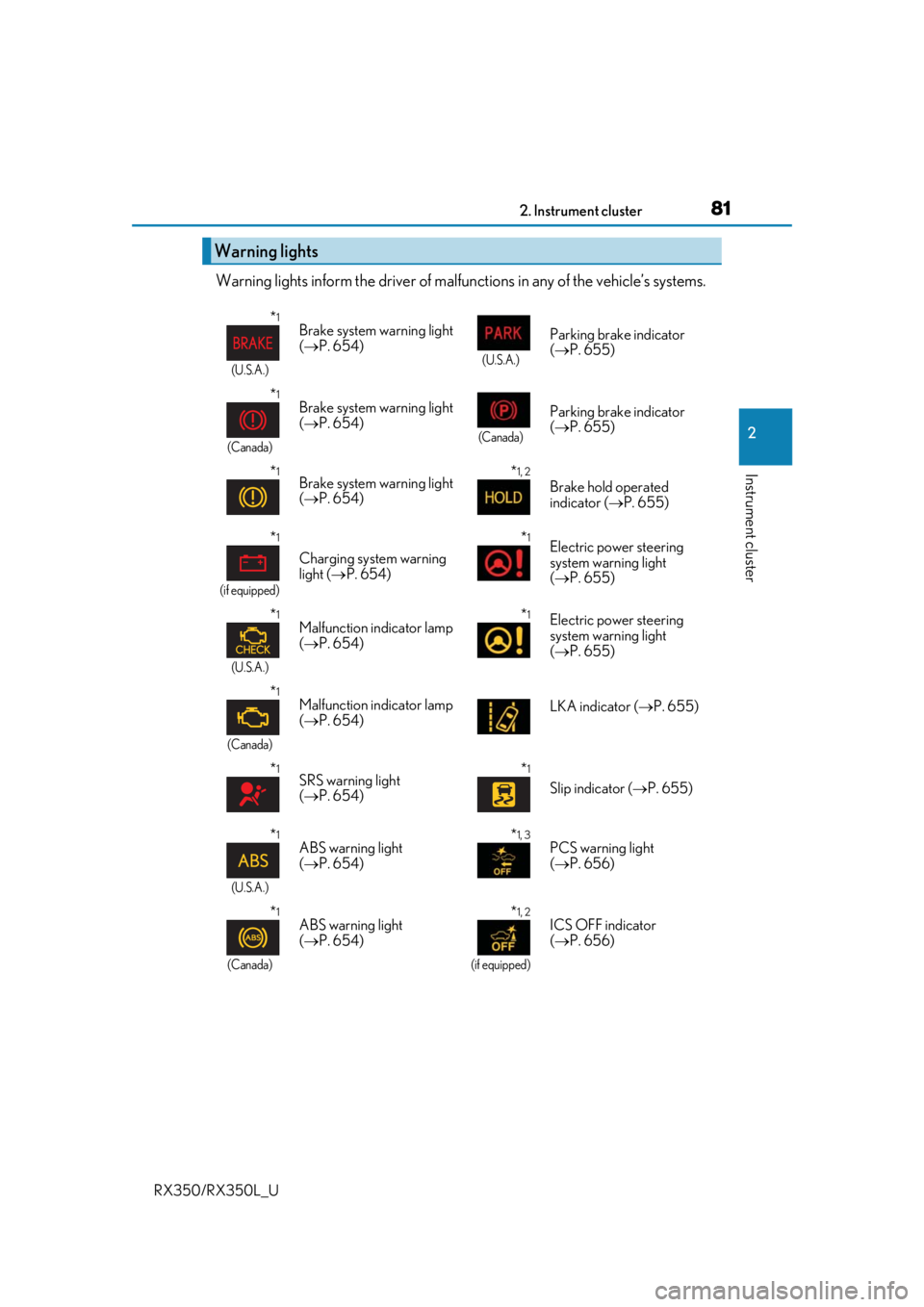
Warning lights inform the driver of malfunctions in any of the vehicle’s systems.
Warning lights
*1
(U.S.A.)
Brake system warning light
( P. 654)
(U.S.A.)
Parking brake indicator
( P. 655)
*1
(Canada)
Brake system warning light
( P. 654)
(Canada)
Parking brake indicator
( P. 655)
*1Brake system warning light
( P. 654)*1, 2
Brake hold operated
indicator ( P. 655)
*1
(if equipped)
Charging system warning
light ( P. 654)
*1Electric power steering
system warning light
( P. 655)
*1
(U.S.A.)
Malfunction indicator lamp
( P. 654)*1Electric power steering
system warning light
( P. 655)
*1
(Canada)
Malfunction indicator lamp
( P. 654) LKA indicator (
P. 655)
*1SRS warning light
( P. 654)*1
Slip indicator ( P. 655)
*1
(U.S.A.)
ABS warning light
( P. 654)*1, 3PCS warning light
( P. 656)
*1
(Canada)
ABS warning light
( P. 654)*1, 2
(if equipped)
ICS OFF indicator
( P. 656)
Page 97 of 777
962. Instrument cluster
RX350/RX350L_U
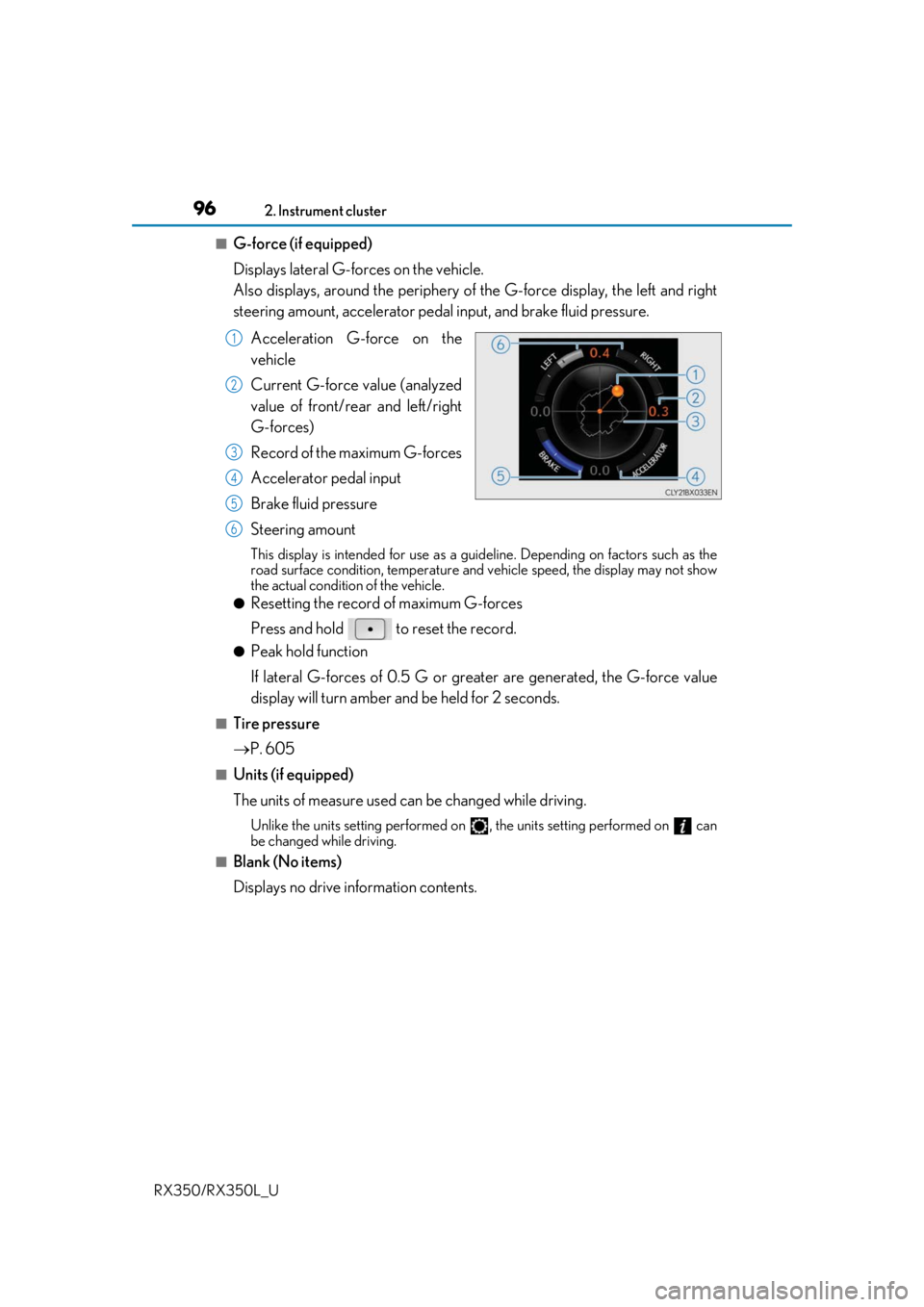
■G-force (if equipped)
Displays lateral G-forces on the vehicle.
Also displays, around the periphery of the G-force display, the left and right
steering amount, accelerator pedal input, and brake fluid pressure.
Acceleration G-force on the
vehicle
Current G-force value (analyzed
value of front/rear and left/right
G-forces)
Record of the maximum G-forces
Accelerator pedal input
Brake fluid pressure
Steering amount
This display is intended for use as a guideline. Depending on factors such as the
road surface condition, temperature and vehicle speed, the display may not show
the actual condition of the vehicle.
●Resetting the record of maximum G-forces
Press and hold to reset the record.
●Peak hold function
If lateral G-forces of 0.5 G or grea ter are generated, the G-force value
display will turn amber and be held for 2 seconds.
■Tire pressure
P. 605
■Units (if equipped)
The units of measure used can be changed while driving.
Unlike the units setting performed on , the units setting performed on can
be changed while driving.
■Blank (No items)
Displays no drive information contents.
1
2
3
4
5
6
Page 98 of 777
972. Instrument cluster
2
Instrument cluster
RX350/RX350L_U
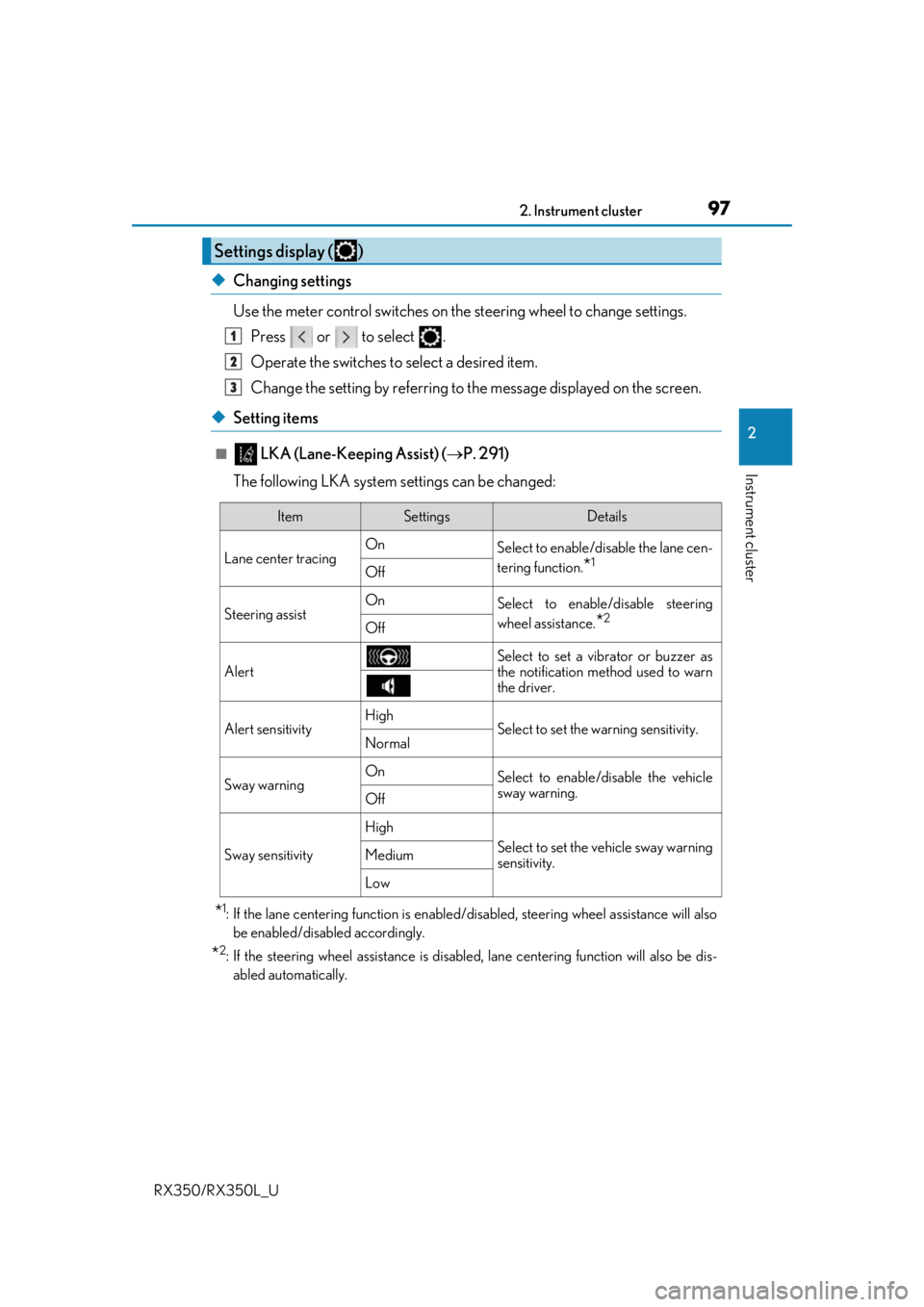
◆Changing settings
Use the meter control switches on the steering wheel to change settings.
Press or to select .
Operate the switches to select a desired item.
Change the setting by referring to the message displayed on the screen.
◆Setting items
■ LKA (Lane-Keeping Assist) ( P. 291)
The following LKA system settings can be changed:
*1: If the lane centering function is enabled/ disabled, steering wheel assistance will also
be enabled/disabled accordingly.
*2: If the steering wheel assistance is disabled, lane cent ering function will also be dis-
abled automatically.
Settings display ( )
1
2
3
ItemSettingsDetails
Lane center tracing On
Select to enable/disable the lane cen-
tering function.
*1Off
Steering assistOnSelect to enable/disable steering
wheel assistance.
*2Off
Alert
Select to set a vibrator or buzzer as
the notification method used to warn
the driver.
Alert sensitivityHighSelect to set the warning sensitivity.Normal
Sway warningOnSelect to enable/disable the vehicle
sway warning.
Off
Sway sensitivity
High
Select to set the vehicle sway warning
sensitivity.Medium
Low
Page 107 of 777

1062. Instrument cluster
RX350/RX350L_U
■Background color of the indicator/shift posi tion display area (except F SPORT models)
The background color of the indicator/shift position display area is changed according to
the driving mode as follows ( P. 373):
●Eco drive mode: Blue
●Sport mode: Red
■G-force display (if equipped)
●The G-force values may not be zero even when the vehicle is parked, such as when it is
parked on an incline.
●Depending on the vehicle usage conditions, the brake fluid pressure display may not
reach its maximum reading even though the brake pedal is fully depressed.
●If a battery terminal is disconnected and reconnected, the steering amount display may
be disabled temporarily. Afte r driving the vehicle for a while , the display will be enabled.
■Suspension of the settings display
●Some settings cannot be changed while driv ing. When changing settings, park the
vehicle in a safe place.
●If a warning message is displa yed, operation of the settings display will be suspended.
■Tire pressure
●It may take a few minutes to display the tire inflation pressure after the engine switch is
turned to IGNITION ON mode. It may also take a few minutes to display the tire infla-
tion pressure after inflation pressure has been adjusted.
●“---” may be displayed if the tire position information cannot be determined due to
unfavorable radio wave conditions.
●Tire inflation pressure changes with temperat ure. The displayed values may also be dif-
ferent from the values measured using a tire pressure gauge.
■Liquid crystal display
Small spots or light spots may appear on the display. This phenomenon is characteristic
of liquid crystal displays, and there is no problem continuing to use the display.
■Customization
Some functions can be customized. ( P. 97, 722)
Page 120 of 777
119
3
Operation of
each component
RX350/RX350L_U
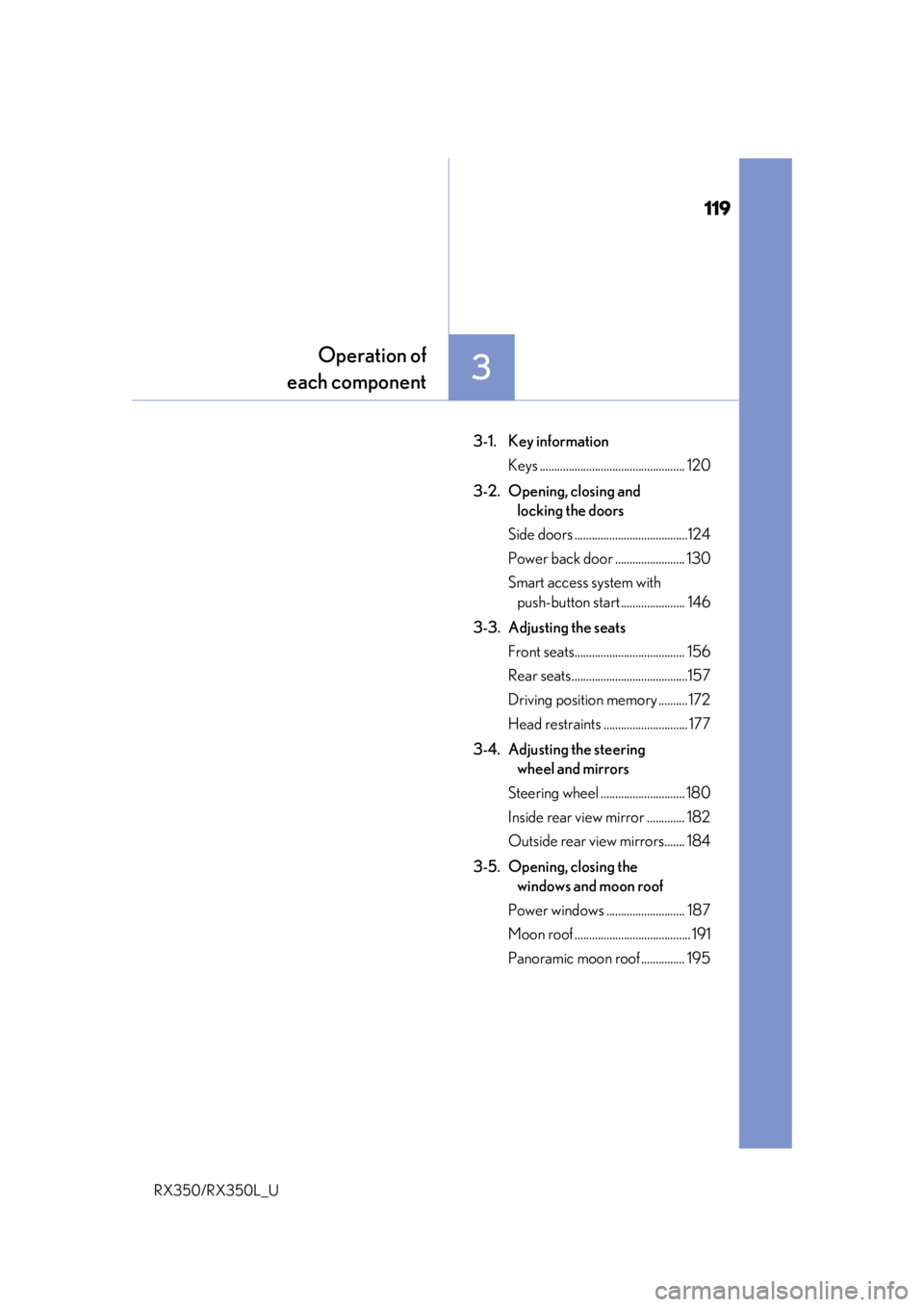
3-1. Key information
Keys .................................................. 120
3-2. Opening, closing and locking the doors
Side doors .......................................124
Power back door ........................ 130
Smart access system with push-button start ...................... 146
3-3. Adjusting the seats Front seats...................................... 156
Rear seats........................................157
Driving position memory .......... 172
Head restraints ............................. 177
3-4. Adjusting the steering wheel and mirrors
Steering wheel ............................. 180
Inside rear view mirror ............. 182
Outside rear view mirrors....... 184
3-5. Opening, closing the windows and moon roof
Power windows ........................... 187
Moon roof ........................................ 191
Panoramic moon roof ............... 195
Page 157 of 777
156
RX350/RX350L_U3-3. Adjusting the seats
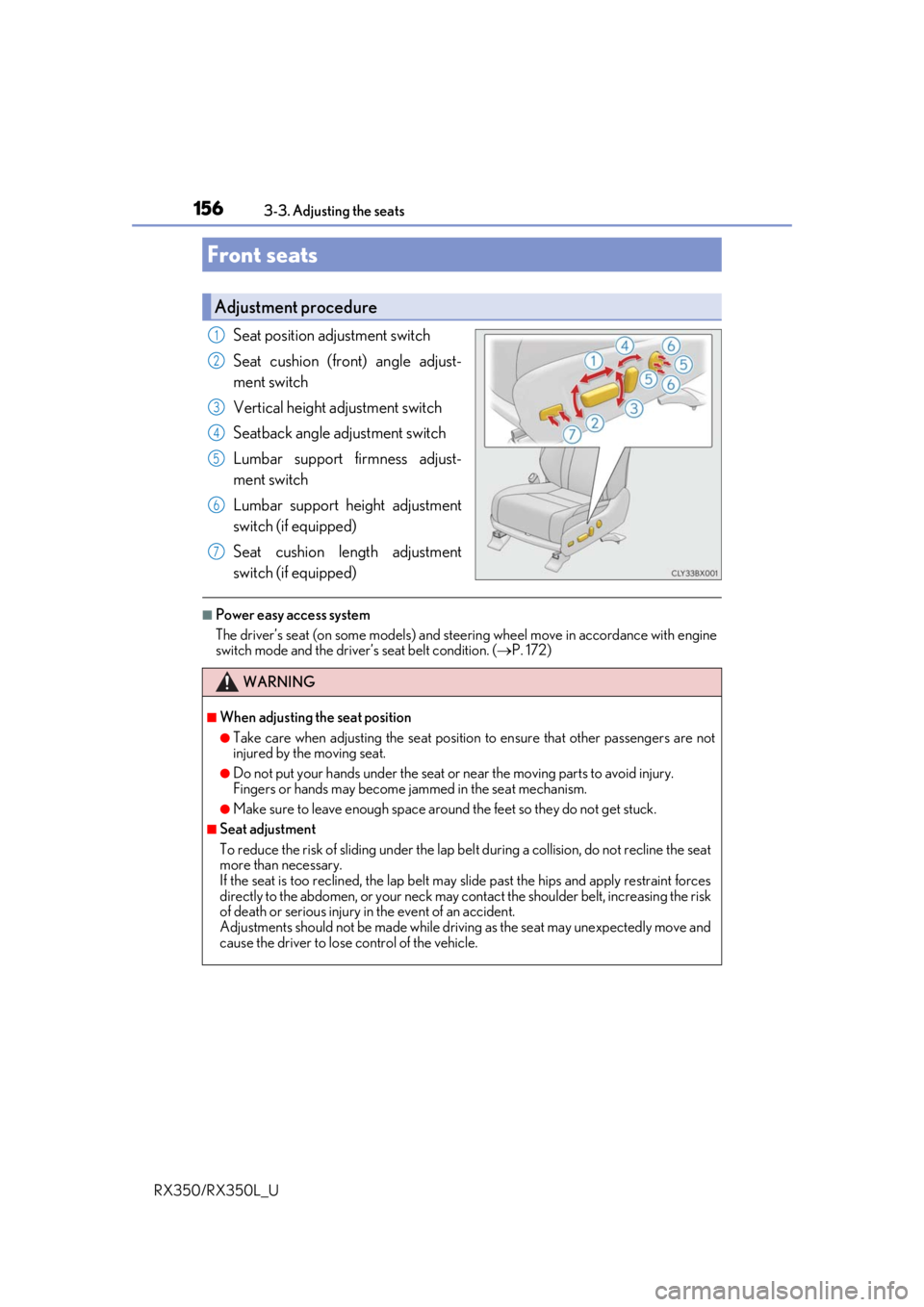
Seat position adjustment switch
Seat cushion (front) angle adjust-
ment switch
Vertical height adjustment switch
Seatback angle adjustment switch
Lumbar support firmness adjust-
ment switch
Lumbar support height adjustment
switch (if equipped)
Seat cushion length adjustment
switch (if equipped)
■Power easy access system
The driver’s seat (on some models) and steering wheel move in accordance with engine
switch mode and the driver’s seat belt condition. (
P. 172)
Front seats
Adjustment procedure
1
2
3
4
5
6
7
WARNING
■When adjusting the seat position
●Take care when adjusting the seat position to ensure that other passengers are not
injured by the moving seat.
●Do not put your hands under the seat or near the moving parts to avoid injury.
Fingers or hands may become jammed in the seat mechanism.
●Make sure to leave enough space around the feet so they do not get stuck.
■Seat adjustment
To reduce the risk of sliding under the lap be lt during a collision, do not recline the seat
more than necessary.
If the seat is too reclined, the lap belt may slide past the hips and apply restraint forces
directly to the abdomen, or your neck may contact the shou lder belt, increasing the risk
of death or serious injury in the event of an accident.
Adjustments should not be made while drivin g as the seat may unexpectedly move and
cause the driver to lose control of the vehicle.
Page 173 of 777
1723-3. Adjusting the seats
RX350/RX350L_U
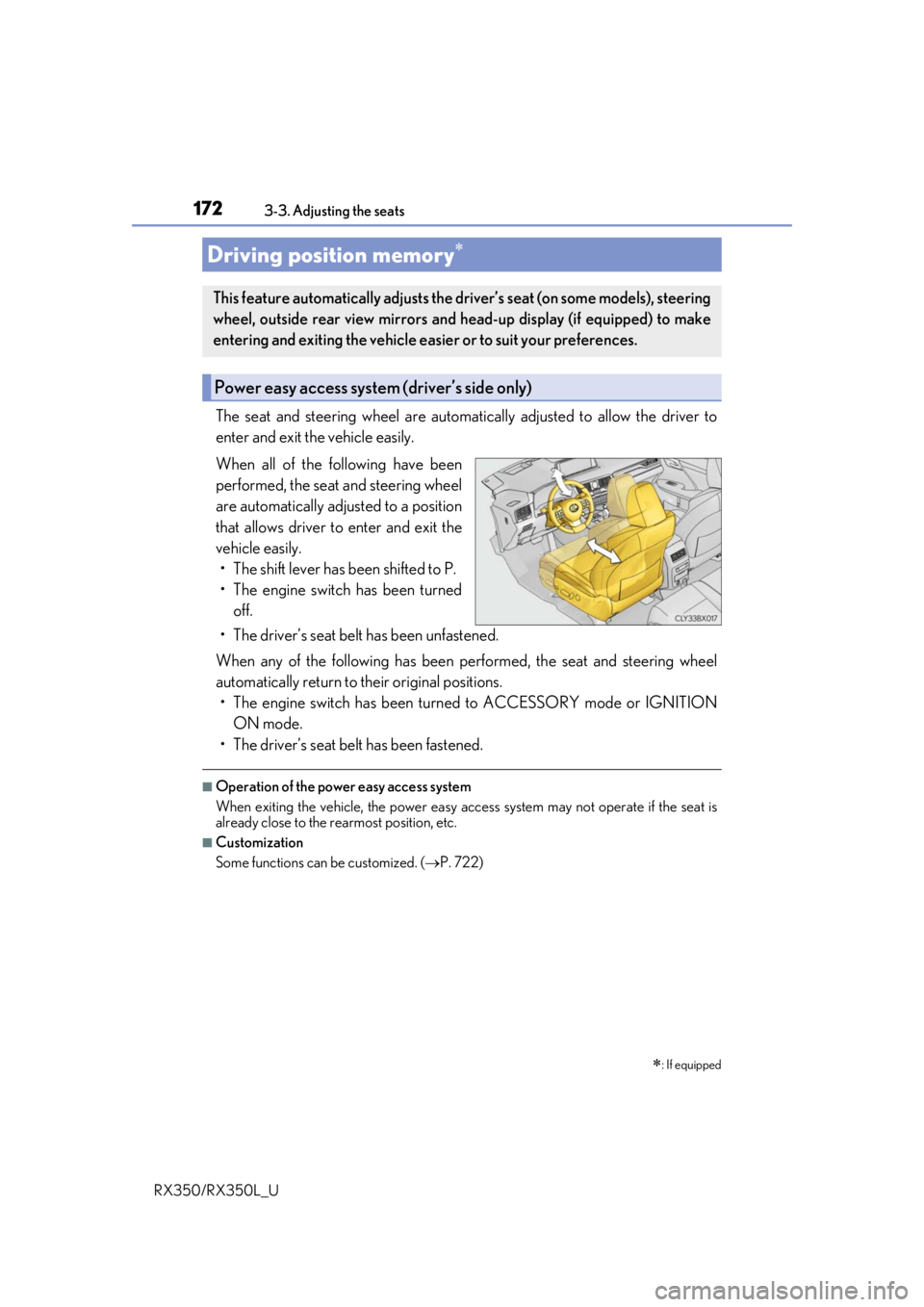
The seat and steering wheel are automati cally adjusted to allow the driver to
enter and exit the vehicle easily.
When all of the following have been
performed, the seat and steering wheel
are automatically adjusted to a position
that allows driver to enter and exit the
vehicle easily. • The shift lever has been shifted to P.
• The engine switch has been turned off.
• The driver’s seat belt has been unfastened.
When any of the following has been performed, the seat and steering wheel
automatically return to their original positions. • The engine switch has been turn ed to ACCESSORY mode or IGNITION
ON mode.
• The driver’s seat belt has been fastened.
■Operation of the power easy access system
When exiting the vehicle, the power easy ac cess system may not operate if the seat is
already close to the rearmost position, etc.
■Customization
Some functions can be customized. ( P. 722)
Driving position memory
: If equipped
This feature automatically adjusts the driver’s seat (on some models), steering
wheel, outside rear view mirrors and head-up display (if equipped) to make
entering and exiting the vehicle easi er or to suit your preferences.
Power easy access system (driver’s side only)
Page 174 of 777
1733-3. Adjusting the seats
3
Operation of each component
RX350/RX350L_U
Your preferred driving position (the position of the driver’s seat, steering wheel,
outside rear view mirrors and head-up display
*) can be recorded and recalled
by pressing a button.
Three different driving positions can be recorded into memory.
*: If equipped
■Recording procedure
Check that the shift lever is in P.
Turn the engine switch to IGNITION ON mode.
Adjust the driver’s seat, steering wh eel, outside rear view mirrors and
head-up display (if equipped) to the desired positions.
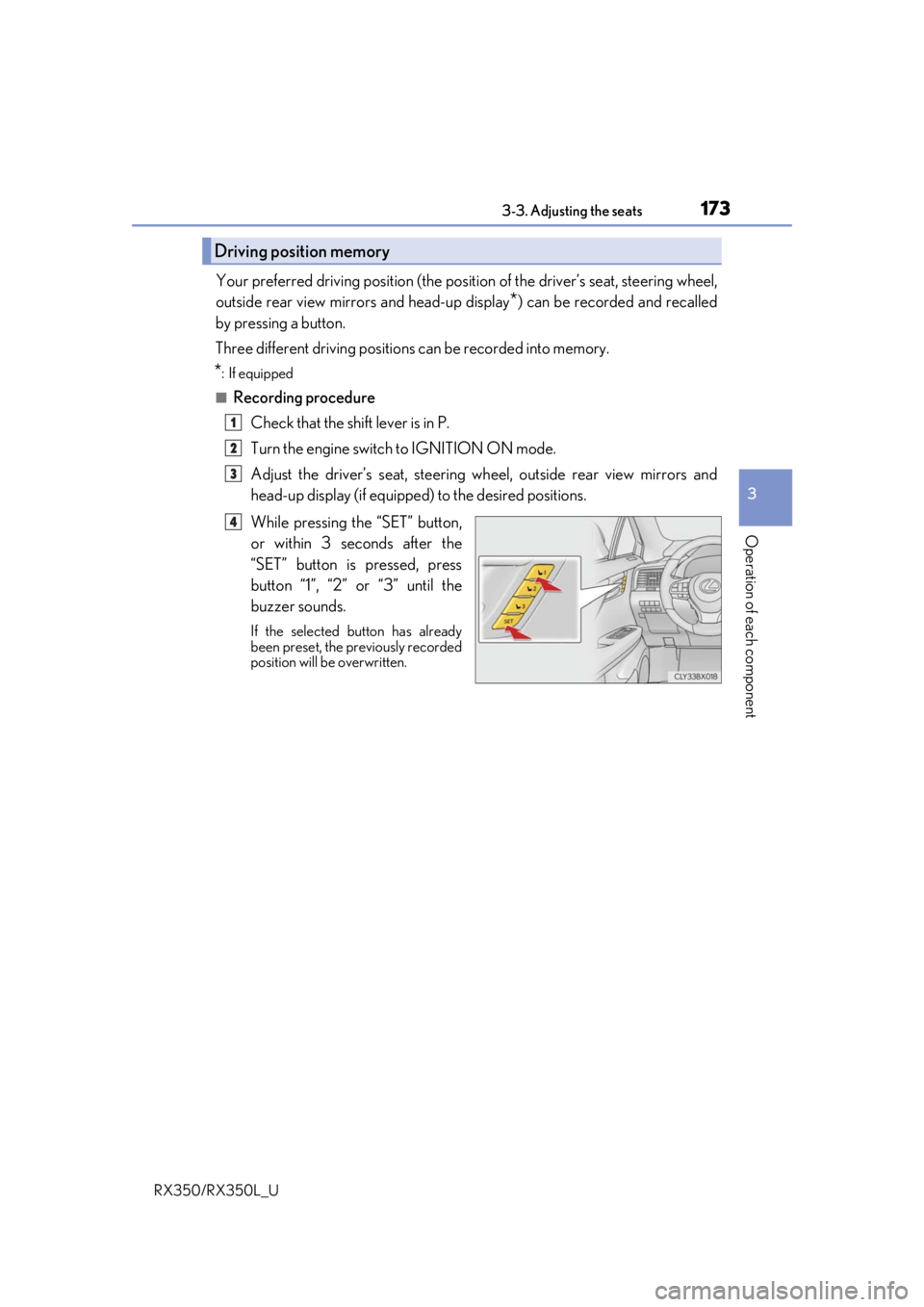
While pressing the “SET” button,
or within 3 seconds after the
“SET” button is pressed, press
button “1”, “2” or “3” until the
buzzer sounds.
If the selected button has already
been preset, the previously recorded
position will be overwritten.
Driving position memory
1
2
3
4
Page 175 of 777
1743-3. Adjusting the seats
RX350/RX350L_U
■Recall procedure Check that the shift lever is in P.
Turn the engine switch to IGNITION ON mode.
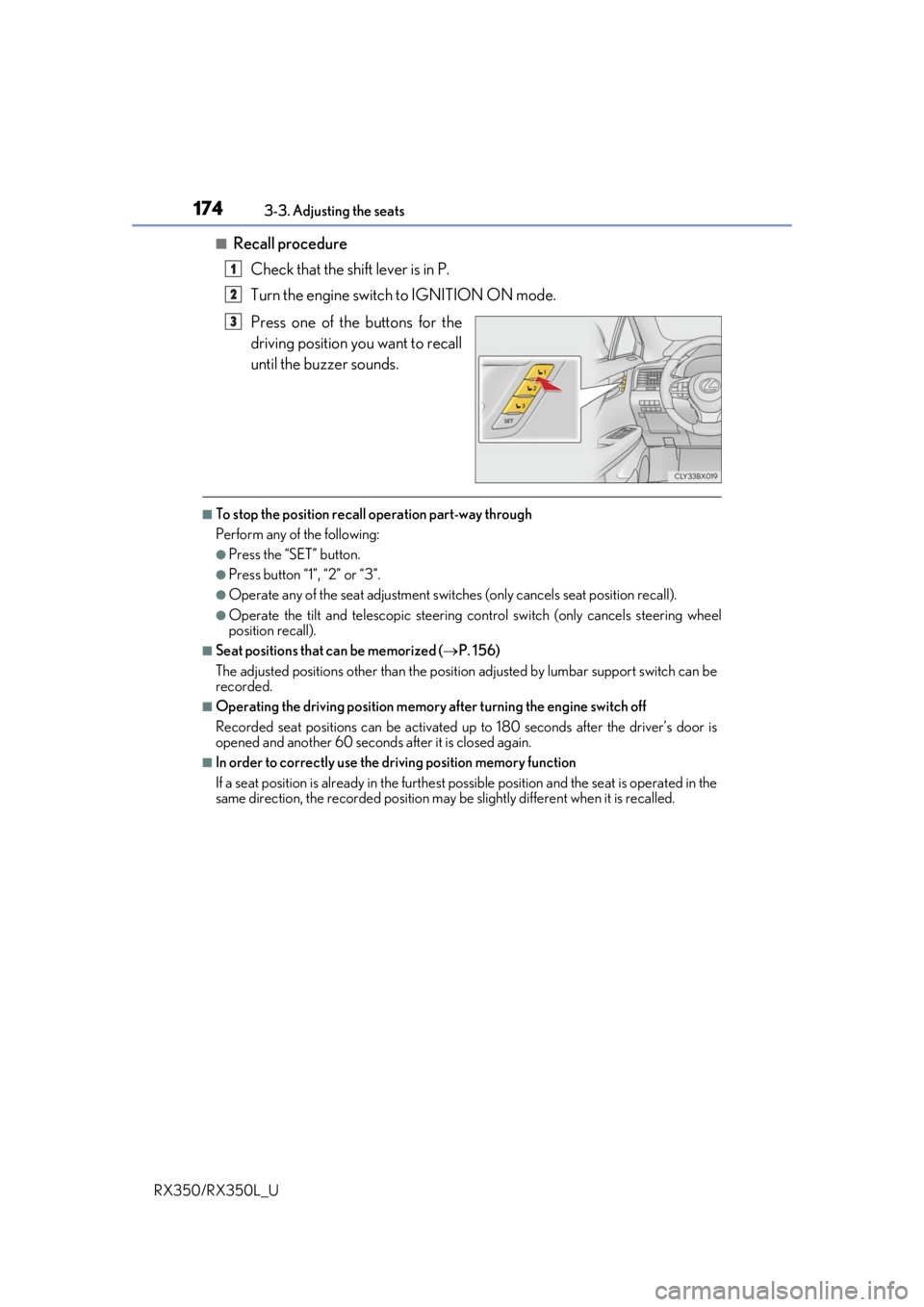
Press one of the buttons for the
driving position you want to recall
until the buzzer sounds.
■To stop the position recall operation part-way through
Perform any of the following:
●Press the “SET” button.
●Press button “1”, “2” or “3”.
●Operate any of the seat adjustment switches (only cancels seat position recall).
●Operate the tilt and telescopic steering control switch (only cancels steering wheel
position recall).
■Seat positions that can be memorized ( P. 156)
The adjusted positions other than the position adjusted by lumbar support switch can be
recorded.
■Operating the driving position memory after turning the engine switch off
Recorded seat positions can be activated up to 180 seconds after the driver’s door is
opened and another 60 seconds after it is closed again.
■In order to correctly use the driving position memory function
If a seat position is already in the furthest po ssible position and the seat is operated in the
same direction, the recorded position may be slightly different when it is recalled.
1
2
3
Page 176 of 777
1753-3. Adjusting the seats
3
Operation of each component
RX350/RX350L_U
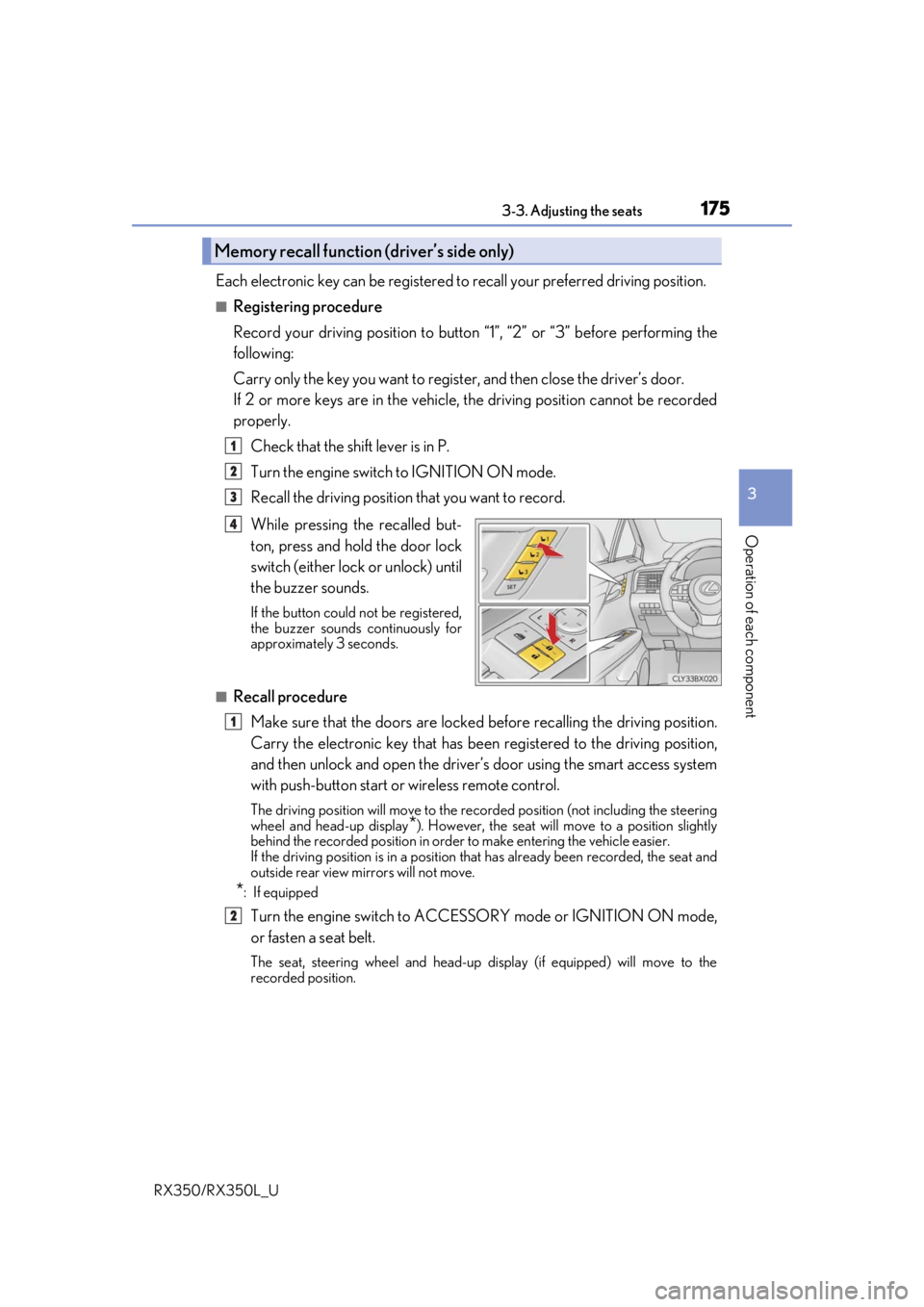
Each electronic key can be registered to recall your preferred driving position.
■Registering procedure
Record your driving position to button “1”, “2” or “3” before performing the
following:
Carry only the key you want to regist er, and then close the driver’s door.
If 2 or more keys are in the vehicle, the driving position cannot be recorded
properly.
Check that the shift lever is in P.
Turn the engine switch to IGNITION ON mode.
Recall the driving position that you want to record.
While pressing the recalled but-
ton, press and hold the door lock
switch (either lock or unlock) until
the buzzer sounds.
If the button could not be registered,
the buzzer sounds continuously for
approximately 3 seconds.
■Recall procedureMake sure that the doors are locked before recalling the driving position.
Carry the electronic key that has been registered to the driving position,
and then unlock and open the driver’s door using the smart access system
with push-button start or wireless remote control.
The driving position will move to the recorded position (not including the steering
wheel and head-up display
*). However, the seat will move to a position slightly
behind the recorded position in order to make entering the vehicle easier.
If the driving position is in a position th at has already been recorded, the seat and
outside rear view mirrors will not move.
*: If equipped
Turn the engine switch to ACCESS ORY mode or IGNITION ON mode,
or fasten a seat belt.
The seat, steering wheel and head-up display (if equipped) will move to the
recorded position.
Memory recall function (driver’s side only)
1
2
3
4
1
2