lock LEXUS RX350L 2019 Owner's Manual
[x] Cancel search | Manufacturer: LEXUS, Model Year: 2019, Model line: RX350L, Model: LEXUS RX350L 2019Pages: 777, PDF Size: 13.14 MB
Page 79 of 777
781-3. Theft deterrent system
RX350/RX350L_U
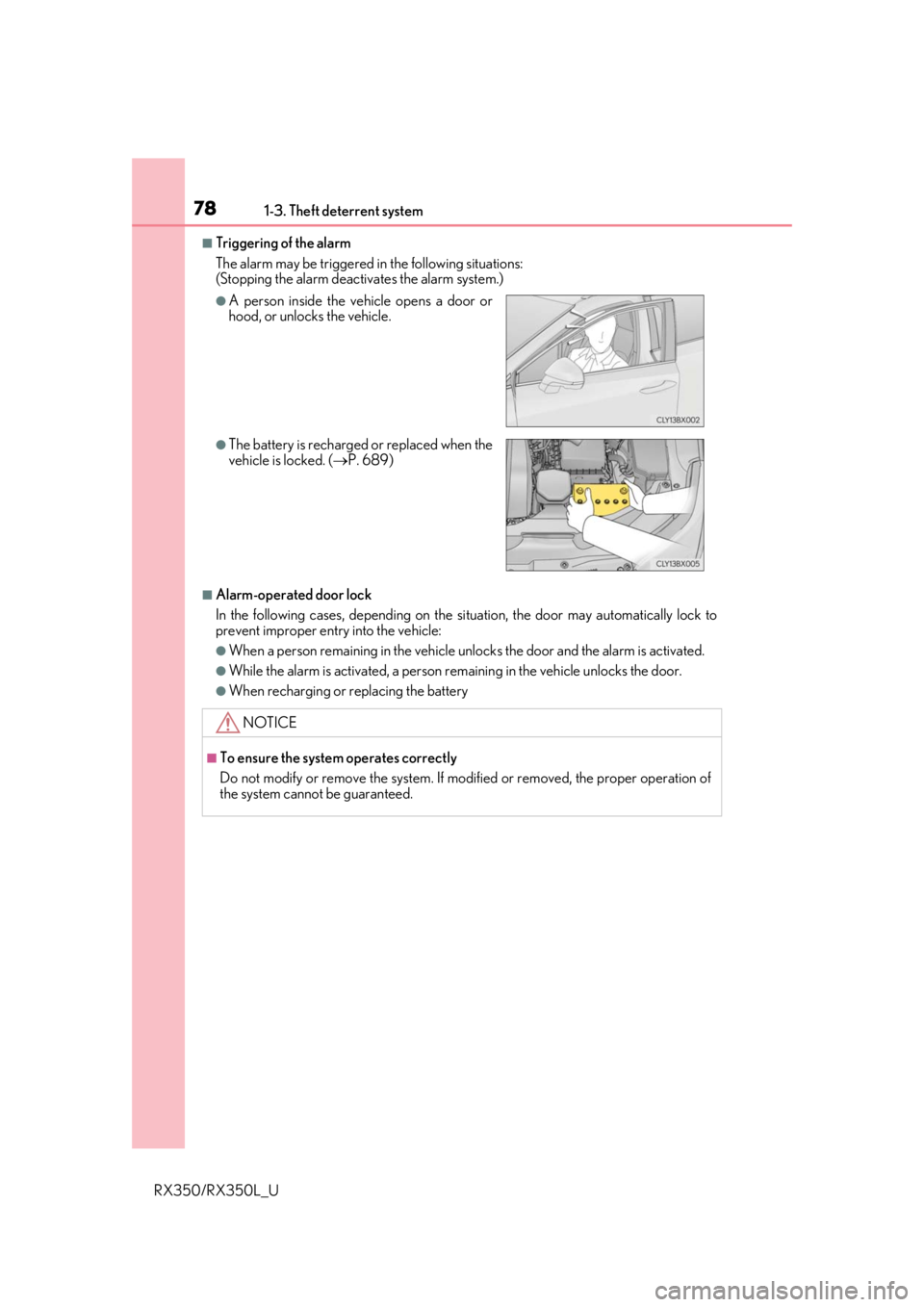
■Triggering of the alarm
The alarm may be triggered in the following situations:
(Stopping the alarm deactivates the alarm system.)
■Alarm-operated door lock
In the following cases, depending on the si tuation, the door may automatically lock to
prevent improper entry into the vehicle:
●When a person remaining in the vehicle un locks the door and the alarm is activated.
●While the alarm is activated, a person remaining in the vehicle unlocks the door.
●When recharging or replacing the battery
●A person inside the vehicle opens a door or
hood, or unlocks the vehicle.
●The battery is recharged or replaced when the
vehicle is locked. (P. 689)
NOTICE
■To ensure the system operates correctly
Do not modify or remove the system. If mo dified or removed, the proper operation of
the system cannot be guaranteed.
Page 84 of 777
832. Instrument cluster
2
Instrument cluster
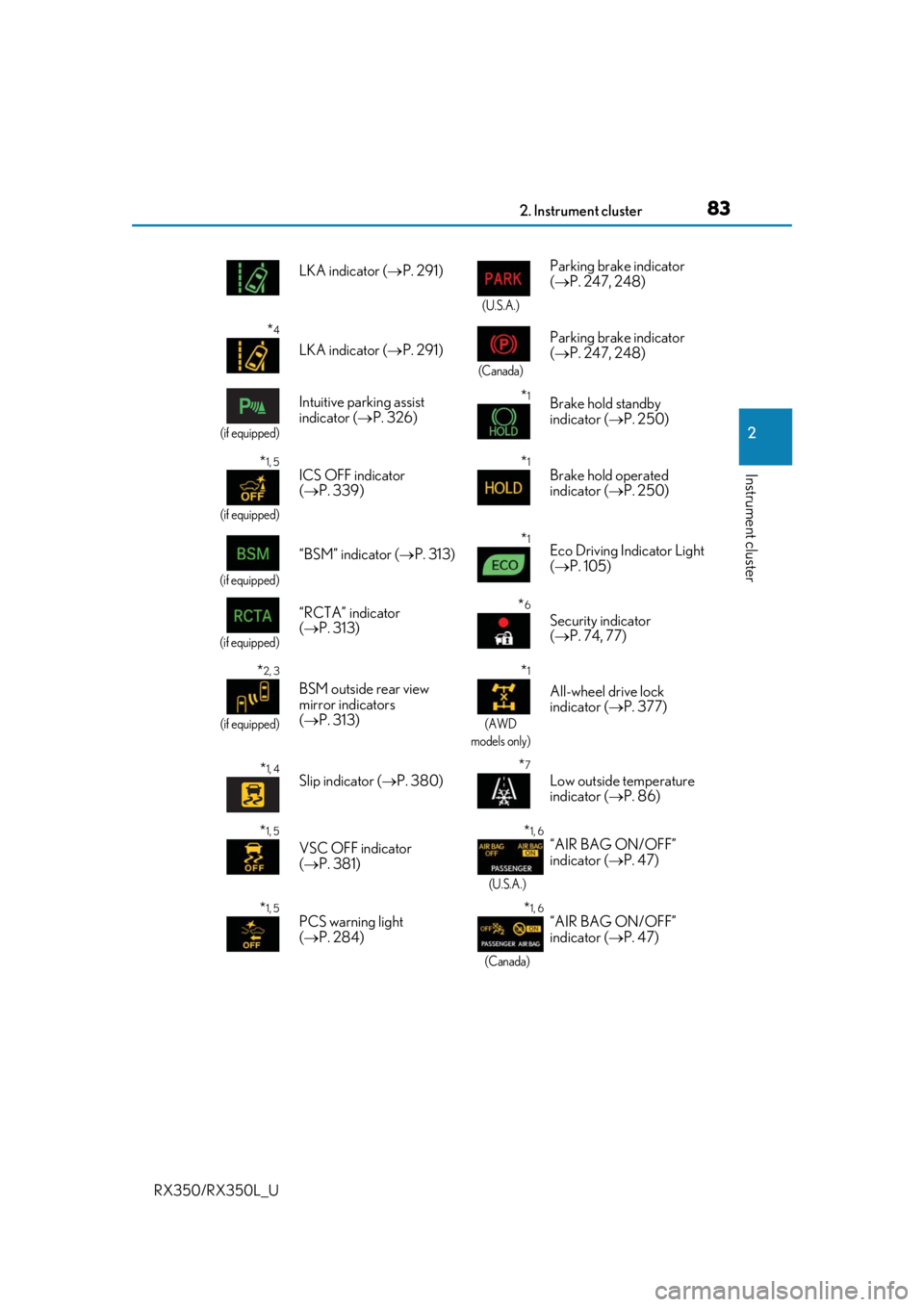
RX350/RX350L_ULKA indicator (
P. 291)
(U.S.A.)
Parking brake indicator
( P. 247, 248)
*4
LKA indicator ( P. 291)
(Canada)
Parking brake indicator
( P. 247, 248)
(if equipped)
Intuitive parking assist
indicator ( P. 326)*1Brake hold standby
indicator ( P. 250)
*1, 5
(if equipped)
ICS OFF indicator
( P. 339)*1Brake hold operated
indicator ( P. 250)
(if equipped)
“BSM” indicator ( P. 313)*1Eco Driving Indicator Light
( P. 105)
(if equipped)
“RCTA” indicator
( P. 313)*6
Security indicator
( P. 74, 77)
*2, 3
(if equipped)
BSM outside rear view
mirror indicators
( P. 313)
*1
(AWD
models only)
All-wheel drive lock
indicator ( P. 377)
*1, 4Slip indicator ( P. 380)*7
Low outside temperature
indicator ( P. 86)
*1, 5
VSC OFF indicator
( P. 381)
*1, 6
(U.S.A.)
“AIR BAG ON/OFF”
indicator ( P. 47)
*1, 5PCS warning light
( P. 284)*1, 6
(Canada)
“AIR BAG ON/OFF”
indicator ( P. 47)
Page 88 of 777
872. Instrument cluster
2
Instrument cluster
RX350/RX350L_U
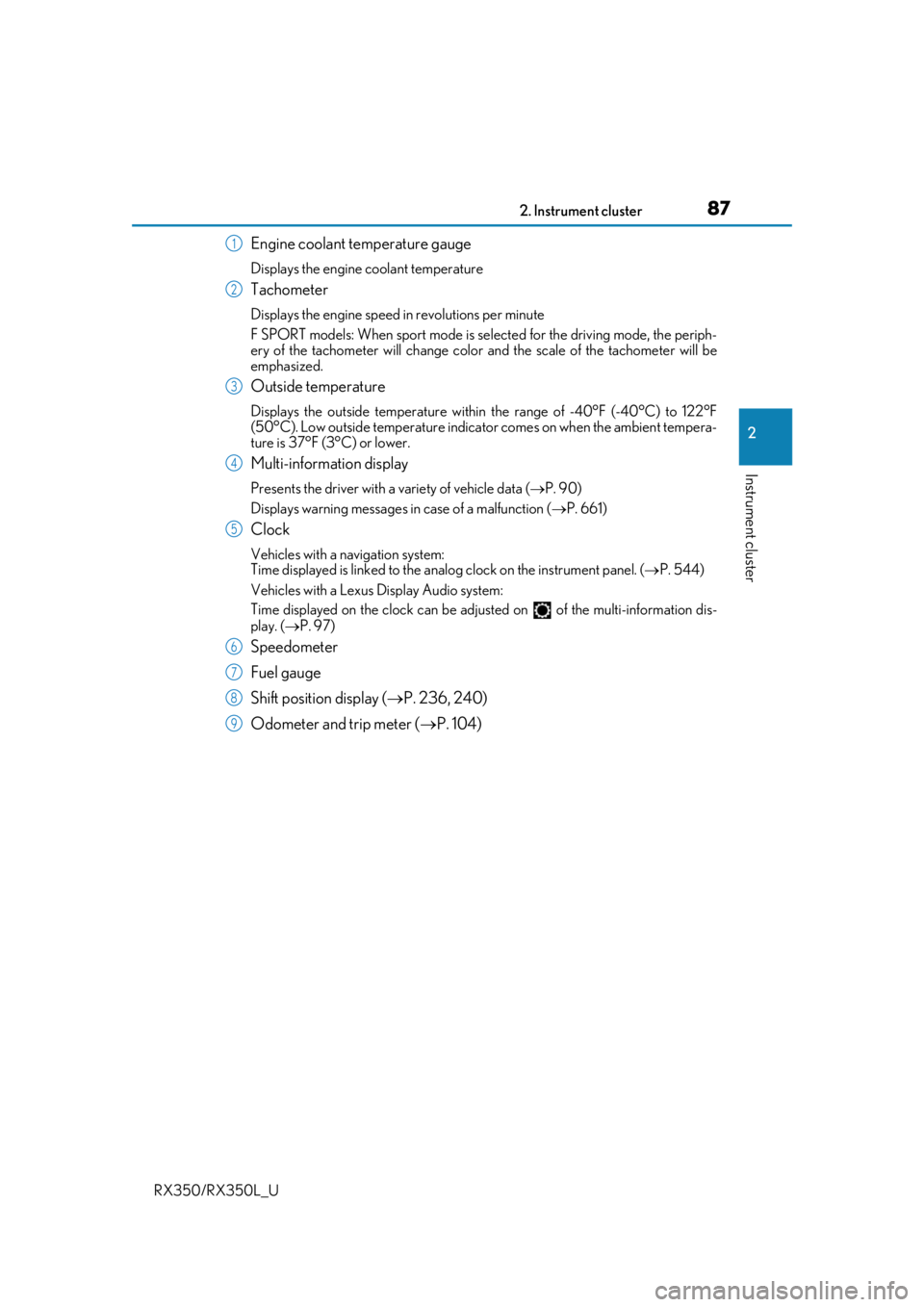
Engine coolant temperature gauge
Displays the engine coolant temperature
Tachometer
Displays the engine speed in revolutions per minute
F SPORT models: When sport mode is selected for the driving mode, the periph-
ery of the tachometer will change color and the scale of the tachometer will be
emphasized.
Outside temperature
Displays the outside temperature within the range of -40°F (-40°C) to 122°F
(50°C). Low outside temperature indicator comes on when the ambient tempera-
ture is 37°F (3°C) or lower.
Multi-information display
Presents the driver with a variety of vehicle data ( P. 90)
Displays warning messages in case of a malfunction ( P. 661)
Clock
Vehicles with a navigation system:
Time displayed is linked to the analog clock on the instrument panel. ( P. 544)
Vehicles with a Lexus Display Audio system:
Time displayed on the clock can be adju sted on of the multi-information dis-
play. ( P. 97)
Speedometer
Fuel gauge
Shift position display ( P. 236, 240)
Odometer and trip meter ( P. 104)
1
2
3
4
5
6
7
8
9
Page 90 of 777
892. Instrument cluster
2
Instrument cluster
RX350/RX350L_U
■The meters and display illuminate when
The engine switch is in IGNITION ON mode.
■Brightness of the meters (day mode and night mode)
The brightness of the meters is changed between day mode and night mode.
●Day mode: When the tail lights are off or when the tail lights are on but the surrounding
area is bright
●Night mode: When the tail lights are on and the surrounding area is dark
■Outside temperature display
●In the following situations, the correct outside temperature may not be displayed, or the
display may take longer than normal to change:
• When stopped, or driving at low speeds (less than 12 mph [20 km/h])
• When the outside temperature has changed suddenly (at the entrance/exit of a garage, tunnel, etc.)
●When “ ” or “E” is displayed, the sy stem may be malfunctioning.
Take your vehicle to your Lexus dealer.
■Clock settings screen (vehicles with a navigation system only)
If the clock adjustment screen is displayed continuously when attempting to change the
clock settings, the system may be malfunctioning.
Have the vehicle inspected by your Lexus dealer.
■Customization
Some functions can be customized. ( P. 97)
NOTICE
■To prevent damage to the engine and its components
●Do not let the indicator needle of the tachometer enter the red zone, which indicates
the maximum engine speed.
●The engine may be overheating if the engine coolant temperature gauge is in the red
zone (H). In this case, immediately stop the vehicle in a safe place, and check the
engine after it has cooled completely. ( P. 692)
Page 91 of 777
902. Instrument cluster
RX350/RX350L_U
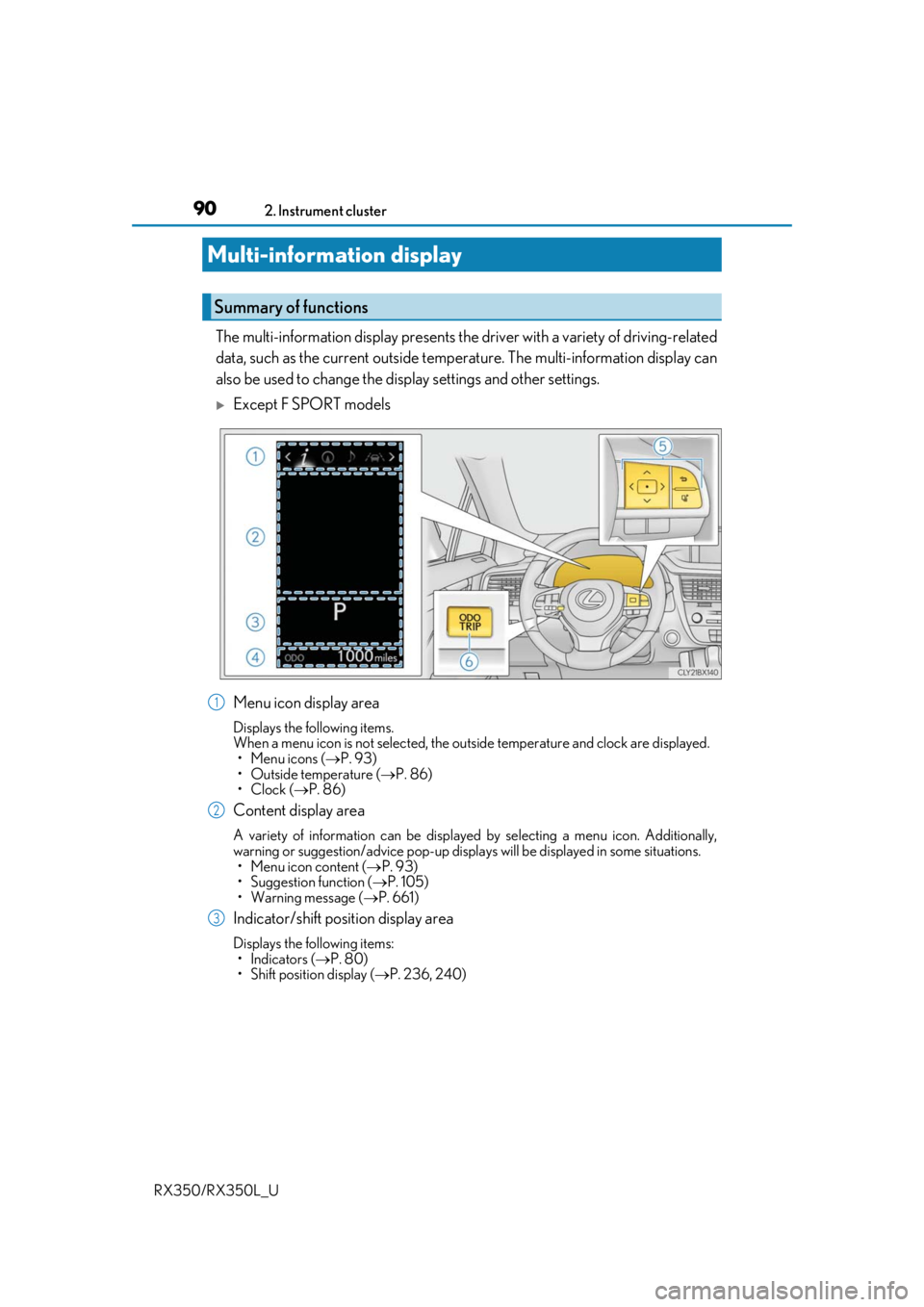
The multi-information display presents the driver with a variety of driving-related
data, such as the current outside temperature. The multi-information display can
also be used to change the display settings and other settings.
Except F SPORT models
Menu icon display area
Displays the following items.
When a menu icon is not selected, the outside temperature and clock are displayed. •Menu icons ( P. 93)
• Outside temperature ( P. 86)
•Clock ( P. 86)
Content display area
A variety of information can be displayed by selecting a menu icon. Additionally,
warning or suggestion/advice pop-up displa ys will be displayed in some situations.
• Menu icon content ( P. 93)
• Suggestion function ( P. 105)
• Warning message ( P. 661)
Indicator/shift position display area
Displays the following items:
•Indicators ( P. 80)
• Shift position display ( P. 236, 240)
Multi-information display
Summary of functions
1
2
3
Page 92 of 777
912. Instrument cluster
2
Instrument cluster
RX350/RX350L_U
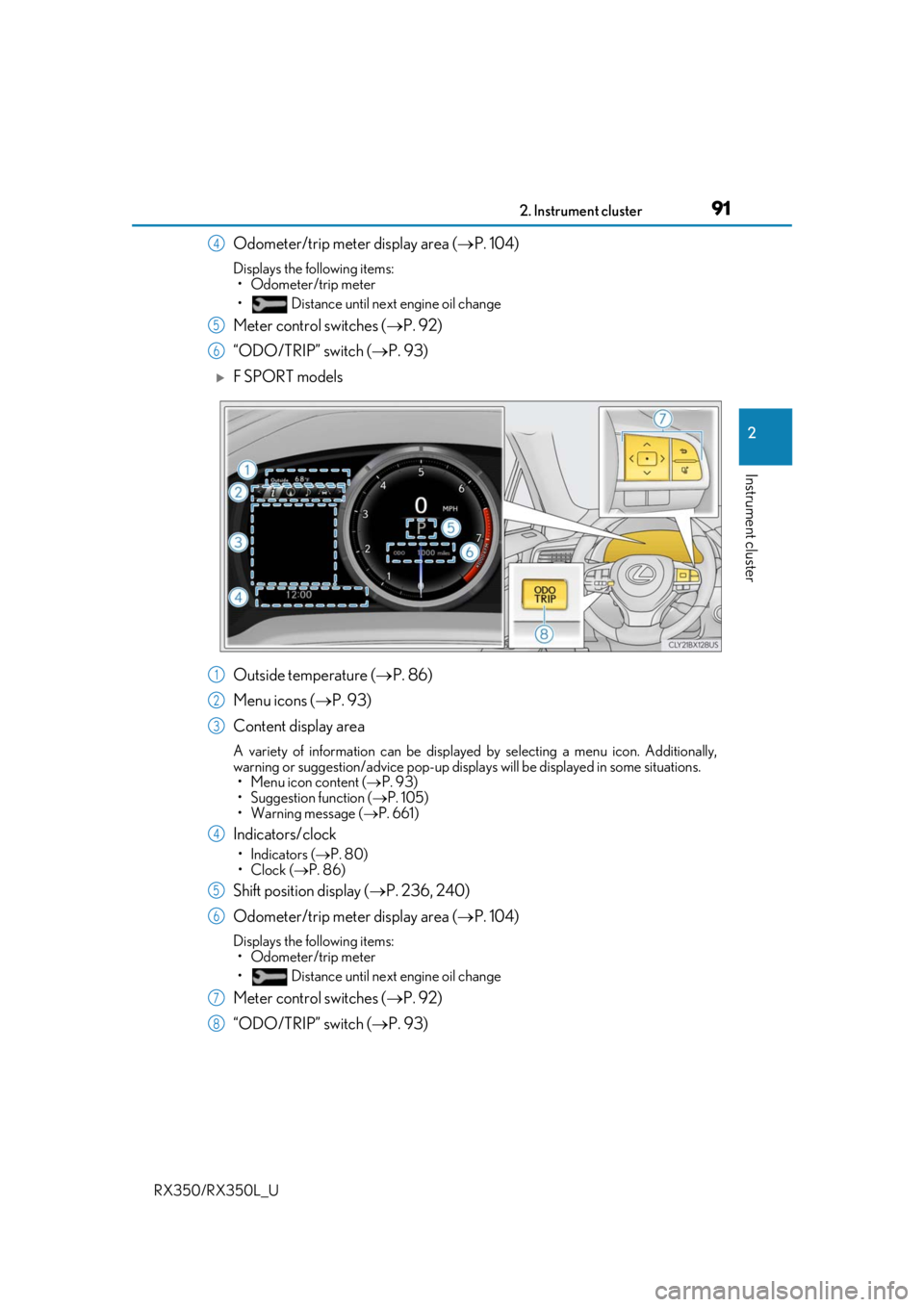
Odometer/trip meter display area (P. 104)
Displays the following items:
• Odometer/trip meter
• Distance until next engine oil change
Meter control switches ( P. 92)
“ODO/TRIP” switch ( P. 93)
F SPORT models
Outside temperature ( P. 86)
Menu icons ( P. 93)
Content display area
A variety of information can be displayed by selecting a menu icon. Additionally,
warning or suggestion/advice pop-up displa ys will be displayed in some situations.
• Menu icon content ( P. 93)
• Suggestion function ( P. 105)
• Warning message ( P. 661)
Indicators/clock
•Indicators ( P. 80)
•Clock ( P. 86)
Shift position display ( P. 236, 240)
Odometer/trip meter display area ( P. 104)
Displays the following items:
• Odometer/trip meter
• Distance until next engine oil change
Meter control switches ( P. 92)
“ODO/TRIP” switch ( P. 93)
4
5
6
1
2
3
4
5
6
7
8
Page 101 of 777
1002. Instrument cluster
RX350/RX350L_U
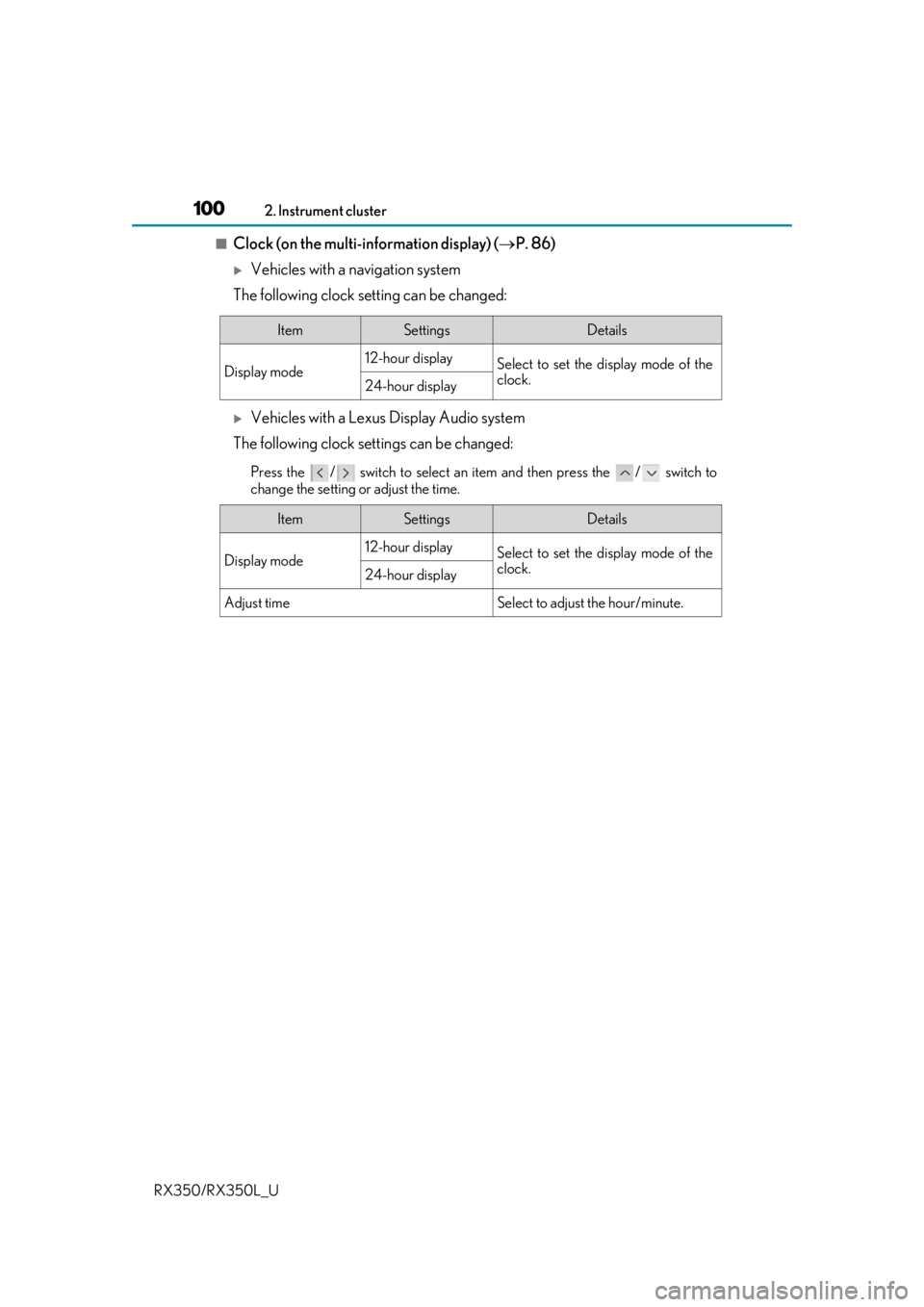
■Clock (on the multi-information display) ( P. 86)
Vehicles with a navigation system
The following clock setting can be changed:
Vehicles with a Lexus Display Audio system
The following clock settings can be changed:
Press the / switch to select an it em and then press the / switch to
change the setting or adjust the time.
ItemSettingsDetails
Display mode 12-hour display
Select to set the display mode of the
clock.
24-hour display
ItemSettingsDetails
Display mode 12-hour display
Select to set the display mode of the
clock.
24-hour display
Adjust timeSelect to adjust the hour/minute.
Page 120 of 777

119
3
Operation of
each component
RX350/RX350L_U
3-1. Key information
Keys .................................................. 120
3-2. Opening, closing and locking the doors
Side doors .......................................124
Power back door ........................ 130
Smart access system with push-button start ...................... 146
3-3. Adjusting the seats Front seats...................................... 156
Rear seats........................................157
Driving position memory .......... 172
Head restraints ............................. 177
3-4. Adjusting the steering wheel and mirrors
Steering wheel ............................. 180
Inside rear view mirror ............. 182
Outside rear view mirrors....... 184
3-5. Opening, closing the windows and moon roof
Power windows ........................... 187
Moon roof ........................................ 191
Panoramic moon roof ............... 195
Page 121 of 777
120
RX350/RX350L_U3-1. Key information
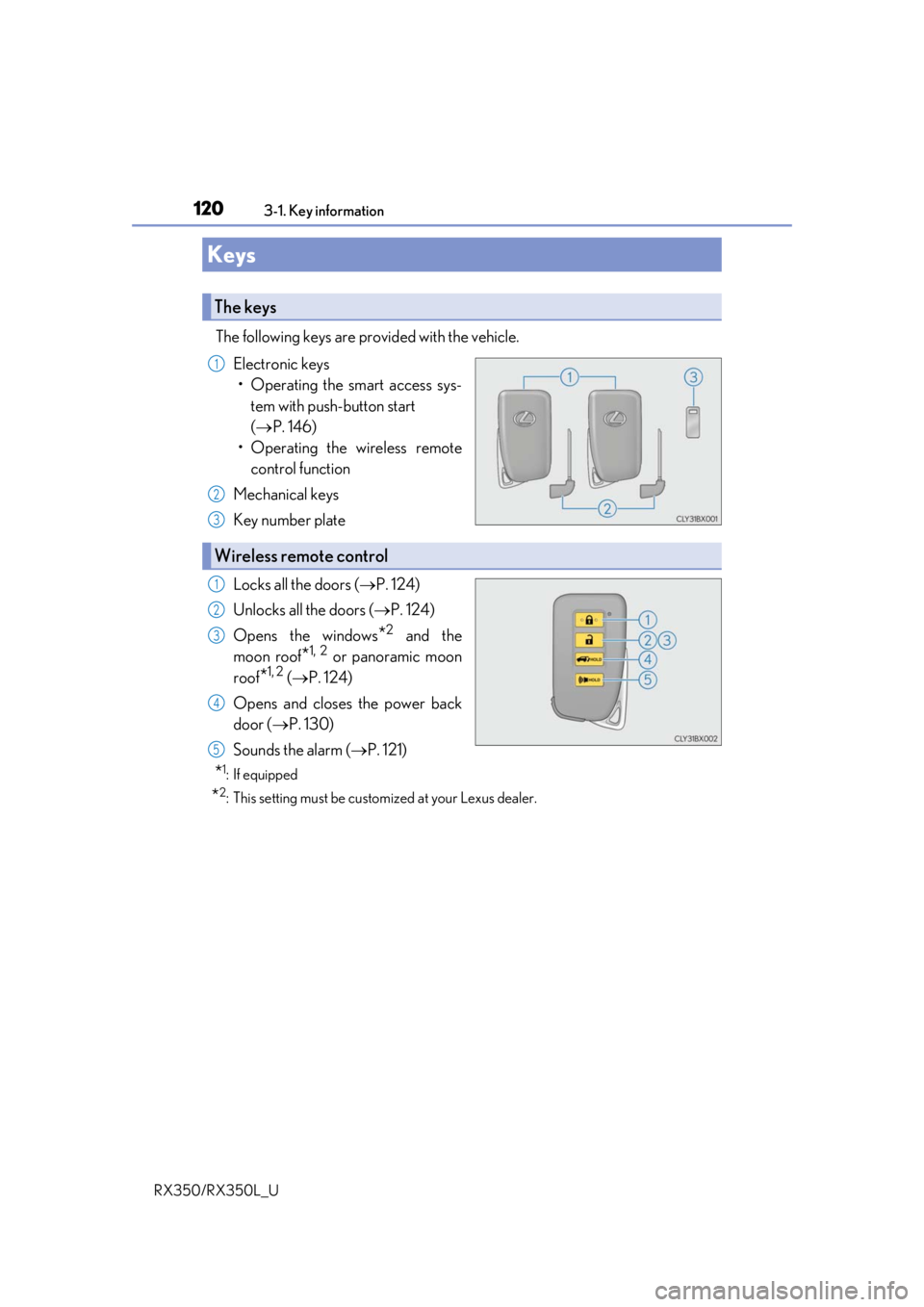
The following keys are provided with the vehicle.
Electronic keys• Operating the smart access sys- tem with push-button start
( P. 146)
• Operating the wireless remote control function
Mechanical keys
Key number plate
Locks all the doors ( P. 124)
Unlocks all the doors ( P. 124)
Opens the windows
*2 and the
moon roof
*1, 2 or panoramic moon
roof
*1, 2 ( P. 124)
Opens and closes the power back
door ( P. 130)
Sounds the alarm ( P. 121)
*1: If equipped
*2: This setting must be custom ized at your Lexus dealer.
Keys
The keys
1
2
3
Wireless remote control
1
2
3
4
5
Page 122 of 777
1213-1. Key information
3
Operation of each component
RX350/RX350L_U
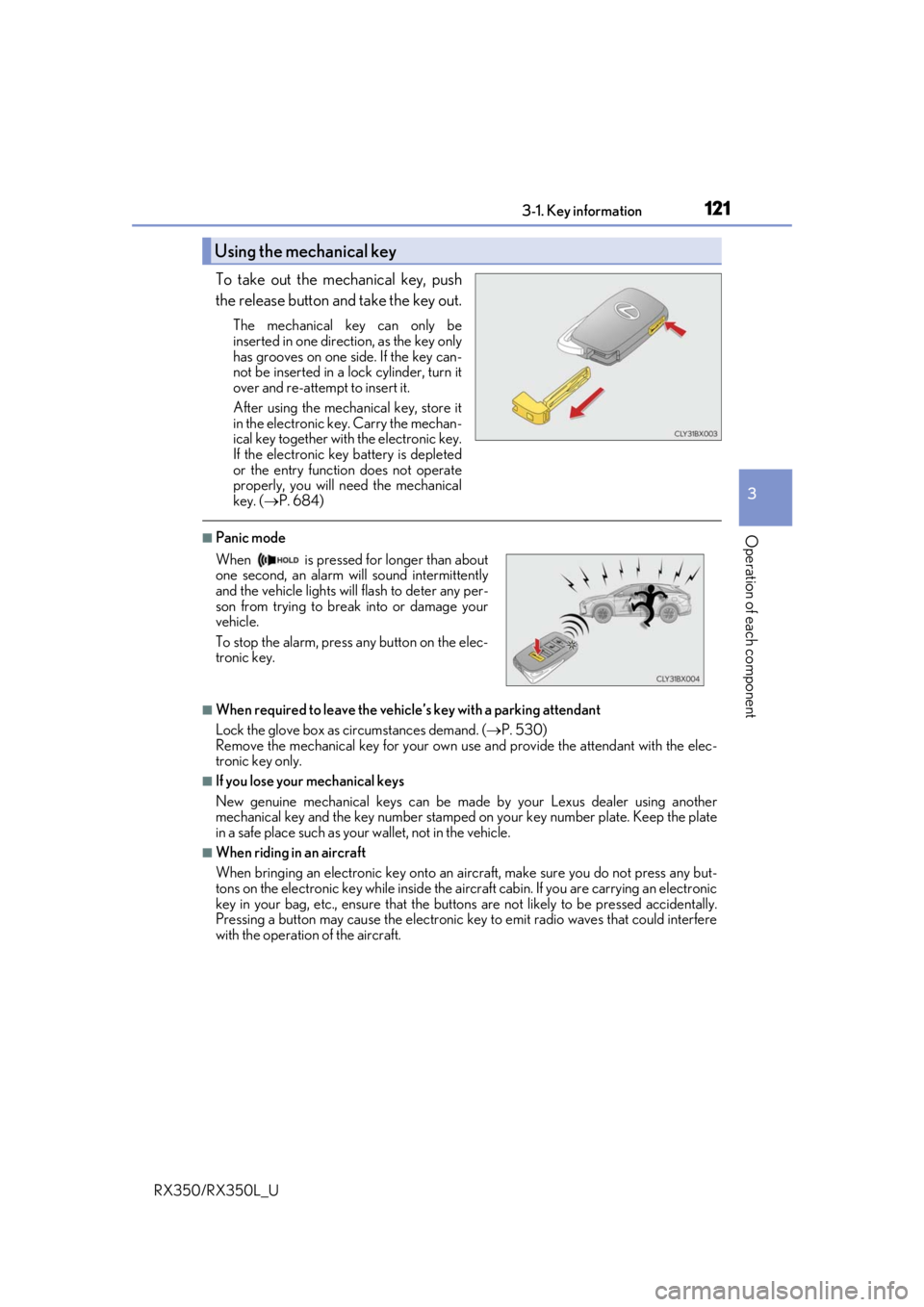
To take out the mechanical key, push
the release button and take the key out.
The mechanical key can only be
inserted in one direction, as the key only
has grooves on one side. If the key can-
not be inserted in a lock cylinder, turn it
over and re-attempt to insert it.
After using the mechanical key, store it
in the electronic key. Carry the mechan-
ical key together with the electronic key.
If the electronic key battery is depleted
or the entry function does not operate
properly, you will need the mechanical
key. ( P. 684)
■Panic mode
■When required to leave the vehicle’s key with a parking attendant
Lock the glove box as circumstances demand. ( P. 530)
Remove the mechanical key for your own use and provide the attendant with the elec-
tronic key only.
■If you lose your mechanical keys
New genuine mechanical keys can be made by your Lexus dealer using another
mechanical key and the key number stamped on your key number plate. Keep the plate
in a safe place such as your wallet, not in the vehicle.
■When riding in an aircraft
When bringing an electronic key onto an aircraft, make sure you do not press any but-
tons on the electronic key while inside the airc raft cabin. If you are carrying an electronic
key in your bag, etc., ensure that the butt ons are not likely to be pressed accidentally.
Pressing a button may cause the electronic key to emit radio waves that could interfere
with the operation of the aircraft.
Using the mechanical key
When is pressed for longer than about
one second, an alarm will sound intermittently
and the vehicle lights will flash to deter any per-
son from trying to break into or damage your
vehicle.
To stop the alarm, press any button on the elec-
tronic key.