warning light LEXUS RX350L 2019 Workshop Manual
[x] Cancel search | Manufacturer: LEXUS, Model Year: 2019, Model line: RX350L, Model: LEXUS RX350L 2019Pages: 777, PDF Size: 13.14 MB
Page 317 of 777
3164-5. Using the driving support systems
RX350/RX350L_U
■Customization
Some functions can be customized. ( P. 325, 722)
WARNING
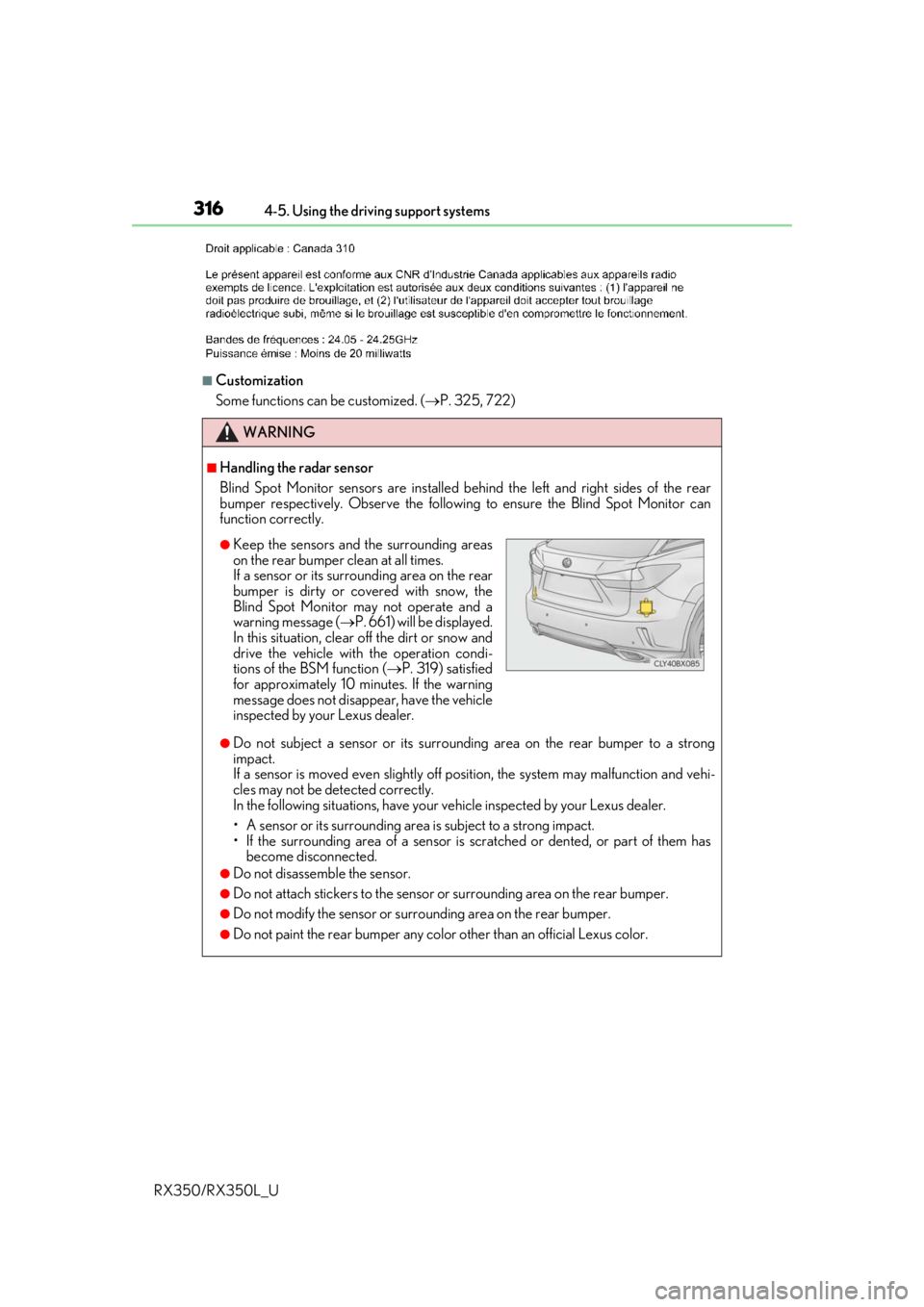
■Handling the radar sensor
Blind Spot Monitor sensors ar e installed behind the left and right sides of the rear
bumper respectively. Observe the following to ensure the Blind Spot Monitor can
function correctly.
●Do not subject a sensor or its surrounding area on the rear bumper to a strong
impact.
If a sensor is moved even slightly off po sition, the system may malfunction and vehi-
cles may not be detected correctly.
In the following situations , have your vehicle inspected by your Lexus dealer.
• A sensor or its surrounding area is subject to a strong impact.
• If the surrounding area of a sensor is sc ratched or dented, or part of them has
become disconnected.
●Do not disassemble the sensor.
●Do not attach stickers to the sensor or surrounding area on the rear bumper.
●Do not modify the sensor or surrounding area on the rear bumper.
●Do not paint the rear bumper any colo r other than an official Lexus color.
●Keep the sensors and the surrounding areas
on the rear bumper clean at all times.
If a sensor or its surrounding area on the rear
bumper is dirty or covered with snow, the
Blind Spot Monitor may not operate and a
warning message (P. 661) will be displayed.
In this situation, clear off the dirt or snow and
drive the vehicle with the operation condi-
tions of the BSM function ( P. 319) satisfied
for approximately 10 minutes. If the warning
message does not disappear, have the vehicle
inspected by your Lexus dealer.
Page 334 of 777

3334-5. Using the driving support systems
4
Driving
RX350/RX350L_U
■The intuitive parking assist can be operated when
●Front corner sensors:
• The engine switch is in IGNITION ON mode.
• The shift lever is in other than P.
• The vehicle speed is less than about 6 mph (10 km/h).(At any speed when the shift lever is in R)
●Front center sensors:
• The engine switch is in IGNITION ON mode.
• The shift lever is in other than P or R.
• The vehicle speed is less than about 6 mph (10 km/h).
●Rear corner and rear center sensors:
• The engine switch is in IGNITION ON mode.
• The shift lever is in R.
■Intuitive parking assist display
●Vehicles with a Lexus Display Audio system/navigation system (8-inch display): When
an object is detected while the Lexus parking assist monito r or panoramic view monitor
is in use, the warning indicator will appear in the upper part of the screen even if the dis-
play setting has been set to off.
●Vehicles with a navigation system (12.3-inch display): If the intuitive parking assist dis-
play is set to on, detected objects will also be displayed on the panoramic view monitor.
For details, refer to “NAVIGATION SYSTEM OWNER’S MANUAL”.
■Sensor detectio n information
●The sensor’s detection areas are limited to the areas around the vehicle’s bumper.
●Certain vehicle conditions and the surrounding environment may affect the ability of a
sensor to correctly detect an object. Particular instances where this may occur are
listed below.
• There is dirt, snow or ice on the sensor . (Wiping the sensors will resolve this prob-
lem.)
• The sensor is frozen. (Thawing the area will resolve this problem.)
In especially cold weather, if a sensor is frozen the screen may show an abnormal
display, or obstacles may not be detected.
• The sensor is covered in any way.
• The vehicle is leaning considerably to one side.
• When a sensor or the area around a sensor is extremely hot or cold.
• On an extremely bumpy road, on an incline, on gravel, or on grass.
• The vicinity of the vehicle is noisy due to vehicle horns, motorcycle engines, air brakes of large vehicles, or other loud noises producing ultrasonic waves.
• There is another vehicle equipped with parking assist sensors in the vicinity.
• The sensor is coated with a sheet of spray or heavy rain.
• The bumper or sensor re ceives a strong impact.
• If the vehicle is significantly tilted.
• The vehicle is approaching a tall or curved curb.
• In harsh sunlight or intense cold weather.
• The area directly under the bumpers is not detected.
• If objects draw too close to the sensor.
• People may not be detected if they are wearing certain types of clothing.
In addition to the examples above, there ar e instances in which, because of their shape,
signs and other objects may be judged by a sensor to be closer than they are.
Page 382 of 777
3814-5. Using the driving support systems
4
Driving
RX350/RX350L_U
■Turning off both TRAC, VSC and Trailer Sway Control systems
To turn the TRAC, VSC and Trailer Sway Co ntrol systems off, press and hold for
more than 3 seconds whil e the vehicle is stopped.
The VSC OFF indicator light will come on an d the “Traction Control Turned Off” will be
shown on the multi-information display.
*
Press again to turn the systems back on.
*: On vehicles with PCS (Pre-Collision Sy stem), pre-collision brake assist and pre-
collision braking will also be disabled. The PCS warning light will come on and a
message will be displa yed on the multi-information display. (P. 290)
■When the message is displayed on the mu lti-information display showing that TRAC
has been disabled even if has not been pressed
TRAC cannot be operated. Contact your Lexus dealer.
■Operating conditions of hill-start assist control
When the following four conditions are met, the hill-start assist control will operate:
●The shift lever is in a position other than P or N (when starting off forward/backward on
an upward incline).
●The vehicle is stopped
●The accelerator pedal is not depressed
●The parking brake is not engaged
■Automatic system cancelation of hill-start assist control
The hill-start assist control will turn off in any of the following situations:
●The shift lever is shifted to P or N
●The accelerator pedal is depressed
●The parking brake is engaged
●2 seconds at maximum elapsed after the brake pedal is released
■Sounds and vibrations caused by the ABS, brake assist, VSC, Trailer Sway Control,
TRAC and hill-start assist control systems
●A sound may be heard from the engine compartment when the brake pedal is
depressed repeatedly, when the engine is started or just after the vehicle begins to
move. This sound does not indicate that a malfunction has occurred in any of these sys-
tems.
●Any of the following conditions may occur when the above systems are operating.
None of these indicates that a malfunction has occurred.
• Vibrations may be felt through the vehicle body and steering.
• A motor sound may be heard also after the vehicle comes to a stop.
• The brake pedal may pulsate slig htly after the ABS is activated.
• The brake pedal may move down sl ightly after the ABS is activated.
■EPS operation sound
When the steering wheel is operated, a motor sound (whirring sound) may be heard.
This does not indicate a malfunction.
Page 384 of 777

3834-5. Using the driving support systems
4
Driving
RX350/RX350L_U
WARNING
■Hill-start assist control does not operate effectively when
●Do not overly rely on hill-start assist control. Hill-start assist control may not operate
effectively on steep inclines and roads covered with ice.
●Unlike the parking brake, hill-start assist control is not intended to hold the vehicle
stationary for an exte nded period of time. Do not atte mpt to use hill-start assist con-
trol to hold the vehicle on an incline, as doing so may lead to an accident.
■When the TRAC/VSC/Trailer Sway Control is activated
The slip indicator light flashes. Always drive carefully. Reckless driving may cause an
accident. Exercise particular care when the indicator light flashes.
■When the TRAC/VSC/Trailer Sway Control systems are turned off
Be especially careful and drive at a speed appropriate to the road conditions. As these
are the systems to help ensure vehicle stab ility and driving force, do not turn the
TRAC/VSC/Trailer Sway Contro l systems off unless necessary.
Trailer Sway Control is part of the VSC syst em and will not operate if VSC is turned off
or experiences a malfunction.
■Replacing tires
Make sure that all tires are of the specified size, brand, tread pattern and total load
capacity. In addition, make sure that the tire s are inflated to the recommended tire infla-
tion pressure level.
The ABS, TRAC, Trailer Sway Control and VS C systems will not function correctly if
different tires are installed on the vehicle.
Contact your Lexus dealer for further in formation when replacing tires or wheels.
■Handling of tires and the suspension
Using tires with any kind of problem or modi fying the suspension will affect the driving
assist systems, and may cause a system to malfunction.
■Trailer Sway Control precaution
The Trailer Sway Control system is not able to reduce trailer sway in all situations.
Depending on many factors such as the condit ions of the vehicle, trailer, road surface,
and driving environment, the Trailer Sway Control system may not be effective. Refer to
your trailer owner’s manual for information on how to tow your trailer properly.
■If trailer sway occurs
Observe the following precautions.
Failing to do so may cause death or serious injury.
●Firmly grip the steering wh eel. Steer straight ahead.
Do not try to control trailer sway by turning the steering wheel.
●Begin releasing the accelerator pedal immediately but very gradually to reduce
speed.
Do not increase speed. Do not apply vehicle brakes.
If you make no extreme correction with the steering or brakes, your vehicle and trailer
should stabilize. ( P. 226)
Page 400 of 777
3995-1. Basic Operations
5
Lexus Display Audio system
RX350/RX350L_U
■When using the screen
●Under extremely cold conditions, the Lexus Display Audio controller may react slowly.
●If the screen is cold, the display may be dark, or the system may seem to be operating
slightly slower than normal.
●The screen may seem dark and hard to see when viewed through sunglasses. Change
your angle of viewing, adjust the display on the “Display” screen (P. 411) or remove
your sunglasses.
■Using cellular phones
Interference may be heard through the audi o system’s speakers if a cellular phone is
being used inside or close to the vehicle while the audio system is operating.
WARNING
■Using the Lexus Display Audio controller
Be careful when touching the Lexus Display Audio controller in extreme temperatures
as it may become very hot or cold due to the temperature inside the vehicle.
■Laser product
●CAUTION
USE OF CONTROL OR ADJUSTMENT OR PERFORMANCE OF PROCE-
DURES OTHER THAN THOSE SPECIFIED HEREIN MAY RESULT IN HAZARD-
OUS RADIATION EXPOSURE.
●CAUTION
THE USE OF OPTICAL INSTRUMENTS WITH THIS PRODUCT WILL
INCREASE EYE HAZARD.
NOTICE
■To prevent Lexus Display Au dio controller malfunction
●Do not allow the Lexus Display Audio controll er to come into contact with food, liq-
uid, stickers or lit cigarettes as doing so may cause it to change color, emit a strange
odor or stop functioning.
●Do not subject the Lexus Display Audio controller to excessive pressure or strong
impact as the controller may bend or break off.
■To prevent battery discharge
Do not leave the audio system on longer than necessary when the engine is off.
■To avoid damaging the audio system
Take care not to spill drinks or other fluids on the audio system.
Page 530 of 777
5296-4. Using the storage features
6
Interior features
RX350/RX350L_U
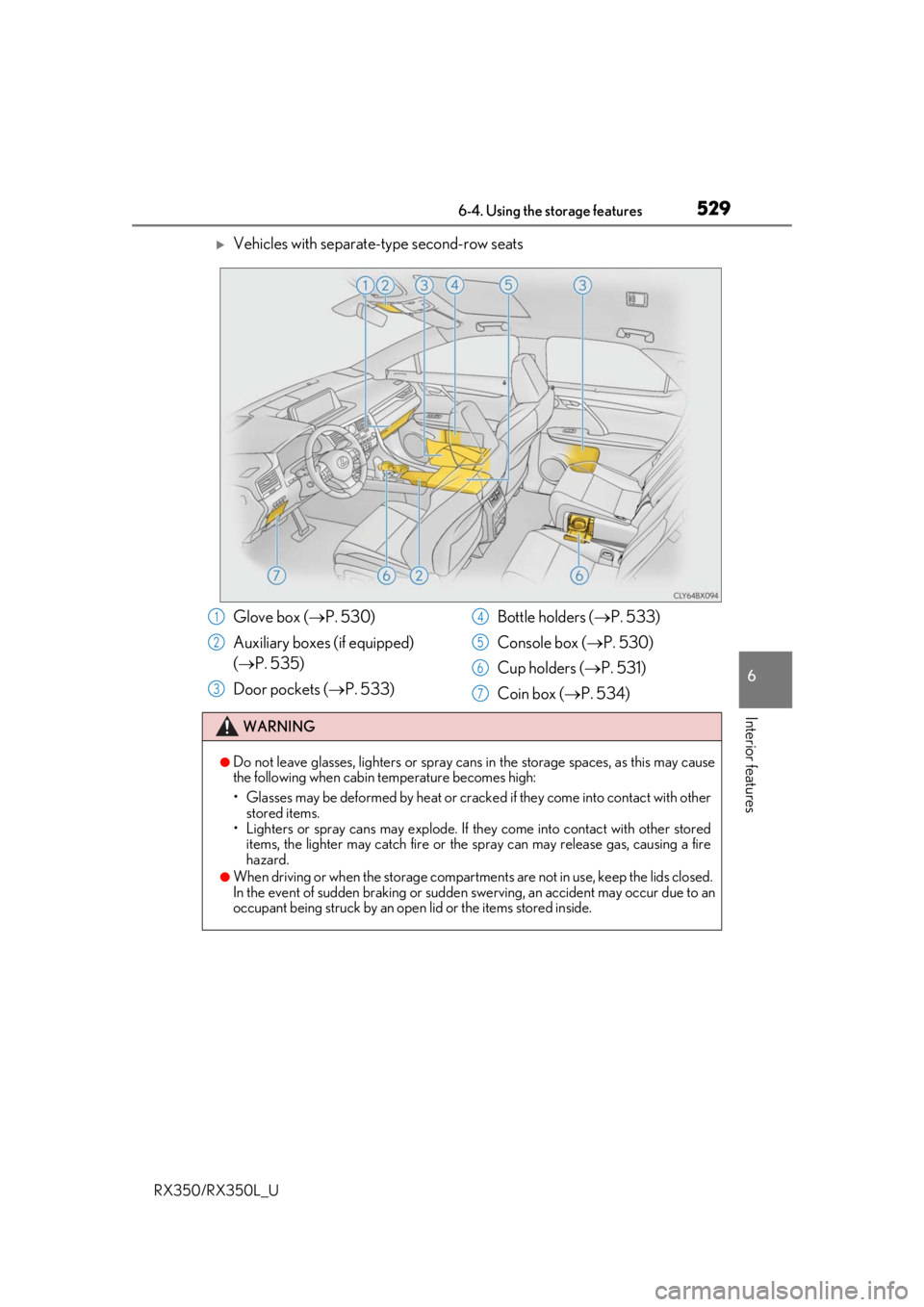
Vehicles with separate-type second-row seats
Glove box (P. 530)
Auxiliary boxes (if equipped)
( P. 535)
Door pockets ( P. 533) Bottle holders (
P. 533)
Console box ( P. 530)
Cup holders ( P. 531)
Coin box ( P. 534)
WARNING
●Do not leave glasses, lighters or spray cans in the storage spaces, as this may cause
the following when cabin temperature becomes high:
• Glasses may be deformed by heat or cracke d if they come into contact with other
stored items.
• Lighters or spray cans may explode. If they come into contact with other stored
items, the lighter may catch fire or the spray can may release gas, causing a fire
hazard.
●When driving or when the storage compartments are not in use, keep the lids closed.
In the event of sudden braking or sudden swerving, an accident may occur due to an
occupant being struck by an open lid or the items stored inside.
1
2
3
4
5
6
7
Page 592 of 777
5917-3. Do-it-yourself maintenance
7
Maintenance and care
RX350/RX350L_U
*: Vehicles with single-beam headlights
Tire inflation pres-
sure (P. 613)• Tire pressure gauge• Compressed air source
Washer fluid
( P. 603)• Water or washer fluid containing antifreeze (for winter use)
• Funnel (used only for adding water or washer fluid)
WARNING
The engine compartment contains many mechan isms and fluids that may move suddenly,
become hot, or become electrically energize d. To avoid death or serious injury, observe
the following precautions.
■When working on the engine compartment
●Keep hands, clothing and tools away from the moving fan and engine drive belt.
●Be careful not to touch the engine, radiator, exhaust manifold, etc. right after driving
as they may be hot. Oil and other fluids may also be hot.
●Do not leave anything that may burn easily, such as paper and rags, in the engine
compartment.
●Do not smoke, cause sparks or expose an open flame to fuel or the battery. Fuel and
battery fumes are flammable.
●Be extremely cautions when working on the battery. It contains poisonous and corro-
sive sulfuric acid.
■When working near the electric cooling fans or radiator grille
Be sure the engine switch is off.
With the engine switch in IGNITION ON mode, the electric cooling fans may auto-
matically start to run if the air conditioning is on and/or the coolant temperature is high.
( P. 599)
■Safety glasses
Wear safety glasses to prevent flying or falling material, fluid spray, etc. from getting in
your eyes.
NOTICE
■If you remove the air cleaner filter
Driving with the air cleaner f ilter removed may cause excessive engine wear due to dirt
in the air.
ItemsParts and tools
Page 593 of 777
5927-3. Do-it-yourself maintenance
RX350/RX350L_U
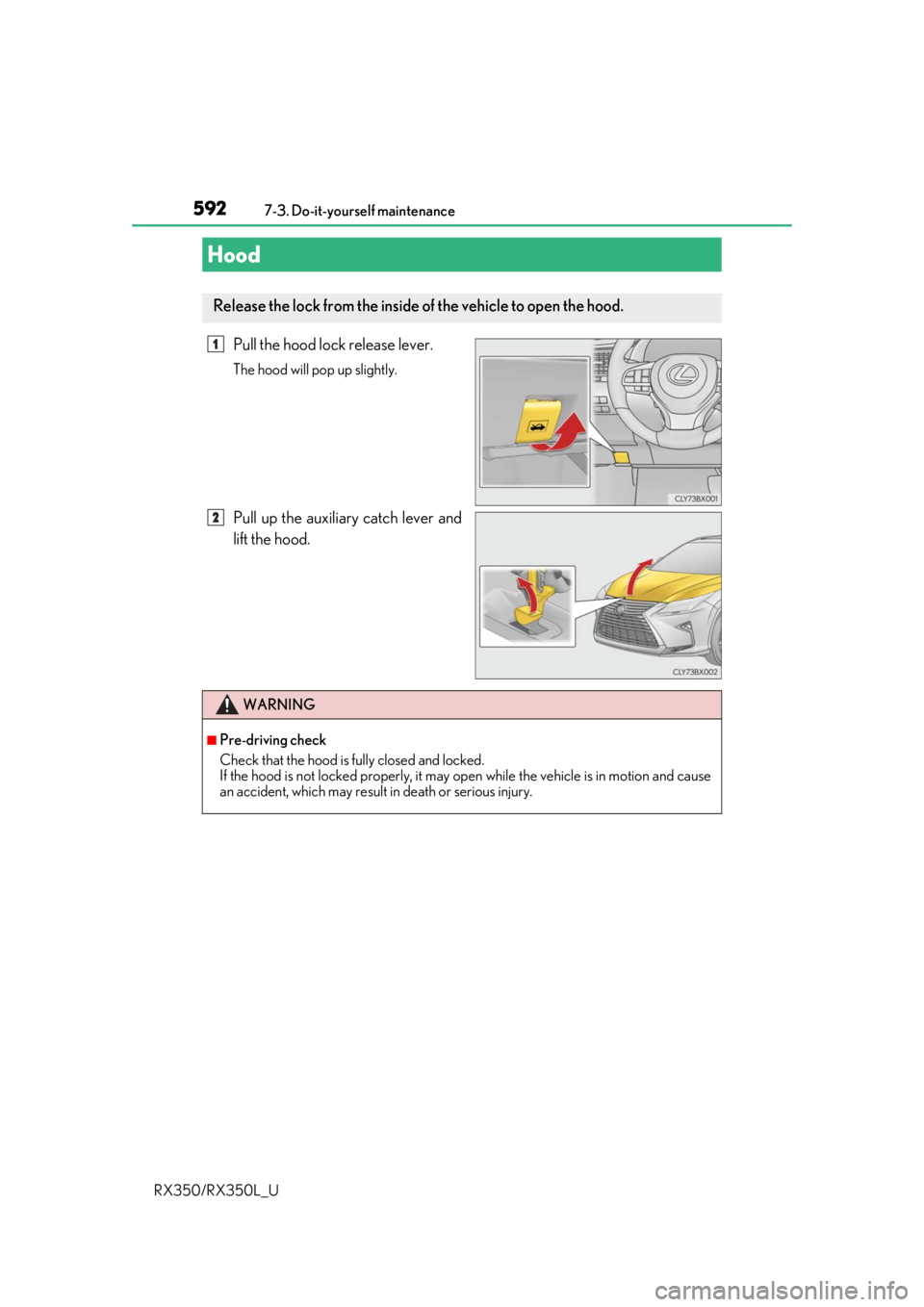
Pull the hood lock release lever.
The hood will pop up slightly.
Pull up the auxiliary catch lever and
lift the hood.
Hood
Release the lock from the inside of the vehicle to open the hood.
1
2
WARNING
■Pre-driving check
Check that the hood is fully closed and locked.
If the hood is not locked properly, it may op en while the vehicle is in motion and cause
an accident, which may result in death or serious injury.
Page 601 of 777
6007-3. Do-it-yourself maintenance
RX350/RX350L_U
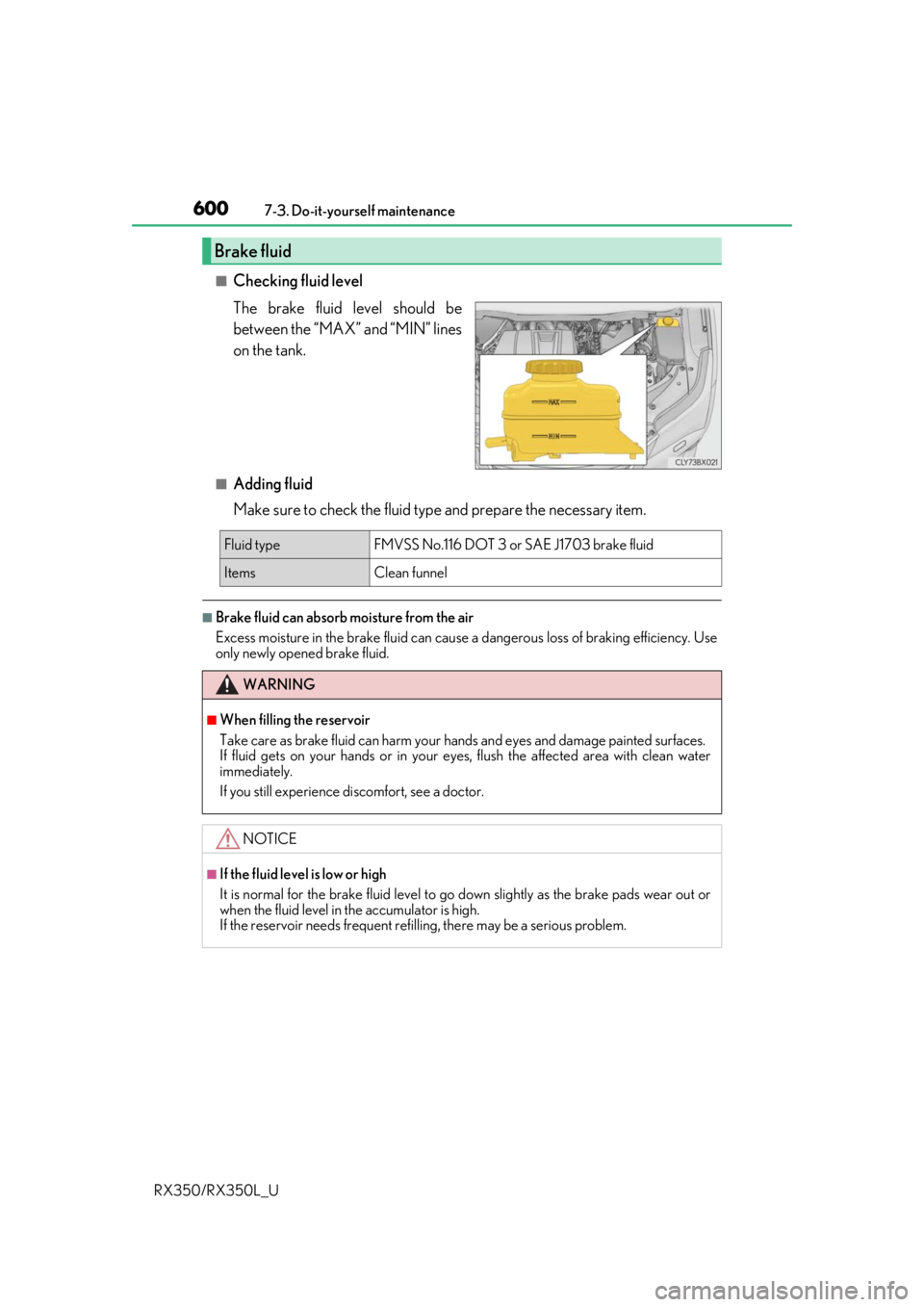
■Checking fluid level
The brake fluid level should be
between the “MAX” and “MIN” lines
on the tank.
■Adding fluid
Make sure to check the fluid type and prepare the necessary item.
■Brake fluid can absorb moisture from the air
Excess moisture in the brake fluid can cause a dangerous loss of braking efficiency. Use
only newly opened brake fluid.
Brake fluid
Fluid type FMVSS No.116 DOT 3 or SAE J1703 brake fluid
ItemsClean funnel
WARNING
■When filling the reservoir
Take care as brake fluid can harm your hands and eyes and damage painted surfaces.
If fluid gets on your hands or in your ey es, flush the affected area with clean water
immediately.
If you still experience di scomfort, see a doctor.
NOTICE
■If the fluid level is low or high
It is normal for the brake fluid level to go down slightly as the brake pads wear out or
when the fluid level in the accumulator is high.
If the reservoir needs frequent ref illing, there may be a serious problem.
Page 603 of 777
6027-3. Do-it-yourself maintenance
RX350/RX350L_U
WARNING
■Chemicals in the battery
Battery contains poisonous and corrosive sulfuric acid and may produce hydrogen gas
which is flammable and explosive. To reduce the risk of death or serious injury, take the
following precautions while wor king on or near the battery:
●Do not cause sparks by touching the battery terminals with tools.
●Do not smoke or light a match near the battery.
●Avoid contact with eyes, skin and clothes.
●Never inhale or swallow electrolyte.
●Wear protective safety glasses when working near the battery.
●Keep children away from the battery.
■Where to safely charge the battery
Always charge the battery in an open area . Do not charge the battery in a garage or
closed room where there is insufficient ventilation.
■How to recharge the battery
Only perform a slow charge (5 A or less) . The battery may explode if charged at a
quicker rate.
■Emergency measures regarding electrolyte
●If electrolyte gets in your eyes
Flush your eyes with clean water for at least 15 minutes and get immediate medical
attention. If possible, continue to apply water with a sponge or cloth while traveling to
the nearest medical facility.
●If electrolyte gets on your skin
Wash the affected area thoroughly. If you fe el pain or burning, get medical attention
immediately.
●If electrolyte gets on your clothes
It can soak through clothing on to your s kin. Immediately take off the clothing and fol-
low the procedure above if necessary.
●If you accidentally swallow electrolyte
Drink a large quantity of water or milk. Get emergenc y medical attention immedi-
ately.
■When there is insufficient battery fluid
Do not use if there is insufficient fluid in th e battery. There is a possible danger that the
battery may explode.
NOTICE
■When recharging the battery
Never recharge the battery while the engine is running. Also, be sure all accessories
are turned off.
■When adding distilled water
Avoid overfilling. Water spilled during battery recharging may cause corrosion.