Sound system LEXUS RX400H 2008 User Guide
[x] Cancel search | Manufacturer: LEXUS, Model Year: 2008, Model line: RX400H, Model: LEXUS RX400H 2008Pages: 487, PDF Size: 6.96 MB
Page 174 of 487
172
2-4. Using other driving systems
RX400h_U
CAUTION
■When the slip indicator flashes and a warning buzzer sounds
This situation occurs immediately while VSC is activated. Always drive carefully.
Reckless driving may cause an accident. Exercise particular care when the indica-
tor light flashes and a buzzer sounds.
■Replacing tires
Make sure that all tires are of the same size, brand, tread pattern and total load
capacity. In addition, make sure that the tires are inflated to the recommended tire
pressure level.
The ABS and VSC systems will not function correctly if different tires are fitted on
the vehicle.
Contact your Lexus dealer for further information when replacing tires or wheels.
■Handling of tires and suspension
Using tires with any kind of problem or modifying the suspension will affect the
VDIM, and may cause the system to malfunction.
Page 227 of 487
225
3-2. Using the front audio system
3
Interior features
RX400h_U
●MP3 and WMA playback
When a disc containing MP3 or WMA files is inserted, all files on the disc are first
checked. Once the file check is finished, the first MP3 or WMA file is played. To
make the file check finish more quickly, we recommend you do not write in any
files other than MP3 or WMA files or create any unnecessary folders.
Discs that contain a mixture of music data and MP3 or WMA format data cannot
be played.
●Extensions
If the file extensions .mp3 and .wma are used for files other than MP3 and WMA
files, they will be mistakenly recognized and played as MP3 and WMA files. This
may result in large amounts of interference and damage to the speakers.
●Playback
• To play MP3 file with steady sound quality, we recommend a fixed bit rate of 128 kbps and a sampling frequency of 44.1 kHz.
• CD-R or CD-RW playback may not be po ssible in some instances, depend-
ing on the characteristics of the disc.
• There is a wide variety of freeware and other encoding software for MP3 and WMA files on the market, and depending on the status of the encoding
and the file format, poor sound quality or noise at the start of playback may
result. In some cases, playback may not be possible at all.
• When files other than MP3 or WMA files are recorded on a disc, it may take
more time to recognize the disc and in some cases, playback may not be
possible at all.
• Microsoft, Windows, and Windows Media are the registered trademarks of
Microsoft Corporation in the U.S.A. and other countries.
Page 230 of 487
228
3-2. Using the front audio system
RX400h_U
Optimal use of the audio system
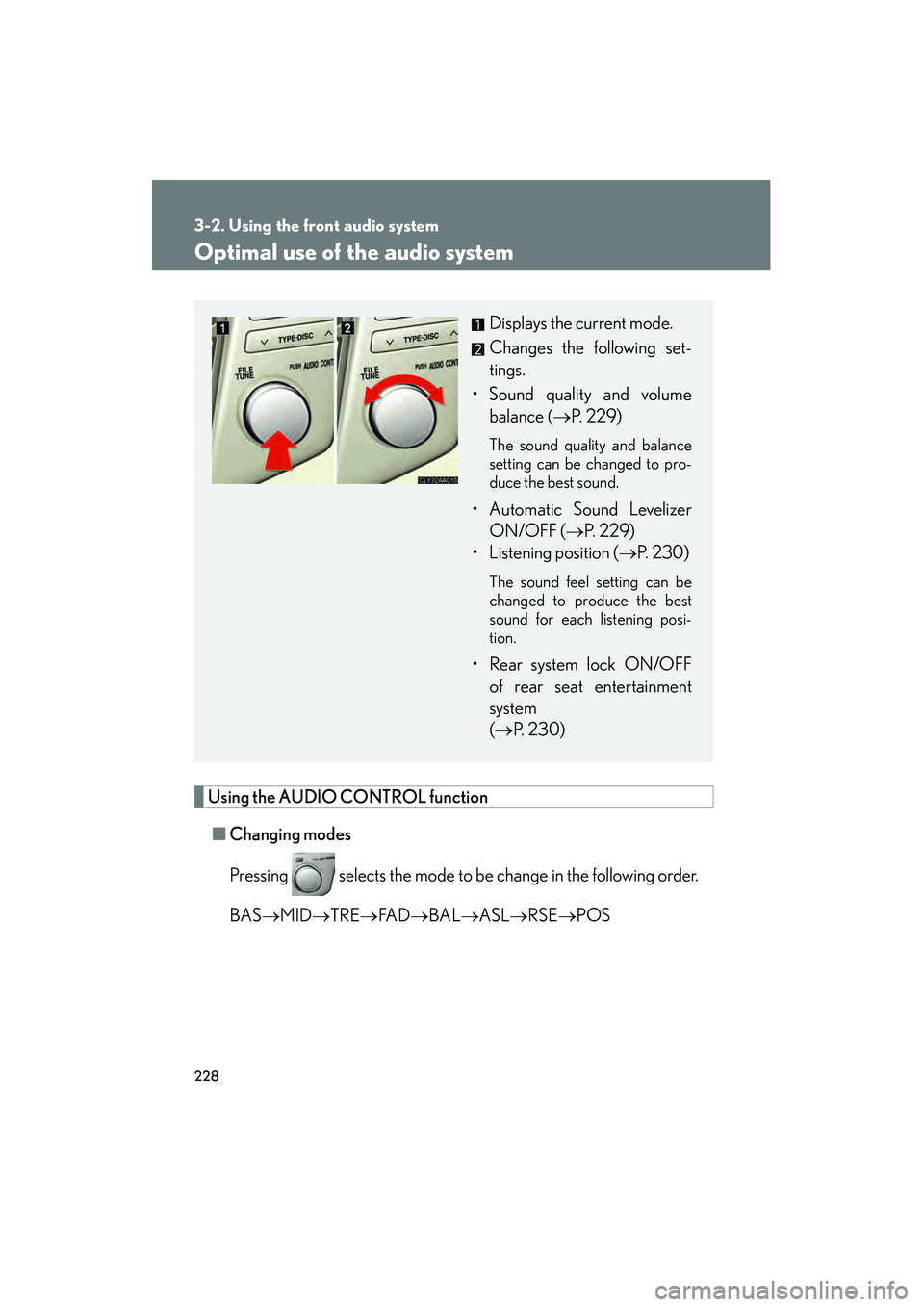
Using the AUDIO CONTROL function■ Changing modes
Pressing selects the mode to be change in the following order.
BAS →MID →TRE →FA D →BAL →ASL →RSE →POS
Displays the current mode.
Changes the following set-
tings.
• Sound quality and volume balance ( →P. 229)
The sound quality and balance
setting can be changed to pro-
duce the best sound.
• Automatic Sound Levelizer
ON/OFF ( →P. 229)
• Listening position ( →P. 2 3 0 )
The sound feel setting can be
changed to produce the best
sound for each listening posi-
tion.
• Rear system lock ON/OFF
of rear seat entertainment
system
(→ P. 2 3 0 )
Page 231 of 487
229
3-2. Using the front audio system
3
Interior features
RX400h_U■
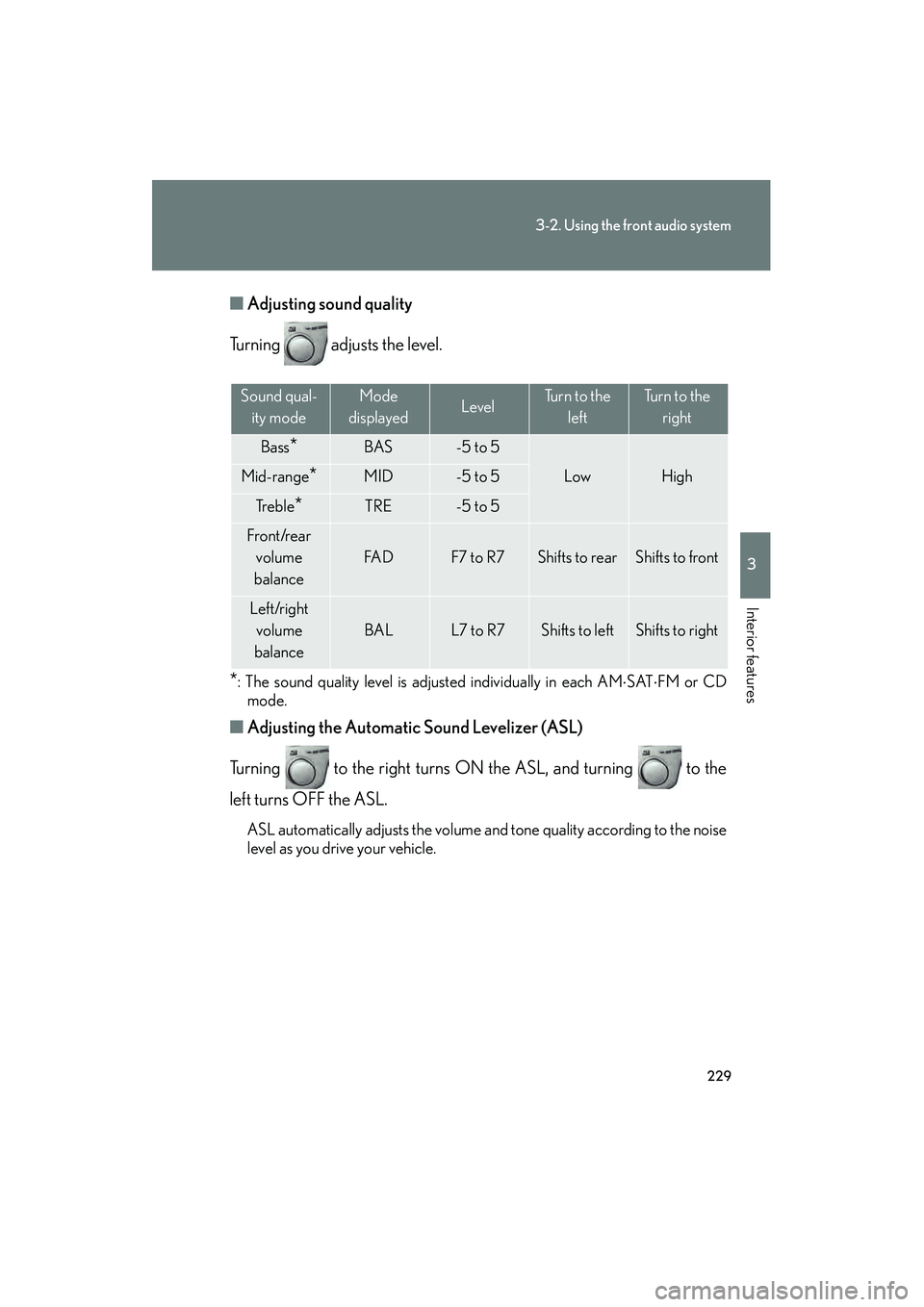
Adjusting sound quality
Turning adjusts the level.
*: The sound quality level is adjusted individually in each AM ⋅SAT ⋅FM or CD
mode.
■ Adjusting the Automatic Sound Levelizer (ASL)
Turning to the right turns ON the ASL, and turning to the
left turns OFF the ASL.
ASL automatically adjusts the volume and tone quality according to the noise
level as you drive your vehicle.
Sound qual- ity modeMode
displayedLevelTurn to the leftTurn to the right
Bass*BAS-5 to 5
LowHighMid-range*MID-5 to 5
Tr e b l e*TRE-5 to 5
Front/rear volume
balance
FA DF7 to R7Shifts to rearShifts to front
Left/right volume
balance
BALL7 to R7Shifts to leftShifts to right
Page 239 of 487
237
3-3. Using the rear audio system
3
Interior features
RX400h_U
■Error messages
DISC CHECK: Indicates that the disc is dirty, damaged or was inserted upsidedown. Clean the disc or insert it correctly.
REGION ERROR: Indicates that the DVD region code is not set properly.
DVD ERROR: Indicates that there is a problem inside the player. Eject the disc. Set the disc again.
If the malfunction still exists, take the vehicle to your Lexus
dealer.
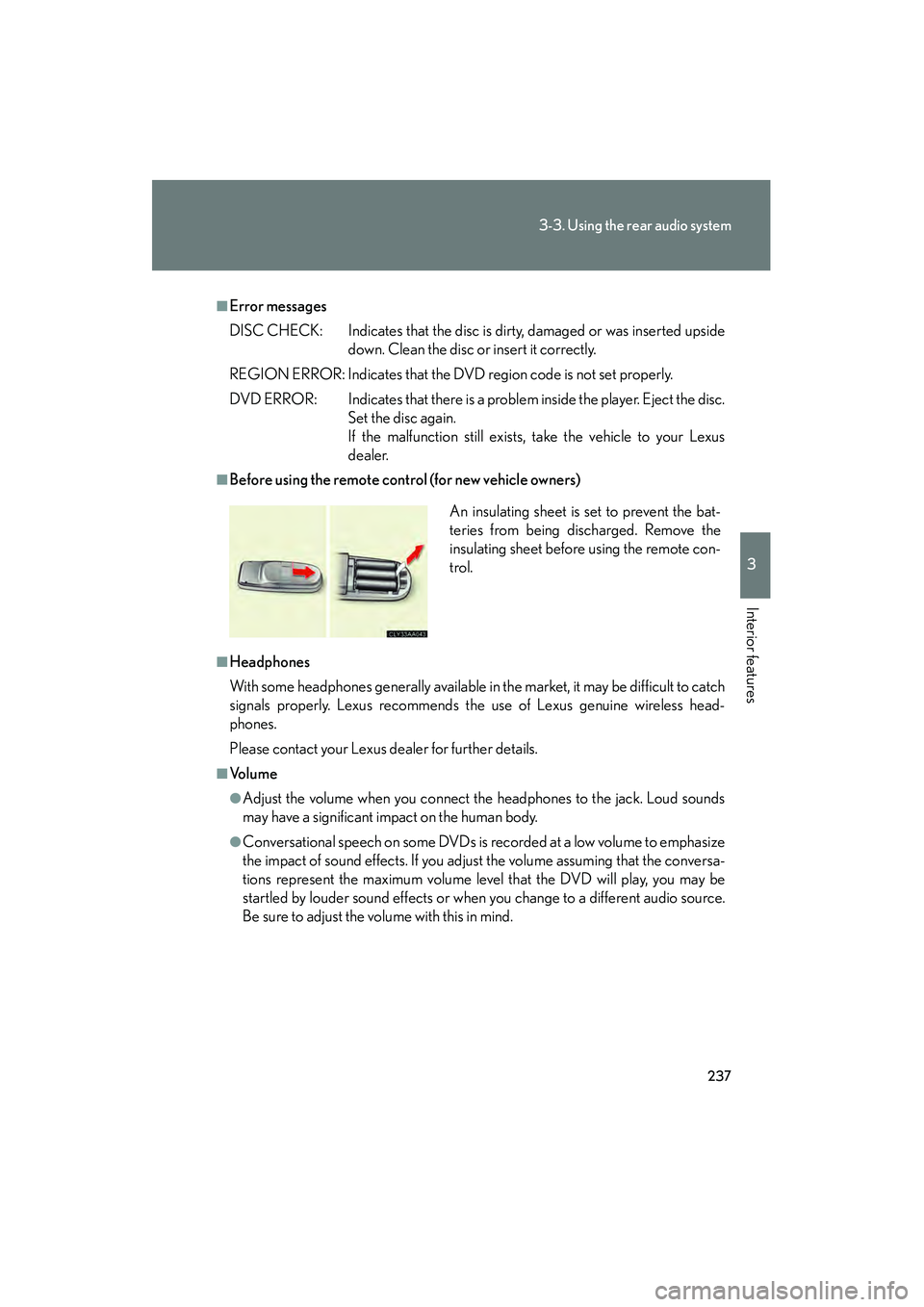
■Before using the remote control (for new vehicle owners)
■Headphones
With some headphones generally available in the market, it may be difficult to catch
signals properly. Lexus recommends the use of Lexus genuine wireless head-
phones.
Please contact your Lexus dealer for further details.
■Vo l u m e
●Adjust the volume when you connect the headphones to the jack. Loud sounds
may have a significant impact on the human body.
●Conversational speech on some DVDs is recorded at a low volume to emphasize
the impact of sound effects. If you adjust the volume assuming that the conversa-
tions represent the maximum volume level that the DVD will play, you may be
startled by louder sound effects or when you change to a different audio source.
Be sure to adjust the volume with this in mind. An insulating sheet is set to prevent the bat-
teries from being discharged. Remove the
insulating sheet before using the remote con-
trol.
Page 246 of 487
244
3-3. Using the rear audio system
RX400h_U
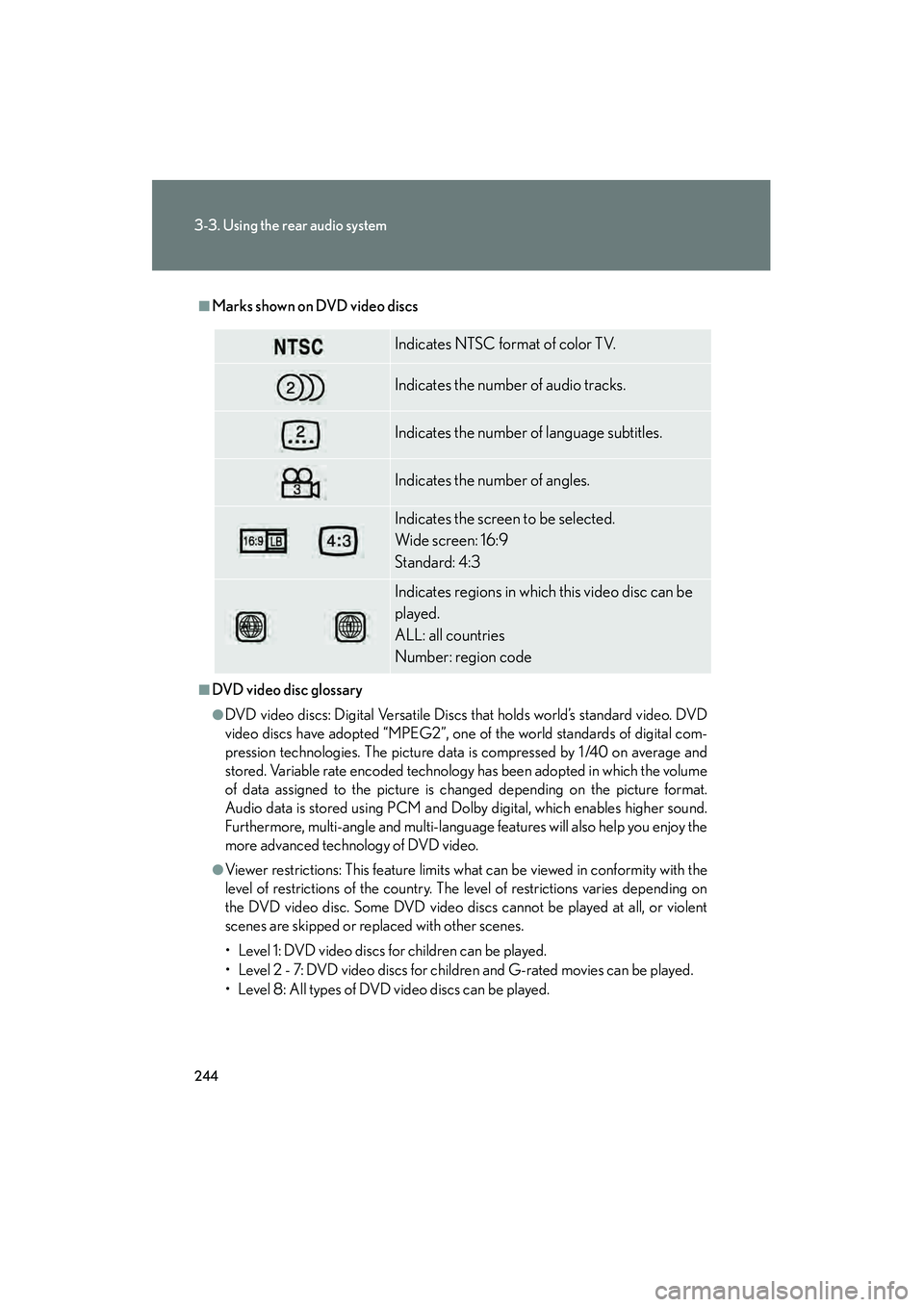
■Marks shown on DVD video discs
■DVD video disc glossary
●DVD video discs: Digital Versatile Discs that holds world’s standard video. DVD
video discs have adopted “MPEG2”, one of the world standards of digital com-
pression technologies. The picture data is compressed by 1 /40 on average and
stored. Variable rate encoded technology has been adopted in which the volume
of data assigned to the picture is changed depending on the picture format.
Audio data is stored using PCM and Dolby digital, which enables higher sound.
Furthermore, multi-angle and multi-language features will also help you enjoy the
more advanced technology of DVD video.
●Viewer restrictions: This feature limits what can be viewed in conformity with the
level of restrictions of the country. The level of restrictions varies depending on
the DVD video disc. Some DVD video discs cannot be played at all, or violent
scenes are skipped or replaced with other scenes.
• Level 1: DVD video discs for children can be played.
• Level 2 - 7: DVD video discs for children and G-rated movies can be played.
• Level 8: All types of DVD video discs can be played.
Indicates NTSC format of color TV.
Indicates the number of audio tracks.
Indicates the number of language subtitles.
Indicates the number of angles.
Indicates the screen to be selected.
Wide screen: 16:9
Standard: 4:3
Indicates regions in which this video disc can be
played.
ALL: all countries
Number: region code
Page 253 of 487
251
3-3. Using the rear audio system
3
Interior features
RX400h_U
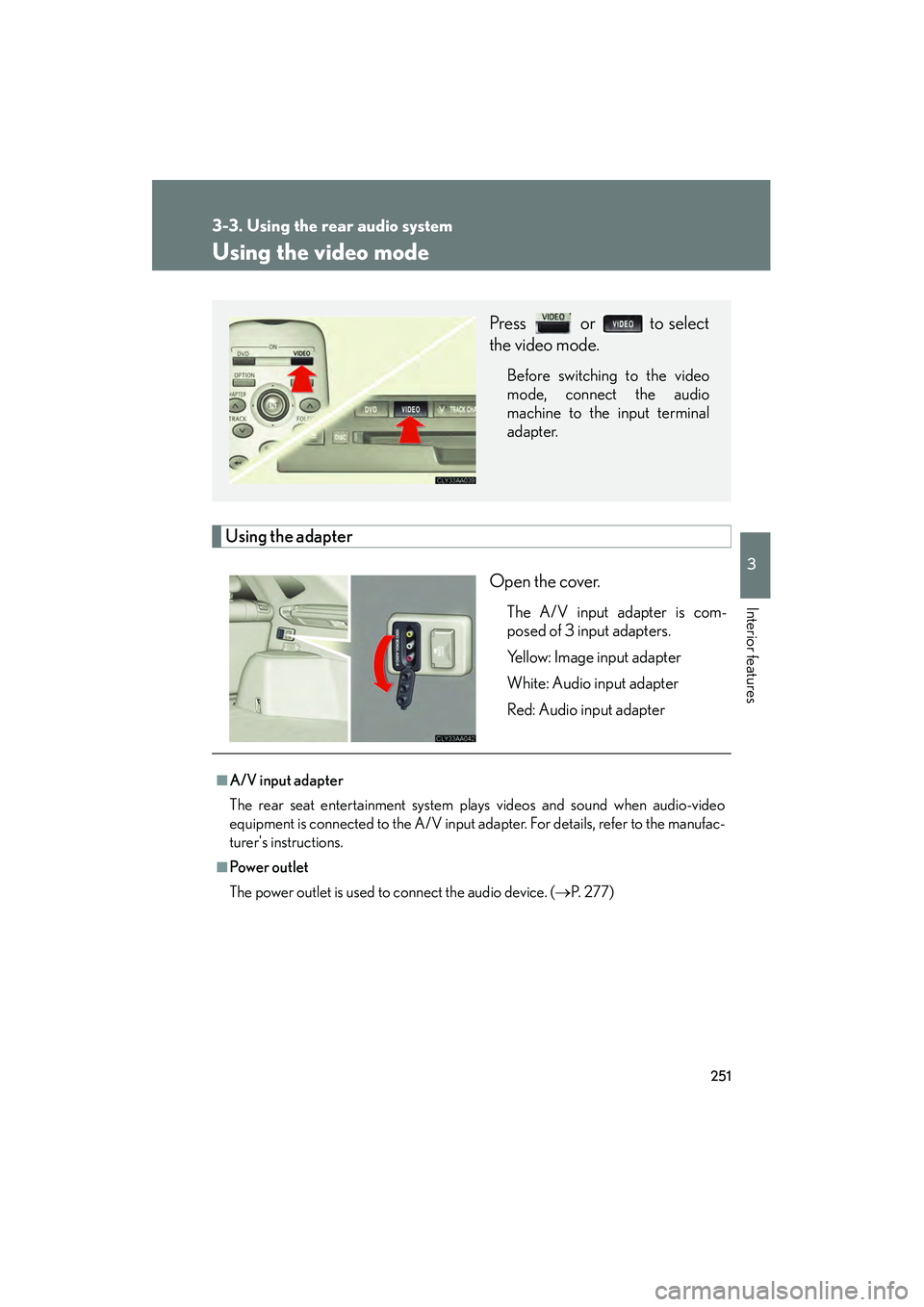
Using the video mode
Using the adapterOpen the cover.
The A/V input adapter is com-
posed of 3 input adapters.
Yellow: Image input adapter
White: Audio input adapter
Red: Audio input adapter
Press or to select
the video mode.
Before switching to the video
mode, connect the audio
machine to the input terminal
adapter.
■A/V input adapter
The rear seat entertainment system plays videos and sound when audio-video
equipment is connected to the A/V input adapter. For details, refer to the manufac-
turer's instructions.
■Powe r o u t le t
The power outlet is used to connect the audio device. ( →P. 277)
Page 308 of 487
306
4-2. Maintenance
RX400h_U
General maintenance
Engine compartment
ItemsCheck points
12-volt batteryMaintenance-free. (→P. 3 2 7 )
Brake fluidAt the correct level? ( →P. 3 2 5 )
Engine/power control unit coolantAt the correct level? ( →P. 3 2 3 )
Engine oilAt the correct level? ( →P. 3 1 8 )
Exhaust systemNo fumes or strange sounds?
Radiator/condenser/hosesNot blocked with foreign matter?
(→ P. 3 2 5 )
Wa s h e r f l u i dAt the correct level? ( →P. 3 2 9 )
Listed below are the general maintenance items that should be performed
at the intervals specified in the “Warranty and Services Guide” or
“Owner’s Manual Supplement”. It is recommended that any problem you
notice should be brought to the attent ion of your Lexus dealer or qualified
service shop for advice.
Page 323 of 487
321
4-3. Do-it-yourself maintenance
4
Maintenance and care
RX400h_U
■Engine oil consumption
●The amount of engine oil consumed depends on the oil viscosity, the quality of the
oil and the way the vehicle is driven.
●More oil is consumed under driving conditions such as high speeds and frequent
acceleration and deceleration.
●A new engine consumes more oil.
●When judging the amount of oil consumption, keep in mind that the oil may have
become diluted, making it difficult to judge the true level accurately.
●Oil consumption: Max. 1.1 qt./600 miles, 0.9 lmp.qt./600 miles (1.0 L per 1000
km)
●If you consume more than 1.1 qt. (1.0 L, 0.9 lmp.qt.) every 600 miles (1000 km),
contact your Lexus dealer.
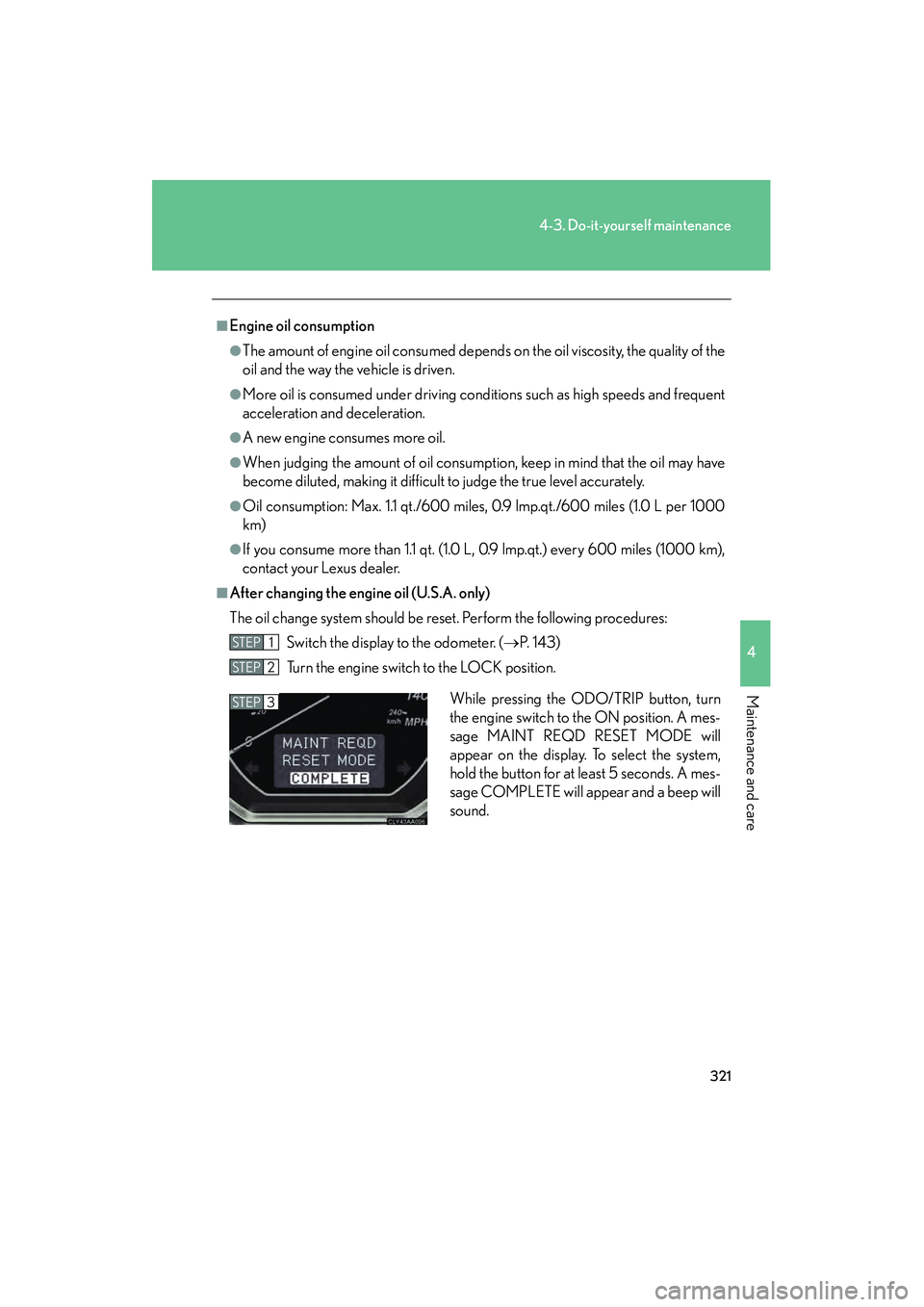
■After changing the engi ne oil (U.S.A. only)
The oil change system should be reset. Perform the following procedures: Switch the display to the odometer. ( →P. 1 4 3 )
Turn the engine switch to the LOCK position.
STEP1
STEP2
While pressing the ODO/TRIP button, turn
the engine switch to the ON position. A mes-
sage MAINT REQD RESET MODE will
appear on the display. To select the system,
hold the button for at least 5 seconds. A mes-
sage COMPLETE will appear and a beep will
sound.STEP3
Page 379 of 487
When trouble arises5
377
RX400h_U
5-1. Essential information .... 378If your vehicle needs to be towed ...................................... 378
If you think something is wrong ...................................... 385
Event data recorder.............. 386
5-2. Steps to take in an emergency ................... 388
If a warning light turns on or a warning buzzer
sounds... ................................. 388
If a warning message is displayed................................ 398
If you have a flat tire............... 408
If the hybrid system will not start ................................... 418
If the shift lever cannot be shifted from P ........................ 419
If you lose your keys .............. 420
If the 12-volt battery is discharged ............................. 421
If your vehicle overheats ..... 424
If the vehicle becomes stuck......................................... 427