air condition LEXUS RX400H 2008 User Guide
[x] Cancel search | Manufacturer: LEXUS, Model Year: 2008, Model line: RX400H, Model: LEXUS RX400H 2008Pages: 487, PDF Size: 6.96 MB
Page 196 of 487
194
2-5. Driving information
RX400h_U●
Avoid sudden braking as you may sk id, resulting in jackknifing and loss
of control. This is especially true on wet or slippery surfaces.
● Avoid jerky starts or sudden acceleration.
● Avoid jerky steering and sharp turns, and slow down before making
turns.
● Note that when making a turn, the trailer wheels will be closer than the
vehicle wheels to the inside of the turn. Compensate by making a
larger than normal turning radius.
● Crosswinds and rough roads will adversely affect handling of your
vehicle and trailer, causing sway. Periodically check the rear to prepare
for being passed by large trucks or buses, which may cause your vehi-
cle and trailer to sway. If swaying occurs, firmly grip the steering wheel,
reduce speed immediately but gradually, and steer straight ahead.
Never increase speed. If you make no extreme correction with the
steering or brakes, your vehicle and trailer will stabilize.
● Take care when passing other vehicles. Passing requires considerable
distance. After passing a vehicle, do not forget the length of your
trailer, and be sure you have plenty of room before changing lanes.
● Due to the added load of the trailer, your vehicle's hybrid system may
overheat on hot days (at temperatures over 85°F [30°C]) when driv-
ing up a long or steep grade. If the coolant temperature gauge indi-
cates overheating, immediately turn off the air conditioning (if in use),
pull your vehicle off the road and stop in a safe spot. ( →P. 4 2 4 )
Page 199 of 487
Interior features3
197
RX400h_U
3-1. Using the air conditioning system and defogger ... 198
Automatic air conditioning system............. 198
Rear window and outside rear view mirror defoggers,
and windshield wiper
de-icer ................................... 204
3-2. Using the front audio system ........................... 205
Audio system type................. 205
Using the radio........................ 207
Using the CD player .............. 214
Playing back MP3 and
WMA discs........................... 220
Optimal use of the audio system .................................... 228
Using the steering wheel audio switches ....................... 231
3-3. Using the rear audio system ........................... 233
Rear seat entertainment system features ................... 233
Using the DVD player
(DVD video) .......................... 239
Using the DVD player (video CD) ............................. 246
Using the DVD player (audio CD/ CD text) .......... 248
Using the DVD player
(MP3 discs) ........................... 249
Using the video mode ............ 251 Changing the initial
setting ..................................... 253
3-4. Using the interior lights ............................. 260
Interior lights list .................... 260
• Interior lights ........................ 263
• Personal lights ..................... 264
3-5. Using the storage features ........................ 265
List of storage features......... 265
• Glove box .............................. 265
• Console boxes ..................... 266
• Coin holder........................... 268
• Overhead console.............. 269
• Cup holders .......................... 269
• Door pockets ........................ 271
3-6. Other interior features ........................ 272
Sun visors ................................. 272
Vanity mirror ........................... 273
Clock .......................................... 274
Outside temperature display...................................... 275
Multi-display light control .... 276
Power outlets ........................... 277
Seat heaters ............................ 280
Armrest .................................... 282
Floor mat .................................. 283
Luggage compartment features .................................. 284
Garage door opener ............ 287
Compass .................................. 292
Page 200 of 487
198
RX400h_U
3-1. Using the air conditioning system and defogger
Automatic air conditioning system
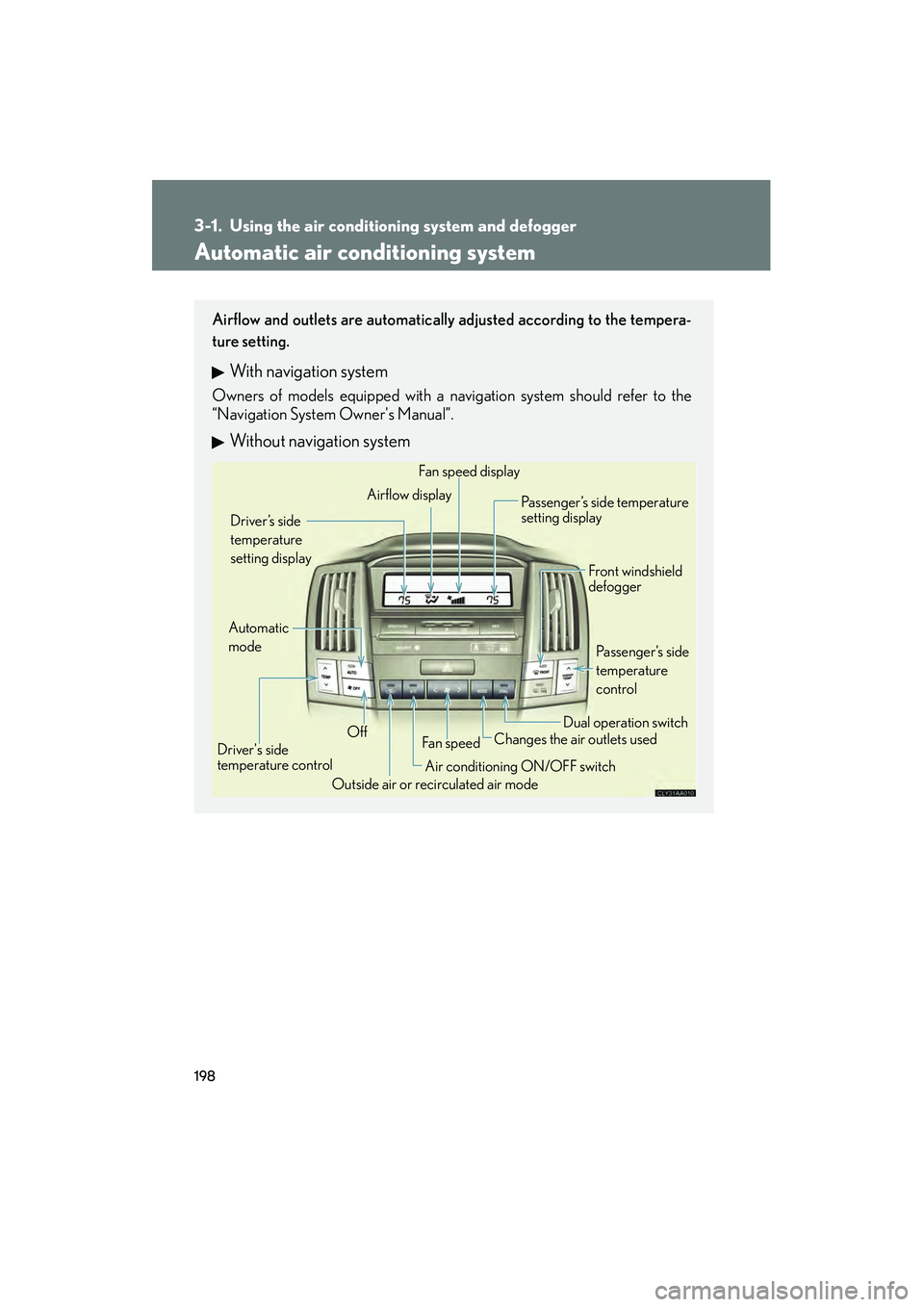
Airflow and outlets are automatically adjusted according to the tempera-
ture setting.
With navigation system
Owners of models equipped with a navigation system should refer to the
“Navigation System Owner's Manual”.
Without navigation system
Automatic
modeDriver’s side
temperature
setting display
OffFan speed
Airflow display
Fan speed display
Passenger’s side temperature
setting display
Driver's side
temperature control Outside air or recirculated air mode Front windshield
defogger
Passenger’s side
temperature
control
Dual operation switch
Changes the air outlets used
Air conditioning ON/OFF switch
Page 201 of 487
199
3-1. Using the air conditioning system and defogger
3
Interior features
RX400h_U
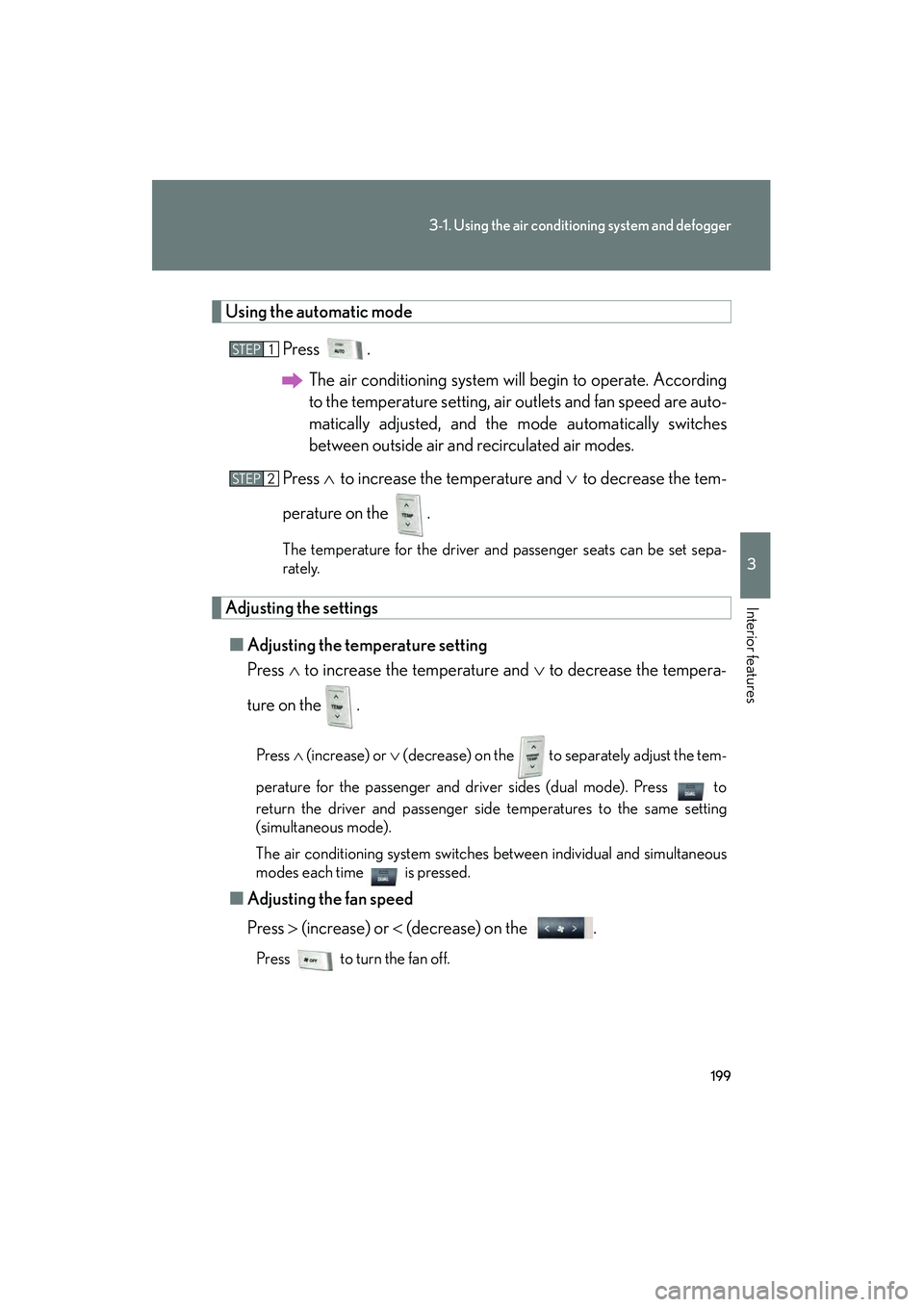
Using the automatic mode
Press .The air conditioning system will begin to operate. According
to the temperature setting, air outlets and fan speed are auto-
matically adjusted, and the mode automatically switches
between outside air and recirculated air modes.
Press ∧ to increase the temperature and ∨ to decrease the tem-
perature on the .
The temperature for the driver and passenger seats can be set sepa-
rately.
Adjusting the settings
■ Adjusting the temperature setting
Press ∧ to increase the temperature and ∨ to decrease the tempera-
ture on the .
Press ∧ (increase) or ∨ (decrease) on the to separately adjust the tem-
perature for the passenger and driver sides (dual mode). Press to
return the driver and passenger side temperatures to the same setting
(simultaneous mode).
The air conditioning system switches between individual and simultaneous
modes each time is pressed.
■ Adjusting the fan speed
Press > (increase) or < (decrease) on the .
Press to turn the fan off.
STEP1
STEP2
Page 202 of 487
200
3-1. Using the air conditioning system and defogger
RX400h_U■
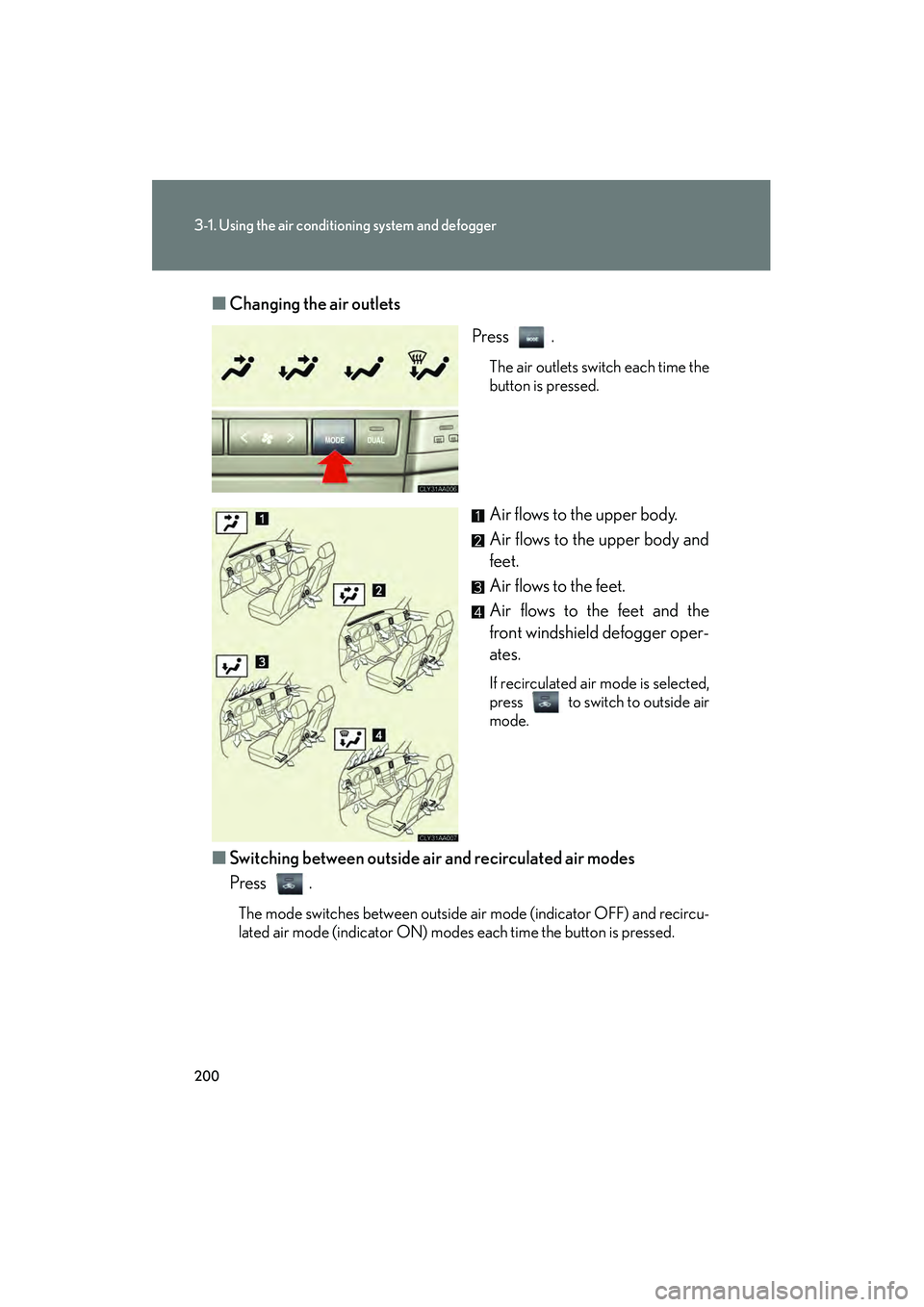
Changing the air outlets
Press .
The air outlets switch each time the
button is pressed.
Air flows to the upper body.
Air flows to the upper body and
feet.
Air flows to the feet.
Air flows to the feet and the
front windshield defogger oper-
ates.
If recirculated air mode is selected,
press to switch to outside air
mode.
■Switching between outside air and recirculated air modes
Press .
The mode switches between outside air mode (indicator OFF) and recircu-
lated air mode (indicator ON) modes each time the button is pressed.
Page 203 of 487
201
3-1. Using the air conditioning system and defogger
3
Interior features
RX400h_U
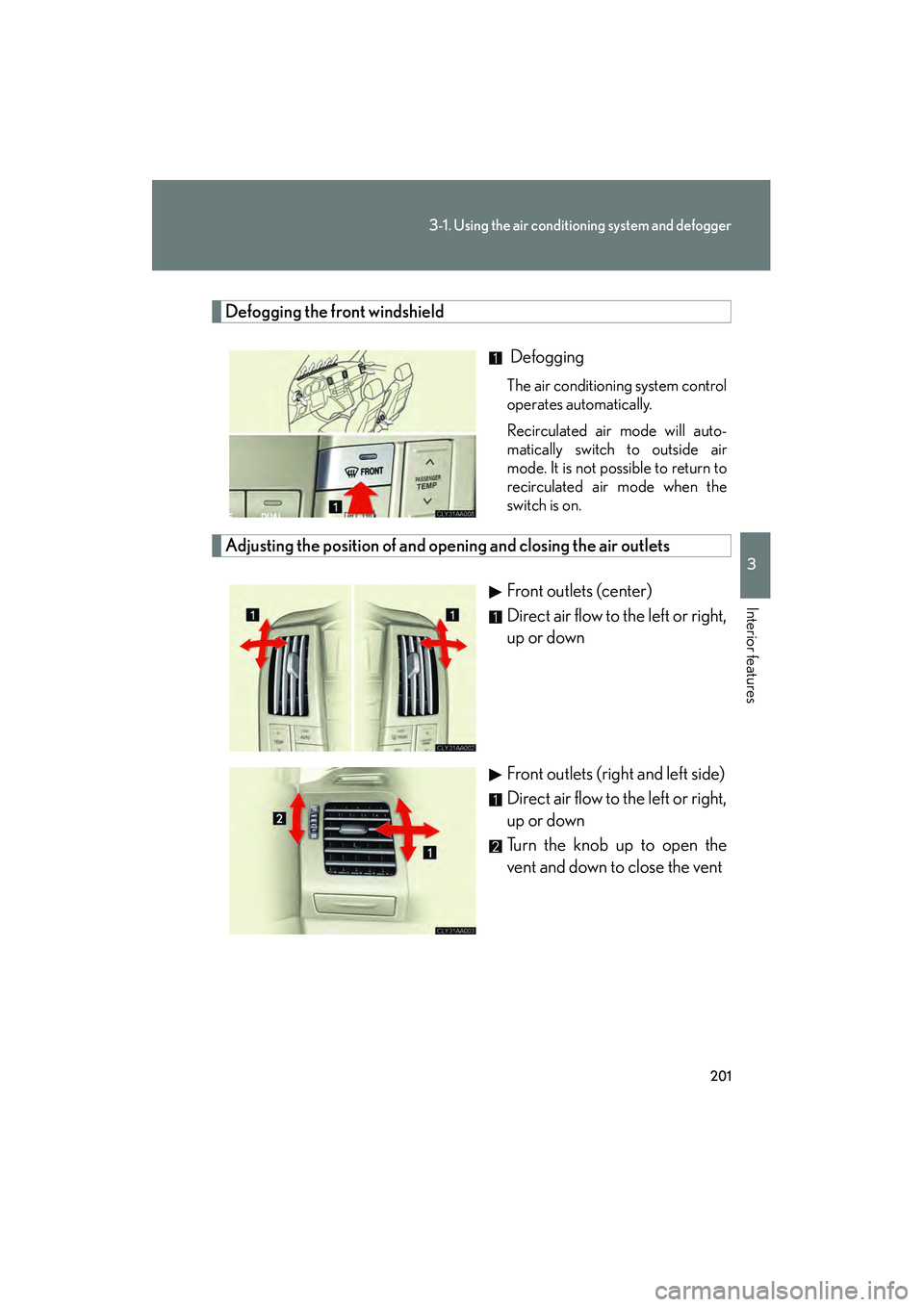
Defogging the front windshield
Defogging
The air conditioning system control
operates automatically.
Recirculated air mode will auto-
matically switch to outside air
mode. It is not possible to return to
recirculated air mode when the
switch is on.
Adjusting the position of and opening and closing the air outlets
Front outlets (center)
Direct air flow to the left or right,
up or down
Front outlets (right and left side)
Direct air flow to the left or right,
up or down
Turn the knob up to open the
vent and down to close the vent
Page 204 of 487
202
3-1. Using the air conditioning system and defogger
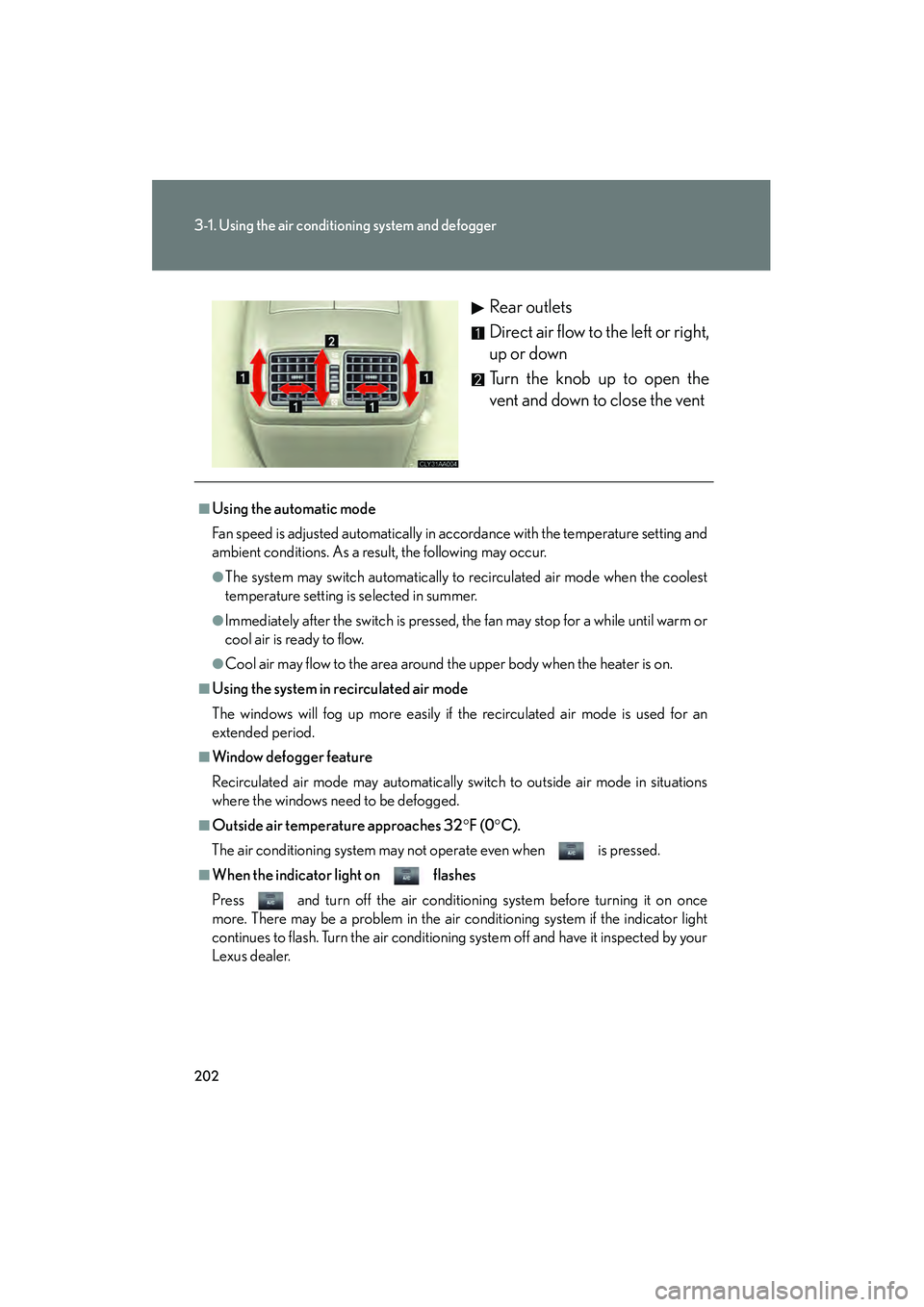
RX400h_URear outlets
Direct air flow to the left or right,
up or down
Turn the knob up to open the
vent and down to close the vent
■Using the automatic mode
Fan speed is adjusted automatically in accordance with the temperature setting and
ambient conditions. As a result, the following may occur.
●The system may switch automatically to recirculated air mode when the coolest
temperature setting is selected in summer.
●Immediately after the switch is pressed, the fan may stop for a while until warm or
cool air is ready to flow.
●Cool air may flow to the area around the upper body when the heater is on.
■Using the system in recirculated air mode
The windows will fog up more easily if the recirculated air mode is used for an
extended period.
■Window defogger feature
Recirculated air mode may automatically switch to outside air mode in situations
where the windows need to be defogged.
■Outside air temperature approaches 32
°F (0 °C).
The air conditioning system may not operate even when is pressed.
■When the indicator light on flashes
Press and turn off the air conditioning system before turning it on once
more. There may be a problem in the air conditioning system if the indicator light
continues to flash. Turn the air conditioning system off and have it inspected by your
Lexus dealer.
Page 205 of 487
203
3-1. Using the air conditioning system and defogger
3
Interior features
RX400h_U
CAUTION
■To prevent the windshield from fogging up
Do not use during cool air operation in extremely humid weather. The differ-
ence between the temperature of the outside air and that of the windshield can
cause the outer surface of the windshield to fog up, blocking your vision.
NOTICE
■To prevent 12-volt battery discharge
Do not leave the automatic air conditioning system on longer than necessary when
the hybrid system is off.
Page 206 of 487
204
3-1. Using the air conditioning system and defogger
RX400h_U
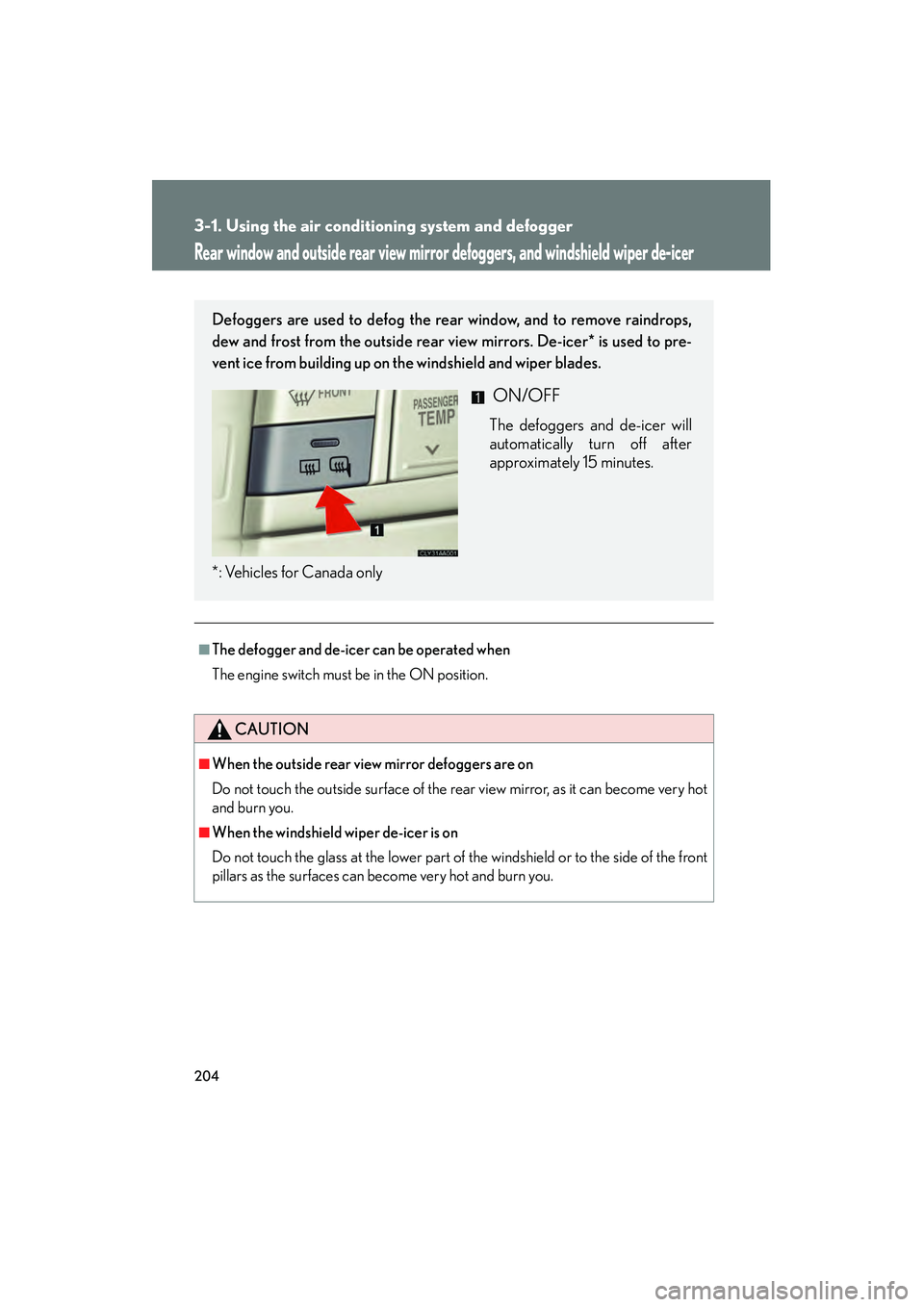
Rear window and outside rear view mirror defoggers, and windshield wiper de-icer
■The defogger and de-icer can be operated when
The engine switch must be in the ON position.
CAUTION
■When the outside rear view mirror defoggers are on
Do not touch the outside surface of the rear view mirror, as it can become very hot
and burn you.
■When the windshield wiper de-icer is on
Do not touch the glass at the lower part of the windshield or to the side of the front
pillars as the surfaces can become very hot and burn you.
Defoggers are used to defog the rear window, and to remove raindrops,
dew and frost from the outside rear view mirrors. De-icer* is used to pre-
vent ice from building up on the windshield and wiper blades.
ON/OFF
The defoggers and de-icer will
automatically turn off after
approximately 15 minutes.
*: Vehicles for Canada only
Page 299 of 487
Maintenance and care4
297
RX400h_U
4-1. Maintenance and care ............................... 298
Cleaning and protecting the vehicle exterior............ 298
Cleaning and protecting the vehicle interior ............... 301
4-2. Maintenance .................. 304 Maintenance requirements ....................... 304
General maintenance .......... 306
Emission inspection and maintenance (I/M)
programs............................... 309 4-3. Do-it-yourself
maintenance ................. 310
Do-it-yourself service precautions ............................ 310
Hood ........................................... 313
Positioning a floor jack .......... 314
Engine compartment ............ 316
Tires............................................. 331
Tire inflation pressure........... 340
Wheels ...................................... 344
Air conditioning filter ........... 346
Wireless remote control battery .................................... 348
Rear seat entertainment system controller ................ 350
Checking and replacing fuses ........................................ 352
Headlight aim (vehicles with discharge
headlights) ............................ 364
Light bulbs................................ 365