remote control LEXUS RX400H 2008 User Guide
[x] Cancel search | Manufacturer: LEXUS, Model Year: 2008, Model line: RX400H, Model: LEXUS RX400H 2008Pages: 487, PDF Size: 6.96 MB
Page 47 of 487

45
1-3. Opening, closing and locking the doors
1
Before driving
RX400h_U
Canceling the power back door system (vehicles with power back door)
Turn off the main switch in the
glove box to disable the power
back door system. ON
OFF
The back door cannot be opened
even with the wireless remote con-
trol or power back door switch.
Back door
Push the switch to close.
Pressing the switch again while
the power back door is closing
will cause it to open again.
However, the reverse operation
cannot be performed for the
first second after pressing the
switch to close the door.
The back door can be opened even if it is locked. Lock the back door
again when you leave the vehicle. The back door will not lock automat-
ically after it has been opened and then closed.
A buzzer sounds twice and the emer gency flashers flash twice to indi-
cate that the back door has been opened/closed.
■ Wireless remote control (vehicles with power back door)
→ P. 36
Page 75 of 487
73
1-5. Opening and closing the windows and moon roof
1
Before driving
RX400h_U
■The power windows can be operated when
The engine switch must be in the ON position.
■Door lock linked window operation
●The power windows can be opened and closed using the key. (→P. 3 9 )
●The power windows can be opened using the wireless remote control. ( →P. 3 6 )
■Retained accessory power
The power windows can be operated for approximately 45 seconds even after the
engine switch is turned to the ACC or LOCK position. They cannot, however, be
operated once either front door is opened.
■Jam protection function
If an object becomes caught between the window and the window frame, window
travel is stopped and the window is opened slightly.
■If the power window does not work correctly
The power windows must be initialized in order to ensure proper operation. (Per-
form for each window with the switch for each seat.)
Open the window halfway.
Fully close the window by pulling the switch up and continue holding the
switch for one second.
The indicator on the switch changes from a flashing pattern to being on when initial
settings are complete.
■Customization that can be configured at Lexus dealer
Settings (e.g. linked door lock operation) can be changed. (Customizable features
→ P. 4 5 8 )
STEP1
STEP2
Page 78 of 487
76
1-5. Opening and closing the windows and moon roof
RX400h_U
■The moon roof can be operated when
The engine switch must be in the ON position.
■Door lock linked moon roof operation
●The moon roof can be opened and closed using the key. (→P. 3 9 )
●The moon roof can be opened using the wireless remote control. ( →P. 3 6 )
■Operating the moon roof after turning the engine switch to the ACC or LOCK
position
The moon roof can be operated for approximately 45 seconds even after the
engine switch is turned to the ACC or LOCK position. It cannot, however, be oper-
ated once either front door is opened.
■Jam protection function
If an object is detected between the moon roof and the frame while closing or tilting
down, travel is stopped and the moon roof opens slightly.
■To reduce moon roof wind noise
Drive with the moon roof where it has stopped when opening automatically.
■Sunshade
The sunshade can be opened and closed manually. However, the sunshade will
open automatically when the moon roof is opened.
■Customization that can be configured at Lexus dealer
Settings (e.g. linked door lock operation) can be changed. (Customizable features
→P. 4 5 8 )
Page 87 of 487
85
1
1-7. Theft deterrent system
Before driving
RX400h_U
Alarm
The system sounds the alarm and flashes lights when forcible entry is
detected.
■Triggered of the alarm
The alarm is triggered in the following situations.
●A locked door is unlocked or opened in any way other than using
the key or wireless remote co ntrol with the alarm being set.
● The hood is opened with the alarm being set.
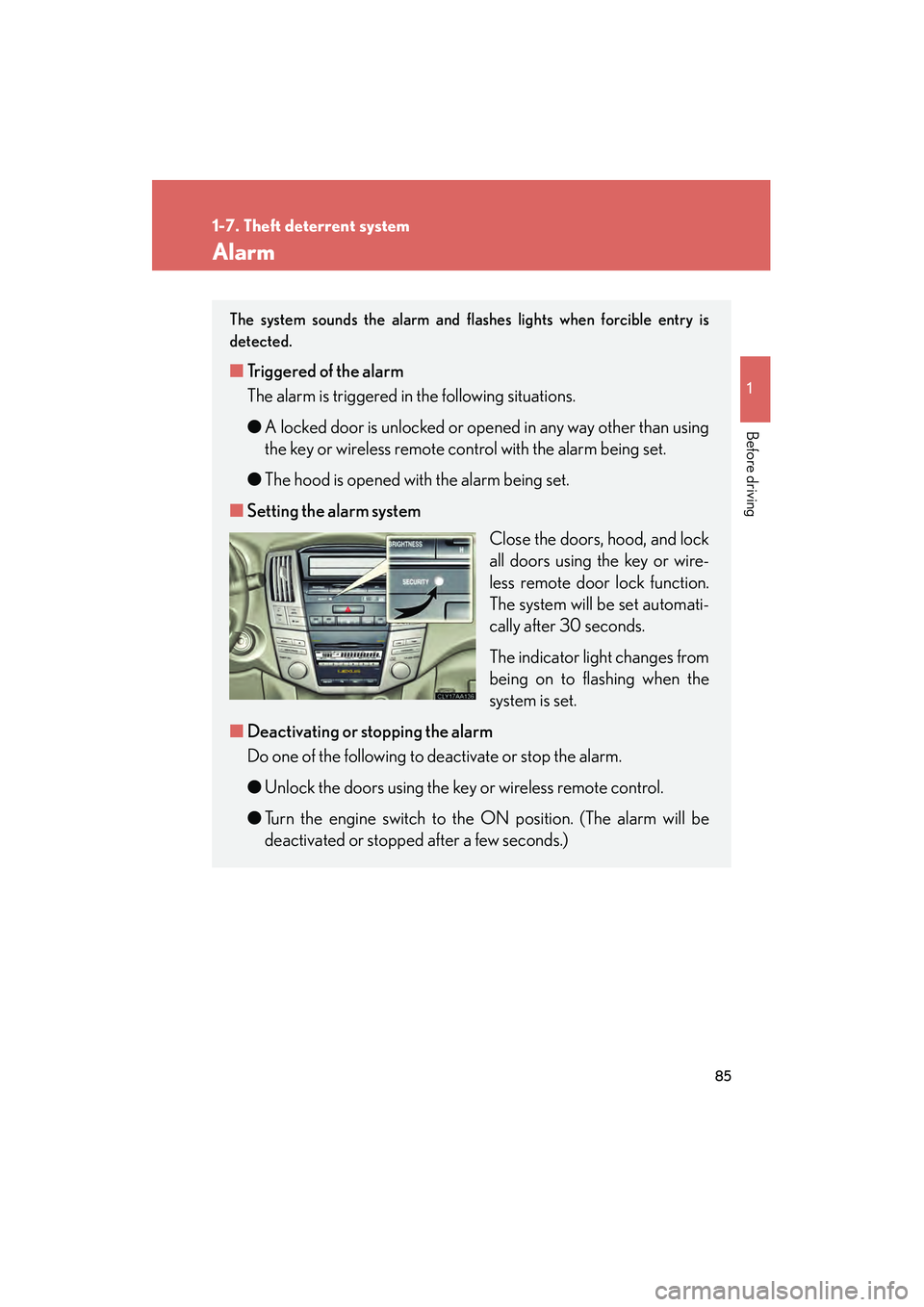
■ Setting the alarm system
Close the doors, hood, and lock
all doors using the key or wire-
less remote door lock function.
The system will be set automati-
cally after 30 seconds.
The indicator light changes from
being on to flashing when the
system is set.
■ Deactivating or stopping the alarm
Do one of the following to deactivate or stop the alarm.
●Unlock the doors using the key or wireless remote control.
● Turn the engine switch to the ON position. (The alarm will be
deactivated or stopped after a few seconds.)
Page 88 of 487
86
1-7. Theft deterrent system
RX400h_U
■Items to check before locking the vehicle
To prevent unexpected triggering of the alarm and vehicle theft, make sure of the
following.
●Nobody is in the vehicle.
●The windows and moon roof are closed before the alarm is set.
●No valuables or other personal items are left in the vehicle.
■Triggering of the alarm
The alarm may be triggered in the following situations.
Stopping the alarm deactivates the alarm system.
●The doors is unlocked using the key.
●A person inside the vehicle opens a door or hood.
●The battery is recharged or replaced when the vehicle is locked.
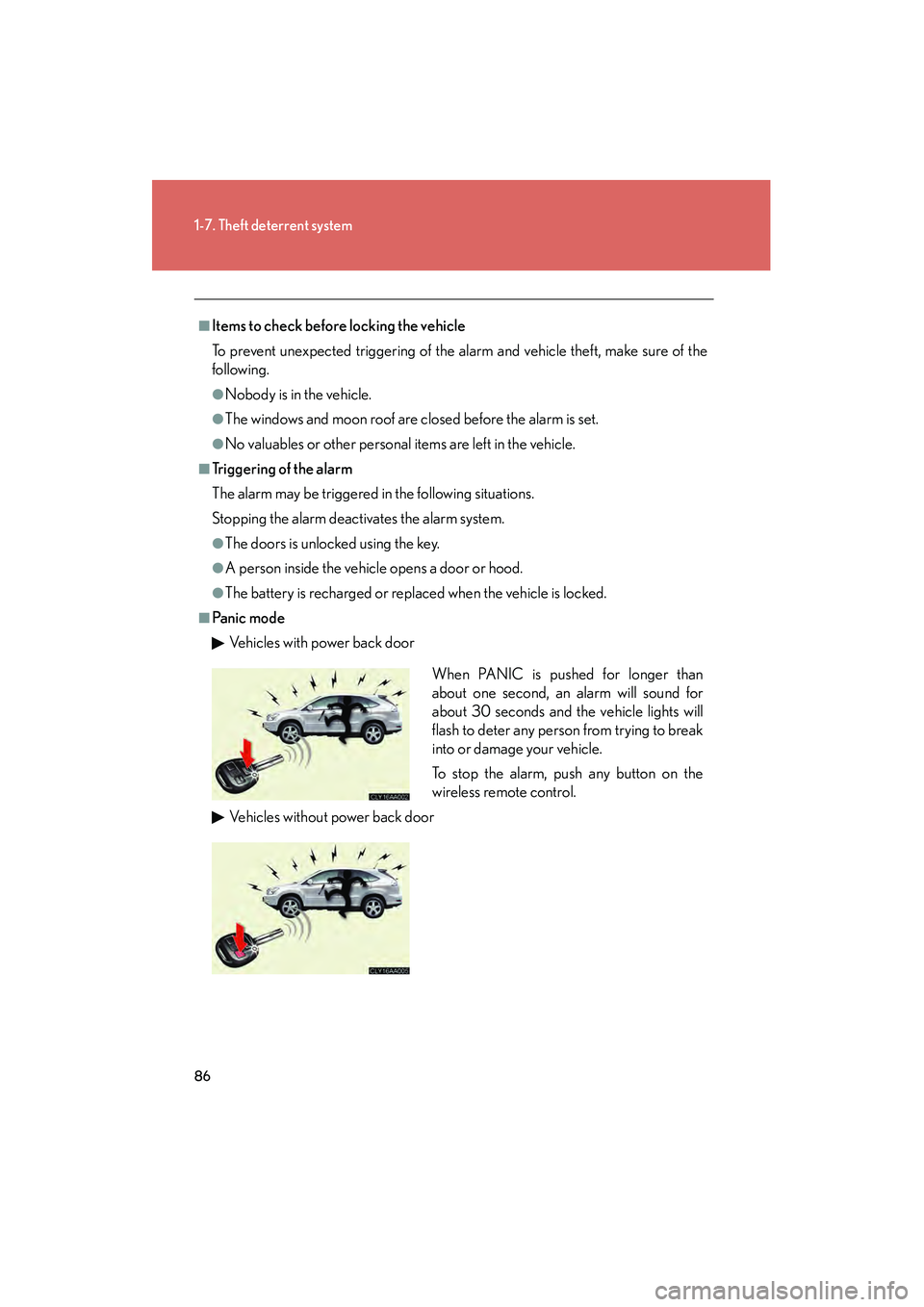
■Pa n ic m o d eVehicles with power back door
Vehicles without power back door
When PANIC is pushed for longer than
about one second, an alarm will sound for
about 30 seconds and the vehicle lights will
flash to deter any person from trying to break
into or damage your vehicle.
To stop the alarm, push any button on the
wireless remote control.
Page 239 of 487
237
3-3. Using the rear audio system
3
Interior features
RX400h_U
■Error messages
DISC CHECK: Indicates that the disc is dirty, damaged or was inserted upsidedown. Clean the disc or insert it correctly.
REGION ERROR: Indicates that the DVD region code is not set properly.
DVD ERROR: Indicates that there is a problem inside the player. Eject the disc. Set the disc again.
If the malfunction still exists, take the vehicle to your Lexus
dealer.
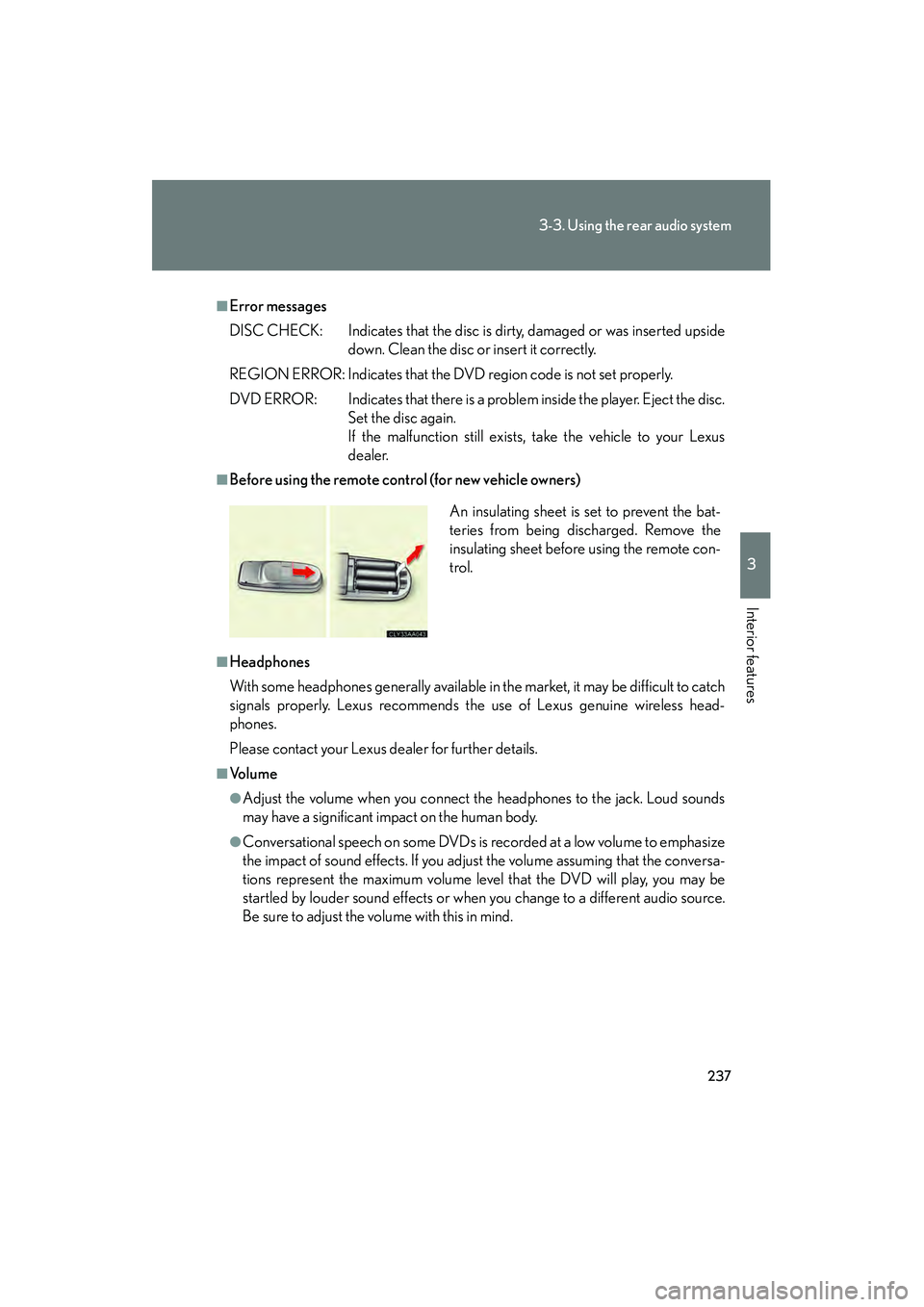
■Before using the remote control (for new vehicle owners)
■Headphones
With some headphones generally available in the market, it may be difficult to catch
signals properly. Lexus recommends the use of Lexus genuine wireless head-
phones.
Please contact your Lexus dealer for further details.
■Vo l u m e
●Adjust the volume when you connect the headphones to the jack. Loud sounds
may have a significant impact on the human body.
●Conversational speech on some DVDs is recorded at a low volume to emphasize
the impact of sound effects. If you adjust the volume assuming that the conversa-
tions represent the maximum volume level that the DVD will play, you may be
startled by louder sound effects or when you change to a different audio source.
Be sure to adjust the volume with this in mind. An insulating sheet is set to prevent the bat-
teries from being discharged. Remove the
insulating sheet before using the remote con-
trol.
Page 240 of 487
238
3-3. Using the rear audio system
RX400h_U
CAUTION
■While driving
Do not use headphones.
Doing so may cause an accident, resulting in death or serious injury.
■When the rear seat entertainment system is not used
Keep the display closed.
In the event of an accident or sudden braking, the opened display may hit an occu-
pant's body, resulting in injury.
■To prevent accidents and electric shock
Do not disassemble or modify the remote control.
■When the remote control is not used
Stow the remote control.
Injuries may result in the event of an accident or sudden braking.
Page 241 of 487
239
3-3. Using the rear audio system
3
Interior features
RX400h_U
Using the DVD player (DVD video)
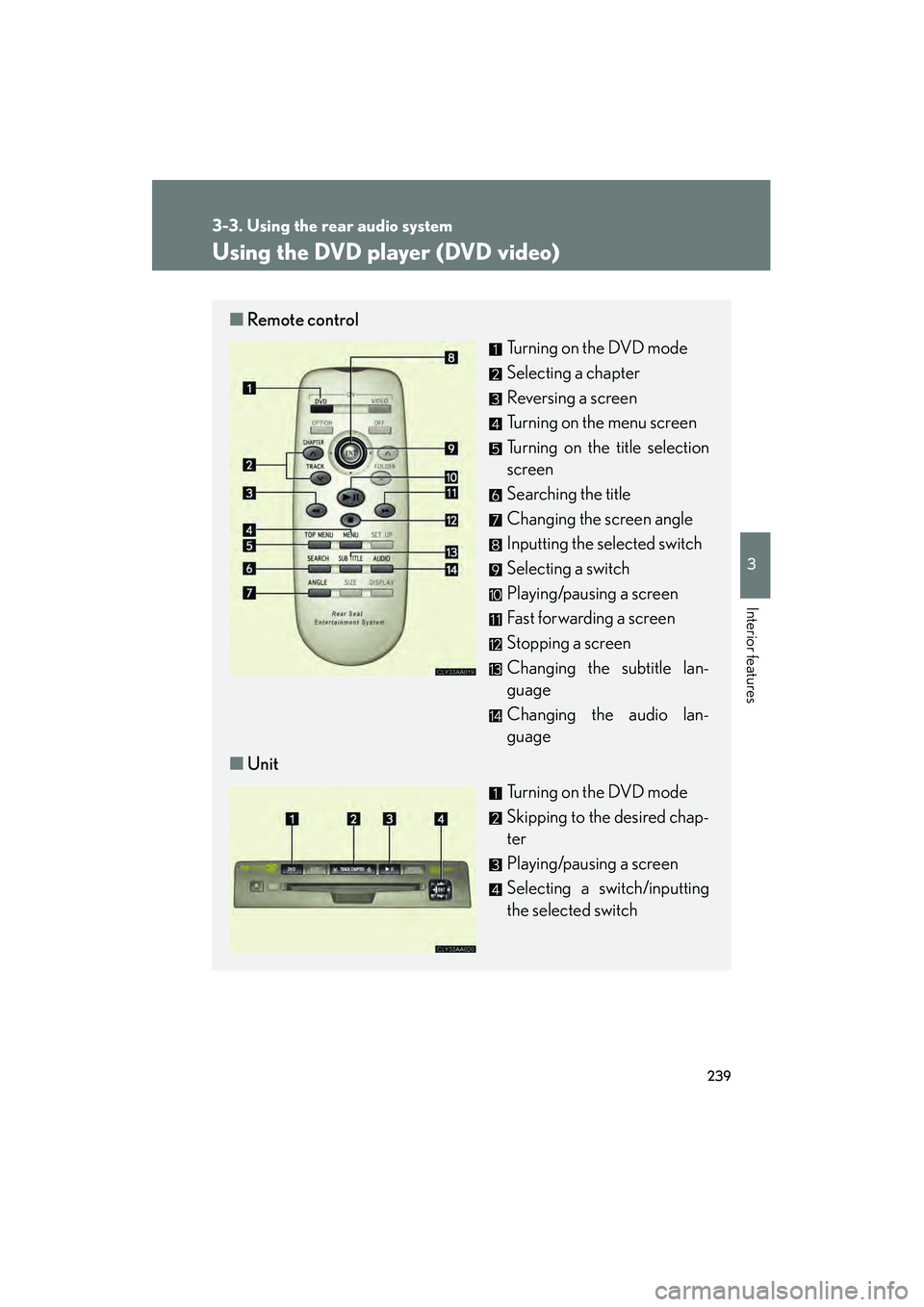
■Remote control
Turning on the DVD mode
Selecting a chapter
Reversing a screen
Turning on the menu screen
Turning on the title selection
screen
Searching the title
Changing the screen angle
Inputting the selected switch
Selecting a switch
Playing/pausing a screen
Fast forwarding a screen
Stopping a screen
Changing the subtitle lan-
guage
Changing the audio lan-
guage
■ Unit
Turning on the DVD mode
Skipping to the desired chap-
ter
Playing/pausing a screen
Selecting a switch/inputting
the selected switch
Page 243 of 487
241
3-3. Using the rear audio system
3
Interior features
RX400h_U
Turning on or off the operation switchesPress or to turn on the operation switches.
Press or once again or select to turn off the opera-
tion switches.
Turning on the title selection screenPress or select to turn on the title selection screen. For the
operation of the title selection screen, see the separate manual for the
DVD disc.
Turning on the menu screenPress or select to turn on the menu screen. For the opera-
tion of the menu screen, see the separate manual for the DVD disc.
NOTICE
■Cleaning the display
Wipe the display with a dry soft cloth.
If the screen is wiped with a rough cloth, the surface of the screen may be
scratched.
■To prevent damage to the remote control
●Keep the remote control away from direct sunlight, temperature heat and high
humidity.
●Do not drop or knock the remote control against hard objects.
●Do not sit on or place heavy objects on the remote control.
■DVD player
Never try to disassemble or oil any part of the DVD player. Do not insert anything
other than a disc into the slot.
Page 248 of 487
246
3-3. Using the rear audio system
RX400h_U
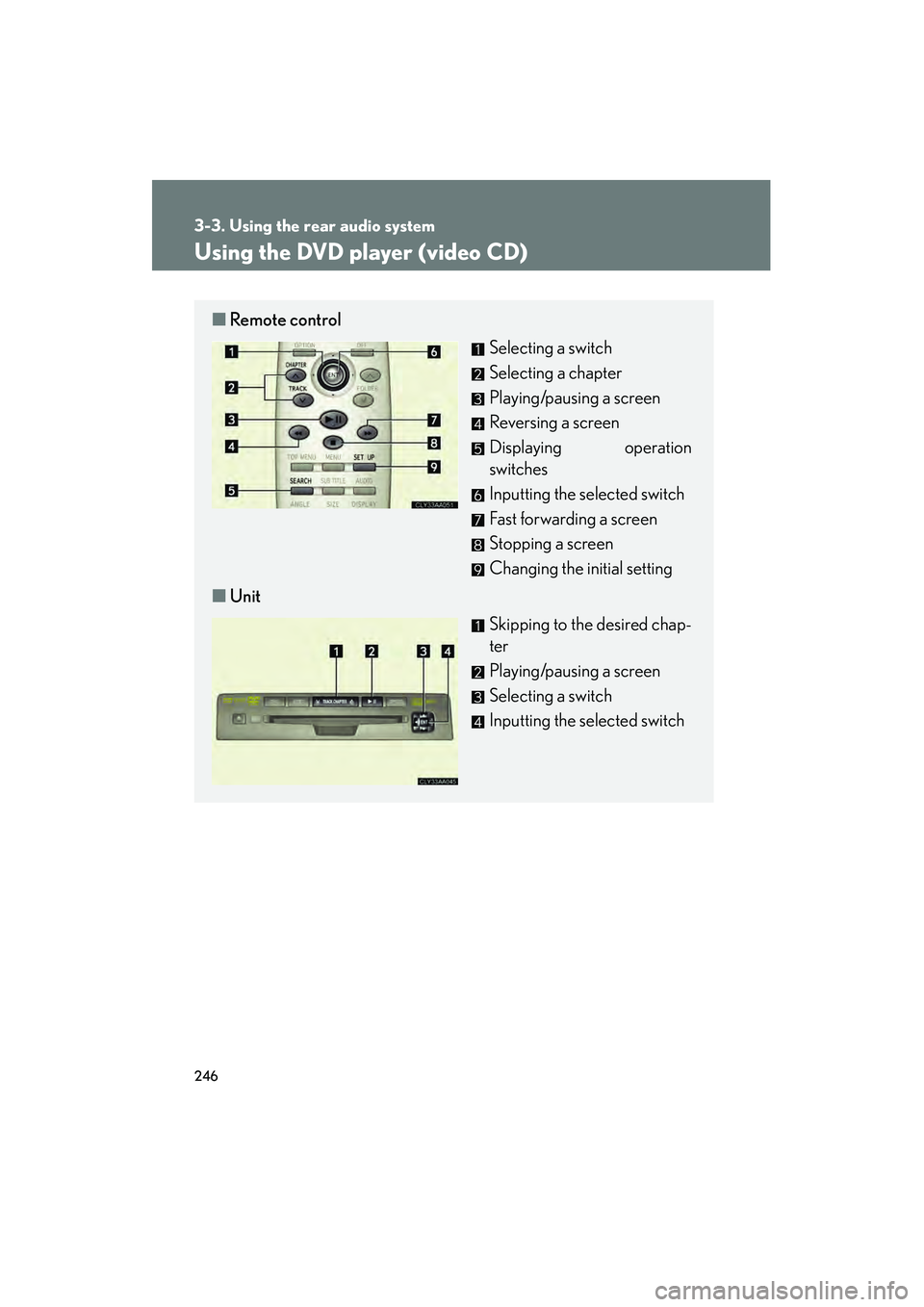
Using the DVD player (video CD)
■Remote control
Selecting a switch
Selecting a chapter
Playing/pausing a screen
Reversing a screen
Displaying operation
switches
Inputting the selected switch
Fast forwarding a screen
Stopping a screen
Changing the initial setting
■ Unit
Skipping to the desired chap-
ter
Playing/pausing a screen
Selecting a switch
Inputting the selected switch