brake LEXUS RX400H 2008 Owner's Manual
[x] Cancel search | Manufacturer: LEXUS, Model Year: 2008, Model line: RX400H, Model: LEXUS RX400H 2008Pages: 487, PDF Size: 6.96 MB
Page 151 of 487
149
2-3. Operating the lights and windshield wipers
2
When driving
RX400h_U
AFS (vehicles with discharge headlights)AFS (Adaptive Front Lighting System) improves visibility at intersections
and on curves by automatically adjusting the direction light axis of the
headlights according to vehicle speed and the degree of the tire angle
that are controlled by steering input.
Operates at speeds of 18 mph (30 km/h) or higher.
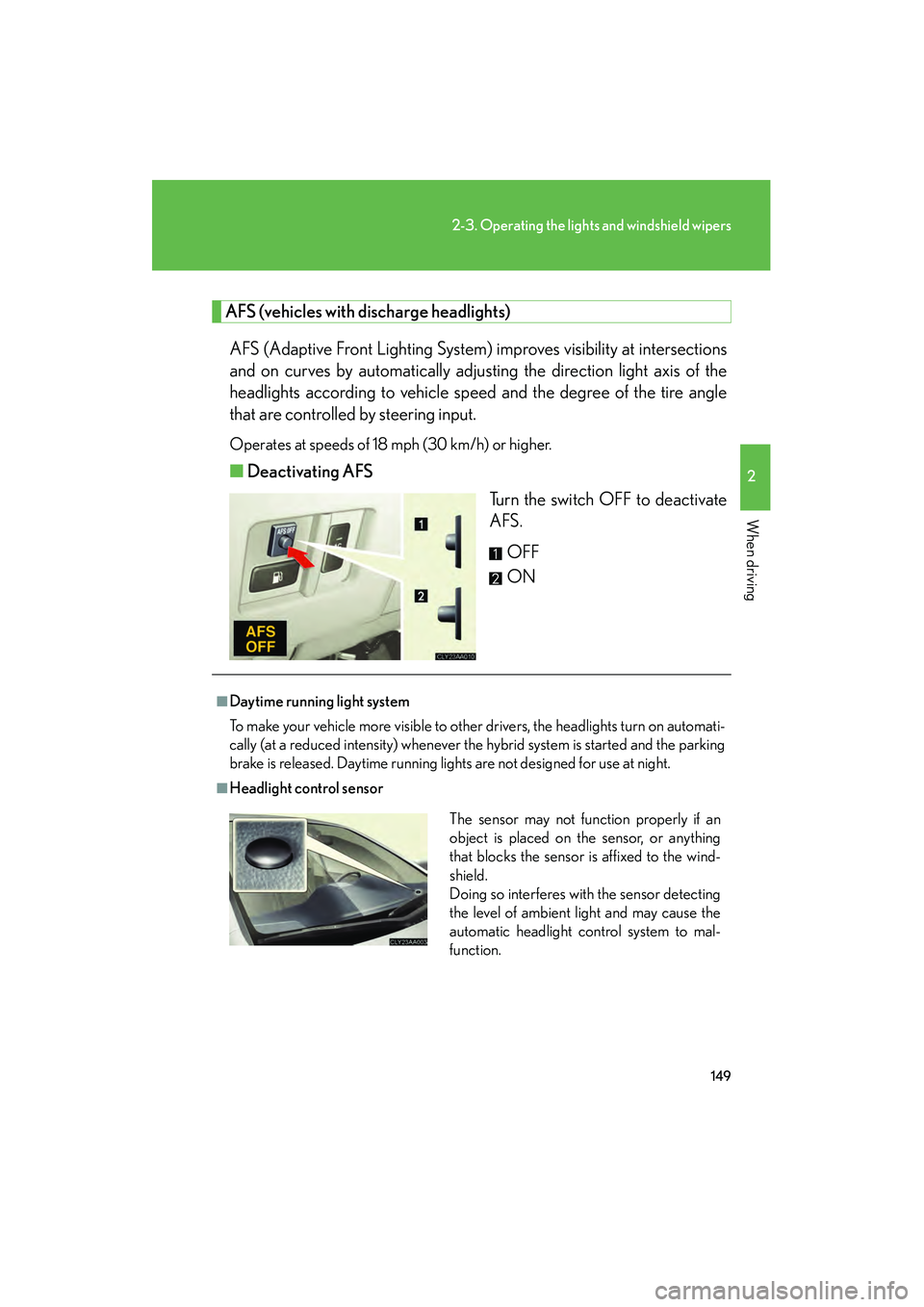
■ Deactivating AFS
Turn the switch OFF to deactivate
AFS.
OFF
ON
■Daytime running light system
To make your vehicle more visible to other drivers, the headlights turn on automati-
cally (at a reduced intensity) whenever the hybrid system is started and the parking
brake is released. Daytime running lights are not designed for use at night.
■Headlight control sensor
The sensor may not function properly if an
object is placed on the sensor, or anything
that blocks the sensor is affixed to the wind-
shield.
Doing so interferes with the sensor detecting
the level of ambient light and may cause the
automatic headlight control system to mal-
function.
Page 160 of 487
158
2-4. Using other driving systems
RX400h_U
■Fine adjustment of the set speed
Adjustment of the set speed by approximately 1.0 mph (1.6 km/h) cab be made by
lightly pressing the lever up or down and releasing it.
■Cruise control can be set when
●The shift lever is in the D.
●Vehicle speed is between approximately 25 mph (40 km/h) and 125 mph (200
km/h).
■Accelerating
The vehicle can be accelerated normally.
■Automatic cruise control cancellation
The set speed is automatically cancelled in any of the following situations.
●Actual vehicle speed falls more than 10 mph (16 km/h) below the preset vehicle
speed.
At this time, the memorized set speed is not retained.
●Actual vehicle speed is below 25 mph (40km/h).
●VSC is activated.
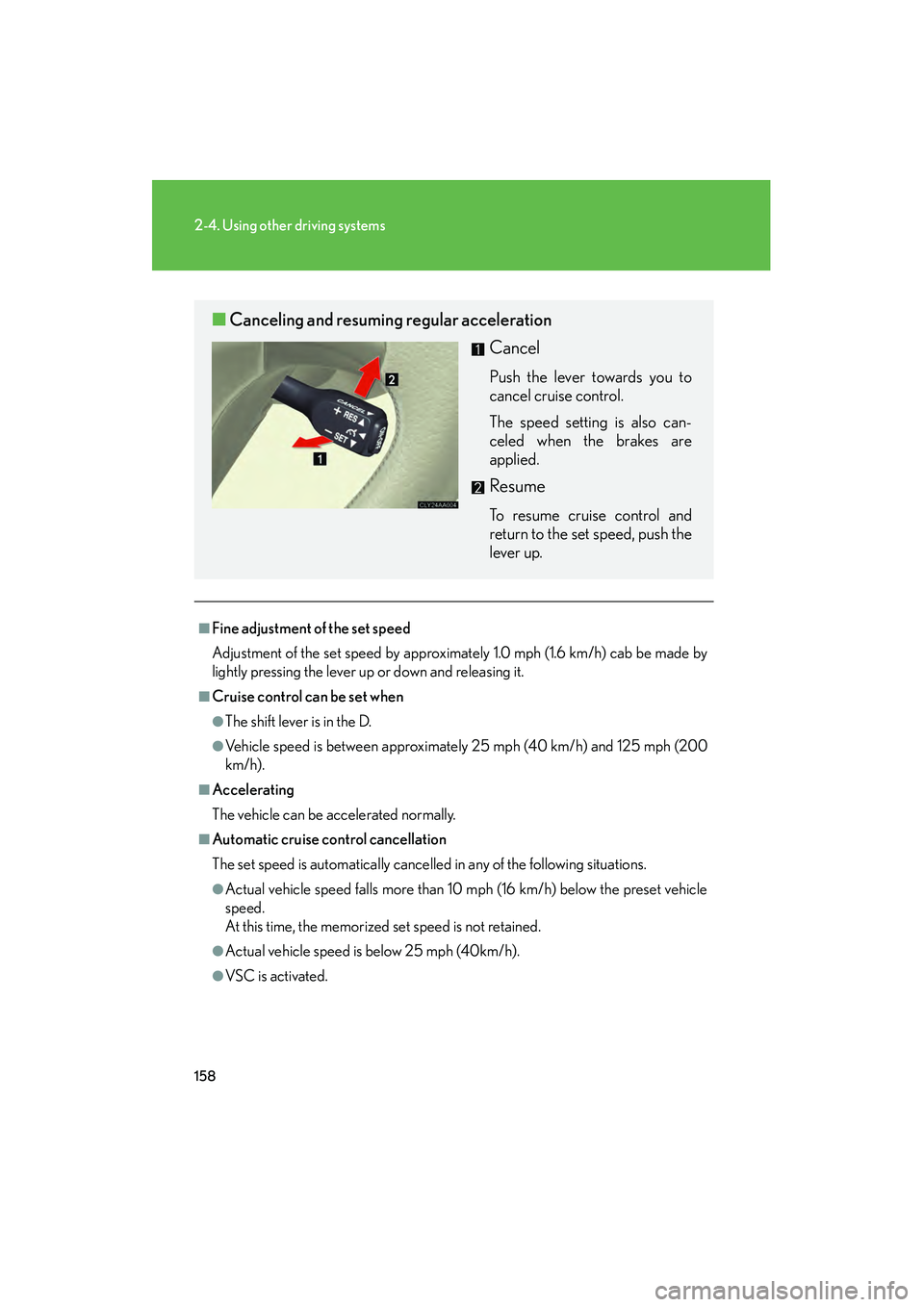
■Canceling and resuming regular acceleration
Cancel
Push the lever towards you to
cancel cruise control.
The speed setting is also can-
celed when the brakes are
applied.
Resume
To resume cruise control and
return to the set speed, push the
lever up.
Page 163 of 487
161
2-4. Using other driving systems
2
When driving
RX400h_U
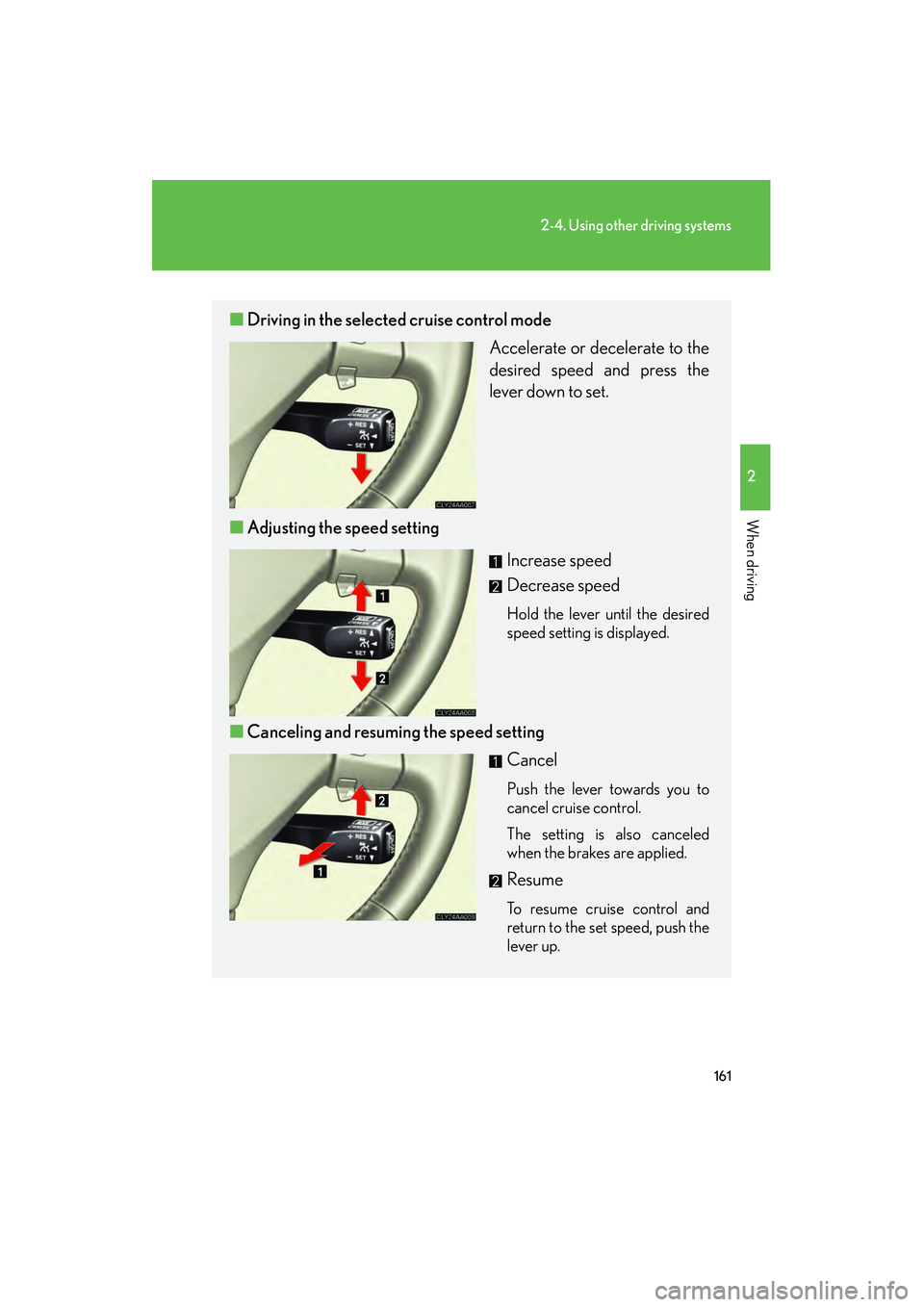
■Driving in the selected cruise control mode
Accelerate or decelerate to the
desired speed and press the
lever down to set.
■ Adjusting the speed setting
Increase speed
Decrease speed
Hold the lever until the desired
speed setting is displayed.
■Canceling and resuming the speed setting
Cancel
Push the lever towards you to
cancel cruise control.
The setting is also canceled
when the brakes are applied.
Resume
To resume cruise control and
return to the set speed, push the
lever up.
Page 165 of 487
163
2-4. Using other driving systems
2
When driving
RX400h_U
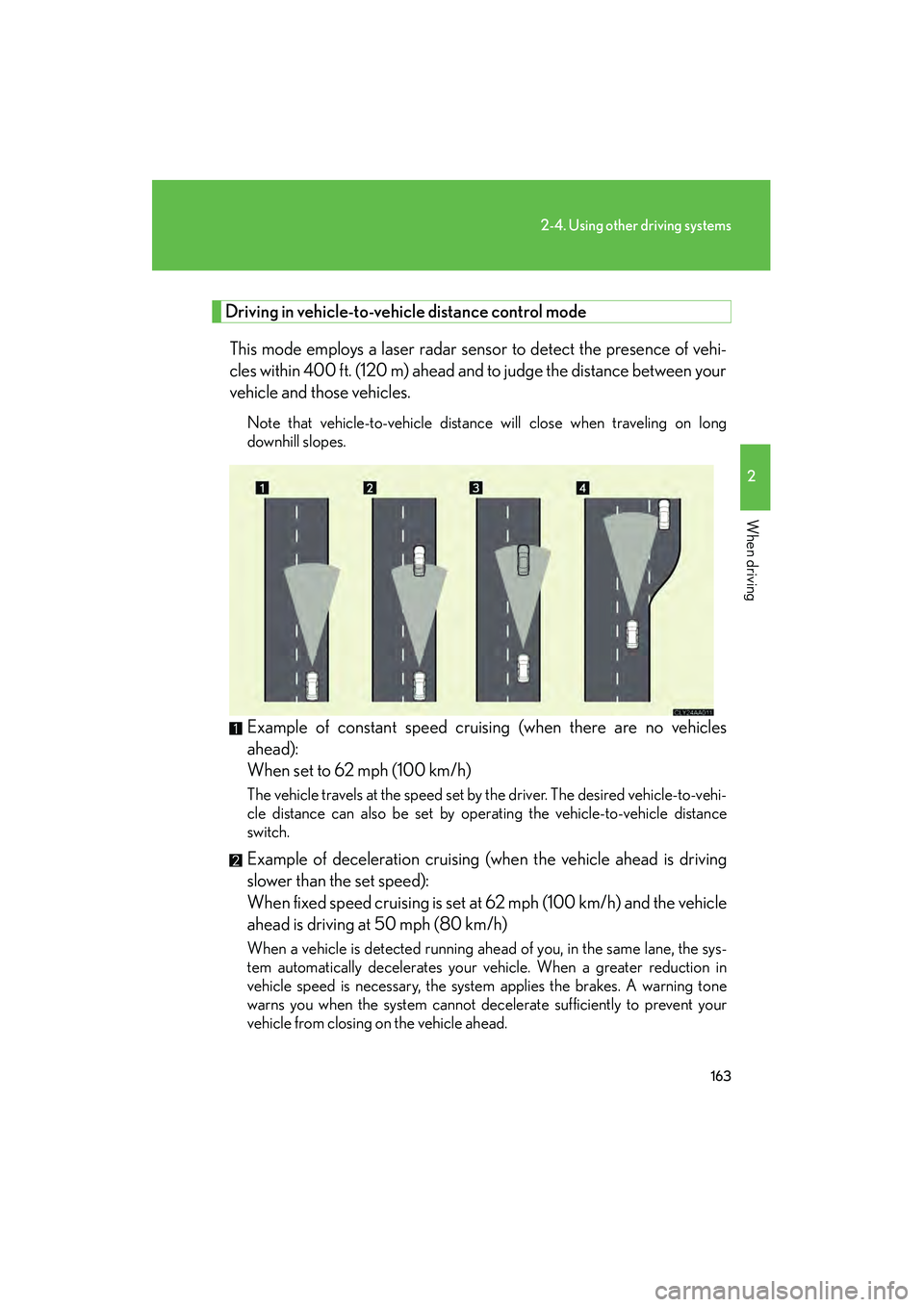
Driving in vehicle-to-vehicle distance control mode
This mode employs a laser radar sensor to detect the presence of vehi-
cles within 400 ft. (120 m) ahead and to judge the distance between your
vehicle and those vehicles.
Note that vehicle-to-vehicle distance will close when traveling on long
downhill slopes.
Example of constant speed cruising (when there are no vehicles
ahead):
When set to 62 mph (100 km/h)
The vehicle travels at the speed set by the driver. The desired vehicle-to-vehi-
cle distance can also be set by operating the vehicle-to-vehicle distance
switch.
Example of deceleration cruising (when the vehicle ahead is driving
slower than the set speed):
When fixed speed cruising is set at 62 mph (100 km/h) and the vehicle
ahead is driving at 50 mph (80 km/h)
When a vehicle is detected running ahead of you, in the same lane, the sys-
tem automatically decelerates your vehicle. When a greater reduction in
vehicle speed is necessary, the system applies the brakes. A warning tone
warns you when the system cannot decelerate sufficiently to prevent your
vehicle from closing on the vehicle ahead.
Page 169 of 487
167
2-4. Using other driving systems
2
When driving
RX400h_U
CAUTION
■Before using dynamic laser cruise control
Do not overly rely on vehicle-to-vehicle distance control.
Be aware of the set vehicle speed. If automatic deceleration/acceleration is not
appropriate, adjust the vehicle speed, as well as the distance between your vehicle
and vehicles ahead by applying the brakes, etc.
■To avoid inadvertent cruise control activation
Keep the ON-OFF button off when not in use.
■Situations unsuitable for dynamic laser cruise control
Do not use dynamic laser cruise control in any of the following situations.
Doing so may result in inappropriate control of speed and could cause serious or
fatal accident.
●In heavy traffic
●On roads with sharp bends
●On winding roads
●On slippery roads, such as those covered with rain, ice or snow
●Where there are sudden changes between sharp up and down gradients
●At entrances to expressways
●When weather conditions are bad enough that they may prevent the sensors
from functioning correctly (fog, snow, sandstorm, etc.)
●When buzzer can be heard often
Page 170 of 487
168
2-4. Using other driving systems
RX400h_U
CAUTION
■When the laser radar sensor may not be correctly detecting the vehicle ahead
Apply the brakes as necessary when any of the following types of vehicles are in
front of you.
As the sensor may not be able to correctly detect these types of vehicles, the prox-
imity alarm (→P. 164) will not be activated, and an accident may result.
●Vehicles that cut in suddenly
●Vehicles traveling at low speeds
●Vehicles that are not moving
●Vehicles with small rear ends (trailers with no load on board etc.)
●Motorcycles traveling in the same lane
■Conditions under which the vehicle-to-vehicle distance control may not function
correctly
Apply the brakes as necessary in the following conditions as the laser radar sensor
may not be able to correctly detect vehicles ahead, and an accident may result.
●When water or snow thrown up by the surrounding vehicles hinders the function-
ing of the sensor
●When your vehicle is pointing upwards (caused by a heavy load in the luggage
compartment, etc.)
●When the road curves or when the lanes are narrow
●When steering wheel operation or your position in the lane is unstable
■To ensure the laser radar sensor functions correctly
Do not do the following to the sensor as doing so may cause the sensor not to func-
tion correctly and could result in an accident.
●Stick or attach anything to them
●Leave them dirty
●Disassemble, subject them to strong shocks
●Modify or paint them
●Replace them with non-genuine parts
Page 171 of 487
169
2-4. Using other driving systems
2
When driving
RX400h_U
Driving assist systems
To help enhance driving safety and performance, the following systems
operate automatically in response to various driving situations. Be aware,
however, that these systems are supplementary and should not be relied
upon too heavily when operating the vehicle.
■ ABS (Anti-lock Brake System)
Helps to prevent wheel lock when the brakes are applied suddenly, or if
the brakes are applied while driving on a slippery road surface.
■Brake assist
Generates an increased level of braking force after the brake pedal is
depressed, when the system detects a panic stop situation.
■VSC (Vehicle Stability Control)
Helps the driver to control skidding when swerving suddenly or turning on
slippery road surfaces.
■Traction Control
Maintains drive power and prevents the front wheels (2WD models) or all
wheels (AWD models) from spinning wh en starting the vehicle or acceler-
ating on slippery roads.
■ EPS (Electric Power Steering)
Employs an electric motor to reduce the amount of effort needed to turn
the steering wheel.
■VDIM (Vehicle Dynamics Integrated Management)
Provides integrated control of the ABS, brake assist, VSC, traction control
and EPS systems.
Maintains vehicle stability when swerving on slippery road surfaces by
controlling the brakes, engine output, and the movement of the front
wheels.
Page 172 of 487
170
2-4. Using other driving systems
RX400h_U
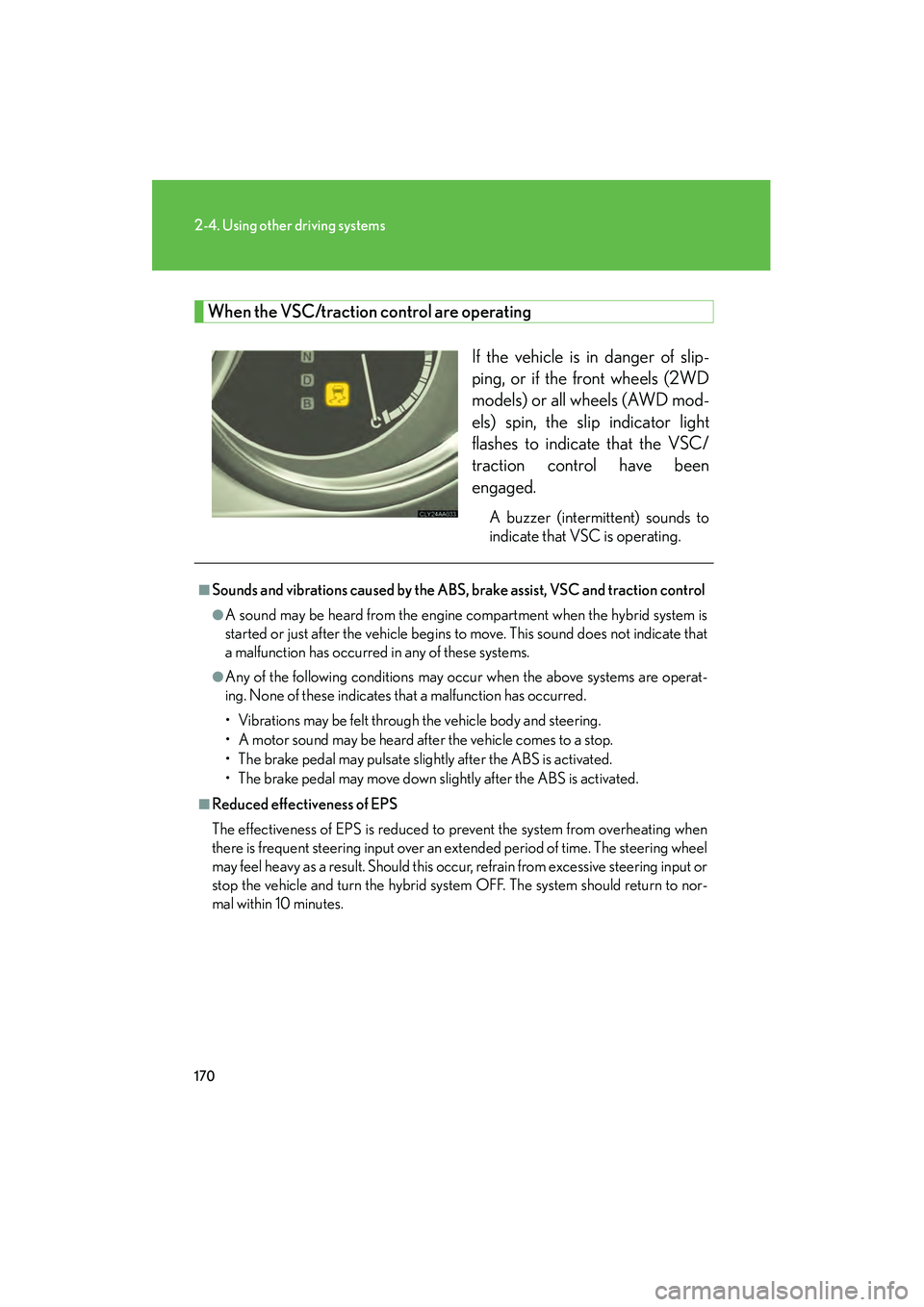
When the VSC/traction control are operatingIf the vehicle is in danger of slip-
ping, or if the front wheels (2WD
models) or all wheels (AWD mod-
els) spin, the slip indicator light
flashes to indicate that the VSC/
traction control have been
engaged.
A buzzer (intermittent) sounds to
indicate that VSC is operating.
■Sounds and vibrations caused by the ABS, brake assist, VSC and traction control
●A sound may be heard from the engine compartment when the hybrid system is
started or just after the vehicle begins to move. This sound does not indicate that
a malfunction has occurred in any of these systems.
●Any of the following conditions may occur when the above systems are operat-
ing. None of these indicates that a malfunction has occurred.
• Vibrations may be felt through the vehicle body and steering.
• A motor sound may be heard after the vehicle comes to a stop.
• The brake pedal may pulsate slightly after the ABS is activated.
• The brake pedal may move down slightly after the ABS is activated.
■Reduced effectiveness of EPS
The effectiveness of EPS is reduced to prevent the system from overheating when
there is frequent steering input over an extended period of time. The steering wheel
may feel heavy as a result. Should this occur, refrain from excessive steering input or
stop the vehicle and turn the hybrid system OFF. The system should return to nor-
mal within 10 minutes.
Page 178 of 487
176
2-5. Driving information
RX400h_U
CAUTION
■Off-road driving precautions
Always observe the following precautions to minimize the risk of serious personal
injury or damage to your vehicle:
●Drive carefully when off the road. Do not take unnecessary risks by driving in
dangerous places.
●Do not grip the steering wheel spokes when driving off-road. A bad bump could
jerk the wheel and injure your hands. Keep both hands and especially your
thumbs on the outside of the rim.
●Always check your brakes for effectiveness immediately after driving in sand,
mud, water or snow.
●After driving through tall grass, mud, rock, sand, rivers, etc., check that there is no
grass, bush, paper, rags, stone, sand, etc. adhering or trapped on the underbody.
Clear off any such matter from the underbody. If the vehicle is used with these
materials trapped or adhering to the underbody, a breakdown or fire could occur.
●When driving off-road or in rugged terrain, do not drive at excessive speeds,
jump, make sharp turns, strike objects, etc. This may cause loss of control or vehi-
cle rollover causing death or serious injury. You are also risking expensive dam-
age to your vehicle’s suspension and chassis.
NOTICE
■To prevent the water damage
Take all necessary safety measures to ensure that water damage to the hybrid bat-
tery, hybrid system or other components does not occur.
●Water entering the engine compartment may cause severe damage to the hybrid
system. Water entering the interior may cause the hybrid battery stowed under
the rear seats to short circuit.
●Water entering the hybrid transaxle will cause deterioration in transmission qual-
ity. The malfunction indicator may come on, and the vehicle may not be drivable.
●Water can wash the grease from wheel bearings, causing rusting and premature
failure, and may also enter the transaxle case, reducing the gear oil’s lubricating
qualities.
Page 179 of 487
177
2-5. Driving information
2
When driving
RX400h_U
NOTICE
■When you drive through water
If driving through water, such as when crossing shallow streams, first check the
depth of the water and the bottom of the river bed for firmness. Drive slowly and
avoid deep water.
■Inspection after off-road driving
●Sand and mud that has accumulated in brake drums and around brake discs may
affect braking efficiency and may damage brake system components.
●Always perform a maintenance inspection after each day of off-road driving that
has taken you through rough terrain, sand, mud, or water. For scheduled mainte-
nance information, refer to the “Warranty and Services Guide/Owner’s Manual
Supplement/Scheduled Maintenance”.