display LEXUS RX450h 2015 Owners Manual
[x] Cancel search | Manufacturer: LEXUS, Model Year: 2015, Model line: RX450h, Model: LEXUS RX450h 2015Pages: 878, PDF Size: 11.62 MB
Page 358 of 878
3583-2. Using the air conditio ning system and defogger
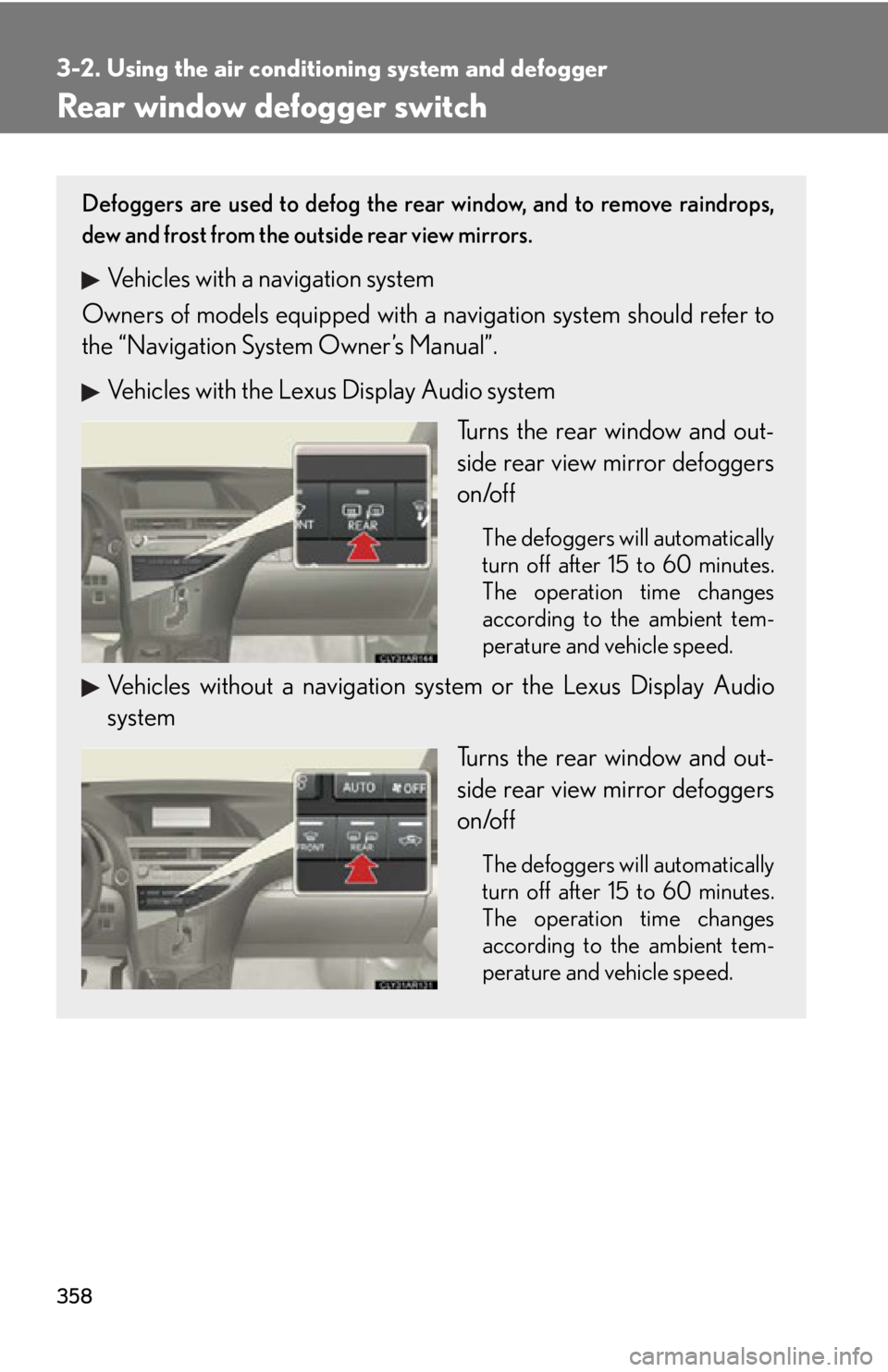
Rear window defogger switch Defoggers are used to defog the rear window, and to remove raindrops,
dew and frost from the outside rear view mirrors.
Vehicles with a navigation system
Owners of models equi pped with a navigation system should refer to
the “Navigation System Owner’s Manual”.
Vehicles with the Lexus Display Audio system
Turns the rear window and out-
side rear view mirror defoggers
on/off The defoggers will automatically
turn off after 15 to 60 minutes.
The operation time changes
according to the ambient tem-
perature and vehicle speed.
Vehicles without a navigation sy stem or the Lexus Display Audio
system
Turns the rear window and out-
side rear view mirror defoggers
on/off The defoggers will automatically
turn off after 15 to 60 minutes.
The operation time changes
according to the ambient tem-
perature and vehicle speed.
Page 360 of 878
3603-2. Using the air conditio ning system and defogger
Windshield wiper de-icer
: If equippedThis feature is used to prevent ice fr om building up on the windshield and
wiper blades.
Vehicles with a navigation system
Owners of models equi pped with a navigation system should refer to
the “Navigation System Owner’s Manual”.
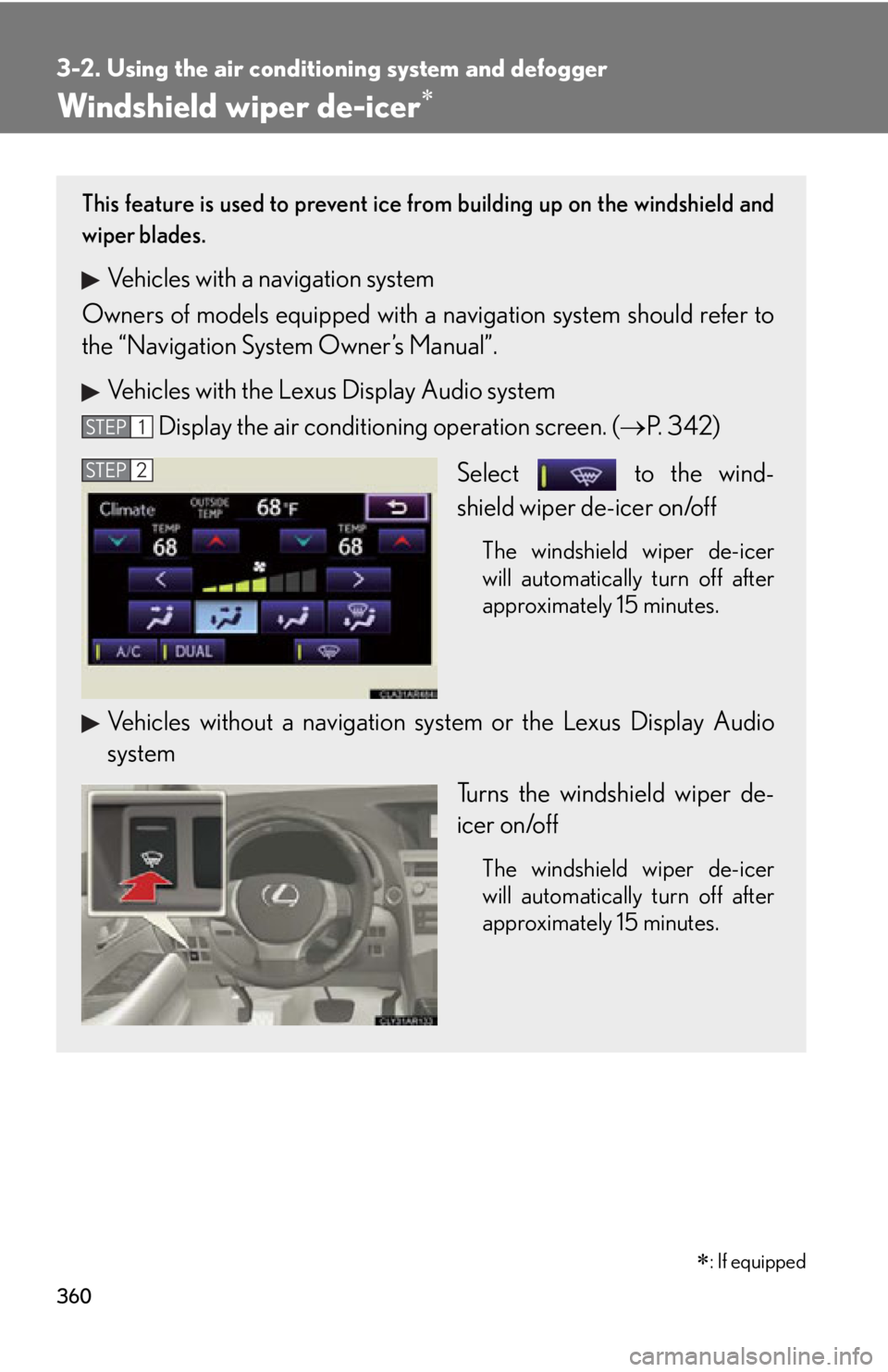
Vehicles with the Lexus Display Audio system
Display the air condition ing operation screen. ( P. 3 4 2 )
Select to the wind-
shield wiper de-icer on/off The windshield wiper de-icer
will automatically turn off after
approximately 15 minutes.
Vehicles without a navigation sy stem or the Lexus Display Audio
system
Turns the windshield wiper de-
icer on/off The windshield wiper de-icer
will automatically turn off after
approximately 15 minutes.STEP 1
STEP 2
Page 362 of 878
3623-3. Using the Lexus Display Audio system
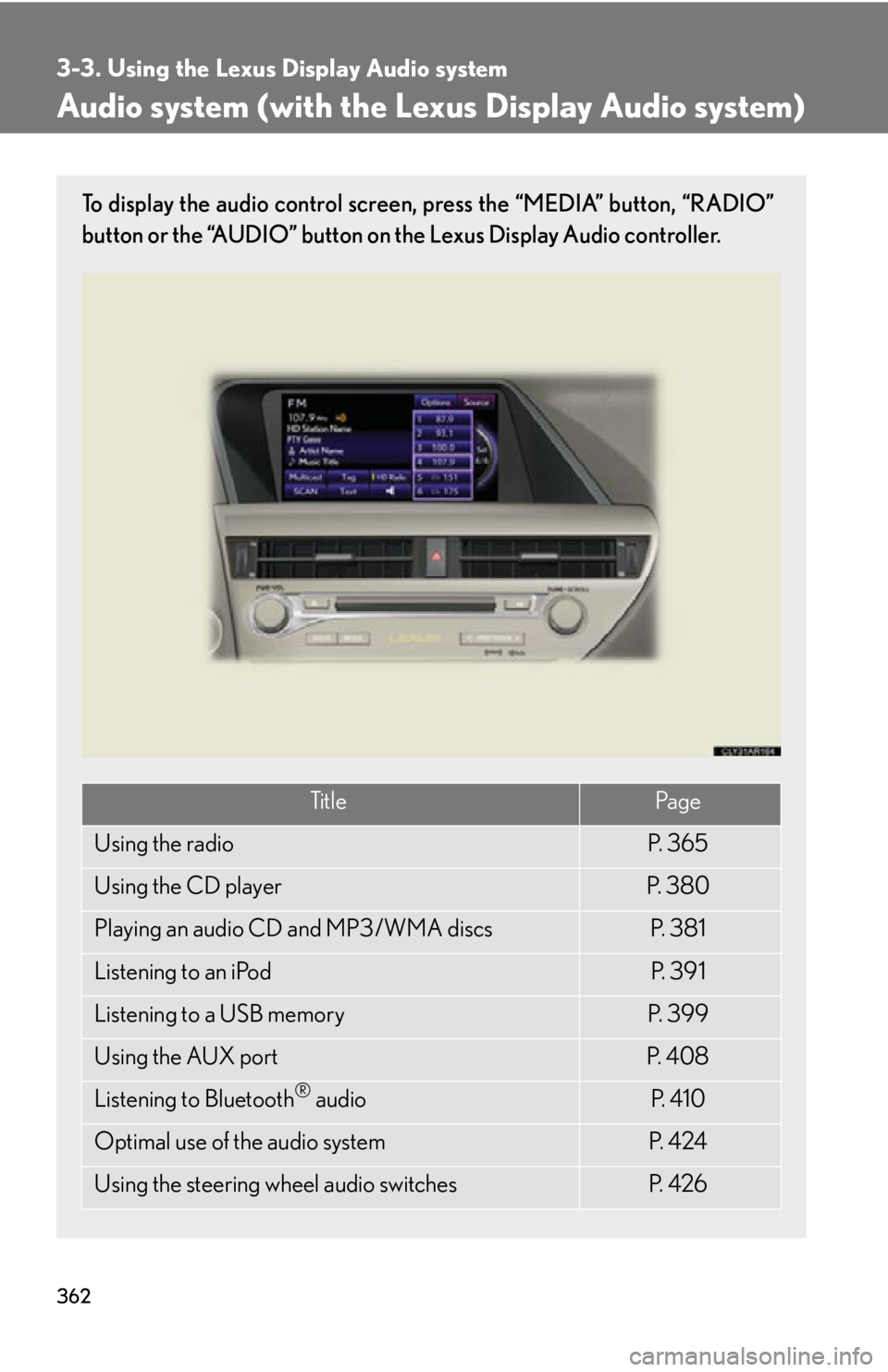
Audio system (with the Lexus Display Audio system) To display the audio control screen, press the “MEDIA” button, “RADIO”
button or the “AUDIO” button on the Lexus Display Audio controller.
Ti t l e Pa g e
Using the radio P. 3 6 5
Using the CD player P. 3 8 0
Playing an audio CD and MP3/WMA discs P. 3 8 1
Listening to an iPod P. 3 9 1
Listening to a USB memory P. 3 9 9
Using the AUX port P. 4 0 8
Listening to Bluetooth ®
audio P. 4 1 0
Optimal use of the audio system P. 4 2 4
Using the steering wheel audio switches P. 4 2 6
Page 363 of 878
3633-3. Using the Lexus Display Audio system
3
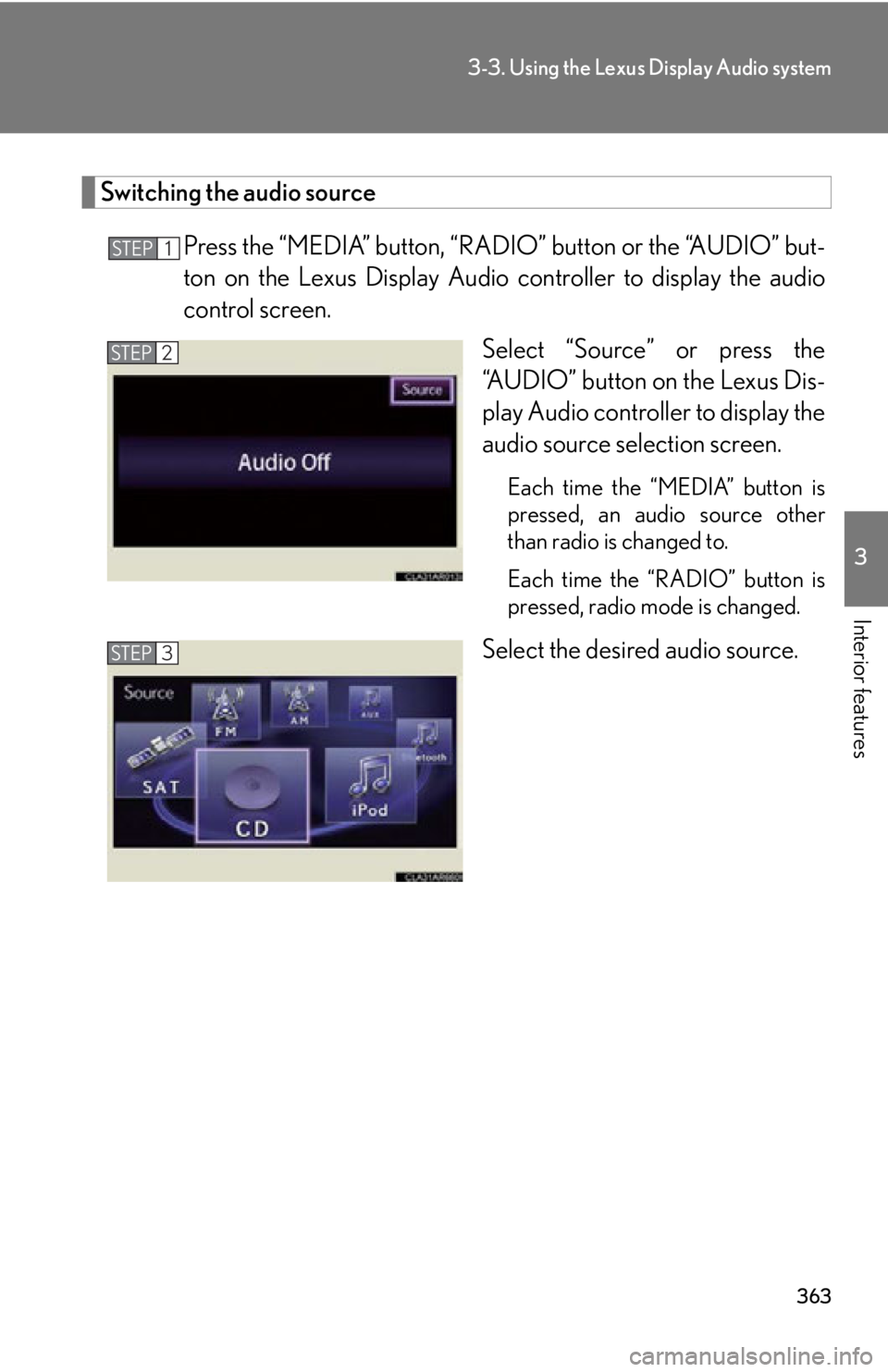
Interior features Switching the audio source
Press the “MEDIA” button, “RAD IO” button or the “AUDIO” but-
ton on the Lexus Display Audio controller to display the audio
control screen.
Select “Source” or press the
“AUDIO” button on the Lexus Dis-
play Audio controller to display the
audio source selection screen. Each time the “MEDIA” button is
pressed, an audio source other
than radio is changed to.
Each time the “RADIO” button is
pressed, radio mode is changed.
Select the desired audio source.STEP 1
STEP 2
STEP 3
Page 364 of 878
3643-3. Using the Lexus Display Audio system
■
Using mobile phones
Interference may be heard through the audio system’s speakers if a mobile phone is
being used inside or close to the vehicl e while the audio system is operating.
CAUTION■
Certification
Part 15 of the FCC Rules
FCC Warning:
Any unauthorized changes or modifications to this equipment will void the user’s
authority to operate this device.
NOTICE■
To prevent 12-volt battery discharge
Do not leave the audio system on longer than necessary when the hybrid system is
off.■
To avoid damaging the audio system
Take care not to spill drinks or other fluids on the audio system.
Page 365 of 878
3653-3. Using the Lexus Display Audio system
3
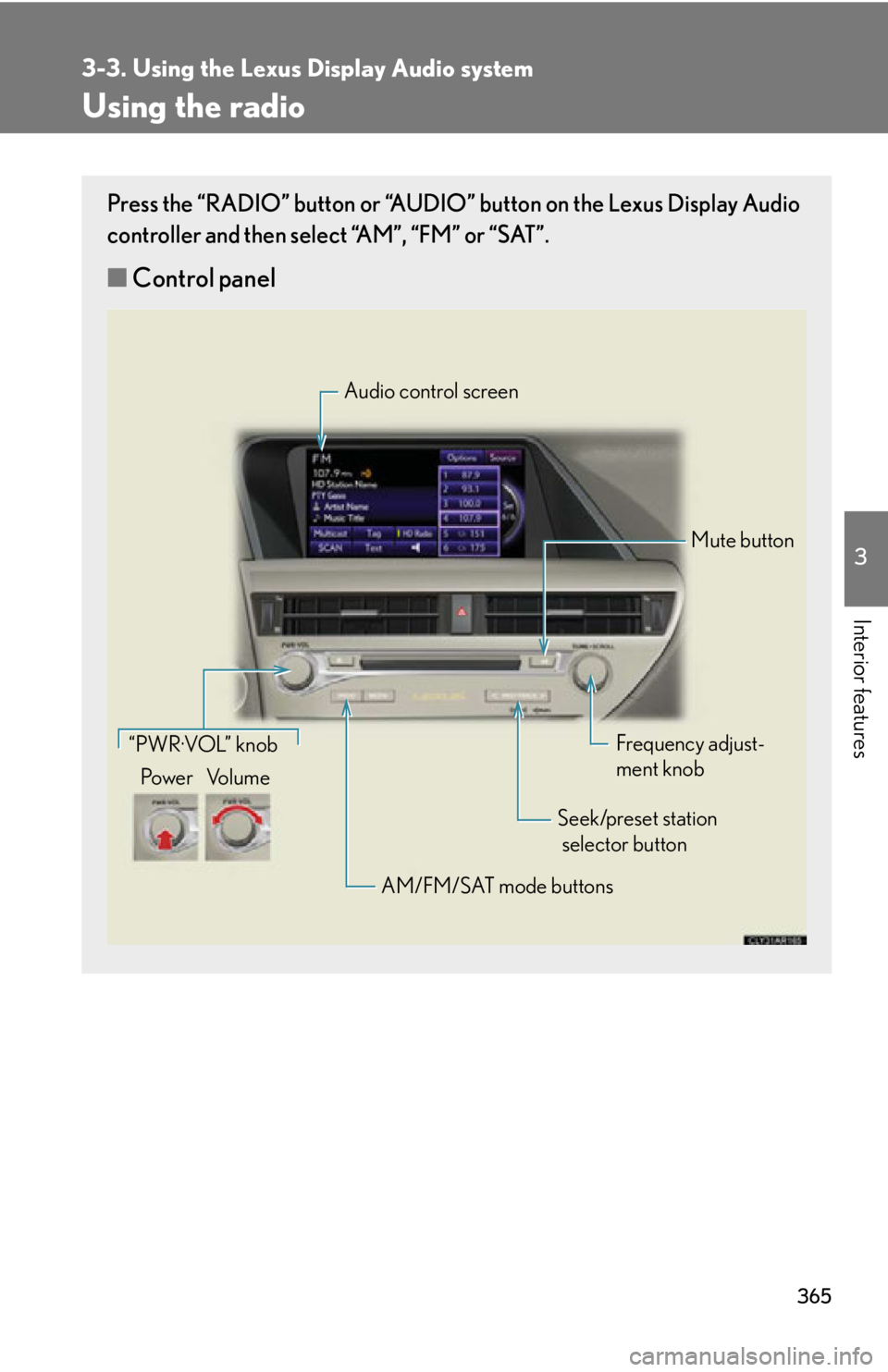
Interior features Using the radio Press the “RADIO” button or “AUDIO” button on the Lexus Display Audio
controller and then select “AM”, “FM” or “SAT”.
■ Control panel Audio control screen
Mute button
Frequency adjust-
ment knob
Seek/preset station
selector button
AM/FM/SAT mode buttons“PWR·VOL” knob
Po w e r Vo l u m e
Page 366 of 878
3663-3. Using the Lexus Display Audio system
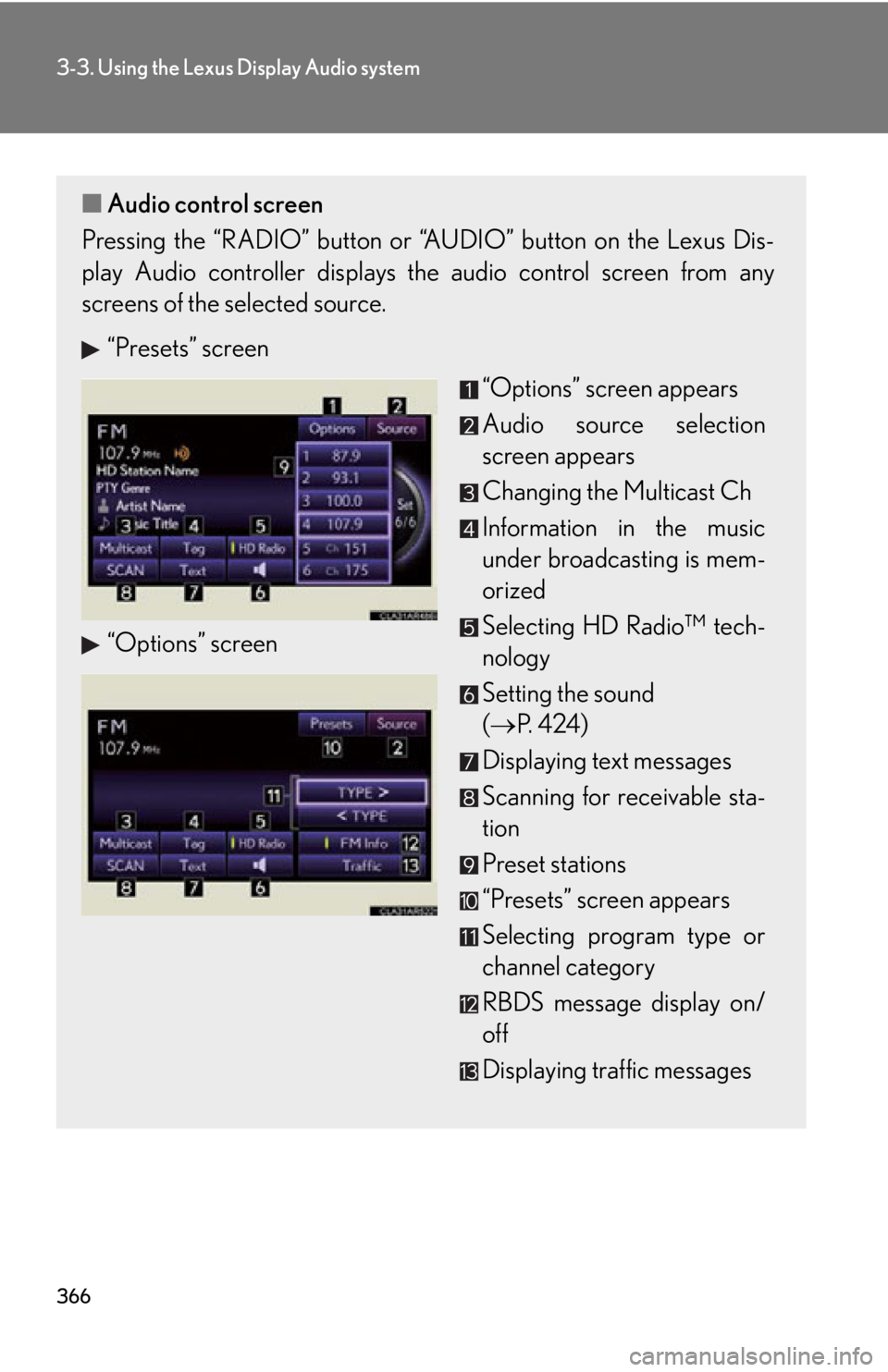
■ Audio control screen
Pressing the “RADIO” button or “A UDIO” button on the Lexus Dis-
play Audio controller displays the audio control screen from any
screens of the selected source.
“Presets” screen
“Options” screen “Options” screen appears
Audio source selection
screen appears
Changing the Multicast Ch
Information in the music
under broadcasting is mem-
orized
Selecting HD Radio™ tech-
nology
Setting the sound
( P. 4 2 4 )
Displaying text messages
Scanning for receivable sta-
tion
Preset stations
“Presets” screen appears
Selecting program type or
channel category
RBDS message display on/
off
Displaying traffic messages
Page 367 of 878
3673-3. Using the Lexus Display Audio system
3
Interior features Selecting a station
■ Seek tuning
Press and hold “ ” or “ ” on the “PRST•TRACK” button.
■ Manual tuning
Turn the “TUNE•SCROLL” knob.
■ Preset stations
Press “ ” or “ ” on the “PRST•TRACK” butto n or select desired preset
stations.
Setting station presets (excluding XM ®
Satellite Radio)
Radio mode has a mix preset function, which can store up to 36 stations
(6 station per page 6 page) from any of the AM, FM or SAT bands.
Search for desired stations by turning the “TUNE•SCROLL”
knob or pressing and holding “ ” or “ ” on the “PRST•TRACK”
button.
Select and hold one of the pr eset stations (1-6 every page).
Scanning radio stations (excluding XM ®
Satellite Radio)
Select “SCAN” on the screen. “SCAN” appears on the screen. The ra dio will find the next station and
stay there for 10 seconds if “All” or “HD Only” is selected, or 5 seconds
if “Analog” is selected ( P. 371), and then scan again.
Select “SCAN” once again when the desired station is reached.STEP 1
STEP 2
STEP 1
STEP 2
Page 368 of 878
3683-3. Using the Lexus Display Audio system
RBDS (Radio Broadcast Data System)
This feature allows your radio to receive station identification information
and program information (classical, ja zz, etc.) from radio stations which
broadcast this information. RBDS features are available only when listen-
ing to an FM station that broadcas ts RBDS information and the “FM Info”
indicator is on.
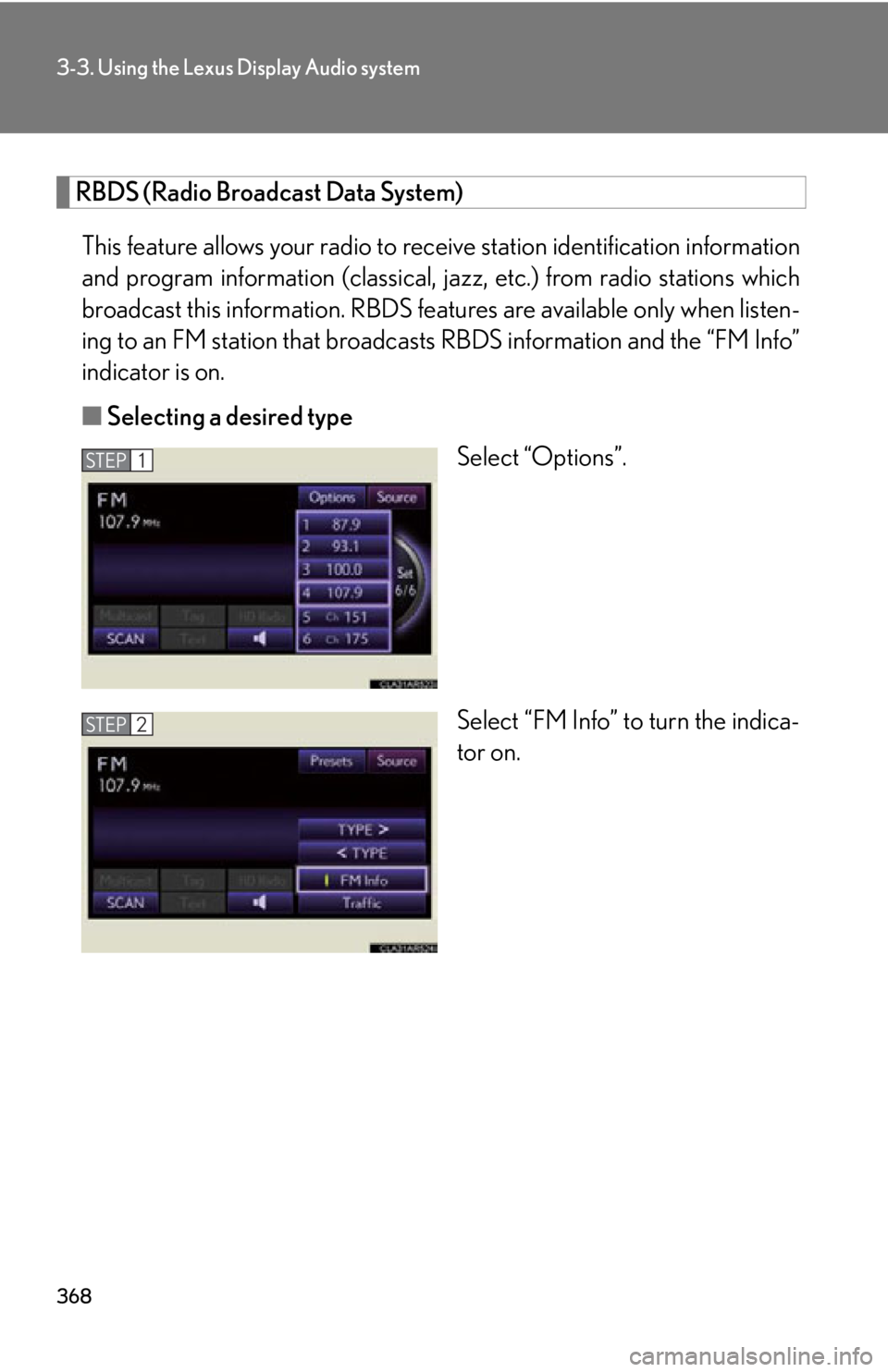
■ Selecting a desired type
Select “Options”.
Select “FM Info” to turn the indica-
tor on.STEP 1
STEP 2
Page 369 of 878
3693-3. Using the Lexus Display Audio system
3
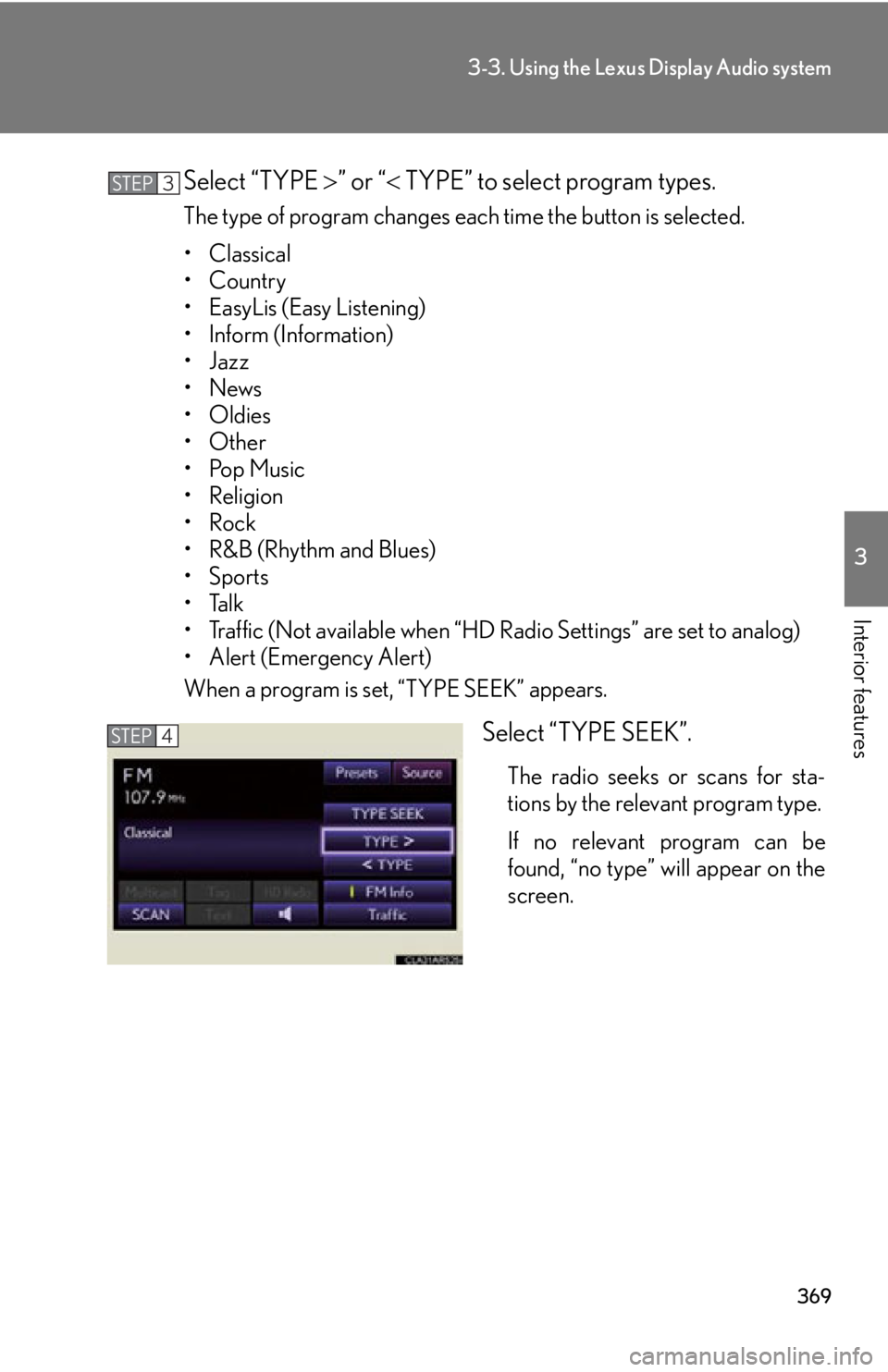
Interior features Select “TYPE ” or “ TYPE” to select program types.The type of program changes each time the button is selected.
• Classical
•Country
• EasyLis (Easy Listening)
• Inform (Information)
•Jazz
•News
• Oldies
•Other
•Pop Music
• Religion
•Rock
•R&B (Rhythm and Blues)
•Sports
•Talk
• Traffic (Not available when “HD Radio Settings” are set to analog)
• Alert (Emergency Alert)
When a program is set, “TYPE SEEK” appears.
Select “TYPE SEEK”. The radio seeks or scans for sta-
tions by the relevant program type.
If no relevant program can be
found, “no type” will appear on the
screen.STEP 3
STEP 4