audio LEXUS RX450h 2015 User Guide
[x] Cancel search | Manufacturer: LEXUS, Model Year: 2015, Model line: RX450h, Model: LEXUS RX450h 2015Pages: 878, PDF Size: 11.62 MB
Page 39 of 878
3911-1. Hybrid system
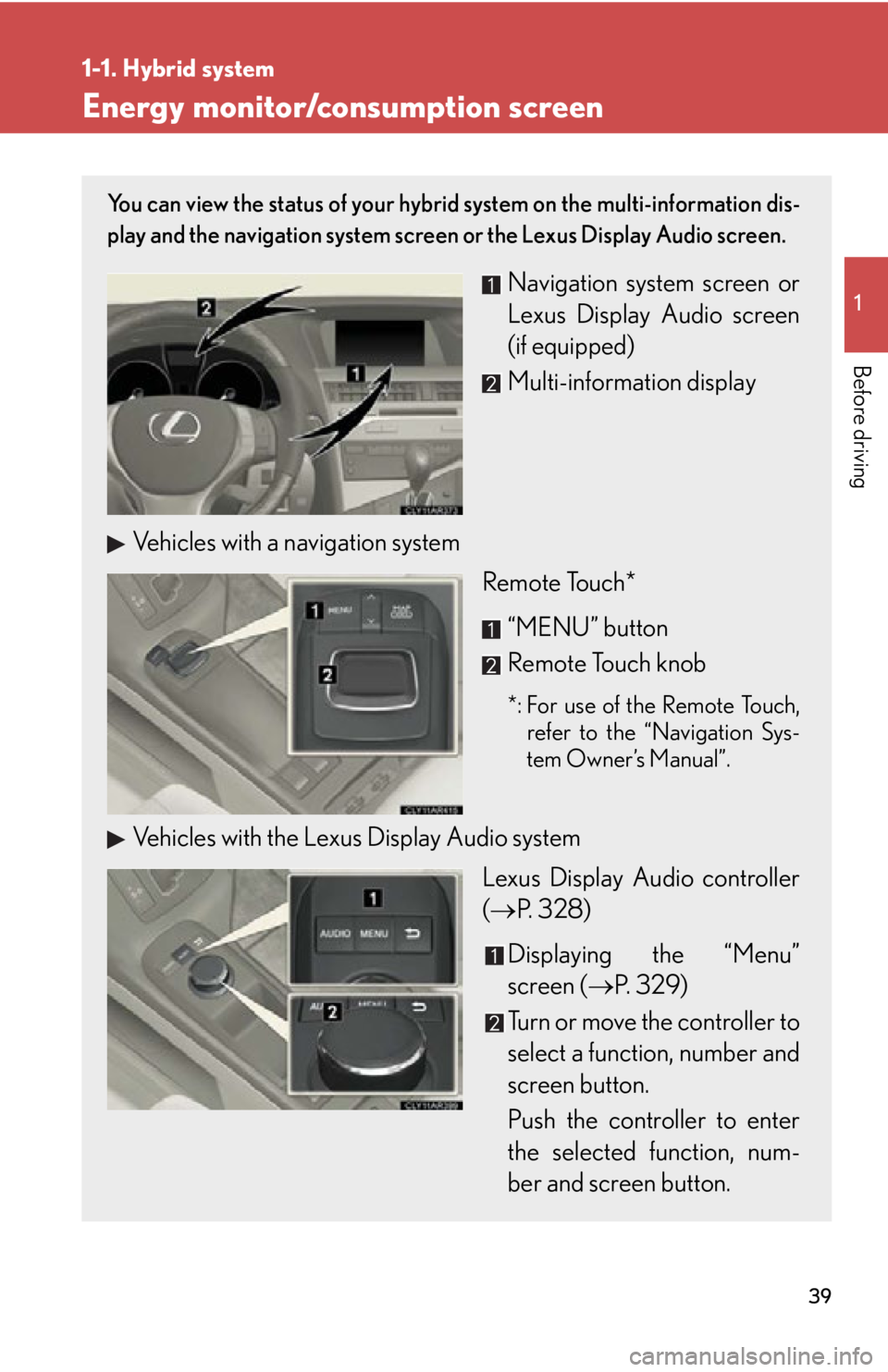
Before driving Energy monitor/consumption screen You can view the status of your hybrid system on the multi-information dis-
play and the navigation system screen or the Lexus Display Audio screen.
Navigation system screen or
Lexus Display Audio screen
(if equipped)
Multi-information display
Vehicles with a navigation system
Remote Touch*
“MENU” button
Remote Touch knob *: For use of the Remote Touch,
refer to the “Navigation Sys-
tem Owner’s Manual”.
Vehicles with the Lexus Display Audio system
Lexus Display Audio controller
( P. 328)
Displaying the “Menu”
screen ( P. 3 2 9 )
Turn or move the controller to
select a function, number and
screen button.
Push the controller to enter
the selected function, num-
ber and screen button.
Page 41 of 878
411-1. Hybrid system
1
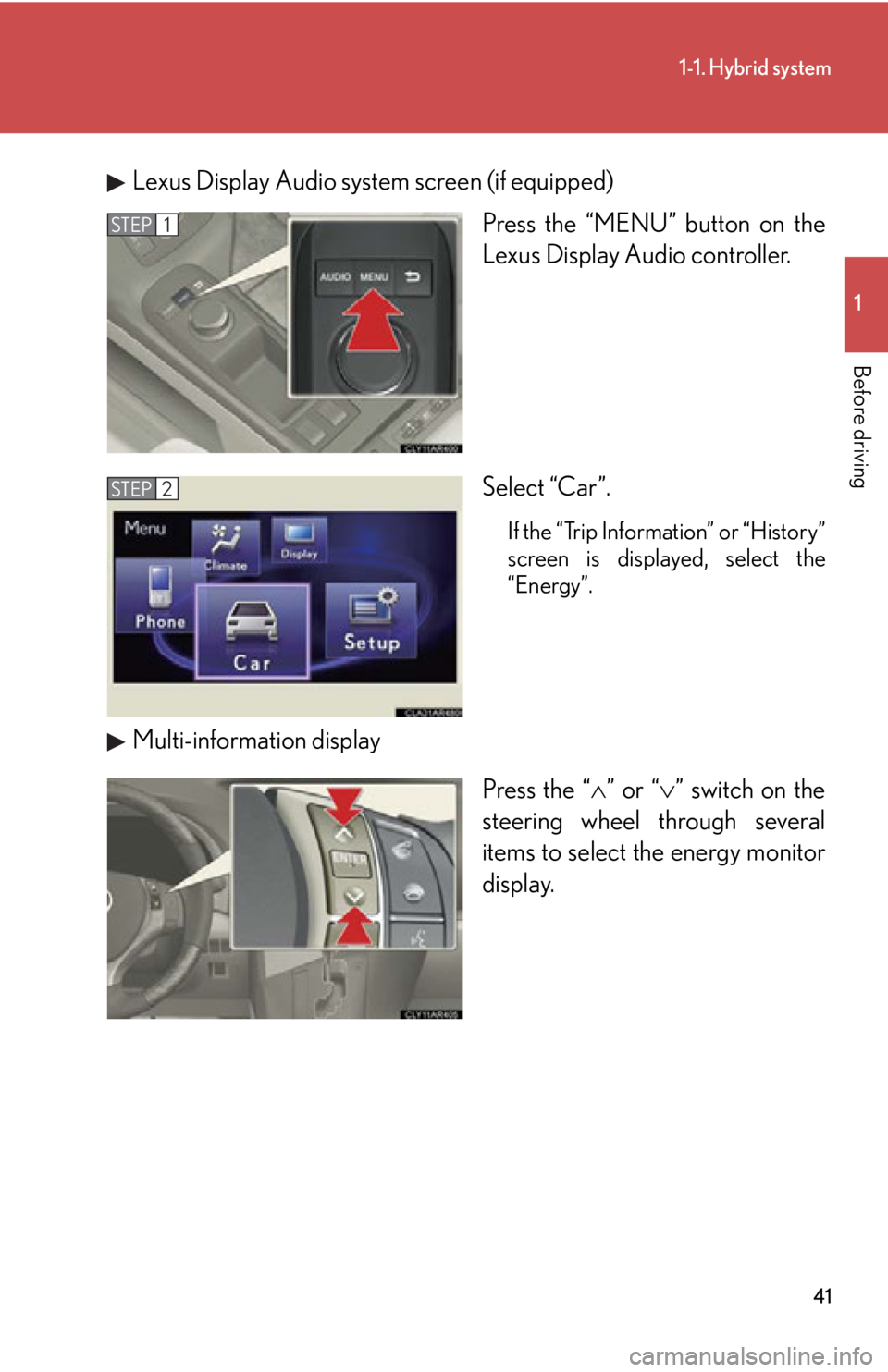
Before driving Lexus Display Audio system screen (if equipped)
Press the “MENU” button on the
Lexus Display Audio controller.
Select “Car”. If the “Trip Information” or “History”
screen is displayed, select the
“Energy”.
Multi-information display
Press the “ ” or “ ” switch on the
steering wheel through several
items to select the energy monitor
display.STEP 1
STEP 2
Page 42 of 878
421-1. Hybrid system
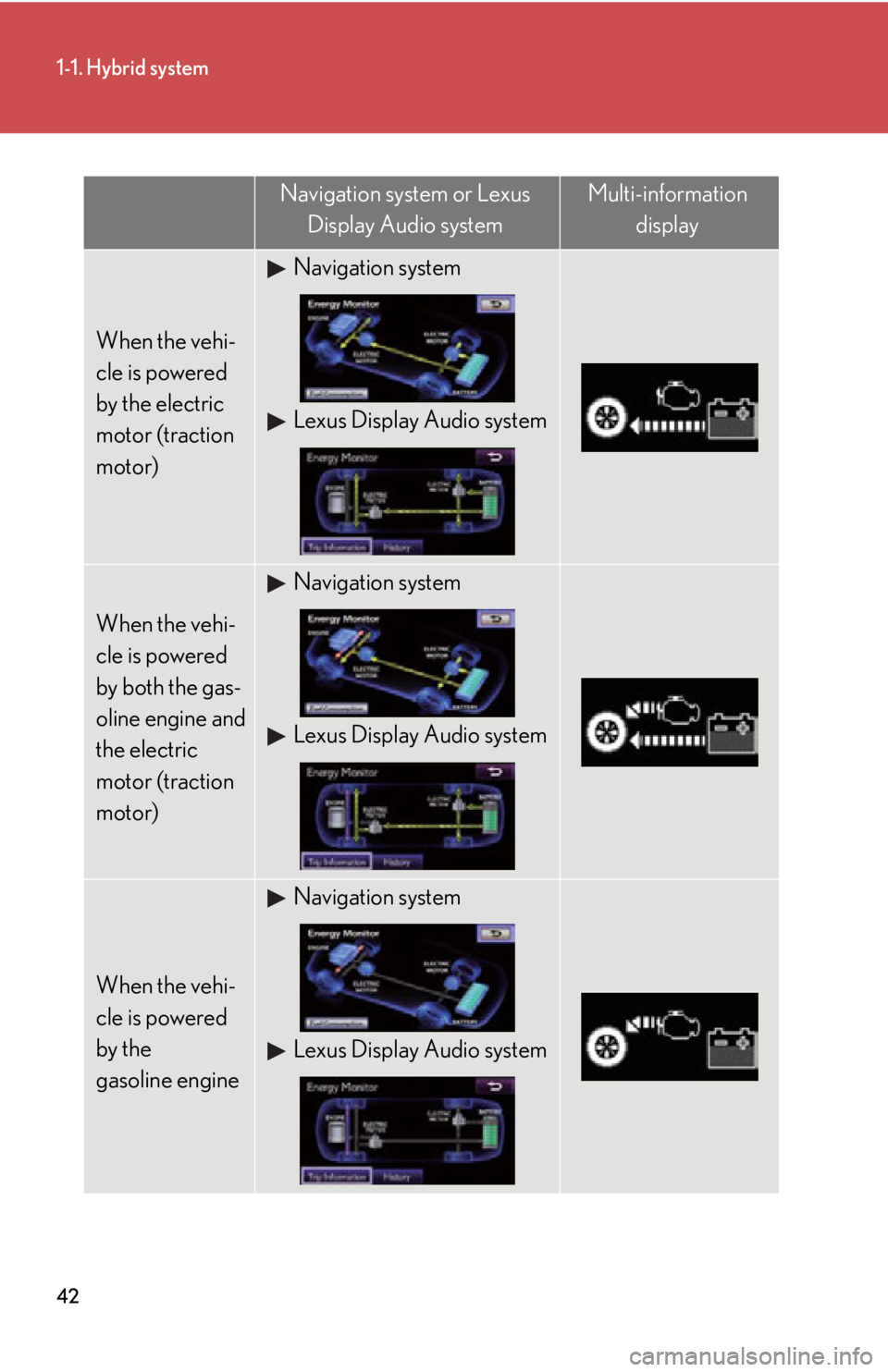
Navigation system or Lexus
Display Audio system Multi-information
display
When the vehi-
cle is powered
by the electric
motor (traction
motor) Navigation system
Lexus Display Audio system
When the vehi-
cle is powered
by both the gas-
oline engine and
the electric
motor (traction
motor) Navigation system
Lexus Display Audio system
When the vehi-
cle is powered
by the
gasoline engine Navigation system
Lexus Display Audio system
Page 43 of 878
431-1. Hybrid system
1
Before driving
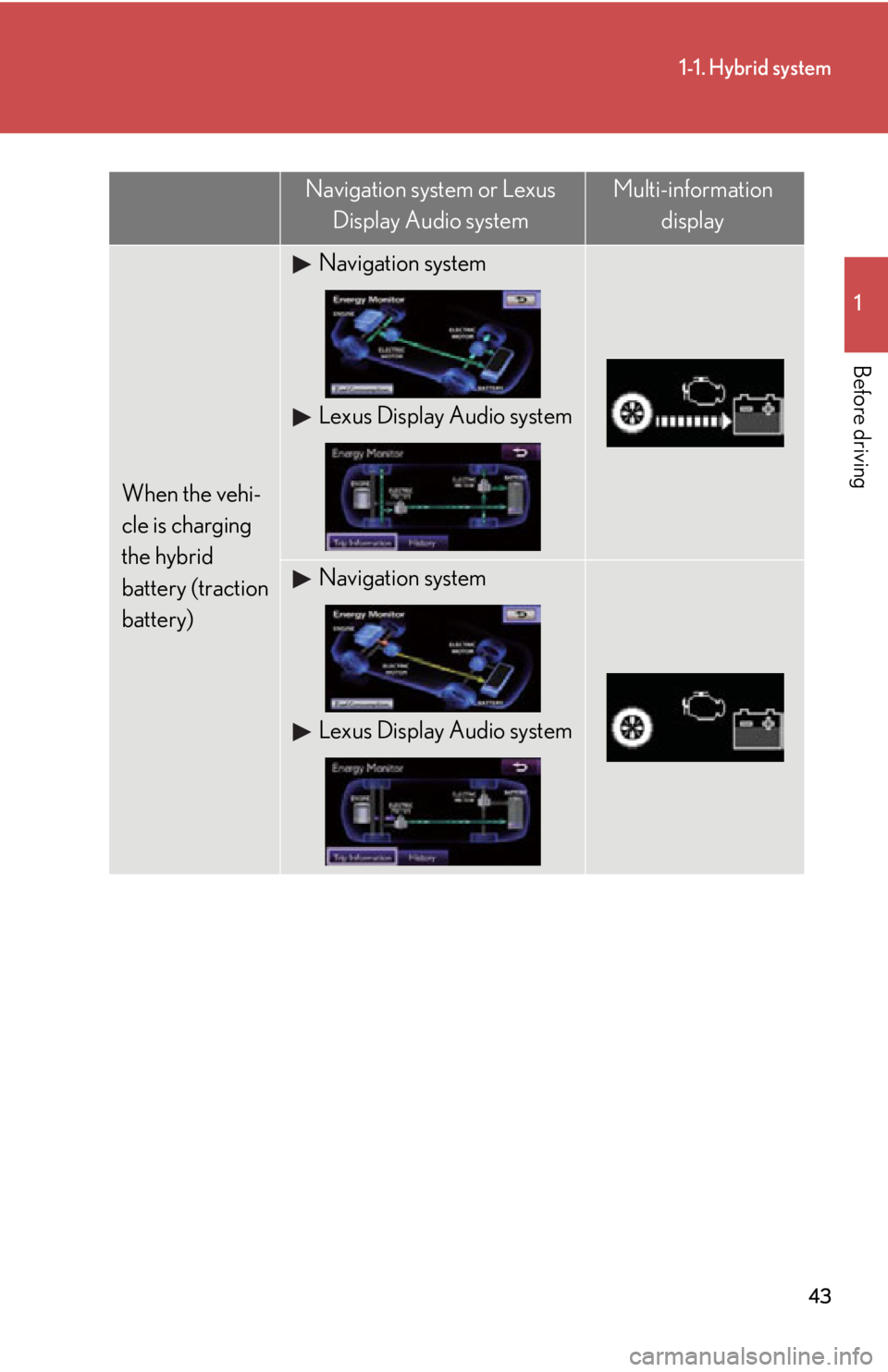
When the vehi-
cle is charging
the hybrid
battery (traction
battery) Navigation system
Lexus Display Audio system
Navigation system
Lexus Display Audio systemNavigation system or Lexus
Display Audio system Multi-information
display
Page 44 of 878
441-1. Hybrid system
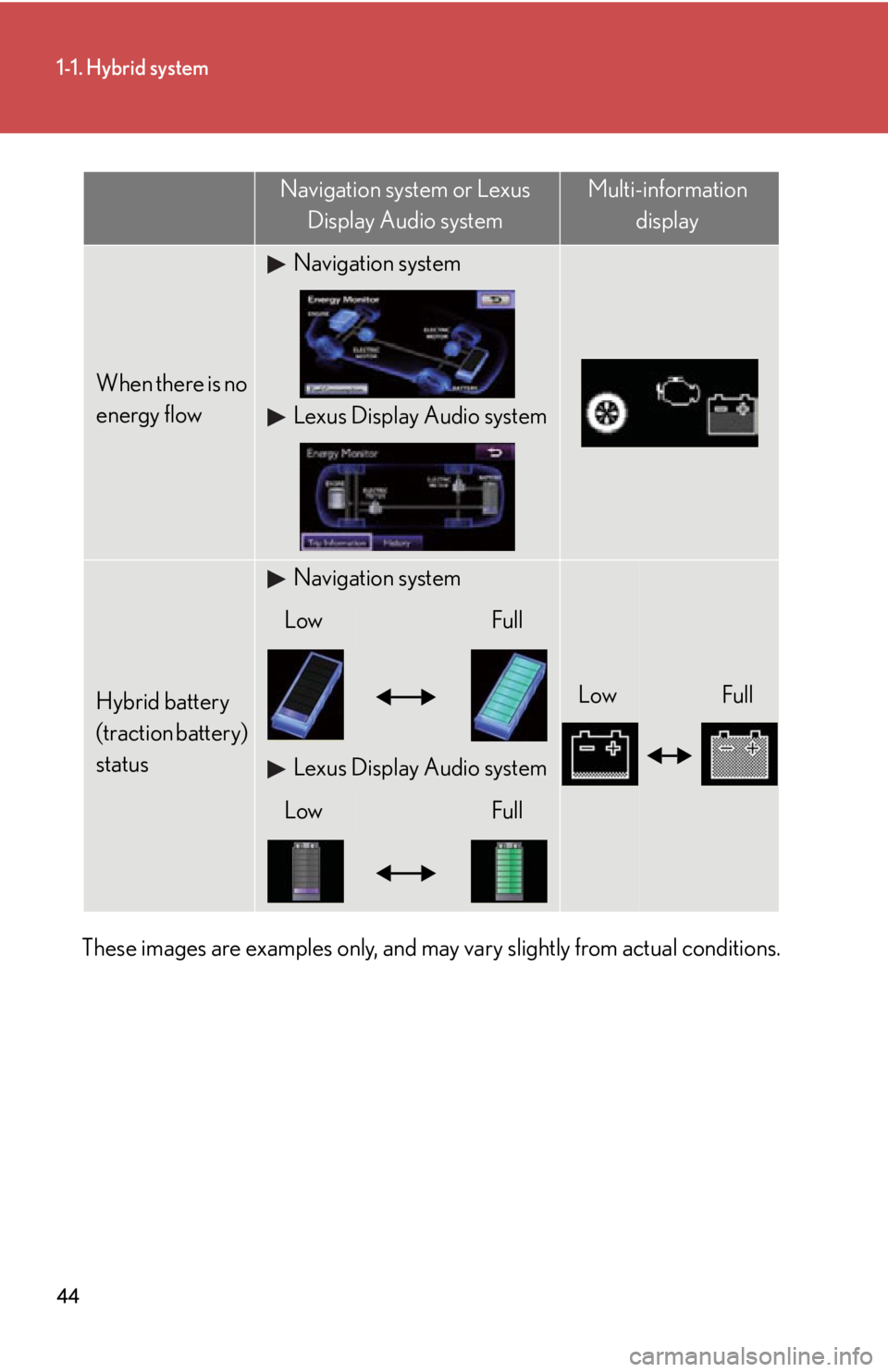
These images are examples only, and may vary slightly from actual conditions. When there is no
energy flow Navigation system
Lexus Display Audio system
Hybrid battery
(traction battery)
status Navigation system
Low FullLow Full
Lexus Display Audio system
Low FullNavigation system or Lexus
Display Audio system Multi-information
display
Page 46 of 878
461-1. Hybrid system
Vehicles with the Lexus Display Audio system
Press the “MENU” button on the Lexus Display Audio controller.
Select “Car” on the “Menu” screen. If the “Trip information” screen does not appear, select “Trip informa-
tion”.
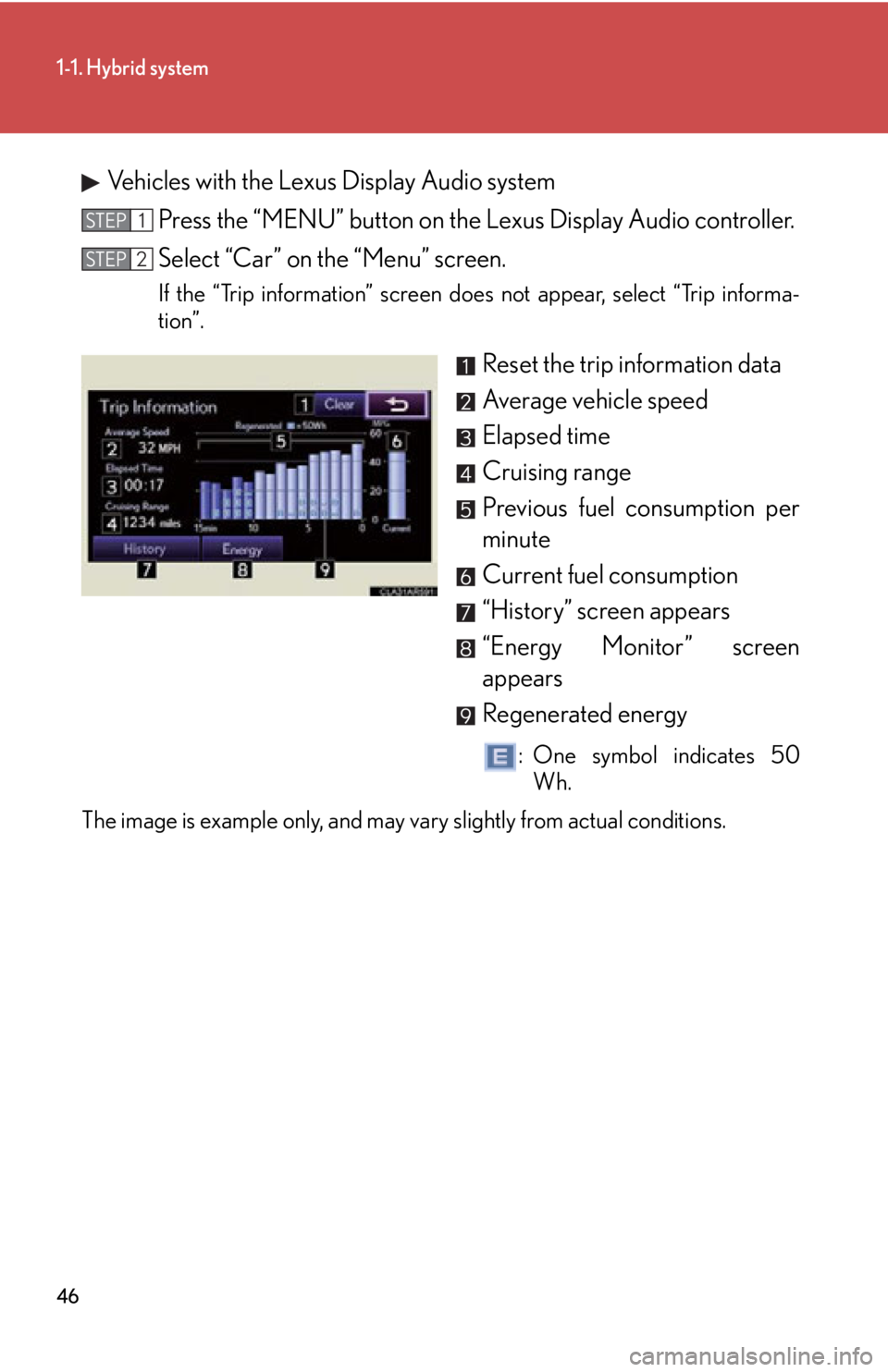
Reset the trip information data
Average vehicle speed
Elapsed time
Cruising range
Previous fuel consumption per
minute
Current fuel consumption
“History” screen appears
“Energy Monitor” screen
appears
Regenerated energy : One symbol indicates 50
Wh.
The image is example only, and may vary slightly from actual conditions. STEP 1
STEP 2
Page 48 of 878
481-1. Hybrid system
Vehicles with the Lexus Display Audio system
Press the “MENU” button on the Lexus Display Audio controller.
Select “Car” on the “Menu” screen. If the “History” screen does not appear, select “History”.
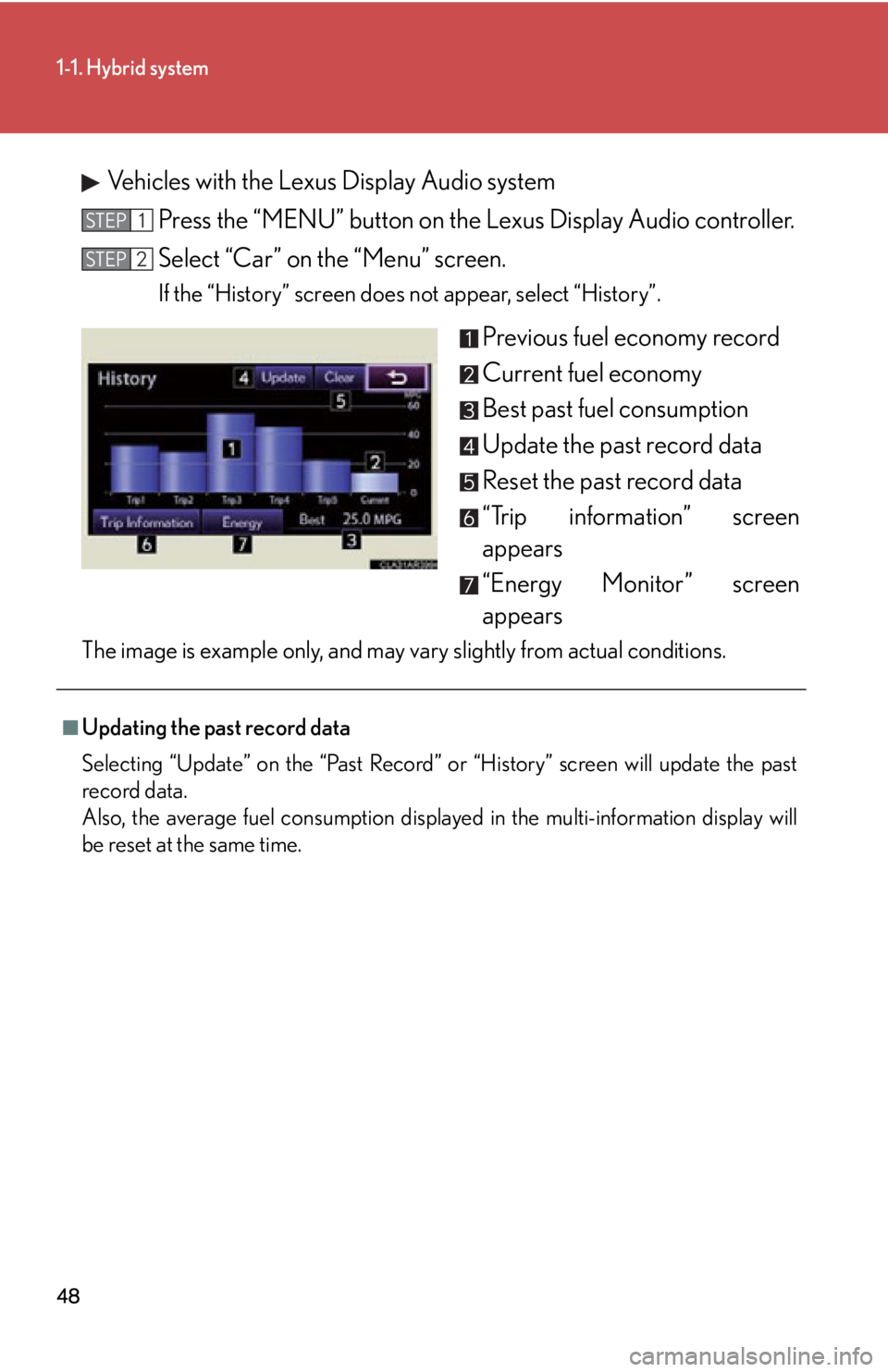
Previous fuel economy record
Current fuel economy
Best past fuel consumption
Update the past record data
Reset the past record data
“Trip information” screen
appears
“Energy Monitor” screen
appearsThe image is example only, and may vary slightly from actual conditions. STEP 1
STEP 2
■
Updating the past record data
Selecting “Update” on the “Past Record” or “History” screen will update the past
record data.
Also, the average fuel consumption displayed in the multi-information display will
be reset at the same time.
Page 54 of 878
541-2. Key information
NOTICE■
To prevent key damage
Observe the following: ●
Do not drop the keys, subject them to strong shocks or bend them.●
Do not expose the keys to high temperatures for a long period of time.●
Do not get the keys wet or wash them in an ultrasonic washer etc.●
Do not attach metallic or magnetic materials to the keys or place the keys close to
such materials.●
Do not disassemble the keys.●
Do not attach a sticker or anything else to the surface of the electronic key.●
Do not place the keys near objects that produce magnetic fields, such as TVs,
audio systems, induction cookers, or medi cal electrical equipment, such as low-
frequency therapy equipment.■
Carrying the electronic key on your person
Carry the electronic key 3.9 in. (10 cm) or more away from electric appliances that
are turned on. Radio waves emitted from electric appliances within 3.9 in. (10 cm)
of the electronic key may interfere with the key, causing the key to not function
properly.■
In case of a smart access system with push-button start malfunction or other key-
related problems
Take your vehicle with all the electronic ke ys provided with your vehicle, including
the card key, to your Lexus dealer.■
When a vehicle key is lost
If the key remains lost, the risk of vehi cle theft increases significantly. Visit your
Lexus dealer immediately with all remaining electronic keys and the card key that
was provided with your vehicle.
Page 62 of 878

621-3. Opening, closing and locking the doors
■
Conditions affecting operation
The smart access system with push-button start uses weak radio waves. In the fol-
lowing situations, the communication betw een the electronic key and the vehicle
may be affected, preventing the smart access system with push-button start, wire-
less remote control and immobilize r system from operating properly.
(Ways of coping: P. 7 8 1 )●
When the electronic key battery is depleted●
Near a TV tower, electric power plant, gas station, radio st ation, large display,
airport or other facility that generates strong radio waves or electrical noise●
When carrying a portable radio, cellular phone, cordless phone or other wire-
less communication devices●
When the electronic key is in contact wi th, or is covered by the following metal-
lic objects
• Cards to which aluminum foil is attached
• Cigarette boxes that have aluminum foil inside
• Metallic wallets or bags
•Coins
• Hand warmers made of metal
• Media such as CDs and DVDs●
When multiple electronic keys are in the vicinity●
When another wireless key (that emits radio waves) is being used nearby●
When carrying the electronic key togeth er with the following devices that emit
radio waves
• Another vehicle's electronic key or a wireless key that emits radio waves
• Personal computers or person al digital assistants (PDAs)
• Digital audio players
• Portable game systems●
If window tint with a metallic content or metallic objects are attached to the rear
window
Page 124 of 878
1241-7. Theft deterrent system
Immobilizer system The vehicle's keys have built-in tran sponder chips that prevent the hybrid
system from starting if the key has not been previously registered in the
vehicle's on-board computer.
Never leave the keys inside the vehicle when you leave the vehicle.
This system is designed to help prev ent vehicle theft but does not guaran-
tee absolute security ag ainst all vehicle thefts.
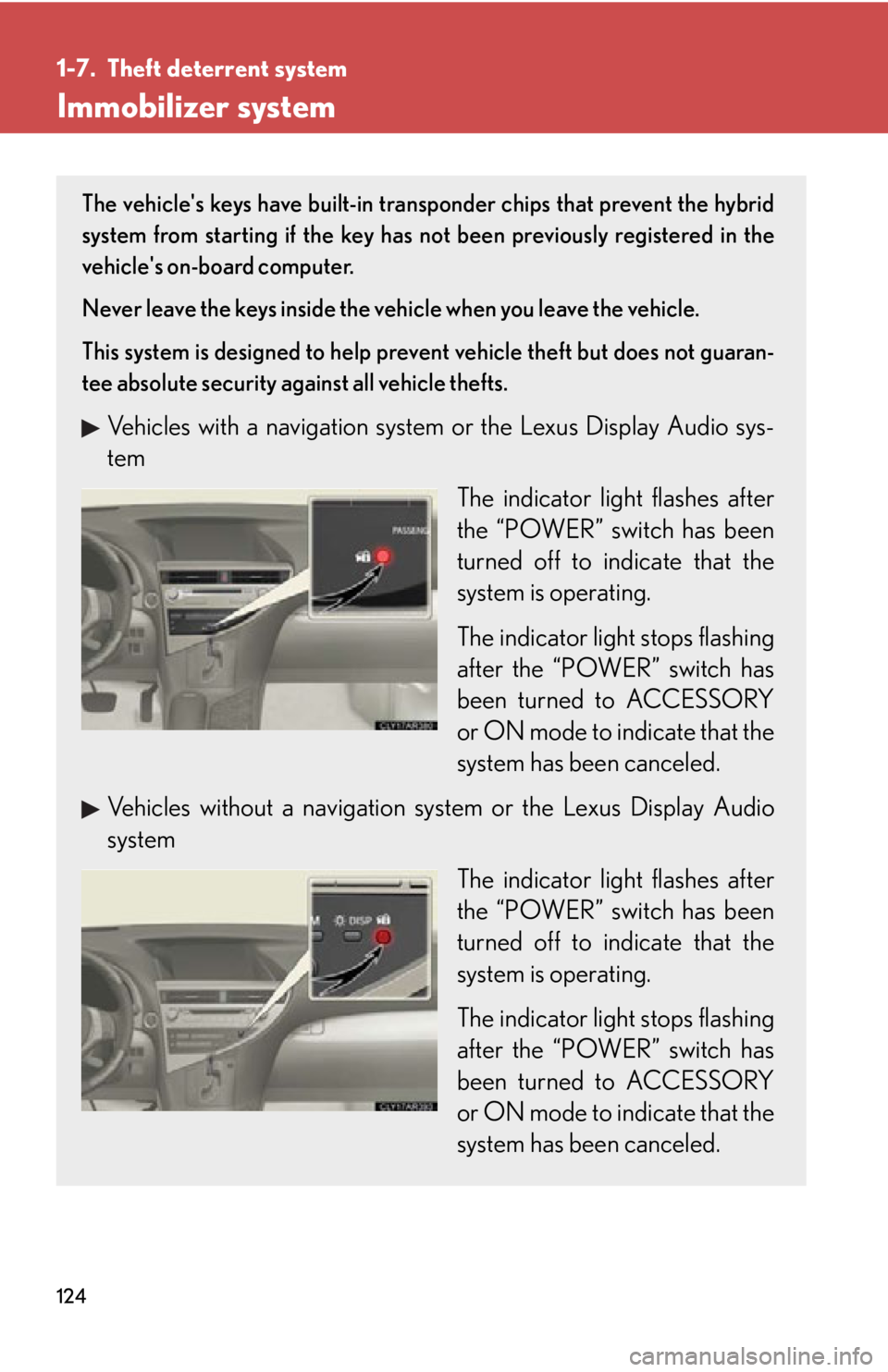
Vehicles with a navigation system or the Lexus Display Audio sys-
tem
The indicator light flashes after
the “POWER” switch has been
turned off to indicate that the
system is operating.
The indicator light stops flashing
after the “POWER” switch has
been turned to ACCESSORY
or ON mode to indicate that the
system has been canceled.
Vehicles without a navigation sy stem or the Lexus Display Audio
system
The indicator light flashes after
the “POWER” switch has been
turned off to indicate that the
system is operating.
The indicator light stops flashing
after the “POWER” switch has
been turned to ACCESSORY
or ON mode to indicate that the
system has been canceled.