battery LEXUS RX450h 2015 User Guide
[x] Cancel search | Manufacturer: LEXUS, Model Year: 2015, Model line: RX450h, Model: LEXUS RX450h 2015Pages: 878, PDF Size: 11.62 MB
Page 38 of 878
381-1. Hybrid system
CAUTION●
If your vehicle needs to be towed, do so with all front wheels (for 2WD models) or
four wheels (for AWD models) raised. If the wheels connected to the electric
motor (traction motor) are on the ground when towing, the motor may continue
to generate electricity. This may cause an electricity leakage leading to a fire.
(
P. 7 2 5 )●
Carefully inspect the ground under the vehicle. If you find that liquid has leaked
onto the ground, the fuel system may have been damaged. Leave the vehicle as
soon as possible.■
Nickel-metal hydride battery
Your vehicle contains a sealed nickel-metal hydride battery. If disposed of improp-
erly, it is hazardous to the environment and there is a risk of severe burns and elec-
trical shock that may result in death or serious injury.■
Emergency shut off system
Carefully check to see if there are exposed high voltage parts or cables. Never
touch the parts or cables. (
P. 3 4 )
NOTICE■
Hybrid battery air vents ●
Do not put foreign objects over the air vents. The hybrid battery (traction battery)
may overheat or lose power and be damaged. ●
Clean the air vents regularly to prevent the hybrid battery (traction battery) from
overheating.●
Do not wet or allow foreign substances to enter the air vents as this may cause a
short circuit and damage the hybrid battery (traction battery).●
Do not carry large amounts of water such as an aquarium into the vehicle. If water
spills onto the hybrid battery (tractio n battery), the battery may be damaged.
Have the vehicle inspected by your Lexus dealer.
Page 43 of 878
431-1. Hybrid system
1
Before driving
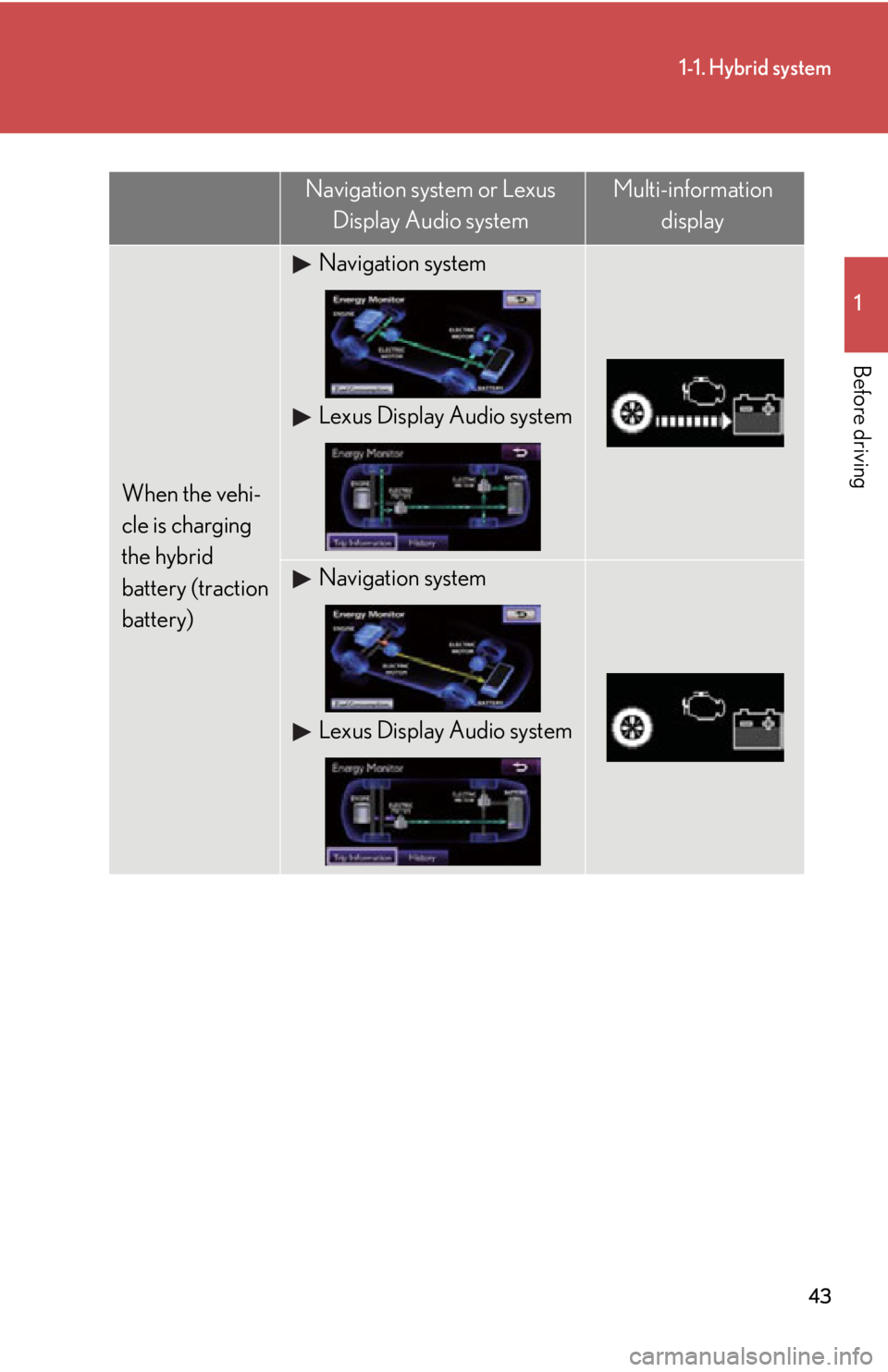
When the vehi-
cle is charging
the hybrid
battery (traction
battery) Navigation system
Lexus Display Audio system
Navigation system
Lexus Display Audio systemNavigation system or Lexus
Display Audio system Multi-information
display
Page 44 of 878
441-1. Hybrid system
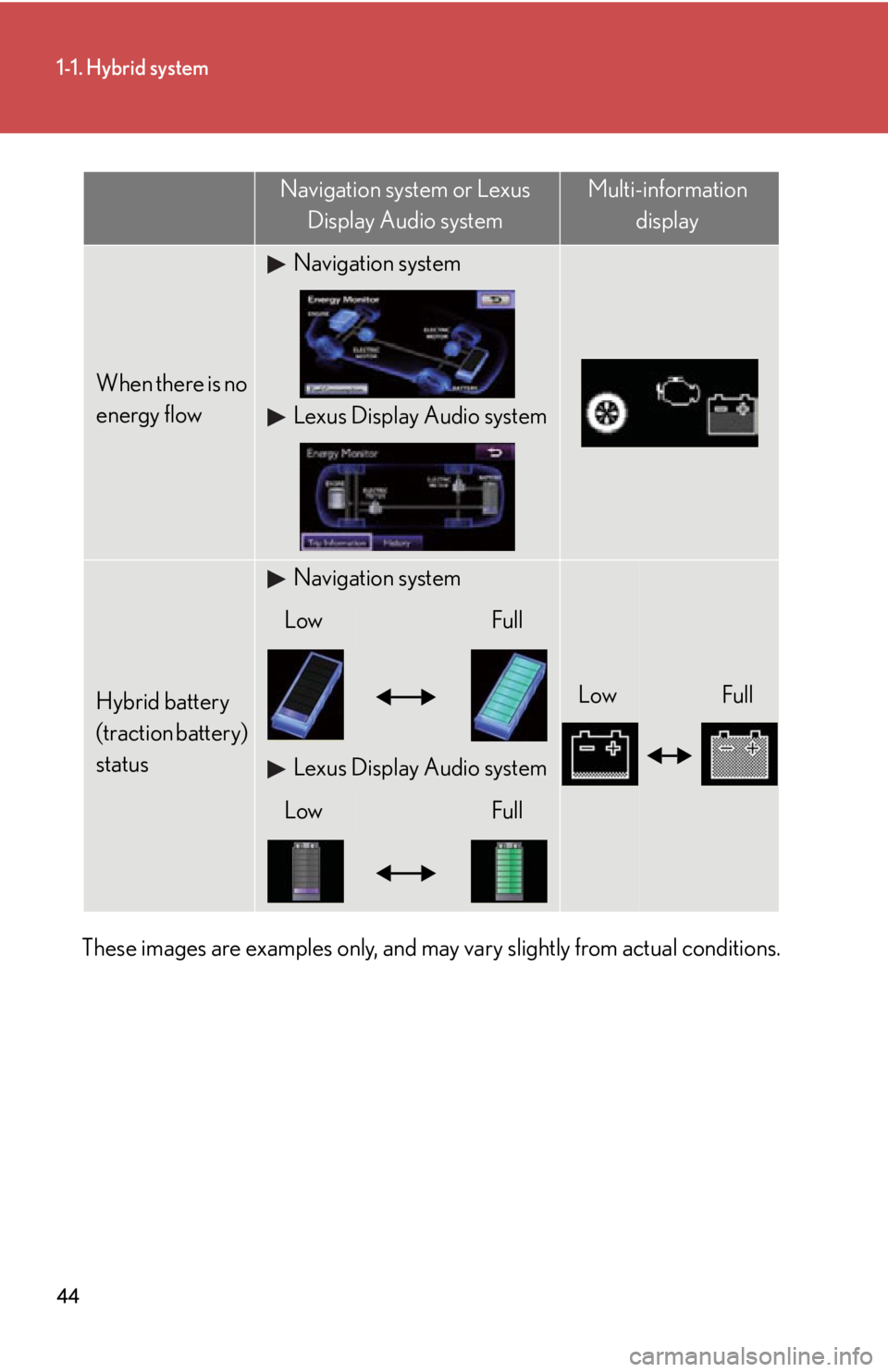
These images are examples only, and may vary slightly from actual conditions. When there is no
energy flow Navigation system
Lexus Display Audio system
Hybrid battery
(traction battery)
status Navigation system
Low FullLow Full
Lexus Display Audio system
Low FullNavigation system or Lexus
Display Audio system Multi-information
display
Page 52 of 878
521-2. Key information
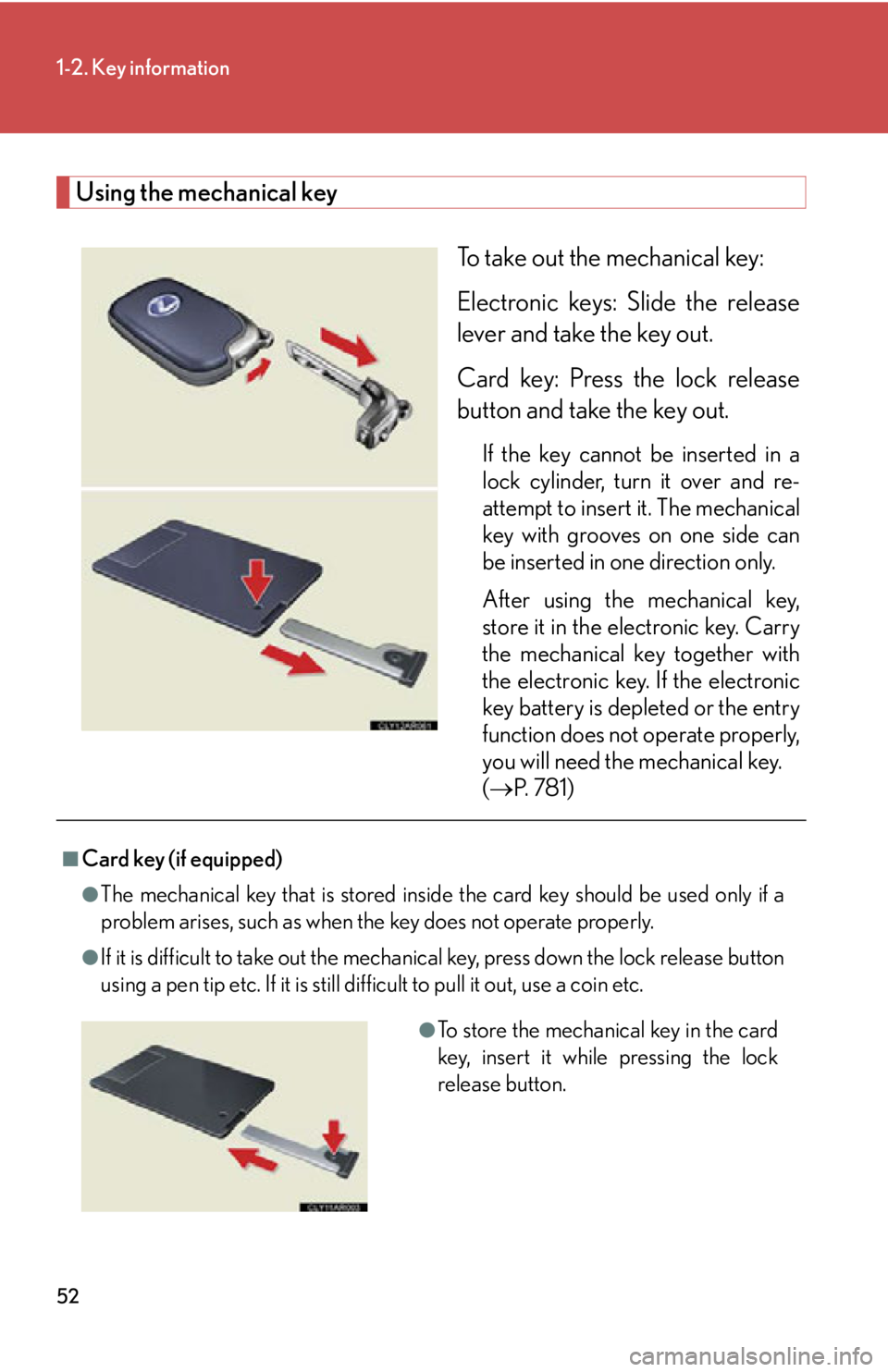
Using the mechanical key
To take out the mechanical key:
Electronic keys: Slide the release
lever and take the key out.
Card key: Press the lock release
button and take the key out. If the key cannot be inserted in a
lock cylinder, turn it over and re-
attempt to insert it. The mechanical
key with grooves on one side can
be inserted in one direction only.
After using the mechanical key,
store it in the electronic key. Carry
the mechanical key together with
the electronic key. If the electronic
key battery is depleted or the entry
function does not operate properly,
you will need the mechanical key.
( P. 7 8 1 )■
Card key (if equipped) ●
The mechanical key that is stored inside the card key should be used only if a
problem arises, such as when the key does not operate properly.●
If it is difficult to take out the mechanical key, press down the lock release button
using a pen tip etc. If it is still difficult to pull it out, use a coin etc.
●
To store the mechanical key in the card
key, insert it while pressing the lock
release button.
Page 53 of 878

531-2. Key information
1
Before driving ●
The card key is not waterproof.■
When required to leave the vehicle’s key with a parking attendant
Lock the glove box as circumstances demand. ( P. 5 8 6 )
Remove the mechanical key for your own use and provide the attendant with the
electronic key only.■
Key number plate
Keep the plate in a safe place such as your wallet, not in the vehicle. In the event that
a mechanical key is lost, a new key can be made at your Lexus dealer using the key
number plate. ( P. 7 8 0 )■
When riding in an aircraft
When bringing an electronic key onto an aircraft, make sure you do not press any
buttons on the electronic key while inside the aircraft cabin. If you are carrying an
electronic key in your bag etc., ensure that the buttons are not li kely to be pressed
accidentally. Pressing a button may cause the electronic key to emit radio waves
that could interfere with the operation of the aircraft. ●
If the battery cover is not installed and
the battery falls out or if the battery was
removed because the key got wet, rein-
stall the battery with the positive termi-
nal facing the Lexus emblem.
Page 55 of 878

551-2. Key information
1
Before driving NOTICE■
Precautions for handling the card key ●
Do not apply excess force when inserting the mechanical key into the card key.
Doing so may damage the card key.●
If the battery or card key terminals get wet, the battery may corrode and the card
key may stop working.
If the key is dropped into water, or if drinking water etc. is spilled on the key,
immediately remove the battery cover and wipe the battery and terminals. (To
remove the battery cover, lightly grasp and pull it.) If the battery is corroded, have
your Lexus dealer replace the battery.●
Do not crush the battery cover or use a screwdriver to remove the battery cover.
Forcibly removing the battery co ver may bend or damage the key.●
If the battery cover is frequently removed, the battery cover may become loose.●
When installing the battery, make sure to check the direct ion of the battery.
Installing the battery in the wrong direct ion may cause the battery to deplete rap-
idly.●
The surface of the card key may be damage d, or its coating may peel off in the
following situations:
• The card key is carried together with hard objects, such as coins and keys.
• The card key is scraped with a sharp object, such as the tip of a mechanical
pencil.
• The surface of the card key is wiped with thinner or benzene.
Page 61 of 878

611-3. Opening, closing and locking the doors
1
Before driving ■
Security feature
If a door is not opened within approx imately 60 seconds after the vehicle is
unlocked, the security feature automatically locks the vehicle again.■
Battery-saving function
If the vehicle is parked for a long period of time, the battery-saving function is acti-
vated in order to prevent the vehicle 12-v olt battery from bein g discharged and the
electronic key battery from being depleted. ●
In the following circumstances, unlock ing the vehicle using the entry function
may take longer than usual:
• When the entry function has not been used for 5 days or more
• When the electronic key has been left within approximately 6 ft. (2 m) of the
vehicle for 10 minutes or more●
If the entry function has not been used for 14 days or more, the vehicle cannot
be unlocked by a door other than the dr iver's door. To unlock the vehicle, grip
the driver's door handle or use the wireless remote control or the mechanical
key.
The system will resume operation when: ●
The vehicle is locked using the lock sensor.●
The vehicle is locked/unlocked using the wireless remote control function.
( P. 6 9 )●
The vehicle is locked/unlocked using the mechanical key. ( P. 7 8 1 )
Page 62 of 878

621-3. Opening, closing and locking the doors
■
Conditions affecting operation
The smart access system with push-button start uses weak radio waves. In the fol-
lowing situations, the communication betw een the electronic key and the vehicle
may be affected, preventing the smart access system with push-button start, wire-
less remote control and immobilize r system from operating properly.
(Ways of coping: P. 7 8 1 )●
When the electronic key battery is depleted●
Near a TV tower, electric power plant, gas station, radio st ation, large display,
airport or other facility that generates strong radio waves or electrical noise●
When carrying a portable radio, cellular phone, cordless phone or other wire-
less communication devices●
When the electronic key is in contact wi th, or is covered by the following metal-
lic objects
• Cards to which aluminum foil is attached
• Cigarette boxes that have aluminum foil inside
• Metallic wallets or bags
•Coins
• Hand warmers made of metal
• Media such as CDs and DVDs●
When multiple electronic keys are in the vicinity●
When another wireless key (that emits radio waves) is being used nearby●
When carrying the electronic key togeth er with the following devices that emit
radio waves
• Another vehicle's electronic key or a wireless key that emits radio waves
• Personal computers or person al digital assistants (PDAs)
• Digital audio players
• Portable game systems●
If window tint with a metallic content or metallic objects are attached to the rear
window
Page 65 of 878

651-3. Opening, closing and locking the doors
1
Before driving ■
To operate the system properly
Make sure to carry the electronic key wh en operating the system. Do not get the
electronic key too close to the vehicle wh en operating the system from the outside
of the vehicle.
Depending on the position and holding condition of the electronic key, the key may
not be detected corr ectly and the system may not operate properly. (The alarm may
go off accidentally, or the door lock prevention function may not operate.)■
If the smart access system with push-button start does not operate properly ●
Locking and unlocking the doors: Use the mechanical key. ( P. 7 8 1 )●
Starting the hybrid system: P. 7 8 2■
Electronic key battery depletion ●
The standard battery life is 1 to 2 years. (The card key battery life is about a year
and a half.)●
If the battery becomes low, an alarm will sound in the cabin when the hybrid sys-
tem stops. ( P. 7 5 6 )●
As the electronic key always receives radio waves, the battery will become
depleted even if the electronic key is not used. The following symptoms indicate
that the electronic key battery may be depleted. Replace the battery when nec-
essary. ( P. 6 8 7 )
• The smart access system with push-but ton start or the wireless remote con-
trol does not operate.
• The detection area becomes smaller.
• The LED indicator on the key surface does not turn on.●
To avoid serious deterioration, do not leave the electronic key within 3 ft. (1 m) of
the following electrical appliances that produce a magnetic field:
•TVs
• Personal computers
• Cellular phones, cordless phones and battery chargers
• Recharging cellular phones or cordless phones
• Induction cookers
• Table lamps
Page 66 of 878

661-3. Opening, closing and locking the doors
■
When the electronic key battery is fully depleted
P. 6 8 7■
Customization
Settings (e.g. smart access system with push-button start) can be changed.
(Customizable features P. 825)■
Certification for the smart access system with push-button start
This system meets the certification requirements of Radio Law.
For vehicles sold in Hawaii, Guam, Saipan and Puerto Rico
FCC ID: NI4TMLF8-6
FCC ID: HYQ14ACX
FCC ID: HYQ14AEB
FCC ID: HYQ13CZF
NOTE:
This device complies with part 15 of the FCC Rules. Operation is subject to the fol-
lowing two conditions: (1) This device may not cause harmful interference, and (2)
this device must accept any interference received, including interference that may
cause undesired operation.
FCC WARNING:
Changes or modifications not expressly approved by the party responsible for
compliance could void the user's authority to operate the equipment.