power steering LEXUS RX450h 2015 User Guide
[x] Cancel search | Manufacturer: LEXUS, Model Year: 2015, Model line: RX450h, Model: LEXUS RX450h 2015Pages: 878, PDF Size: 11.62 MB
Page 107 of 878
10711-4. Adjustable components (s eats, mirrors, steering wheel)
Before driving Anti-glare inside rear view mirror Adjusting the height of rear view mirror
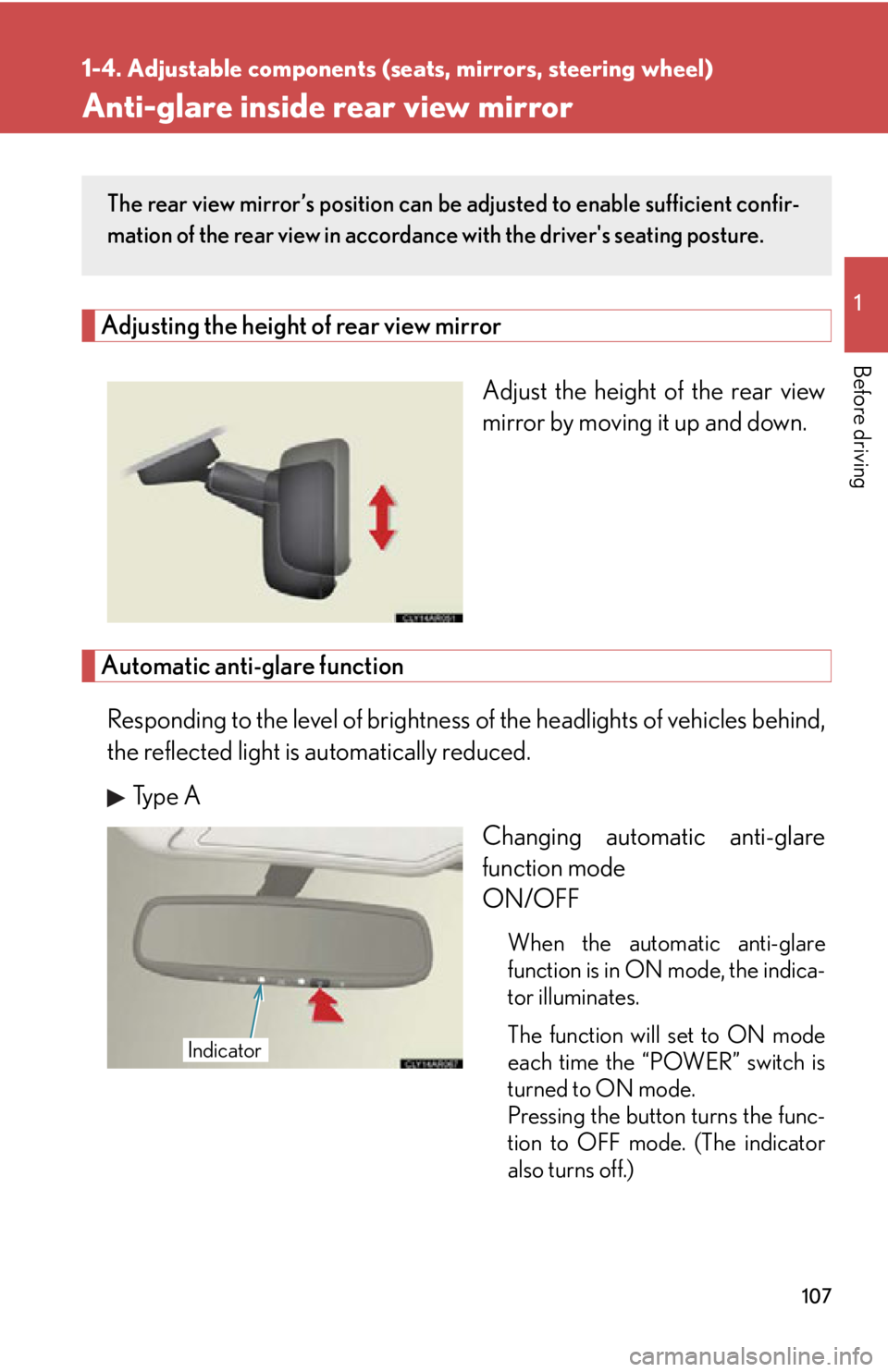
Adjust the height of the rear view
mirror by moving it up and down.
Automatic anti-glare function
Responding to the level of brightness of the headlights of vehicles behind,
the reflected light is automatically reduced.
Type A
Changing automatic anti-glare
function mode
ON/OFF
When the automatic anti-glare
function is in ON mode, the indica-
tor illuminates.
The function will set to ON mode
each time the “POWER” switch is
turned to ON mode.
Pressing the button turns the func-
tion to OFF mode. (The indicator
also turns off.) The rear view mirror’s position can be adjusted to enable sufficient confir-
mation of the rear view in accordance with the driver's seating posture.
Indicator
Page 108 of 878
1081-4. Adjustable components (s eats, mirrors, steering wheel)
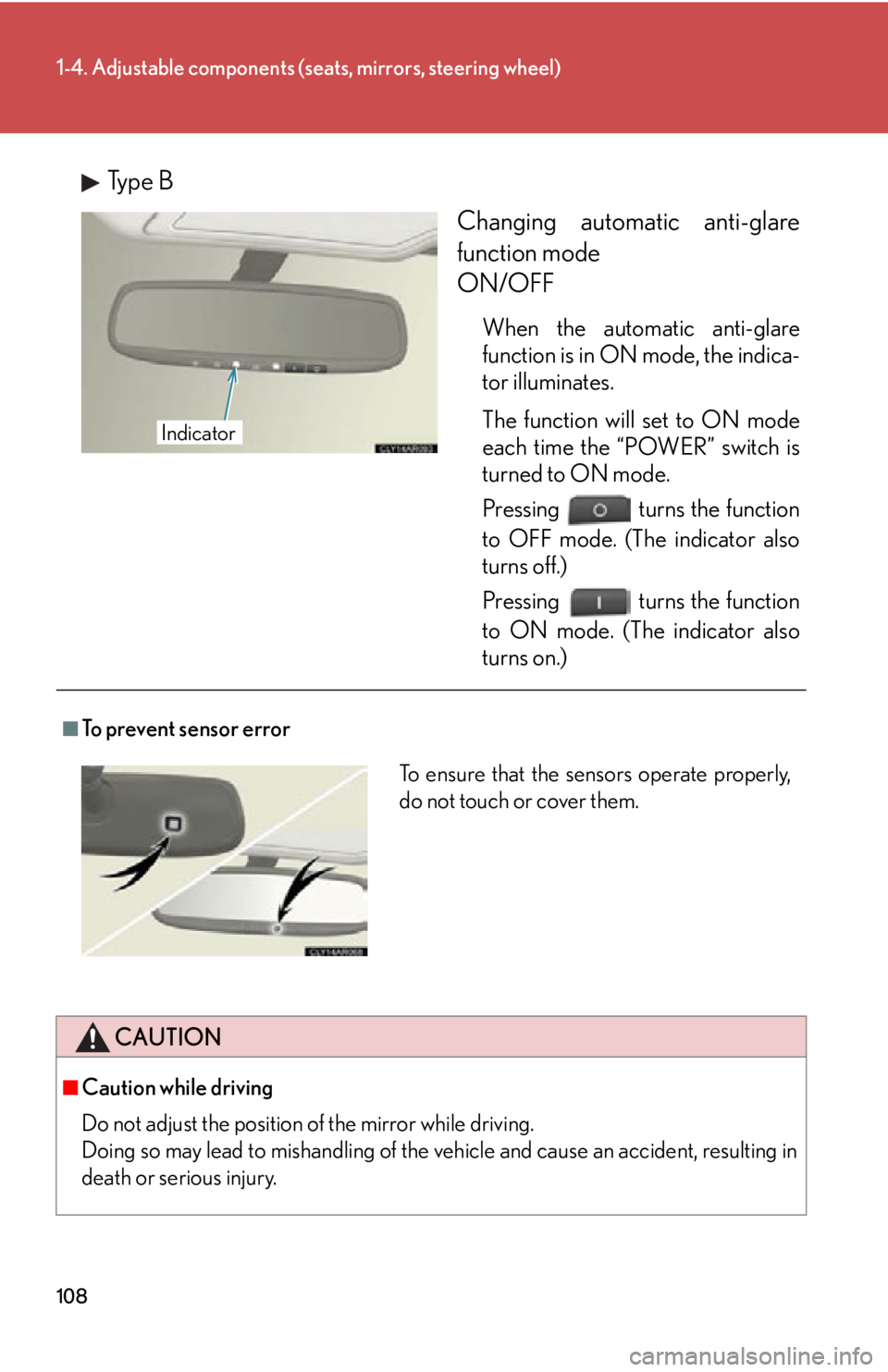
Type B
Changing automatic anti-glare
function mode
ON/OFF When the automatic anti-glare
function is in ON mode, the indica-
tor illuminates.
The function will set to ON mode
each time the “POWER” switch is
turned to ON mode.
Pressing turns the function
to OFF mode. (The indicator also
turns off.)
Pressing turns the function
to ON mode. (The indicator also
turns on.)Indicator
■
To prevent sensor error
CAUTION
■
Caution while driving
Do not adjust the position of the mirror while driving.
Doing so may lead to mishandling of the vehicle and cause an accident, resulting in
death or serious injury. To ensure that the sensors operate properly,
do not touch or cover them.
Page 110 of 878
1101-4. Adjustable components (s eats, mirrors, steering wheel)
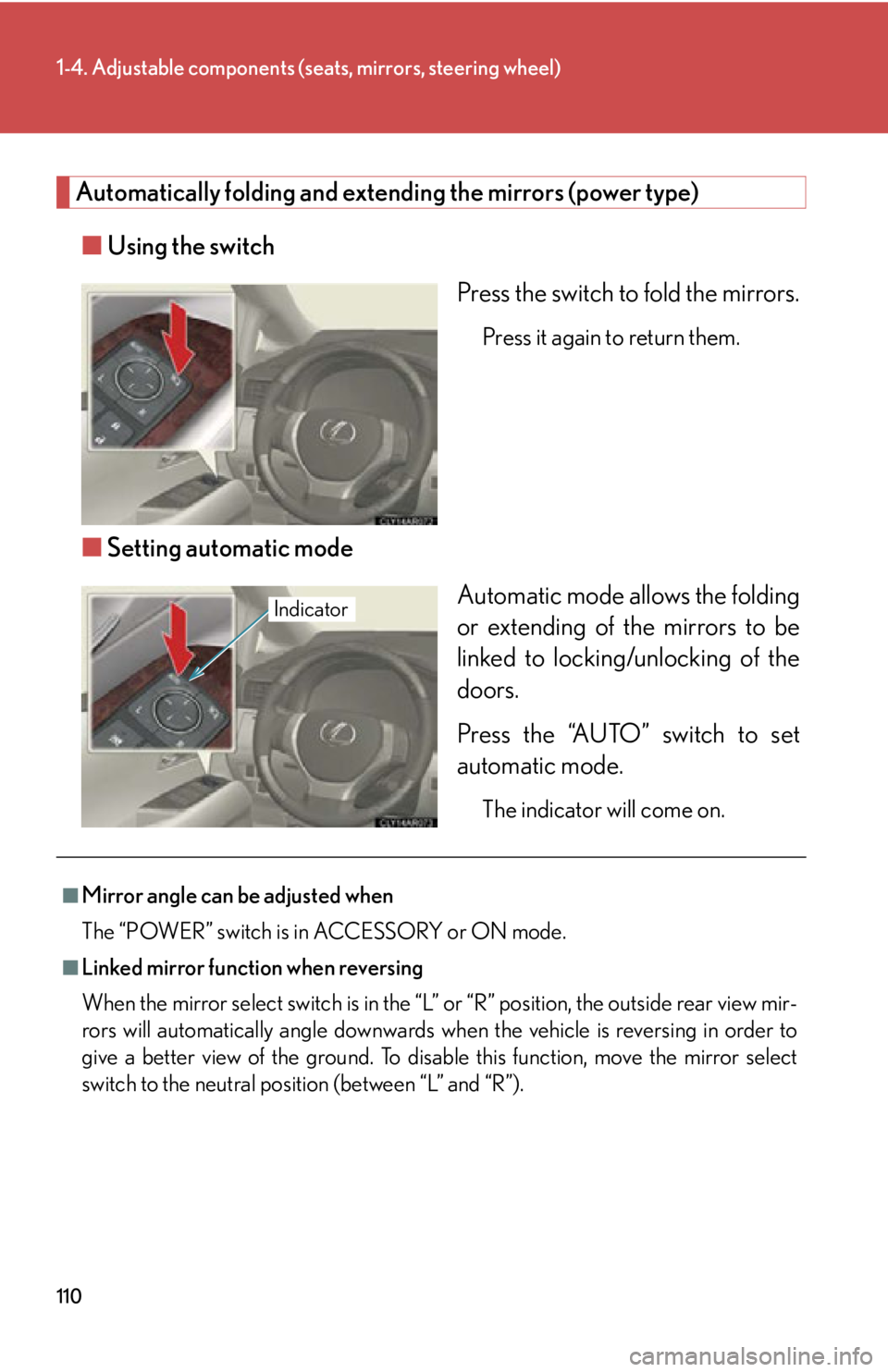
Automatically folding and extending the mirrors (power type)
■ Using the switch
Press the switch to fold the mirrors. Press it again to return them.
■ Setting automatic mode
Automatic mode allows the folding
or extending of the mirrors to be
linked to locking/unlocking of the
doors.
Press the “AUTO” switch to set
automatic mode. The indicator will come on.Indicator
■
Mirror angle can be adjusted when
The “POWER” switch is in ACCESSORY or ON mode.■
Linked mirror function when reversing
When the mirror select switch is in the “L ” or “R” position, the outside rear view mir-
rors will automatically angl e downwards when the vehicle is reversing in order to
give a better view of the ground. To disable this function, move the mirror select
switch to the neutral positi on (between “L” and “R”).
Page 170 of 878

1702-1. Driving procedures
CAUTION●
Do not shift the shift lever to R while the vehicle is moving forward.
Doing so can damage the transmission and may result in a loss of vehicle control.●
Do not shift the shift lever to D while the vehicle is moving backward.
Doing so can damage the transmission and may result in a loss of vehicle control.●
Moving the shift lever to N while the vehicle is moving will disengage the hybrid
system. Engine braking is not availabl e with the hybrid system disengaged.●
During normal driving, do not turn off the hybrid system. Turning the hybrid sys-
tem off while driving will not cause loss of steering or braking control, however,
power assist to the steering will be lost. This will make it more difficult to steer
smoothly, so you should pull over and stop the vehicle as soon as it is safe to do so.
In the event of an emergency, such as if it becomes impossible to stop the vehicle
in the normal way: P. 7 9 5●
Use engine braking (downshift) to maintain a safe speed when driving down a
steep hill.
Using the brakes continuously may cause the brakes to overheat and lose effec-
tiveness. ( P. 1 8 6 )●
When stopped on an incline, use the brake pedal and parking brake to prevent
the vehicle from rolling backward or forward, causing an accident. ●
Do not adjust the position of the steering wheel, the seat, or the inside or outside
rear view mirrors while driving.
Doing so may result in a loss of vehicle control that can cause accidents, resulting
in death or serious injury.●
Always check that all passengers' arms, heads or other parts of their body are not
outside the vehicle, as this may result in death or serious injury.●
Do not drive in excess of the speed limit. Even if the legal speed limit permits it, do
not drive over 85 mph (140 km/h) unless your vehicle has high-speed capability
tires. Driving over 85 mph (140 km/h) may result in tire failure, loss of control and
possible injury. Be sure to consult a tire dealer to determine whether the tires on
your vehicle are high-speed capability tires or not before driving at such speeds.
Page 175 of 878

1752-1. Driving procedures
2
When driving CAUTION■
If the vehicle becomes stuck
Do not spin the wheels excessively when any of the tires is up in the air, or the vehi-
cle is stuck in sand, mud, etc. This may damage the driveline components or propel
the vehicle forward or backward, causing an accident.
NOTICE■
When driving the vehicle ●
Do not depress the accelerator and brake pe dals at the same time during driving,
as this may restrain driving torque.●
Do not use the accelerator pedal or depress the accelerator and brake pedals at
the same time to hold the vehicle on a hill.■
When parking the vehicle
Always shift the shift lever to P. Failure to do so may cause the vehicle to move or the
vehicle may accelerate suddenly if the accel erator pedal is accidentally depressed.■
Avoiding damage to vehicle parts ●
Do not turn the steering wheel fully in either direction and hold it there for an
extended period of time.
Doing so may damage the power steering motor.●
When driving over bumps in the road, drive as slowly as possible to avoid damag-
ing the wheels, underside of the vehicle, etc. ■
If you get a flat tire while driving
A flat or damaged tire may cause the following situations. Hold the steering wheel
firmly and gradually depress the brak e pedal to slow down the vehicle.●
It may be difficult to control your vehicle.
●
The vehicle will make abnormal sounds.
●
The vehicle will behave abnormally.
Information on what to do in case of a flat tire ( P. 76 4 )
Page 180 of 878
1802-1. Driving procedures
■
Note for the entry function
P. 6 3■
If the hybrid system does not start
The immobilizer system may not have been deactivated. ( P. 1 2 4 )
Contact your Lexus dealer.■
Steering lock
After turning the “POWER” switch off and opening and closing the doors, the
steering wheel will be locked due to th e steering lock function. Operating the
“POWER” switch again automatically cancels the steering lock.■
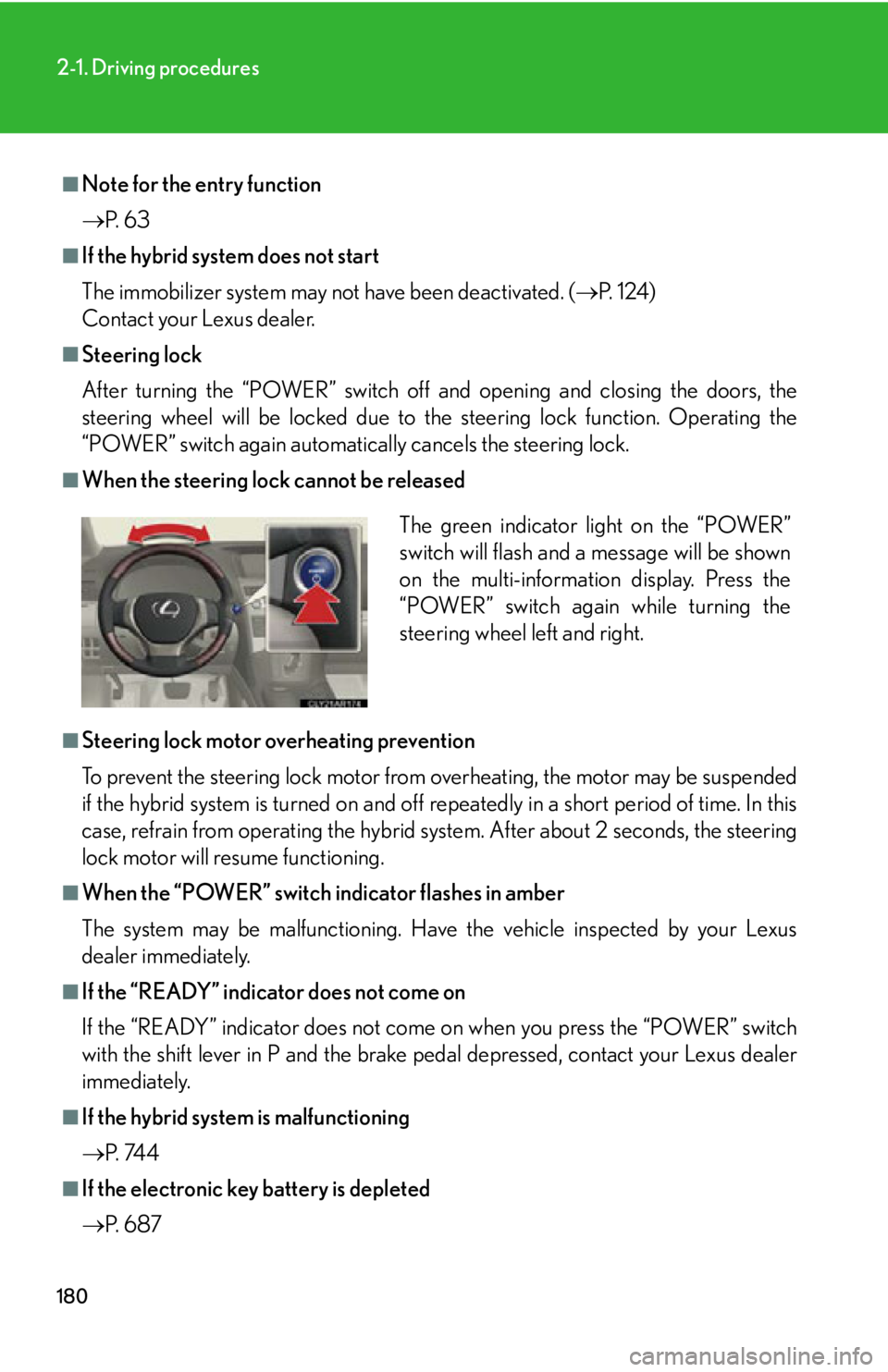
When the steering lock cannot be released
■
Steering lock motor overheating prevention
To prevent the steering lock motor from overheating, the motor may be suspended
if the hybrid system is turned on and off re peatedly in a short period of time. In this
case, refrain from operating the hybrid sy stem. After about 2 seconds, the steering
lock motor will resume functioning.■
When the “POWER” switch indicator flashes in amber
The system may be malfunctioning. Have the vehicle inspected by your Lexus
dealer immediately.■
If the “READY” indicator does not come on
If the “READY” indicator does not come on when you press the “POWER” switch
with the shift lever in P and the brake pe dal depressed, contact your Lexus dealer
immediately.
■
If the hybrid system is malfunctioning
P. 74 4
■
If the electronic key battery is depleted
P. 6 8 7 The green indicator light on the “POWER”
switch will flash and a message will be shown
on the multi-information display. Press the
“POWER” switch again while turning the
steering wheel left and right.
Page 181 of 878

1812-1. Driving procedures
2
When driving CAUTION■
When starting the hybrid system
Always start the hybrid system while sitting in the driver’s seat. Do not depress the
accelerator pedal while starting the hybrid system under any circumstances.
Doing so may cause an accident resu lting in death or serious injury.■
Caution while driving
If a hybrid system failure occurs while the vehicle is moving, do not lock or open the
doors until the vehicle reaches a safe and complete stop. Activation of the steering
lock in this circumstance may lead to an accident, resulting in death or serious
injury.■
Stopping the hybrid system in an emergency
If you want to stop the hybrid system in an emergency while driving the vehicle,
press and hold the “POWER” switch for more than 2 seconds, or press it briefly 3
times or more in succession. ( P. 795)
However, do not touch the “POWER” switch while driving except in an emergency.
Turning the hybrid system off while driving wi ll not cause loss of steering or braking
control, however, power assist to the steering will be lost. This will make it more diffi-
cult to steer smoothly, so you should pull over and stop the vehicle as soon as it is
safe to do so.
Page 271 of 878
2712-4. Using other driving systems
2
When driving Driving assist systems To help enhance driving safety and performance, the following systems
operate automatically in response to various driving situations. Be aware,
however, that these systems are supplementary and should not be relied
upon too heavily when operating the vehicle.
■ ABS (Anti-lock Brake System) Helps to prevent wheel lock when the brakes are applied suddenly, or if
the brakes are applied while driving on a slippery road surface
■ Brake assist Generates an increased level of braking force after the brake pedal is
depressed, when the system detects a panic stop situation
■ VSC (Vehicle Stability Control) Helps the driver to control skidding when swerving suddenly or turning on
slippery road surfaces
■ TRAC (Traction Control) Helps to maintain drive power and prevent the drive wheels from spinning
when starting the vehicle or accelerating on slippery roads
■ Hill-start assist control P. 2 76
■ EPS (Electric Power Steering) Employs an electric motor to reduce the amount of effort needed to turn
the steering wheel
■ VDIM (Vehicle Dynamics Integrated Management) Provides integrated control of the ABS, brake assist, TRAC, VSC, hill-start
assist control, and EPS systems.
Helps to maintain vehicle stability when swerving on slippery road sur-
faces by controlling the brakes and hybrid system output.
■ PCS (Pre-Collision System) (if equipped)
P. 2 7 8
■ BSM (Blind Spot Monitor) (if equipped)
P. 2 8 6
Page 274 of 878
2742-4. Using other driving systems
■
Reactivation of the TRAC sy stem linked to vehicle speed
When only the TRAC system is turned off, the TRAC system will turn on when vehi-
cle speed increases. However, when both TRAC and VSC systems are turned off,
the systems will not turn on even when vehicle speed increases.■
Reduced effectiveness of the EPS system
The effectiveness of the EPS system is reduced to prevent the system from over-
heating when there is frequent steering in put over an extended period of time. The
steering wheel may feel heavy as a result. Should this occur, refrain from excessive
steering input or stop the vehicle and turn the hybrid system off. The EPS system
should return to normal within 10 minutes.
CAUTION■
The ABS does not operate effectively when ●
The limits of tire gripping performance have been exceeded (such as excessively
worn tires on a snow covered road).●
The vehicle hydroplanes while driving at high speed on a wet or slick road.■
Stopping distance when the ABS is operating may exceed that of normal condi-
tions
The ABS is not designed to shorten the vehicle’s stopping dist ance. Always main-
tain a safe distance from the vehicle in fron t of you, especially in the following situa-
tions: ●
When driving on dirt, gravel or snow-covered roads●
When driving with tire chains●
When driving over bumps in the road●
When driving over roads with potholes or roads with uneven surfaces■
TRAC may not operate effectively when
Directional control and power may not be ac hievable while driving on slippery road
surfaces, even if the TRAC system is operating.
Drive the vehicle carefully in conditions where stability and power may be lost.
Page 320 of 878

3202-5. Driving information
■
Break-in schedule
If your vehicle is new or equipped with any new power train components (such as
an engine, transmission, differential or wheel bearing), Lexus recommends that you
do not tow a trailer until the vehicle has been driven for over 500 miles (800 km).
After the vehicle has been driven for over 500 miles (800 km), you can start tow-
ing. However, for the next 500 miles (800 km), drive the vehicle at a speed of less
than 50 mph (80 km/h) when towing a trailer, and avoid full throttle acceleration.■
Maintenance ●
If you tow a trailer, your vehicle will require more frequent maintenance due to
the additional load. (See “Warranty and Services Guide”, “Owner's Manual
Supplement” or “Scheduled Maintenance”.)●
Retighten the fixing bolts of the towing ball and bracket after approximately
600 miles (1000 km) of trailer towing.■
If trailer sway occurs
One or more factors (crosswinds, passing vehicles, rough roads, etc.) can adversely
affect handling of your vehicle and trailer, causing instability. ●
If trailer swaying occurs:
• Firmly grip the steering wheel. Steer straight ahead.
Do not try to control trailer sway ing by turning the steering wheel.
• Begin releasing the accelerator peda l immediately but very gradually to
reduce speed.
Do not increase speed. Do not apply vehicle brakes.
If you make no extreme correction with the steering or brakes, your vehicle and
trailer should stabilize. ●
After the trailer swaying has stopped:
• Stop in a safe place. Get all occupants out of the vehicle.
• Check the tires of the vehicle and the trailer.
• Check the load in the trailer.
Make sure the load has not shifted.
Make sure the tongue weight is appropriate, if possible.
• Check the load in the vehicle.
Make sure the vehicle is not ov erloaded after occupants get in.
If you cannot find any problems, the speed at which trailer swaying occurred is
beyond the limit of your particular vehicle-trailer combination.
Drive at a lower speed to prevent instability. Remember that swaying of the towing
vehicle-trailer increases as speed increases.