ad blue LEXUS RX450h 2015 Workshop Manual
[x] Cancel search | Manufacturer: LEXUS, Model Year: 2015, Model line: RX450h, Model: LEXUS RX450h 2015Pages: 878, PDF Size: 11.62 MB
Page 519 of 878
5193-4. Using the audio system
3
Interior features Bluetooth ®
audio system
■
Conditions under which the system will not operate ●
If using a portable player that does not support Bluetooth ®
●
If the portable player is switched off●
If the portable player is not connected●
If the portable player’s battery is low●
If the portable player is behind the seat or in the glove box or console box●
If metal is covering or touching the portable player■
When transferring ownership of the vehicle
Be sure to initialize the system to prevent personal data from being improperly
accessed. ( P. 5 74 )The Bluetooth ®
audio system enables you to enjoy music played on a por-
table digital audio player (portable pl ayer) from the vehicle speakers via
wireless communication.
This audio system supports Bluetooth ®
, a wireless data system capable of
playing portable audio music without ca bles. If your portable player does
not support Bluetooth ®
, the Bluetooth ®
audio system will not function.
Ti t l e Pa g e
Using the Bluetooth ®
audio system P. 5 2 3
Operating a Bluetooth ®
enabled portable player P. 5 2 8
Setting up a Bluetooth ®
enabled portable player P. 5 3 1
Bluetooth ®
audio system setup P. 5 3 8
Page 520 of 878
5203-4. Using the audio system
■
About Bluetooth ®
■
Compatible models ●
Bluetooth ®
specifications:
Ver. 1.1, or higher (Recommended: Ver. 1.2 or higher)●
Following profiles:
• A2DP (Advanced Audio Distribution Profil e) Ver. 1.0, or higher (Conformed:
Ve r. 1 . 2 )
• AVRCP (Audio/Video Remote Control Profile) Ver. 1.0 or higher (Con-
formed: Ver. 1.3)
Portable players must correspond to the above specifications in order to be con-
nected to the Bluetooth ®
audio system. However, please note that some functions
may be limited depending on the type of portable player.■
Certification for the Bluetooth ®
audio system
FCC ID: AJDK018
IC ID: 775E-K018
This device complies with Part 15 of FCC Rules and Industry Canada licence-
exempt RSS standard(s). Operation is subject to the following two conditions: (1)
this device may not cause interference, and (2) this device must accept any inter-
ference, including interference that may cause undesired operation of this device.
Le présent appareil est conforme aux la partie 15 des règles de la FCC et CNR
d’Industrie Canada applicables aux appareils radio exempts de licence. L’exploita-
tion est autorisée aux deux conditions suivantes : (1) l’appareil ne doit pas produire
de brouillage, et (2) l’utilisateur de l’appareil doit accepter tout brouillage
radioélectrique subi, même si le brouilla ge est susceptible d’en compromettre le
fonctionnement. Bluetooth is a registered trademark of
Bluetooth SIG. Inc.
Page 522 of 878
5223-4. Using the audio system
CAUTION■
Caution while driving
Do not connect portable players or operate the controls.■
Caution regarding interference with electronic devices ●
Your audio unit is fi tted with Bluetooth ®
antennas. People with implantable car-
diac pacemakers, cardiac resynchronization therapy-pacemakers or implantable
cardioverter defibrillators should maintain a reasonable distance between them-
selves and the Bluetooth ®
antennas. The radio waves may affect the operation of
such devices.●
Before using Bluetooth ®
devices, users of any electrical medical device other
than implantable cardiac pacemakers, cardiac resynchronization therapy-pace-
makers or implantable cardioverter defibrillators should consult the manufac-
turer of the device for information about its operation under the influence of radio
waves. Radio waves could have unexpected effects on the operation of such
medical devices.
NOTICE■
To prevent damage to portable players
Do not leave portable players in the vehicle. The temperature inside the vehicle
may become high, resulting in damage to the player.
Page 523 of 878
5233-4. Using the audio system
3
Interior features Using the Bluetooth ®
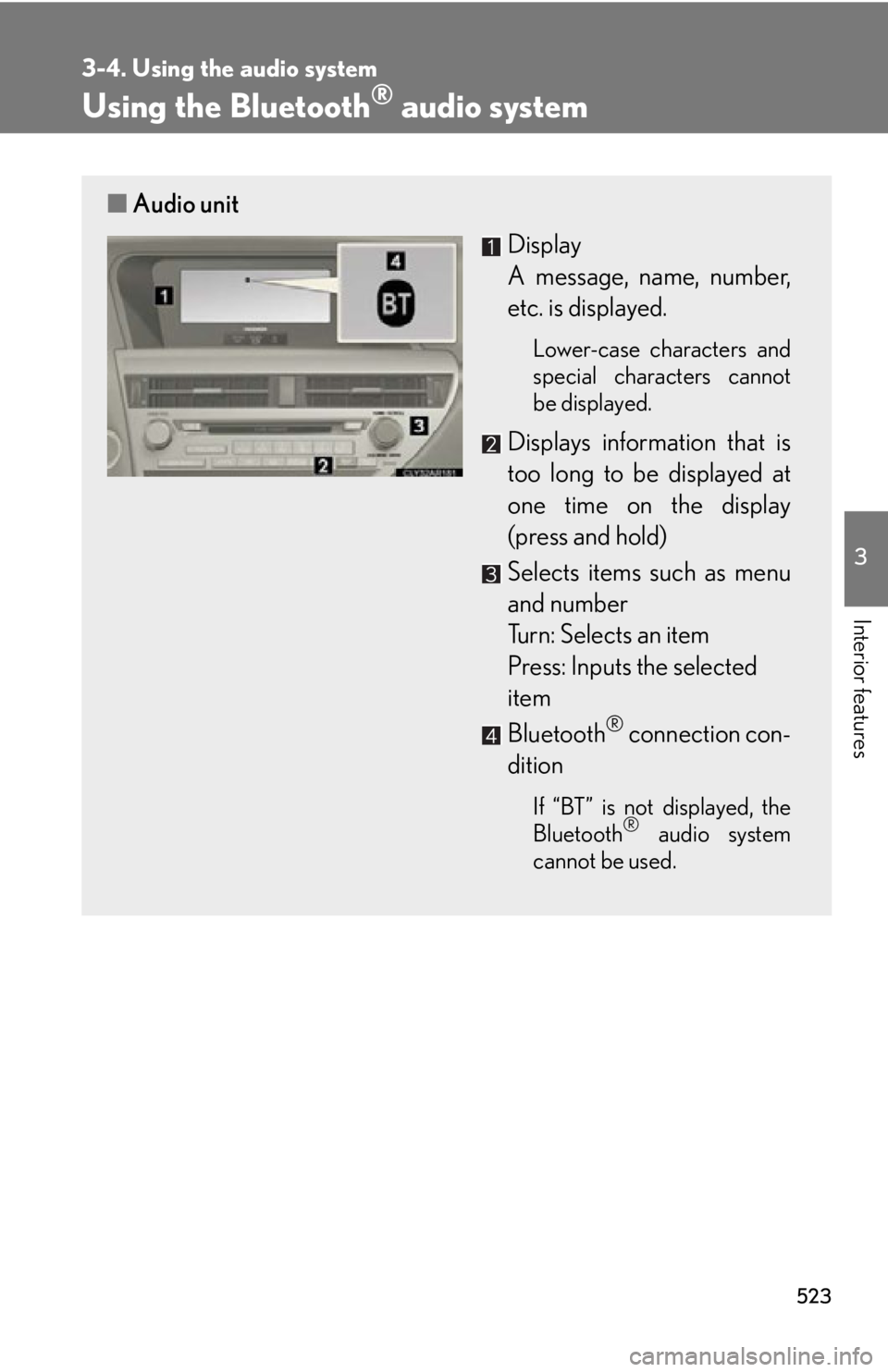
audio system■ Audio unit
Display
A message, name, number,
etc. is displayed. Lower-case characters and
special characters cannot
be displayed.
Displays information that is
too long to be displayed at
one time on the display
(press and hold)
Selects items such as menu
and number
Turn: Selects an item
Press: Inputs the selected
item
Bluetooth ®
connection con-
dition If “BT” is not displayed, the
Bluetooth ®
audio system
cannot be used.
Page 524 of 878

5243-4. Using the audio system
Operating the system using voice commands
By following voice guidance instructio ns output from the speaker, voice
commands enable the operation of the Bluetooth ®
audio system without
the need to check the display or operate .
■ Operation procedure when using voice commands
Press the talk switch and fo llow voice guidance instructions.
■ Auxiliary commands when using voice commands
The following auxiliary commands ca n be used when operating the
system using a voice command:
“Cancel”: Exits the Bluetooth ®
audio system
“Repeat”: Repeats the previous voice guidance instruction
“Go back”: Returns to the previous procedure
“Help”: Reads aloud the function summary if a help comment is regis-
tered for the selected function
Page 525 of 878
5253-4. Using the audio system
3
Interior features Using the Bluetooth ®
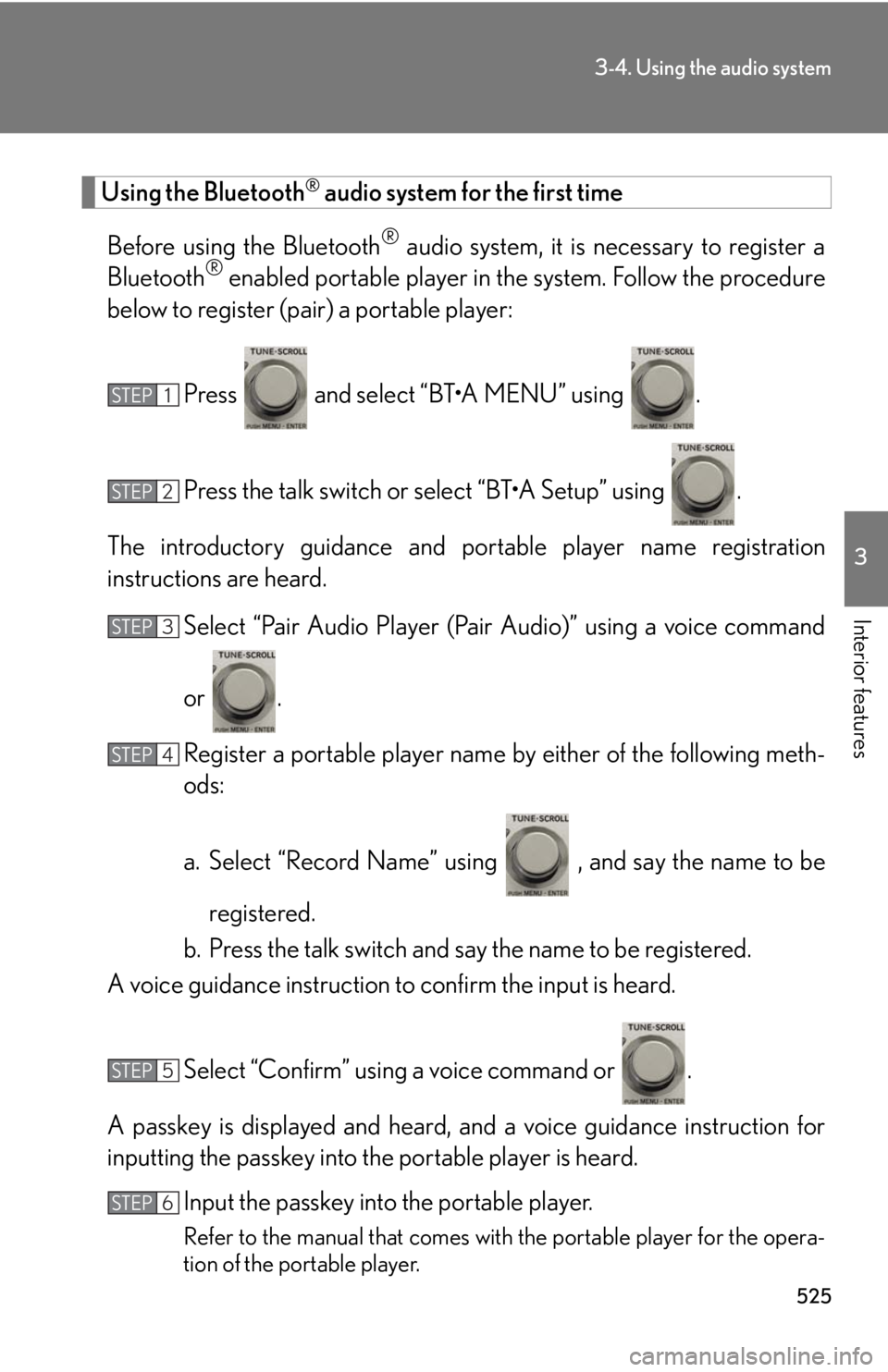
audio system for the first time
Before using the Bluetooth ®
audio system, it is necessary to register a
Bluetooth ®
enabled portable player in th e system. Follow the procedure
below to register (pair) a portable player:
Press and select “BT•A MENU” using .
Press the talk switch or select “BT•A Setup” using .
The introductory guidance and portable player name registration
instructions are heard.
Select “Pair Audio Player (Pair Audio)” using a voice command
or .
Register a portable player name by either of the following meth-
ods:
a. Select “Record Name” using , and say the name to be
registered.
b. Press the talk switch and say the name to be registered.
A voice guidance instruction to confirm the input is heard.
Select “Confirm” using a voice command or .
A passkey is displayed and heard, an d a voice guidance instruction for
inputting the passkey into the portable player is heard.
Input the passkey into the portable player.
Refer to the manual that comes with the portable player for the opera-
tion of the portable player.STEP 1
STEP 2
STEP 3
STEP 4
STEP 5
STEP 6
Page 526 of 878
5263-4. Using the audio system
Guidance for registration completion is heard.
If the portable pl ayer has a Bluetooth ®
phone, the phone can be regis-
tered at the same time. A voice guidance instruction to register a
Bluetooth ®
phone is heard.
Select “Yes” or “No” using a voice command or .
(Bluetooth ®
phone P. 549)
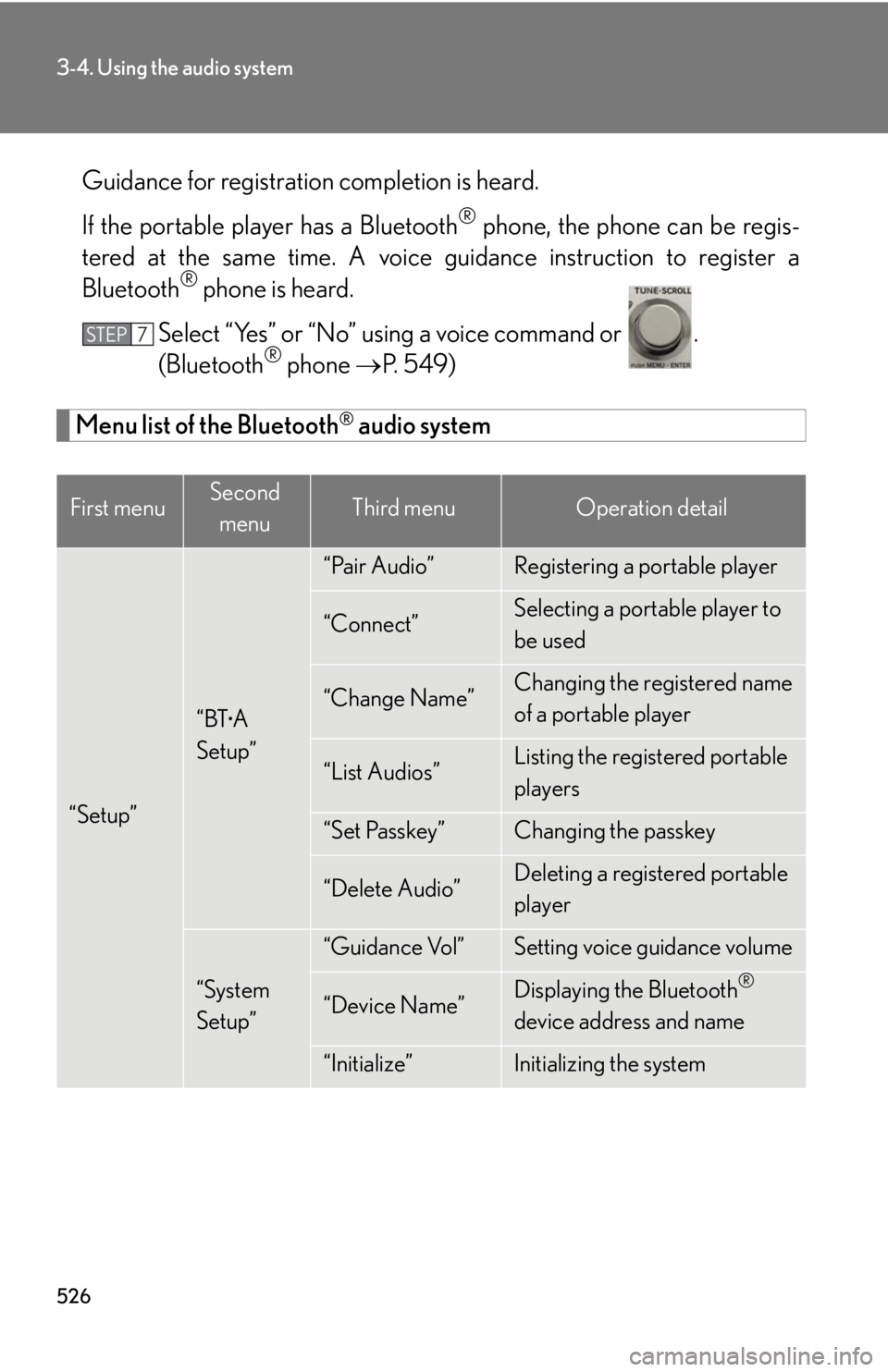
Menu list of the Bluetooth ®
audio system
First menu Second
menu Third menu Operation detail
“Setup” “BT •
A
Setup” “Pair Audio” Registering a portable player
“Connect” Selecting a portable player to
be used
“Change Name” Changing the registered name
of a portable player
“List Audios” Listing the registered portable
players
“Set Passkey” Changing the passkey
“Delete Audio” Deleting a registered portable
player
“System
Setup” “Guidance Vol” Setting voice guidance volume
“Device Name” Displaying the Bluetooth ®
device address and name
“Initialize” Initializing the systemSTEP 7
Page 528 of 878
5283-4. Using the audio system
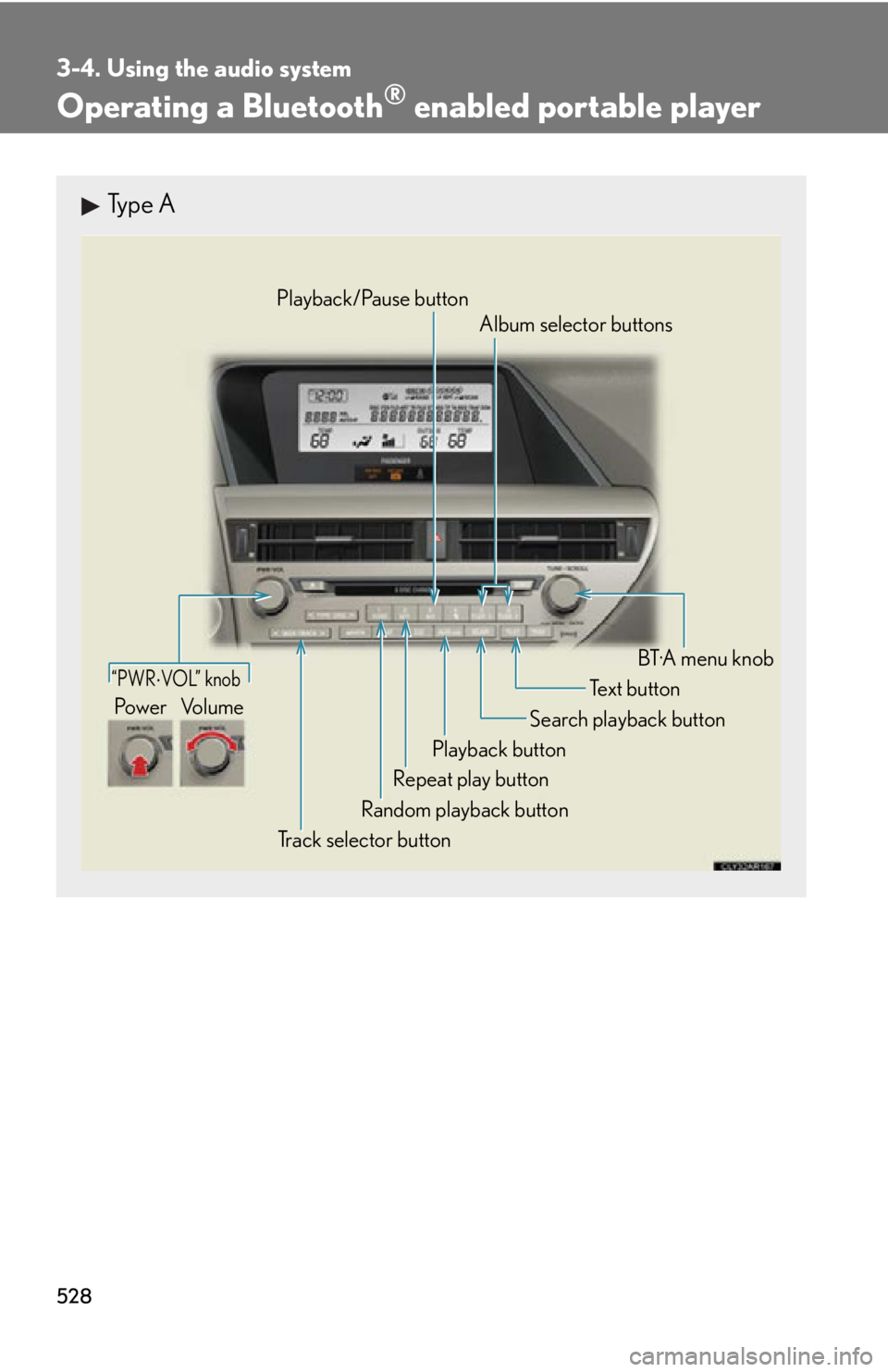
Operating a Bluetooth ®
enabled portable playerType A
“PWR VOL” knob
Track selector button Playback button Search playback button
Random playback button Repeat play button Te x t b u t t o n
Pow e r Vo l u m e Playback/Pause button
Album selector buttons
BT·A menu knob
Page 530 of 878
5303-4. Using the audio system
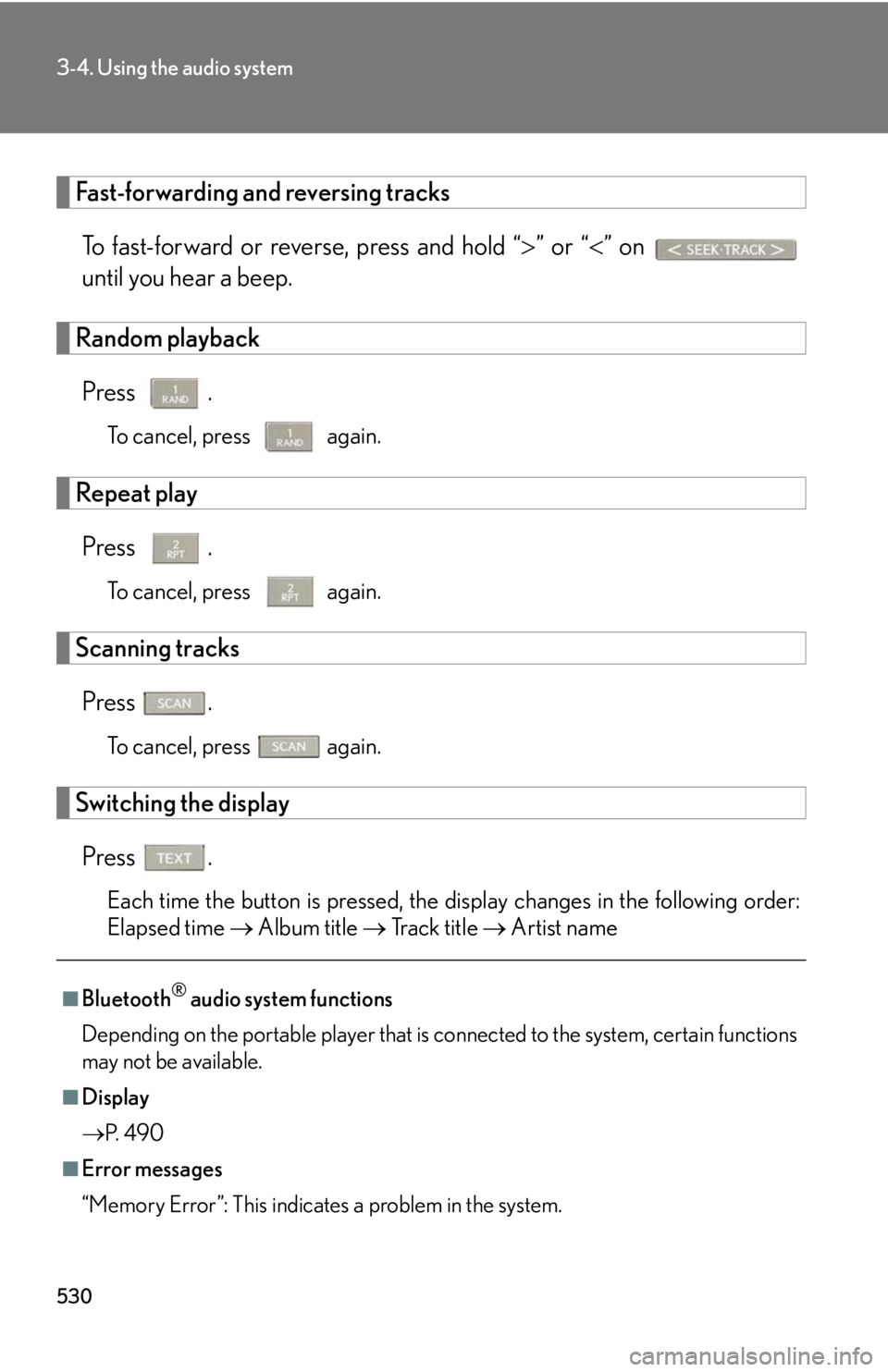
Fast-forwarding and reversing tracks
To fast-forward or reverse, press and hold “ ” or “ ” on
until you hear a beep.
Random playback
Press . To cancel, press
again.
Repeat play
Press . To cancel, press
again.
Scanning tracks
Press . To cancel, press
again.
Switching the display
Press .
Each time the button is pressed, the display changes in the following order:
Elapsed time Album title Tr a c k t i t l e Artist name
■
Bluetooth ®
audio system functions
Depending on the portable player that is connected to the system, certain functions
may not be available.
■
Display
P. 4 9 0
■
Error messages
“Memory Error”: This indicates a problem in the system.
Page 531 of 878
5313-4. Using the audio system
3
Interior features Setting up a Bluetooth ®
enabled portable playerRegistering a portable player in the Bluetooth ®
audio system allows the
system to function. The following functions can be used for registered por-
table players:
■ Functions and operation procedures
Pattern A
To enter the menu for each function , follow the steps below using a
voice command or :
● Registering a portable player
1. “Setup” 2. “Bluetooth Audio Setup (BT•A Setup)”
3. “Pair Audio Player (Pair Audio)”
● Selecting a portable player to be used
1. “Setup” 2. “Bluetooth Audio Setup (BT•A Setup)”
3. “Connect Audio Player (Connect)”
● Changing the registered name of a portable player
1. “Setup” 2. “Bluetooth Audio Setup (BT•A Setup)”
3. “Change Name”
● Listing the registered portable players
1. “Setup” 2. “Bluetooth Audio Setup (BT•A Setup)”
3. “List Audio Players (List Audios)”
● Changing the passkey
1. “Setup” 2. “Bluetooth Audio Setup (BT•A Setup)”
3. “Set Passkey”
● Deleting a registered portable player
1. “Setup” 2. “Bluetooth Audio Setup (BT•A Setup)”
3. “Delete Audio Player (Delete Audio)”