AUX LEXUS RX450h 2015 Owners Manual
[x] Cancel search | Manufacturer: LEXUS, Model Year: 2015, Model line: RX450h, Model: LEXUS RX450h 2015Pages: 878, PDF Size: 11.62 MB
Page 4 of 878

TABLE OF CONTENTS Index
43-1. Lexus Display Audio system
Lexus Display Audio
system ........................................... 328
Display settings ............................. 332
Setup menu..................................... 334
Mobile Assistant .......................... 340
3-2. Using the air conditioning
system and defogger
Automatic air conditioning
system (with the Lexus
Display Audio system) ............ 342
Automatic air conditioning
system (without a navigation
system or the Lexus Display
Audio system)............................ 350
Rear window defogger
switch............................................. 358
Windshield wiper de-icer ........ 360
3-3. Using the Lexus Display
Audio system
Audio system (with the Lexus
Display Audio system) ............ 362
Using the radio ............................. 365
Using the CD player .................. 380
Playing an audio CD and
MP3/WMA discs ...................... 381
Listening to an iPod ...................... 391
Listening to a USB
memory ........................................ 399 Using the AUX port .................. 408
Listening to Bluetooth ®
audio ................................................ 410
Optimal use of the audio
system ............................................ 424
Using the steering wheel
audio switches ............................ 426
Hands-free system
(for mobile phone) .................... 429
Using the Bluetooth ®
phone ............................................. 437
Setting the hands-free
system ............................................ 454
Bluetooth ®
settings .................... 466
3-4. Using the audio system
Audio system
(without a navigation
system or the Lexus Display
Audio system)............................. 474
Using the radio .............................. 477
Using the CD player .................. 485
Playing MP3 and WMA
discs ................................................ 493
Operating an iPod ........................ 501
Operating a USB memory........ 510
Bluetooth ®
audio system .......... 519
Using the Bluetooth ®
audio
system ............................................ 523
Operating a Bluetooth ®
enabled portable player ........ 528
Setting up a Bluetooth ®
enabled portable player .......... 531
Bluetooth ®
audio system
setup .............................................. 5383
Interior features
Page 5 of 878

1
2
3
4
5
6
7
5Optimal use of the audio
system ............................................ 539
Using the AUX port .................... 541
Using the steering wheel
audio switches ............................ 543
Hands-free system for
mobile phones ............................ 547
Using the hands-free system
(for mobile phones) .................. 552
Making a phone call................... 560
Setting a mobile phone .............. 565
Security and system setup ......... 571
Using the phone book................ 575
3-5. Using the interior lights
Interior lights list........................... 582
• Interior lights .............................. 583
• Personal lights ........................... 583
3-6. Using the storage features
List of storage fe atures.............. 585
• Glove box ................................... 586
• Bottle holders/
door pockets ............................... 587
• Cup holders................................ 588
• Console box ............................... 590
• Coin holder.................................. 592
• Auxiliary boxes........................... 592
• Under tray .................................... 594 3-7. Other interior features
Sun visors........................................ 595
Vanity mirrors................................ 596
Clock................................................. 597
Outside temperature
display ........................................... 598
Multi-display light control........ 600
Power outlets .................................. 601
Heated steering wheel .............. 604
Seat heaters and
ventilators .................................... 605
Armrest ............................................ 607
Coat hooks .................................... 608
Assist grips ..................................... 609
Floor mat........................................... 610
Luggage compartment
features........................................... 612
Garage door opener................... 616
Compass ......................................... 622
Safety Connect ............................. 626
Page 10 of 878
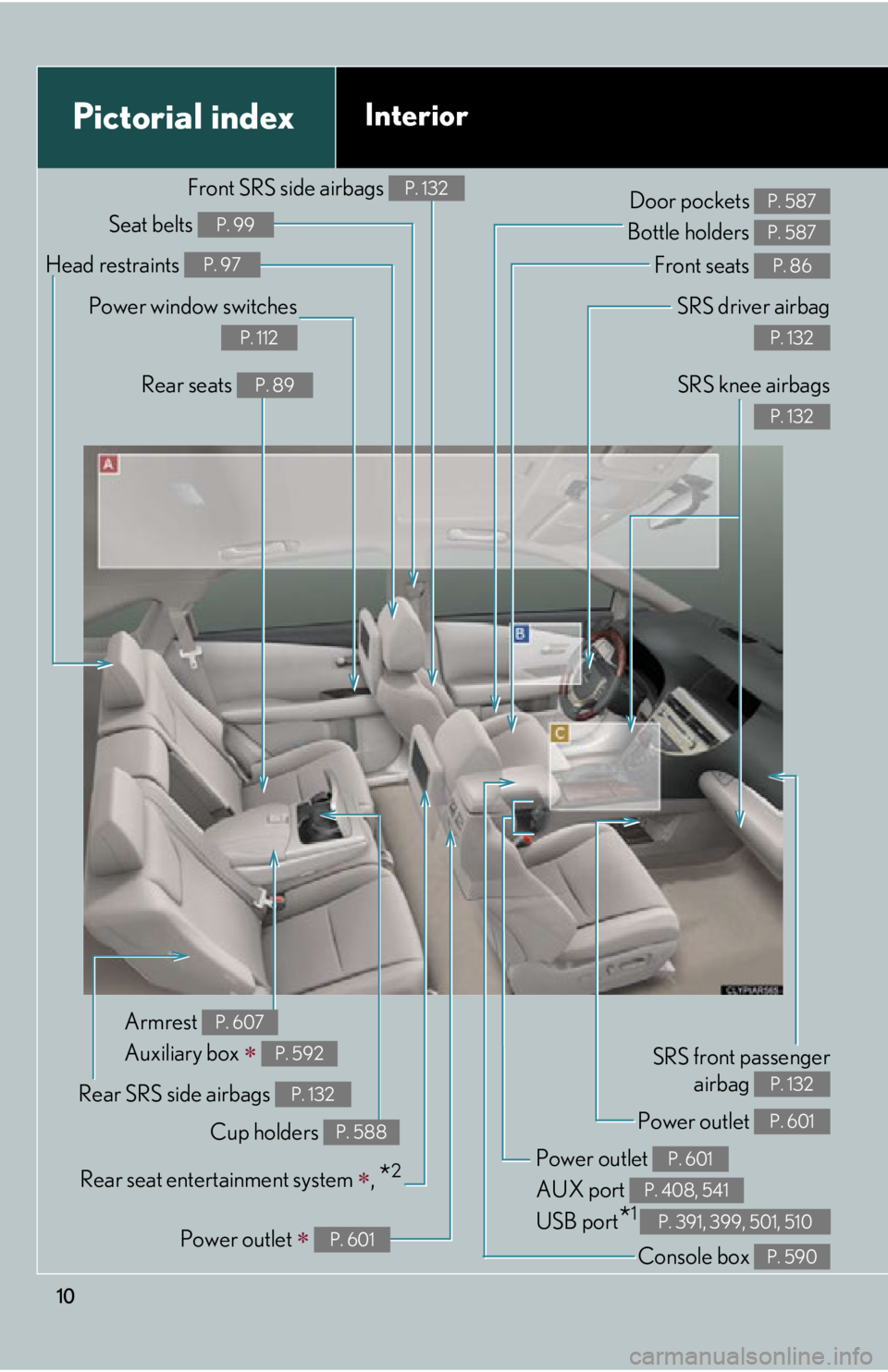
10Pictorial index Interior SRS driver airbag
P. 132
SRS knee airbags P. 132
Front seats P. 86
SRS front passenger
airbag P. 132
Power outlet
AUX port
USB port
* 1 P. 601
P. 408, 541
P. 391, 399, 501, 510Door pockets
Bottle holders P. 587
P. 587
Rear SRS side airbags P. 132
Power outlet P. 601
Console box P. 590Armrest
Auxiliary box
P. 607
P. 592
Power outlet
P. 601Power window switches P. 112
Rear seats P. 89
Head restraints P. 97
Seat belts P. 99
Front SRS side airbags P. 132
Cup holders P. 588
Rear seat entert ainment system
,
* 2
Page 11 of 878
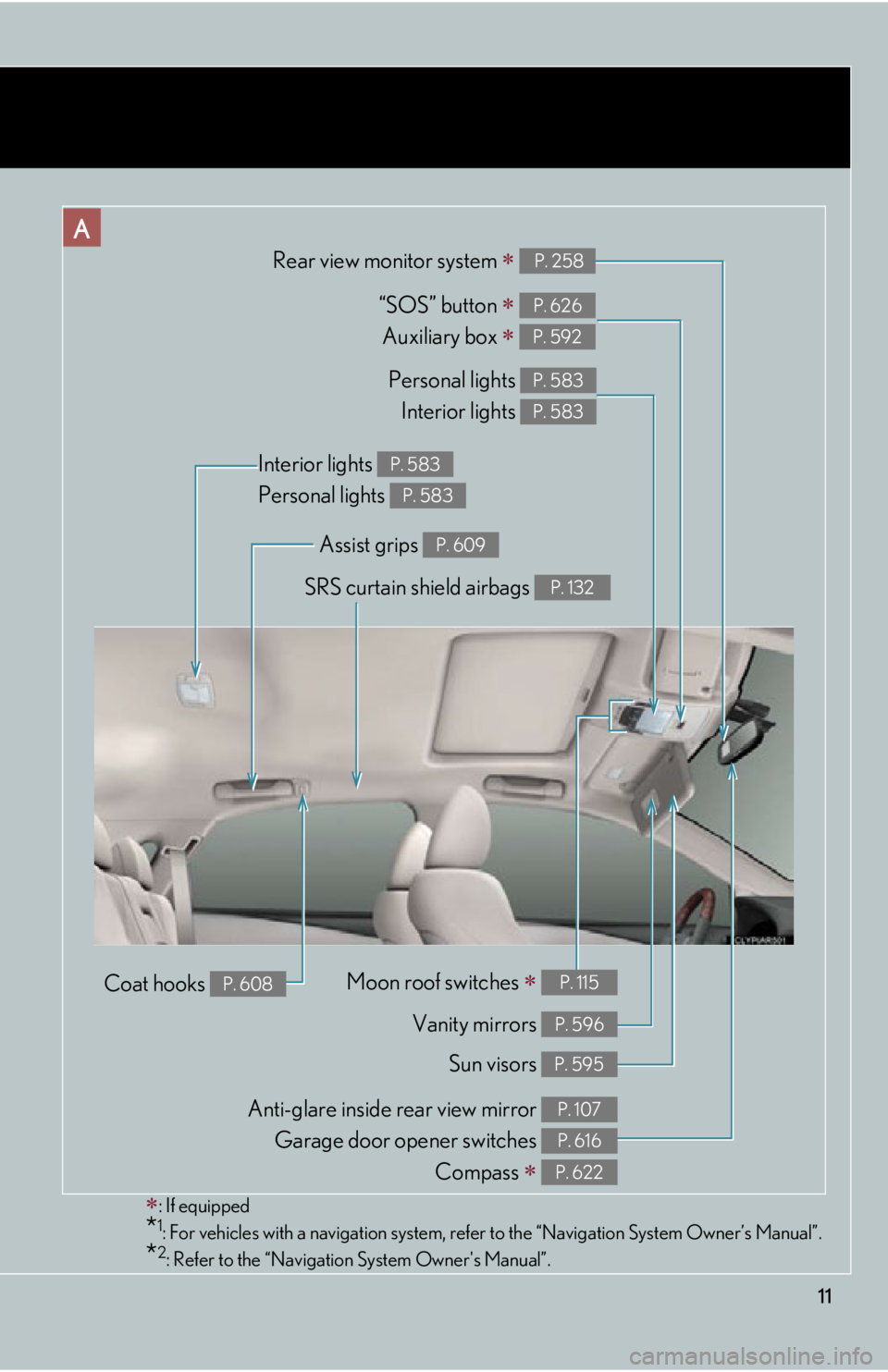
11A
Personal lights
Interior lights P. 583
P. 583
Sun visors P. 595SRS curtain shield airbags P. 132
Interior lights
Personal lights P. 583
P. 583
Vanity mirrors P. 596“SOS” button
Auxiliary box
P. 626
P. 592
: If equipped
* 1
: For vehicles with a navigation system, refe r to the “Navigation Sy stem Owner’s Manual”.
* 2
: Refer to the “Navigation System Owner's Manual”. Moon roof switches
P. 115
Anti-glare inside rear view mirror
Garage door opener switches
Compass
P. 107
P. 616
P. 622Rear view monitor system
P. 258
Coat hooks P. 608 Assist grips P. 609
Page 20 of 878
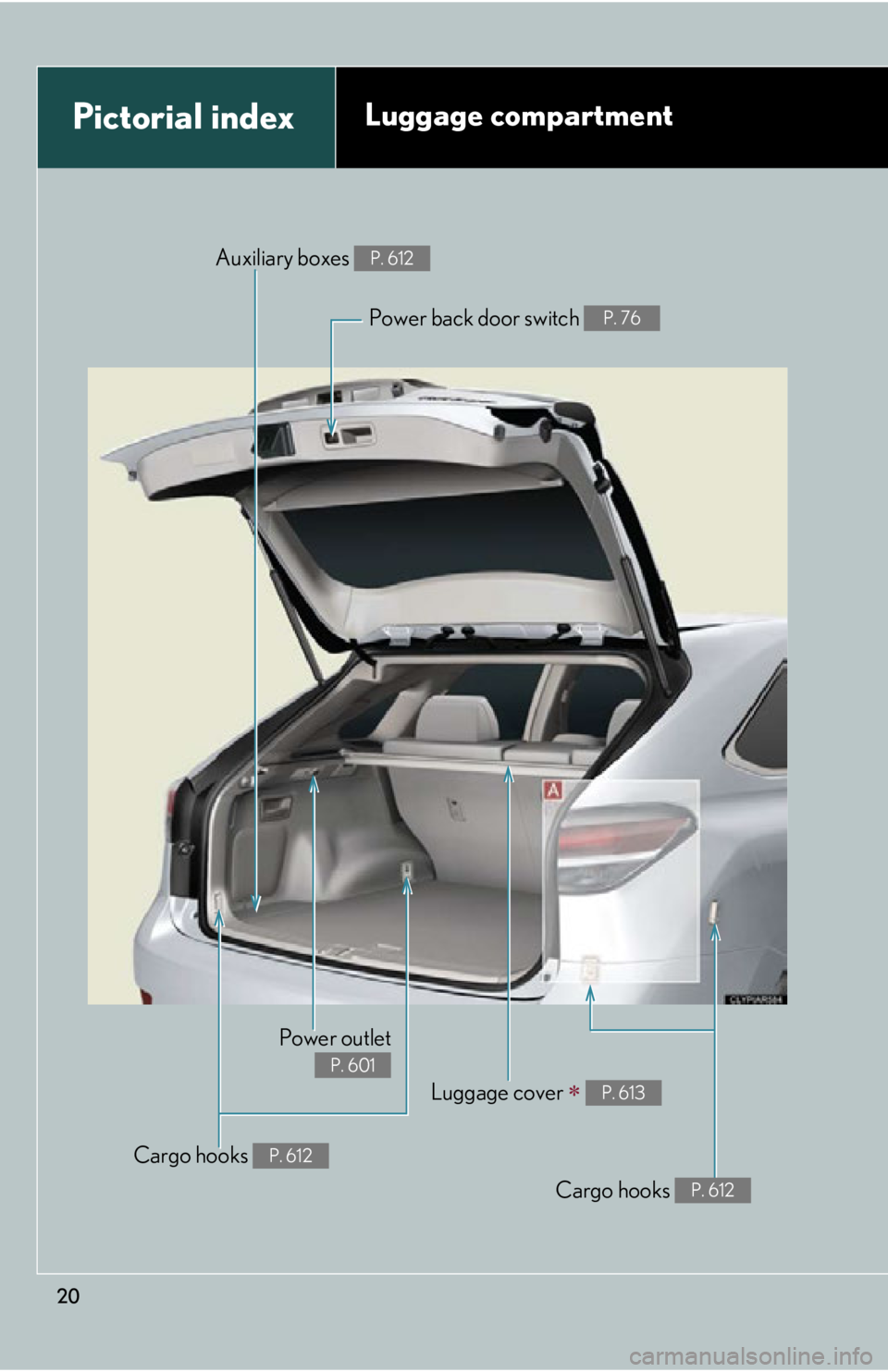
20Pictorial index Luggage compartment
Cargo hooks P. 612Power outlet P. 601
Luggage cover
P. 613
Cargo hooks P. 612Auxiliary boxes P. 612
Power back door switch P. 76
Page 326 of 878
326 3-3. Using the Lexus Display
Audio system
Audio system
(with the Lexus Display
Audio system) ....................... 362
Using the radio........................ 365
Using the CD player ............ 380
Playing an audio CD and
MP3/WMA discs ................ 381
Listening to an iPod................. 391
Listening to a USB
memory .................................. 399
Using the AUX port ............. 408
Listening to Bluetooth ®
audio......................................... 410
Optimal use of the audio
system ..................................... 424
Using the steering wheel
audio switches ...................... 426
Hands-free system
(for mobile phone)............... 429
Using the Bluetooth ®
phone ...................................... 437
Setting the hands-free
system ..................................... 454
Bluetooth ®
settings .............. 466 3-4. Using the audio system
Audio system (without a
navigation system or
the Lexus Display Audio
system) .................................... 474
Using the radio ........................ 477
Using the CD player ............. 485
Playing MP3 and WMA
discs......................................... 493
Operating an iPod .................. 501
Operating a USB
memory................................... 510
Bluetooth ®
audio system ..... 519
Using the Bluetooth ®
audio system ......................... 523
Operating a Bluetooth ®
enabled portable
player ...................................... 528
Setting up a Bluetooth ®
enabled portable
player ....................................... 531
Bluetooth ®
audio system
setup ....................................... 538
Optimal use of the audio
system..................................... 539
Using the AUX port ............... 541
Using the steering wheel
audio switches...................... 543
Page 327 of 878
Interior features
3
327Hands-free system for
mobile phones ...................... 547
Using the hands-free system
(for mobile phones)............. 552
Making a phone call .............. 560
Setting a mobile phone......... 565
Security and system
setup ......................................... 571
Using the phone book........... 575
3-5. Using the interior lights
Interior lights list .................... 582
• Interior lights ....................... 583
• Personal lights ..................... 583
3-6. Using the storage
features
List of storage features ........ 585
• Glove box .............................. 586
• Bottle holders/
door pockets ......................... 587
• Cup holders ......................... 588
• Console box ......................... 590
• Coin holder ........................... 592
• Auxiliary boxes .................... 592
• Under tray ............................. 594 3-7. Other interior features
Sun visors ................................. 595
Vanity mirrors ......................... 596
Clock .......................................... 597
Outside temperature
display..................................... 598
Multi-display light
control .................................... 600
Power outlets ........................... 601
Heated steering wheel ........ 604
Seat heaters and
ventilators ............................. 605
Armrest .................................... 607
Coat hooks .............................. 608
Assist grips ............................... 609
Floor mat ................................... 610
Luggage compartment
features .................................... 612
Garage door opener .............. 616
Compass .................................. 622
Safety Connect ....................... 626
Page 362 of 878
3623-3. Using the Lexus Display Audio system
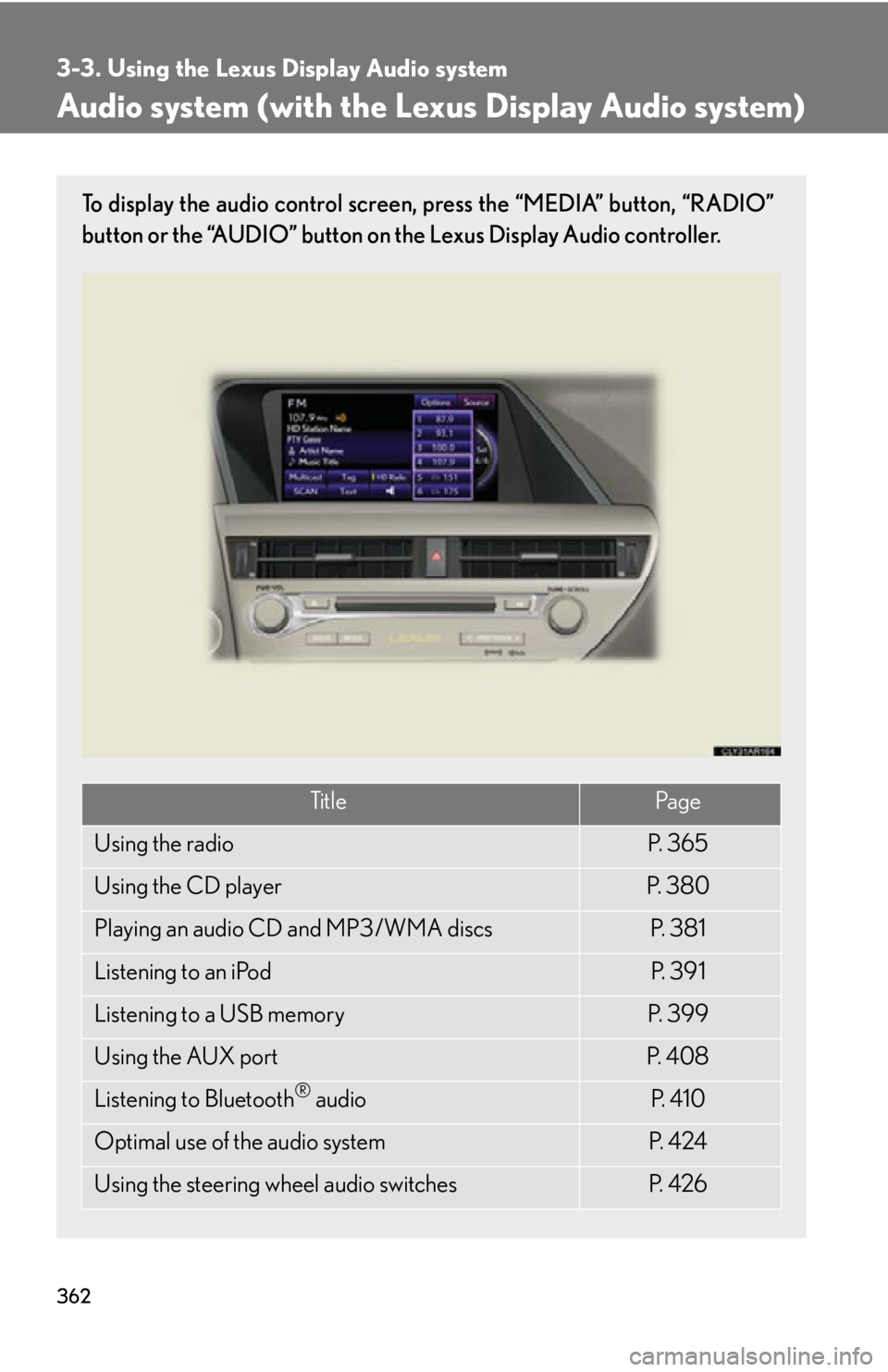
Audio system (with the Lexus Display Audio system) To display the audio control screen, press the “MEDIA” button, “RADIO”
button or the “AUDIO” button on the Lexus Display Audio controller.
Ti t l e Pa g e
Using the radio P. 3 6 5
Using the CD player P. 3 8 0
Playing an audio CD and MP3/WMA discs P. 3 8 1
Listening to an iPod P. 3 9 1
Listening to a USB memory P. 3 9 9
Using the AUX port P. 4 0 8
Listening to Bluetooth ®
audio P. 4 1 0
Optimal use of the audio system P. 4 2 4
Using the steering wheel audio switches P. 4 2 6
Page 408 of 878
4083-3. Using the Lexus Display Audio system
Using the AUX port
■
Operating portable audio devices connected to the audio system
The volume can be adjusted using the vehicle’s audio controls. All other adjust-
ments must be made on the portable audio device itself.
■
When using a portable audio devi ce connected to the power outlet
Noise may occur during playback. Use the power source of the portable audio
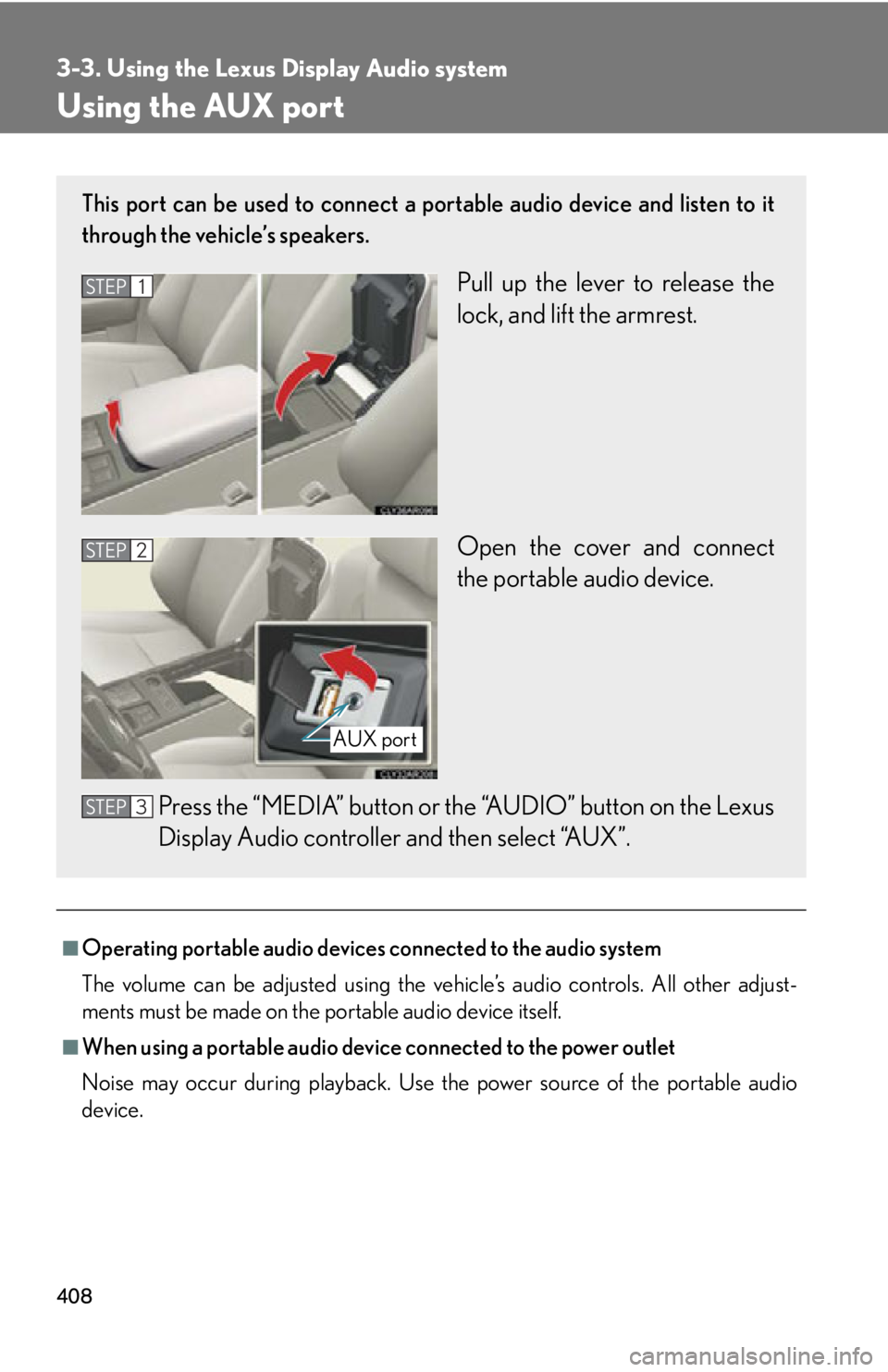
device.This port can be used to connect a po rtable audio device and listen to it
through the vehicle’s speakers.
Pull up the lever to release the
lock, and lift the armrest.
Open the cover and connect
the portable audio device.
Press the “MEDIA” button or th e “AUDIO” button on the Lexus
Display Audio controller and then select “AUX”.STEP 1
STEP 2
AUX port
STEP 3
Page 421 of 878
4213-3. Using the Lexus Display Audio system
3
Interior features ■
Certification for the Bluetooth ®
audio system
FCC ID: AJDK046
IC ID: 775E-K046
This device complies with Part 15 of FCC Rules and Indust ry Canada licence-
exempt RSS standard(s). Operation is subj ect to the following two conditions: (1)
this device may not cause interference, an d (2) this device must accept any inter-
ference, including interference that may cause undesired operation of this device.
Le présent appareil est conforme aux la partie 15 des règles de la FCC et CNR
d’Industrie Canada applicables aux appareils radio exempts de licence. L’exploita-
tion est autorisée aux deux conditions suivantes : (1) l’appareil ne doit pas produire
de brouillage, et (2) l’utilisateur de l’appareil doit accepter tout brouillage
radioélectrique subi, même si le brouilla ge est susceptible d’en compromettre le
fonctionnement.■
Reconnecting the portable audio player
If the portable audio player is disconnected with a poor reception when the
“POWER” switch is in ACCESSORY or ON mode, the system automatically
reconnects the portable audio player.
If you have switched off the portable audio player yourself, follow the instructions
below to reconnect: ●
Select the portable audio player again●
Enter the portable audio player■
When you release your car
Be sure to initialize your data. ( P. 3 3 6 )