bluetooth LEXUS RX450h 2015 Owners Manual
[x] Cancel search | Manufacturer: LEXUS, Model Year: 2015, Model line: RX450h, Model: LEXUS RX450h 2015Pages: 878, PDF Size: 11.62 MB
Page 4 of 878

TABLE OF CONTENTS Index
43-1. Lexus Display Audio system
Lexus Display Audio
system ........................................... 328
Display settings ............................. 332
Setup menu..................................... 334
Mobile Assistant .......................... 340
3-2. Using the air conditioning
system and defogger
Automatic air conditioning
system (with the Lexus
Display Audio system) ............ 342
Automatic air conditioning
system (without a navigation
system or the Lexus Display
Audio system)............................ 350
Rear window defogger
switch............................................. 358
Windshield wiper de-icer ........ 360
3-3. Using the Lexus Display
Audio system
Audio system (with the Lexus
Display Audio system) ............ 362
Using the radio ............................. 365
Using the CD player .................. 380
Playing an audio CD and
MP3/WMA discs ...................... 381
Listening to an iPod ...................... 391
Listening to a USB
memory ........................................ 399 Using the AUX port .................. 408
Listening to Bluetooth ®
audio ................................................ 410
Optimal use of the audio
system ............................................ 424
Using the steering wheel
audio switches ............................ 426
Hands-free system
(for mobile phone) .................... 429
Using the Bluetooth ®
phone ............................................. 437
Setting the hands-free
system ............................................ 454
Bluetooth ®
settings .................... 466
3-4. Using the audio system
Audio system
(without a navigation
system or the Lexus Display
Audio system)............................. 474
Using the radio .............................. 477
Using the CD player .................. 485
Playing MP3 and WMA
discs ................................................ 493
Operating an iPod ........................ 501
Operating a USB memory........ 510
Bluetooth ®
audio system .......... 519
Using the Bluetooth ®
audio
system ............................................ 523
Operating a Bluetooth ®
enabled portable player ........ 528
Setting up a Bluetooth ®
enabled portable player .......... 531
Bluetooth ®
audio system
setup .............................................. 5383
Interior features
Page 326 of 878
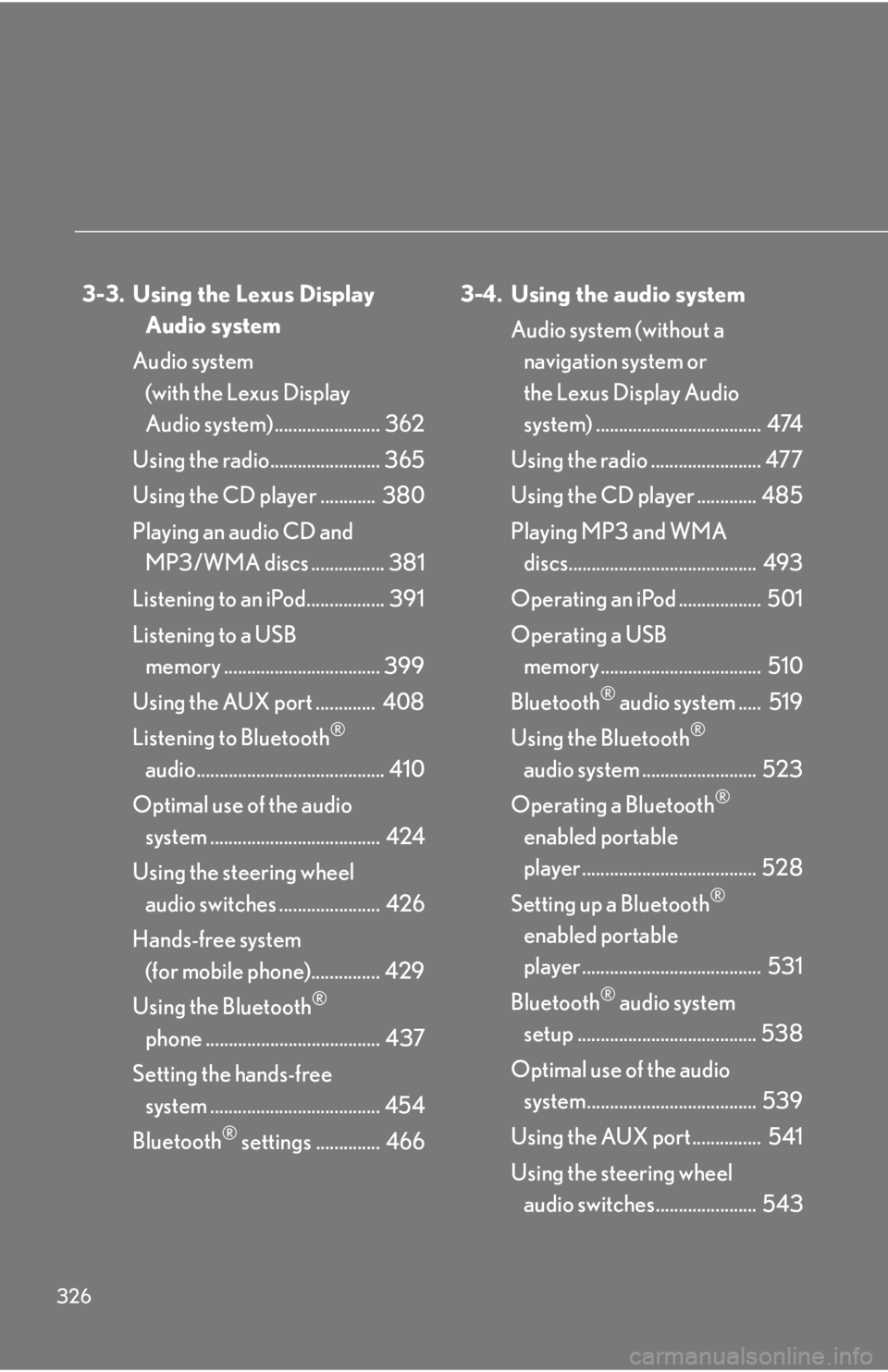
326 3-3. Using the Lexus Display
Audio system
Audio system
(with the Lexus Display
Audio system) ....................... 362
Using the radio........................ 365
Using the CD player ............ 380
Playing an audio CD and
MP3/WMA discs ................ 381
Listening to an iPod................. 391
Listening to a USB
memory .................................. 399
Using the AUX port ............. 408
Listening to Bluetooth ®
audio......................................... 410
Optimal use of the audio
system ..................................... 424
Using the steering wheel
audio switches ...................... 426
Hands-free system
(for mobile phone)............... 429
Using the Bluetooth ®
phone ...................................... 437
Setting the hands-free
system ..................................... 454
Bluetooth ®
settings .............. 466 3-4. Using the audio system
Audio system (without a
navigation system or
the Lexus Display Audio
system) .................................... 474
Using the radio ........................ 477
Using the CD player ............. 485
Playing MP3 and WMA
discs......................................... 493
Operating an iPod .................. 501
Operating a USB
memory................................... 510
Bluetooth ®
audio system ..... 519
Using the Bluetooth ®
audio system ......................... 523
Operating a Bluetooth ®
enabled portable
player ...................................... 528
Setting up a Bluetooth ®
enabled portable
player ....................................... 531
Bluetooth ®
audio system
setup ....................................... 538
Optimal use of the audio
system..................................... 539
Using the AUX port ............... 541
Using the steering wheel
audio switches...................... 543
Page 334 of 878
3343-1. Lexus Display Audio system
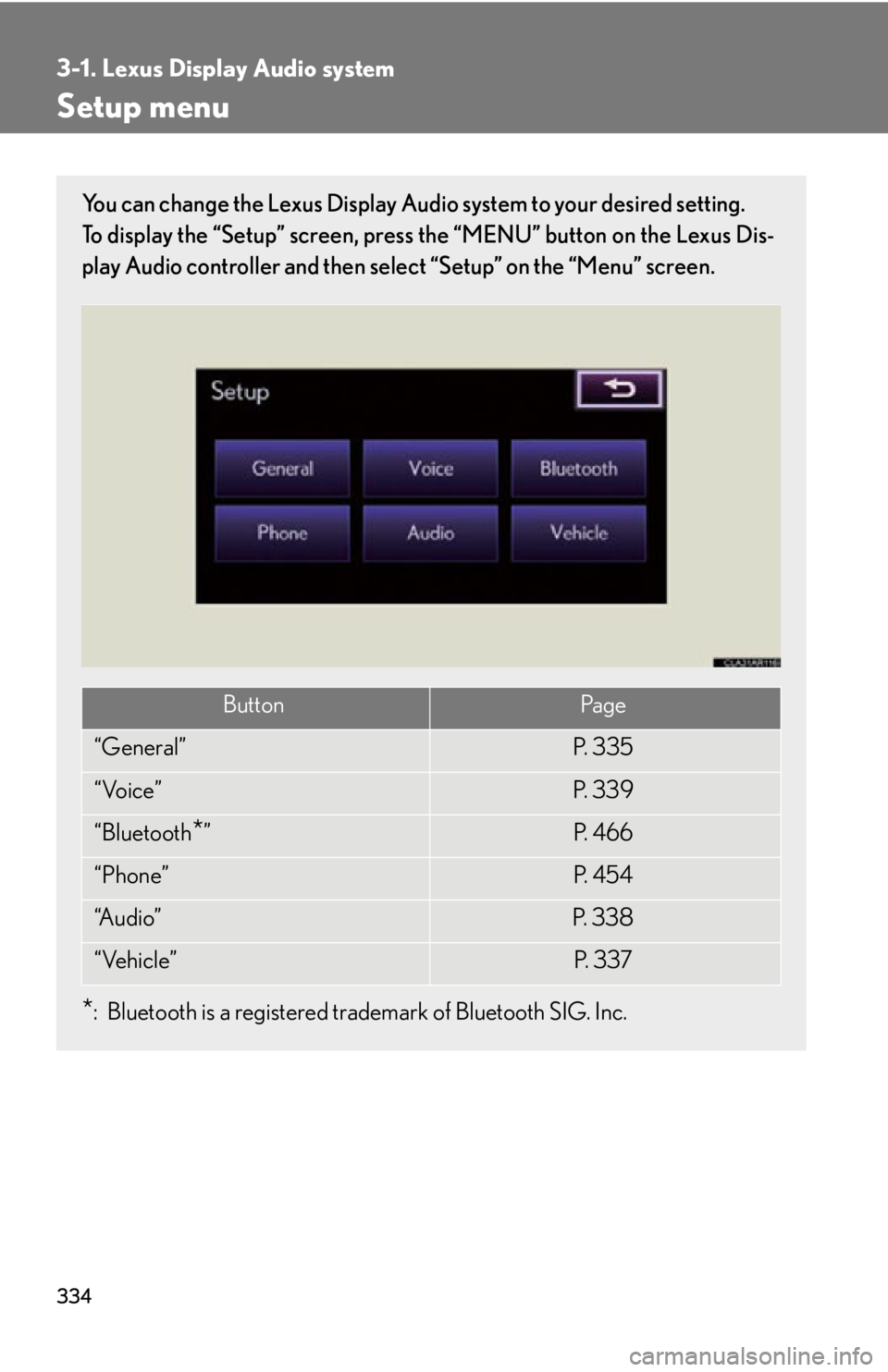
Setup menu You can change the Lexus Display Audi o system to your desired setting.
To display the “Setup” screen, press the “MENU” button on the Lexus Dis-
play Audio controller and then sele ct “Setup” on the “Menu” screen.
* : Bluetooth is a registered tr ademark of Bluetooth SIG. Inc.Button Pa g e
“General” P. 3 3 5
“Voice” P. 3 3 9
“Bluetooth
* ” P. 4 6 6
“Phone” P. 4 5 4
“A u d i o ” P. 3 3 8
“Vehicle” P. 3 3 7
Page 336 of 878
3363-1. Lexus Display Audio system
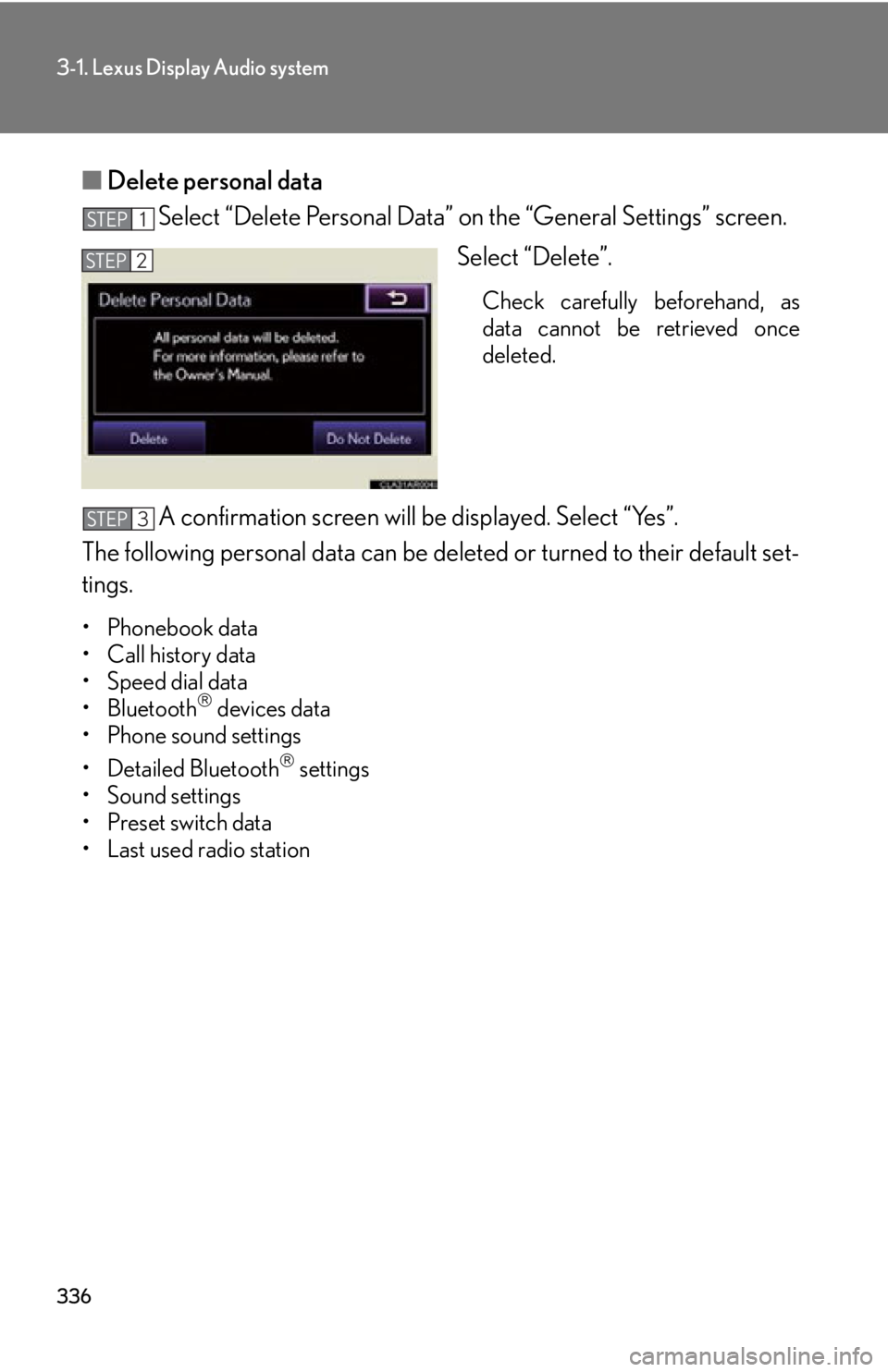
■ Delete personal data
Select “Delete Personal Data” on the “General Settings” screen.
Select “Delete”. Check carefully beforehand, as
data cannot be retrieved once
deleted.
A confirmation screen will be displayed. Select “Yes”.
The following personal data can be deleted or turn ed to their default set-
tings. •Phonebook data
• Call history data
• Speed dial data
•Bluetooth
devices data
• Phone sound settings
• Detailed Bluetooth
settings
• Sound settings
• Preset switch data
• Last used radio station STEP 1
STEP 2
STEP 3
Page 339 of 878
3393-1. Lexus Display Audio system
3
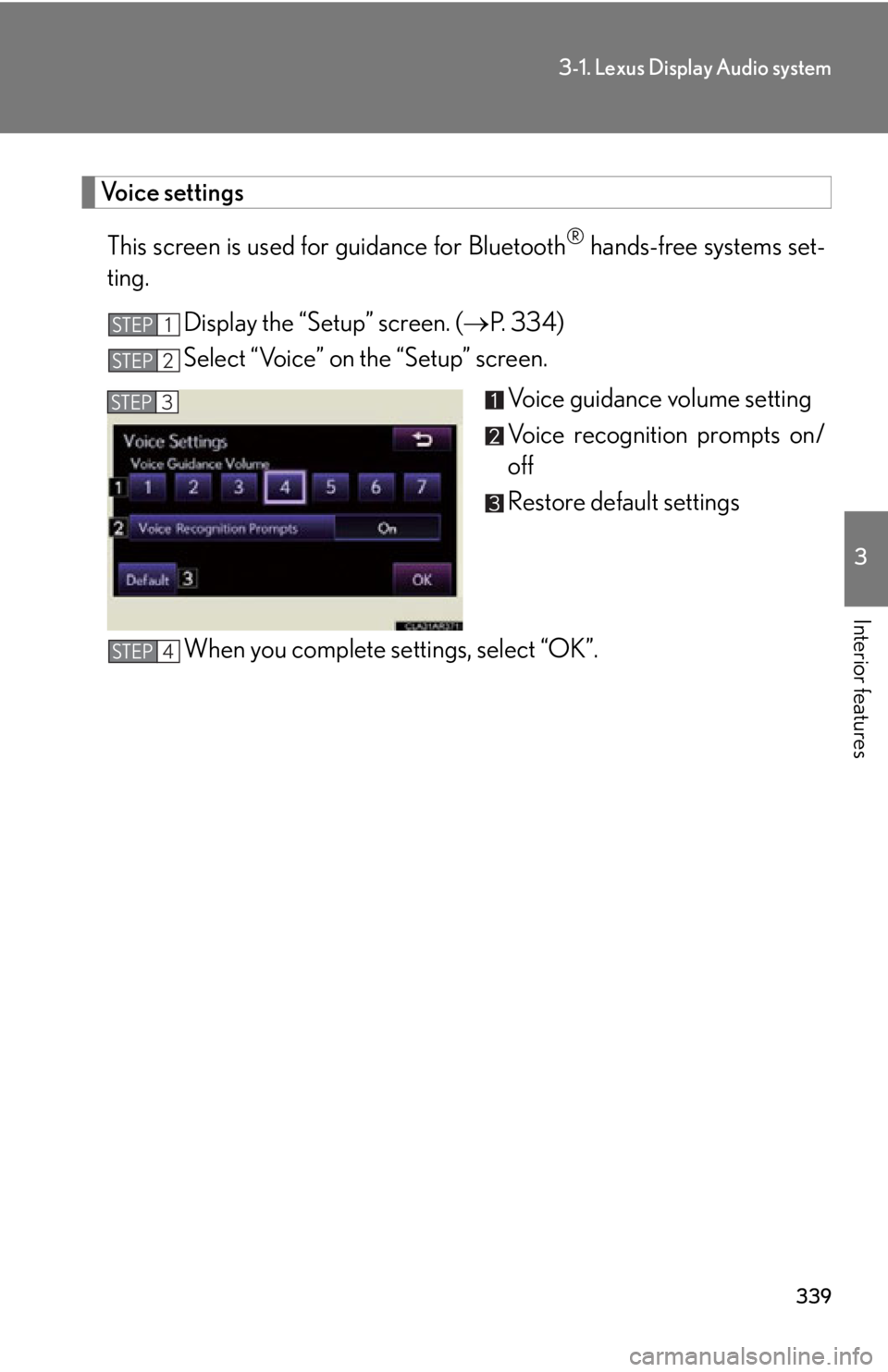
Interior features Voice settings
This screen is used for guidance for Bluetooth ®
hands-free systems set-
ting.
Display the “Setup” screen. ( P. 3 3 4 )
Select “Voice” on the “Setup” screen.
Voice guidance volume setting
Voice recognition prompts on/
off
Restore default settings
When you complete settings, select “OK”.STEP 1
STEP 2
STEP 3
STEP 4
Page 340 of 878
3403-1. Lexus Display Audio system
Mobile Assistant The Mobile Assistant feature will activate Apple’s Siri ®
Eyes Free mode via
the steering wheel switches. To operat e the Mobile Assistant, a compatible
cellular phone must be registered and connected to this system via
Bluetooth ®
. ( P. 4 3 7 )
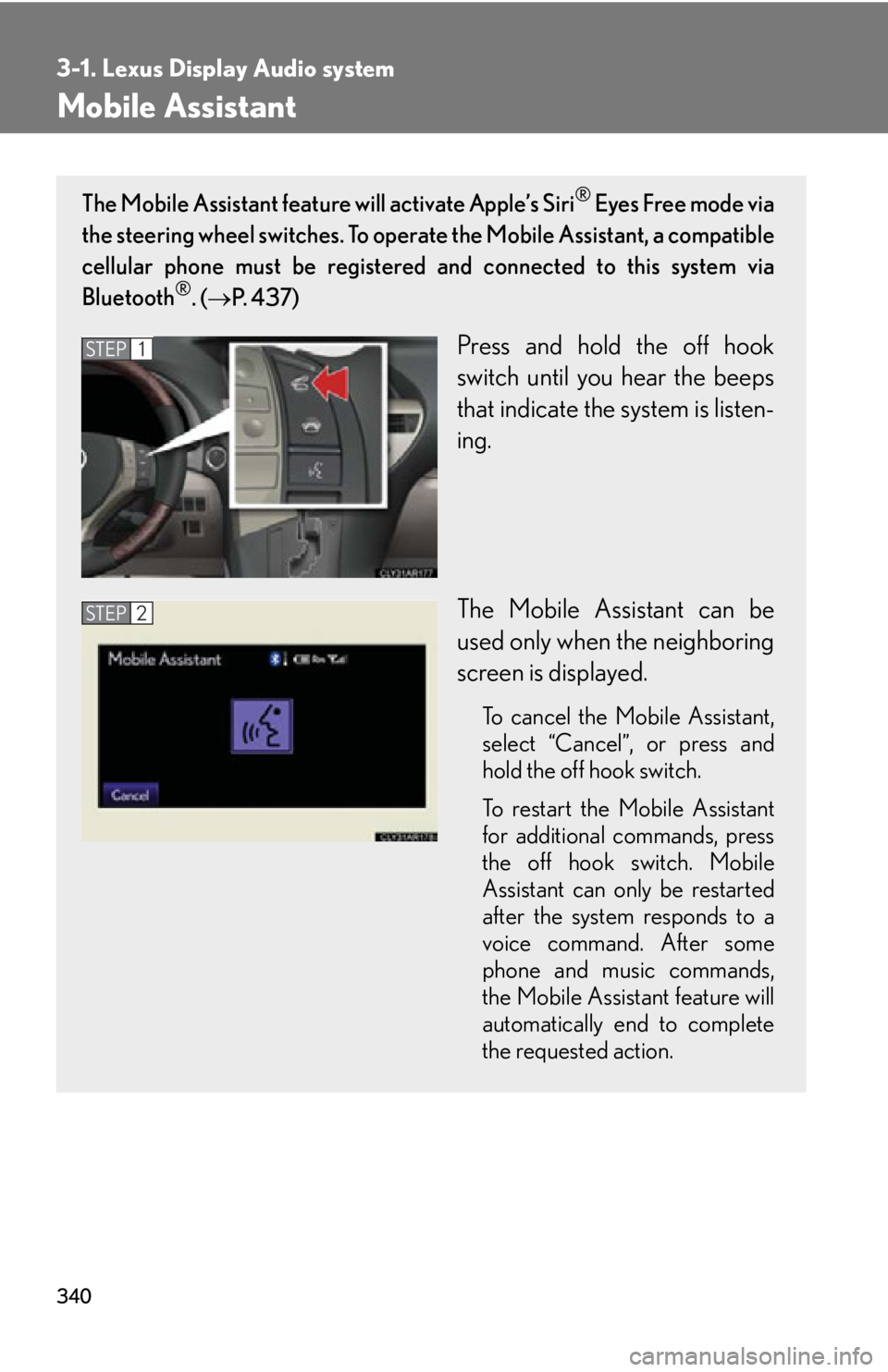
Press and hold the off hook
switch until you hear the beeps
that indicate the system is listen-
ing.
The Mobile Assistant can be
used only when the neighboring
screen is displayed. To cancel the Mobile Assistant,
select “
Cancel ”
, or press and
hold the off hook switch.
To restart the Mobile Assistant
for additional commands, press
the off hook switch. Mobile
Assistant can only be restarted
after the system responds to a
voice command. After some
phone and music commands,
the Mobile Assistant feature will
automatically end to complete
the requested action.STEP 1
STEP 2
Page 341 of 878
3413-1. Lexus Display Audio system
3
Interior features ■
Adjusting the volume
The volume of the Mobile Assistant can be adjusted using the
“ PWR·VOL
” knob or
steering wheel volume switches. The Mobile Assistant and phone call volumes are
synchronized.■
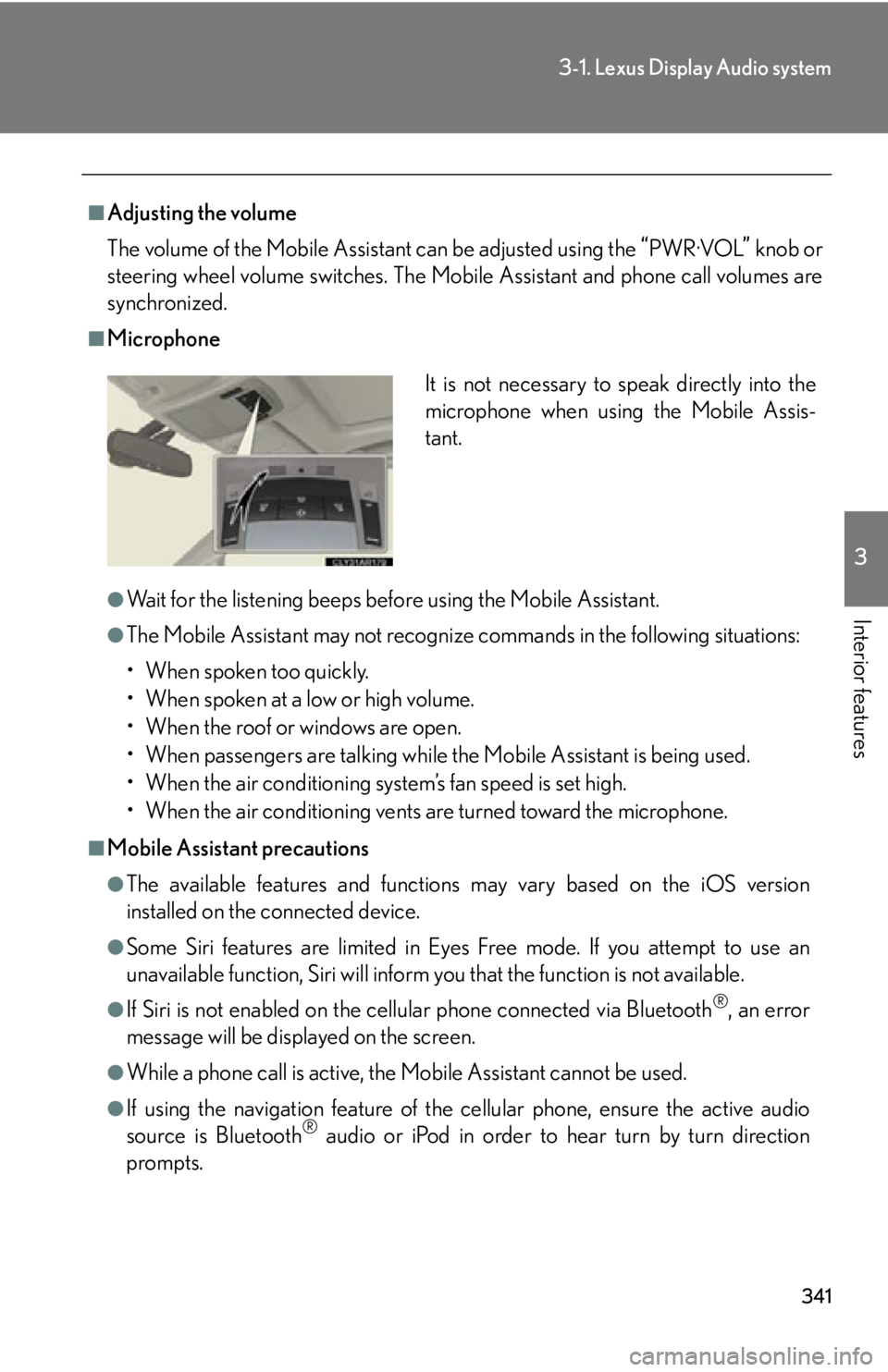
Microphone
●
Wait for the listening beeps befo re using the Mobile Assistant.●
The Mobile Assistant may not recognize commands in the following situations:
• When spoken too quickly.
• When spoken at a low or high volume.
• When the roof or windows are open.
• When passengers are talking while the Mobile Assistant is being used.
• When the air conditioning system’s fan speed is set high.
• When the air conditioning vents are turned toward the microphone.■
Mobile Assistant precautions ●
The available features and functions may vary based on the iOS version
installed on the connected device.●
Some Siri features are limited in Eyes Free mode. If you attempt to use an
unavailable function, Siri will inform you that the function is not available.●
If Siri is not enabled on the cell ular phone connected via Bluetooth ®
, an error
message will be displayed on the screen.
●
While a phone call is active, the Mo bile Assistant cannot be used.
●
If using the navigation feature of the cellular phone, ensure the active audio
source is Bluetooth ®
audio or iPod in order to hear turn by turn direction
prompts. It is not necessary to speak directly into the
microphone when using the Mobile Assis-
tant.
Page 362 of 878
3623-3. Using the Lexus Display Audio system
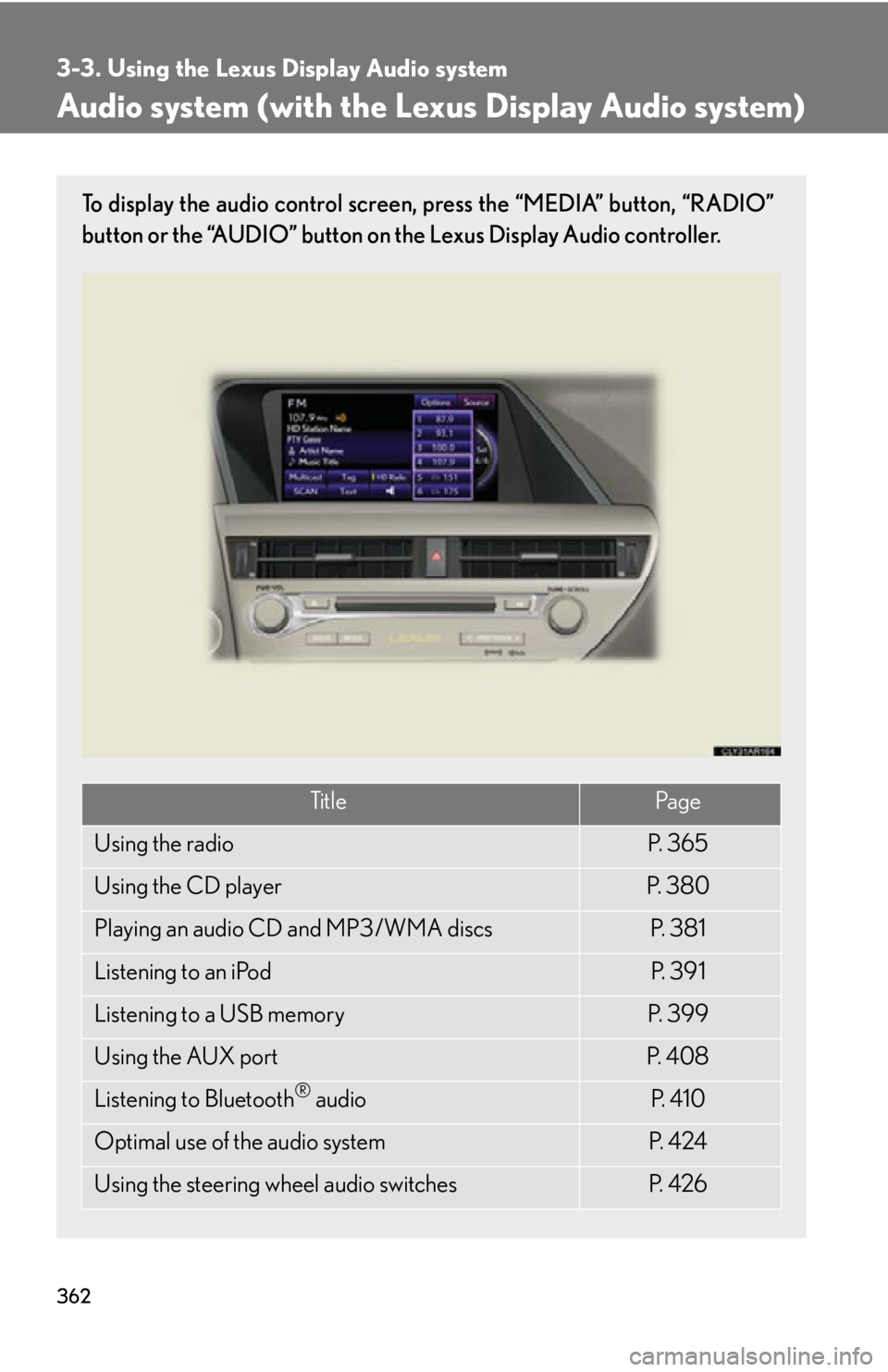
Audio system (with the Lexus Display Audio system) To display the audio control screen, press the “MEDIA” button, “RADIO”
button or the “AUDIO” button on the Lexus Display Audio controller.
Ti t l e Pa g e
Using the radio P. 3 6 5
Using the CD player P. 3 8 0
Playing an audio CD and MP3/WMA discs P. 3 8 1
Listening to an iPod P. 3 9 1
Listening to a USB memory P. 3 9 9
Using the AUX port P. 4 0 8
Listening to Bluetooth ®
audio P. 4 1 0
Optimal use of the audio system P. 4 2 4
Using the steering wheel audio switches P. 4 2 6
Page 410 of 878
4103-3. Using the Lexus Display Audio system
Listening to Bluetooth ®
audioThe Bluetooth ®
audio system enables users to enjoy music played on a por-
table player from the vehicle speaker via wireless communication. This
audio system supports Bluetooth ®
, a wireless data system capable of play-
ing portable audio music without cables . If your portable player does not
support Bluetooth ®
, the Bluetooth ®
audio system will not function.
Press the “MEDIA” button or the “AUDIO” button on the Lexus Display
Audio controller and then select “Bluetooth*”.
*: Bluetooth is a registered trademark of Bluetooth SIG. Inc.
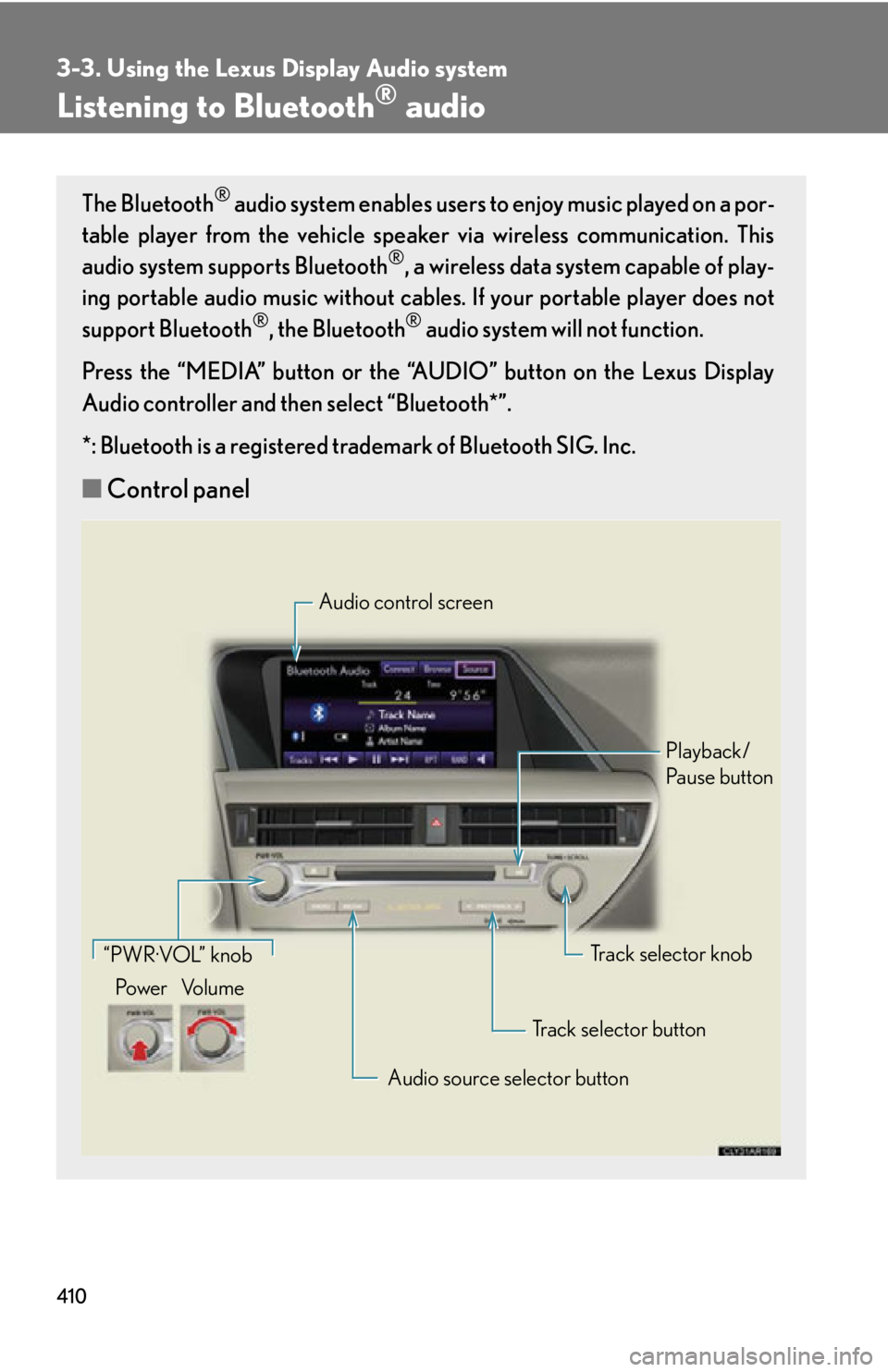
■ Control panel Audio control screen
Playback/
Pa u s e b u t t o n
Track selector knob
Track selector button
Audio source selector button“PWR·VOL” knob
Po w e r Vo l u m e
Page 411 of 878
4113-3. Using the Lexus Display Audio system
3
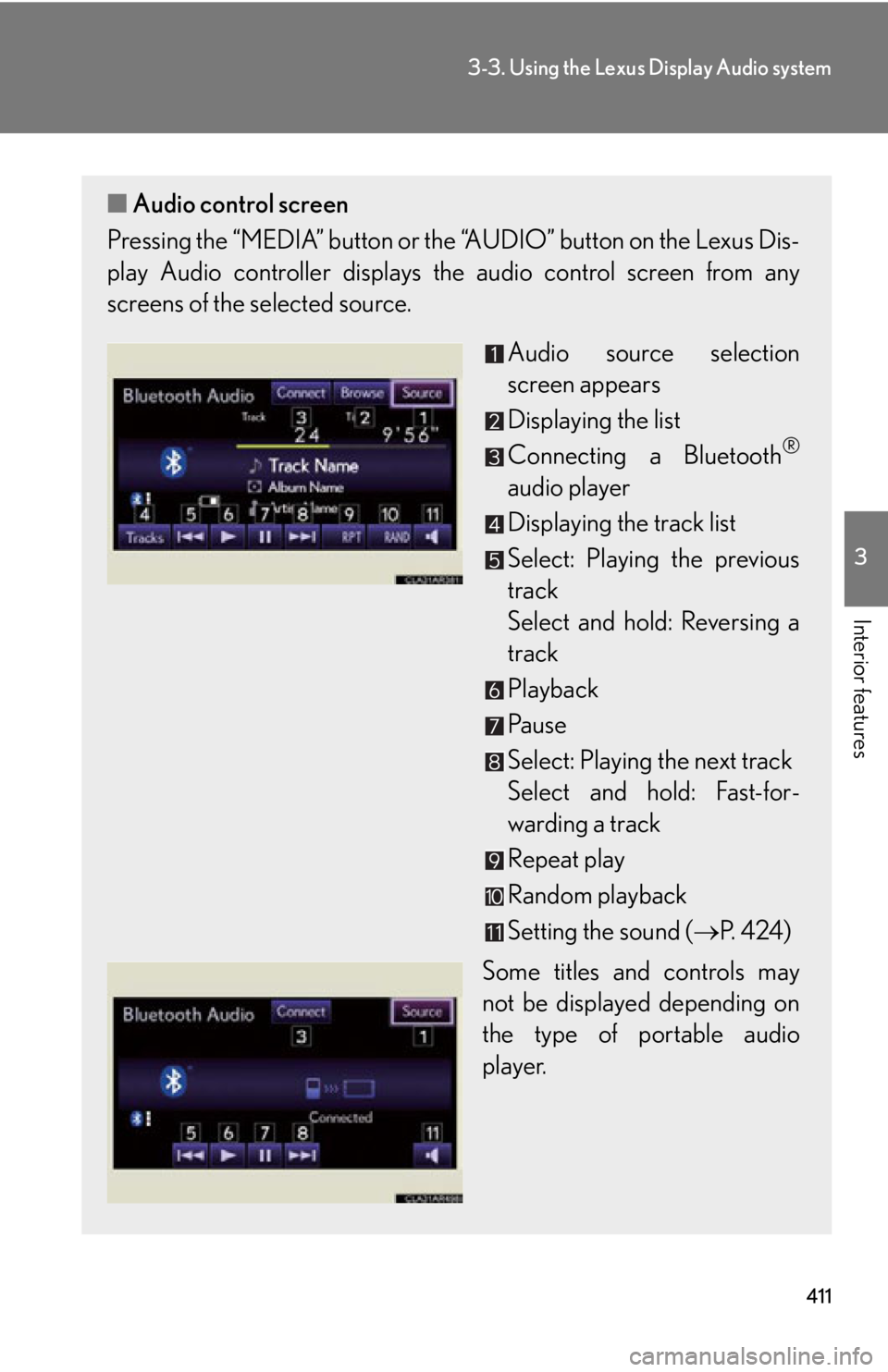
Interior features ■ Audio control screen
Pressing the “MEDIA” button or the “AUDIO” button on the Lexus Dis-
play Audio controller displays the audio control screen from any
screens of the selected source.
Audio source selection
screen appears
Displaying the list
Connecting a Bluetooth ®
audio player
Displaying the track list
Select: Playing the previous
track
Select and hold: Reversing a
track
Playback
Pa u s e
Select: Playing the next track
Select and hold: Fast-for-
warding a track
Repeat play
Random playback
Setting the sound ( P. 4 2 4 )
Some titles and controls may
not be displayed depending on
the type of portable audio
player.