fuse LEXUS RX450h 2015 Owners Manual
[x] Cancel search | Manufacturer: LEXUS, Model Year: 2015, Model line: RX450h, Model: LEXUS RX450h 2015Pages: 878, PDF Size: 11.62 MB
Page 6 of 878

TABLE OF CONTENTS Index
64-1. Maintenance and care
Cleaning and protecting
the vehicle exterior................... 634
Cleaning and protecting
the vehicle interior .................... 637
4-2. Maintenance
Maintenance requirements .... 640
General maintenance ................ 643
Emission inspection and
maintenance (I/M)
programs ...................................... 647
4-3. Do-it-yourself maintenance
Do-it-yourself service
precautions ................................. 648
Hood................................................... 651
Positioning a floor jack............... 652
Engine compartment.................. 654
12-volt battery................................ 664
Tires ................................................... 670
Tire inflation pressure ................. 679
Wheels............................................. 683
Air conditioning filter ................. 685
Electronic key battery ................ 687
Checking and replacing
fuses ............................................... 689
Headlight aim................................. 705
Light bulbs ...................................... 708 5-1. Essential information
Emergency flashers..................... 724
If your vehicle needs to be
towed.............................................. 725
If you think something is
wrong ............................................. 732
5-2. Steps to take in an emergency
If a warning light turns on
or a warning buzzer
sounds... ........................................ 733
If a warning message is
displayed ....................................... 743
If you have a flat tire..................... 764
If the hybrid system will not
start ................................................. 777
If the shift lever cannot be
shifted from P .............................. 779
If you lose your keys ................... 780
If the electronic key does
not operate properly ................ 781
If the vehicle 12-volt battery
is discharged ............................... 784
If your vehicle overheats .......... 788
If the vehicle becomes
stuck................................................ 793
If your vehicle has to be
stopped in an em ergency ...... 7954
Maintenance and care 5
When trouble arises
Page 79 of 878
791-3. Opening, closing and locking the doors
1
Before driving ■
If the back door opener is inoperative
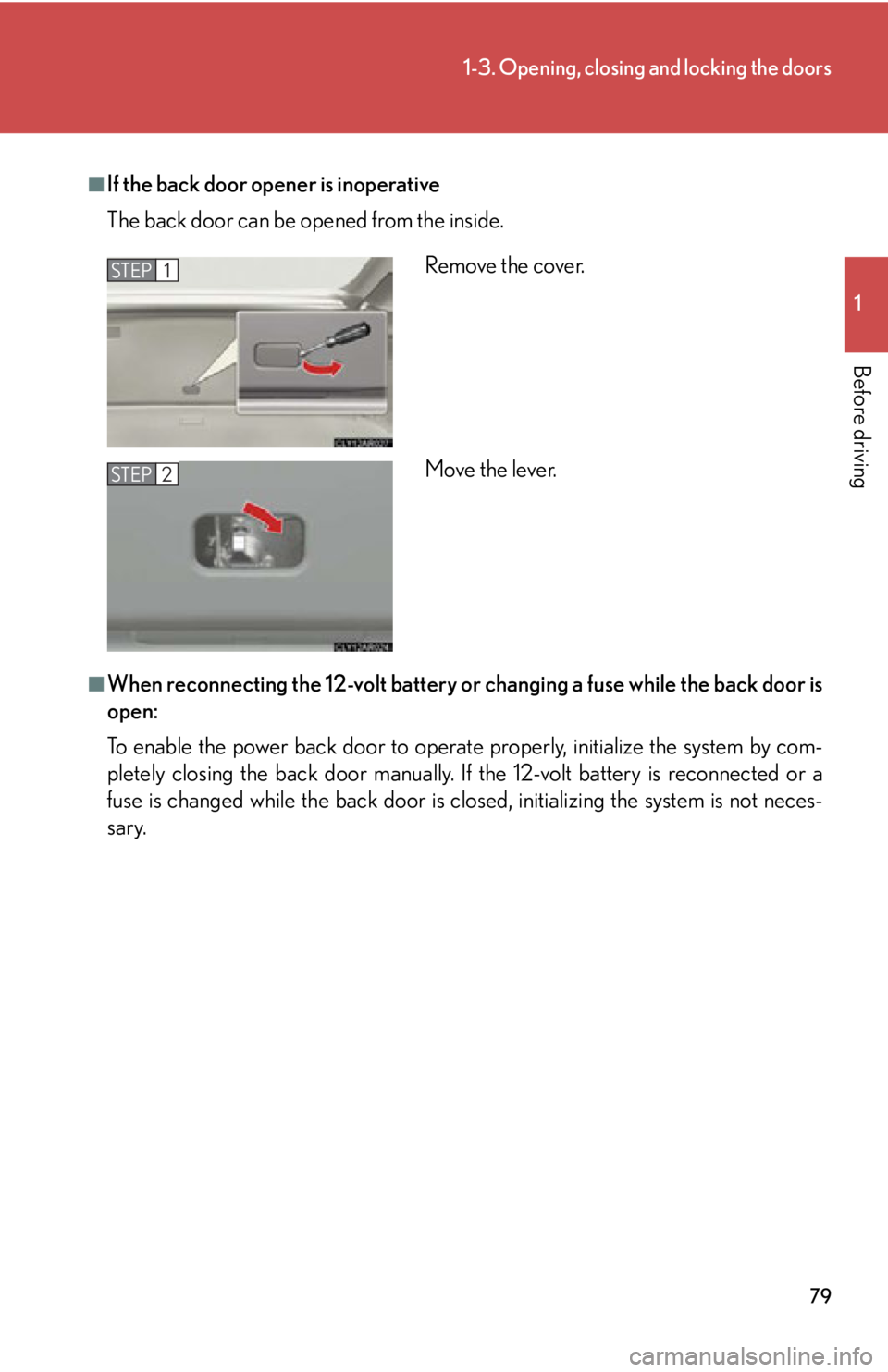
The back door can be op ened from the inside.
■
When reconnecting the 12-volt battery or changing a fuse while the back door is
open:
To enable the power back door to operate properly, initialize the system by com-
pletely closing the back door manually. If the 12-volt battery is reconnected or a
fuse is changed while the back door is cl osed, initializing the system is not neces-
sary. Remove the cover.
Move the lever.STEP 1
STEP 2
Page 429 of 878
4293-3. Using the Lexus Display Audio system
3
Interior features Hands-free system (for mobile phone) The hands-free system is a function that allows you to use your mobile
phone without touching it.
This system supports Bluetooth ®
. Bluetooth ®
is a wireless data system that
allows the mobile phone to wirelessly connect to the hands-free system and
make/receive calls.
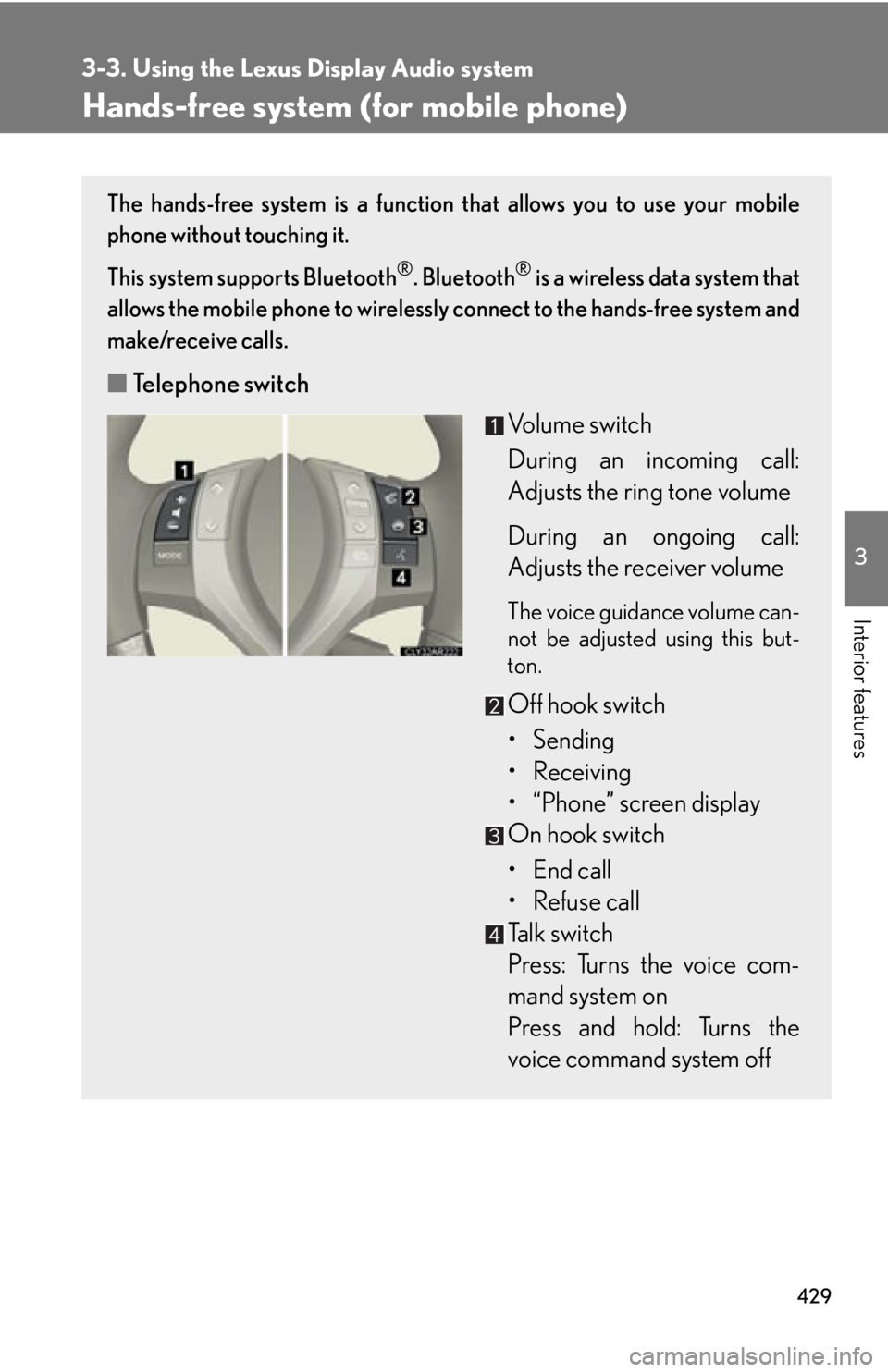
■ Telephone switch
Volume switch
During an incoming call:
Adjusts the ring tone volume
During an ongoing call:
Adjusts the receiver volume The voice guidance volume can-
not be adjusted using this but-
ton.
Off hook switch
• Sending
• Receiving
• “Phone” screen display
On hook switch
• End call
• Refuse call
Talk switch
Press: Turns the voice com-
mand system on
Press and hold: Turns the
voice command system off
Page 450 of 878
4503-3. Using the Lexus Display Audio system
Receiving a call
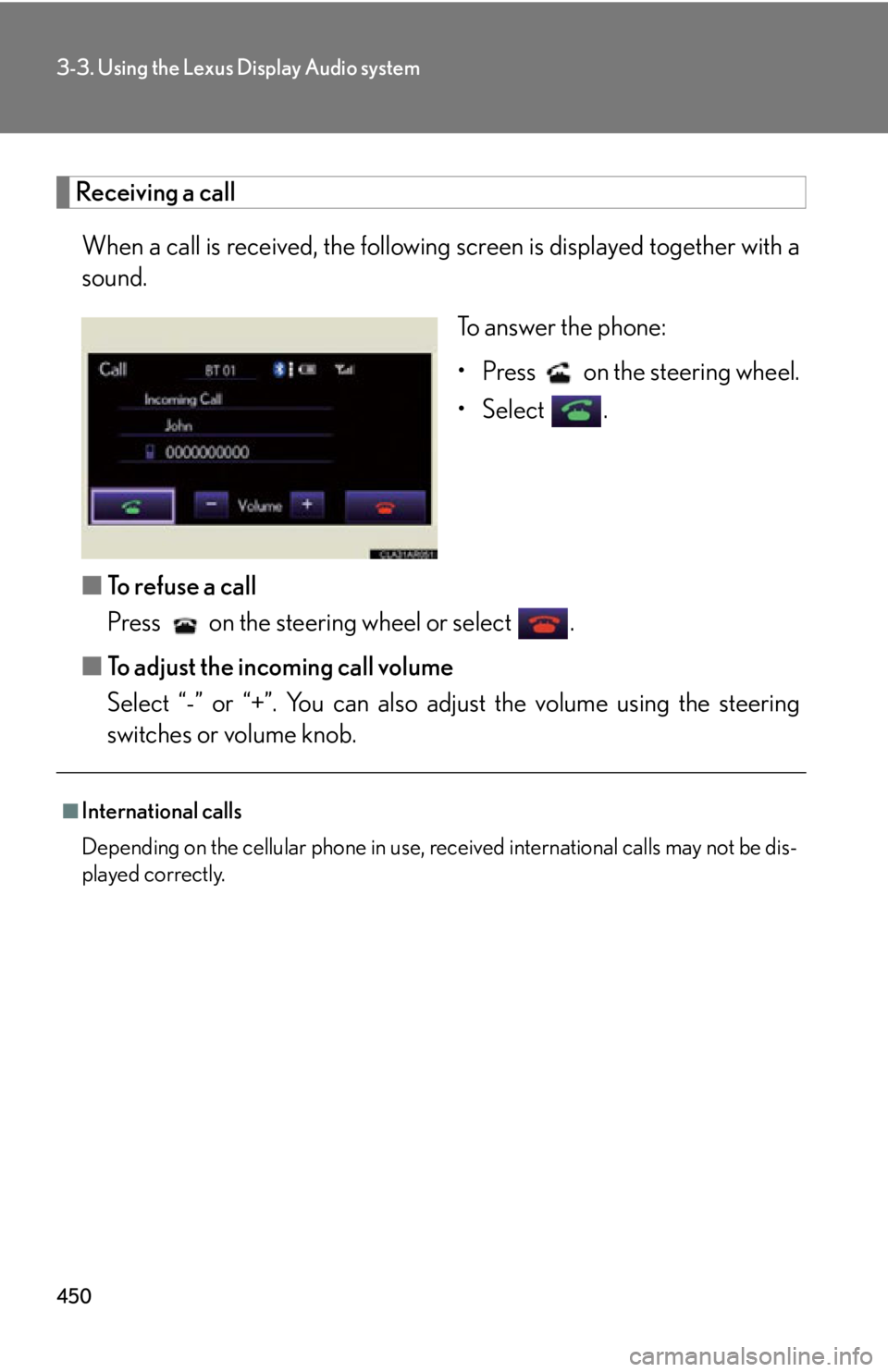
When a call is received, the following screen is displayed together with a
sound.
To answer the phone:
• Press on the steering wheel.
• Select .
■ To refuse a call
Press on the steering wheel or select .
■ To adjust the incoming call volume
Select “-” or “+”. You can also adjust the volume using the steering
switches or volume knob.■
International calls
Depending on the cellular phone in use, received international calls may not be dis-
played correctly.
Page 452 of 878
4523-3. Using the Lexus Display Audio system
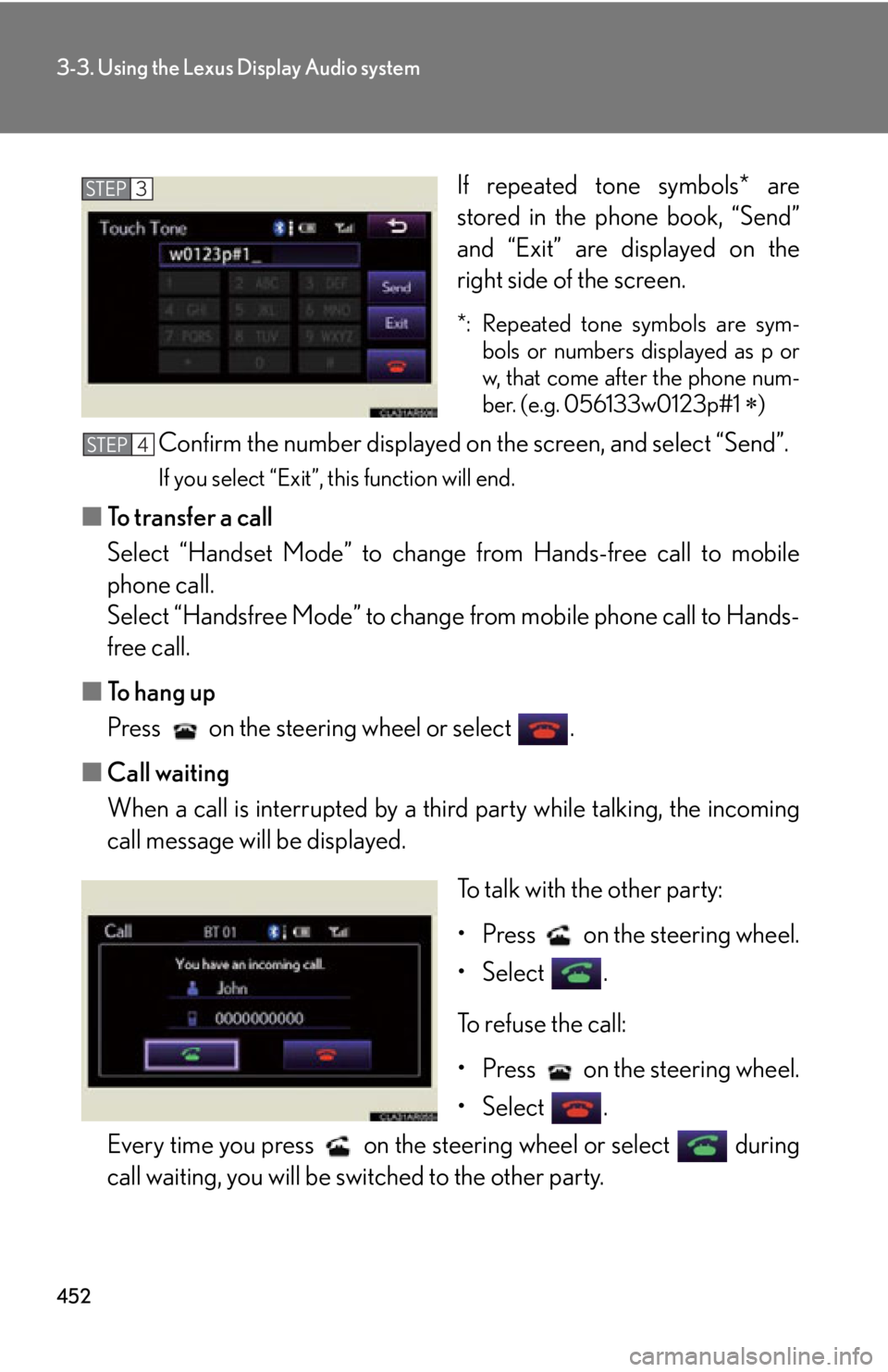
If repeated tone symbols* are
stored in the phone book, “Send”
and “Exit” are displayed on the
right side of the screen. *: Repeated tone symbols are sym-
bols or numbers displayed as p or
w, that come after the phone num-
ber. (e.g. 056133w0123p#1
)
Confirm the number displayed on the screen, and select “Send”. If you select “Exit”, this function will end.
■ To transfer a call
Select “Handset Mode” to change from Hands-free call to mobile
phone call.
Select “Handsfree Mode” to change from mobile phone call to Hands-
free call.
■ To hang up
Press on the steering wheel or select .
■ Call waiting
When a call is interrupted by a third party while talking, the incoming
call message will be displayed.
To talk with the other party:
• Press on the steering wheel.
• Select .
To refuse the call:
• Press on the steering wheel.
• Select .
Every time you press on the s teering wheel or select during
call waiting, you will be switched to the other party. STEP 3
STEP 4
Page 553 of 878
5533-4. Using the audio system
3
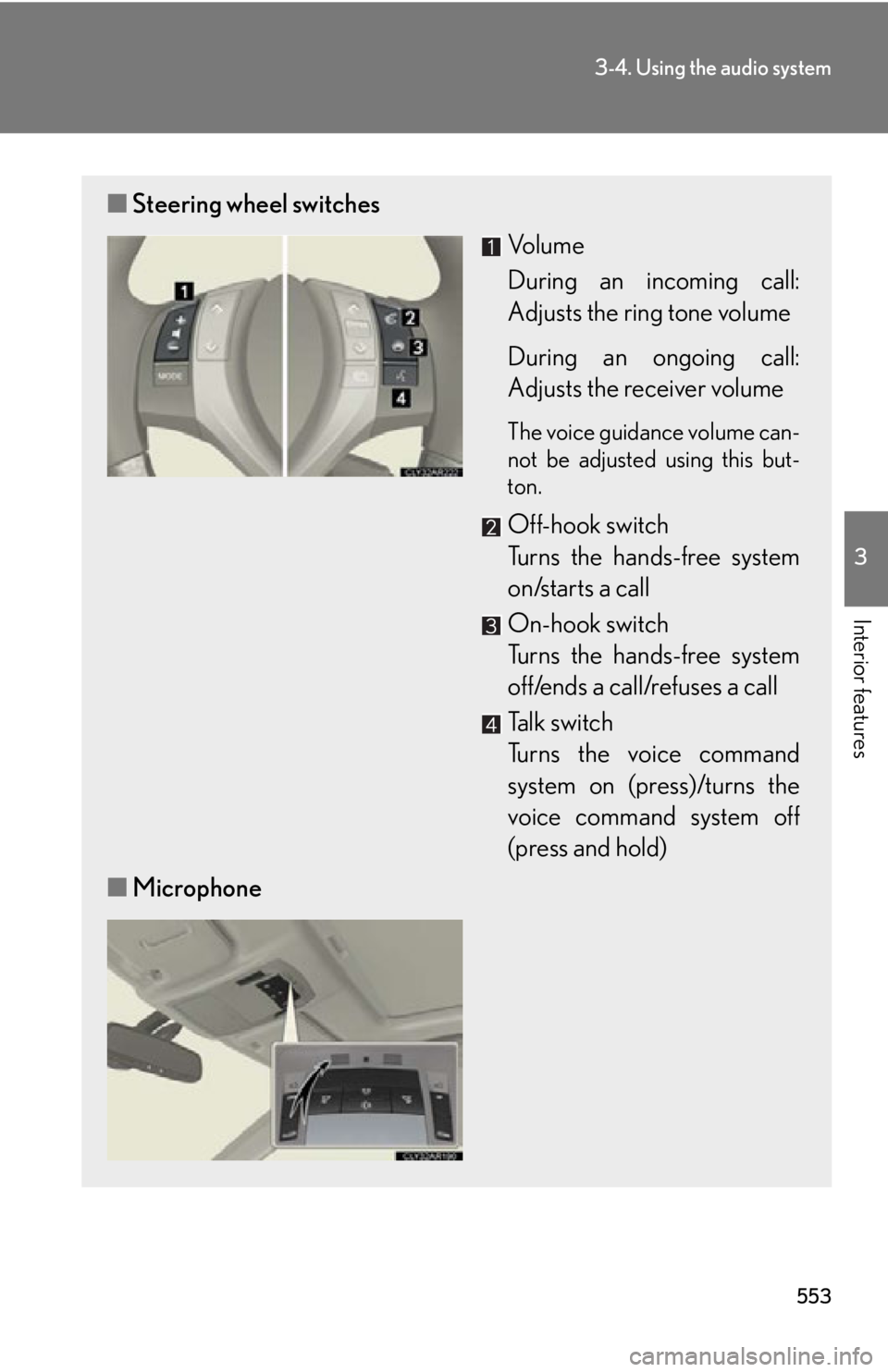
Interior features ■ Steering wheel switches
Vo l u m e
During an incoming call:
Adjusts the ring tone volume
During an ongoing call:
Adjusts the receiver volume The voice guidance volume can-
not be adjusted using this but-
ton.
Off-hook switch
Turns the hands-free system
on/starts a call
On-hook switch
Turns the hands-free system
off/ends a call/refuses a call
Talk switch
Turns the voice command
system on (press)/turns the
voice command system off
(press and hold)
■ Microphone
Page 562 of 878
5623-4. Using the audio system
When receiving a phone call
■ Answering a phone call
Press the off-hook switch.
■ Refusing a phone call
Press the on-hook switch.
Transferring a phone call
A call can be transferred between the mobile phone and system while
dialing, receiving a call, or during a call. Use one of the following meth-
ods:
a. Operate the mobile phone. Refer to the manual that comes with the mobile phone for the operation
of the phone.
b. Press the off-hook switch *1
.
c. Press the talk switch and say “Call Transfer” *2
.*1
: This operation can be performed only when transferring a call
from the mobile phone to the system during a call.*2
: While the vehicle is in motion, calls cannot be transferred from
the system to the mobile phone.
Call waiting
When a call is interrupted by an incoming call from a third party, the fol-
lowing options will become available:
● Answer the incoming call: Press the off-hook switch. (Press the off-
hook switch again as necessary to switch back and forth between
calls.)
● Refuse the incoming call: Press the on-hook switch.
Page 603 of 878
6033-7. Other interior features
3
Interior features NOTICE■
To avoid damaging the power outlets
Close the power outlet lid when the power outlet is not in use.
Foreign objects or liquids that enter th e power outlet may cause a short circuit.■
To prevent the fuse from being blown
Close the power outlet lid when the power outlet is not in use.
Foreign objects or liquids that enter th e power outlet may cause a short circuit.
12 V :
Do not use an accessory that uses more than 12 V 10 A.
120 VAC :
Do not use a 120 VAC appliance that requires more than 100 W.
If a 120 VAC appliance that consumes more than 100 W is used, the protection cir-
cuit will cut the power supply.■
To prevent 12-volt battery discharge
Do not use the power outlets longer than necessary when the hybrid system is off.■
Appliances that may not operate properly (120 VAC)
The following 120 VAC appliances may not operate properly even if their power
consumption is under 100 W: ●
Appliances with high initial peak wattage●
Measuring devices that process precise data●
Other appliances that require an extremely stable power supply
Page 633 of 878
Maintenance and care
4
6334-1. Maintenance and care
Cleaning and protecting
the vehicle exterior............. 634
Cleaning and protecting
the vehicle interior .............. 637
4-2. Maintenance
Maintenance
requirements ........................ 640
General maintenance .......... 643
Emission inspection and
maintenance (I/M)
programs................................ 647 4-3. Do-it-yourself
maintenance
Do-it-yourself service
precautions ........................... 648
Hood ........................................... 651
Positioning a floor jack ......... 652
Engine compartment ........... 654
12-volt battery ........................ 664
Tires............................................. 670
Tire inflation pressure............ 679
Wheels ...................................... 683
Air conditioning filter ........... 685
Electronic key battery.......... 687
Checking and replacing
fuses ........................................ 689
Headlight aim ......................... 705
Light bulbs ................................ 708
Page 649 of 878
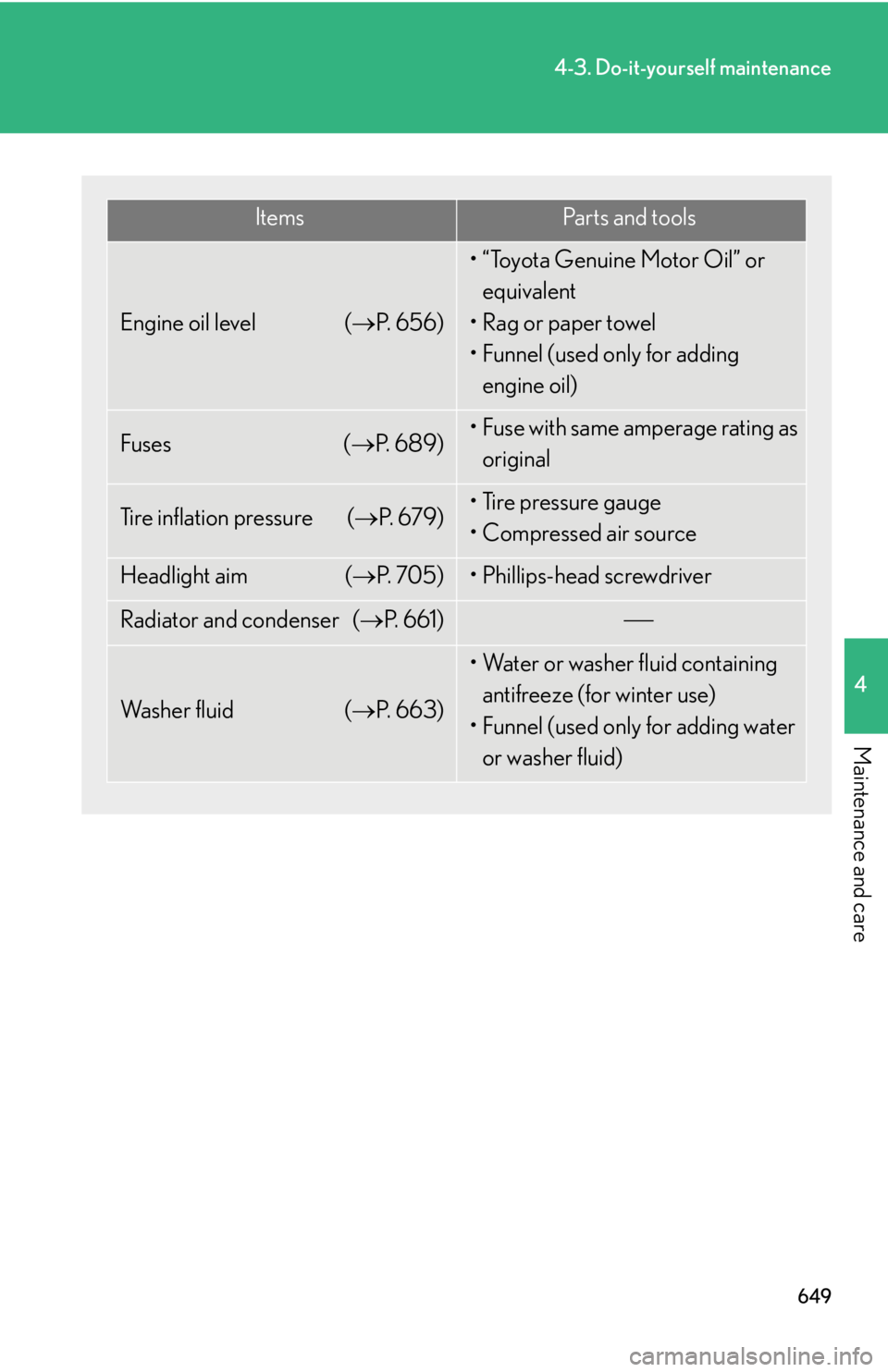
6494-3. Do-it-yourself maintenance
4
Maintenance and care Items Pa r t s a n d t o o l s
Engine oil level ( P. 6 5 6 ) • “Toyota Genuine Motor Oil” or
equivalent
•Rag or paper towel
• Funnel (used only for adding
engine oil)
Fuses ( P. 6 8 9 ) • Fuse with same amperage rating as
original
Tire inflation pressure ( P. 6 7 9 ) • Tire pressure gauge
• Compressed air source
Headlight aim ( P. 7 0 5 ) • Phillips-head screwdriver
Radiator and condenser ( P. 6 6 1 )
Wa s h e r f l u i d ( P. 663) • Water or washer fluid containing
antifreeze (for winter use)
• Funnel (used only for adding water
or washer fluid)