park assist LEXUS RX450h 2015 Owners Manual
[x] Cancel search | Manufacturer: LEXUS, Model Year: 2015, Model line: RX450h, Model: LEXUS RX450h 2015Pages: 878, PDF Size: 11.62 MB
Page 2 of 878

TABLE OF CONTENTS Index
21-1. Hybrid system
Hybrid system .................................. 30
Hybrid system precautions ......... 34
Energy monitor/consumption
screen................................................ 39
Hybrid vehicle driving tips........... 49
1-2. Key information
Keys ....................................................... 51
1-3. Opening, closing and locking
the doors
Smart access system with
push-button start .......................... 56
Wireless remote control .............. 69
Side doors .......................................... 72
Back door ........................................... 75 1-4. Adjustable components
(seats, mirrors,
steering wheel)
Front seats .......................................... 86
Rear seats ........................................... 89
Driving position memory ............. 93
Head restraints................................. 97
Seat belts ............................................ 99
Steering wheel................................ 105
Anti-glare inside rear view
mirror .............................................. 107
Outside rear view mirrors ......... 109
1-5. Opening and closing the
windows and moon roof
Power windows................................ 112
Moon roof .......................................... 115
1-6. Refueling
Opening the fuel tank cap........... 119
1-7. Theft deterrent system
Immobilizer system ...................... 124
Alarm.................................................. 126
Theft prevention labels ............... 1291
Before drivingFor vehicles with a navigation system, refer to the “Navigation System Owner’s
Manual” for information regarding the equipment listed below.
• Navigation system
• Air conditioning controls
• Windshield wiper de-icer
• Rear view monitor system • Intuitive parking assist
• Audio/video system
• Rear window and outside rear view
mirror defogging
Page 3 of 878

1
2
3
4
5
6
7
31-8. Safety information
Correct driving posture ............. 130
SRS airbags ..................................... 132
Front passenger occupant
classification sy stem .................. 145
Child restraint systems ............... 150
Installing child re straints ............. 154
2-1. Driving procedures
Driving the vehicle ........................ 166
Power (ignition) switch ................ 177
EV drive mode ............................... 183
Hybrid transmission ..................... 186
Turn signal lever ............................ 193
Parking brake ................................. 195
Horn.................................................... 196
2-2. Instrument cluster
Gauges and meters ..................... 197
Indicators and warning
lights................................................. 201
Multi-information display.......... 206
Head-up display ............................ 212
2-3. Operating the lights and
windshield wipers
Headlight switch ............................. 217
Fog light switch .............................. 221
Windshield wipers and
washer............................................ 223 Rear window wiper and
washer ........................................... 229
Headlight cleaner switch ........... 231
2-4. Using other driving systems
Cruise control ............................... 232
Dynamic radar cruise
control............................................ 236
Intuitive parking assist ................ 248
Rear view monitor system
(rear view mirror-attached
type) ............................................... 258
Rear view monitor system
(vehicles with the Lexus
Display Audio system) ............ 266
Driving assist systems................... 271
Hill-start assist control ............... 276
Pre-Collision System.................. 278
BSM (Blind Spot Monitor) ....... 286
2-5. Driving information
Utility vehicle pre cautions ........ 292
Cargo and luggage ..................... 296
Vehicle load limits ......................... 301
Winter driving tips ....................... 302
Trailer towing (AWD models
with towing package) ............. 306
Trailer towing
(without towing package)...... 323
Dinghy towing ............................... 3242
When driving
Page 135 of 878

1351-8. Safety information
1
Before driving Your vehicle is equipped with AD VANCED AIRBAGS designed based
on the US motor vehicle safety st andards (FMVSS208). The airbag sen-
sor assembly (ECU) controls airbag deployment based on information
obtained from the sensors etc. show n in the system components diagram
above. This information includes cras h severity and occupant informa-
tion. As the airbags deploy, a chemica l reaction in the inflators quickly fills
the airbags with non-toxic gas to he lp restrain the motion of the occu-
pants. ■
If the SRS airbags deploy (inflate) ●
Bruising and slight abrasions may result from contact with a deploying (inflating)
SRS airbag.●
A loud noise and white powder will be emitted.●
Parts of the airbag module (steering wheel hub, airbag cover and inflator) as
well as the seats, parts of the front and rear pillars, and roof side rails, may be hot
for several minutes. The airbag itself may also be hot.●
The windshield may crack.●
For Safety Connect subscriber s, if the SRS airbags deploy or in the event of a
severe rear-end collision, the system is designed to send an emergency call to
the response center, notifying them of the vehicle’s location (without needing to
push the “SOS” button) and an agent will attempt to speak with the occupants
to ascertain the level of emergency and assistance required. If the occupants
are unable to communicate, the agent automatically treats the call as an emer-
gency and helps to dispatch the necessary emergency services. ( P. 6 2 6 )■
SRS airbag deployment conditions (SRS front airbags) ●
The SRS front airbags will deploy in the event of an impact that exceeds the
set threshold level (the level of force corresponding to an approximately 12 -
18 mph [20 - 30 km/h] frontal collision with a fixed wall that does not move or
deform).
However, this threshold velocity will be considerably higher in the following situa-
tions:
• If the vehicle strikes an object, such as a parked vehicle or sign pole, which
can move or deform on impact
• If the vehicle is involved in an underride collision, such as a collision in which
the front of the vehicle “underrides”, or goes under, the bed of a truck
Page 165 of 878
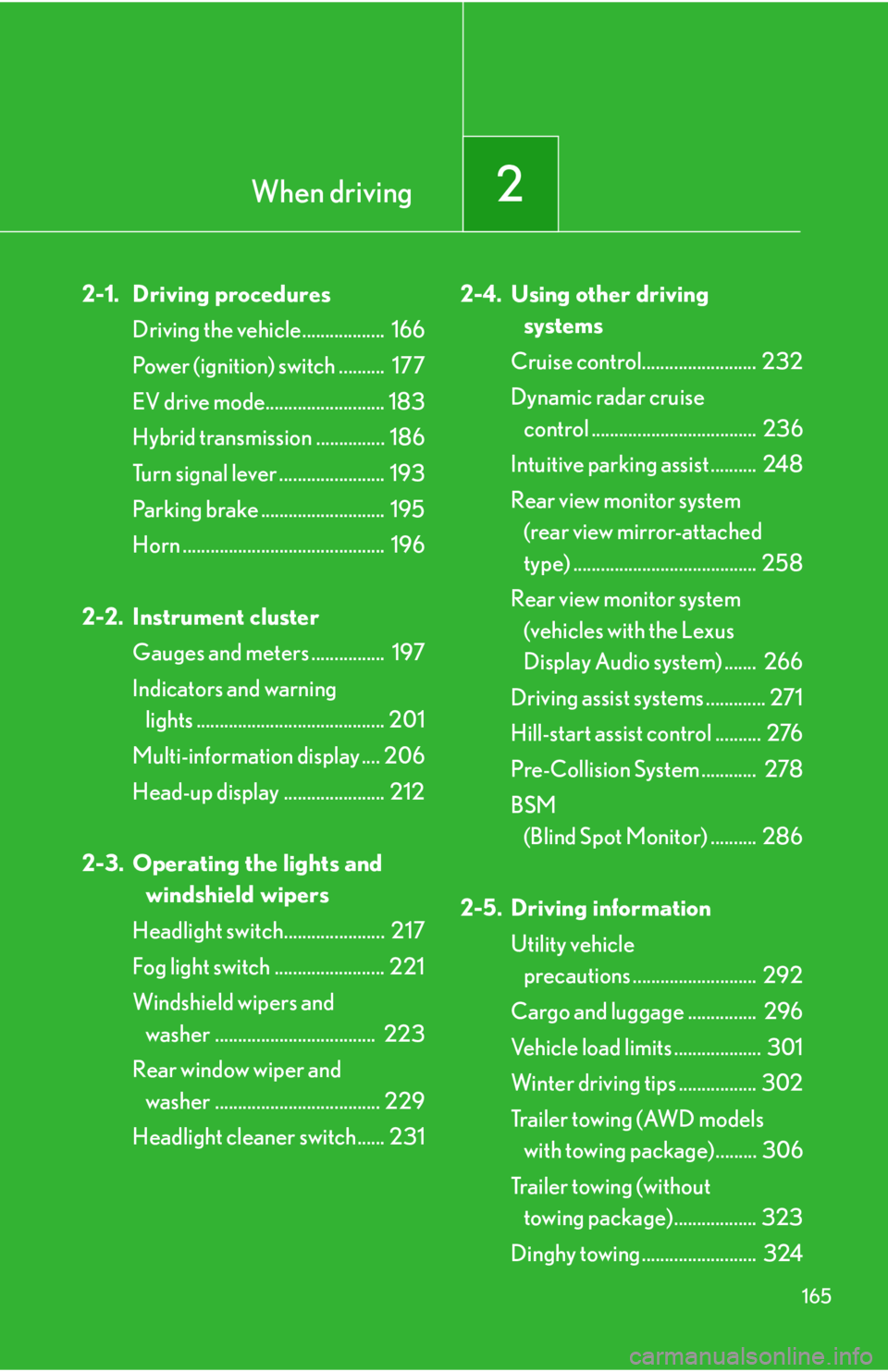
When driving
2
1652-1. Driving procedures
Driving the vehicle.................. 166
Power (ignition) switch .......... 177
EV drive mode.......................... 183
Hybrid transmission ............... 186
Turn signal lever ....................... 193
Parking brake ........................... 195
Horn ............................................ 196
2-2. Instrument cluster
Gauges and meters ................ 197
Indicators and warning
lights ......................................... 201
Multi-information display .... 206
Head-up display ...................... 212
2-3. Operating the lights and
windshield wipers
Headlight switch...................... 217
Fog light switch ........................ 221
Windshield wipers and
washer ................................... 223
Rear window wiper and
washer .................................... 229
Headlight cleaner switch...... 231 2-4. Using other driving
systems
Cruise control......................... 232
Dynamic radar cruise
control .................................... 236
Intuitive parking assist .......... 248
Rear view monitor system
(rear view mirror-attached
type) ........................................ 258
Rear view monitor system
(vehicles with the Lexus
Display Audio system) ....... 266
Driving assist systems ............. 271
Hill-start assist control .......... 276
Pre-Collision System ............ 278
BSM
(Blind Spot Monitor) .......... 286
2-5. Driving information
Utility vehicle
precautions ........................... 292
Cargo and luggage ............... 296
Vehicle load limits ................... 301
Winter driving tips ................. 302
Tr a i l e r t o w i n g ( AW D m o d e l s
with towing package)......... 306
Trailer towing (without
towing package).................. 323
Dinghy towing ......................... 324
Page 170 of 878

1702-1. Driving procedures
CAUTION●
Do not shift the shift lever to R while the vehicle is moving forward.
Doing so can damage the transmission and may result in a loss of vehicle control.●
Do not shift the shift lever to D while the vehicle is moving backward.
Doing so can damage the transmission and may result in a loss of vehicle control.●
Moving the shift lever to N while the vehicle is moving will disengage the hybrid
system. Engine braking is not availabl e with the hybrid system disengaged.●
During normal driving, do not turn off the hybrid system. Turning the hybrid sys-
tem off while driving will not cause loss of steering or braking control, however,
power assist to the steering will be lost. This will make it more difficult to steer
smoothly, so you should pull over and stop the vehicle as soon as it is safe to do so.
In the event of an emergency, such as if it becomes impossible to stop the vehicle
in the normal way: P. 7 9 5●
Use engine braking (downshift) to maintain a safe speed when driving down a
steep hill.
Using the brakes continuously may cause the brakes to overheat and lose effec-
tiveness. ( P. 1 8 6 )●
When stopped on an incline, use the brake pedal and parking brake to prevent
the vehicle from rolling backward or forward, causing an accident. ●
Do not adjust the position of the steering wheel, the seat, or the inside or outside
rear view mirrors while driving.
Doing so may result in a loss of vehicle control that can cause accidents, resulting
in death or serious injury.●
Always check that all passengers' arms, heads or other parts of their body are not
outside the vehicle, as this may result in death or serious injury.●
Do not drive in excess of the speed limit. Even if the legal speed limit permits it, do
not drive over 85 mph (140 km/h) unless your vehicle has high-speed capability
tires. Driving over 85 mph (140 km/h) may result in tire failure, loss of control and
possible injury. Be sure to consult a tire dealer to determine whether the tires on
your vehicle are high-speed capability tires or not before driving at such speeds.
Page 203 of 878
2032-2. Instrument cluster
2
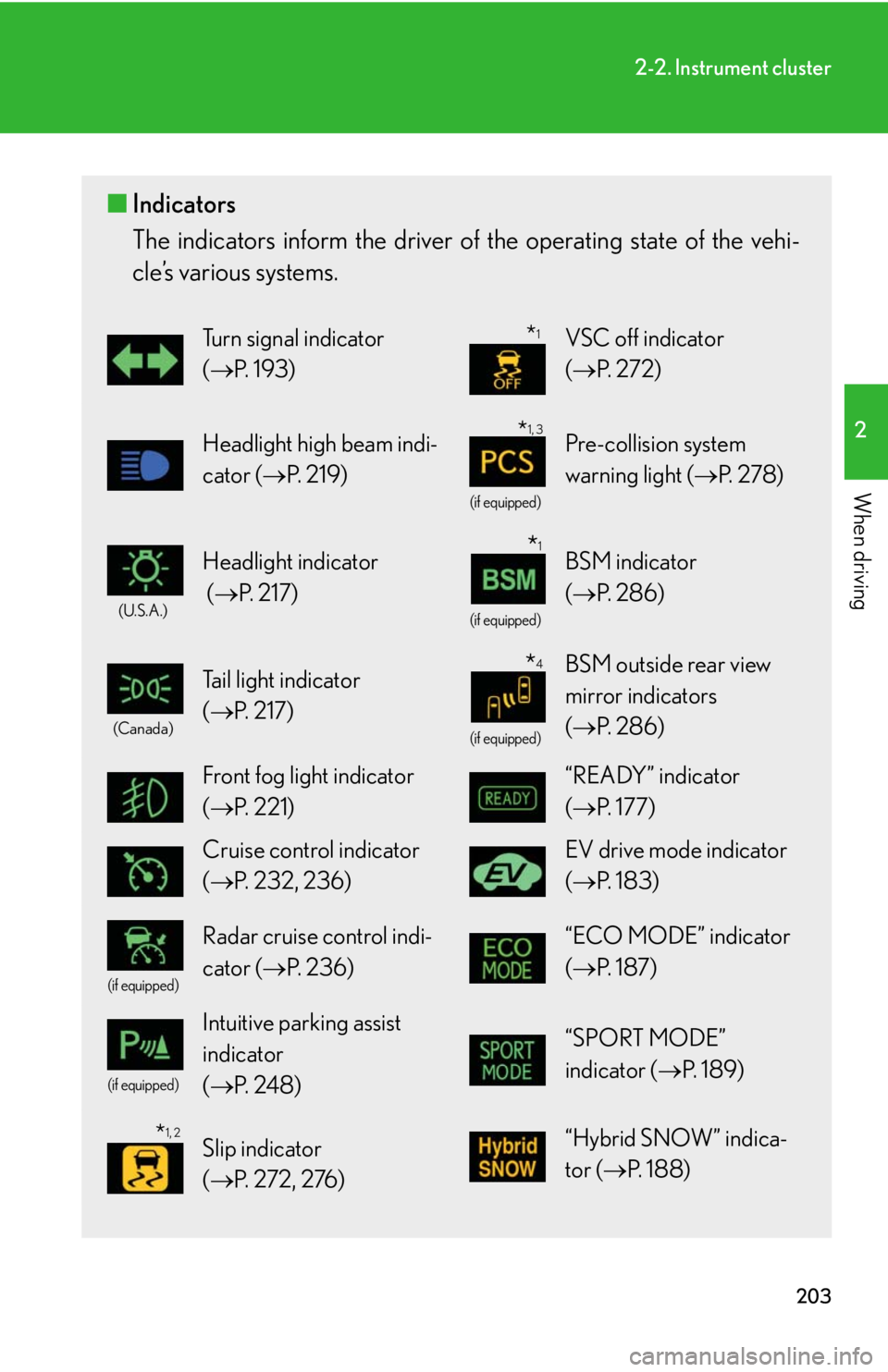
When driving ■ Indicators
The indicators inform the driver of th e operating state of the vehi-
cle’s various systems. Turn signal indicator
( P. 1 9 3 ) VSC off indicator
( P. 2 7 2 )
Headlight high beam indi-
cator ( P. 2 1 9 ) (if equipped)
Pre-collision system
warning light ( P. 2 7 8 )(U.S.A.)
Headlight indicator
( P. 2 1 7 ) (if equipped)
BSM indicator
( P. 2 8 6 )(Canada)
Tail light indicator
( P. 2 1 7 ) (if equipped)
BSM outside rear view
mirror indicators
( P. 2 8 6 )
Front fog light indicator
( P. 221) “READY” indicator
( P. 1 7 7 )
Cruise control indicator
( P. 232, 236) EV drive mode indicator
( P. 1 8 3 )(if equipped)
Radar cruise control indi-
cator ( P. 2 3 6 ) “ECO MODE” indicator
( P. 1 8 7 )(if equipped)
Intuitive parking assist
indicator
( P. 2 4 8 ) “SPORT MODE”
indicator ( P. 1 8 9 )
Slip indicator
( P. 2 7 2 , 2 76 ) “Hybrid SNOW” indica-
tor ( P. 1 8 8 ) * 1
* 1, 3
* 1
* 4
* 1, 2
Page 208 of 878
2082-2. Instrument cluster
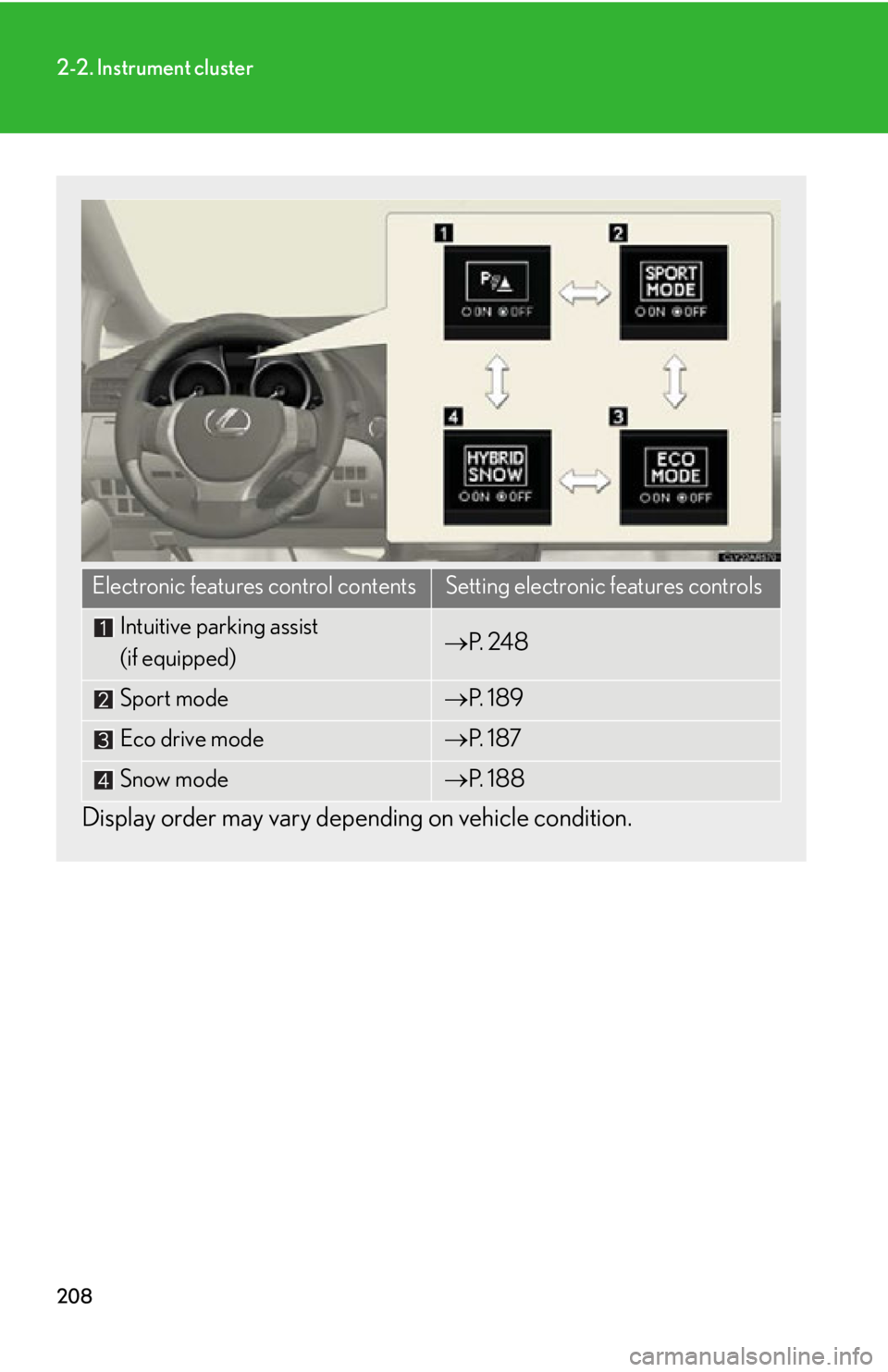
Display order may vary depe nding on vehicle condition.Electronic features control contents Setting electronic features controls
Intuitive parking assist
(if equipped) P. 2 4 8
Sport mode P. 1 8 9
Eco drive mode P. 1 8 7
Snow mode P. 1 8 8
Page 211 of 878

2112-2. Instrument cluster
2
When driving ■
Electronic features control can be turned on/off when
The “POWER” switch is in ON mode.■
Conditions for ending electronic features control
In the following situations, the electronic features control will end: ●
The menu switch is pressed.●
The dynamic radar cruise control is operated (if equipped).●
Intuitive parking assist starts operating (if equipped).●
No action is performed for some time after the electronic features control
screen is displayed.●
A warning message appears after the electronic features control screen is dis-
played.■
Outside temperature display
In the following situations, the correct outside temperature may not be displayed, or
the display may take longer than normal to change. ●
When stopped, or driving at low speeds (less than 16 mph [25 km/h])●
When the outside temperature has changed suddenly (at the entrance/exit of a
garage, tunnel, etc.)■
The multi-information display at low temperatures
Allow the interior of the vehicle to warm up before using the liquid crystal informa-
tion display. At extremely low temperatures, the information display monitor may
respond slowly, and display changes may be delayed. ■
Customization
Settings (e.g. available la nguages) can be changed.
(Customizable features P. 825)
CAUTION
■
Caution while driving
When operating the electronic features control while driving, take extra notice of
the vehicle's surrounding area.
Page 248 of 878
2482-4. Using other driving systems
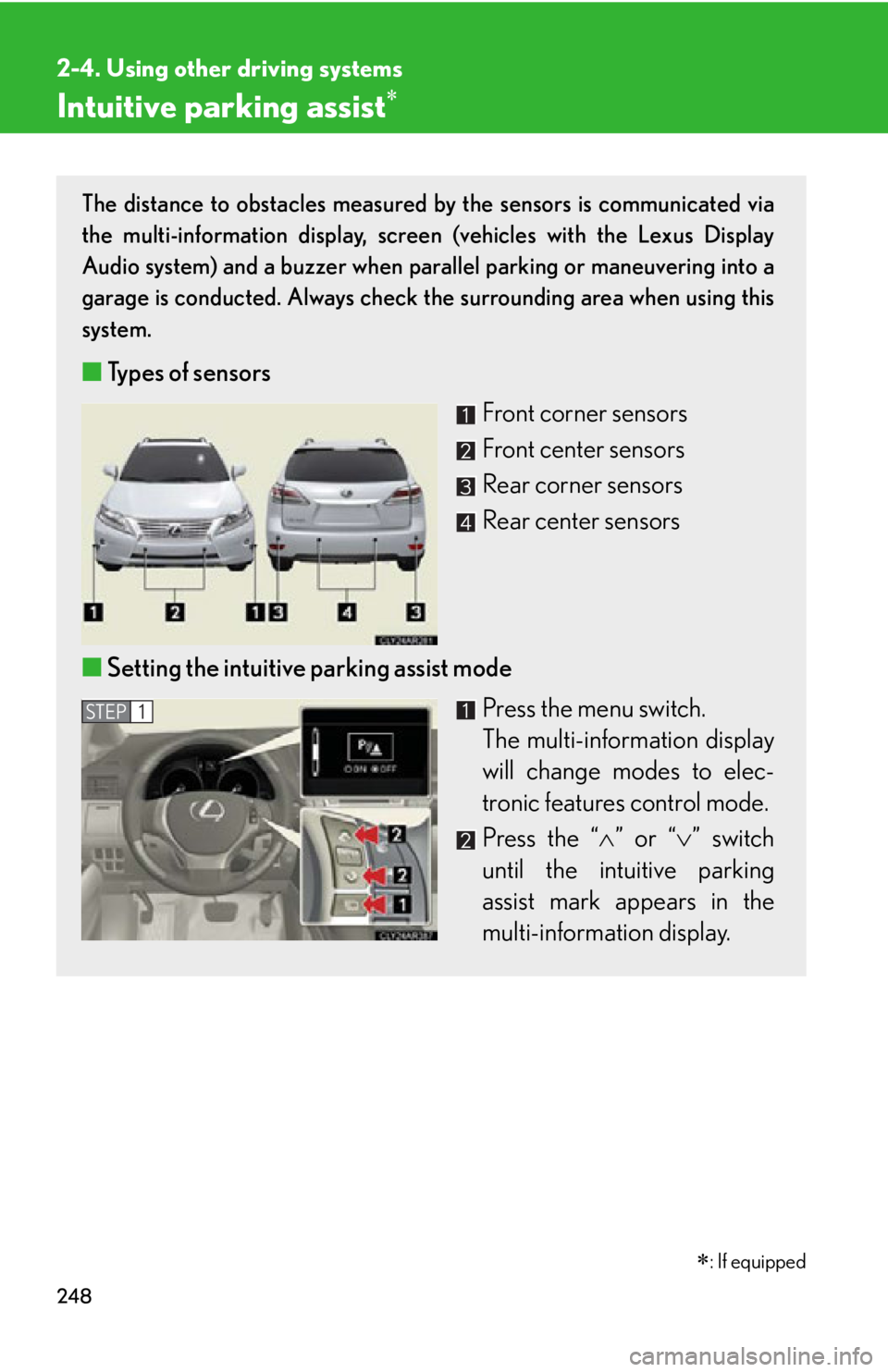
Intuitive parking assist The distance to obstacles measured by the sensors is communicated via
the multi-information display, screen (vehicles with the Lexus Display
Audio system) and a buzzer when parallel parking or maneuvering into a
garage is conducted. Always check the surrounding area when using this
system.
■ Types of sensors
Front corner sensors
Front center sensors
Rear corner sensors
Rear center sensors
■ Setting the intuitive parking assist mode
Press the menu switch.
The multi-information display
will change modes to elec-
tronic features control mode.
Press the “ ” or “ ” switch
until the intuitive parking
assist mark appears in the
multi-information display. STEP 1
: If equipped
Page 249 of 878
2492-4. Using other driving systems
2
When driving
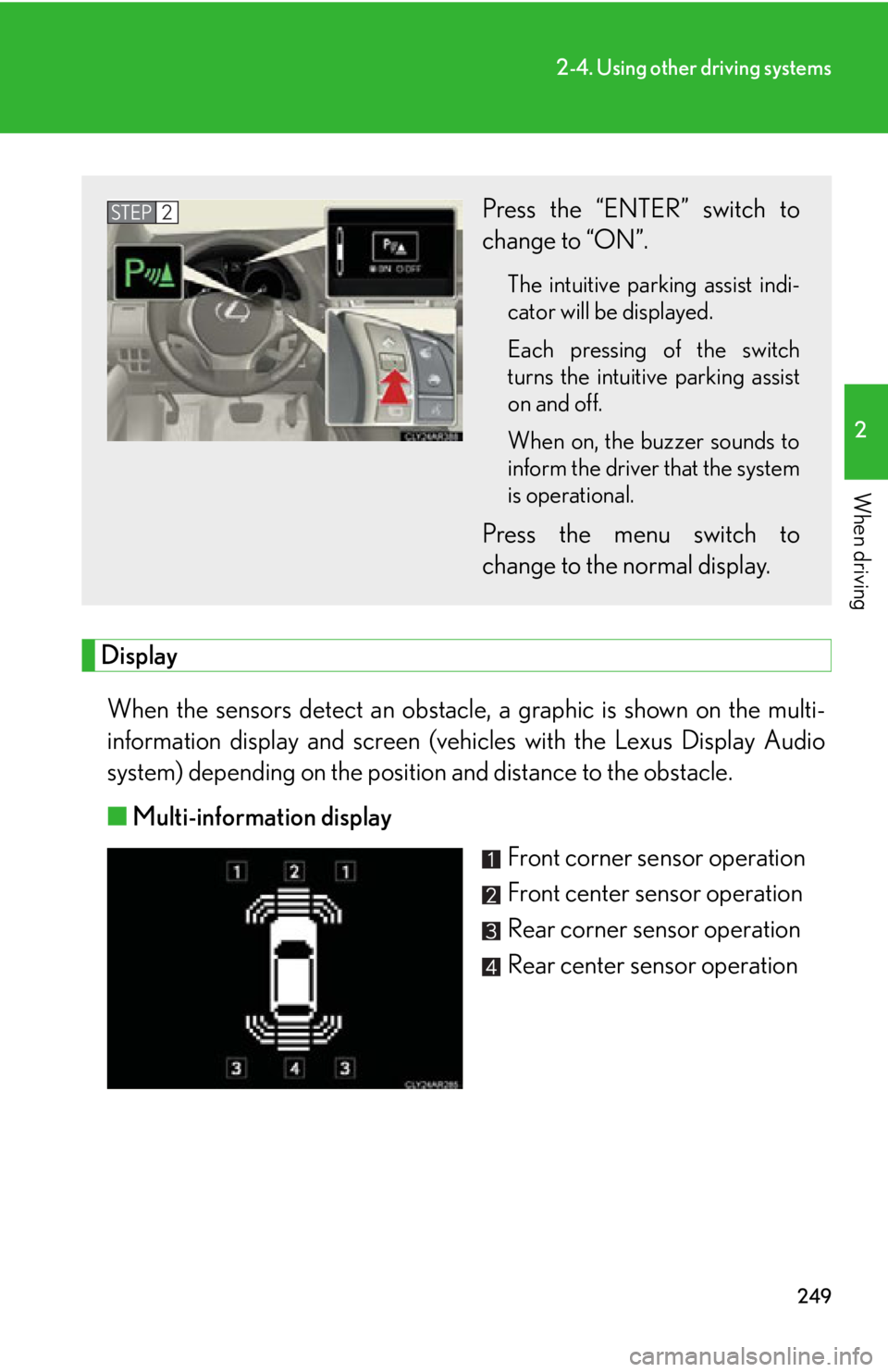
Display
When the sensors detect an obstacle , a graphic is shown on the multi-
information display and screen (vehic les with the Lexus Display Audio
system) depending on the position and distance to the obstacle.
■ Multi-information display
Front corner sensor operation
Front center sensor operation
Rear corner sensor operation
Rear center sensor operationPress the “ENTER” switch to
change to “ON”. The intuitive parking assist indi-
cator will be displayed.
Each pressing of the switch
turns the intuitive parking assist
on and off.
When on, the buzzer sounds to
inform the driver that the system
is operational.
Press the menu switch to
change to the normal display.STEP 2