fuel LEXUS RX450h 2016 User Guide
[x] Cancel search | Manufacturer: LEXUS, Model Year: 2016, Model line: RX450H, Model: LEXUS RX450H 2016Pages: 660, PDF Size: 10.15 MB
Page 94 of 660
94 2. Instrument cluster
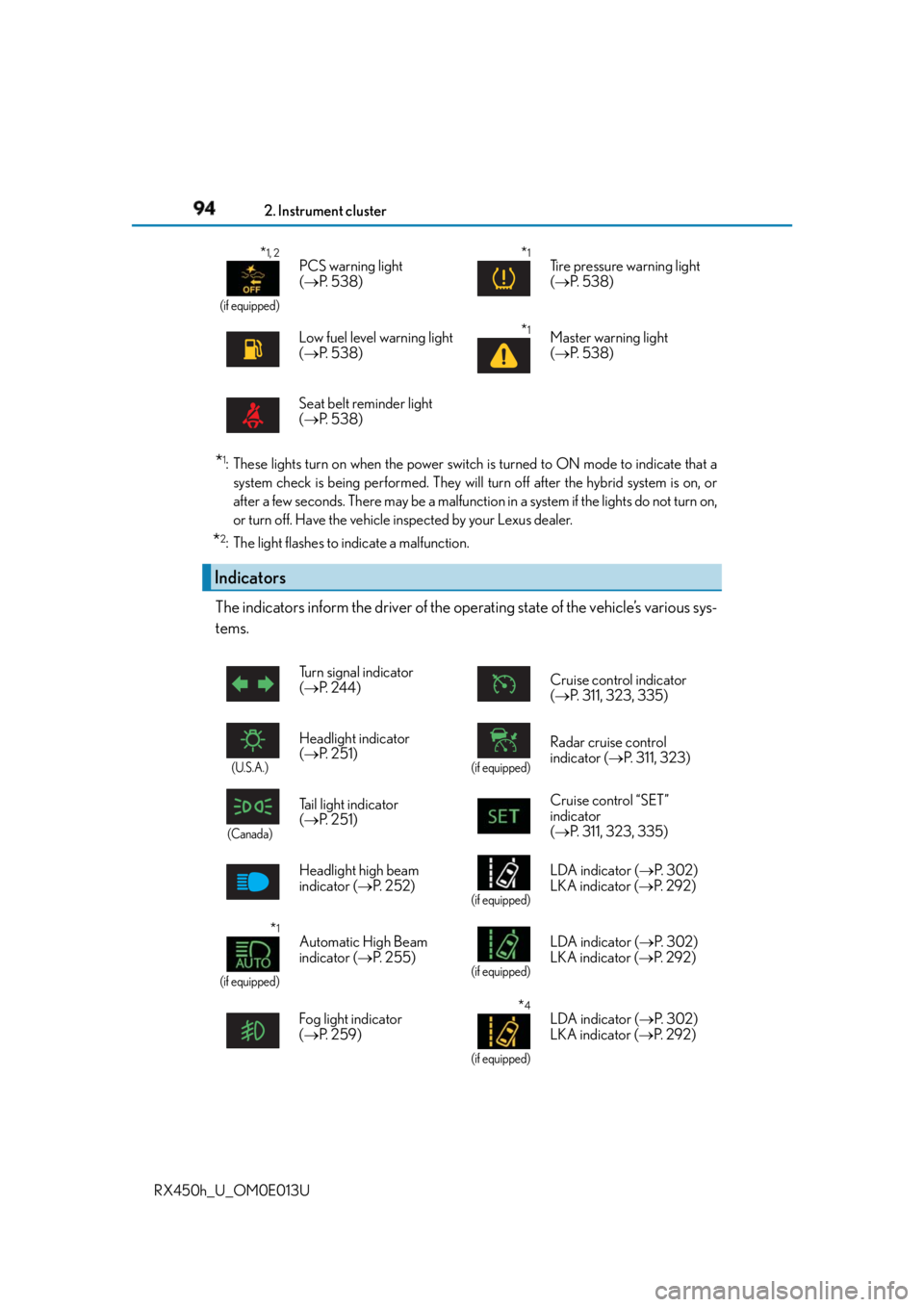
RX450h_U_OM0E013U * 1
: These lights turn on when the power switch is turned to ON mode to indicate that a
system check is being performed. They will turn off after the hybrid system is on, or
after a few seconds. There may be a malfunctio n in a system if the lights do not turn on,
or turn off. Have the vehicle inspected by your Lexus dealer.
* 2
: The light flashes to indicate a malfunction.
The indicators inform the driver of the op erating state of the vehicle’s various sys-
tems. * 1, 2
(if equipped)
PCS warning light
( P. 5 3 8 )
* 1
Tire pressure warning light
( P. 5 3 8 )
Low fuel level warning light
( P. 5 3 8 )
* 1
Master warning light
( P. 5 3 8 )
Seat belt reminder light
( P. 5 3 8 )
Indicators Turn signal indicator
( P. 2 4 4 ) Cruise control indicator
( P. 311, 323, 335)
(U.S.A.)
Headlight indicator
( P. 2 5 1 ) (if equipped)
Radar cruise control
indicator ( P. 311, 323)
(Canada)
Tail light indicator
( P. 2 5 1 ) Cruise control “SET”
indicator
( P. 311, 323, 335)
Headlight high beam
indicator ( P. 252) (if equipped)
LDA indicator ( P. 3 0 2 )
LKA indicator ( P. 2 9 2 )
* 1
(if equipped) Automatic High Beam
indicator ( P. 2 5 5 ) (if equipped)
LDA indicator ( P. 3 0 2 )
LKA indicator ( P. 2 9 2 )
Fog light indicator
( P. 2 5 9 ) * 4
(if equipped)LDA indicator ( P. 3 0 2 )
LKA indicator ( P. 2 9 2 )
Page 98 of 660
98 2. Instrument cluster
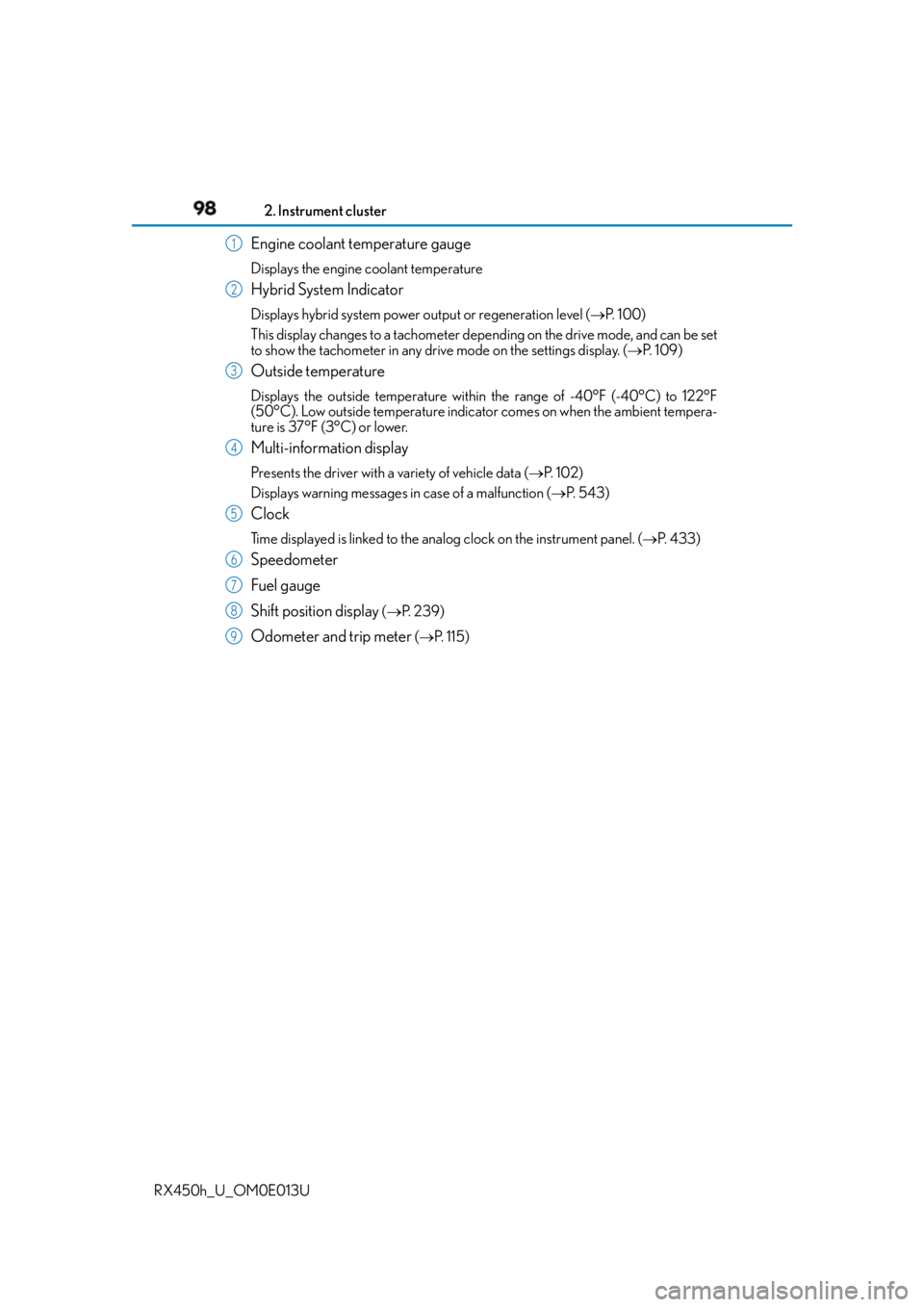
RX450h_U_OM0E013U Engine coolant temperature gauge Displays the engine coolant temperature
Hybrid System Indicator Displays hybrid system power output or regeneration level ( P. 1 0 0 )
This display changes to a tachometer depe nding on the drive mode, and can be set
to show the tachometer in any driv e mode on the settings display. ( P. 1 0 9 )
Outside temperature Displays the outside temperature within the range of -40°F (-40°C) to 122°F
(50°C). Low outside temperature indicator comes on when the ambient tempera-
ture is 37°F (3°C) or lower.
Multi-information display Presents the driver with a variety of vehicle data ( P. 1 0 2 )
Displays warning messages in case of a malfunction ( P. 5 4 3 )
Clock Time displayed is linked to the analog clock on the instrument panel. ( P. 4 3 3 )
Speedometer
Fuel gauge
Shift position display ( P. 2 3 9 )
Odometer and trip meter ( P. 1 1 5 )1
2
3
4
5
6
7
8
9
Page 101 of 660
1012. Instrument cluster
2
Instrument cluster
RX450h_U_OM0E013U ■
Tachometer
Hybrid System Indicator switches to the tachometer when driving mode is in sport mode.
The settings of the tachometer display can be changed on of the multi-information
display. ( P. 1 0 9 )■
Engine speed
On hybrid vehicles, engine speed is precisely controlled in order to help improve fuel
efficiency and reduce exhaust emissions etc.
There are times when the engine speed that is displayed may differ even when vehicle
operation and driving conditions are the same. ■
Brightness of the meters (day mode and night mode)
The brightness of the meters is changed between day mode and night mode. ●
Day mode: When the tail lights are off or when the tail lights are on but the surrounding
area is bright ●
Night mode: When the tail lights are on and the surrounding area is dark ■
Outside temperature display ●
In the following situations, the correct outside temperature may not be displayed, or the
display may take longer than normal to change.
• When stopped, or driving at low speeds (less than 12 mph [20 km/h])
• When the outside temperature has changed suddenly (at the entrance/exit of a
garage, tunnel, etc.) ●
When “ ” or “E” is displayed, the sy stem may be ma lfunctioning.
Take your vehicle to your Lexus dealer. ■
Clock settings screen
If the clock adjustment screen is displayed continuously when attempting to change the
clock settings, the system may be malfunctioning.
Have the vehicle inspected by your Lexus dealer. ■
Customization
Some functions can be customized. ( P. 1 0 9 )
NOTICE ■
To prevent damage to the engine and its components ●
Do not let the indicator needle of the tachometer enter the red zone, which indicates
the maximum engine speed. ●
The engine may be overheating if the engine coolant temperature gauge is in the red
zone (H). In this case, immediately stop the vehicle in a safe place, and check the
engine after it has cooled completely. ( P. 5 74 )
Page 104 of 660
104 2. Instrument cluster
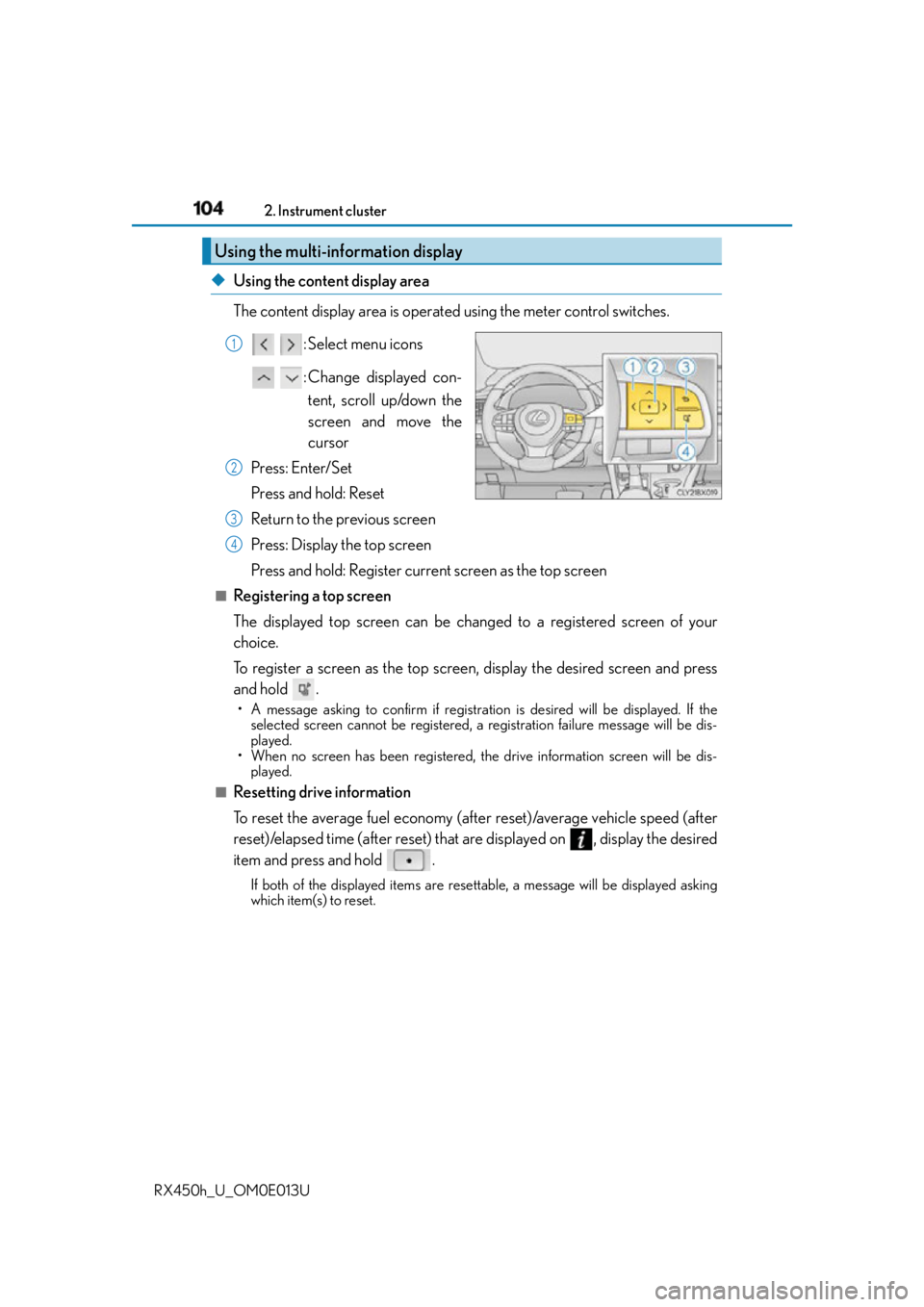
RX450h_U_OM0E013U ◆ Using the content display area
The content display area is operated using the meter control switches.
: Select menu icons
:Change displayed con-
tent, scroll up/down the
screen and move the
cursor
Press: Enter/Set
Press and hold: Reset
Return to the previous screen
Press: Display the top screen
Press and hold: Register current screen as the top screen■
Registering a top screen
The displayed top screen can be changed to a registered screen of your
choice.
To register a screen as the top screen, display the desired screen and press
and hold . • A message asking to confirm if registration is desired will be displayed. If the
selected screen cannot be registered, a registration failure message will be dis-
played.
• When no screen has been registered, th e drive information screen will be dis-
played.■
Resetting drive information
To reset the average fuel economy (after reset)/average vehicle speed (after
reset)/elapsed time (after reset) that are displayed on , display the desired
item and press and hold . If both of the displayed items are rese ttable, a message will be displayed asking
which item(s) to reset.Using the multi-information display 1
2
3
4
Page 106 of 660
106 2. Instrument cluster
RX450h_U_OM0E013U ■
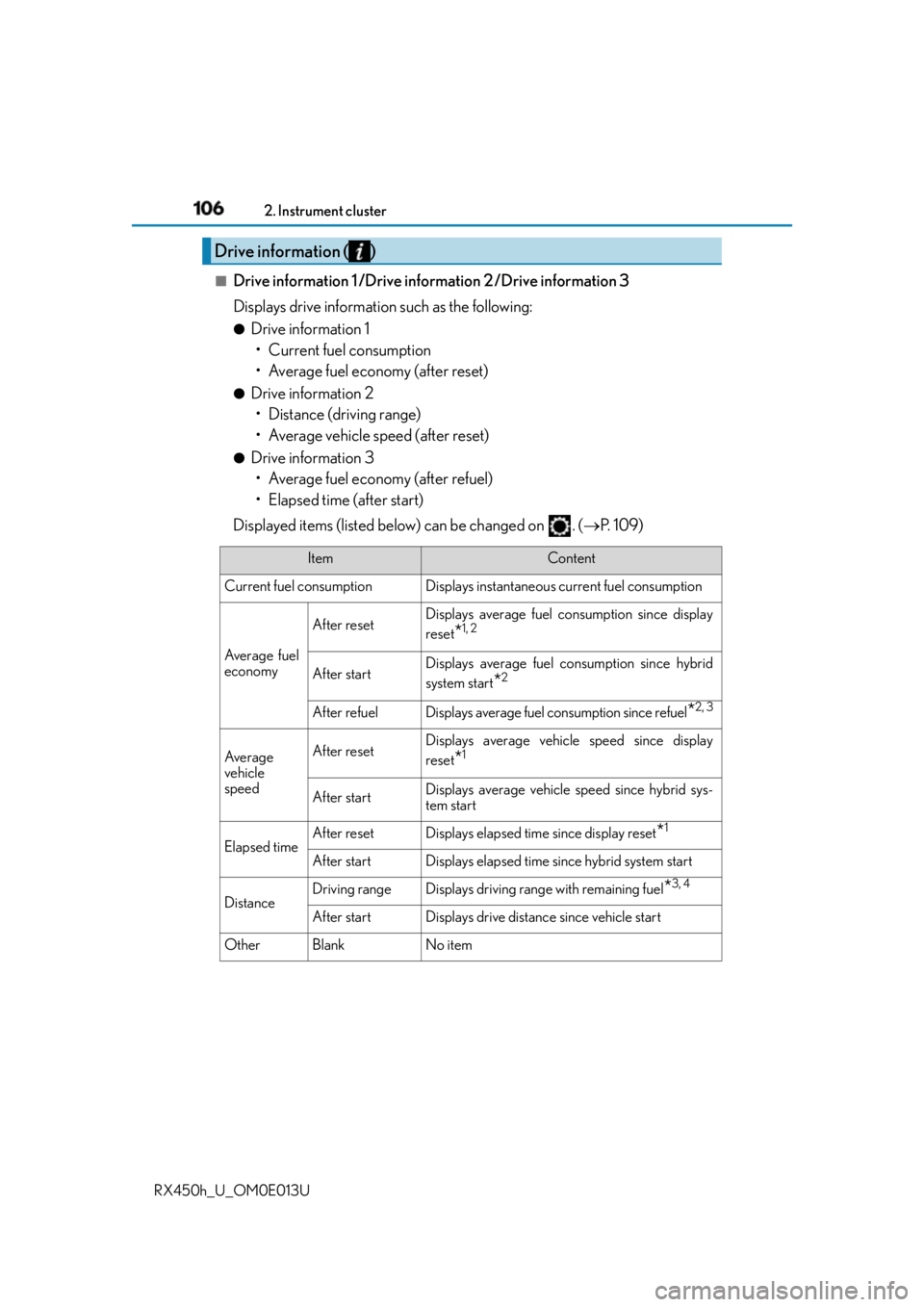
Drive information 1 /Drive information 2 /Drive information 3
Displays drive information such as the following: ●
Drive information 1
• Current fuel consumption
• Average fuel economy (after reset) ●
Drive information 2
• Distance (driving range)
• Average vehicle speed (after reset) ●
Drive information 3
• Average fuel economy (after refuel)
• Elapsed time (after start)
Displayed items (listed below) can be changed on . ( P. 1 0 9 )Drive information ( )
Item Content
Current fuel consumption Displays instantaneous current fuel consumption
Average fuel
economy After reset Displays average fuel consumption since display
reset
* 1, 2
After start Displays average fuel consumption since hybrid
system start
* 2
After refuel Displays average fuel consumption since refuel
* 2, 3
Av e r a g e
vehicle
speed After reset Displays average vehicle speed since display
reset
* 1
After start Displays average vehicle speed since hybrid sys-
tem start
Elapsed time After reset Displays elapsed time since display reset
* 1
After start Displays elapsed time since hybrid system start
Distance Driving range Displays driving range with remaining fuel
* 3, 4
After start Displays drive distance since vehicle start
Other Blank No item
Page 107 of 660
1072. Instrument cluster
2
Instrument cluster
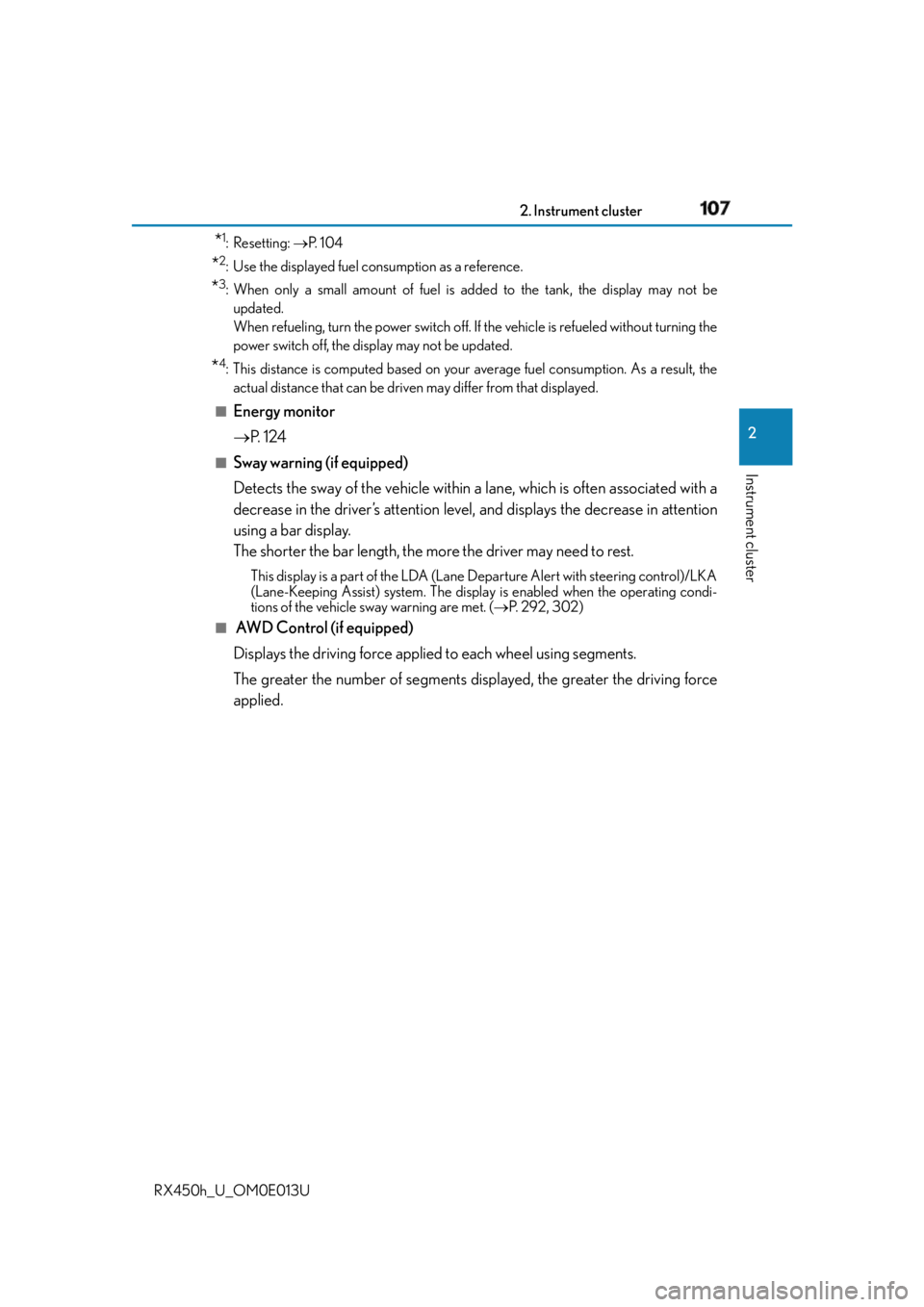
RX450h_U_OM0E013U * 1
: Resetting: P. 1 0 4
* 2
: Use the displayed fuel consumption as a reference.
* 3
: When only a small amount of fuel is added to the tank, the display may not be
updated.
When refueling, turn the power switch off. If the vehicle is refueled without turning the
power switch off, the display may not be updated.
* 4
: This distance is computed based on your average fuel consumption. As a result, the
actual distance that can be driven may differ from that displayed.■
Energy monitor
P. 1 2 4■
Sway warning (if equipped)
Detects the sway of the vehicle within a lane, which is often associated with a
decrease in the driver’s attention level, and displays the decrease in attention
using a bar display.
The shorter the bar length, the more the driver may need to rest. This display is a part of the LDA (Lane Departure Alert with steering control)/LKA
(Lane-Keeping Assist) system. The displa y is enabled when the operating condi-
tions of the vehicle sway warning are met. ( P. 292, 302)■
AWD Control (if equipped)
Displays the driving force applie d to each wheel using segments.
The greater the number of segments displayed, the greater the driving force
applied.
Page 125 of 660
1252. Instrument cluster
2
Instrument cluster
RX450h_U_OM0E013U
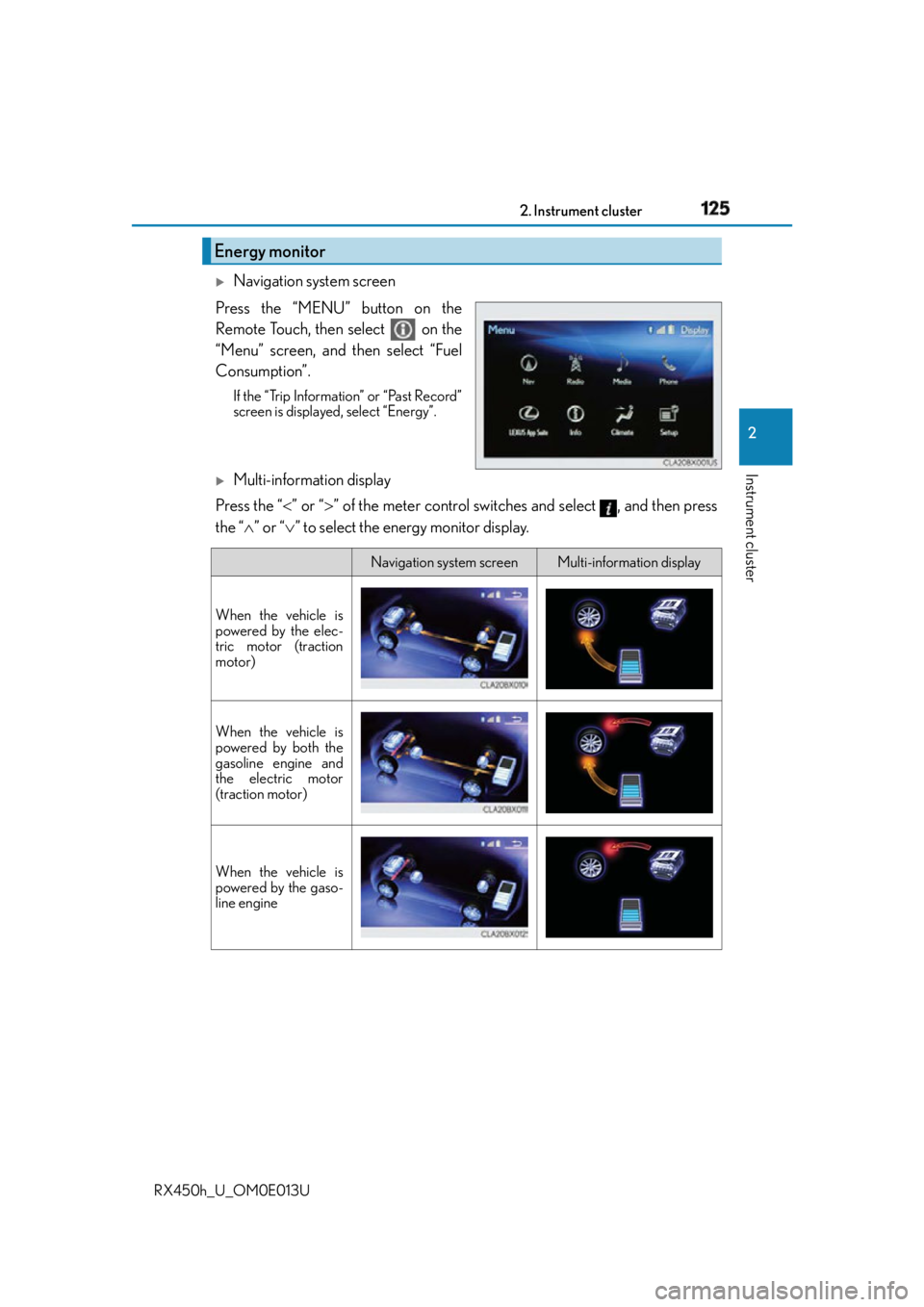
Navigation system screen
Press the “MENU” button on the
Remote Touch, then select on the
“Menu” screen, and then select “Fuel
Consumption”. If the “Trip Information” or “Past Record”
screen is displayed, select “Energy”.
Multi-information display
Press the “ ” or “ ” of the meter control switches and select , and then press
the “ ” or “ ” to select the energy monitor display.Energy monitor
Navigation system screen Multi-information display
When the vehicle is
powered by the elec-
tric motor (traction
motor)
When the vehicle is
powered by both the
gasoline engine and
the electric motor
(traction motor)
When the vehicle is
powered by the gaso-
line engine
Page 127 of 660
1272. Instrument cluster
2
Instrument cluster
RX450h_U_OM0E013U ■
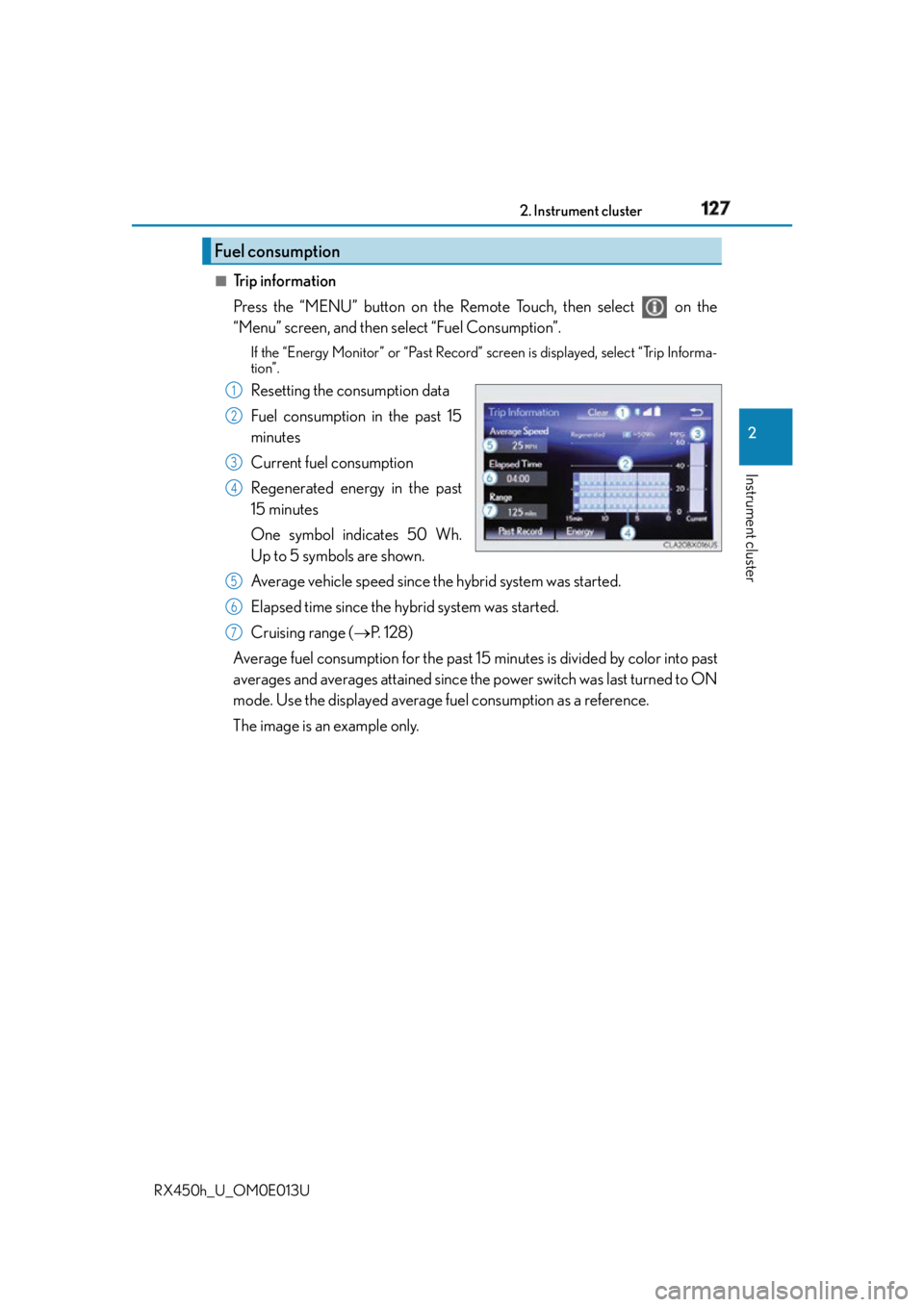
Trip information
Press the “MENU” button on the Remote Touch, then select on the
“Menu” screen, and then select “Fuel Consumption”. If the “Energy Monitor” or “Past Record” screen is displayed, select “Trip Informa-
tion”.
Resetting the consumption data
Fuel consumption in the past 15
minutes
Current fuel consumption
Regenerated energy in the past
15 minutes
One symbol indicates 50 Wh.
Up to 5 symbols are shown.
Average vehicle speed since the hybrid system was started.
Elapsed time since the hybrid system was started.
Cruising range ( P. 1 2 8 )
Average fuel consumption fo r the past 15 minutes is divided by color into past
averages and averages attained since th e power switch was last turned to ON
mode. Use the displayed average fuel consumption as a reference.
The image is an example only.Fuel consumption 1
2
3
4
5
6
7
Page 128 of 660
128 2. Instrument cluster
RX450h_U_OM0E013U ■
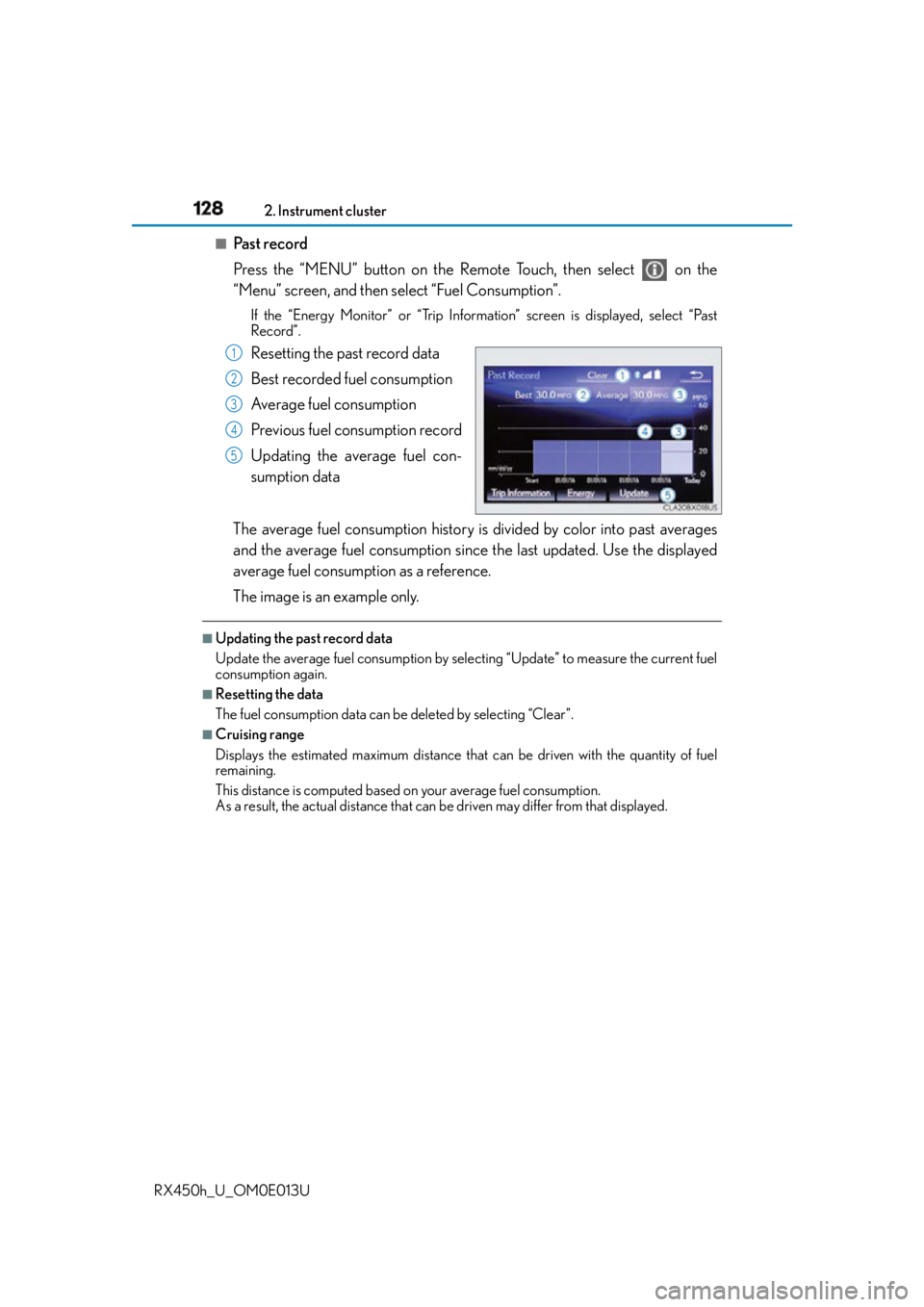
Past record
Press the “MENU” button on the Remote Touch, then select on the
“Menu” screen, and then select “Fuel Consumption”. If the “Energy Monitor” or “Trip Information” screen is displayed, select “Past
Record”.
Resetting the past record data
Best recorded fuel consumption
Average fuel consumption
Previous fuel consumption record
Updating the average fuel con-
sumption data
The average fuel consumption history is divided by color into past averages
and the average fuel consumption since the last updated. Use the displayed
average fuel consumption as a reference.
The image is an example only. ■
Updating the past record data
Update the average fuel consumption by selecting “Update” to measure the current fuel
consumption again. ■
Resetting the data
The fuel consumption data can be deleted by selecting “Clear”. ■
Cruising range
Displays the estimated maximum distance that can be driven with the quantity of fuel
remaining.
This distance is computed based on your average fuel consumption.
As a result, the actual distance that can be driven may differ from that displayed.1
2
3
4
5
Page 129 of 660
1292. Instrument cluster
2
Instrument cluster
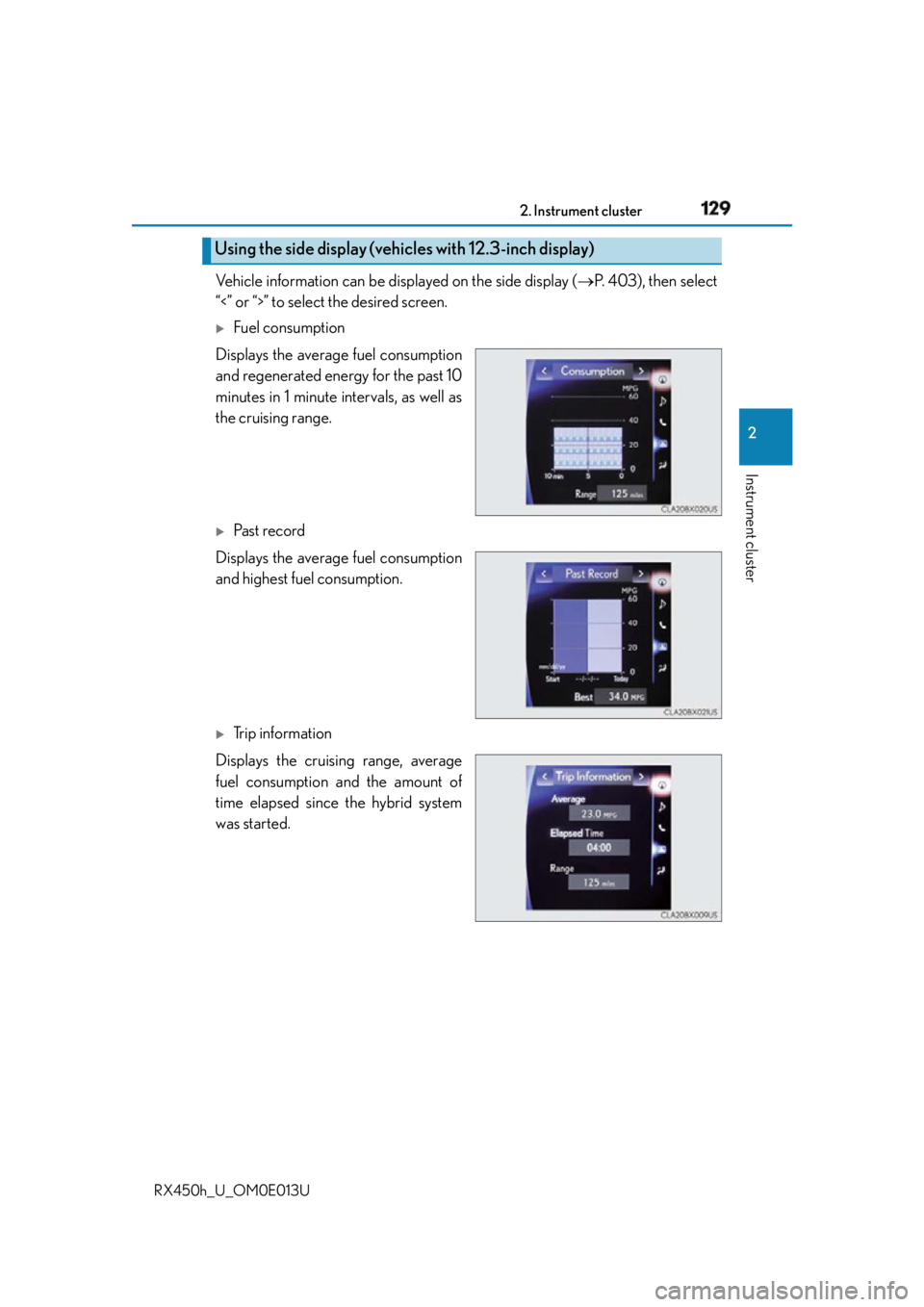
RX450h_U_OM0E013U Vehicle information can be displayed on the side display ( P. 4 0 3 ) , t h e n s e l e c t
“<” or “>” to select the desired screen.
Fuel consumption
Displays the average fuel consumption
and regenerated energy for the past 10
minutes in 1 minute intervals, as well as
the cruising range.
Past record
Displays the average fuel consumption
and highest fuel consumption.
Trip information
Displays the cruising range, average
fuel consumption and the amount of
time elapsed since the hybrid system
was started.Using the side display (vehicles with 12.3-inch display)