sport mode LEXUS RX450h 2016 User Guide
[x] Cancel search | Manufacturer: LEXUS, Model Year: 2016, Model line: RX450H, Model: LEXUS RX450H 2016Pages: 660, PDF Size: 10.15 MB
Page 114 of 660
114 2. Instrument cluster
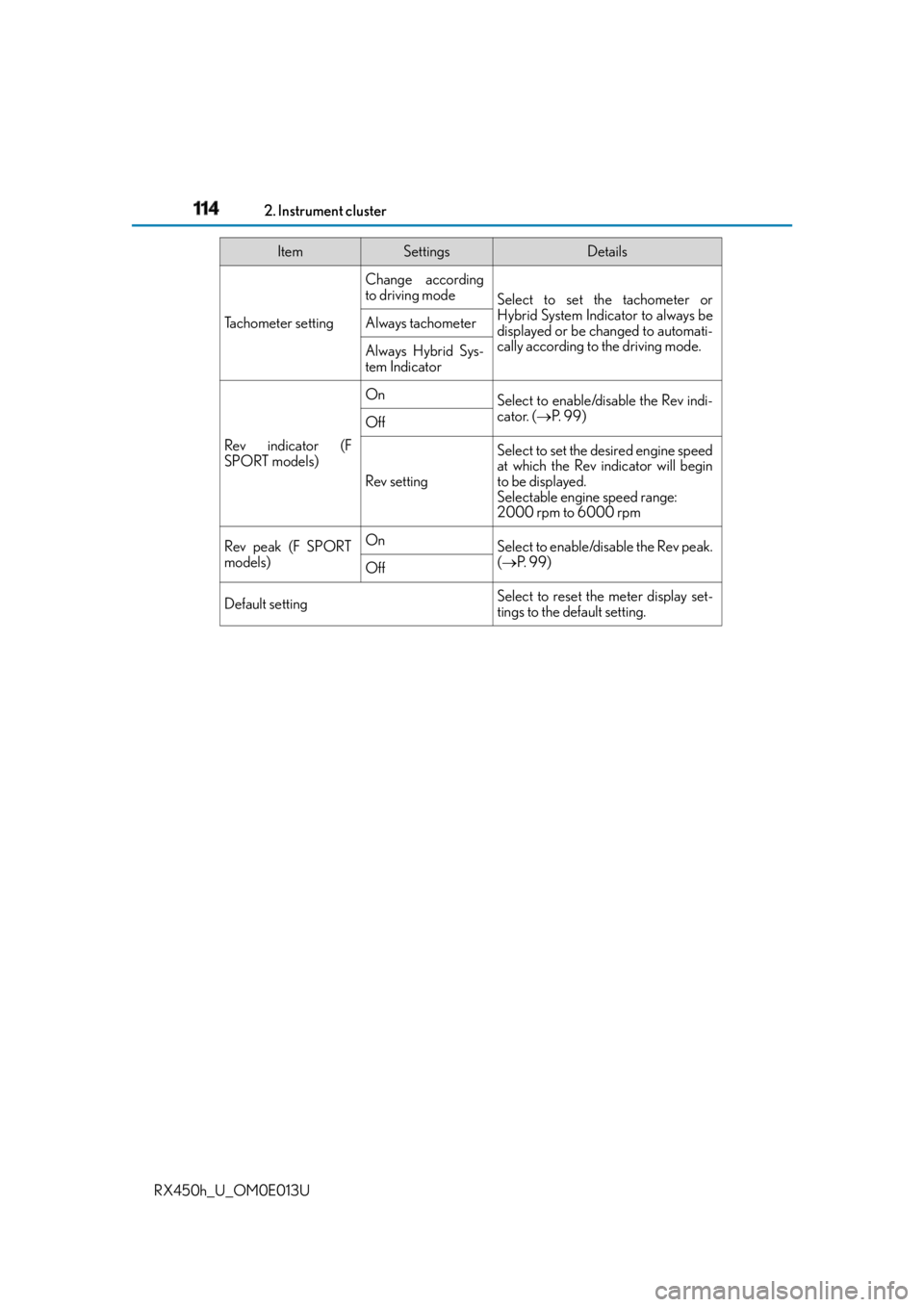
RX450h_U_OM0E013U Tachometer setting Change according
to driving mode
Select to set the tachometer or
Hybrid System Indicator to always be
displayed or be changed to automati-
cally according to the driving mode.Always tachometer
Always Hybrid Sys-
tem Indicator
Rev indicator (F
SPORT models) On
Select to enable/disable the Rev indi-
cator. ( P. 99)
Off
Rev setting Select to set the desired engine speed
at which the Rev indicator will begin
to be displayed.
Selectable engine speed range:
2000 rpm to 6000 rpm
Rev peak (F SPORT
models) On
Select to enable/disable the Rev peak.
( P. 99)
Off
Default setting Select to reset the meter display set-
tings to the default setting.Item Settings Details
Page 116 of 660

116 2. Instrument cluster
RX450h_U_OM0E013U Displays suggestions to the driver in the following situations. To select a response
to a displayed suggestion, use the meter control switches. The suggestion function can be turn ed on/off. (Customizable features: P. 6 0 7 )■
Suggestion to enable the power back door
If the power back door system is disabled (setting on set to off) and the
power back door switch on the instru ment panel is operated, a suggestion
message will be displayed asking if yo u wish to enable the power back door
system. To enable the power back door system, select “Yes”. After enabling the power back door syst em, press the power back door switch
again to open or close the power back door.■
Suggestion to turn off the headlights
If the headlights are left on for a certain amount of time after the power switch
has been turned off, a suggestion message will be displayed asking if you wish
to turn the headlights off. To turn the headlights off, select “Yes”.If a front door is opened after the power sw itch is turned off, this suggestion mes-
sage will not be displayed.■
Background color of the indicator/shift position display area (except F SPORT models)
The background color of the indicator/shift position display area is changed according to
the driving mode as follows ( P. 377):●
Eco drive mode: Blue ●
Sport mode: Red ■
G-force display (if equipped) ●
The G-force values may not be zero even when the vehicle is parked, such as when it is
parked on an incline. ●
Depending on the vehicle usage conditions, the brake fluid pressure display may not
reach its maximum reading even though the brake pedal is fully depressed.●
If a 12-volt battery terminal is disconnected and reconnected, the steering amount dis-
play may be disabled temporarily. After driv ing the vehicle for a while, the display will
be enabled. ■
Suspension of the settings display ●
Some settings cannot be changed while driv ing. When changing settings, park the
vehicle in a safe place. ●
If a warning message is displayed, operation of the settings displa y will be suspended.Suggestion function
Page 339 of 660
3394-5. Using the driving support systems
4
Driving
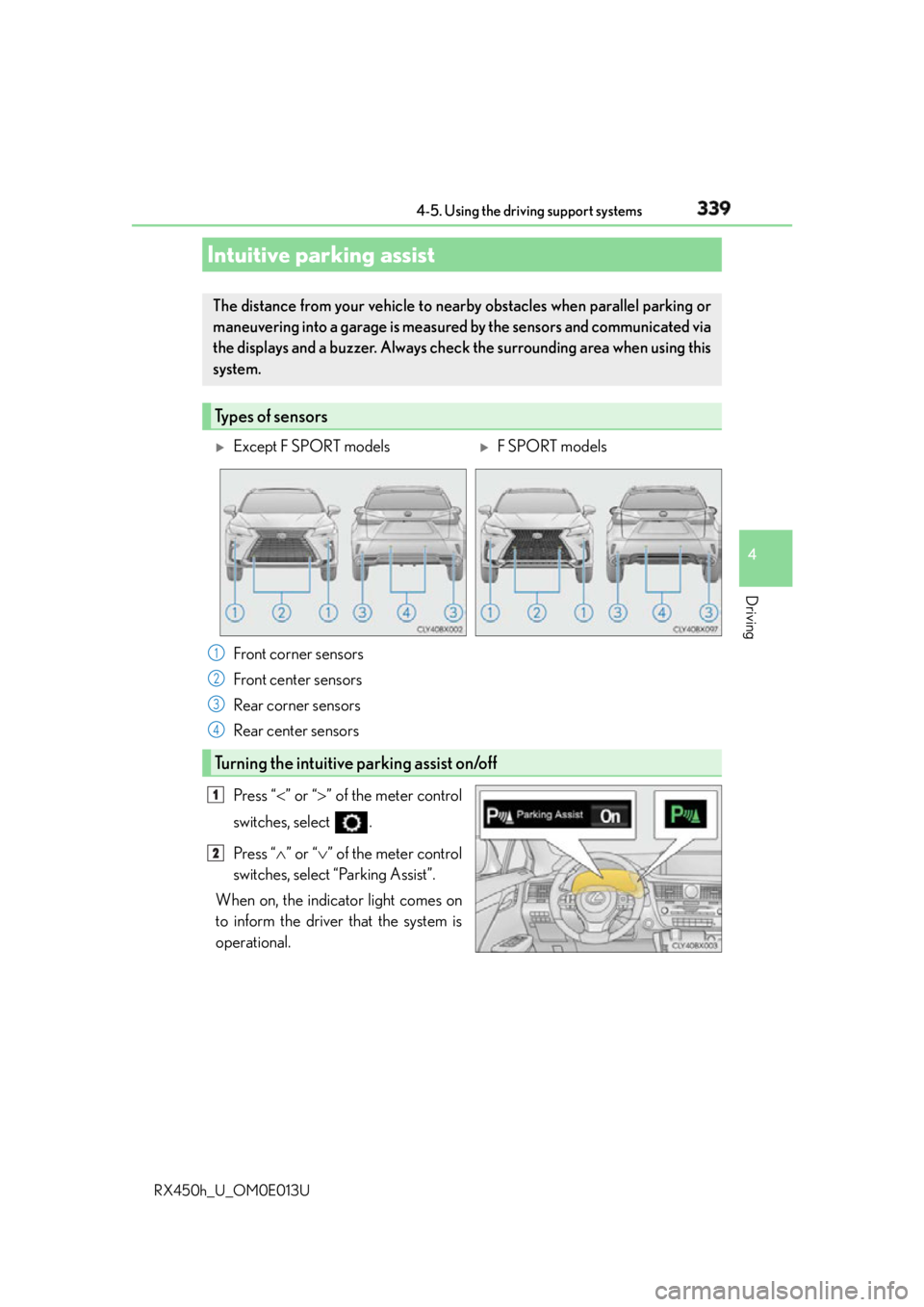
RX450h_U_OM0E013U Press “ ” or “ ” of the meter control
switches, select .
Press “ ” or “ ” of the meter control
switches, select “Parking Assist”.
When on, the indicator light comes on
to inform the driver that the system is
operational.Intuitive parking assist The distance from your vehicle to near by obstacles when parallel parking or
maneuvering into a garage is measure d by the sensors and communicated via
the displays and a buzzer. Always chec k the surrounding area when using this
system.
Types of sensors
Except F SPORT models
F SPORT models
Front corner sensors
Front center sensors
Rear corner sensors
Rear center sensors
Turning the intuitive parking assist on/off 1
2
3
4
1
2
Page 377 of 660
3774-5. Using the driving support systems
4
Driving
RX450h_U_OM0E013U
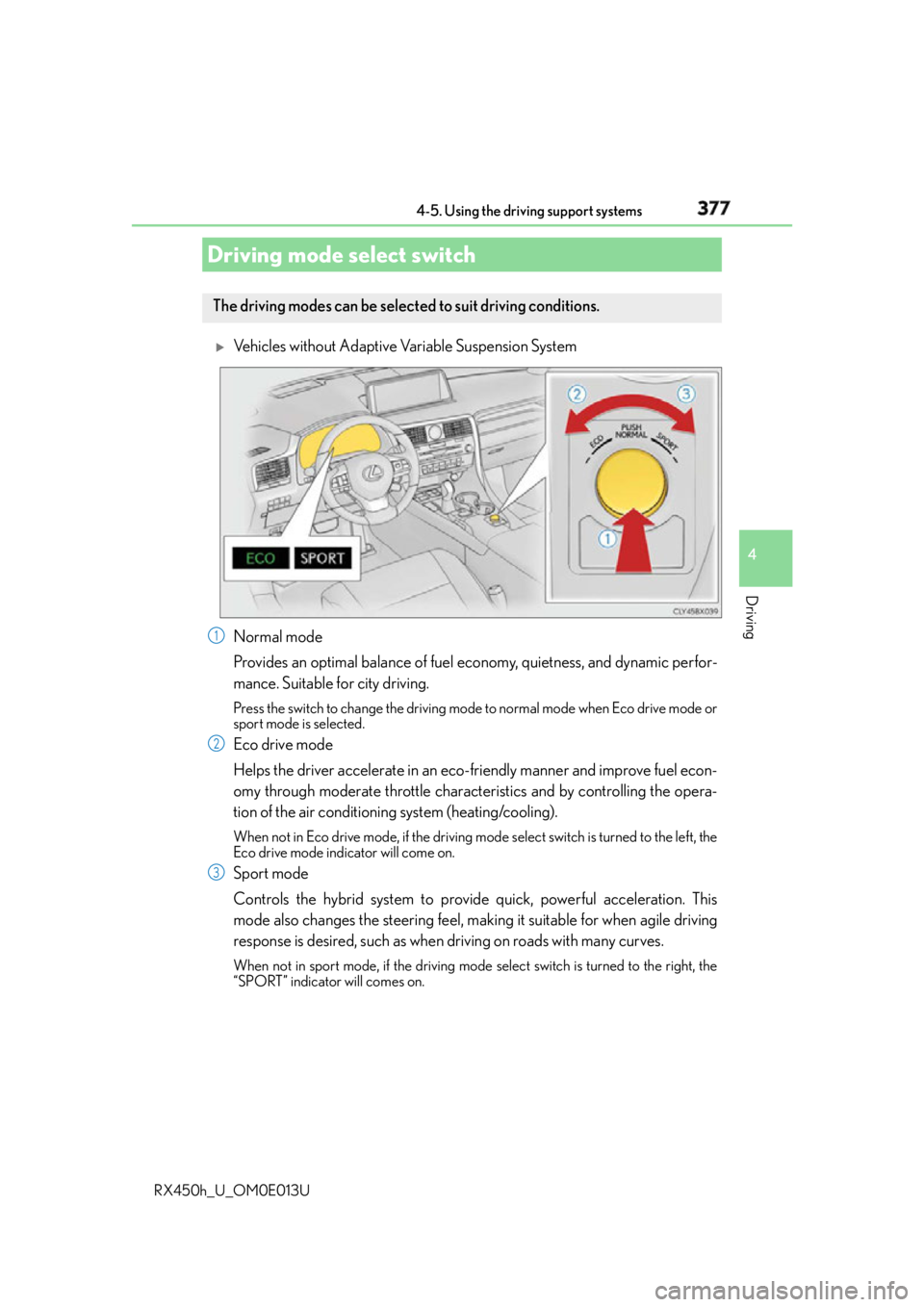
Vehicles without Adaptive Variable Suspension System
Normal mode
Provides an optimal balance of fuel economy, quietness, and dynamic perfor-
mance. Suitable for city driving. Press the switch to change the driving mode to normal mode when Eco drive mode or
sport mode is selected.
Eco drive mode
Helps the driver accelerate in an eco- friendly manner and improve fuel econ-
omy through moderate throttle characteristics and by controlling the opera-
tion of the air conditioning system (heating/cooling). When not in Eco drive mode, if the driving mode select switch is tu rned to the left, the
Eco drive mode indicator will come on.
Sport mode
Controls the hybrid system to provide quick, powerful acceleration. This
mode also changes the steering feel, maki ng it suitable for when agile driving
response is desired, such as when driving on roads with many curves.When not in sport mode, if the driving mode select switch is turned to the right, the
“SPORT” indicator will comes on.Driving mode select switch The driving modes can be selected to suit driving conditions.
1
2
3
Page 378 of 660
378 4-5. Using the driving support systems
RX450h_U_OM0E013U
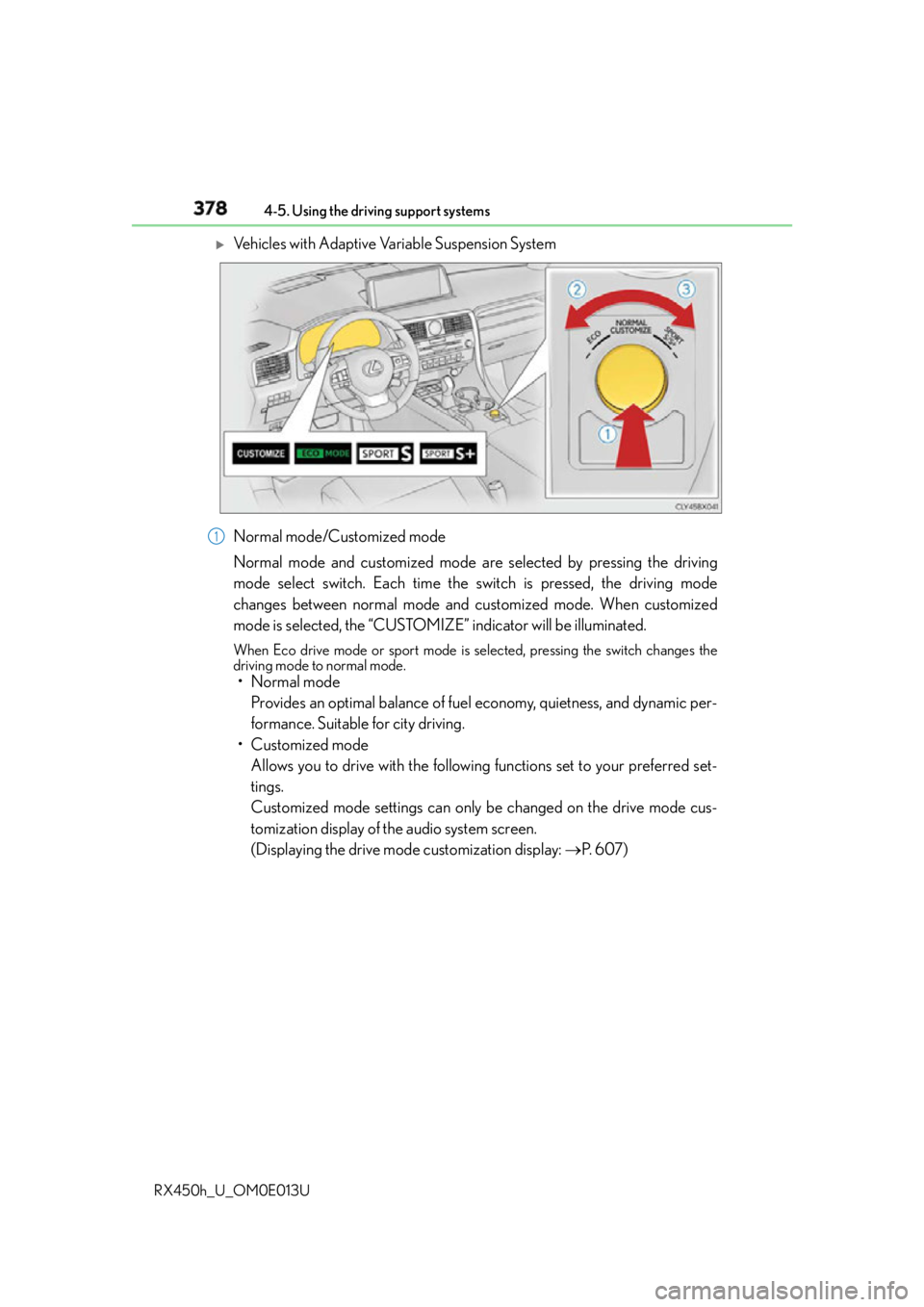
Vehicles with Adaptive Variable Suspension System
Normal mode/Customized mode
Normal mode and customized mode are selected by pressing the driving
mode select switch. Each time the switch is pressed, the driving mode
changes between normal mode and customized mode. When customized
mode is selected, the “CUSTOMIZE” indicator will be illuminated. When Eco drive mode or sport mode is se lected, pressing the switch changes the
driving mode to normal mode.
• Normal mode
Provides an optimal balance of fuel economy, quietness, and dynamic per-
formance. Suitable for city driving.
• Customized mode
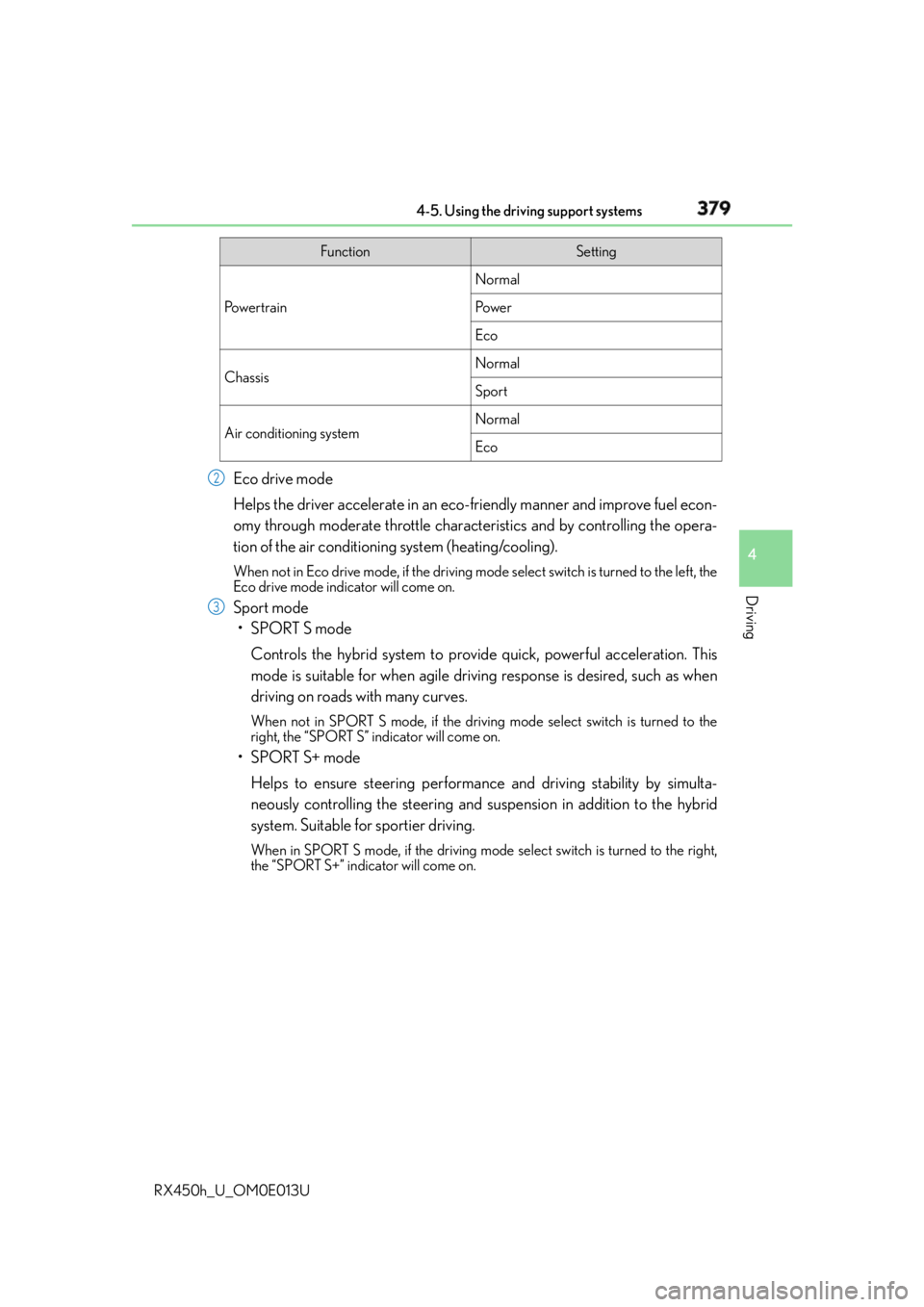
Allows you to drive with the following functions set to your preferred set-
tings.
Customized mode settings can only be changed on the drive mode cus-
tomization display of the audio system screen.
(Displaying the drive mode customization display: P. 6 0 7 )1
Page 379 of 660
3794-5. Using the driving support systems
4
Driving
RX450h_U_OM0E013U Eco drive mode
Helps the driver accelerate in an eco- friendly manner and improve fuel econ-
omy through moderate throttle characteristics and by controlling the opera-
tion of the air conditioning system (heating/cooling). When not in Eco drive mode, if the driving mode select switch is tu rned to the left, the
Eco drive mode indicator will come on.
Sport mode
•SPORT S mode
Controls the hybrid system to provide quick, powerful acceleration. This
mode is suitable for when agile drivin g response is desired, such as when
driving on roads with many curves. When not in SPORT S mode, if the driving mode select switch is turned to the
right, the “SPORT S” indicator will come on.
•SPORT S+ mode
Helps to ensure steering performanc e and driving stability by simulta-
neously controlling the steering and su spension in addition to the hybrid
system. Suitable for sportier driving. When in SPORT S mode, if the driving mode select switch is turned to the right,
the “SPORT S+” indicator will come on. Function Setting
Po w e r t r a i n Normal
Po w e r
Eco
Chassis Normal
Sport
Air conditioning system Normal
Eco2
3
Page 380 of 660

380 4-5. Using the driving support systems
RX450h_U_OM0E013U ■
Operation of the air conditioning system in Eco drive mode
Eco drive mode controls the heating/cooling operations and fan speed of the air condi-
tioning system to enhance fuel efficiency. To improve air conditioning performance,
adjust the fan speed or turn off Eco drive mode. ■
Automatic deactivation of sport mode and customized mode
If the power switch is turned off after driv ing in sport mode or customized mode, the
drive mode will be changed to normal mode. ■
Driving mode pop-up display (12.3-inch display only)
When the driving mode is changed, the selected driving mode will be temporarily dis-
played on the side display. ( P. 4 0 2 )
Page 382 of 660

382 4-5. Using the driving support systems
RX450h_U_OM0E013U ◆ E-Four (AWD models)
Electronic On-Demand AWD system. Automatically switches from front-
wheel drive to all-wheel drive (AWD) according to the driving conditions,
helping to ensure reliable handling and stability. Examples of conditions where
the system will switch to AWD are when cornering, going uphill, starting off or
accelerating, and when the road surface is slippery due to snow, rain, etc.
◆ Adaptive Variable Suspension System (if equipped)
Controls the damping force of the shock absorber of each wheel according to
the road and driving conditions, helping achieve a comfortable ride, excellent
driveability and a high level of stability.
If SPORT S+ mode is selected using the driving mode select switch, the
damping force will become more su itable for sporty driving. ( P. 3 7 8 )
◆ VDIM (Vehicle Dynamics Integrated Management)
Provides integrated control of the ABS, brake assist, TRAC, VSC, hill-start
assist control, and EPS systems
Helps to maintain vehicle stability when swerving on slippery road surfaces by
controlling the brakes and hybrid system output
◆ Trailer Sway Control
Helps the driver to control trailer sway by selectively applying brake pressure
for individual wheels and reducing dr iving torque when trailer sway is
detected.
Trailer Sway Control is part of the VSC system and will not operate if VSC
turned off or experi ences a malfunction.
Page 387 of 660

387
4
Driving
RX450h_U_OM0E013U 4-6. Driving tips
◆ Using Eco drive mode
When using Eco drive mode, the torq ue corresponding to the accelerator
pedal depression amount can be generate d more smoothly than it is in normal
conditions. In addition, the operation of the air conditioning system (heat-
ing/cooling) will be minimized, improving the fuel economy. ( P. 3 7 7 )
◆ Use of Hybrid System Indicator
The Eco-friendly driving is possible by keeping the indicator needle (except F
SPORT models) or bar display (F SPOR T models) of Hybrid System Indicator
within Eco area. ( P. 100)
◆ Shift lever operation
Shift the shift lever to D when stopped at a traffic light, or driving in heavy traf-
fic, etc. Shift the shift lever to P when parking. When using the N, there is no
positive effect on fuel consumption. In the N, the gasoline engine operates but
electricity cannot be generated. Also, wh en using the air conditioning system,
etc., the hybrid battery (traction battery) power is consumed.
◆ Accelerator pedal/brake pedal operation ●
Drive your vehicle smoothly. Avoid ab rupt acceleration and deceleration.
Gradual acceleration and deceleration will make more effective use of the
electric motor (traction motor) wi thout having to use gasoline engine
power. ●
Avoid repeated acceleration. Repeated acceleration consumes hybrid bat-
tery (traction battery) power, resulting in poor fuel consumption. Battery
power can be restored by driving with the accelerator pedal slightly
released.
◆ When braking
Make sure to operate the brakes gently and in a timely manner. A greater
amount of electrical energy can be regenerated when slowing down.Hybrid vehicle driving tips For economical and ecological driving, pay attention to the following points:
Page 533 of 660
5337-2. Steps to take in an emergency
7
When trouble arises
RX450h_U_OM0E013U WA R N I N G
Observe the following precautions.
Failure to do so may result in death or serious injury. ■
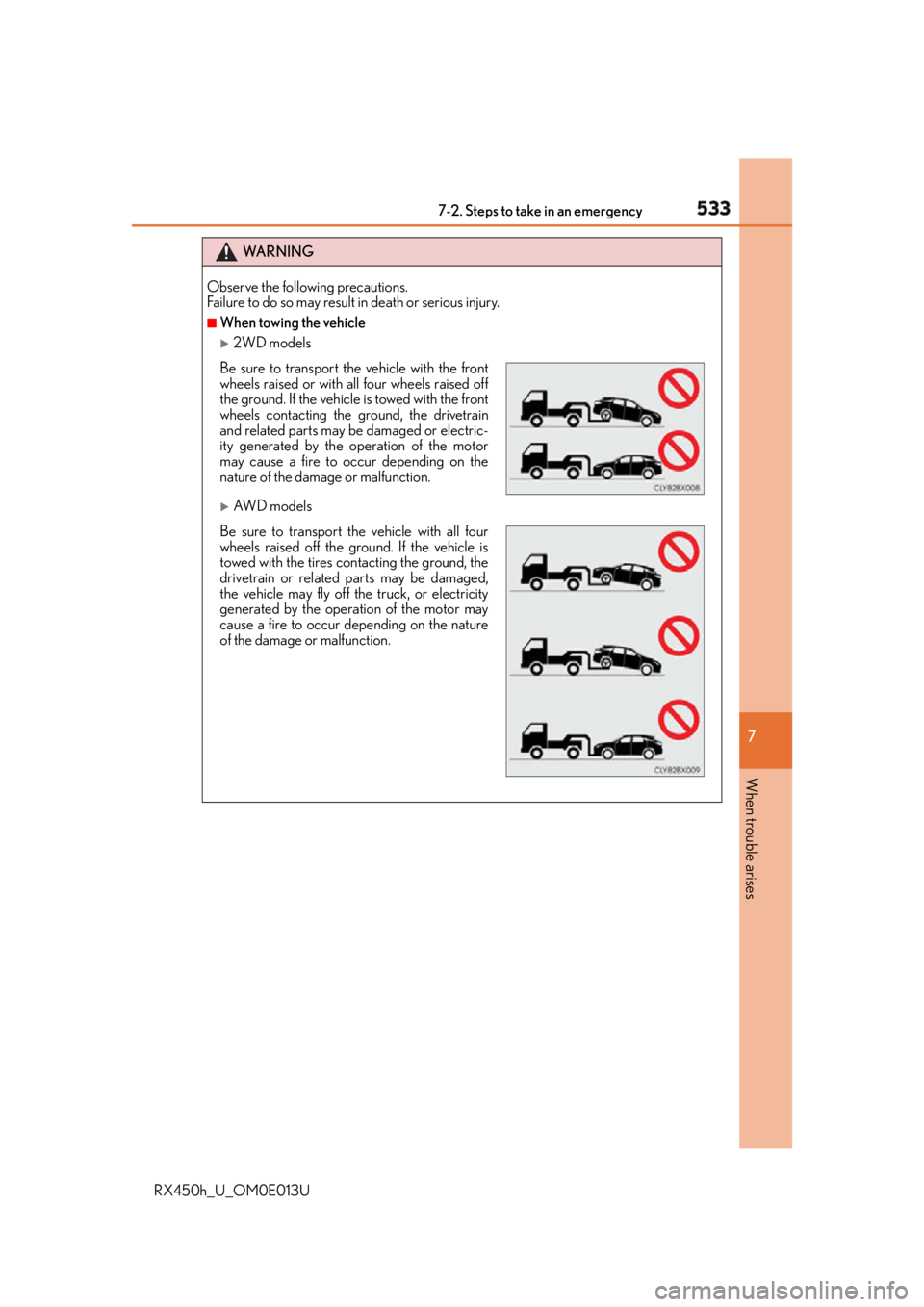
When towing the vehicle
2WD models
AW D m o d e l sBe sure to transport the vehicle with the front
wheels raised or with all four wheels raised off
the ground. If the vehicle is towed with the front
wheels contacting the ground, the drivetrain
and related parts may be damaged or electric-
ity generated by the operation of the motor
may cause a fire to occur depending on the
nature of the damage or malfunction.
Be sure to transport the vehicle with all four
wheels raised off the ground. If the vehicle is
towed with the tires contacting the ground, the
drivetrain or related parts may be damaged,
the vehicle may fly off the truck, or electricity
generated by the operation of the motor may
cause a fire to occur depending on the nature
of the damage or malfunction.