steering LEXUS RX450h 2016 User Guide
[x] Cancel search | Manufacturer: LEXUS, Model Year: 2016, Model line: RX450H, Model: LEXUS RX450H 2016Pages: 660, PDF Size: 10.15 MB
Page 46 of 660
46 1-1. For safe use
RX450h_U_OM0E013U ■
If the SRS airbags deploy (inflate) ●
Slight abrasions, burns, bruising etc., may be sustained from SRS airbags, due to the
extremely high speed deployment (inflation) by hot gases. ●
A loud noise and white powder will be emitted. ●
Parts of the airbag module (steering wheel hub, airbag cover and inflator) as well as the
front seats, parts of th e front and rear pillars, and roof side rails, may be hot for several
minutes. The airbag itself may also be hot. ●
The windshield may crack. ●
For Lexus Enform Safety Connect subscribers, if the SRS airb ags deploy or in the event
of a severe rear-end collision, the system is designed to send an emergency call to the
response center, notifying them of the vehicl e’s location (without needing to push the
“SOS” button) and an agent will attempt to speak with the occupants to ascertain the
level of emergency and assistance required . If the occupants are unable to communi-
cate, the agent automatically treats the call as an emergency and helps to dispatch the
necessary emergency services. ( P. 4 5 2 )■
SRS airbag deployment conditions (SRS front airbags) ●
The SRS front airbags will deploy in the event of an impact that exceeds the set threshold
level (the level of force corresponding to an approximately 12-18 mph [20-30 km/h]
frontal collision with a fixed wall that does not move or deform).
However, this threshold velocity will be considerably higher in the following situations:
• If the vehicle strikes an object, such as a parked vehicle or sign pole, which can move
or deform on impact
• If the vehicle is involved in an underride collision, such as a collision in which the
front of the vehicle “underrides”, or goes under, the bed of a truck●
Depending on the type of collision, it is possib le that only the seat belt pretensioners will
activate. ●
The SRS front airbags for the front passenger will not activate if there is no passenger
sitting in the front passenger seat. However, the SRS front airbags for the front passen-
ger may deploy if luggage is put in the seat, even if the se at is unoccupied. ( P. 5 1 )●
The SRS seat cushion airbag on the front passenger seat will not operate if the occu-
pant is not wearing a seat belt. ■
SRS airbag deployment conditions (S RS side and curtain shield airbags)●
The SRS side and curtain shield airbags wi ll deploy in the even t of an impact that
exceeds the set threshol d level (the level of force corresponding to the impact force
produced by an approximately 3300 lb. [1 500 kg] vehicle colliding with the vehicle
cabin from a direction perpendicular to the vehicle orientation at an approximate
speed of 12 -18 mph [20 -30 km/h]). ●
The SRS curtain shield airbags will deploy in the event of vehicle rollover. ●
The SRS side and curtain shield airbags will deploy in the event of a severe frontal colli-
sion.
Page 49 of 660
491-1. For safe use
1
For safety and security
RX450h_U_OM0E013U ■
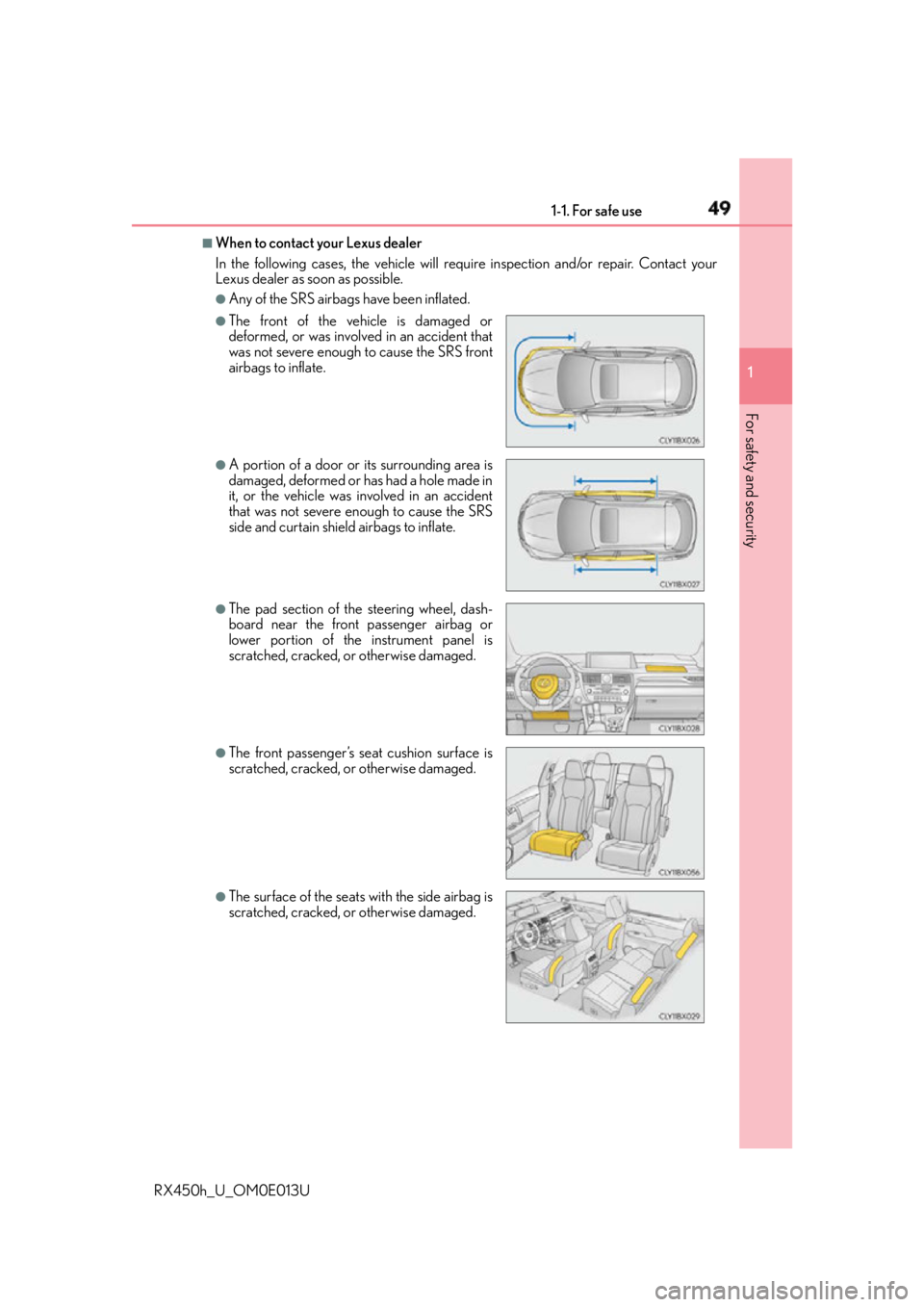
When to contact your Lexus dealer
In the following cases, the vehicle will re quire inspection and/or repair. Contact your
Lexus dealer as soon as possible. ●
Any of the SRS airbags have been inflated.●
The front of the vehicle is damaged or
deformed, or was involv ed in an accident that
was not severe enough to cause the SRS front
airbags to inflate. ●
A portion of a door or its surrounding area is
damaged, deformed or has had a hole made in
it, or the vehicle was in volved in an accident
that was not severe enough to cause the SRS
side and curtain shield airbags to inflate. ●
The pad section of the steering wheel, dash-
board near the front passenger airbag or
lower portion of the instrument panel is
scratched, cracked, or otherwise damaged. ●
The front passenger’s seat cushion surface is
scratched, cracked, or otherwise damaged.
●
The surface of the seats with the side airbag is
scratched, cracked, or otherwise damaged.
Page 93 of 660
932. Instrument cluster
2
Instrument cluster
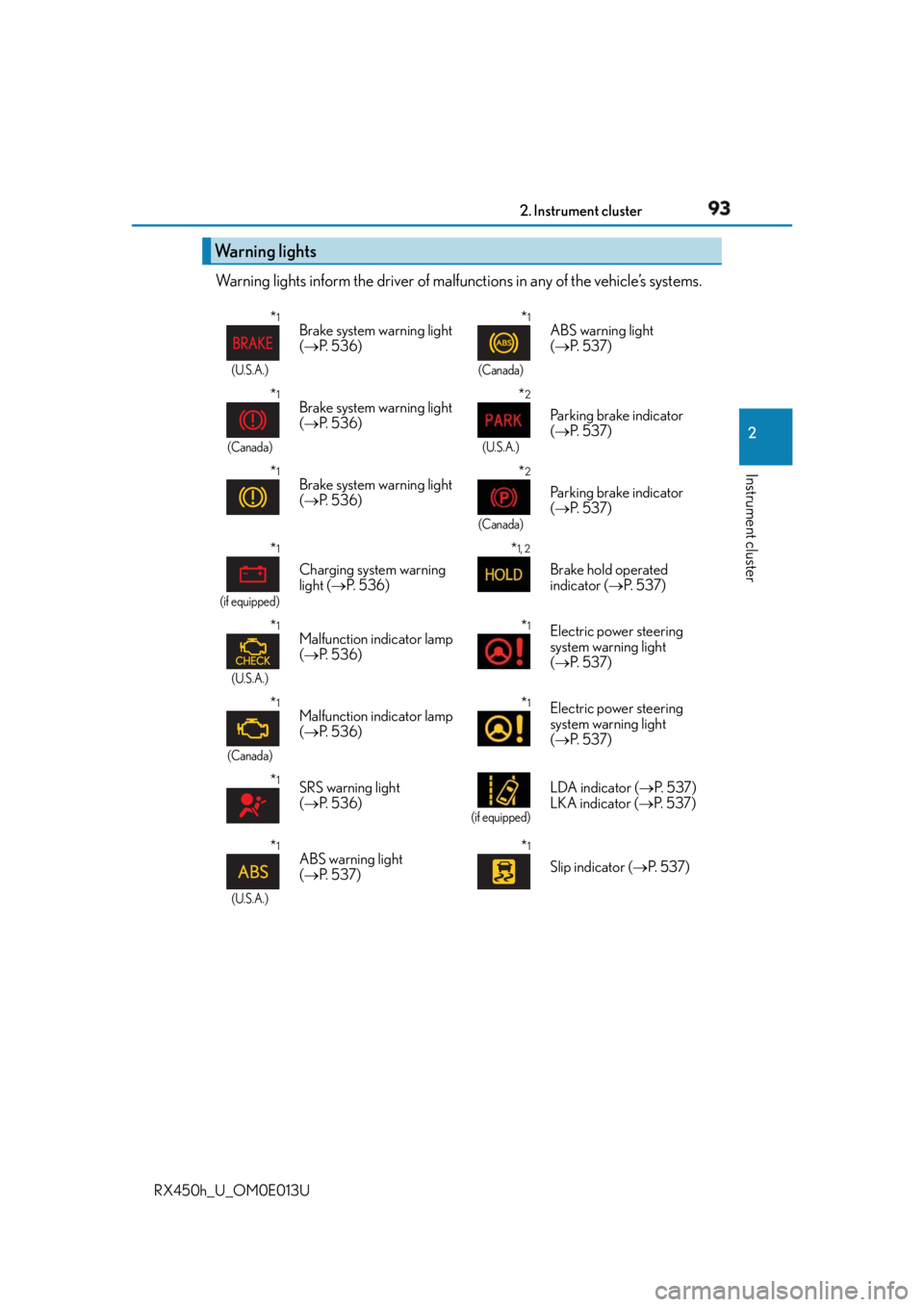
RX450h_U_OM0E013U Warning lights inform the driver of malfun ctions in any of the vehicle’s systems.
Warning lights * 1
(U.S.A.)
Brake system warning light
( P. 5 3 6 )
* 1
(Canada)
ABS warning light
( P. 5 3 7 )
* 1
(Canada)
Brake system warning light
( P. 5 3 6 )
* 2
(U.S.A.)
Parking brake indicator
( P. 5 3 7 )
* 1
Brake system warning light
( P. 5 3 6 )
* 2
(Canada)
Parking brake indicator
( P. 5 3 7 )
* 1
(if equipped)
Charging system warning
light ( P. 5 3 6 ) * 1, 2
Brake hold operated
indicator ( P. 5 3 7 )
* 1
(U.S.A.)
Malfunction indicator lamp
( P. 5 3 6 ) * 1
Electric power steering
system warning light
( P. 5 3 7 )
* 1
(Canada)
Malfunction indicator lamp
( P. 5 3 6 ) * 1
Electric power steering
system warning light
( P. 5 3 7 )
* 1
SRS warning light
( P. 5 3 6 ) (if equipped)
LDA indicator ( P. 5 3 7 )
LKA indicator ( P. 5 3 7 )
* 1
(U.S.A.)
ABS warning light
( P. 5 3 7 ) * 1
Slip indicator ( P. 5 3 7 )
Page 105 of 660
1052. Instrument cluster
2
Instrument cluster
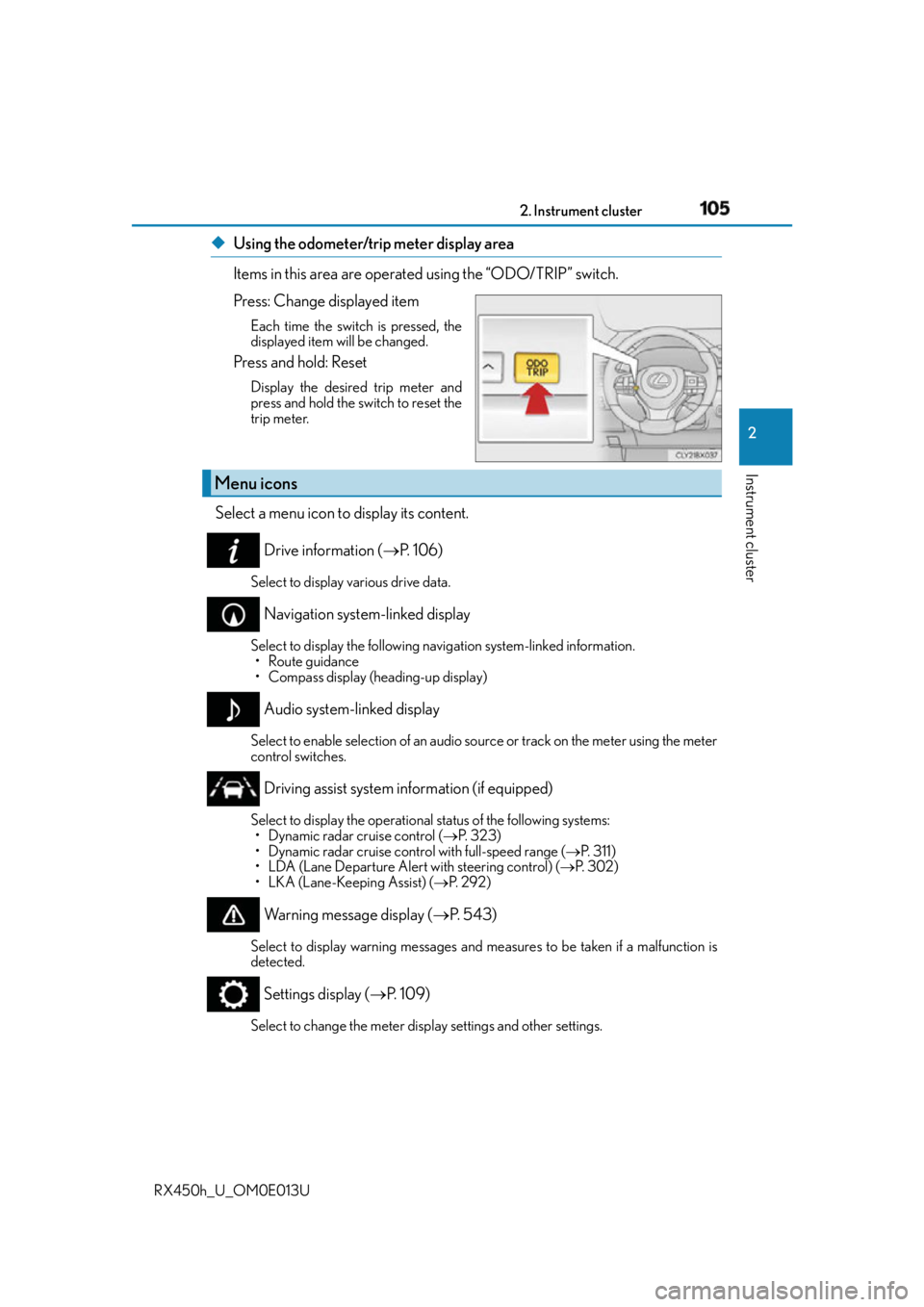
RX450h_U_OM0E013U ◆ Using the odometer/trip meter display area
Items in this area are operated using the “ODO/TRIP” switch.
Press: Change displayed item Each time the switch is pressed, the
displayed item will be changed.
Press and hold: Reset Display the desired trip meter and
press and hold the switch to reset the
trip meter.
Select a menu icon to display its content.
Drive information ( P. 1 0 6 )Select to display various drive data.
Navigation system-linked display Select to display the following na vigation system-linked information.
• Route guidance
• Compass display (heading-up display)
Audio system-linked display Select to enable selection of an audio so urce or track on the meter using the meter
control switches.
Driving assist system information (if equipped) Select to display the operational status of the following systems:
• Dynamic radar cruise control ( P. 323)
• Dynamic radar cruise control with full-speed range ( P. 3 1 1 )
• LDA (Lane Departure Alert with steering control) ( P. 3 0 2 )
• LKA (Lane-Keeping Assist) ( P. 2 9 2 )
Warning message display ( P. 5 4 3 )Select to display warning me ssages and measures to be taken if a malfunction is
detected.
Settings display ( P. 1 0 9 )
Select to change the meter display settings and other settings.Menu icons
Page 107 of 660

1072. Instrument cluster
2
Instrument cluster
RX450h_U_OM0E013U * 1
: Resetting: P. 1 0 4
* 2
: Use the displayed fuel consumption as a reference.
* 3
: When only a small amount of fuel is added to the tank, the display may not be
updated.
When refueling, turn the power switch off. If the vehicle is refueled without turning the
power switch off, the display may not be updated.
* 4
: This distance is computed based on your average fuel consumption. As a result, the
actual distance that can be driven may differ from that displayed.■
Energy monitor
P. 1 2 4■
Sway warning (if equipped)
Detects the sway of the vehicle within a lane, which is often associated with a
decrease in the driver’s attention level, and displays the decrease in attention
using a bar display.
The shorter the bar length, the more the driver may need to rest. This display is a part of the LDA (Lane Departure Alert with steering control)/LKA
(Lane-Keeping Assist) system. The displa y is enabled when the operating condi-
tions of the vehicle sway warning are met. ( P. 292, 302)■
AWD Control (if equipped)
Displays the driving force applie d to each wheel using segments.
The greater the number of segments displayed, the greater the driving force
applied.
Page 108 of 660
108 2. Instrument cluster
RX450h_U_OM0E013U ■
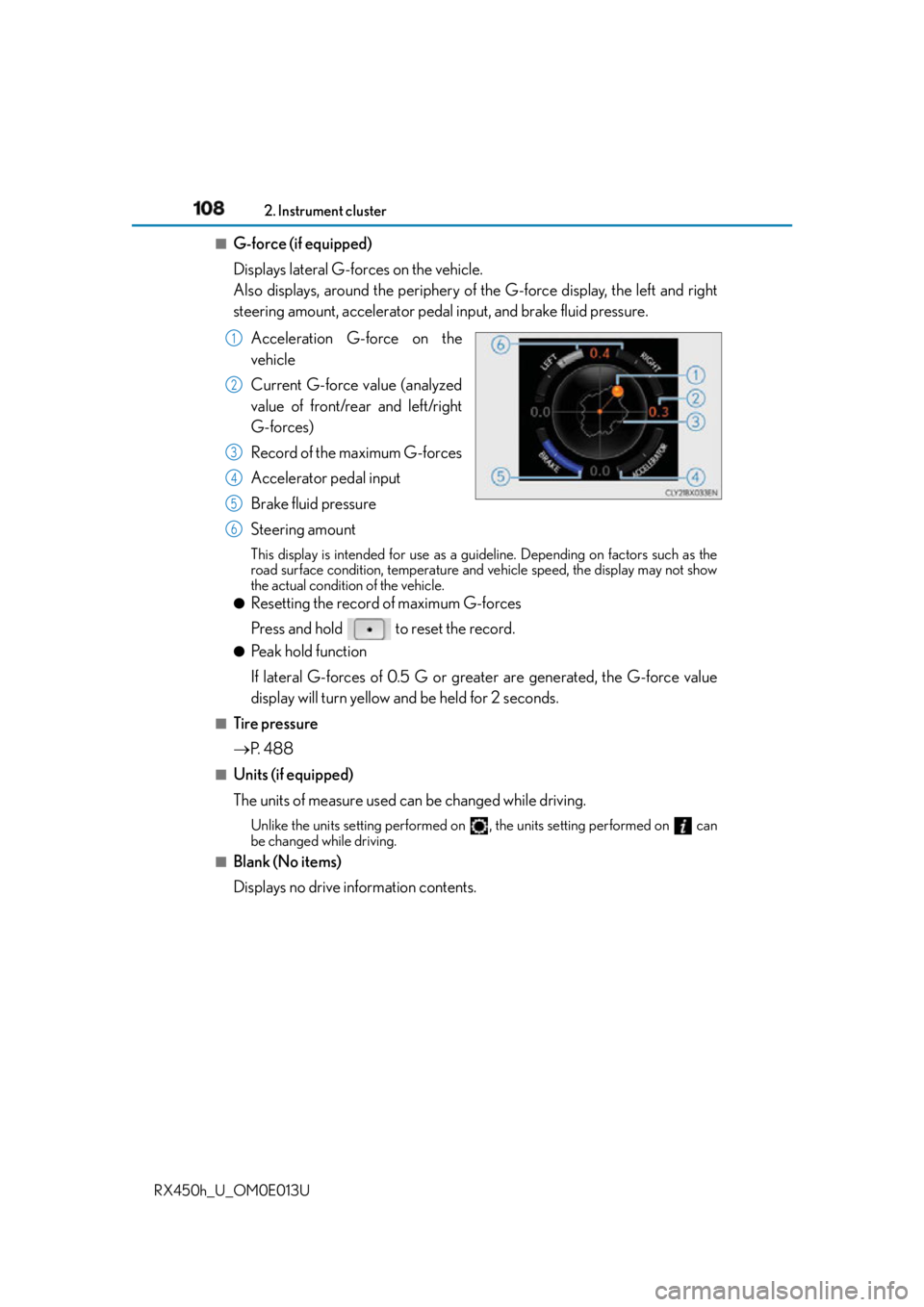
G-force (if equipped)
Displays lateral G-forces on the vehicle.
Also displays, around the periphery of the G-force display, the left and right
steering amount, accelerator pedal input, and brake fluid pressure.
Acceleration G-force on the
vehicle
Current G-force value (analyzed
value of front/rear and left/right
G-forces)
Record of the maximum G-forces
Accelerator pedal input
Brake fluid pressure
Steering amount This display is intended for use as a guid eline. Depending on factors such as the
road surface condition, temperature and vehicle speed, the display may not show
the actual condition of the vehicle. ●
Resetting the record of maximum G-forces
Press and hold to reset the record. ●
Peak hold function
If lateral G-forces of 0.5 G or greater are generated, the G-force value
display will turn yellow and be held for 2 seconds.■
Tire pressure
P. 4 8 8■
Units (if equipped)
The units of measure used can be changed while driving. Unlike the units setting performed on , the units setting performed on can
be changed while driving.■
Blank (No items)
Displays no drive information contents. 1
2
3
4
5
6
Page 109 of 660
1092. Instrument cluster
2
Instrument cluster
RX450h_U_OM0E013U ◆ Changing settings
Use the meter control switches on the steering wheel to change settings.
Press or to select .
Operate the switches to select a desired item.
Change the setting by referring to the message displayed on the screen.
◆ Setting items ■
LDA (Lane Departure Alert with steering control)/LKA (Lane-Keep-
ing Assist) (if equipped) ( P. 292, 302)
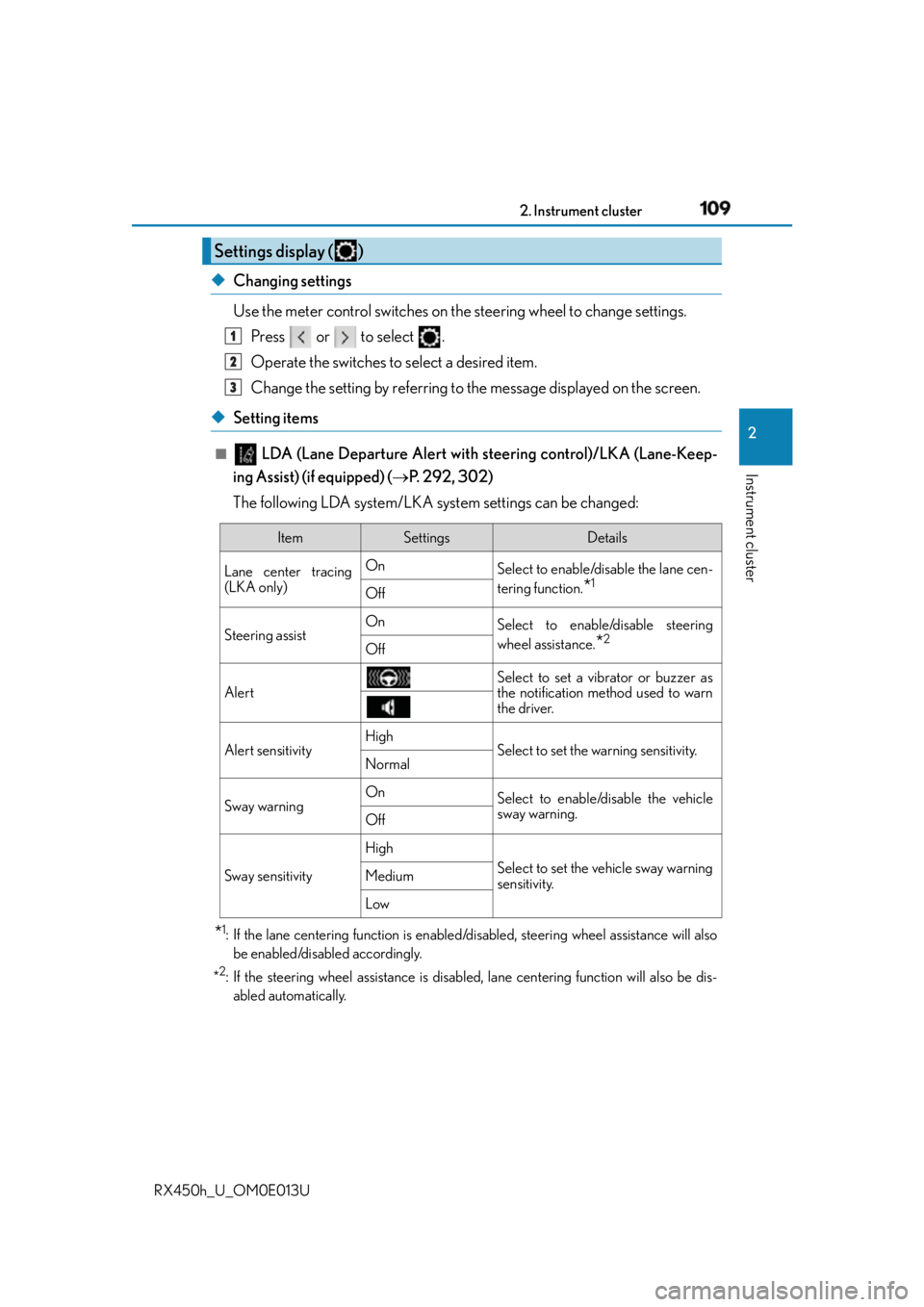
The following LDA system/LKA system settings can be changed:
* 1
: If the lane centering function is enabled/disabled, steeri ng wheel assistance will also
be enabled/disabled accordingly.
* 2
: If the steering wheel assistance is disabled, lane cent ering function will also be dis-
abled automatically.Settings display ( ) 1
2
3
Item Settings Details
Lane center tracing
(LKA only) On
Select to enable/dis able the lane cen-
tering function.
* 1
Off
Steering assist On
Select to enable/disable steering
wheel assistance.
* 2
Off
Alert Select to set a vibrator or buzzer as
the notification method used to warn
the driver.
Alert sensitivity High
Select to set the warning sensitivity.
Normal
Sway warning On
Select to enable/disable the vehicle
sway warning.
Off
Sway sensitivity High
Select to set the vehicle sway warning
sensitivity.Medium
Low
Page 116 of 660
116 2. Instrument cluster
RX450h_U_OM0E013U Displays suggestions to the driver in the following situations. To select a response
to a displayed suggestion, use the meter control switches. The suggestion function can be turn ed on/off. (Customizable features: P. 6 0 7 )■
Suggestion to enable the power back door
If the power back door system is disabled (setting on set to off) and the
power back door switch on the instru ment panel is operated, a suggestion
message will be displayed asking if yo u wish to enable the power back door
system. To enable the power back door system, select “Yes”. After enabling the power back door syst em, press the power back door switch
again to open or close the power back door.■
Suggestion to turn off the headlights
If the headlights are left on for a certain amount of time after the power switch
has been turned off, a suggestion message will be displayed asking if you wish
to turn the headlights off. To turn the headlights off, select “Yes”.If a front door is opened after the power sw itch is turned off, this suggestion mes-
sage will not be displayed.■
Background color of the indicator/shift position display area (except F SPORT models)
The background color of the indicator/shift position display area is changed according to
the driving mode as follows ( P. 377):●
Eco drive mode: Blue ●
Sport mode: Red ■
G-force display (if equipped) ●
The G-force values may not be zero even when the vehicle is parked, such as when it is
parked on an incline. ●
Depending on the vehicle usage conditions, the brake fluid pressure display may not
reach its maximum reading even though the brake pedal is fully depressed.●
If a 12-volt battery terminal is disconnected and reconnected, the steering amount dis-
play may be disabled temporarily. After driv ing the vehicle for a while, the display will
be enabled. ■
Suspension of the settings display ●
Some settings cannot be changed while driv ing. When changing settings, park the
vehicle in a safe place. ●
If a warning message is displayed, operation of the settings displa y will be suspended.Suggestion function
Page 118 of 660
118 2. Instrument cluster
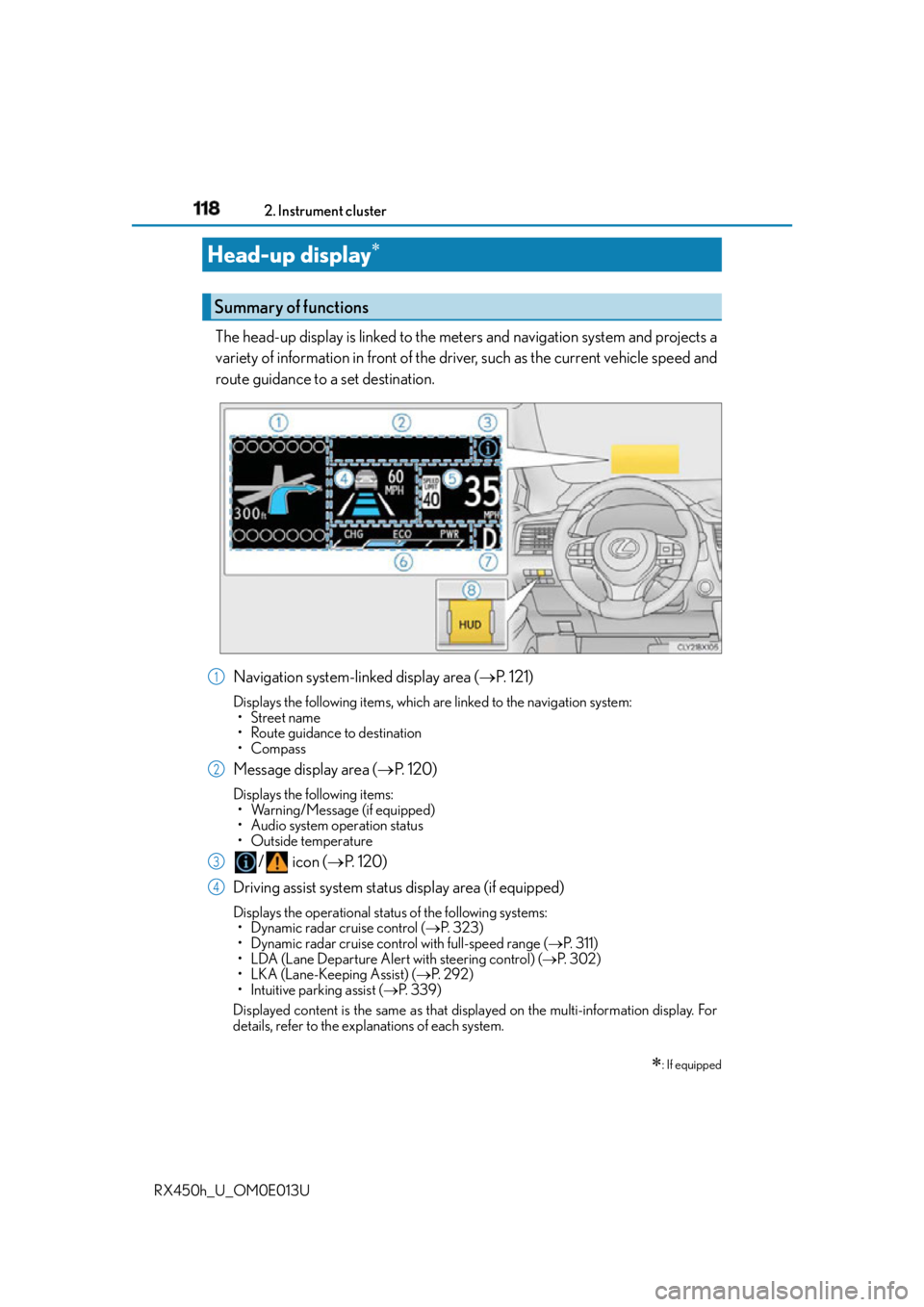
RX450h_U_OM0E013U The head-up display is linked to the meters and navigation system and projects a
variety of information in front of the driver, such as the current vehicle speed and
route guidance to a set destination.
Navigation system-linked display area ( P. 121)Displays the following items, which ar e linked to the navigation system:
• Street name
• Route guidance to destination
•Compass
Message display area ( P. 1 2 0 )Displays the following items:
• Warning/Message (if equipped)
• Audio system operation status
•Outside temperature
/ icon ( P. 1 2 0 )
Driving assist system status display area (if equipped) Displays the operational status of the following systems:
• Dynamic radar cruise control ( P. 323)
• Dynamic radar cruise control with full-speed range ( P. 3 1 1 )
• LDA (Lane Departure Alert with steering control) ( P. 3 0 2 )
• LKA (Lane-Keeping Assist) ( P. 2 9 2 )
• Intuitive parking assist ( P. 3 3 9 )
Displayed content is the same as that disp layed on the multi-information display. For
details, refer to the explanations of each system.Head-up display
: If equippedSummary of functions
1
2
3
4
Page 131 of 660
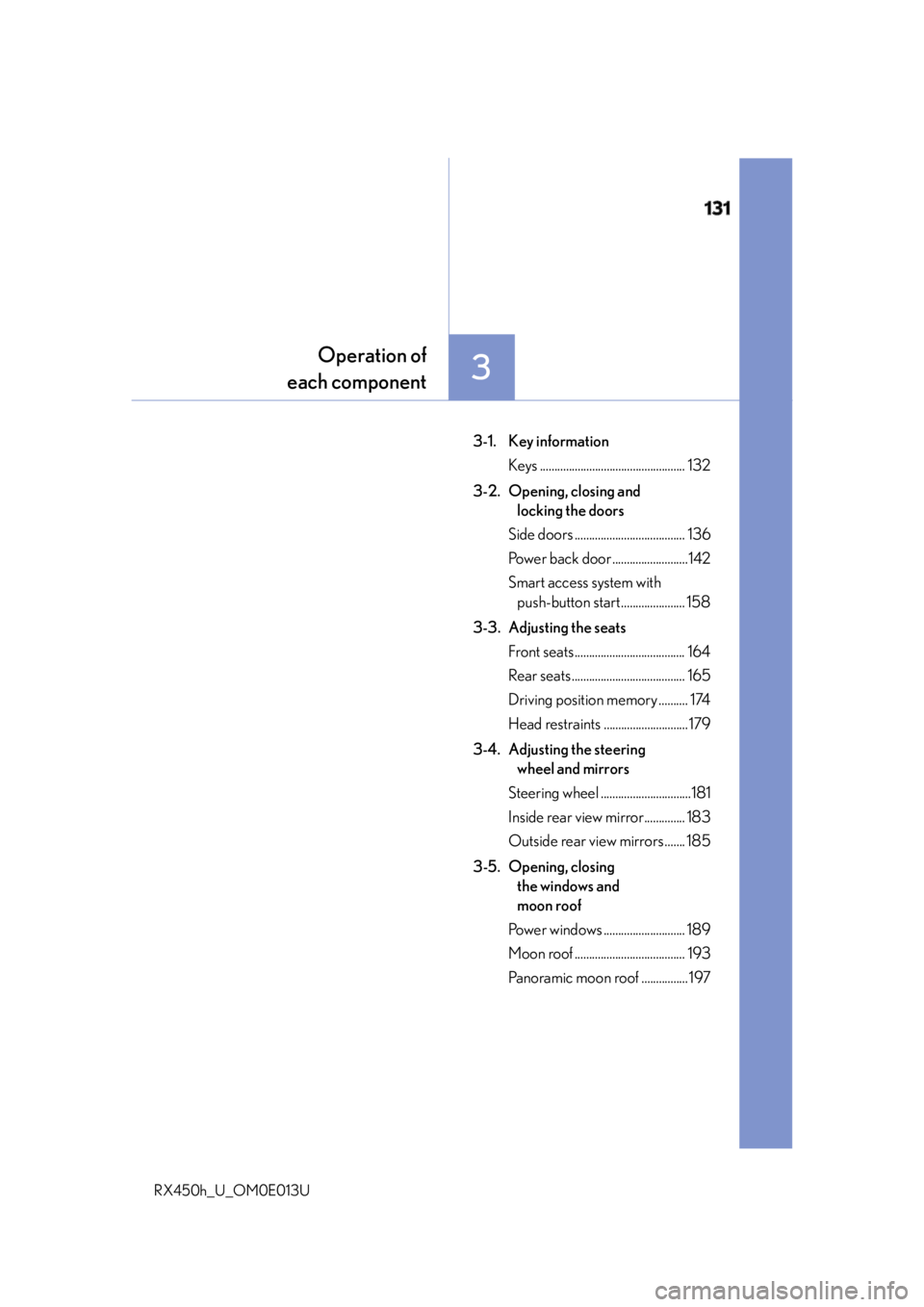
131
3 Operation of
each component
RX450h_U_OM0E013U 3-1. Key information
Keys .................................................. 132
3-2. Opening, closing and
locking the doors
Side doors ...................................... 136
Power back door ..........................142
Smart access system with
push-button start...................... 158
3-3. Adjusting the seats
Front seats ...................................... 164
Rear seats ....................................... 165
Driving position memory .......... 174
Head restraints .............................179
3-4. Adjusting the steering
wheel and mirrors
Steering wheel ...............................181
Inside rear view mirror.............. 183
Outside rear view mirrors ....... 185
3-5. Opening, closing
the windows and
moon roof
Power windows ............................ 189
Moon roof ...................................... 193
Panoramic moon roof ................ 197