wheel LEXUS RX450h 2016 User Guide
[x] Cancel search | Manufacturer: LEXUS, Model Year: 2016, Model line: RX450H, Model: LEXUS RX450H 2016Pages: 660, PDF Size: 10.15 MB
Page 77 of 660
771-3. Hybrid system
1
For safety and security
RX450h_U_OM0E013U ◆ When stopped/during start off
The gasoline engine stops* when the vehi cle is stopped. During start off, the
electric motor (traction mo tor) drives the vehicle. At slow speeds or when
traveling down a gentle slope, the engine is stopped* and the electric motor
(traction motor) is used.
When the shift lever is in N, the hybrid battery (traction battery) is not being
charged.
* : When the hybrid battery (traction battery) requires charging or the engine is warm-
ing up, etc., the gasoline engine will not automatically stop. ( P. 7 8 )
◆ During normal driving
The gasoline engine is predominantly used. The electric motor (traction
motor) charges the hybrid battery (traction battery) as necessary.
◆ When accelerating sharply
When the accelerator pedal is depressed heavily, the power of the hybrid bat-
tery (traction battery) is added to that of the gasoline engine via the electric
motor (traction motor).
◆ When braking (regenerative braking)
The wheels operate the electric motor (traction motor) as a power generator,
and the hybrid battery (tr action battery) is charged.
When the gasoline engine is off while driving, a sound is produced to warn
pedestrians, people riding bicycles or ot her people and vehicles in the surround-
ing area that the vehicle is approaching. The pitch of the sound varies according
to the vehicle speed. When the vehicle speed becomes approximately 15 mph
(25 km/h) or more, the notification sound turns off.Vehicle proximity notification system
Page 83 of 660
831-3. Hybrid system
1
For safety and security
RX450h_U_OM0E013U WA R N I N G ■
Road accident cautions
Observe the following precautions to reduce the risk of death or serious injury:●
Pull your vehicle off the road, shift the shift lever to P, apply the parking brake, and
turn the hybrid system off. ●
Do not touch the high voltage parts, cables and connectors. ●
If electric wires are exposed inside or ou tside your vehicle, an electric shock may
occur. Never touch exposed electric wires. ●
If a fluid leak occurs, do not touch the fluid as it may be strong alkaline electrolyte
from the hybrid battery (traction battery). If it comes into contact with your skin or
eyes, wash it off immediately with a large amount of water or, if possible, boric acid
solution. Seek immediate medical attention. ●
If a fire occurs in the hybrid vehicle, leave the vehicle as soon as possible. Never use a
fire extinguisher that is not meant for el ectric fires. Using even a small amount of
water may be dangerous. ●
If your vehicle needs to be towed, do so with front wheels (2WD models) or four
wheels (AWD models) raised. If the wheels connected to the electric motor (traction
motor) are on the ground when towing, the motor may continue to generate electric-
ity. This may cause a fire. ( P. 5 3 0 )●
Carefully inspect the ground under the vehicle. If you find that liquid has leaked onto
the ground, the fuel system may have been damaged. Leave the vehicle as soon as
possible.
Page 107 of 660

1072. Instrument cluster
2
Instrument cluster
RX450h_U_OM0E013U * 1
: Resetting: P. 1 0 4
* 2
: Use the displayed fuel consumption as a reference.
* 3
: When only a small amount of fuel is added to the tank, the display may not be
updated.
When refueling, turn the power switch off. If the vehicle is refueled without turning the
power switch off, the display may not be updated.
* 4
: This distance is computed based on your average fuel consumption. As a result, the
actual distance that can be driven may differ from that displayed.■
Energy monitor
P. 1 2 4■
Sway warning (if equipped)
Detects the sway of the vehicle within a lane, which is often associated with a
decrease in the driver’s attention level, and displays the decrease in attention
using a bar display.
The shorter the bar length, the more the driver may need to rest. This display is a part of the LDA (Lane Departure Alert with steering control)/LKA
(Lane-Keeping Assist) system. The displa y is enabled when the operating condi-
tions of the vehicle sway warning are met. ( P. 292, 302)■
AWD Control (if equipped)
Displays the driving force applie d to each wheel using segments.
The greater the number of segments displayed, the greater the driving force
applied.
Page 109 of 660
1092. Instrument cluster
2
Instrument cluster
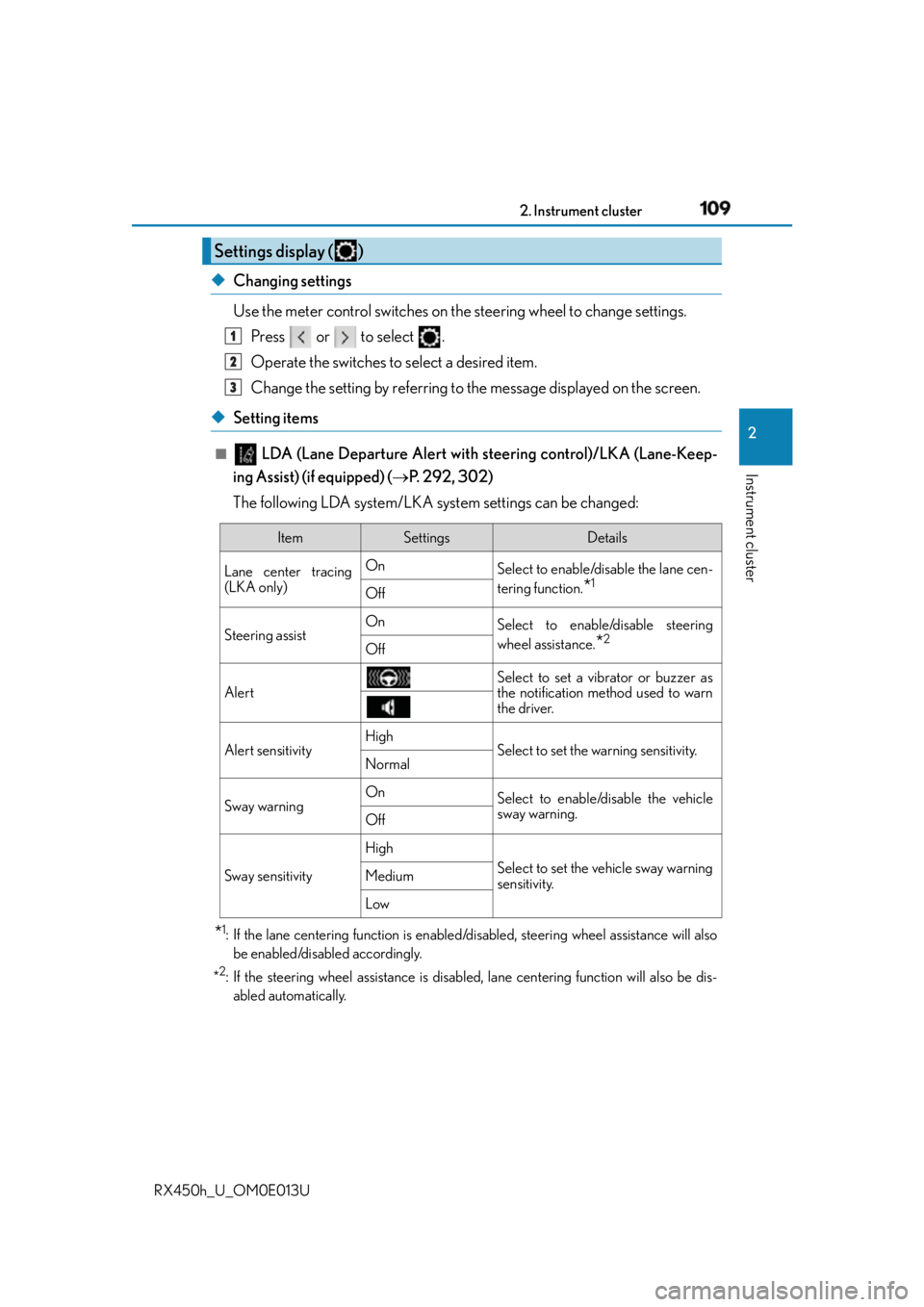
RX450h_U_OM0E013U ◆ Changing settings
Use the meter control switches on the steering wheel to change settings.
Press or to select .
Operate the switches to select a desired item.
Change the setting by referring to the message displayed on the screen.
◆ Setting items ■
LDA (Lane Departure Alert with steering control)/LKA (Lane-Keep-
ing Assist) (if equipped) ( P. 292, 302)
The following LDA system/LKA system settings can be changed:
* 1
: If the lane centering function is enabled/disabled, steeri ng wheel assistance will also
be enabled/disabled accordingly.
* 2
: If the steering wheel assistance is disabled, lane cent ering function will also be dis-
abled automatically.Settings display ( ) 1
2
3
Item Settings Details
Lane center tracing
(LKA only) On
Select to enable/dis able the lane cen-
tering function.
* 1
Off
Steering assist On
Select to enable/disable steering
wheel assistance.
* 2
Off
Alert Select to set a vibrator or buzzer as
the notification method used to warn
the driver.
Alert sensitivity High
Select to set the warning sensitivity.
Normal
Sway warning On
Select to enable/disable the vehicle
sway warning.
Off
Sway sensitivity High
Select to set the vehicle sway warning
sensitivity.Medium
Low
Page 131 of 660
131
3 Operation of
each component
RX450h_U_OM0E013U 3-1. Key information
Keys .................................................. 132
3-2. Opening, closing and
locking the doors
Side doors ...................................... 136
Power back door ..........................142
Smart access system with
push-button start...................... 158
3-3. Adjusting the seats
Front seats ...................................... 164
Rear seats ....................................... 165
Driving position memory .......... 174
Head restraints .............................179
3-4. Adjusting the steering
wheel and mirrors
Steering wheel ...............................181
Inside rear view mirror.............. 183
Outside rear view mirrors ....... 185
3-5. Opening, closing
the windows and
moon roof
Power windows ............................ 189
Moon roof ...................................... 193
Panoramic moon roof ................ 197
Page 164 of 660
164
RX450h_U_OM0E013U 3-3. Adjusting the seats
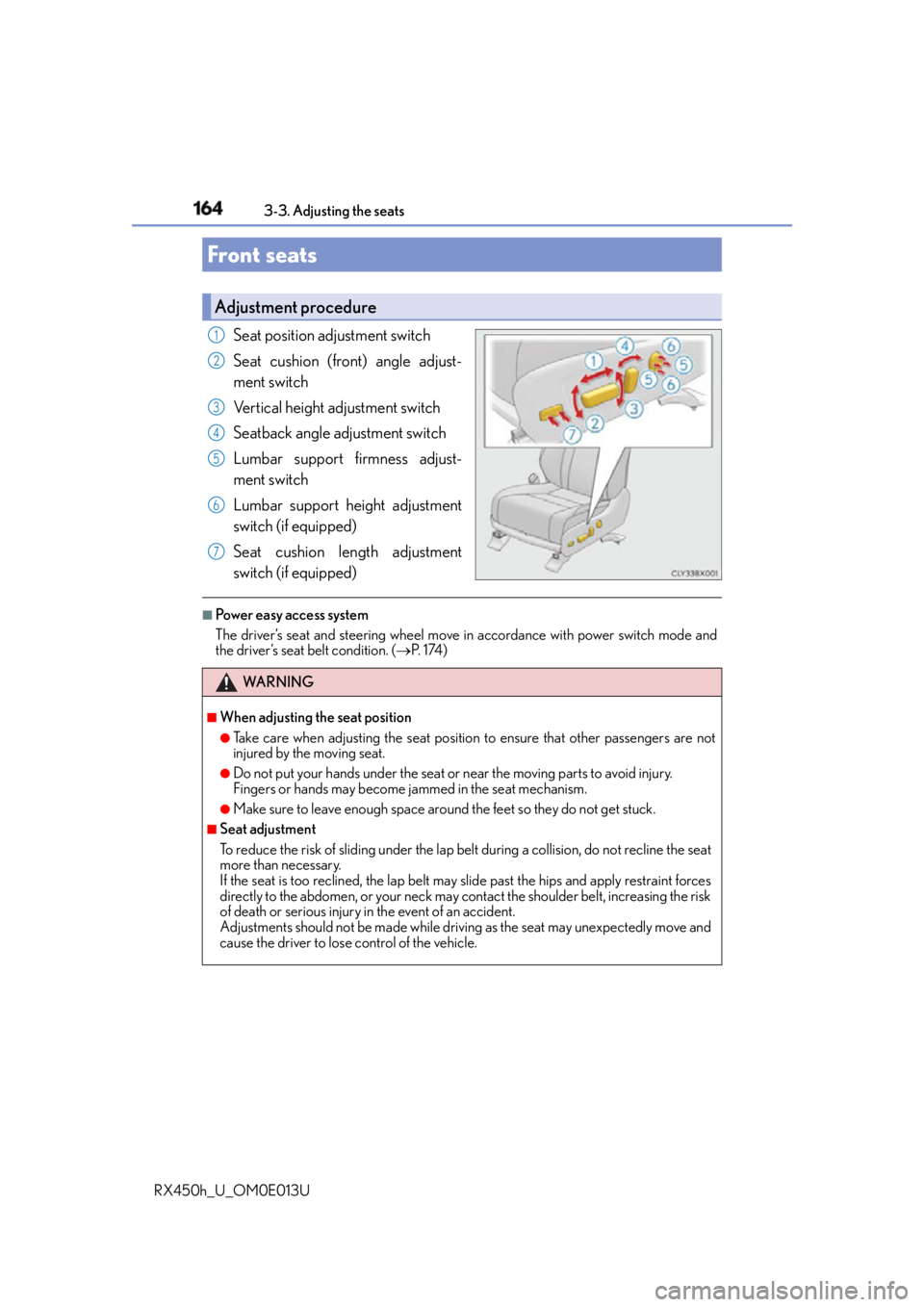
Seat position adjustment switch
Seat cushion (front) angle adjust-
ment switch
Vertical height adjustment switch
Seatback angle adjustment switch
Lumbar support firmness adjust-
ment switch
Lumbar support height adjustment
switch (if equipped)
Seat cushion length adjustment
switch (if equipped) ■
Power easy access system
The driver’s seat and steering wheel move in accordance with power switch mode and
the driver’s seat belt condition. ( P. 1 74 )Front seats Adjustment procedure 1
2
3
4
5
6
7
WA R N I N G ■
When adjusting the seat position ●
Take care when adjusting the seat position to ensure that other passengers are not
injured by the moving seat. ●
Do not put your hands under the seat or near the moving parts to avoid injury.
Fingers or hands may become jammed in the se at mechanism.●
Make sure to leave enough space around the feet so they do not get stuck.■
Seat adjustment
To reduce the risk of sliding under the lap belt during a co llision, do not recline the seat
more than necessary.
If the seat is too rec lined, the lap belt may slide past the hips and apply restraint forces
directly to the abdomen, or your neck may contact the shoulder belt, increasing the risk
of death or serious injury in the event of an accident.
Adjustments should not be ma de while driving as the seat may unexpectedly move and
cause the driver to lose control of the vehicle.
Page 174 of 660
174 3-3. Adjusting the seats
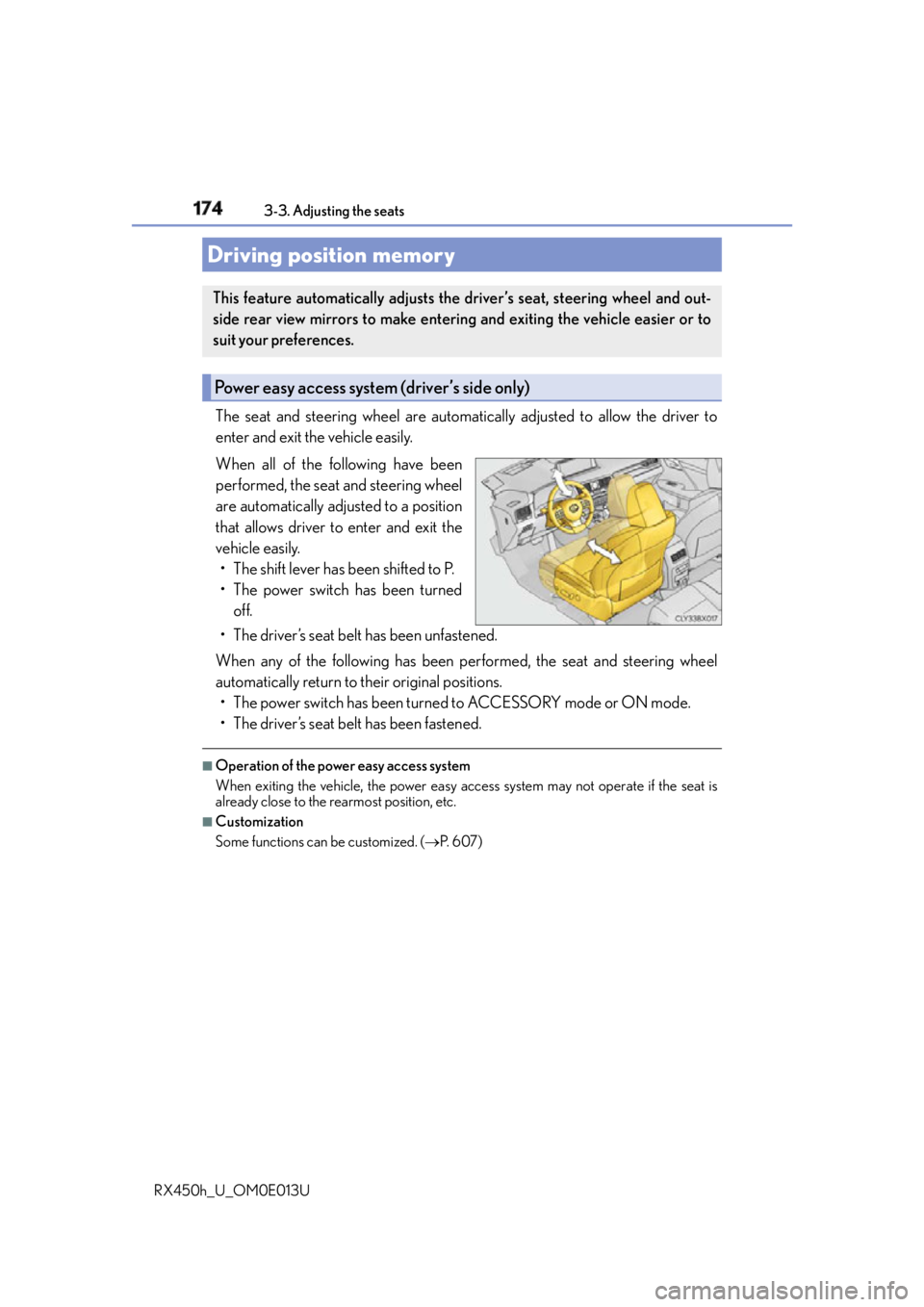
RX450h_U_OM0E013U The seat and steering wheel are automati cally adjusted to allow the driver to
enter and exit the vehicle easily.
When all of the following have been
performed, the seat and steering wheel
are automatically adjusted to a position
that allows driver to enter and exit the
vehicle easily.
• The shift lever has been shifted to P.
• The power switch has been turned
off.
• The driver’s seat belt has been unfastened.
When any of the following has been performed, the seat and steering wheel
automatically return to their original positions.
• The power switch has been turned to ACCESSORY mode or ON mode.
• The driver’s seat belt has been fastened. ■
Operation of the power easy access system
When exiting the vehicle, the power easy acc ess system may not operate if the seat is
already close to the rearmost position, etc. ■
Customization
Some functions can be customized. ( P. 6 0 7 )Driving position memory This feature automatically adjusts the driver’s seat, steering wheel and out-
side rear view mirrors to make enteri ng and exiting the vehicle easier or to
suit your preferences.
Power easy access system (driver’s side only)
Page 175 of 660
1753-3. Adjusting the seats
3
Operation of each component
RX450h_U_OM0E013U Your preferred driving position (the posi tion of the driver’s seat, steering wheel
and outside rear view mirrors) can be recorded and recalled by pressing a but-
ton.
Three different driving positions can be recorded into memory. ■
Recording procedure
Check that the shift lever is in P.
Turn the power switch to ON mode.
Adjust the driver’s seat, steering wheel, and outside rear view mirrors to the
desired positions.
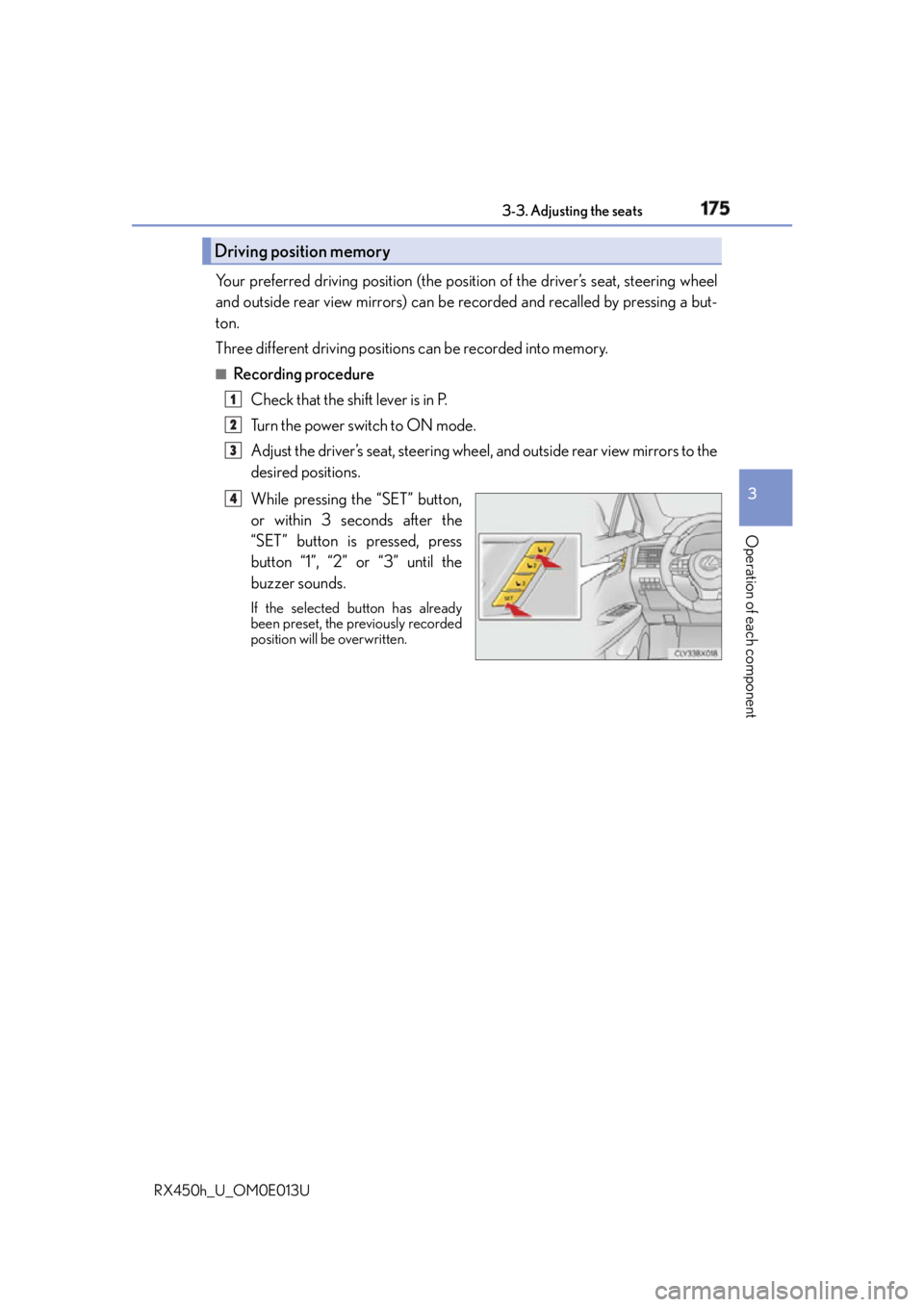
While pressing the “SET” button,
or within 3 seconds after the
“SET” button is pressed, press
button “1”, “2” or “3” until the
buzzer sounds. If the selected button has already
been preset, the previously recorded
position will be overwritten.Driving position memory 1
2
3
4
Page 176 of 660
176 3-3. Adjusting the seats
RX450h_U_OM0E013U ■
Recall procedure
Check that the shift lever is in P.
Turn the power switch to ON mode.
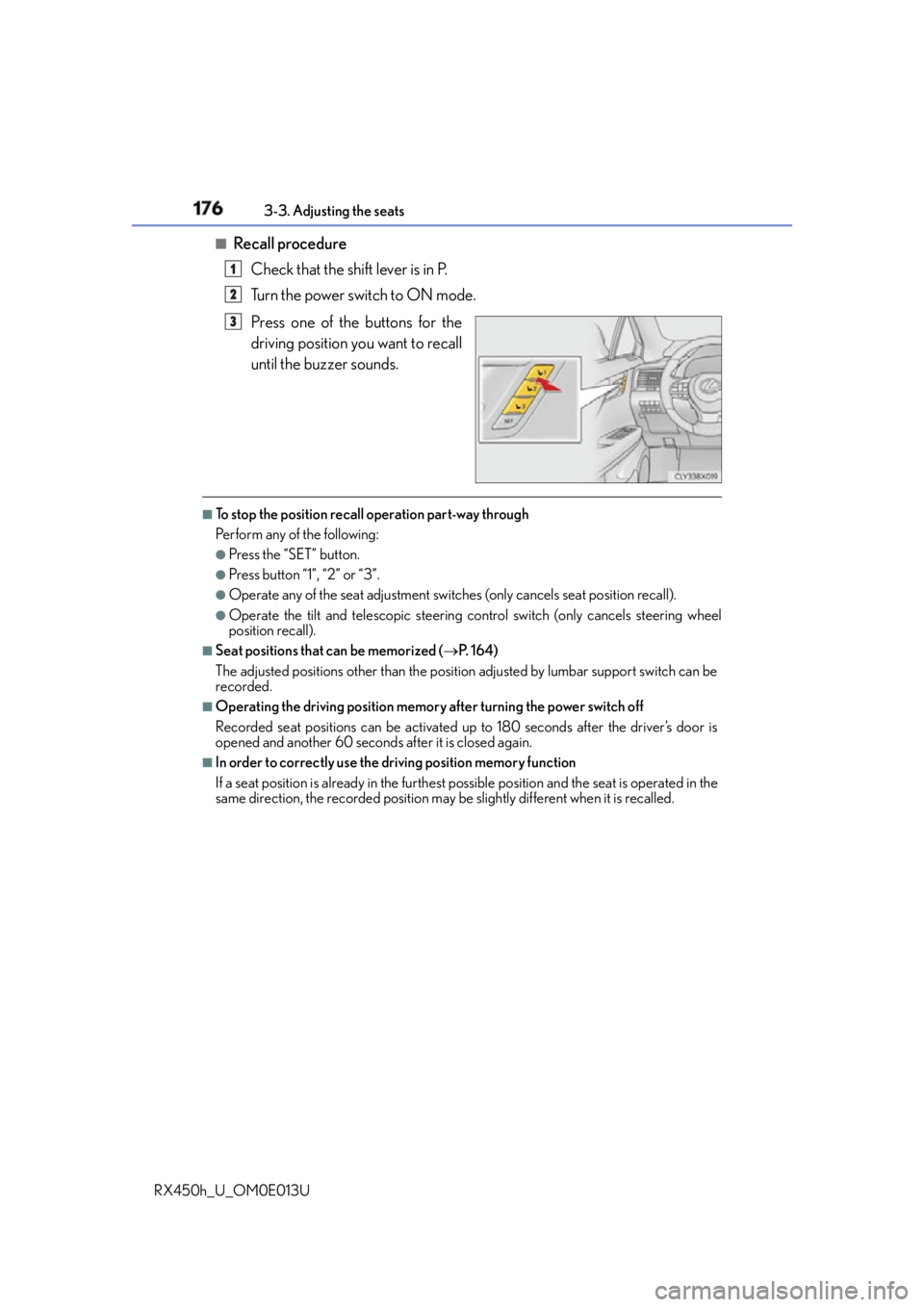
Press one of the buttons for the
driving position you want to recall
until the buzzer sounds. ■
To stop the position recall operation part-way through
Perform any of the following: ●
Press the “SET” button. ●
Press button “1”, “2” or “3”. ●
Operate any of the seat adjustment switch es (only cancels seat position recall).●
Operate the tilt and telescopic steering co ntrol switch (only ca ncels steering wheel
position recall). ■
Seat positions that can be memorized ( P. 1 6 4 )
The adjusted positions other than the position adjusted by lumbar support switch can be
recorded. ■
Operating the driving position memory after turning the power switch off
Recorded seat positions can be activated up to 180 seconds after the driver’s door is
opened and another 60 seconds after it is closed again. ■
In order to correctly use the dr iving position memory function
If a seat position is already in the furthest po ssible position and the seat is operated in the
same direction, the recorded position may be slightly different when it is recalled.1
2
3
Page 177 of 660
1773-3. Adjusting the seats
3
Operation of each component
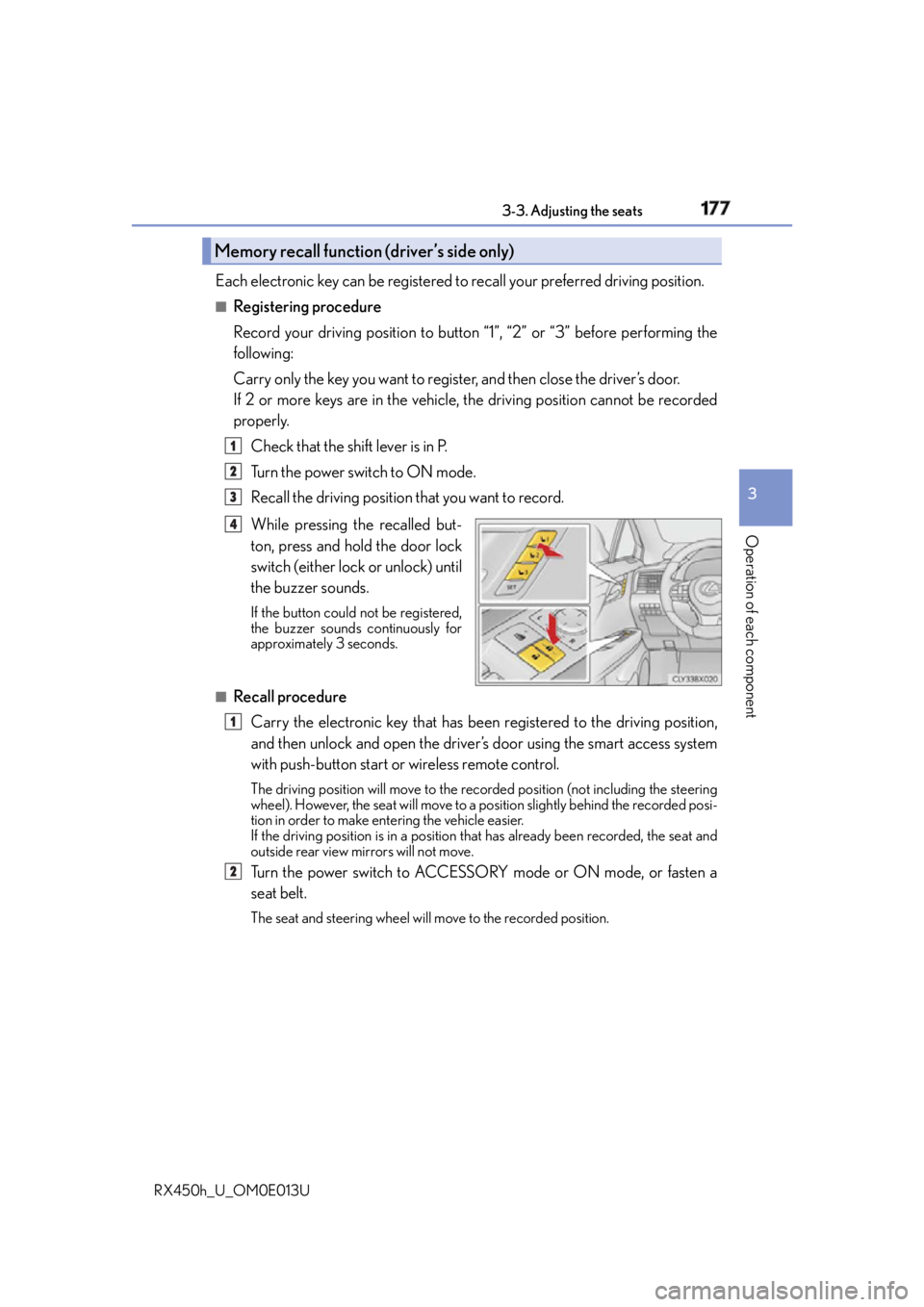
RX450h_U_OM0E013U Each electronic key can be registered to recall your preferred driving position.■
Registering procedure
Record your driving position to button “1”, “2” or “3” before performing the
following:
Carry only the key you want to regist er, and then close the driver’s door.
If 2 or more keys are in the vehicle, the driving position cannot be recorded
properly.
Check that the shift lever is in P.
Turn the power switch to ON mode.
Recall the driving position that you want to record.
While pressing the recalled but-
ton, press and hold the door lock
switch (either lock or unlock) until
the buzzer sounds. If the button could not be registered,
the buzzer sounds continuously for
approximately 3 seconds.
■
Recall procedure
Carry the electronic key that has been registered to the driving position,
and then unlock and open the driver’s door using the smart access system
with push-button start or wireless remote control. The driving position will move to the reco rded position (not including the steering
wheel). However, the seat will move to a po sition slightly behind the recorded posi-
tion in order to make entering the vehicle easier.
If the driving position is in a position th at has already been recorded, the seat and
outside rear view mirrors will not move.
Turn the power switch to ACCESSORY mode or ON mode, or fasten a
seat belt. The seat and steering wheel will move to the recorded position.Memory recall function (driver’s side only) 1
2
3
4
1
2