audio LEXUS RX450h 2016 Owner's Manual
[x] Cancel search | Manufacturer: LEXUS, Model Year: 2016, Model line: RX450H, Model: LEXUS RX450H 2016Pages: 660, PDF Size: 10.15 MB
Page 403 of 660
4035-1. Basic operation of the Remote Touch screen
5
Interior features
RX450h_U_OM0E013U ■
Selecting the operation screen
When selecting the main display, move the Remote Touch knob to the left.
When selecting the side display, move the Remote Touch knob to the right. ■
Main display
For details about the functions and operat ion of the main display, refer to the
respective section and “NAVIGATION SYSTEM OWNER’S MANUAL”. ■
Side display
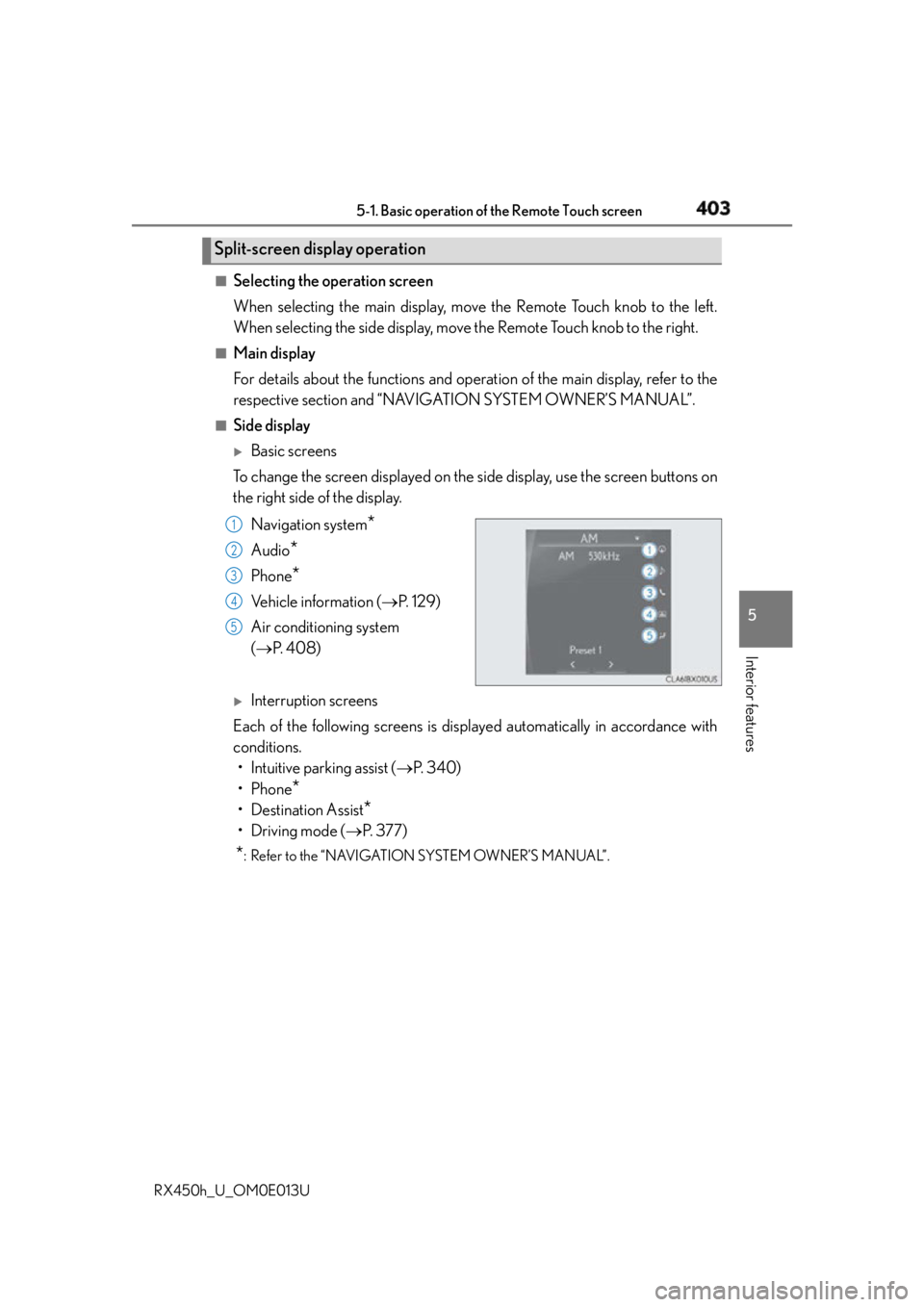
Basic screens
To change the screen displayed on the side display, use the screen buttons on
the right side of the display.
Navigation system
*Audio
* Phone
* Vehicle information ( P. 1 2 9 )
Air conditioning system
( P. 4 0 8 )
Interruption screens
Each of the following screens is displayed automatically in accordance with
conditions.
• Intuitive parking assist ( P. 3 4 0 )
•Phone
*• Destination Assist
*•Driving mode ( P. 3 7 7 )
* : Refer to the “NAVIGATION SYSTEM OWNER’S MANUAL”.Split-screen display operation
1
2
3
4
5
Page 464 of 660
464 6-1. Maintenance and care
RX450h_U_OM0E013U NOTICE ■
Cleaning detergents ●
Do not use the following types of detergent, as they may discolor the vehicle interior
or cause streaks or damage to painted surfaces:
• Non-seat portions: Organic substances such as benzene or gasoline, alkaline or
acidic solutions, dye, and bleach
• Seats: Alkaline or acidic solutions, su ch as thinner, benzene, and alcohol●
Do not use polish wax or polish cleaner. The instrument panel’s or other interior part’s
painted surface may be damaged. ■
Preventing damage to leather surfaces
Observe the following precautions to avoid damage to and deterioration of leather
surfaces: ●
Remove any dust or dirt from leather surfaces immediately. ●
Do not expose the vehicle to direct sunlight for extended periods of time. Park the
vehicle in the shade, especially during summer. ●
Do not place items made of vinyl, plastic, or containing wax on the upholstery, as they
may stick to the leather su rface if the vehicle interior heats up significantly.■
Water on the floor
Do not wash the vehicle floor with water.
Vehicle systems such as the audio system ma y be damaged if water comes into contact
with electrical components such as the au dio system above or under the floor of the
vehicle. Water may also cause the body to rust. ■
When cleaning the inside of the windshie ld (vehicles with Lexus Safety System+)
Do not allow glass cleaner to contact the lens. Also, do not touch the lens.
( P. 292, 302) ■
Cleaning the inside of the rear window ●
Do not use glass cleaner to clean the rear window, as this may cause damage to the
rear window defogger heater wires or antenna. Use a cloth dampened with luke-
warm water to gently wipe the window cl ean. Wipe the window in strokes running
parallel to the heater wires or antenna. ●
Be careful not to scratch or damage the heater wires or antenna.
Page 540 of 660
540 7-2. Steps to take in an emergency
RX450h_U_OM0E013U ■
When the tire pressure warning light comes on
Inspect the tires to check if a tire is punctured.
If a tire is punctured: P. 5 4 9
If none of the tires are punctured:
Turn the power switch off then turn it to ON mode. Check if the tire pressure warning
light comes on or blinks.
If the tire pressure warning light comes on
After the temperature of the tires has lowere d sufficiently, check the inflation pressure
of each tire and adjust th em to the specified level.
If the warning light does not turn off even after several minutes have elapsed, check
that the inflation pressure of each tire is at the specified level and perform initialization.
( P. 4 8 9 )
If the warning light does not turn off several minutes after the initia lization has been per-
formed, have the vehicle inspected by your Lexus dealer immediately.
If the tire pressure warning light blinks for 1 minute then stays on
There may be a malfunction in the tire pressure warning system. Have the vehicle
inspected by your Lexus dealer immediately. ■
The tire pressure warning light may come on due to natural causes
The tire pressure warning light may come on due to natural causes such as natural air
leaks and tire inflation pressure changes caused by temperature. In this case, adjusting
the tire inflation pressure will turn off the warning light (after a few minutes). ■
When a tire is replaced with a spare tire
The compact spare tire is not equipped with a tire pressure warning valve and transmit-
ter. If a tire goes flat, the tire pressure warning light will not turn off even though the flat
tire has been replaced with the spare tire. Replace the spare tire with the repaired tire
and adjust the tire inflation pressure. The tire pressure warning light will go off after a few
minutes. ■
Conditions that the tire pressure warning system may not function properly
P. 4 9 2 ■
Warning buzzer
In some cases, the buzzer may not be heard due to being in a noisy location or audio
sound. ■
Customization
Some functions can be customized. ( P. 6 0 7 )1
2
Page 570 of 660
570 7-2. Steps to take in an emergency
RX450h_U_OM0E013U Start the engine of the second vehicle. Increase the engine speed slightly and
maintain at that level for approximately 5 minutes to recharge the 12-volt bat-
tery of your vehicle.
Open and close any of the doors of your vehicle with the power switch off.
Maintain the engine speed of the second vehicle and start the hybrid system
of your vehicle by turning the power switch to ON mode.
Make sure the “READY” indicator comes on. If the indicator light does not
come on, contact your Lexus dealer.
Once the hybrid system has started, remove the jumper cables in the exact
reverse order from which they were connected.
Close the exclusive jump starting terminal cover, and reinstall the fuse box
cover to its original position.
Once the hybrid system starts, have th e vehicle inspected at your Lexus dealer
as soon as possible. ■
Starting the hybrid system when the 12-volt battery is discharged
The hybrid system cannot be started by push-starting. ■
To prevent 12-volt battery discharge ●
Turn off the headlights and the audio system while the hybrid system is off. ●
Turn off any unnecessary electrical components when the vehicle is running at a low
speed for an extended period, such as in heavy traffic. ■
Charging the 12-volt battery
The electricity stored in the 12-volt battery will discharge gradually even when the vehicle
is not in use, due to natural discharge and th e draining effects of certain electrical appli-
ances. If the vehicle is left for a long time, the 12-volt battery may discharge, and the
hybrid system may be unable to start. (The 12-volt battery recharges automatically while
the hybrid system is operating.) ■
When the 12-volt battery is removed or discharged ●
In some cases, it may not be possible to unlock the doors using the smart access system
with push-button start when the 12-volt battery is discharged. Use the wireless remote
control or the mechanical key to lock or unlock the doors. ●
The hybrid system may not start on the first attempt after the 12-volt battery has
recharged but will start normally after the second attempt. This is not a malfunction.●
The power switch mode is memorized by the vehicle. When the 12-volt battery is
reconnected, the system will return to the mode it was in before the 12-volt battery was
discharged. Before disconnecting the 12-volt battery, turn the power switch off.
If you are unsure what mode the power switch was in before the 12-volt battery dis-
charged, be especially careful when reconnecting the 12-volt battery. ●
The power back door must be initialized. ( P. 1 5 0 )6
7
8
9
10
11
Page 607 of 660
607
RX450h_U_OM0E013U 8
Vehicle specifications 8-2. Customization
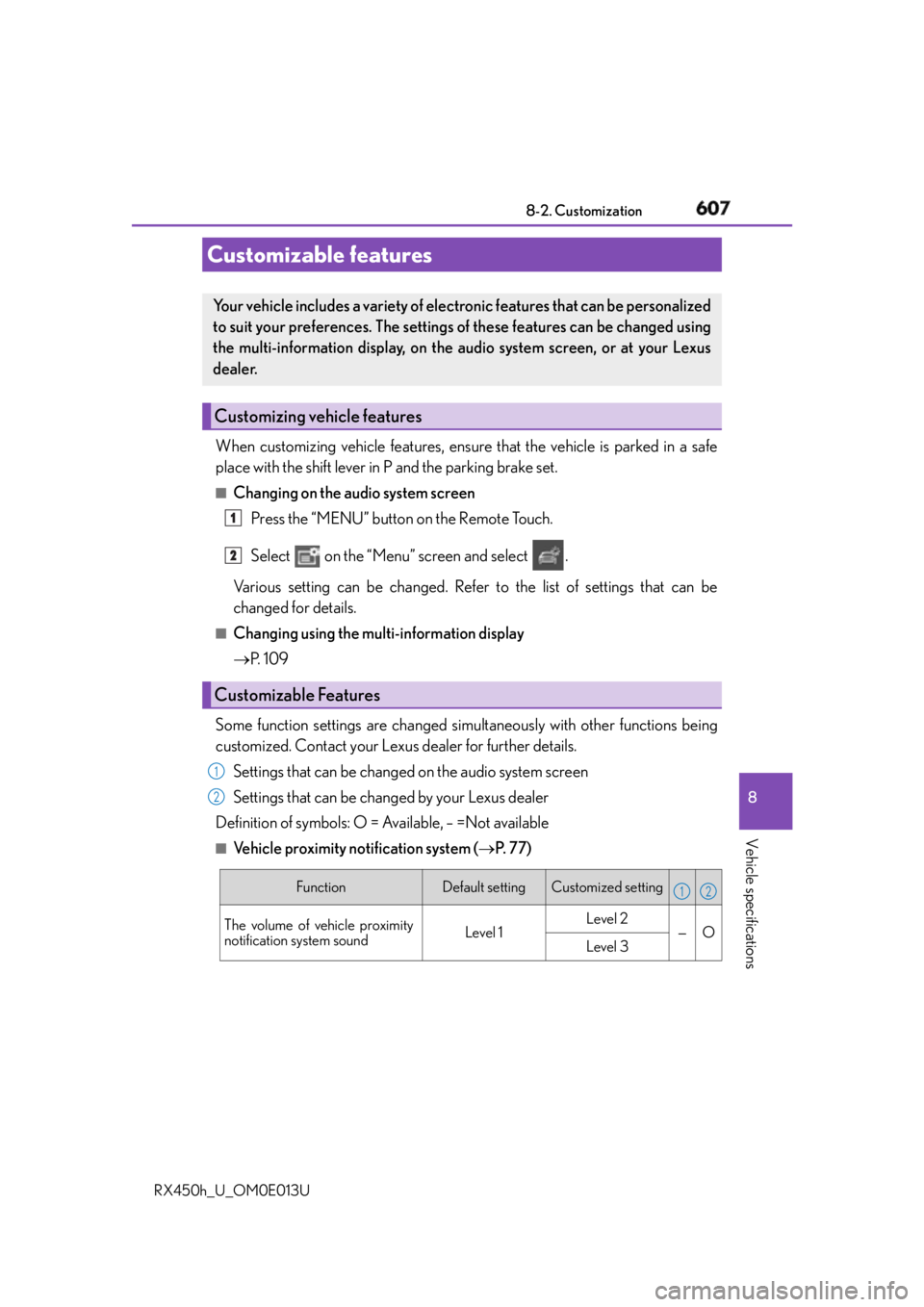
When customizing vehicle features, ensure that the vehicle is parked in a safe
place with the shift lever in P and the parking brake set. ■
Changing on the audio system screen
Press the “MENU” button on the Remote Touch.
Select on the “Menu” screen and select .
Various setting can be changed. Refer to the list of settings that can be
changed for details. ■
Changing using the multi-information display
P. 1 0 9
Some function settings are changed simultaneously with other functions being
customized. Contact your Lexus dealer for further details.
Settings that can be changed on the audio system screen
Settings that can be changed by your Lexus dealer
Definition of symbols: O = Available, – =Not available ■
Vehicle proximity notification system ( P. 77)Customizable features Your vehicle includes a variety of electronic features that can be personalized
to suit your preferences. The settings of these features can be changed using
the multi-information display, on the audio system screen, or at your Lexus
dealer.
Customizing vehicle features
Customizable Features 1
2
1
2
Function Default setting Customized setting
The volume of vehicle proximity
notification system sound Level 1 Level 2
— O
Level 3 1 2
Page 618 of 660
618 8-2. Customization
RX450h_U_OM0E013U ■
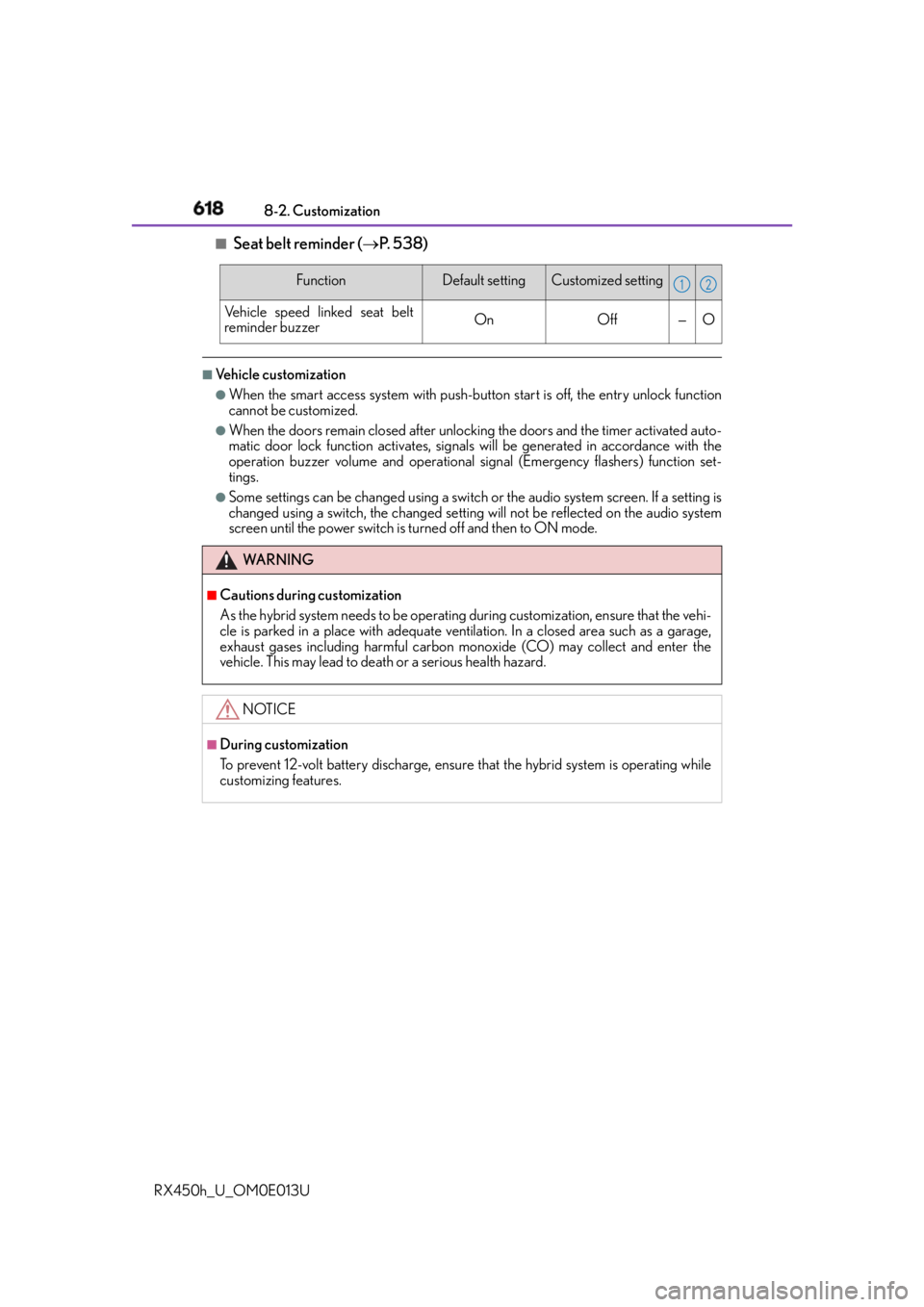
Seat belt reminder ( P. 5 3 8 )■
Vehicle customization ●
When the smart access system with push-but ton start is off, the entry unlock function
cannot be customized. ●
When the doors remain closed after unlocking the doors and the timer activated auto-
matic door lock function activates, signals will be generated in accordance with the
operation buzzer volume and operational si gnal (Emergency flashers) function set-
tings. ●
Some settings can be changed using a switch or the audio system screen. If a setting is
changed using a switch, the changed setting will not be reflected on the audio system
screen until the power switch is turned off and then to ON mode. Function Default setting Customized setting
Vehicle speed linked seat belt
reminder buzzer On Off — O
WA R N I N G ■
Cautions during customization
As the hybrid system needs to be operating during customization, ensure that the vehi-
cle is parked in a place with adequate vent ilation. In a closed area such as a garage,
exhaust gases including harmful carbon mo noxide (CO) may collect and enter the
vehicle. This may lead to death or a serious health hazard.
NOTICE ■
During customization
To prevent 12-volt battery discharge, ensure that the hybrid syst em is operating while
customizing features. 1 2
Page 635 of 660

635
Index
RX450h_U_OM0E013U What to do if...
(Troubleshooting)................................ 636
Alphabetical index.................................640
Refer to the “NAVIGATION SYSTEM OWNER’S MANUAL” for
information regarding the equipment listed below.
• Navigation system
• Audio/visual system
• Rear seat entertainment sys-
tem •Panoramic view monitor
•Lexus Enform
Page 641 of 660
641Alphabetical index
RX450h_U_OM0E013U Anchor brackets ........................................ 61
Antenna
Smart access system
with push-button start ................... 158
Anti-lock Brake System (ABS)........ 381
Warning light .......................................537
Approach warning.....................318, 330
Armrest .................................................... 443
Assist grips .............................................. 444
Audio system
* Automatic air conditioning
system .................................................... 405
Air conditioning filter......................... 501
Automatic air conditioning
system ................................................. 405
S-FLOW mode ............................... 406
Automatic headlight leveling
system .................................................... 253
Automatic High Beam ....................... 255
Automatic light control system.........251
Auxiliary boxes ...........................426, 430
Back door
Power back door .................................142
Touchless power back door ......... 144
Wireless remote control ..................142
Back-up lights
Replacing light bulbs ......................... 513
Wattage ................................................. 590 Battery (12-volt battery)
Battery checking ................................483
If the 12-volt battery is
discharged........................................ 568
Preparing and checking before
winter....................................................390
Warning light .......................................536
Battery (traction battery) ..................... 80
Blind Spot Monitor (BSM) ............... 363
Blind Spot Monitor
function ............................................367
Rear Cross Traffic Alert
function ............................................. 371
Bottle holders .........................................425
Brake
Brake Hold ........................................... 249
Fluid ......................................................... 588
Parking brake ...................................... 245
Regenerative braking ......................... 78
Warning light .......................................536
Brake assist ...............................................381
Brake Hold...............................................249
Warning light ....................................... 537
Break-in tips ........................................... 206
Brightness control
Instrument panel light control ........ 99
BSM (Blind Spot Monitor) ............... 363
Blind Spot Monitor function......... 367
Rear Cross Traffic Alert
function.................................................. 371B
* : Refer to the “NAVIGATION SYSTEM OWNER’S MANUAL”.