warning light LEXUS RX450h 2016 Owner's Manual
[x] Cancel search | Manufacturer: LEXUS, Model Year: 2016, Model line: RX450H, Model: LEXUS RX450H 2016Pages: 660, PDF Size: 10.15 MB
Page 116 of 660
116 2. Instrument cluster
RX450h_U_OM0E013U Displays suggestions to the driver in the following situations. To select a response
to a displayed suggestion, use the meter control switches. The suggestion function can be turn ed on/off. (Customizable features: P. 6 0 7 )■
Suggestion to enable the power back door
If the power back door system is disabled (setting on set to off) and the
power back door switch on the instru ment panel is operated, a suggestion
message will be displayed asking if yo u wish to enable the power back door
system. To enable the power back door system, select “Yes”. After enabling the power back door syst em, press the power back door switch
again to open or close the power back door.■
Suggestion to turn off the headlights
If the headlights are left on for a certain amount of time after the power switch
has been turned off, a suggestion message will be displayed asking if you wish
to turn the headlights off. To turn the headlights off, select “Yes”.If a front door is opened after the power sw itch is turned off, this suggestion mes-
sage will not be displayed.■
Background color of the indicator/shift position display area (except F SPORT models)
The background color of the indicator/shift position display area is changed according to
the driving mode as follows ( P. 377):●
Eco drive mode: Blue ●
Sport mode: Red ■
G-force display (if equipped) ●
The G-force values may not be zero even when the vehicle is parked, such as when it is
parked on an incline. ●
Depending on the vehicle usage conditions, the brake fluid pressure display may not
reach its maximum reading even though the brake pedal is fully depressed.●
If a 12-volt battery terminal is disconnected and reconnected, the steering amount dis-
play may be disabled temporarily. After driv ing the vehicle for a while, the display will
be enabled. ■
Suspension of the settings display ●
Some settings cannot be changed while driv ing. When changing settings, park the
vehicle in a safe place. ●
If a warning message is displayed, operation of the settings displa y will be suspended.Suggestion function
Page 140 of 660
140 3-2. Opening, closing and locking the doors
RX450h_U_OM0E013U ■
Switching the door unlock function
It is possible to set which doors the entry fu nction unlocks using the wireless remote con-
trol.
Turn the power switch off.
When the indicator light on the key surface is not on, press and hold , or
for approximately 5 seconds while pressing and holding .
The setting changes each time an operatio n is performed, as shown below. (When
changing the setting continuously, release the buttons, wait for at least 5 seconds, and
repeat step .)
To prevent unintended triggering of the alarm, unlock the doors using the wireless
remote control and open and close a door once after the settings have been changed. (If
a door is not opened within 60 seconds after is pressed, the doors will be locked
again and the alarm will automatically be set.)
In a case that the alarm is triggered, immediately stop the alarm. ( P. 8 7 )■
Impact detection door lock release system
In the event that the vehicle is subject to a strong impact, all the doors are unlocked.
Depending on the force of the impact or the type of accident, however, the system may
not operate. ■
Using the mechanical key
The doors can also be locked and unlocked with the mechanical key. ( P. 5 6 4 )■
Open door warning buzzer
If the vehicle speed reaches 3 mph (5 km/h), the master warning light flashes and a
buzzer sounds to indicate that door (s) or the hood in not fully closed.
The open door(s) or hood is displa yed on the multi-information display.1
2
2
Multi-information
display Unlocking function Beep
Holding the driver’s door handle
unlocks only the driver’s door.
Exterior: Beeps 3 times
Interior: Pings onceHolding any of the passenger
door handles unlocks all the
doors.
Holding a door handle unlocks
all the doors. Exterior: Beeps twice
Interior: Pings once
Page 195 of 660

1953-5. Opening, closing the windows and moon roof
3
Operation of each component
RX450h_U_OM0E013U ■
When the moon roof does not close normally
Perform the following procedure: ●
If the moon roof closes but then re-opens slightly
Stop the vehicle.
Press and hold the “CLOSE” switch.
* 1
The moon roof will close, reopen and pause for approximately 10 seconds.
* 2
Then it
will close again, tilt up and pause for approx imately 1 second. Finally, it will tilt down,
open and close.
Check to make sure that the moon roof is completely closed and then release the
switch. ●
If the moon roof tilts down but then tilts back up
Stop the vehicle.
Press and hold the “UP” switch
* 1
until the moon roof moves into the tilt up position
and stops.
Release the “UP” switch once and then press and hold the “UP” switch again.
* 1
The moon roof will pause for approximatel y 10 seconds in the tilt up position.
* 2
Then it will adjust slightly and pause for approximately 1 second. Finally, it will tilt
down, open and close.
Check to make sure that the moon roof is completely closed and then release the
switch.
* 1
: If the switch is released at the incorrec t time, the procedure will have to be per-
formed again from the beginning.
* 2
: If the switch is released after the above mentioned 10 second pause, automatic
operation will be disabled. In that case, press and hold the “CLOSE” or “UP” switch,
and the moon roof will tilt up and pause fo r approximately 1 second . Then it will tilt
down, open and close. Check to make sure that the moon roof is completely closed
and then release the switch.
If the moon roof does not fully close even after performing the above procedure cor-
rectly, have the vehicle inspected by your Lexus dealer. ■
Alarm
The alarm may be triggered if the alarm is se t and the moon roof is closed using the door
lock linked moon roof operation function. ( P. 88) ■
Moon roof open warning buzzer
The buzzer sounds and a message is shown on the multi-information display in the instru-
ment cluster when the power switch is turned off and the driver’s door is opened with the
moon roof open. ■
Customization
Some functions can be customized. ( P. 6 0 7 )1
2
3
1
2
3
4
Page 247 of 660
2474-2. Driving procedures
4
Driving
RX450h_U_OM0E013U ■
Parking brake operation sound
When the parking brake operates, a motor sound (whirring sound) may be heard. This
does not indicate a malfunction. ■
Parking brake indicator light and parking brake lamp ●
Depending on the power switch mode, the parking brake indicator light and parking
brake lamp will turn on and stay on as described below:
ON mode: Comes on until the parking brake is released.
Not in ON mode: Stays on for approximately 15 seconds. ●
When the power switch is turned off with th e parking brake set, the parking brake indi-
cator light and parking brake lamp will stay on for about 15 seconds. This does not indi-
cate a malfunction. ■
Changing the mode
When changing the automatic mode on/off , the message will be shown on the multi-
information display and the buzzer sounds. ■
Parking brake engaged warning buzzer
A buzzer will sound if the vehicle is driven with the parking brake engaged. “Release
Parking Brake” is displayed on the multi-information display. ■
Warning messages and buzzers
Warning messages and buzzers are used to indicate a system malfunction or to inform
the driver of the need for caution. If a warn ing message is shown on the multi-information
display, read the message and follow the instructions.■
If the brake system warning light comes on
P. 5 3 6 ■
Usage in winter time
P. 3 9 1
Page 249 of 660
2494-2. Driving procedures
4
Driving
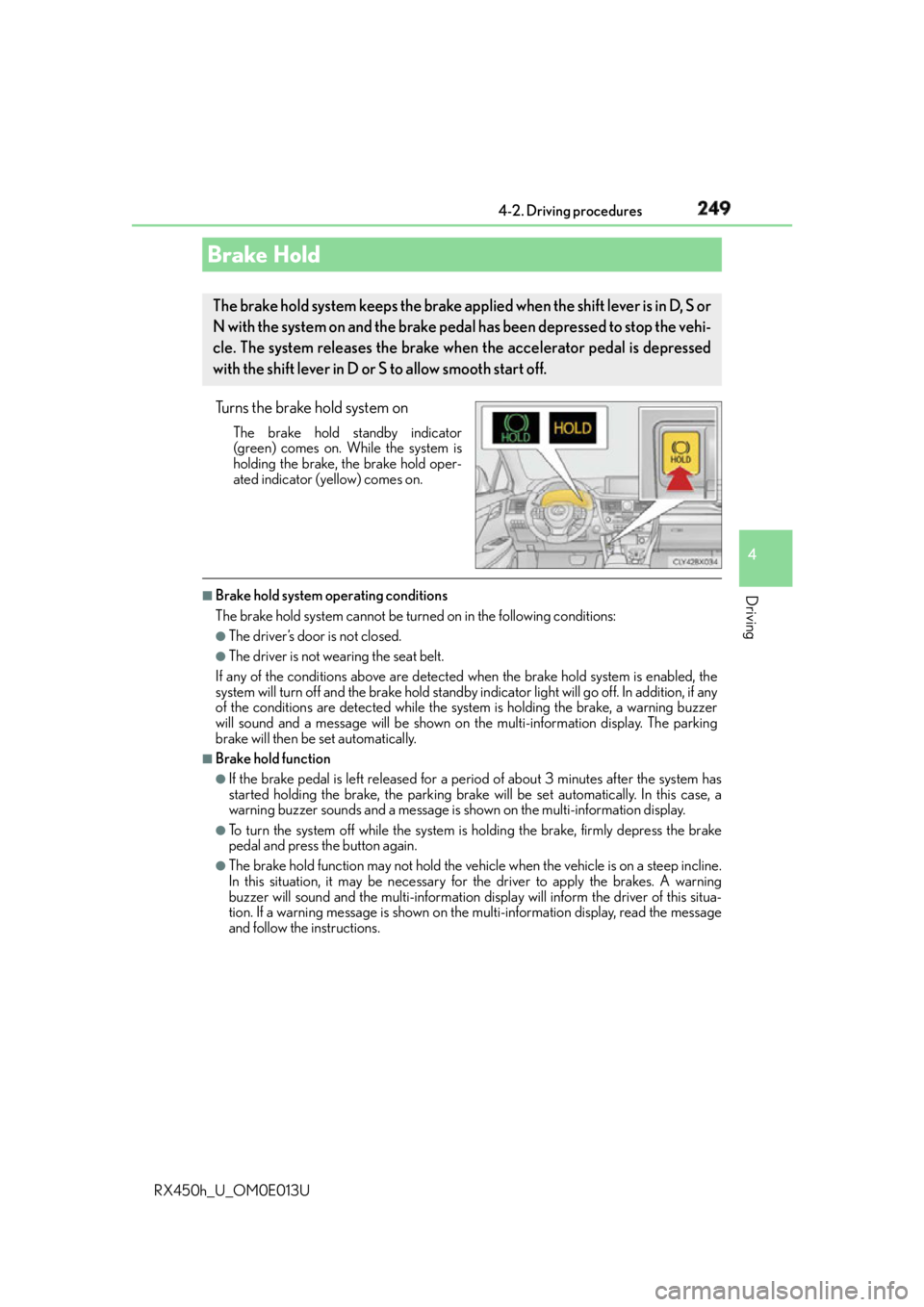
RX450h_U_OM0E013U Turns the brake hold system on The brake hold standby indicator
(green) comes on. While the system is
holding the brake, the brake hold oper-
ated indicator (yellow) comes on. ■
Brake hold system operating conditions
The brake hold system cannot be turn ed on in the following conditions:●
The driver’s door is not closed. ●
The driver is not wearing the seat belt.
If any of the conditions above are detected when the brake hold system is enabled, the
system will turn off and the brake hold standby in dicator light will go of f. In addition, if any
of the conditions are detected while the sy stem is holding the brake, a warning buzzer
will sound and a message will be shown on th e multi-information display. The parking
brake will then be set automatically. ■
Brake hold function ●
If the brake pedal is left released for a period of about 3 minutes after the system has
started holding the brake, the parking brake w ill be set automatically. In this case, a
warning buzzer sounds and a message is shown on the multi-information display.●
To turn the system off while the system is holding the brake, firmly depress the brake
pedal and press the button again. ●
The brake hold function may not hold the vehicle when the vehicle is on a steep incline.
In this situation, it may be necessary fo r the driver to apply the brakes. A warning
buzzer will sound and the multi-information di splay will inform the dr iver of this situa-
tion. If a warning message is shown on the multi-information displa y, re a d t h e m e s s a g e
and follow the instructions.Brake Hold The brake hold system keeps the brake applied when the shift lever is in D, S or
N with the system on and the brake pedal has been depressed to stop the vehi-
cle. The system releases the brake when the accelerator pedal is depressed
with the shift lever in D or S to allow smooth start off.
Page 250 of 660
250 4-2. Driving procedures
RX450h_U_OM0E013U ■
When the parking brake is set automatically while the system is holding the brakes
The parking brake will not be released automatically. With the brake pedal depressed,
release the parking brake by operating the parking brake switch, making sure that the
parking brake indicator light goes off. ( P. 2 4 5 )■
If “Brake Hold Fault Depress Brake to Deacti vate Visit Your Dealer” is displayed on the
multi-information display
The system may be malfunctioning. Have the vehicle inspected by your Lexus dealer
immediately. ■
Warning messages and buzzers
Warning messages and buzzers are used to indicate a system malfunction or to inform
the driver of the need for caution. If a warn ing message is shown on the multi-information
display, read the message and follow the instructions.■
If the brake hold operated indicator flashes
P. 5 3 6
WA R N I N G ■
When the vehicle is on a steep incline
When using the brake hold system on a stee p incline exercise caution. The brake hold
function may not hold the vehicle in such a situation. ■
When stopped on a slippery road
The system cannot stop the vehicle when the gripping ability of the tires has been
exceeded. Do not use the system when stopped on a slippery road.
NOTICE ■
When parking the vehicle
The brake hold system is not designed for use when parking the vehicle for a long
period of time. Turning the power switch of f while the system is holding the brake may
release the brake, which would cause the vehicle to move. When operating the power
switch, depress the brake pedal, shift the shift lever to P and set the parking brake.
Page 283 of 660
2834-5. Using the driving support systems
4
Driving
RX450h_U_OM0E013U ■
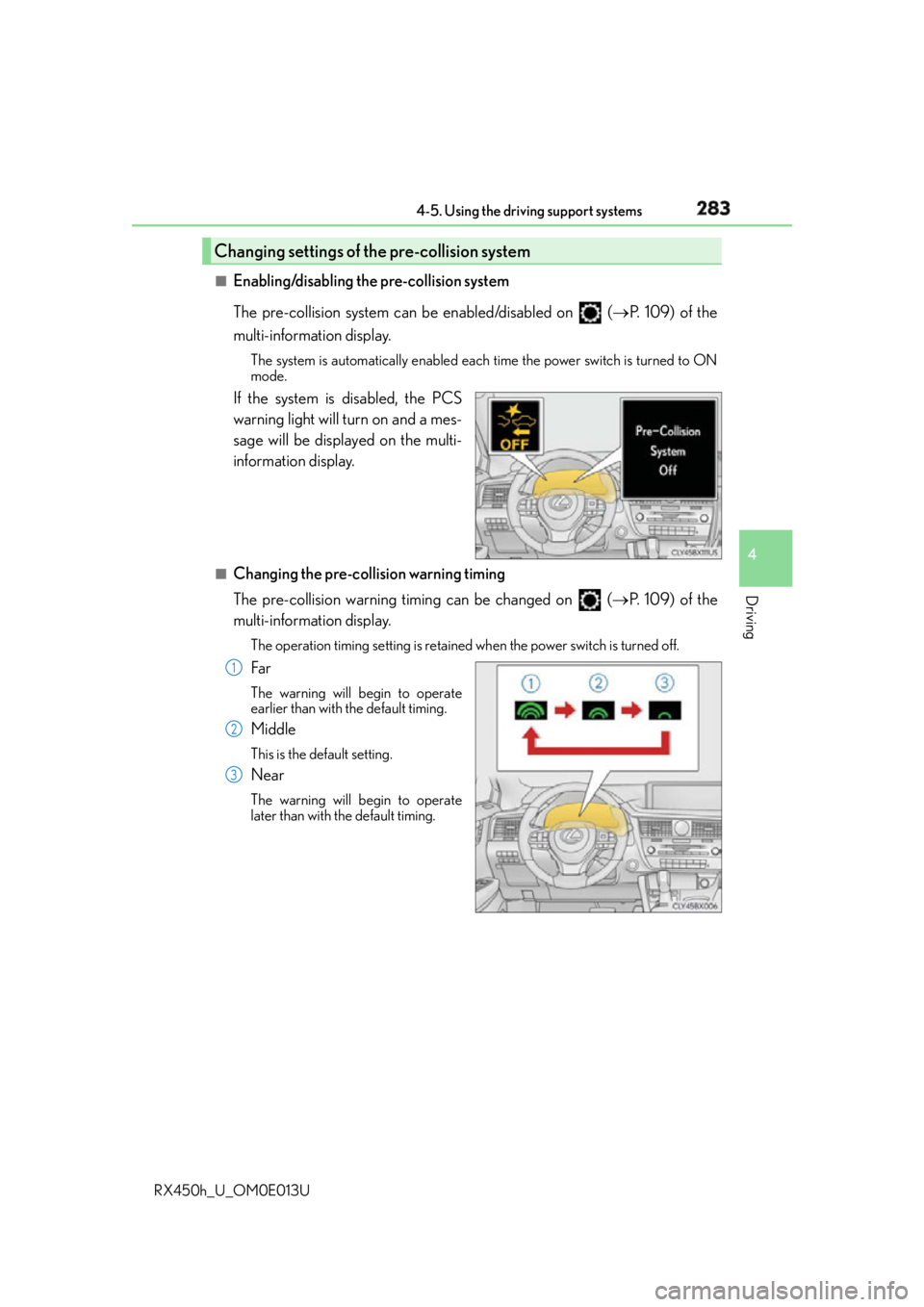
Enabling/disabling the pre-collision system
The pre-collision system can be enabled/disabled on ( P. 1 0 9 ) o f t h e
multi-information display. The system is automatically enabled each time the power switch is turned to ON
mode.
If the system is disabled, the PCS
warning light will turn on and a mes-
sage will be displayed on the multi-
information display. ■
Changing the pre-col lision warning timing
The pre-collision warning timing can be changed on ( P. 1 0 9 ) o f t h e
multi-information display. The operation timing setting is retained when the power switch is turned off.
Far The warning will begin to operate
earlier than with the default timing.
Middle This is the default setting.
Near The warning will begin to operate
later than with the default timing.Changing settings of the pre-collision system
1
2
3
Page 284 of 660
284 4-5. Using the driving support systems
RX450h_U_OM0E013U ■
Operational conditions
Availability of the pedestrian detection function and pre-collision braking function
depend on the region in which the vehicle was sold.
Read the following for details:
Region A
(The pedestrian detection fu nction and pre-collision braking function are available)
The pre-collision system is enabled and the sy stem determines that the possibility of a
frontal collision with a vehicle or pedestrian is high.
Each function is operationa l at the following speeds:●
Pre-collision warning:
• Vehicle speed is approximately 7 mph (1 0 km/h) or more. (For detecting a pedes-
trian, vehicle speed is between approxim ately 7 and 50 mph [10 and 80 km/h].)
• The relative speed between your vehicl e and the vehicle or pedestrian ahead is
approximately 7 mph (10 km/h) or more. ●
Pre-collision brake assist:
• Vehicle speed is approximately 19 mph (3 0 km/h) or more. (For detecting a pedes-
trian, vehicle speed is between approxim ately 19 and 50 mph [30 and 80 km/h].)
• The relative speed between your vehicl e and the vehicle or pedestrian ahead is
approximately 19 mph (30 km/h) or more. ●
Pre-collision braking:
• Vehicle speed is approximately 7 mph (1 0 km/h) or more. (For detecting a pedes-
trian, vehicle speed is between approxim ately 7 and 50 mph [10 and 80 km/h].)
• The relative speed between your vehicl e and the vehicle or pedestrian ahead is
approximately 7 mph (10 km/h) or more.
The system may not operate in the following situations: ●
If a 12-volt battery terminal has been disconnected and reconnected and then the vehi-
cle has not been driven for a certain amount of time ●
If the shift lever is in R ●
If VSC is disabled (only the pre-collision warning function will be operational) ●
If the PCS warning light is flashing or illuminated Regions Function availability
Region A The pedestrian detection function and pre-collision braking
function are available
Region B The pedestrian detection function is not available and the pre-
collision braking function is available
Region C The pedestrian detection function and pre-collision braking
function are not available
Page 285 of 660
2854-5. Using the driving support systems
4
Driving
RX450h_U_OM0E013U
Region B
(The pedestrian detection fu nction is not available and the pre-collision braking func-
tion is available)
The pre-collision system is enabled and the sy stem determines that the possibility of a
frontal collision with a vehicle is high.
Each function is operationa l at the following speeds:●
Pre-collision warning:
• Vehicle speed is approximately 10 mph (15 km/h) or more.
• The relative speed between your vehicl e and the vehicle or pedestrian ahead is
approximately 7 mph (10 km/h) or more. ●
Pre-collision brake assist:
• Vehicle speed is approximately 19 mph (30 km/h) or more.
• The relative speed between your vehicl e and the vehicle or pedestrian ahead is
approximately 19 mph (30 km/h) or more. ●
Pre-collision braking:
• Vehicle speed is approximately 10 mph (15 km/h) or more.
• The relative speed between your vehicl e and the vehicle or pedestrian ahead is
approximately 7 mph (10 km/h) or more.
The system may not operate in the following situations: ●
If a 12-volt battery terminal has been disconnected and reconnected and then the vehi-
cle has not been driven for a certain amount of time ●
If the shift lever is in R ●
If VSC is disabled (only the pre-collision warning function will be operational) ●
If the PCS warning light is flashing or illuminated
Region C
(The pedestrian detection function and pr e-collision braking function are not avail-
able)
The pre-collision system is enabled and the sy stem determines that the possibility of a
frontal collision with a vehicle is high.
Each function is operationa l at the following speeds:●
Pre-collision warning:
• Vehicle speed is approximately 10 mph (15 km/h) or more.
• The relative speed between your vehicl e and the vehicle or pedestrian ahead is
approximately 7 mph (10 km/h) or more. ●
Pre-collision brake assist:
• Vehicle speed is approximately 19 mph (30 km/h) or more.
• The relative speed between your vehicl e and the vehicle or pedestrian ahead is
approximately 19 mph (30 km/h) or more.
The system may not operate in the following situations: ●
If a 12-volt battery terminal has been disconnected and reconnected and then the vehi-
cle has not been driven for a certain amount of time ●
If the shift lever is in R ●
If VSC is disabled (only the pre-collision warning function will be operational) ●
If the PCS warning light is flashing or illuminated
Page 291 of 660

2914-5. Using the driving support systems
4
Driving
RX450h_U_OM0E013U ■
If the PCS warning light flashes and a warnin g message is displayed on the multi-infor-
mation display
The pre-collision system may be temporarily unavailable or there may be a malfunction
in the system. ●
In the following situations, the warning light will turn off, the message will disappear and
the system will become operational when normal operating conditions return:
• When the radar sensor or camera sensor or the area around either sensor is hot,
such as in the sun
• When the radar sensor or camera sensor or the area around either sensor is cold,
such as in an extremely cold environment
• When the radar sensor or front grille embl em is dirty or covered with snow, etc.
• If the camera sensor is obst ructed, such as when the h ood is open or a sticker is
attached to the windshield near the camera sensor ●
If the PCS warning light continues to flash or the warning messag e does not disappear,
the system may be malfunctioning. Have the vehicle inspected by your Lexus dealer
immediately. ■
If VSC is disabled ●
If VSC is disabled ( P. 384), the pre-collision brake assist and pre-collision braking
functions are also disabled. ●
The PCS warning light will turn on and “VSC Turned Off Pre-Collision Brake System
Unavailable” will be displayed on the multi-information display.