light LEXUS RX450h 2016 Service Manual
[x] Cancel search | Manufacturer: LEXUS, Model Year: 2016, Model line: RX450H, Model: LEXUS RX450H 2016Pages: 660, PDF Size: 10.15 MB
Page 126 of 660
126 2. Instrument cluster
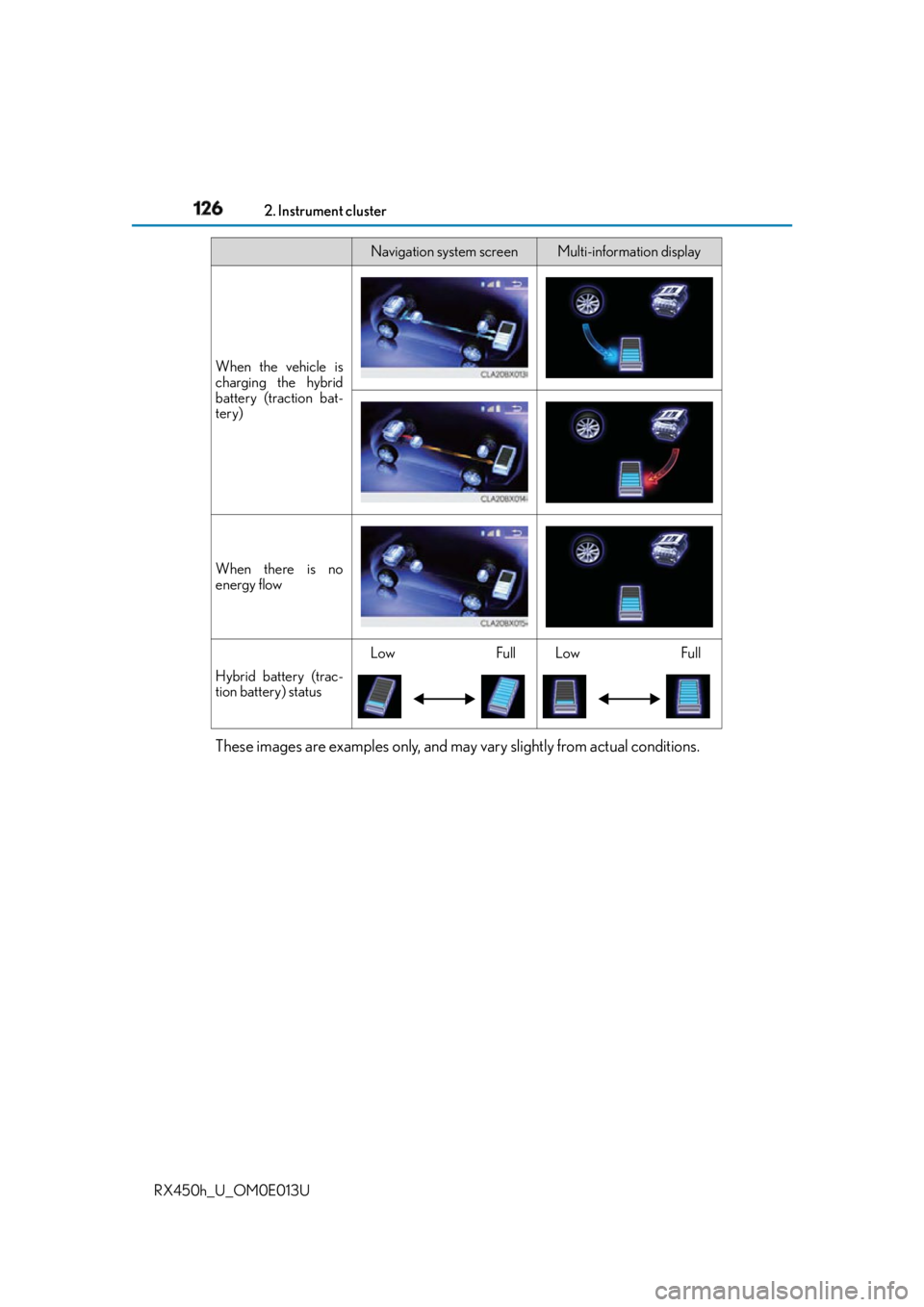
RX450h_U_OM0E013U These images are examples only, and may vary slightly from actual conditions. When the vehicle is
charging the hybrid
battery (traction bat-
tery)
When there is no
energy flow
Hybrid battery (trac-
tion battery) status Low Full Low FullNavigation system screen Multi-information display
Page 130 of 660
130 2. Instrument cluster
RX450h_U_OM0E013U
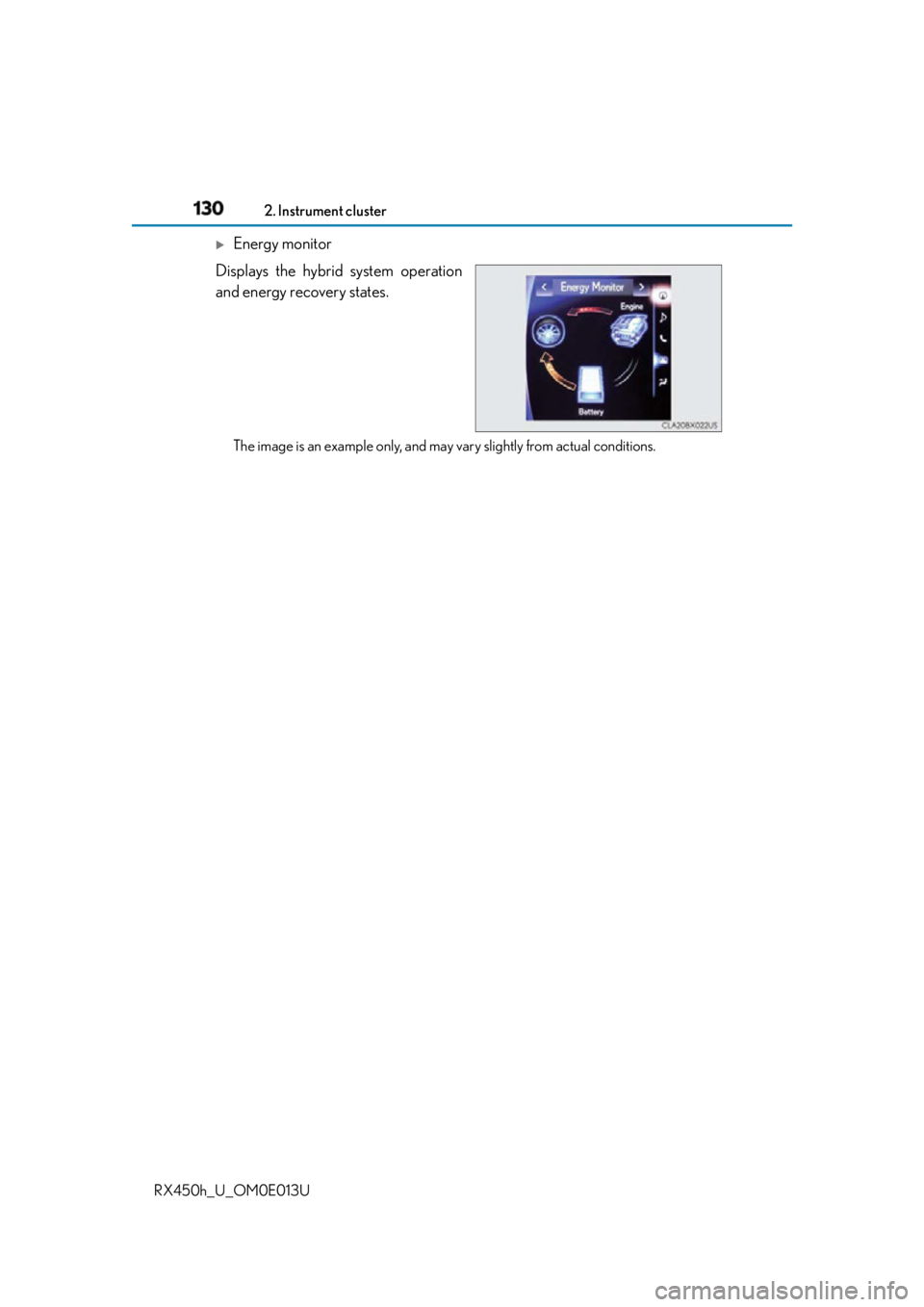
Energy monitor
Displays the hybrid system operation
and energy recovery states.
The image is an example only, and may vary slightly from actual conditions.
Page 133 of 660
1333-1. Key information
3
Operation of each component
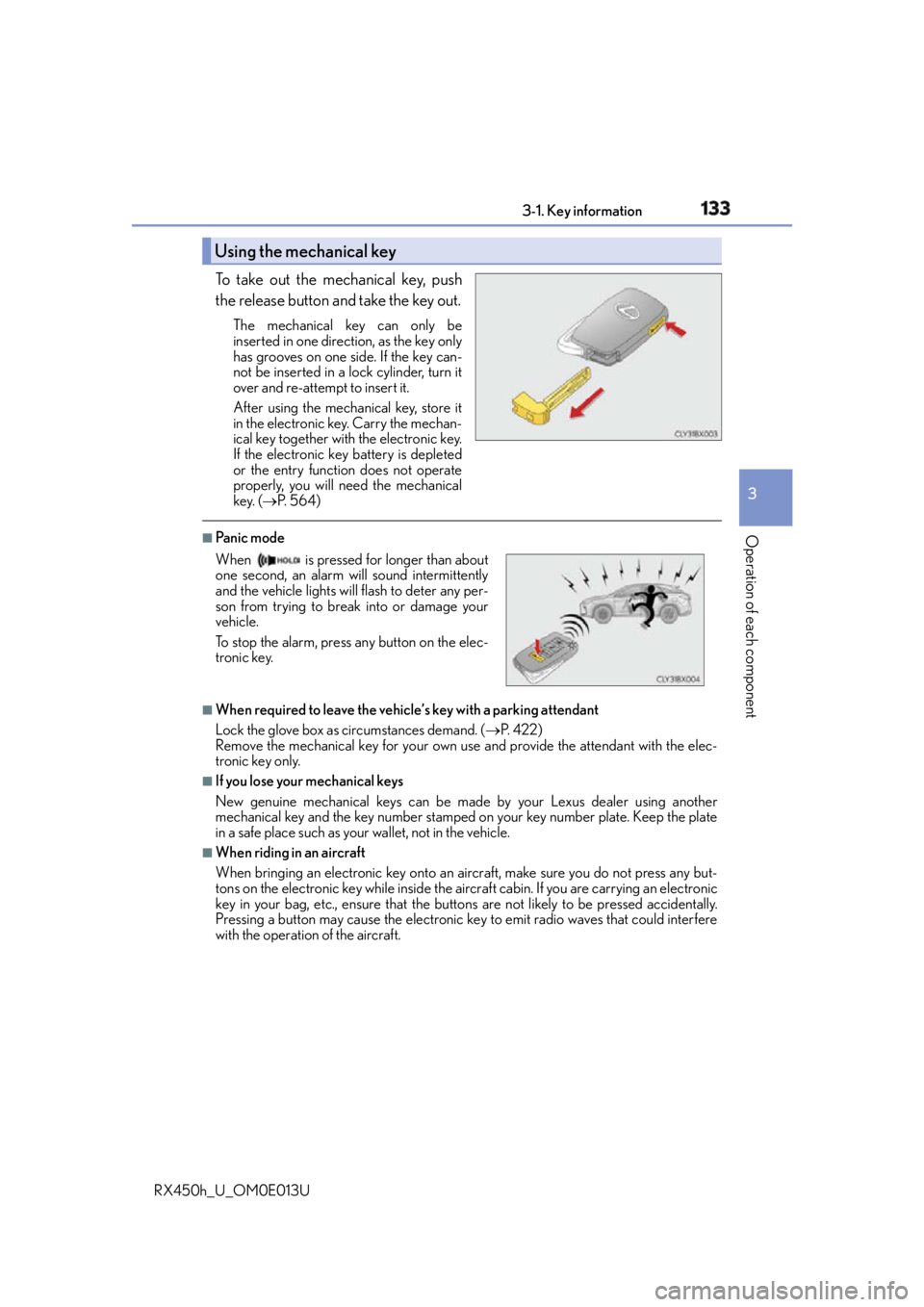
RX450h_U_OM0E013U To take out the mechanical key, push
the release button and take the key out. The mechanical key can only be
inserted in one direction, as the key only
has grooves on one side. If the key can-
not be inserted in a lock cylinder, turn it
over and re-attempt to insert it.
After using the mechanical key, store it
in the electronic key. Carry the mechan-
ical key together with the electronic key.
If the electronic key battery is depleted
or the entry function does not operate
properly, you will need the mechanical
key. ( P. 5 6 4 )■
Panic mode
■
When required to leave the vehicle’s key with a parking attendant
Lock the glove box as circumstances demand. ( P. 422)
Remove the mechanical key for your own use and provide the attendant with the elec-
tronic key only. ■
If you lose your mechanical keys
New genuine mechanical keys can be made by your Lexus dealer using another
mechanical key and the key number stamped on your key number plate. Keep the plate
in a safe place such as your wallet, not in the vehicle.■
When riding in an aircraft
When bringing an electronic key onto an aircraft, make sure you do not press any but-
tons on the electronic key while inside the airc raft cabin. If you are carrying an electronic
key in your bag, etc., ensure that the butt ons are not likely to be pressed accidentally.
Pressing a button may cause the electronic key to emit radio waves that could interfere
with the operation of the aircraft.Using the mechanical key
When is pressed for longer than about
one second, an alarm will sound intermittently
and the vehicle lights will flash to deter any per-
son from trying to break into or damage your
vehicle.
To stop the alarm, press any button on the elec-
tronic key.
Page 140 of 660
140 3-2. Opening, closing and locking the doors
RX450h_U_OM0E013U ■
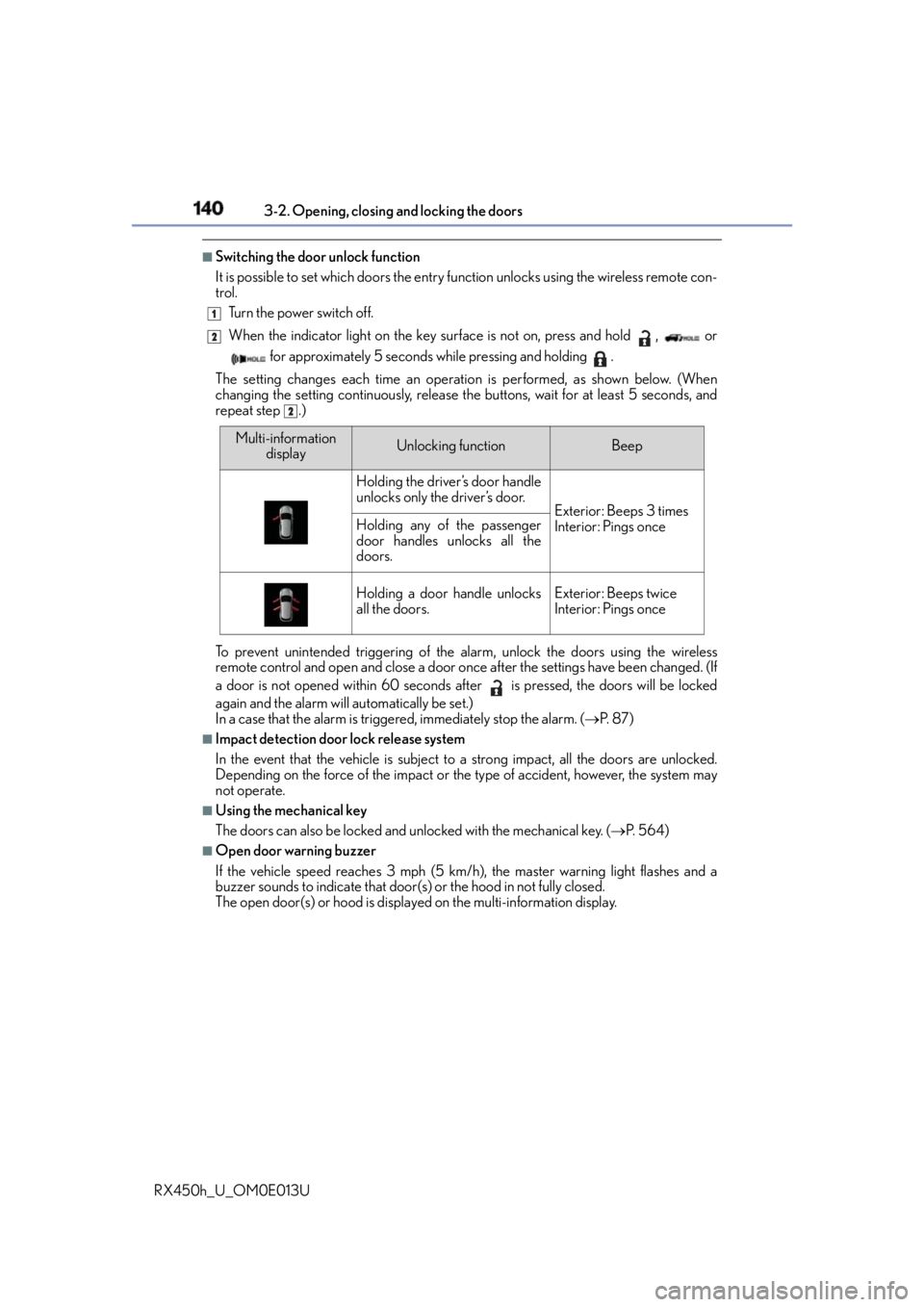
Switching the door unlock function
It is possible to set which doors the entry fu nction unlocks using the wireless remote con-
trol.
Turn the power switch off.
When the indicator light on the key surface is not on, press and hold , or
for approximately 5 seconds while pressing and holding .
The setting changes each time an operatio n is performed, as shown below. (When
changing the setting continuously, release the buttons, wait for at least 5 seconds, and
repeat step .)
To prevent unintended triggering of the alarm, unlock the doors using the wireless
remote control and open and close a door once after the settings have been changed. (If
a door is not opened within 60 seconds after is pressed, the doors will be locked
again and the alarm will automatically be set.)
In a case that the alarm is triggered, immediately stop the alarm. ( P. 8 7 )■
Impact detection door lock release system
In the event that the vehicle is subject to a strong impact, all the doors are unlocked.
Depending on the force of the impact or the type of accident, however, the system may
not operate. ■
Using the mechanical key
The doors can also be locked and unlocked with the mechanical key. ( P. 5 6 4 )■
Open door warning buzzer
If the vehicle speed reaches 3 mph (5 km/h), the master warning light flashes and a
buzzer sounds to indicate that door (s) or the hood in not fully closed.
The open door(s) or hood is displa yed on the multi-information display.1
2
2
Multi-information
display Unlocking function Beep
Holding the driver’s door handle
unlocks only the driver’s door.
Exterior: Beeps 3 times
Interior: Pings onceHolding any of the passenger
door handles unlocks all the
doors.
Holding a door handle unlocks
all the doors. Exterior: Beeps twice
Interior: Pings once
Page 148 of 660
148 3-2. Opening, closing and locking the doors
RX450h_U_OM0E013U ■
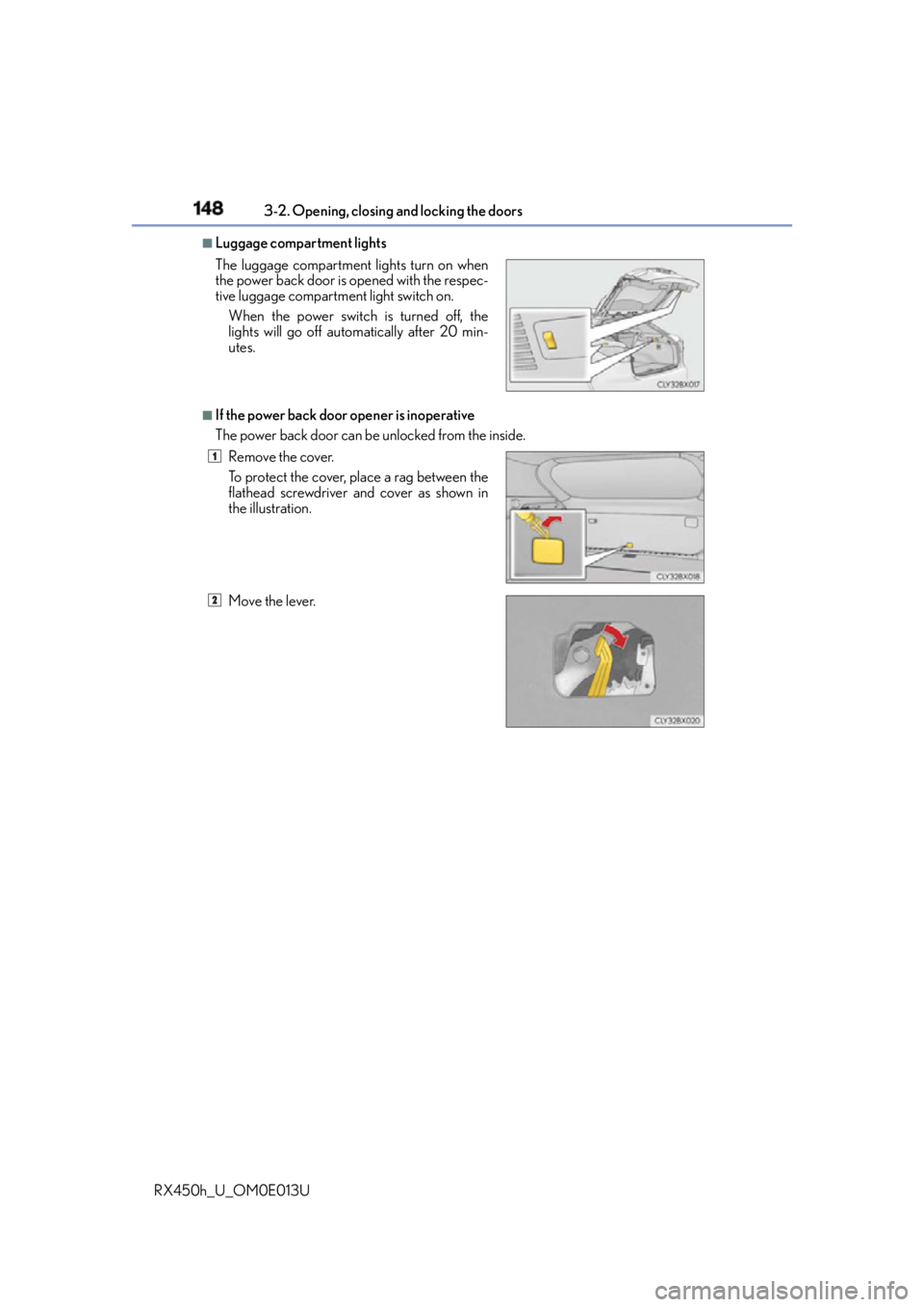
Luggage compartment lights
■
If the power back door opener is inoperative
The power back door can be unlocked from the inside.The luggage compartment lights turn on when
the power back door is opened with the respec-
tive luggage compartment light switch on.
When the power switch is turned off, the
lights will go off automatically after 20 min-
utes.
Remove the cover.
To protect the cover, place a rag between the
flathead screwdriver and cover as shown in
the illustration.
Move the lever. 1
2
Page 149 of 660
1493-2. Opening, closing and locking the doors
3
Operation of each component
RX450h_U_OM0E013U ■
Back door closer
In the event that the power back door is left slightly open, the back door closer will auto-
matically close it to the fully closed position. ●
The back door closer can function wh en the power switch is in any mode.●
The power back door can be opened using th e back door opener switch even if the
back door closer is operating. ■
Operation of the power back door ●
When the power back door begins to operate, the emergency flashers will flash twice
and a buzzer will sound. ●
When the power back door is disabled ( P. 112), the power back door will not operate
but can be opened and closed manually. ●
The power back door turns to manual operat ion when the back door opener switch is
pressed while the power back door is in an automatic opening/closing operation.●
If anything obstructs the po wer back door while opening, a buzzer will sound and the
power back door will stop immediately. If anything obstructs the power back door while
closing, a buzzer will sound and the power back door will automatically move slightly in
the opposite direction and then stop. ■
Back door reserve lock function
This function reserves the locking of the po wer back door when the power back door is
open. If the following operations are performed, all of the doors except the power back
door will lock and then the power back door will lock when it is completely closed.
Close all of the doors, ex cept the power back door.
Perform an automatic closing operation of the power back door and lock the doors
using the wireless remote control ( P. 136) or smart access system with push-button
start ( P. 136, 142) while the power back door is closing. 1
2
Page 153 of 660
1533-2. Opening, closing and locking the doors
3
Operation of each component
RX450h_U_OM0E013U WA R N I N G ■
Operating the power back door
Observe the following precautions.
Failure to do so may cause parts of the body to be caught, resulting in death or serious
injury. ●
Remove any heavy loads, such as snow and ice, from the power back door before
opening it. Failure to do so may cause the power back door to suddenly shut again
after it is opened. ●
When opening or closing the power back d oor, thoroughly check to make sure the
surrounding area is safe. ●
If anyone is in the vicinity, make sure they are safe and let them know that the power
back door is about to open or close. ●
Use caution when opening or closing the powe r back door in windy weather as it may
move abruptly in strong wind.
●
Do not pull on the back door spindle ( P. 156) to close the power back door, and
do not hang on the back door spindle.
Doing so may cause hands to be caught or the back door spindle to break, causing
an accident. ●
If a bicycle carrier or similar heavy object is attached to the power back door, it may
suddenly shut again after being opened, causing someone’s hands, arms, head or
neck to be caught and injured. When installing an accessory part to the power back
door, using a genuine Lexus part is recommended. ●
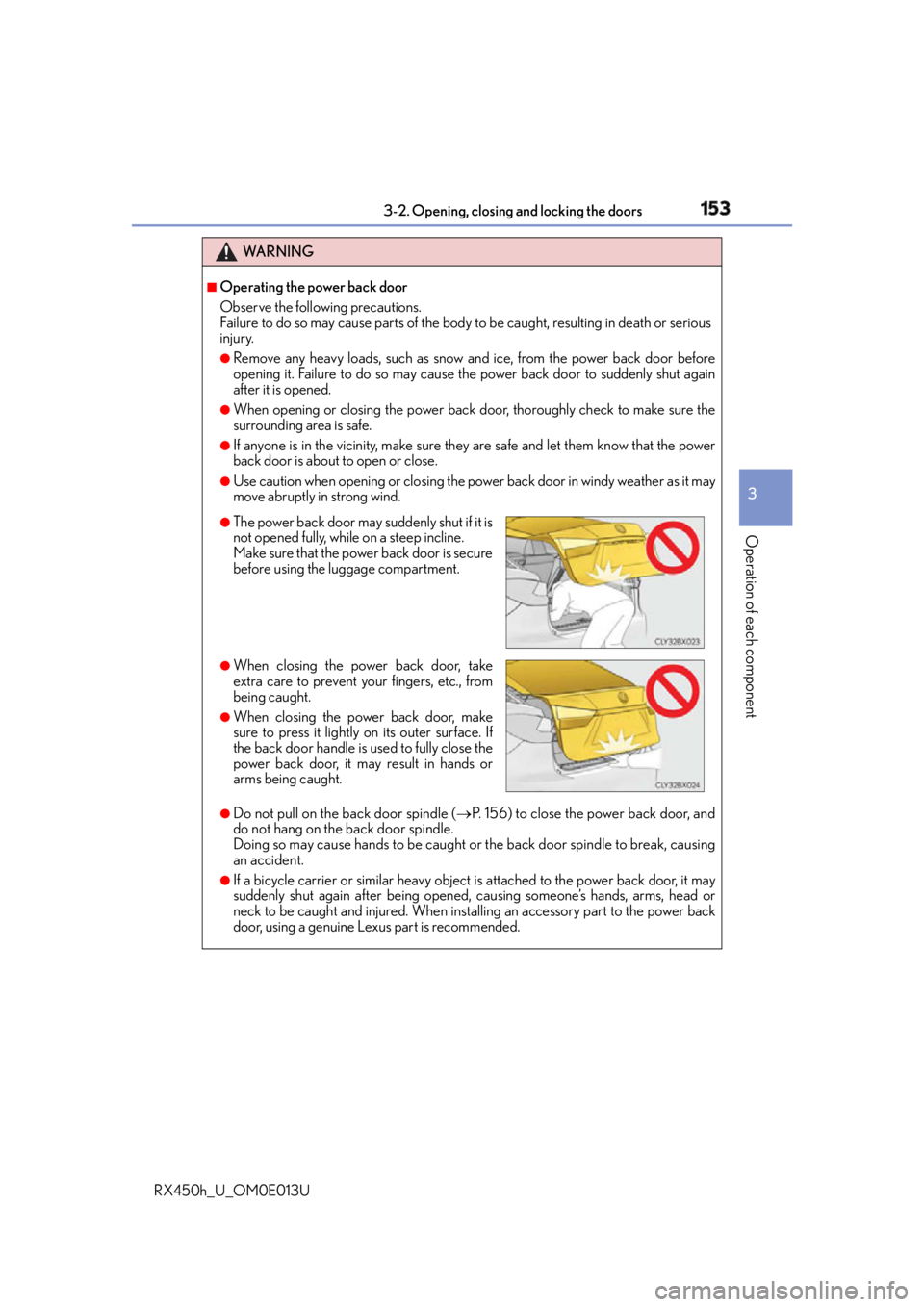
The power back door may suddenly shut if it is
not opened fully, while on a steep incline.
Make sure that the power back door is secure
before using the lu ggage compartment.●
When closing the power back door, take
extra care to prevent your fingers, etc., from
being caught. ●
When closing the power back door, make
sure to press it lightly on its outer surface. If
the back door handle is used to fully close the
power back door, it may result in hands or
arms being caught.
Page 154 of 660
154 3-2. Opening, closing and locking the doors
RX450h_U_OM0E013U WA R N I N G ■
Back door closer
●
Use caution when using the back door closer as it still operates when the power back
door system is disabled. ■
Power back door
Observe the following precautions when operating the power back door.
Failure to do so may cause death or serious injury. ●
Check the safety of the surrounding area to make sure there are no obstacles or any-
thing that could cause any of your belongings to get caught. ●
If anyone is in the vicinity, make sure they are safe and let them know that the power
back door is about to open or close. ●
If the power back door system is disabled ( P. 112) while the power back door is
operating, the power back door will stop operating. The power back door must then
be operated manually. Take extra care in this situation, as the power back door may
open or close suddenly. ●
If the operating conditions of the power back door ( P. 147) are no longer met, a
buzzer may sound and the power back door may stop opening or closing. The power
back door must then be operated manually. Take extra care on an incline in this situa-
tion, as the power back door may move suddenly. ●
On an incline, the power back door may suddenly shut after it opens. Make sure the
power back door is fully open and secure. ●
In the following situations, the power back door may detect an abnormality and auto-
matic operation may be stopped. In this case, the power back door must then be
operated manually. Take extra care in this situation, as the stopped power back door
may suddenly open or close, causing an accident.
• When the power back door contacts an obstacle
• When the 12-volt battery voltage suddenly drops, such as when the power switch
is turned to ON mode or the hybrid syst em is started during automatic operation●
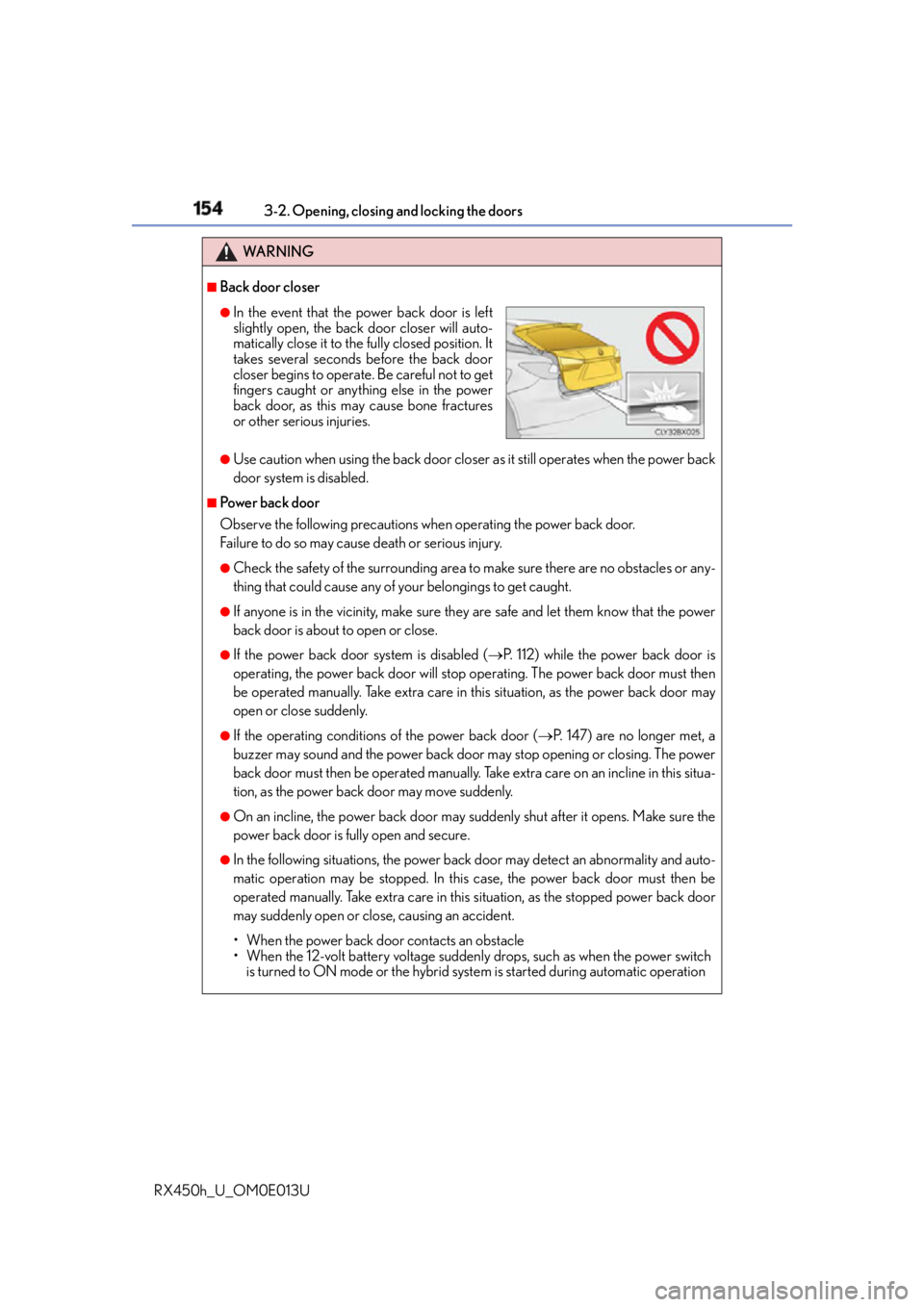
In the event that the power back door is left
slightly open, th e back door closer will auto-
matically close it to the fully closed position. It
takes several seconds before the back door
closer begins to operate. Be careful not to get
fingers caught or anything else in the power
back door, as this may cause bone fractures
or other serious injuries.
Page 161 of 660
1613-2. Opening, closing and locking the doors
3
Operation of each component
RX450h_U_OM0E013U ■
Note for the entry function ●
Even when the electronic key is within the effective range (detection areas), the system
may not operate properly in the following cases:
• The electronic key is too close to the window or outside door handle, near the
ground, or in a high place when the doors are locked or unlocked.
• The electronic key is near the ground or in a high place, or too close to the rear
bumper center when the back door is opened.
• The electronic key is on the instrument pa nel, luggage compartment, floor, or in the
door pockets or glove box when the hybrid system is started or power switch modes
are changed. ●
Do not leave the electronic key on top of th e instrument panel or near the door pockets
when exiting the vehicle. Depending on the radio wave reception conditions, it may be
detected by the antenna outs ide the cabin and the door will become lockable from the
outside, possibly trapping the el ectronic key inside the vehicle.●
As long as the electronic key is within the effective range, the doors may be locked or
unlocked by anyone. ●
Even if the electronic key is not inside the ve hicle, it may be possible to start the hybrid
system if the electronic key is near the window. ●
The doors may unlock if a large amount of wa ter splashes on the door handle, such as in
the rain or in a car wash when the electronic key is within the effective range. (The door
will automatically be locked after approximately 60 seconds if the doors are not
opened and closed.) ●
If the wireless remote control is used to lo ck the doors when the electronic key is near
the vehicle, there is a possibility that the door may not be unlocked by the entry func-
tion. (Use the wireless remote control to unlock the doors.) ●
Touching the door lock sensor while wearin g gloves may delay or prevent lock opera-
tion. Remove the gloves and touch the lock sensor again. ●
When the lock operation is performed using the lock sensor, recognition signals will be
shown up to two consecutive times. After this, no recognition signals will be given.
*●
If the door handle becomes wet while the el ectronic key is within the effective range,
the door may lock and unlock repeatedly. In that case, follow the following correction
procedures to wash the vehicle:
• Place the electronic key in a location 6 ft. (2 m) or more away from the vehicle. (Take
care to ensure that the key is not stolen.)
• Set the electronic key to battery-saving mode to disable the smart access system
with push-button start. ( P. 1 6 0 )●
If the electronic key is insi de the vehicle and a door handle becomes wet during a car
wash, a message may be shown on the mult i-information display and a buzzer will
sound outside the vehicle. To turn off the alarm, lock all the doors. ●
The lock sensor may not work properly if it comes into contact with ice, snow, mud, etc.
Clean the lock sensor and attempt to operate it again. ●
A sudden approach to the effective range or door handle may prevent the doors from
being unlocked. In this case, return the door handle to the original position and check
that the doors unlock before pulling the door handle again.●
If there is another electronic key in the detection area, it may take slightly longer to
unlock the doors after the door handle is gripped.
Page 171 of 660
1713-3. Adjusting the seats
3
Operation of each component
RX450h_U_OM0E013U ■
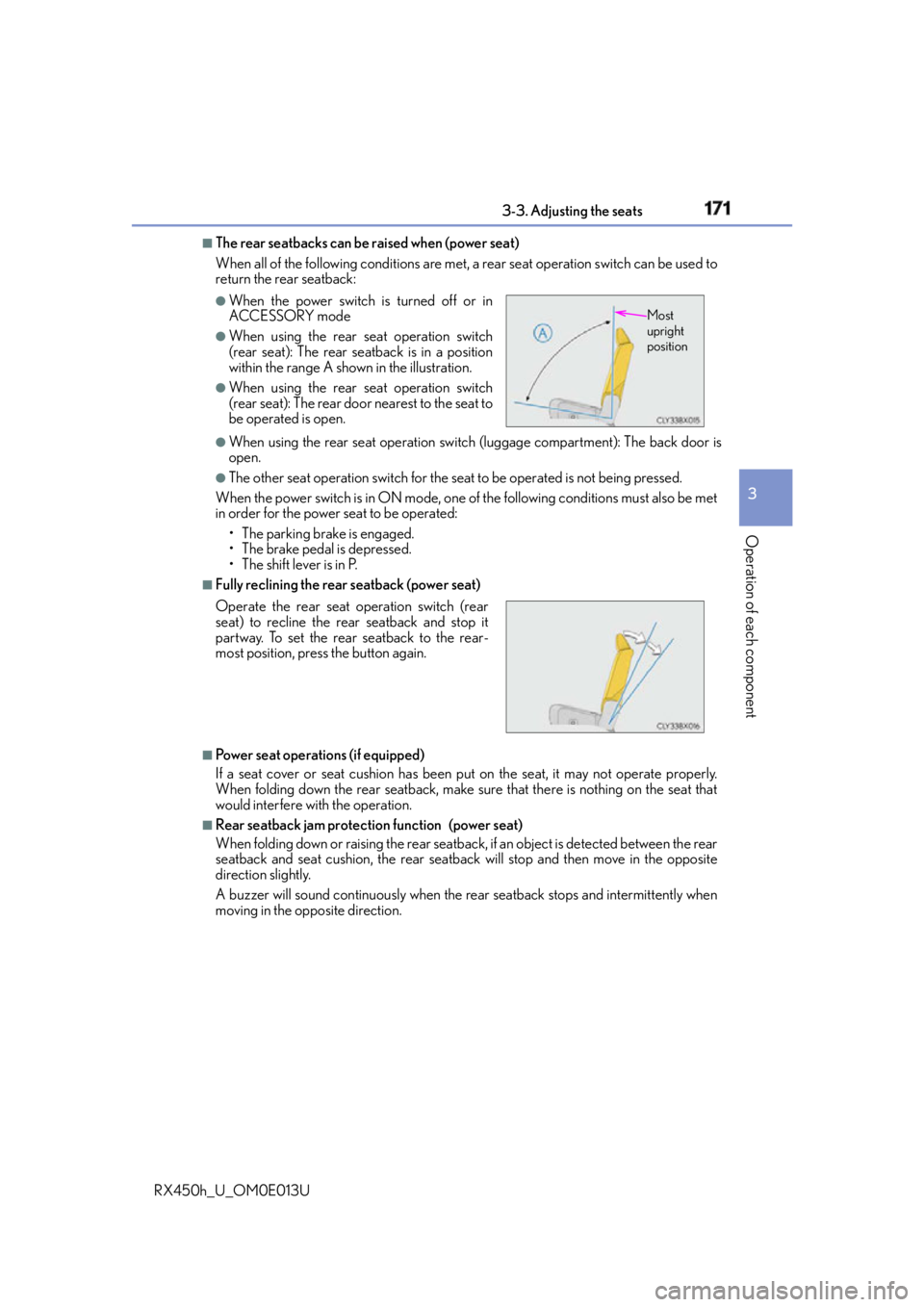
The rear seatbacks can be raised when (power seat)
When all of the following conditions are met, a rear seat operation switch can be used to
return the rear seatback:
●
When using the rear seat operation switch (luggage compartment): The back door is
open. ●
The other seat operation switch for the seat to be operated is not being pressed.
When the power switch is in ON mode, one of the following conditions must also be met
in order for the power seat to be operated:
• The parking brake is engaged.
• The brake pedal is depressed.
• The shift lever is in P. ■
Fully reclining the rear seatback (power seat)
■
Power seat operations (if equipped)
If a seat cover or seat cushion has been pu t on the seat, it may not operate properly.
When folding down the rear seatback, make sure that there is nothing on the seat that
would interfere with the operation. ■
Rear seatback jam protection function (power seat)
When folding down or raising the rear seatback, if an object is detected between the rear
seatback and seat cushion, th e rear seatback will stop an d then move in the opposite
direction slightly.
A buzzer will sound continuously when the re ar seatback stops an d intermittently when
moving in the opposite direction. ●
When the power switch is turned off or in
ACCESSORY mode ●
When using the rear seat operation switch
(rear seat): The rear seatback is in a position
within the range A shown in the illustration. ●
When using the rear seat operation switch
(rear seat): The rear door nearest to the seat to
be operated is open.
Operate the rear seat operation switch (rear
seat) to recline the rear seatback and stop it
partway. To set the rear seatback to the rear-
most position, press the button again. Most
upright
position